warning HYUNDAI ELANTRA GT 2014 Owners Manual
[x] Cancel search | Manufacturer: HYUNDAI, Model Year: 2014, Model line: ELANTRA GT, Model: HYUNDAI ELANTRA GT 2014Pages: 476, PDF Size: 31.71 MB
Page 162 of 476
477
Features of your vehicle
Electronic power steer-
ing (EPS) system
warning light
This indicator comes on after the
ignition key is turned to the ON posi-
tion and then it will go out.
This indicator also comes on when
the EPS needs repairs. If it comes on
while driving, have your vehicle
inspected by an authorized HYUNDAI
dealer.
Steering effort may increase if this
lamp illuminates. See EPS system in
this section.
Key reminder warning chime
(if equipped)
Without smart key
If the driver’s door is opened while
the ignition key is left in the ignition
switch (ACC or LOCK position), the
key reminder warning chime will
sound. This helps prevent you from
locking your keys in the vehicle. The
chime sounds until the key is
removed from the ignition switch or
the driver’s door is closed.
With smart key
If the driver’s door is opened while
the smart key is in the vehicle with
the engine start/stop button in ACC,
the key reminder warning chime will
sound.
The chime sounds until the driver’s
door is closed.
Engine coolant tempera-
ture warning light
The warning light illuminates if the
temperature of the engine coolant is
above 257±4.5°F (125±2.5°C).
Do not continue driving with an over-
heated engine. If your vehicle over-
heats, refer to “Overheating” in sec-
tion 6.
✽ ✽
NOTICE
If the engine coolant temperature
warning light illuminates, it indi-
cates overheating that may damage
the engine.
Page 163 of 476
Features of your vehicle
78 4
LCD display warning (if equipped)
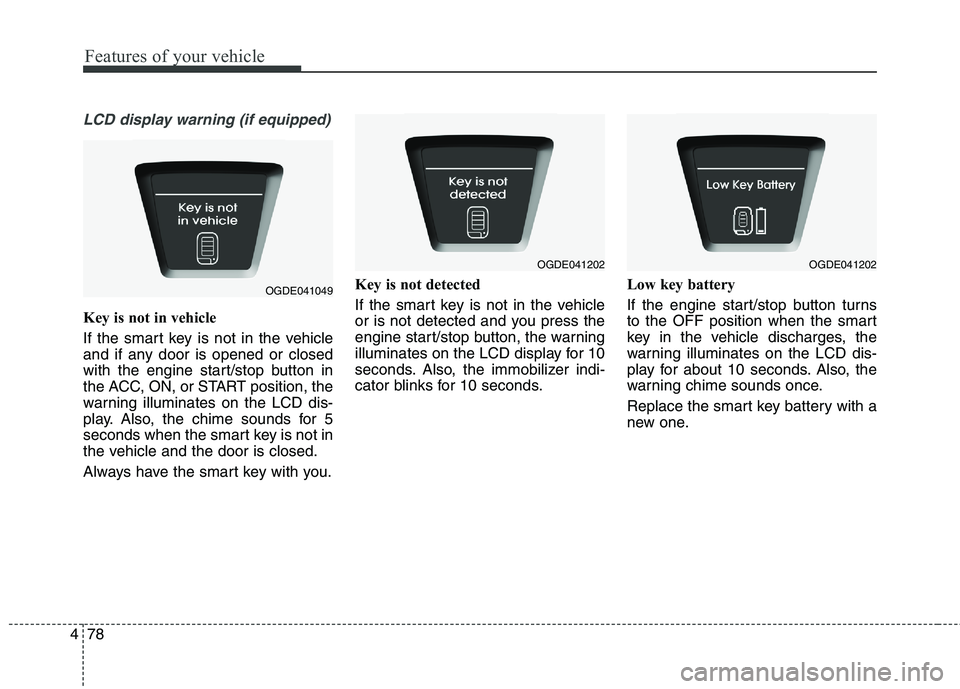
Key is not in vehicle
If the smart key is not in the vehicle
and if any door is opened or closed
with the engine start/stop button in
the ACC, ON, or START position, the
warning illuminates on the LCD dis-
play. Also, the chime sounds for 5
seconds when the smart key is not in
the vehicle and the door is closed.
Always have the smart key with you.Key is not detected
If the smart key is not in the vehicle
or is not detected and you press the
engine start/stop button, the warning
illuminates on the LCD display for 10
seconds. Also, the immobilizer indi-
cator blinks for 10 seconds.Low key battery
If the engine start/stop button turns
to the OFF position when the smart
key in the vehicle discharges, the
warning illuminates on the LCD dis-
play for about 10 seconds. Also, the
warning chime sounds once.
Replace the smart key battery with a
new one.
OGDE041049
OGDE041202OGDE041202
Page 164 of 476
479
Features of your vehicle
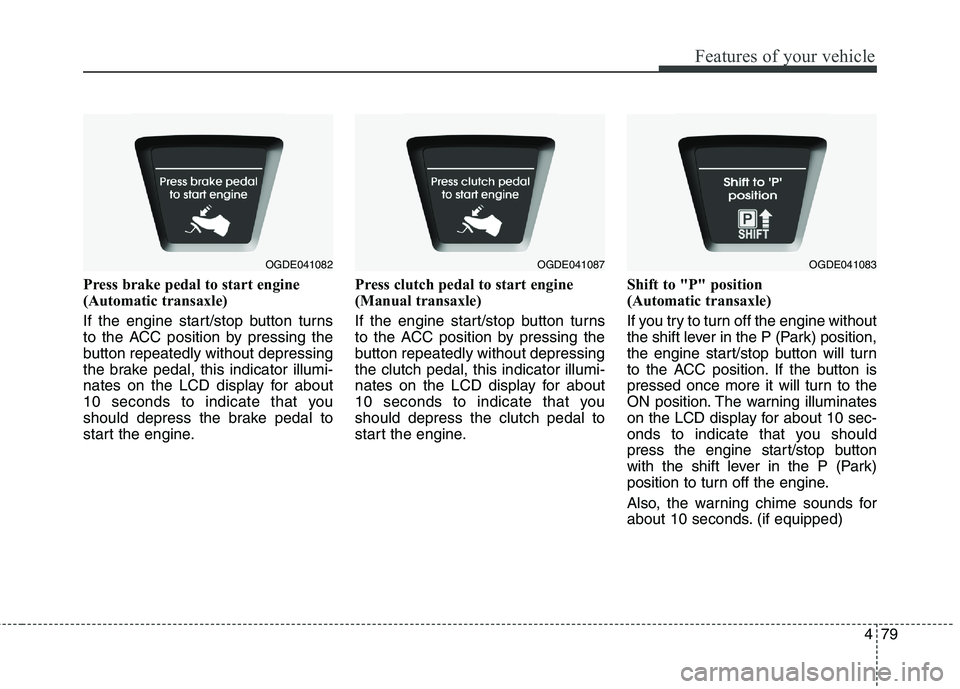
Press brake pedal to start engine
(Automatic transaxle)
If the engine start/stop button turns
to the ACC position by pressing the
button repeatedly without depressing
the brake pedal, this indicator illumi-
nates on the LCD display for about
10 seconds to indicate that you
should depress the brake pedal to
start the engine.Press clutch pedal to start engine
(Manual transaxle)
If the engine start/stop button turns
to the ACC position by pressing the
button repeatedly without depressing
the clutch pedal, this indicator illumi-
nates on the LCD display for about
10 seconds to indicate that you
should depress the clutch pedal to
start the engine.Shift to "P" position
(Automatic transaxle)
If you try to turn off the engine without
the shift lever in the P (Park) position,
the engine start/stop button will turn
to the ACC position. If the button is
pressed once more it will turn to the
ON position. The warning illuminates
on the LCD display for about 10 sec-
onds to indicate that you should
press the engine start/stop button
with the shift lever in the P (Park)
position to turn off the engine.
Also, the warning chime sounds for
about 10 seconds. (if equipped)
OGDE041082OGDE041087OGDE041083
Page 165 of 476
Features of your vehicle
80 4
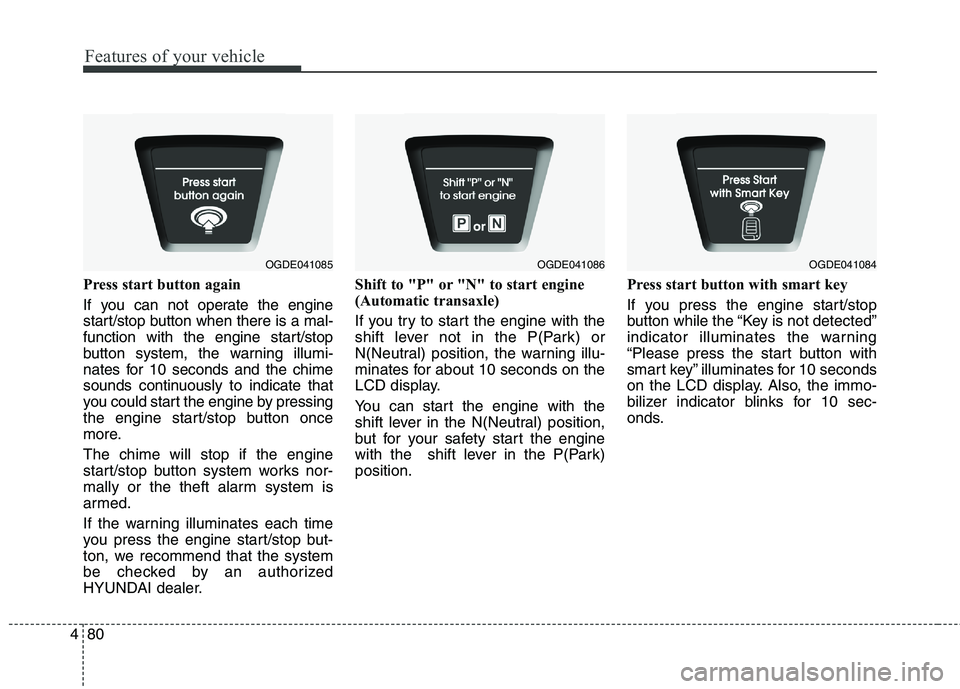
Press start button again
If you can not operate the engine
start/stop button when there is a mal-
function with the engine start/stop
button system, the warning illumi-
nates for 10 seconds and the chime
sounds continuously to indicate that
you could start the engine by pressing
the engine start/stop button once
more.
The chime will stop if the engine
start/stop button system works nor-
mally or the theft alarm system is
armed.
If the warning illuminates each time
you press the engine start/stop but-
ton, we recommend that the system
be checked by an authorized
HYUNDAI dealer.Shift to "P" or "N" to start engine
(Automatic transaxle)
If you try to start the engine with the
shift lever not in the P(Park) or
N(Neutral) position, the warning illu-
minates for about 10 seconds on the
LCD display.
You can start the engine with the
shift lever in the N(Neutral) position,
but for your safety start the engine
with the shift lever in the P(Park)
position.Press start button with smart key
If you press the engine start/stop
button while the “Key is not detected”
indicator illuminates the warning
“Please press the start button with
smart key” illuminates for 10 seconds
on the LCD display. Also, the immo-
bilizer indicator blinks for 10 sec-
onds.
OGDE041085OGDE041086OGDE041084
Page 166 of 476
481
Features of your vehicle
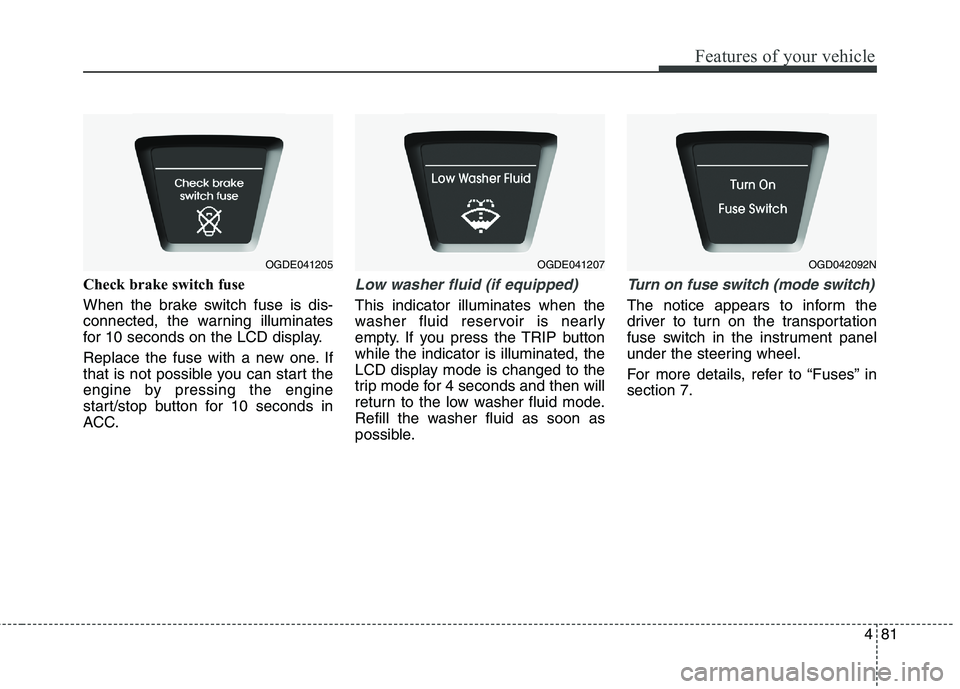
Check brake switch fuse
When the brake switch fuse is dis-
connected, the warning illuminates
for 10 seconds on the LCD display.
Replace the fuse with a new one. If
that is not possible you can start the
engine by pressing the engine
start/stop button for 10 seconds in
ACC.Low washer fluid (if equipped)
This indicator illuminates when the
washer fluid reservoir is nearly
empty. If you press the TRIP button
while the indicator is illuminated, the
LCD display mode is changed to the
trip mode for 4 seconds and then will
return to the low washer fluid mode.
Refill the washer fluid as soon as
possible.
Turn on fuse switch (mode switch)
The notice appears to inform the
driver to turn on the transportation
fuse switch in the instrument panel
under the steering wheel.
For more details, refer to “Fuses” in
section 7.
OGDE041205OGDE041207OGD042092N
Page 167 of 476
Features of your vehicle
82 4
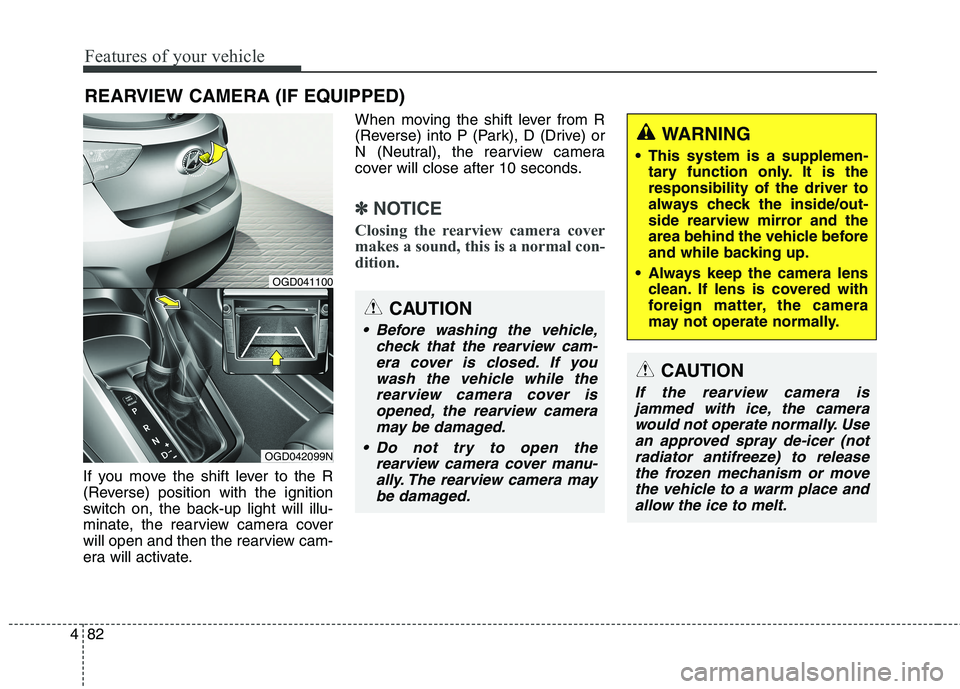
If you move the shift lever to the R
(Reverse) position with the ignition
switch on, the back-up light will illu-
minate, the rearview camera cover
will open and then the rearview cam-
era will activate.When moving the shift lever from R
(Reverse) into P (Park), D (Drive) or
N (Neutral), the rearview camera
cover will close after 10 seconds.
✽ ✽
NOTICE
Closing the rearview camera cover
makes a sound, this is a normal con-
dition.
REARVIEW CAMERA (IF EQUIPPED)
OGD042099N
OGD041100
CAUTION
Before washing the vehicle,
check that the rearview cam-
era cover is closed. If you
wash the vehicle while the
rearview camera cover is
opened, the rearview camera
may be damaged.
Do not try to open the
rearview camera cover manu-
ally. The rearview camera may
be damaged.
WARNING
This system is a supplemen-
tary function only. It is the
responsibility of the driver to
always check the inside/out-
side rearview mirror and the
area behind the vehicle before
and while backing up.
Always keep the camera lens
clean. If lens is covered with
foreign matter, the camera
may not operate normally.
CAUTION
If the rearview camera is
jammed with ice, the camera
would not operate normally. Use
an approved spray de-icer (not
radiator antifreeze) to release
the frozen mechanism or move
the vehicle to a warm place and
allow the ice to melt.
Page 171 of 476
Features of your vehicle
86 4
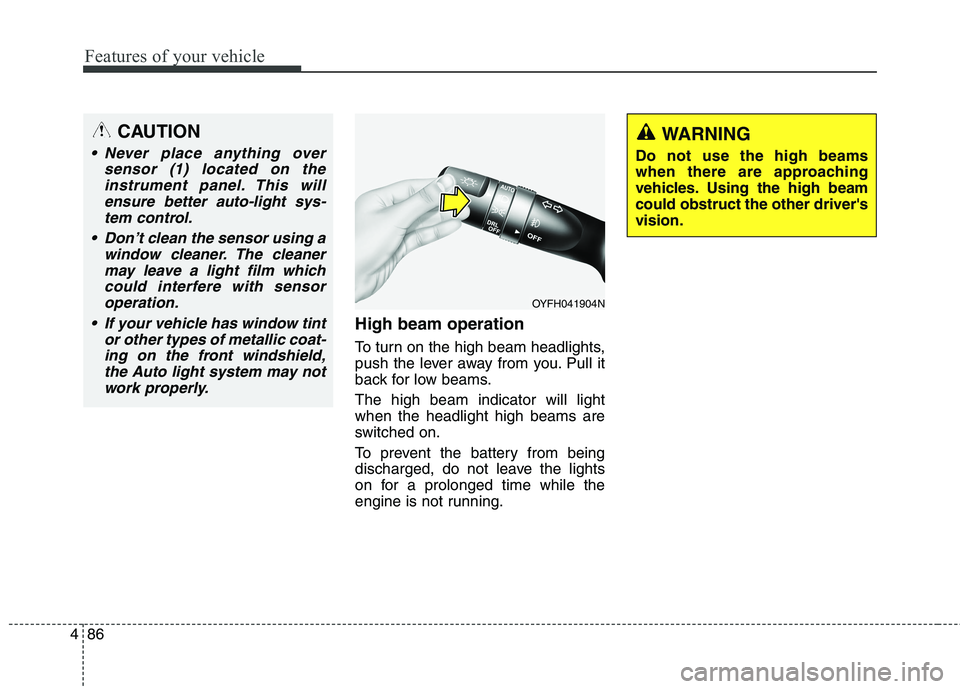
High beam operation
To turn on the high beam headlights,
push the lever away from you. Pull it
back for low beams.
The high beam indicator will light
when the headlight high beams are
switched on.
To prevent the battery from being
discharged, do not leave the lights
on for a prolonged time while the
engine is not running.
WARNING
Do not use the high beams
when there are approaching
vehicles. Using the high beam
could obstruct the other driver's
vision.
OYFH041904N
CAUTION
Never place anything over
sensor (1) located on the
instrument panel. This will
ensure better auto-light sys-
tem control.
Don’t clean the sensor using a
window cleaner. The cleaner
may leave a light film which
could interfere with sensor
operation.
If your vehicle has window tint
or other types of metallic coat-
ing on the front windshield,
the Auto light system may not
work properly.
Page 175 of 476
Features of your vehicle
90 4
LO : Normal wiper speed
HI : Fast wiper speed
✽ ✽
NOTICE
If there is heavy accumulation of
snow or ice on the windshield,
defrost the windshield for about 10
minutes, or until the snow and/or ice
is removed before using the wind-
shield wipers to ensure proper oper-
ation.
✽ ✽
NOTICE
• When you operate the wipers, if
your vehicle has a problem in any
part of the wiper operation sys-
tem, the wiper may operate in the
LO mode regardless of the wiper
switch position. In this case, have
your vehicle checked by an
authorized HYUNDAI dealer as
soon as possible.
• When the ignition key is removed,
the wiper blade sometimes may
move slightly for reducing the
deterioration of the windshield
wipers.
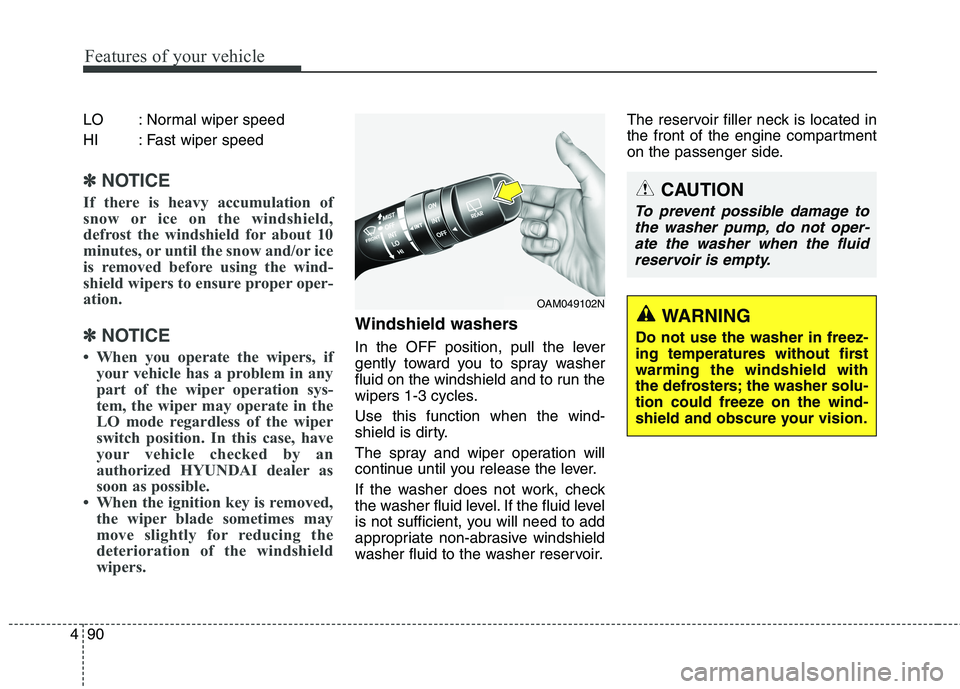
Windshield washers
In the OFF position, pull the lever
gently toward you to spray washer
fluid on the windshield and to run the
wipers 1-3 cycles.
Use this function when the wind-
shield is dirty.
The spray and wiper operation will
continue until you release the lever.
If the washer does not work, check
the washer fluid level. If the fluid level
is not sufficient, you will need to add
appropriate non-abrasive windshield
washer fluid to the washer reservoir.The reservoir filler neck is located in
the front of the engine compartment
on the passenger side.
OAM049102N
CAUTION
To prevent possible damage to
the washer pump, do not oper-
ate the washer when the fluid
reservoir is empty.
WARNING
Do not use the washer in freez-
ing temperatures without first
warming the windshield with
the defrosters; the washer solu-
tion could freeze on the wind-
shield and obscure your vision.
Page 177 of 476
Features of your vehicle
92 4
Automatic turn off function
(if equipped)
The interior lights automatically turn
off approximately 20 minutes after
the ignition switch is turned off.
If your vehicle is equipped with the
theft alarm system, the interior lights
automatically turn off approximately
5 seconds after the system is in the
armed stage.
Map lamp (if equipped)
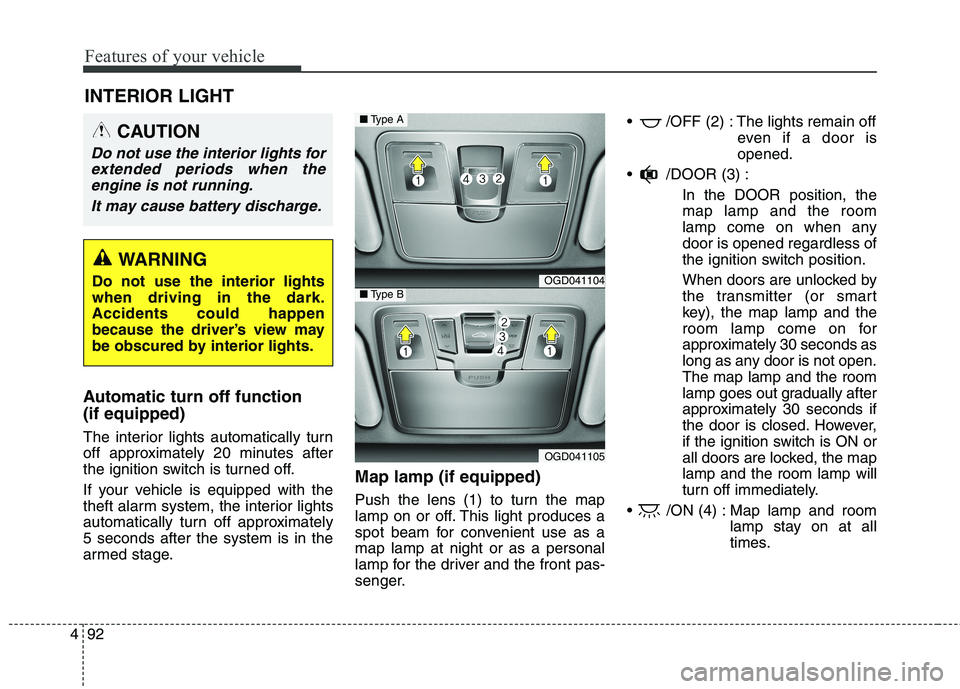
Push the lens (1) to turn the map
lamp on or off. This light produces a
spot beam for convenient use as a
map lamp at night or as a personal
lamp for the driver and the front pas-
senger. /OFF (2) : The lights remain off
even if a door is
opened.
/DOOR (3) :
In the DOOR position, the
map lamp and the room
lamp come on when any
door is opened regardless of
the ignition switch position.
When doors are unlocked by
the transmitter (or smart
key), the map lamp and the
room lamp come on for
approximately 30 seconds as
long as any door is not open.
The map lamp and the room
lamp goes out gradually after
approximately 30 seconds if
the door is closed. However,
if the ignition switch is ON or
all doors are locked, the map
lamp and the room lamp will
turn off immediately.
/ON (4) : Map lamp and room
lamp stay on at all
times.
INTERIOR LIGHT
CAUTION
Do not use the interior lights for
extended periods when the
engine is not running.
It may cause battery discharge.
WARNING
Do not use the interior lights
when driving in the dark.
Accidents could happen
because the driver’s view may
be obscured by interior lights.OGD041104
OGD041105
■Type A
■Type B
Page 187 of 476
Features of your vehicle
102 4
Fan speed control
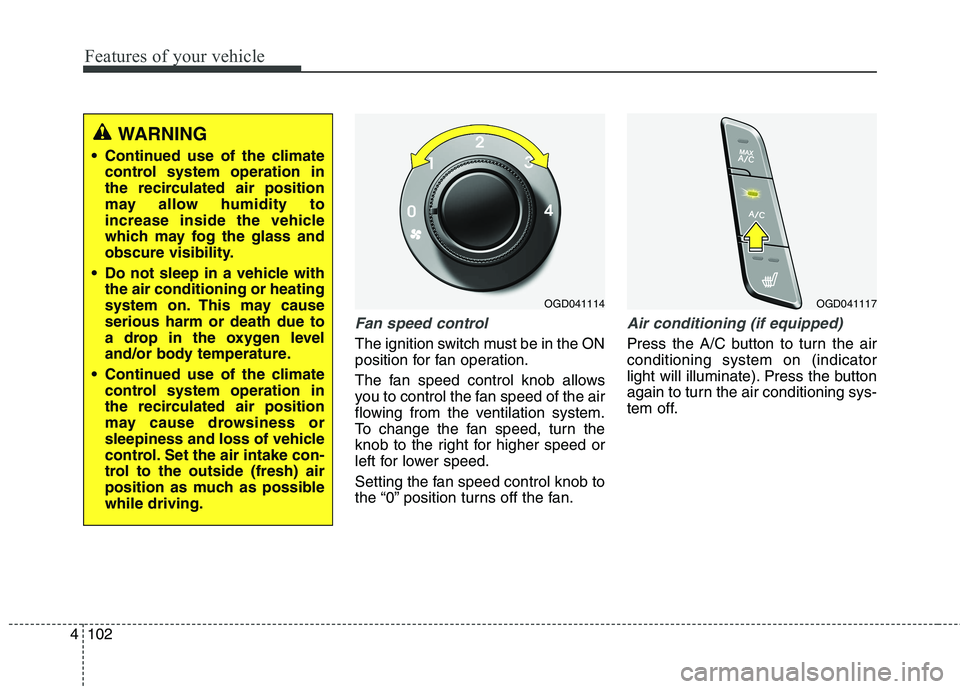
The ignition switch must be in the ON
position for fan operation.
The fan speed control knob allows
you to control the fan speed of the air
flowing from the ventilation system.
To change the fan speed, turn the
knob to the right for higher speed or
left for lower speed.
Setting the fan speed control knob to
the “0” position turns off the fan.
Air conditioning (if equipped)
Press the A/C button to turn the air
conditioning system on (indicator
light will illuminate). Press the button
again to turn the air conditioning sys-
tem off.
OGD041117OGD041114
WARNING
Continued use of the climate
control system operation in
the recirculated air position
may allow humidity to
increase inside the vehicle
which may fog the glass and
obscure visibility.
Do not sleep in a vehicle with
the air conditioning or heating
system on. This may cause
serious harm or death due to
a drop in the oxygen level
and/or body temperature.
Continued use of the climate
control system operation in
the recirculated air position
may cause drowsiness or
sleepiness and loss of vehicle
control. Set the air intake con-
trol to the outside (fresh) air
position as much as possible
while driving.