Eco HYUNDAI ELANTRA GT 2014 Owners Manual
[x] Cancel search | Manufacturer: HYUNDAI, Model Year: 2014, Model line: ELANTRA GT, Model: HYUNDAI ELANTRA GT 2014Pages: 476, PDF Size: 31.71 MB
Page 260 of 476
![HYUNDAI ELANTRA GT 2014 Owners Manual 4175
Features of your vehicle
VOICE COMMAND
(IF EQUIPPED)
Starting Voice Command
press the key on the steering
wheel remote controller.
Mode], then the system will say
“Please say a command. Be](/img/35/56097/w960_56097-259.png "HYUNDAI ELANTRA GT 2014 Owners Manual 4175
Features of your vehicle
VOICE COMMAND
(IF EQUIPPED)
Starting Voice Command
press the key on the steering
wheel remote controller.
Mode], then the system will say
“Please say a command. Be")
4175
Features of your vehicle
VOICE COMMAND
(IF EQUIPPED)
Starting Voice Command
press the key on the steering
wheel remote controller.
Mode], then the system will say
“Please say a command. Beep”
❈If voice command is in [Expert
Mode], then the system will only
say a “Beep-”
❈Setting Voice command [Normal
Mode]/[Expert Mode]:
Press the key Select
[System] through the TUNE
knob or key Select [Voice
Command Mode] through the
TUNE knob Set [Normal
Mode]/[Expert Mode]
Skipping the Guidance
Message
While the guidance message is
being stated, shortly press the
key (under 0.8 seconds) to discontin-
ue the guidance message and sound
the “beep”.
After the “beep”, say the voice com-
mand.
Ending Voice Command
and hold the key (over 0.8 sec-
onds) to end voice command.
ing the steering wheel remote con-
troller or a different key will end
voice command.
ing for your voice command, say
“cancel” or “end” to end voice com-
mand.
ing for your voice command, short-
ly press the key (under 0.8 sec-
onds) to end voice command.
5
SETUP
CAUTION
For proper voice recognition,
say the voice command after
the guidance message and the
“Beep” sound.
Page 261 of 476
Features of your vehicle
176 4
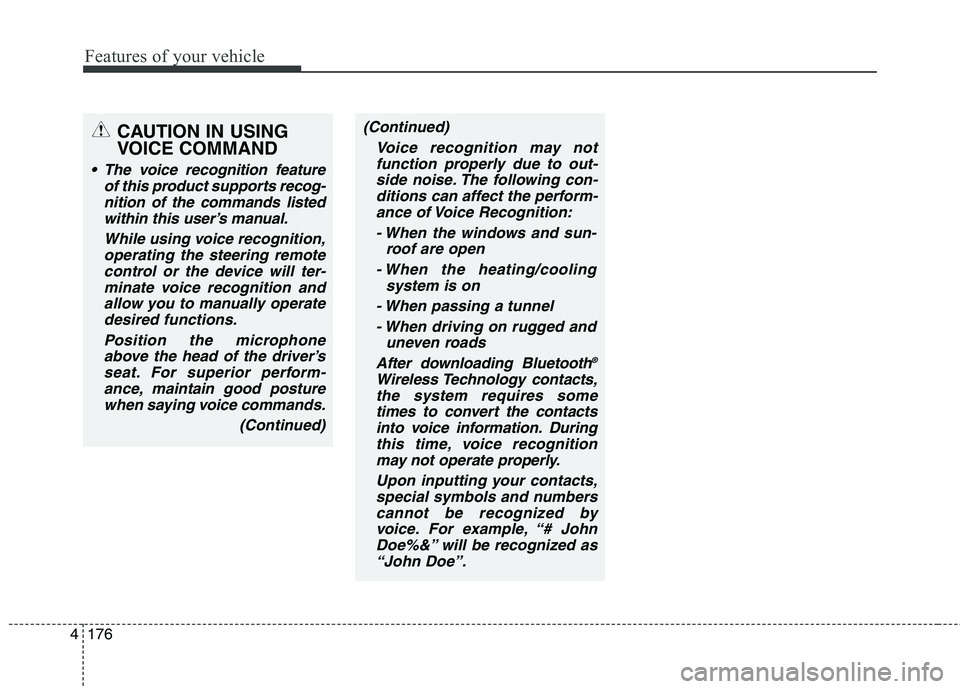
(Continued)
Voice recognition may not
function properly due to out-
side noise. The following con-
ditions can affect the perform-
ance of Voice Recognition:
- When the windows and sun-
roof are open
- When the heating/cooling
system is on
- When passing a tunnel
- When driving on rugged and
uneven roads
After downloading Bluetooth
®
Wireless Technology contacts,
the system requires some
times to convert the contacts
into voice information. During
this time, voice recognition
may not operate properly.
Upon inputting your contacts,
special symbols and numbers
cannot be recognized by
voice. For example, “# John
Doe%&” will be recognized as
“John Doe”.
CAUTION IN USING
VOICE COMMAND
The voice recognition feature
of this product supports recog-
nition of the commands listed
within this user’s manual.
While using voice recognition,
operating the steering remote
control or the device will ter-
minate voice recognition and
allow you to manually operate
desired functions.
Position the microphone
above the head of the driver’s
seat. For superior perform-
ance, maintain good posture
when saying voice commands.
(Continued)
Page 262 of 476
4177
Features of your vehicle
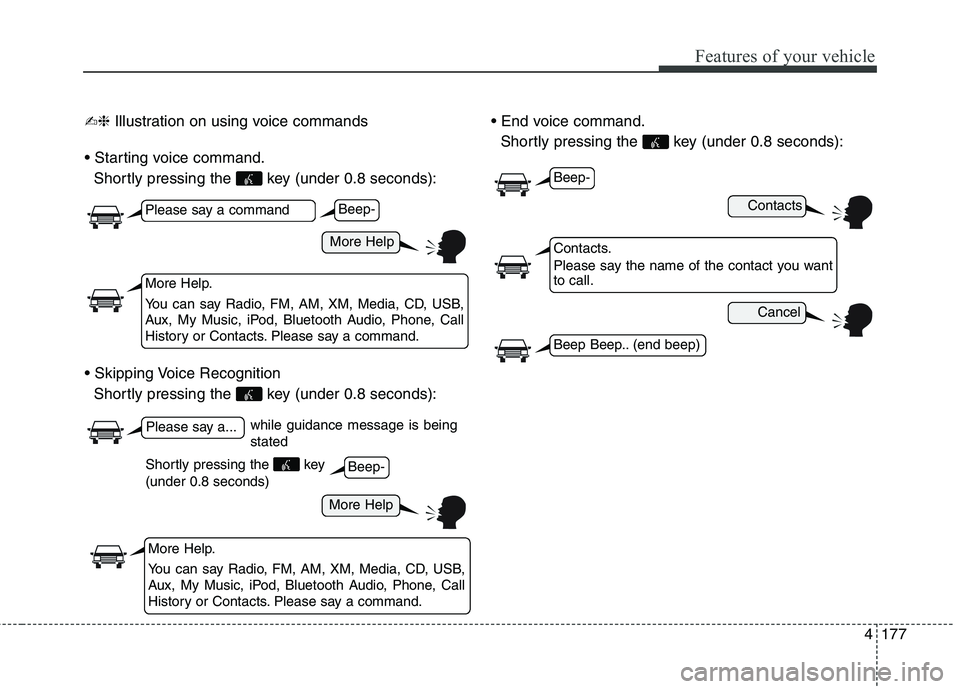
✍❈Illustration on using voice commands
Shortly pressing the key (under 0.8 seconds):
Shortly pressing the key (under 0.8 seconds):
Shortly pressing the key (under 0.8 seconds):
while guidance message is being
stated
More Help
Contacts
Cancel
More Help
Please say a command
Please say a...
More Help.
You can say Radio, FM, AM, XM, Media, CD, USB,
Aux, My Music, iPod, Bluetooth Audio, Phone, Call
History or Contacts. Please say a command.
Contacts.
Please say the name of the contact you want
to call.
More Help.
You can say Radio, FM, AM, XM, Media, CD, USB,
Aux, My Music, iPod, Bluetooth Audio, Phone, Call
History or Contacts. Please say a command.
Beep-
Beep-
Beep-
Beep Beep.. (end beep)
Shortly pressing the key
(under 0.8 seconds)
Page 265 of 476
Features of your vehicle
180 4
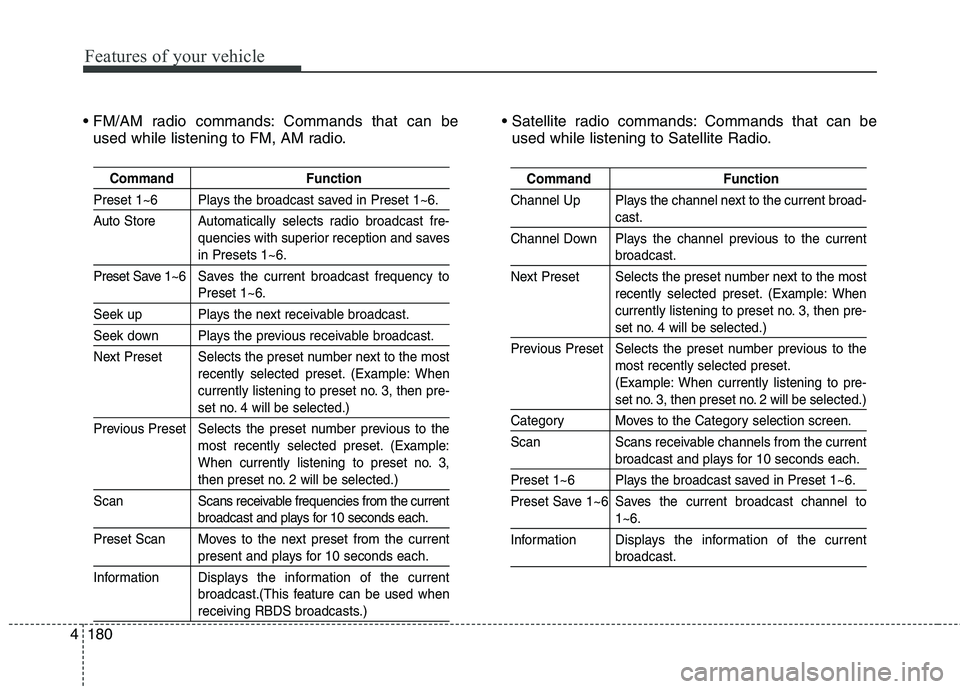
Command Function
Preset 1~6 Plays the broadcast saved in Preset 1~6.
Auto Store Automatically selects radio broadcast fre-
quencies with superior reception and saves
in Presets 1~6.
Preset Save 1~6 Saves the current broadcast frequency to
Preset 1~6.
Seek up Plays the next receivable broadcast.
Seek down Plays the previous receivable broadcast.
Next Preset Selects the preset number next to the most
recently selected preset. (Example: When
currently listening to preset no. 3, then pre-
set no. 4 will be selected.)
Previous Preset Selects the preset number previous to the
most recently selected preset. (Example:
When currently listening to preset no. 3,
then preset no. 2 will be selected.)
ScanScans receivable frequencies from the current
broadcast and plays for 10 seconds each.
Preset Scan Moves to the next preset from the current
present and plays for 10 seconds each.
InformationDisplays the information of the current
broadcast.(This feature can be used when
receiving RBDS broadcasts.)
Command Function
Channel Up Plays the channel next to the current broad-
cast.
Channel Down Plays the channel previous to the current
broadcast.
Next Preset Selects the preset number next to the most
recently selected preset. (Example: When
currently listening to preset no. 3, then pre-
set no. 4 will be selected.)
Previous Preset Selects the preset number previous to the
most recently selected preset.
(Example: When currently listening to pre-
set no. 3, then preset no. 2 will be selected.)
Category Moves to the Category selection screen.
Scan Scans receivable channels from the current
broadcast and plays for 10 seconds each.
Preset 1~6 Plays the broadcast saved in Preset 1~6.
Preset Save 1~6 Saves the current broadcast channel to
1~6.
InformationDisplays the information of the current
broadcast.
Commands that can be
used while listening to FM, AM radio. Commands that can be
used while listening to Satellite Radio.
Page 266 of 476
4181
Features of your vehicle
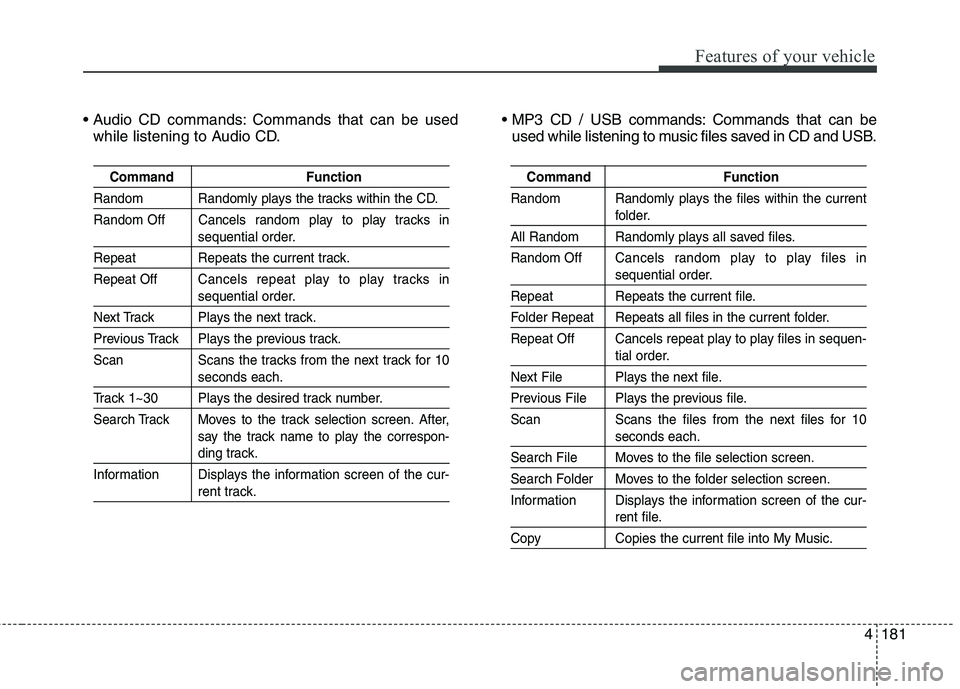
Commands that can be used
while listening to Audio CD. Commands that can be
used while listening to music files saved in CD and USB.
Command Function
Random Randomly plays the tracks within the CD.
Random Off Cancels random play to play tracks in
sequential order.
Repeat Repeats the current track.
Repeat OffCancels repeat play to play tracks in
sequential order.
Next Track Plays the next track.
Previous Track Plays the previous track.
Scan Scans the tracks from the next track for 10
seconds each.
Track 1~30 Plays the desired track number.
Search Track Moves to the track selection screen. After,
say the track name to play the correspon-
ding track.
Information Displays the information screen of the cur-
rent track.
Command Function
Random Randomly plays the files within the current
folder.
All Random Randomly plays all saved files.
Random OffCancels random play to play files in
sequential order.
Repeat Repeats the current file.
Folder Repeat Repeats all files in the current folder.
Repeat Off Cancels repeat play to play files in sequen-
tial order.
Next File Plays the next file.
Previous File Plays the previous file.
Scan Scans the files from the next files for 10
seconds each.
Search File Moves to the file selection screen.
Search Folder Moves to the folder selection screen.
Information Displays the information screen of the cur-
rent file.
Copy Copies the current file into My Music.
Page 267 of 476
Features of your vehicle
182 4
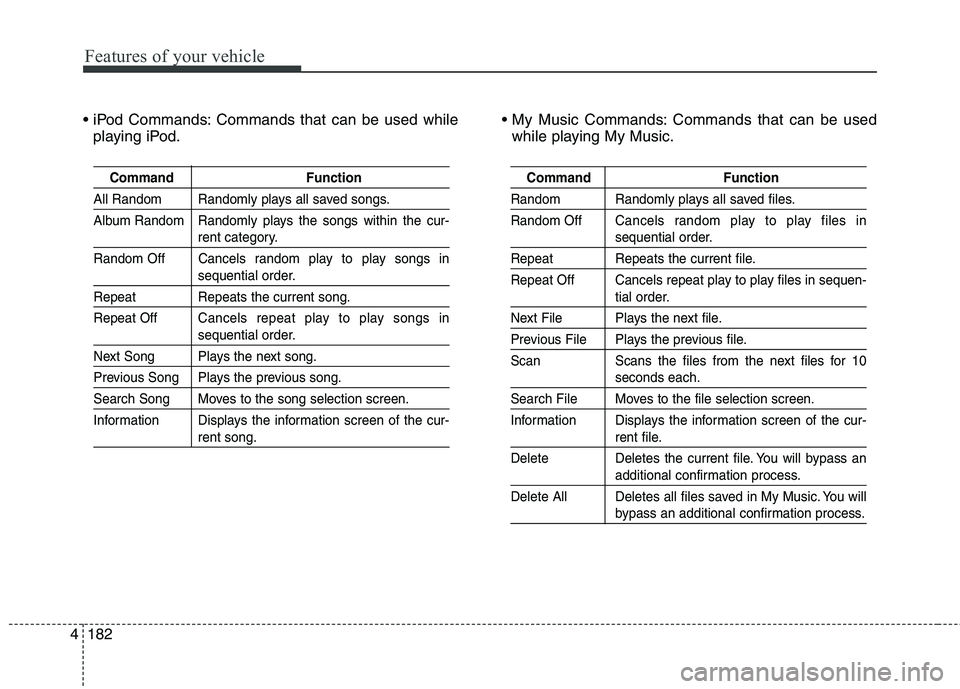
Commands that can be used while
playing iPod. Commands that can be used
while playing My Music.
Command Function
All Random Randomly plays all saved songs.
Album Random Randomly plays the songs within the cur-
rent category.
Random Off Cancels random play to play songs in
sequential order.
Repeat Repeats the current song.
Repeat OffCancels repeat play to play songs in
sequential order.
Next Song Plays the next song.
Previous Song Plays the previous song.
Search Song Moves to the song selection screen.
Information Displays the information screen of the cur-
rent song.
Command Function
Random Randomly plays all saved files.
Random OffCancels random play to play files in
sequential order.
Repeat Repeats the current file.
Repeat Off Cancels repeat play to play files in sequen-
tial order.
Next File Plays the next file.
Previous File Plays the previous file.
Scan Scans the files from the next files for 10
seconds each.
Search File Moves to the file selection screen.
Information Displays the information screen of the cur-
rent file.
Delete Deletes the current file. You will bypass an
additional confirmation process.
Delete All Deletes all files saved in My Music. You will
bypass an additional confirmation process.
Page 269 of 476
Features of your vehicle
184 4
Blue Link®
Hyundai aims to offer differentiated
customer values through a
‘Connected Car Life,’ which is to pro-
vide consumers with fast and reliable
IT technology. As consumers’
lifestyles become more and more
mobile in thanks to remarkable
advances in smart phones, tablet
PCs and overall wireless telecommu-
nication, new lifestyle patterns
demand seamless connection
between one’s office, home, out-
doors and automobiles.
Automobile companies are now
faced with the task of shifting their
paradigm from vehicle-centered
services to customer value-centered
services, with the ultimate goal of
securing global leadership in the
field of vehicle IT and telematics.Hyundai Motor plans to achieve this
by realizing a terminal platform flexi-
ble to changes in IT technology,
cooperating with global IT compa-
nies, creating an eco-system and
providing the latest contents & serv-
ices based on an open environment.
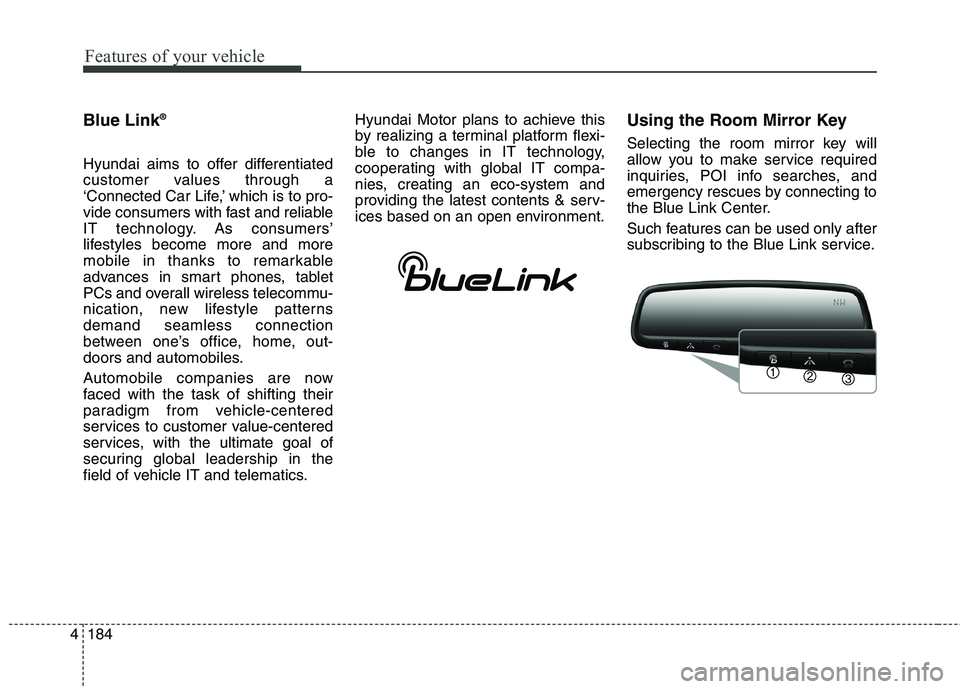
Using the Room Mirror Key
Selecting the room mirror key will
allow you to make service required
inquiries, POI info searches, and
emergency rescues by connecting to
the Blue Link Center.
Such features can be used only after
subscribing to the Blue Link service.
Page 271 of 476
Features of your vehicle
186 4
7. Resume Route
“Resume Route” VR command
allows the user to resume Turn by
Turn(TBT) route guidance.
➂(Blue Link for SOS)
In the case of an emergency, requests
for help to the Blue Link center.
Call is connected to the Blue Link
emergency rescue center. Re-press-
ing the key will end the call.
If already on a
Bluetooth®Wireless
Technology phone call, the call will
end to connect you to the Blue Link
Emergency Rescue Center.
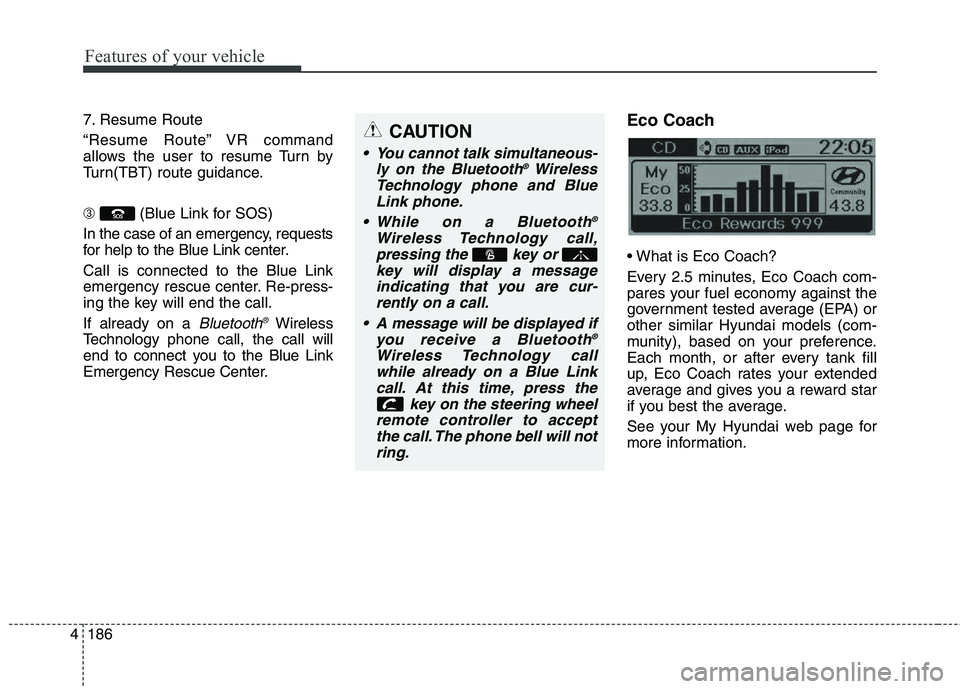
Eco Coach
Every 2.5 minutes, Eco Coach com-
pares your fuel economy against the
government tested average (EPA) or
other similar Hyundai models (com-
munity), based on your preference.
Each month, or after every tank fill
up, Eco Coach rates your extended
average and gives you a reward star
if you best the average.
See your My Hyundai web page for
more information.
CAUTION
You cannot talk simultaneous-
ly on the Bluetooth®Wireless
Technology phone and Blue
Link phone.
While on a Bluetooth
®
Wireless Technology call,
pressing the key or
key will display a message
indicating that you are cur-
rently on a call.
A message will be displayed if
you receive a Bluetooth
®
Wireless Technology call
while already on a Blue Link
call. At this time, press the
key on the steering wheel
remote controller to accept
the call. The phone bell will not
ring.
Page 272 of 476
4187
Features of your vehicle
zontal line mean?
The horizontal line is adjusted once
per month or at each tank full, based
on your preference; it represents the
EPA combined average or communi-
ty average fuel economy target.
Your actual fuel economy average
over 2.5 minutes.
This value is also shown in bar graph
as your “now” rating.
If you beat the average (the EPA or
community), you will receive an Eco
Reward point.
See your my Hyundai web page for
more information.
[Eco Driving] will not operate if the
vehicle ignition is not turned on.
Please operate with the ignition
turned on.Turn by Turn
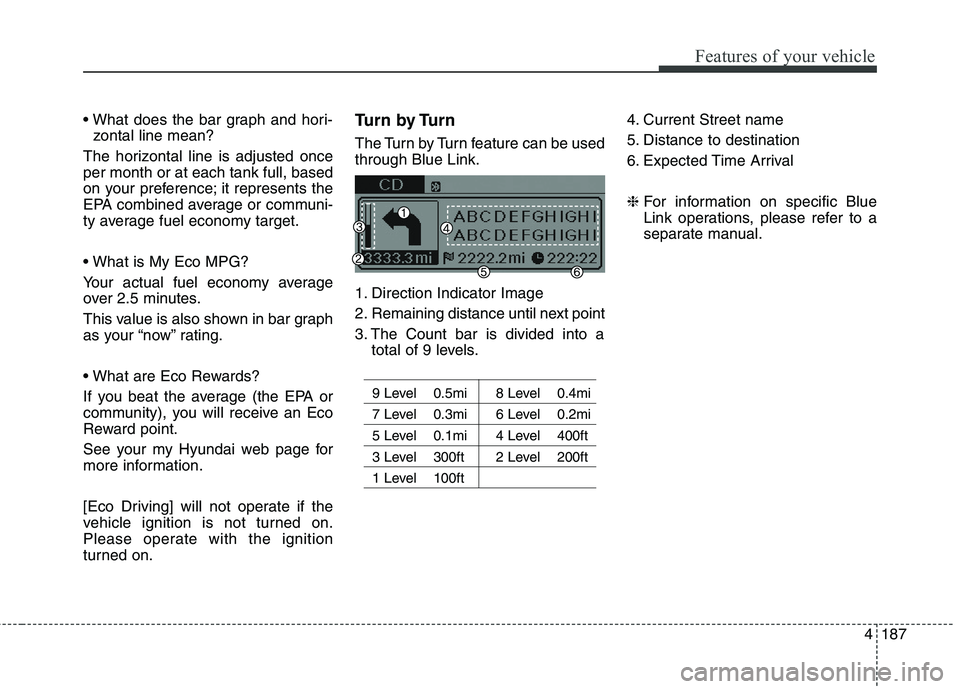
The Turn by Turn feature can be used
through Blue Link.
1. Direction Indicator Image
2. Remaining distance until next point
3. The Count bar is divided into a
total of 9 levels.
9 Level 0.5mi 8 Level 0.4mi
7 Level 0.3mi 6 Level 0.2mi
5 Level 0.1mi 4 Level 400ft
3 Level 300ft 2 Level 200ft
1 Level 100ft
4. Current Street name
5. Distance to destination
6. Expected Time Arrival
❈For information on specific Blue
Link operations, please refer to a
separate manual.
Page 273 of 476
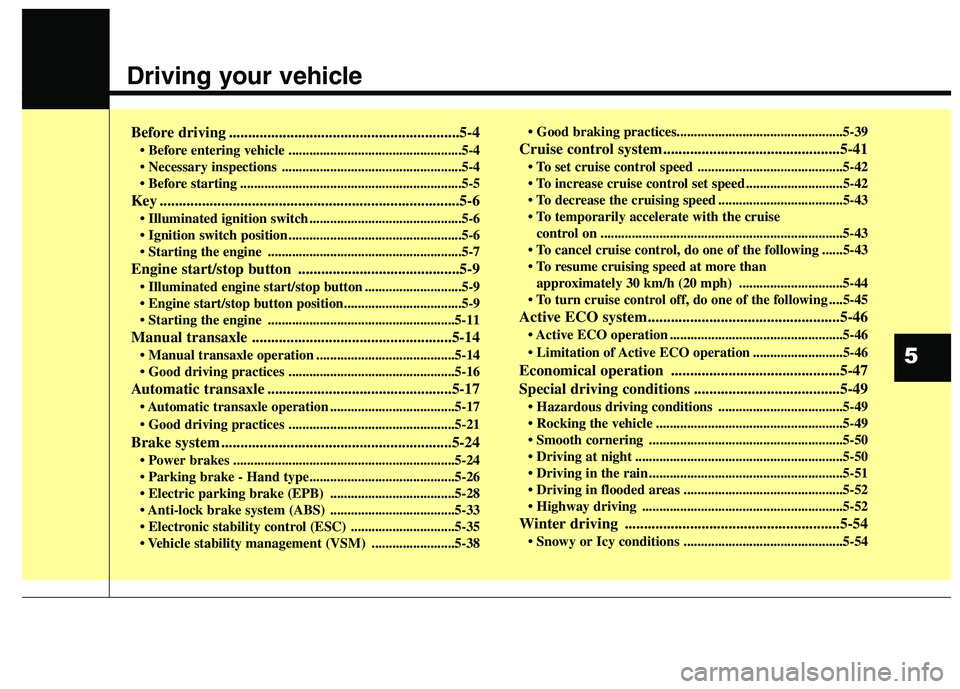
Driving your vehicle
Before driving ............................................................5-4
• Before entering vehicle ..................................................5-4
....................................................5-4
................................................................5-5
Key ..............................................................................5-6
............................................5-6
..................................................5-6
........................................................5-7
Engine start/stop button ..........................................5-9
............................5-9
......................................................5-11
Manual transaxle ....................................................5-14
........................................5-14
................................................5-16
Automatic transaxle ................................................5-17
transaxle operation ....................................5-17
................................................5-21
Brake system ............................................................5-24
................................................................5-24
....................................5-28
....................................5-33
..............................5-35
........................5-38
Cruise control system..............................................5-41
..........................................5-42
............................5-42
....................................5-43
control on ......................................................................5-43
do one of the following ......5-43
approximately 30 km/h (20 mph) ..............................5-44
do one of the following ....5-45
Active ECO system..................................................5-46
..................................................5-46
..........................5-46
Economical operation ............................................5-47
Special driving conditions ......................................5-49
....................................5-49
......................................................5-49
........................................................5-50
............................................................5-50
........................................................5-51
..............................................5-52
..........................................................5-52
Winter driving ........................................................5-54
..............................................5-54
5