Eco HYUNDAI ELANTRA GT 2014 Manual Online
[x] Cancel search | Manufacturer: HYUNDAI, Model Year: 2014, Model line: ELANTRA GT, Model: HYUNDAI ELANTRA GT 2014Pages: 476, PDF Size: 31.71 MB
Page 205 of 476
Features of your vehicle
120 4
CAUTION
To prevent damage to the goods
or the vehicle, care should be
taken when carrying fragile or
bulky objects in the luggage
compartment.
WARNING
Avoid eye injury. DO NOT over-
stretch the luggage net,
ALWAYS keep your face and
body out of the luggage net’s
recoil path. DO NOT use when
the strap has visible signs of
wear or damage.
Page 210 of 476
4125
Features of your vehicle
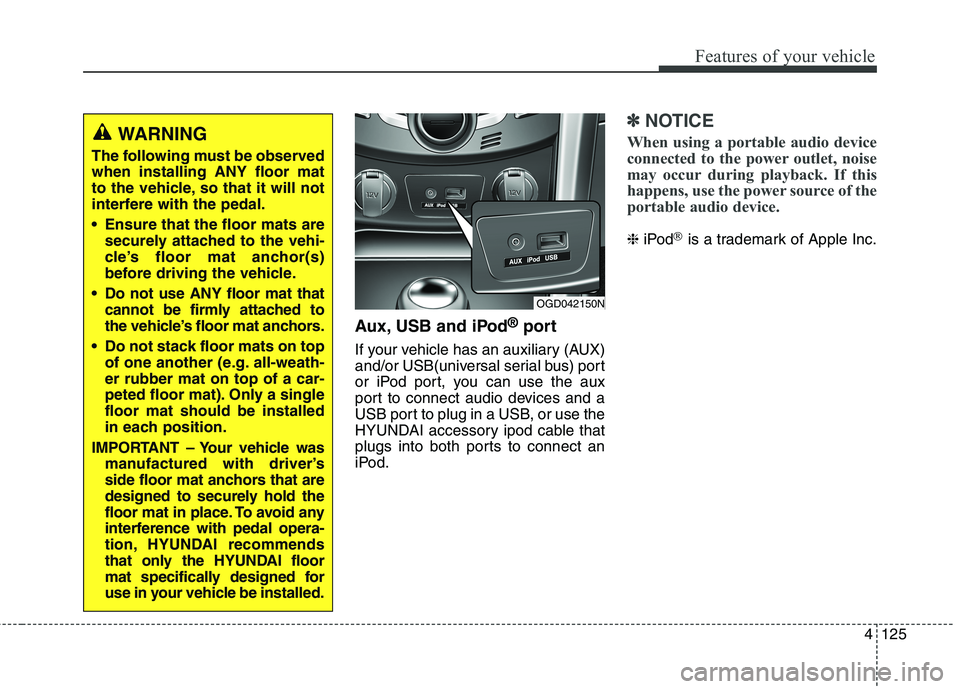
Aux, USB and iPod®port
If your vehicle has an auxiliary (AUX)
and/or USB(universal serial bus) port
or iPod port, you can use the aux
port to connect audio devices and a
USB port to plug in a USB, or use the
HYUNDAI accessory ipod cable that
plugs into both ports to connect an
iPod.
✽ ✽
NOTICE
When using a portable audio device
connected to the power outlet, noise
may occur during playback. If this
happens, use the power source of the
portable audio device.
❈iPod®is a trademark of Apple Inc.
OGD042150N
WARNING
The following must be observed
when installing ANY floor mat
to the vehicle, so that it will not
interfere with the pedal.
Ensure that the floor mats are
securely attached to the vehi-
cle’s floor mat anchor(s)
before driving the vehicle.
Do not use ANY floor mat that
cannot be firmly attached to
the vehicle’s floor mat anchors.
Do not stack floor mats on top
of one another (e.g. all-weath-
er rubber mat on top of a car-
peted floor mat). Only a single
floor mat should be installed
in each position.
IMPORTANT – Your vehicle was
manufactured with driver’s
side floor mat anchors that are
designed to securely hold the
floor mat in place. To avoid any
interference with pedal opera-
tion, HYUNDAI recommends
that only the HYUNDAI floor
mat specifically designed for
use in your vehicle be installed.
Page 216 of 476
4131
Features of your vehicle
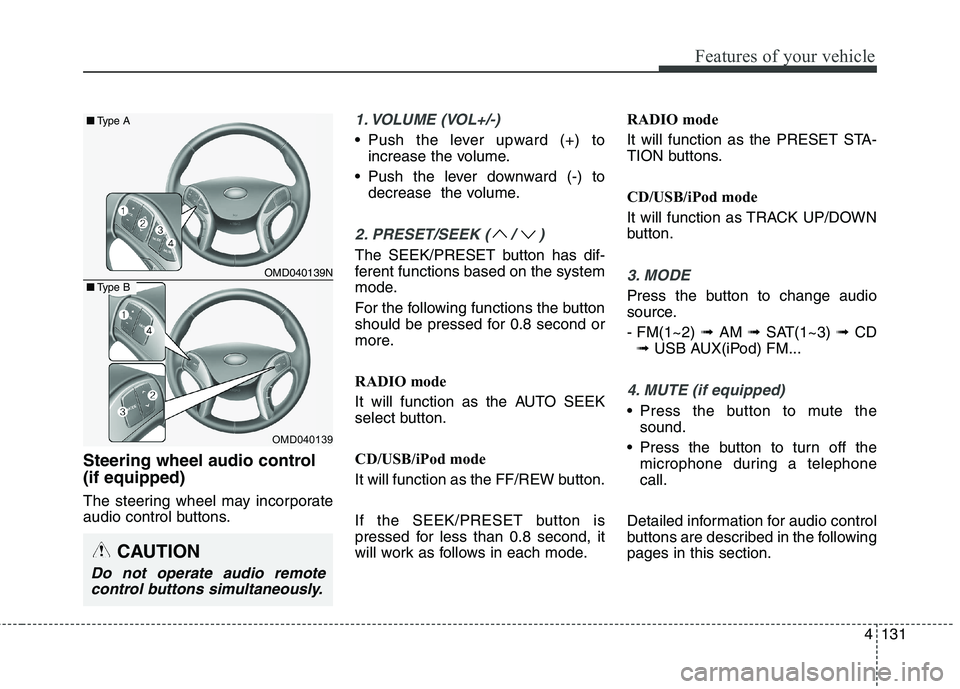
Steering wheel audio control
(if equipped)
The steering wheel may incorporate
audio control buttons.
1. VOLUME (VOL+/-)
• Push the lever upward (+) to
increase the volume.
Push the lever downward (-) to
decrease the volume.
2. PRESET/SEEK ( / )
The SEEK/PRESET button has dif-
ferent functions based on the system
mode.
For the following functions the button
should be pressed for 0.8 second or
more.
RADIO mode
It will function as the AUTO SEEK
select button.
CD/USB/iPod mode
It will function as the FF/REW button.
If the SEEK/PRESET button is
pressed for less than 0.8 second, it
will work as follows in each mode.RADIO mode
It will function as the PRESET STA-
TION buttons.
CD/USB/iPod mode
It will function as TRACK UP/DOWN
button.
3. MODE
Press the button to change audio
source.
- FM(1~2) ➟ AM ➟ SAT(1~3) ➟ CD
➟ USB AUX(iPod) FM...
4. MUTE (if equipped)
Press the button to mute the
sound.
Press the button to turn off the
microphone during a telephone
call.
Detailed information for audio control
buttons are described in the following
pages in this section.
OMD040139N
OMD040139
■Type A
■Type B
CAUTION
Do not operate audio remote
control buttons simultaneously.
Page 219 of 476
Features of your vehicle
134 4
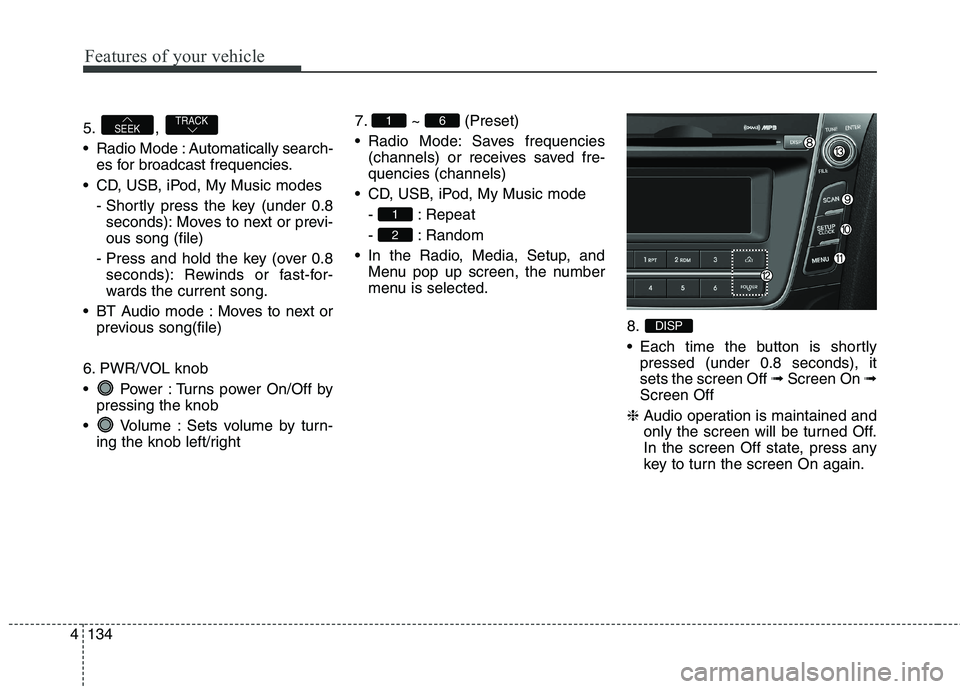
5. ,
Radio Mode : Automatically search-
es for broadcast frequencies.
CD, USB, iPod, My Music modes
- Shortly press the key (under 0.8
seconds): Moves to next or previ-
ous song (file)
- Press and hold the key (over 0.8
seconds): Rewinds or fast-for-
wards the current song.
BT Audio mode : Moves to next or
previous song(file)
6. PWR/VOL knob
Power : Turns power On/Off by
pressing the knob
Volume : Sets volume by turn-
ing the knob left/right7. ~ (Preset)
Radio Mode: Saves frequencies
(channels) or receives saved fre-
quencies (channels)
CD, USB, iPod, My Music mode
- : Repeat
- : Random
In the Radio, Media, Setup, and
Menu pop up screen, the number
menu is selected.
8.
Each time the button is shortly
pressed (under 0.8 seconds), it
sets the screen Off ➟Screen On ➟
Screen Off
❈Audio operation is maintained and
only the screen will be turned Off.
In the screen Off state, press any
key to turn the screen On again.
DISP
2
1
61TRACKSEEK
Page 220 of 476
4135
Features of your vehicle
9.
Radio Mode
- Shortly press the key (under 0.8
seconds): Previews each broadcast
for 5 seconds each.
- Press and hold the key (over 0.8
seconds): Previews the broadcasts
saved in Preset ~ for 5
seconds each.
❈Press the key again to
continue listening to the current
frequency.
❈XM Radio does not support the
Preset scan feature.
CD, USB, iPod mode
- Shortly press the key (under 0.8
seconds): Previews each song (file)
for 10 seconds each
❈Press the key again to
continue listening to the current
song (file).10.
Shortly press the key (under 0.8
seconds) : Moves to the Display,
Sound, Clock, Phone, System set-
ting modes
Press and hold the key (over 0.8
seconds) : Move to the Time set-
ting screen
11.
Displays menus for the current mode.
12. ,
Radio Mode
- XM RADIO : Category Search
MP3, CD, USB mode : Folder Search
iPod mode: Moves to parent folder
❈May differ depending on the
selected audio.13. TUNE knob
Radio mode : Changes frequency
by turning the knob left/right
CD, USB, iPod mode: Searches
songs (files) by turning the knob
left/right
❈When the desired song is displayed,
press the knob to play the song.
Moves focus in all selection menus
and selects menus.
FOLDERCAT
MENU
SETUPCLOCK
SCAN
SCAN
61
SCAN
Page 224 of 476
![HYUNDAI ELANTRA GT 2014 Manual Online 4139
Features of your vehicle
Voice Recognition Volume
(❈For
Bluetooth®Wireless Technology
equipped Model)
Adjusts voice recognition volume.
Select [Voice Recognition Vol.] Set
volume of TUNE kno](/img/35/56097/w960_56097-223.png "HYUNDAI ELANTRA GT 2014 Manual Online 4139
Features of your vehicle
Voice Recognition Volume
(❈For
Bluetooth®Wireless Technology
equipped Model)
Adjusts voice recognition volume.
Select [Voice Recognition Vol.] Set
volume of TUNE kno")
4139
Features of your vehicle
Voice Recognition Volume
(❈For
Bluetooth®Wireless Technology
equipped Model)
Adjusts voice recognition volume.
Select [Voice Recognition Vol.] Set
volume of TUNE knobBlue Link Voice Volume
(❈For TMU supported Model)
Sets the Blue Link voice recognition
volume.
❈While using Blue Link voice recog-
nition, turning the tune knob will
display the volume control popup
screen.
❈May differ depending on the
selected audio.
Page 231 of 476
Features of your vehicle
146 4
Using the Bluetooth®Wireless
Technology System
To use
Bluetooth®Wireless
Technology when the system is cur-
rently off, follow these next steps.
On
Bluetooth®Wireless
Technology through the Key
Press the key Screen
Guidance
❈Moves to the screen where
Bluetooth
®Wireless Technology
functions can be used and dis-
plays guidance.
On
Bluetooth®Wireless
Technology through the KeyPress the key Select [Phone]
through TUNE knob or key
➀A screen asking whether to turn on
Bluetooth®Wireless Technology
will be displayed.
➁On the screen, select to turn
on
Bluetooth®Wireless Technology
and display guidance.
❈If the
Bluetooth®Wireless
Technology system is turned on,
the system will automatically try to
connect the most recently connect-
ed
Bluetooth®Wireless Technology
enabled mobile phone.
YES
3
SETUP
SETUP
PHONE
PHONE
CAUTION
Bluetooth®Wireless
Technology connection may
become intermittently discon-
nected in some mobile
phones. Follow these next
steps to try again.
1) Turn the Bluetooth
®Wireless
Technology function within
the mobile phone ON/OFF
and try to connect again.
2) Turn the mobile phone power
ON/OFF and try to connect
again.
3) Completely remove the
mobile phone battery, reboot,
and then try to connect again.
4) Reboot the audio system and
try to connect again
5) Delete all paired devices in
your mobile phone and the
audio system and pair again
for use.
Page 233 of 476
![HYUNDAI ELANTRA GT 2014 Manual Online Features of your vehicle
148 4
Language
This menu is used to set the display
and voice recognition language.
Select [Language] Set through
TUNE knob
❈The system will reboot after the
language is ch](/img/35/56097/w960_56097-232.png "HYUNDAI ELANTRA GT 2014 Manual Online Features of your vehicle
148 4
Language
This menu is used to set the display
and voice recognition language.
Select [Language] Set through
TUNE knob
❈The system will reboot after the
language is ch")
Features of your vehicle
148 4
Language
This menu is used to set the display
and voice recognition language.
Select [Language] Set through
TUNE knob
❈The system will reboot after the
language is changed.
❈Language support by region
- English, Francais, Espanol
Page 234 of 476
4149
Features of your vehicle
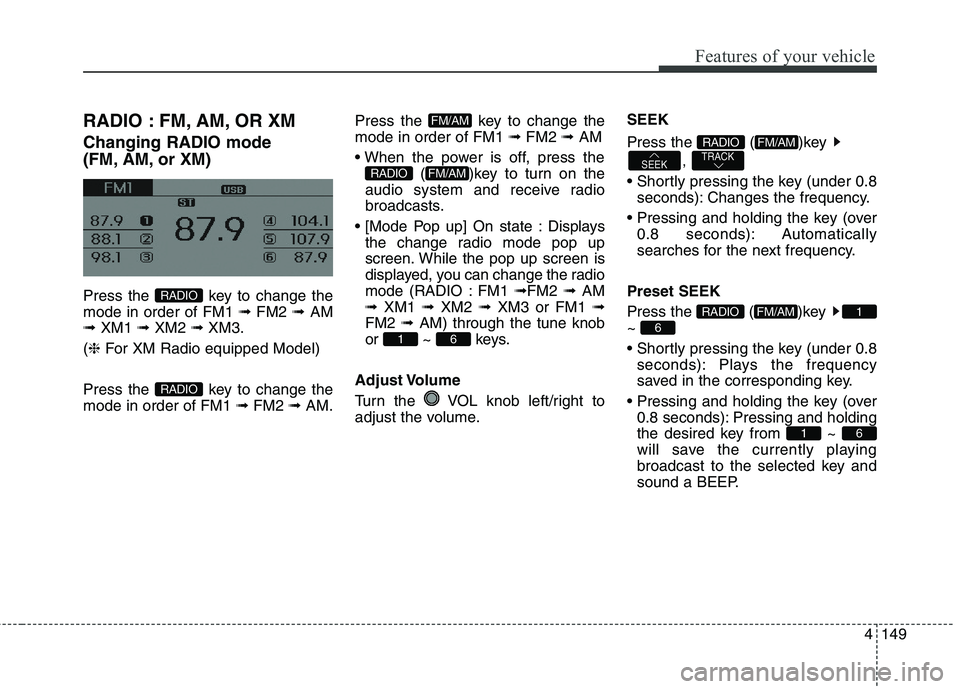
RADIO : FM, AM, OR XM
Changing RADIO mode
(FM, AM, or XM)
Press the key to change the
mode in order of FM1 ➟ FM2 ➟ AM
➟ XM1 ➟ XM2 ➟ XM3.
(❈For XM Radio equipped Model)
Press the key to change the
mode in order of FM1 ➟FM2 ➟AM.Press the key to change the
mode in order of FM1 ➟FM2 ➟AM
( )key to turn on the
audio system and receive radio
broadcasts.
Displays
the change radio mode pop up
screen. While the pop up screen is
displayed, you can change the radio
mode (RADIO : FM1 ➟FM2 ➟ AM
➟ XM1 ➟ XM2 ➟ XM3 or FM1 ➟
FM2 ➟ AM) through the tune knob
or ~ keys.
Adjust Volume
Turn the VOL knob left/right to
adjust the volume.SEEK
Press the ( )key
,
seconds): Changes the frequency.
0.8 seconds): Automatically
searches for the next frequency.
Preset SEEK
Press the ( )key
~
seconds): Plays the frequency
saved in the corresponding key.
0.8 seconds): Pressing and holding
the desired key from ~
will save the currently playing
broadcast to the selected key and
sound a BEEP.
61
6
1FM/AMRADIO
TRACKSEEK
FM/AMRADIO
61
FM/AMRADIO
FM/AM
RADIO
RADIO
Page 235 of 476
Features of your vehicle
150 4
SCAN
Press the ( ) key
seconds): The broadcast frequency
increases and previews each
broadcast for 5 seconds each. After
scanning all frequencies, returns
and plays the current broadcast fre-
quency.
0.8 seconds): Previews the broad-
casts saved in Preset ~
for 5 seconds each.Selecting through manual search
Turn the TUNE knob left/right to
adjust the frequency.
Changes by 200KHz
Changes by 10MHz
(❈AC103A5GG / AC110A5GG :
changes by 9Khz)MENU
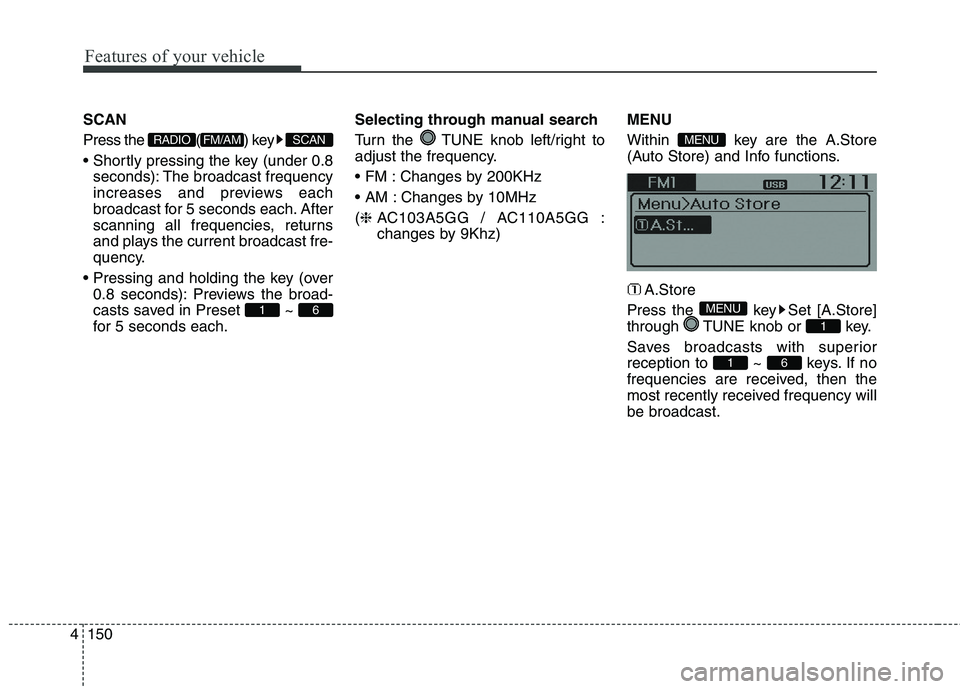
Within key are the A.Store
(Auto Store) and Info functions.
A.Store
Press the key Set [A.Store]
through TUNE knob or key.
Saves broadcasts with superior
reception to ~ keys. If no
frequencies are received, then the
most recently received frequency will
be broadcast.
61
1
MENU
MENU
61
SCANFM/AMRADIO