ESP HYUNDAI ELANTRA GT 2014 User Guide
[x] Cancel search | Manufacturer: HYUNDAI, Model Year: 2014, Model line: ELANTRA GT, Model: HYUNDAI ELANTRA GT 2014Pages: 476, PDF Size: 31.71 MB
Page 139 of 476
Features of your vehicle
54 4
Remote control
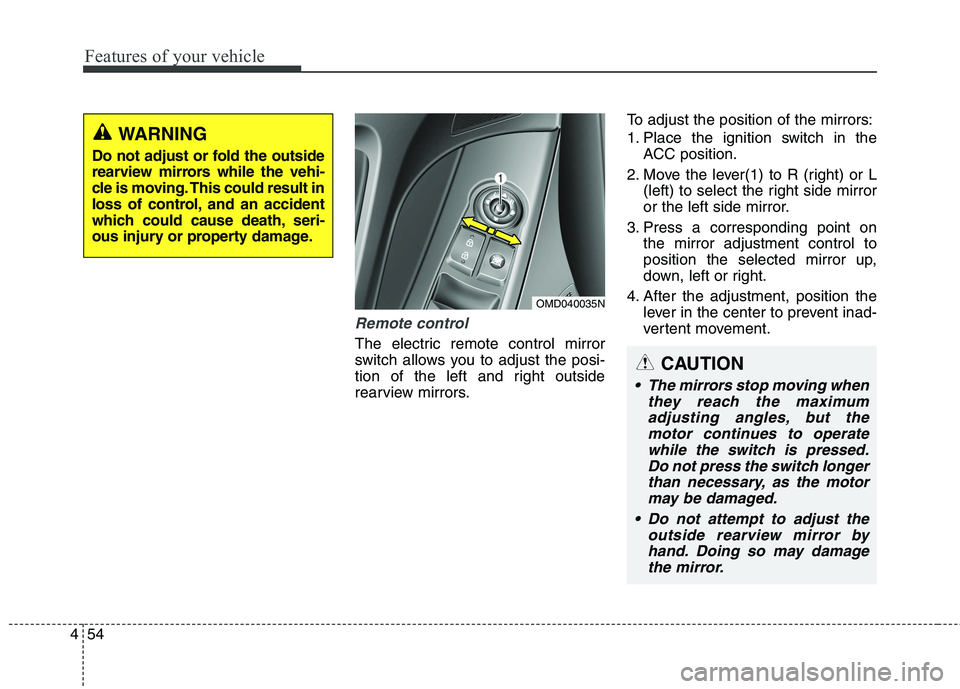
The electric remote control mirror
switch allows you to adjust the posi-
tion of the left and right outside
rearview mirrors.To adjust the position of the mirrors:
1. Place the ignition switch in the
ACC position.
2. Move the lever(1) to R (right) or L
(left) to select the right side mirror
or the left side mirror.
3. Press a corresponding point on
the mirror adjustment control to
position the selected mirror up,
down, left or right.
4. After the adjustment, position the
lever in the center to prevent inad-
vertent movement.
WARNING
Do not adjust or fold the outside
rearview mirrors while the vehi-
cle is moving. This could result in
loss of control, and an accident
which could cause death, seri-
ous injury or property damage.
OMD040035N
CAUTION
The mirrors stop moving when
they reach the maximum
adjusting angles, but the
motor continues to operate
while the switch is pressed.
Do not press the switch longer
than necessary, as the motor
may be damaged.
Do not attempt to adjust the
outside rearview mirror by
hand. Doing so may damage
the mirror.
Page 167 of 476
Features of your vehicle
82 4
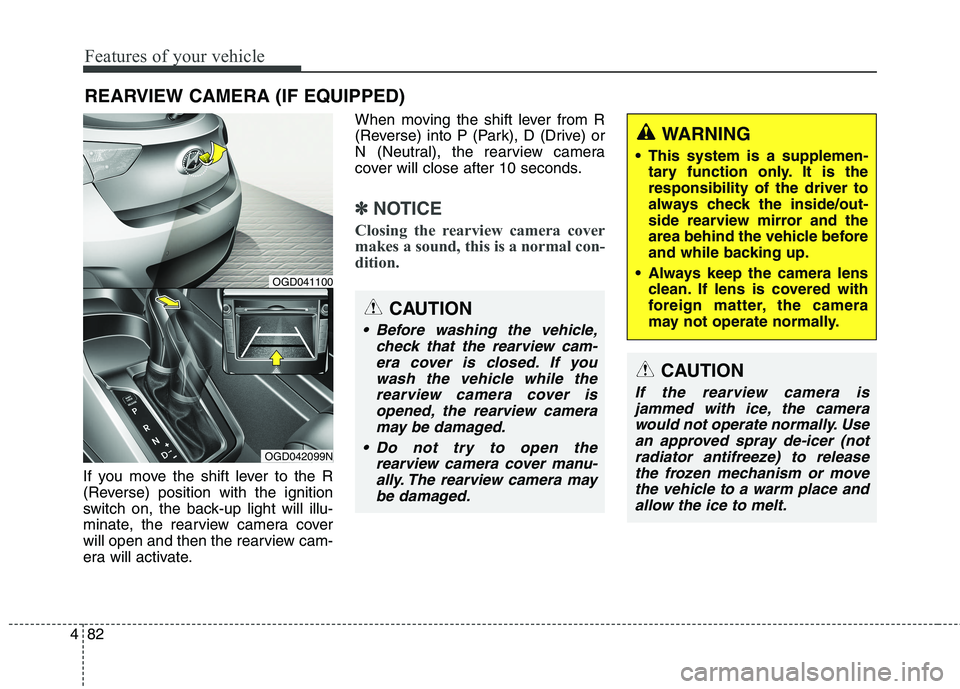
If you move the shift lever to the R
(Reverse) position with the ignition
switch on, the back-up light will illu-
minate, the rearview camera cover
will open and then the rearview cam-
era will activate.When moving the shift lever from R
(Reverse) into P (Park), D (Drive) or
N (Neutral), the rearview camera
cover will close after 10 seconds.
✽ ✽
NOTICE
Closing the rearview camera cover
makes a sound, this is a normal con-
dition.
REARVIEW CAMERA (IF EQUIPPED)
OGD042099N
OGD041100
CAUTION
Before washing the vehicle,
check that the rearview cam-
era cover is closed. If you
wash the vehicle while the
rearview camera cover is
opened, the rearview camera
may be damaged.
Do not try to open the
rearview camera cover manu-
ally. The rearview camera may
be damaged.
WARNING
This system is a supplemen-
tary function only. It is the
responsibility of the driver to
always check the inside/out-
side rearview mirror and the
area behind the vehicle before
and while backing up.
Always keep the camera lens
clean. If lens is covered with
foreign matter, the camera
may not operate normally.
CAUTION
If the rearview camera is
jammed with ice, the camera
would not operate normally. Use
an approved spray de-icer (not
radiator antifreeze) to release
the frozen mechanism or move
the vehicle to a warm place and
allow the ice to melt.
Page 169 of 476
Features of your vehicle
84 4
Headlamp welcome function
(if equipped)
When the headlight switch is in the
ON or AUTO position and all doors
(and trunk) are closed and locked, if
you press the door unlock button on
the transmitter (or the smart key), the
headlights will come on for about 15
seconds. At this time, if you press the
door lock button on the transmitter
(or smart key) the headlights will turn
off immediately.
You can activate or deactivate this
feature. Refer to “User Settings” in
this section.
Daytime running light
(if equipped)
Daytime Running Lights (DRL) can
make it easier for others to see the
front of your vehicle during the day.
DRL can be helpful in many different
driving conditions, and it is especially
helpful after dawn and before sunset.
The DRL system will turn OFF when:
The headlights are ON.
Engine stops.
The multifuntion switch is in the
“DRL OFF” position.
The parking brake is applied.
Lighting control
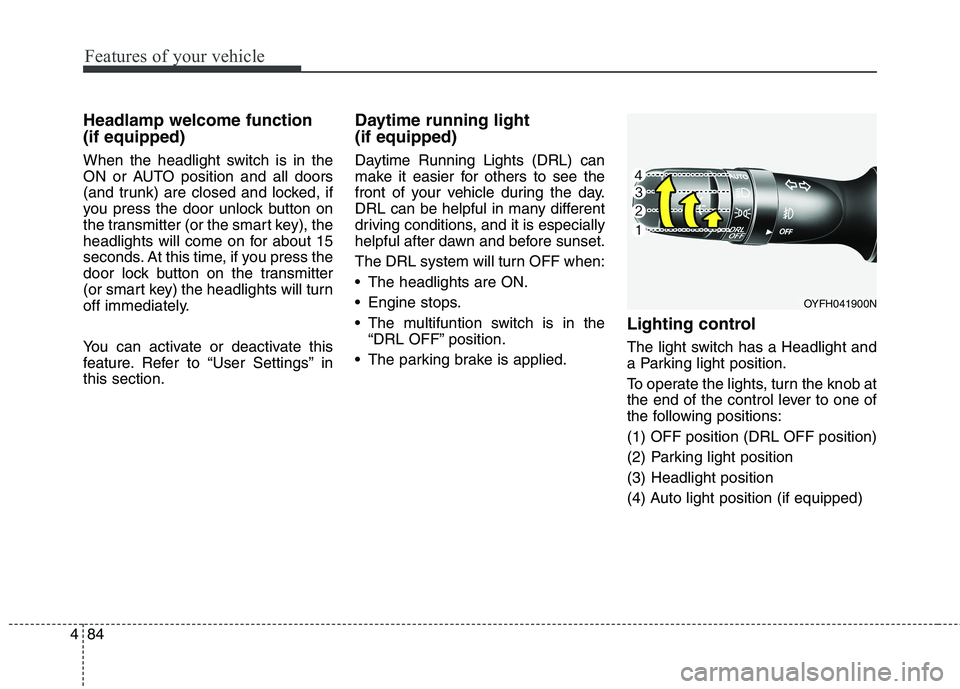
The light switch has a Headlight and
a Parking light position.
To operate the lights, turn the knob at
the end of the control lever to one of
the following positions:
(1) OFF position (DRL OFF position)
(2) Parking light position
(3) Headlight position
(4) Auto light position (if equipped)
OYFH041900N
Page 198 of 476
4113
Features of your vehicle
For maximum defrosting, set the
temperature control to the extreme
right/hot position and the fan speed
control to the highest speed.
If warm air to the floor is desired
while defrosting or defogging, set
the mode to the floor-defrost posi-
tion.
Before driving, clear all snow and
ice from the windshield, rear win-
dow, outside rear view mirrors, and
all side windows.
Clear all snow and ice from the
hood and air inlet in the cowl grill to
improve heater and defroster effi-
ciency and to reduce the probabili-
ty of fogging up the inside of the
windshield.
✽ ✽
NOTICE
Be sure to keep the interior surface
of the windshield clean by wiping it
with a clean cloth and glass cleaner.
This will help reduce the tendency of
the glass fogging and also improve
visibility.
Manual climate control system
To defog inside windshield
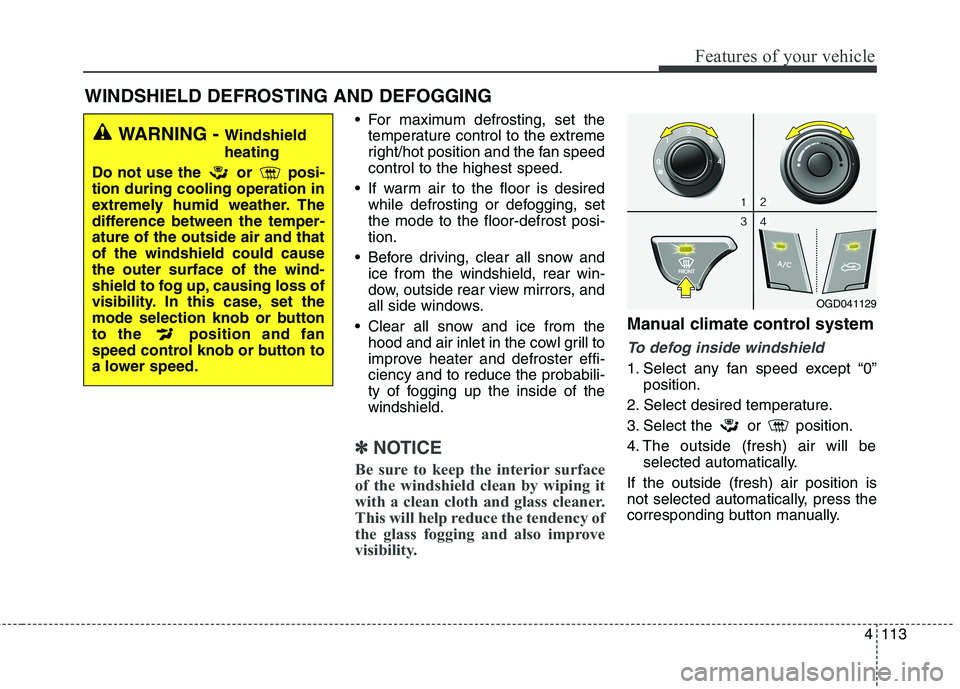
1. Select any fan speed except “0”
position.
2. Select desired temperature.
3. Select the or position.
4. The outside (fresh) air will be
selected automatically.
If the outside (fresh) air position is
not selected automatically, press the
corresponding button manually.
WINDSHIELD DEFROSTING AND DEFOGGING
WARNING - Windshield
heating
Do not use the or posi-
tion during cooling operation in
extremely humid weather. The
difference between the temper-
ature of the outside air and that
of the windshield could cause
the outer surface of the wind-
shield to fog up, causing loss of
visibility. In this case, set the
mode selection knob or button
to the position and fan
speed control knob or button to
a lower speed.
OGD041129
Page 199 of 476
Features of your vehicle
114 4
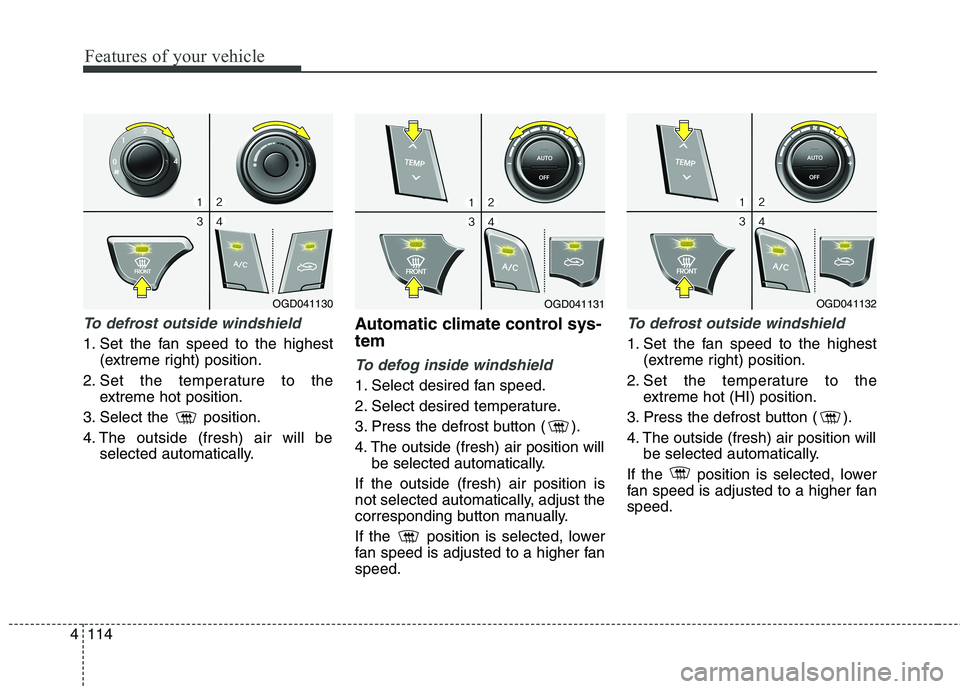
To defrost outside windshield
1. Set the fan speed to the highest
(extreme right) position.
2. Set the temperature to the
extreme hot position.
3. Select the position.
4. The outside (fresh) air will be
selected automatically.
Automatic climate control sys-
tem
To defog inside windshield
1. Select desired fan speed.
2. Select desired temperature.
3. Press the defrost button ( ).
4. The outside (fresh) air position will
be selected automatically.
If the outside (fresh) air position is
not selected automatically, adjust the
corresponding button manually.
If the position is selected, lower
fan speed is adjusted to a higher fan
speed.
To defrost outside windshield
1. Set the fan speed to the highest
(extreme right) position.
2. Set the temperature to the
extreme hot (HI) position.
3. Press the defrost button ( ).
4. The outside (fresh) air position will
be selected automatically.
If the position is selected, lower
fan speed is adjusted to a higher fan
speed.
OGD041130OGD041131OGD041132
Page 214 of 476
4129
Features of your vehicle
✽ ✽
NOTICE
If the vehicle is equipped with a sun-
roof, be sure not to position cargo
onto the roof in such a way that it
could interfere with sunroof opera-
tion.WARNING
The vehicle center of gravity will
be higher when items are
loaded onto the roof. Avoid sud-
den starts, braking, sharp turns,
abrupt maneuvers or high
speeds that may result in loss
of vehicle control or rollover
resulting in an accident.
Always drive slowly and turn
corners carefully when carry-
ing items on the roof. Severe
wind updrafts, caused by pass-
ing vehicles or natural causes,
can cause sudden upward
pressure on items loaded on
the roof. This is especially true
when carrying large, flat items
such as wood panels or mat-
tresses. This could cause the
items to fall off the roof and
cause damage to your vehicle
or others around you.
To prevent damage or loss of
cargo while driving, check fre-
quently before or while driving
to make sure the items on the
roof are securely fastened.
CAUTION
When carrying cargo on the
roof, take the necessary pre-
cautions to make sure the
cargo does not damage the
roof of the vehicle.
When carrying large objects
on the roof, make sure they do
not exceed the overall roof
length or width.
Page 233 of 476
![HYUNDAI ELANTRA GT 2014 User Guide Features of your vehicle
148 4
Language
This menu is used to set the display
and voice recognition language.
Select [Language] Set through
TUNE knob
❈The system will reboot after the
language is ch](/img/35/56097/w960_56097-232.png "HYUNDAI ELANTRA GT 2014 User Guide Features of your vehicle
148 4
Language
This menu is used to set the display
and voice recognition language.
Select [Language] Set through
TUNE knob
❈The system will reboot after the
language is ch")
Features of your vehicle
148 4
Language
This menu is used to set the display
and voice recognition language.
Select [Language] Set through
TUNE knob
❈The system will reboot after the
language is changed.
❈Language support by region
- English, Francais, Espanol
Page 234 of 476
4149
Features of your vehicle
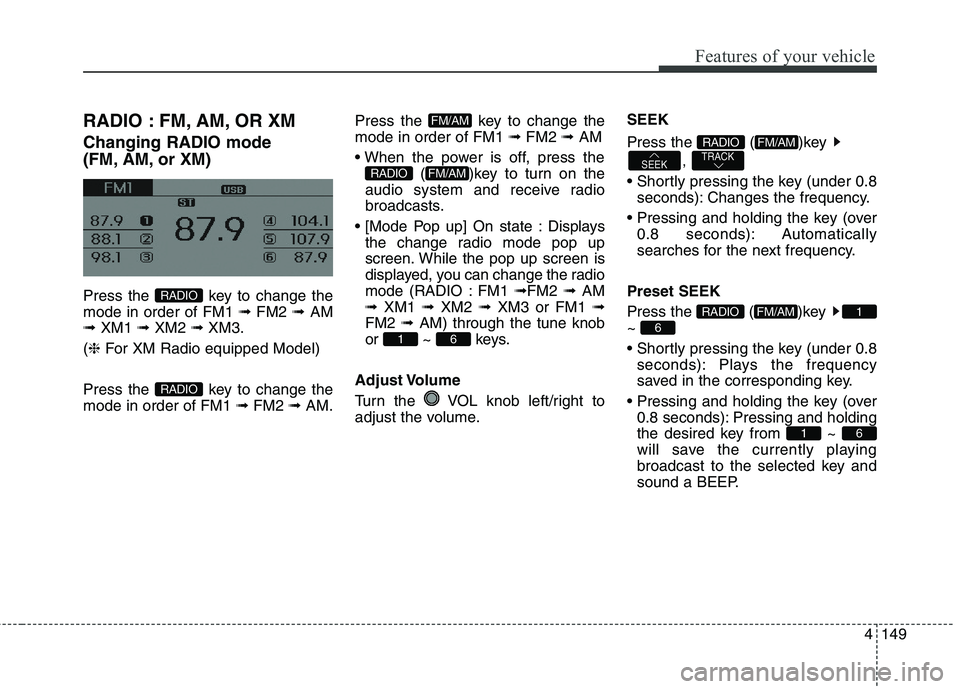
RADIO : FM, AM, OR XM
Changing RADIO mode
(FM, AM, or XM)
Press the key to change the
mode in order of FM1 ➟ FM2 ➟ AM
➟ XM1 ➟ XM2 ➟ XM3.
(❈For XM Radio equipped Model)
Press the key to change the
mode in order of FM1 ➟FM2 ➟AM.Press the key to change the
mode in order of FM1 ➟FM2 ➟AM
( )key to turn on the
audio system and receive radio
broadcasts.
Displays
the change radio mode pop up
screen. While the pop up screen is
displayed, you can change the radio
mode (RADIO : FM1 ➟FM2 ➟ AM
➟ XM1 ➟ XM2 ➟ XM3 or FM1 ➟
FM2 ➟ AM) through the tune knob
or ~ keys.
Adjust Volume
Turn the VOL knob left/right to
adjust the volume.SEEK
Press the ( )key
,
seconds): Changes the frequency.
0.8 seconds): Automatically
searches for the next frequency.
Preset SEEK
Press the ( )key
~
seconds): Plays the frequency
saved in the corresponding key.
0.8 seconds): Pressing and holding
the desired key from ~
will save the currently playing
broadcast to the selected key and
sound a BEEP.
61
6
1FM/AMRADIO
TRACKSEEK
FM/AMRADIO
61
FM/AMRADIO
FM/AM
RADIO
RADIO
Page 237 of 476
Features of your vehicle
152 4
Preset
Press the key ~
seconds): Plays the frequency
saved in the corresponding key.
0.8 seconds): Pressing and holding
the desired key from ~
will save the current broadcast to
the selected key and sound a
BEEP.
Tune
TUNE knob : Changes
the channel number or scrolls cate-
gory list.
TUNE knob : Selects the
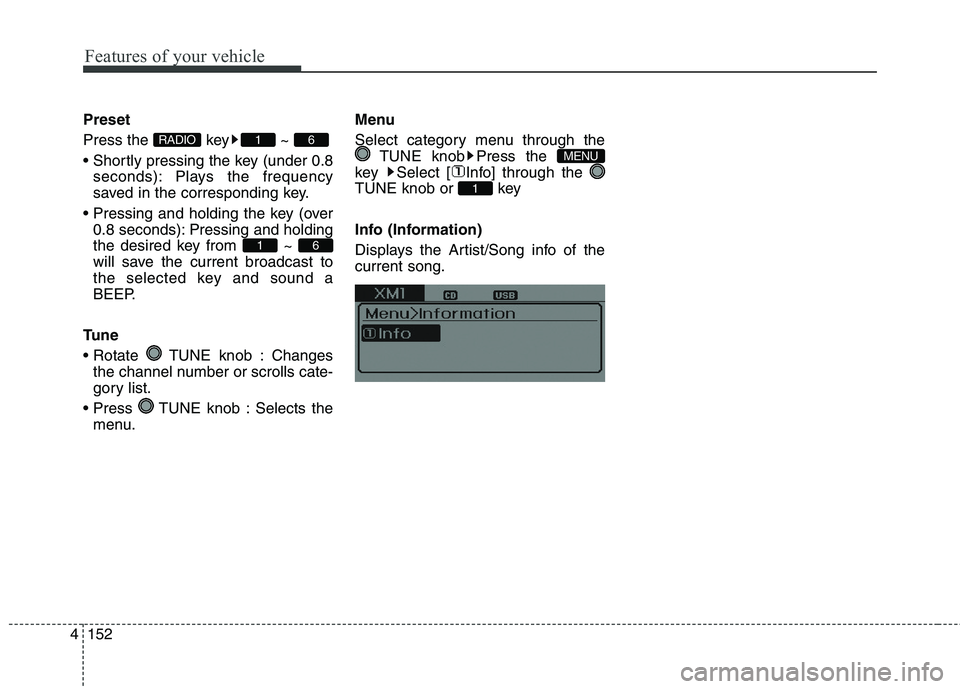
menu.Menu
Select category menu through the
TUNE knob Press the
key Select [ Info] through the
TUNE knob or key
Info (Information)
Displays the Artist/Song info of the
current song.
1
MENU
61
61RADIO
Page 263 of 476
Features of your vehicle
178 4
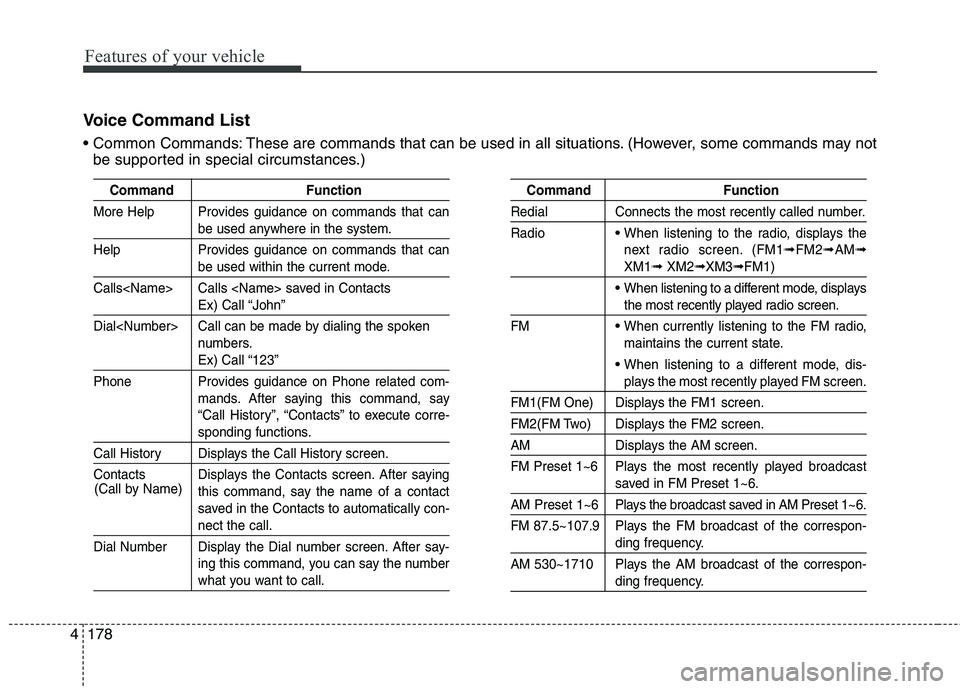
Voice Command List
These are commands that can be used in all situations. (However, some commands may not
be supported in special circumstances.)
Command Function
More Help Provides guidance on commands that can
be used anywhere in the system.
Help Provides guidance on commands that can
be used within the current mode.
Calls
Ex) Call “John”
Dial
numbers.
Ex) Call “123”
Phone Provides guidance on Phone related com-
mands. After saying this command, say
“Call History”, “Contacts” to execute corre-
sponding functions.
Call History Displays the Call History screen.
Contacts Displays the Contacts screen. After saying
this command, say the name of a contact
saved in the Contacts to automatically con-
nect the call.
Dial Number Display the Dial number screen. After say-
ing this command, you can say the number
what you want to call.
Command Function
Redial Connects the most recently called number.
Radio
When listening to the radio, displays the
next radio screen. (FM1
➟FM2➟AM➟
XM1➟XM2➟XM3➟FM1)
When listening to a different mode, displays
the most recently played radio screen.
FM
When currently listening to the FM radio,
maintains the current state.
When listening to a different mode, dis-
plays the most recently played FM screen.
FM1(FM One) Displays the FM1 screen.
FM2(FM Two) Displays the FM2 screen.
AM Displays the AM screen.
FM Preset 1~6 Plays the most recently played broadcast
saved in FM Preset 1~6.
AM Preset 1~6 Plays the broadcast saved in AM Preset 1~6.
FM 87.5~107.9 Plays the FM broadcast of the correspon-
ding frequency.
AM 530~1710 Plays the AM broadcast of the correspon-
ding frequency. (Call by Name)