turn signal Hyundai Elantra GT 2016 User Guide
[x] Cancel search | Manufacturer: HYUNDAI, Model Year: 2016, Model line: Elantra GT, Model: Hyundai Elantra GT 2016Pages: 546, PDF Size: 14.04 MB
Page 180 of 546
493
Features of your vehicle
One-touch triple turn signal
To activate an one-touch triple turn
signal move the turn signal lever
slightly for less than 1.8 seconds and
then release it. The lane change sig-
nals will blink 3 times.
You can activate or deactivate this
feature. Refer to “User Settings” in
this section.
✽ ✽NOTICE
If an indicator flash is abnormally
quick or slow, a bulb may be burned
out or have a poor electrical connec-
tion in the circuit.
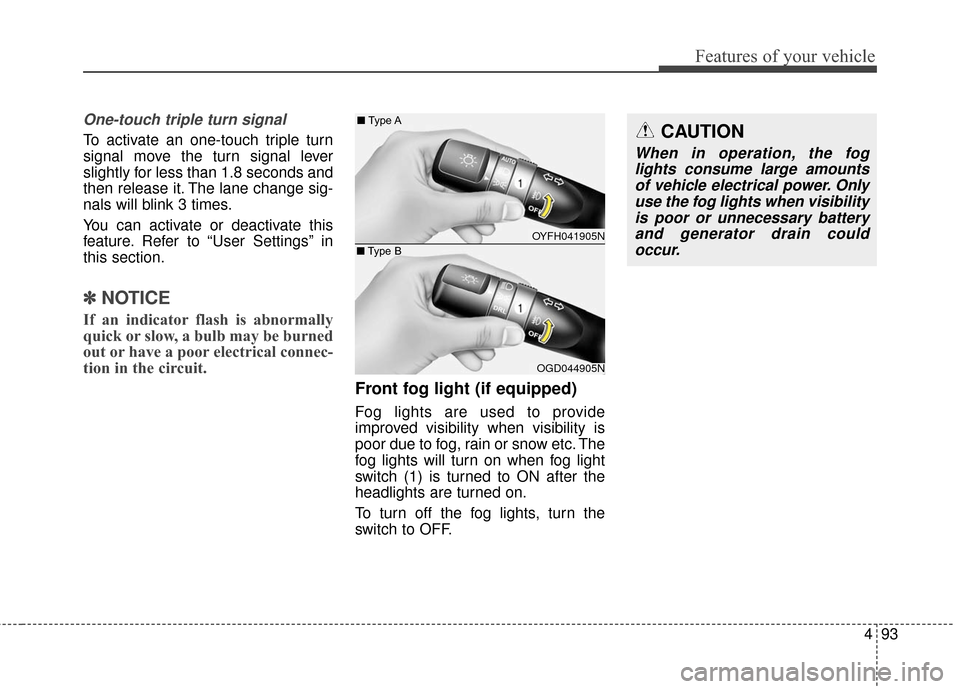
Front fog light (if equipped)
Fog lights are used to provide
improved visibility when visibility is
poor due to fog, rain or snow etc. The
fog lights will turn on when fog light
switch (1) is turned to ON after the
headlights are turned on.
To turn off the fog lights, turn the
switch to OFF.
CAUTION
When in operation, the fog
lights consume large amountsof vehicle electrical power. Onlyuse the fog lights when visibilityis poor or unnecessary batteryand generator drain couldoccur.
OYFH041905N
■
Type A
OGD044905N
■
Type B
Page 222 of 546
4135
Features of your vehicle
✽
✽NOTICE
• If you install an aftermarket HID
headlamp, your vehicle's audio
and electronic device may mal-
function.
• Prevent chemicals such as per- fume, cosmetic oil, sun cream,
hand cleaner, and air freshener
from contacting the interior parts
because they may cause damage
or discoloration.
Antenna
Roof antenna
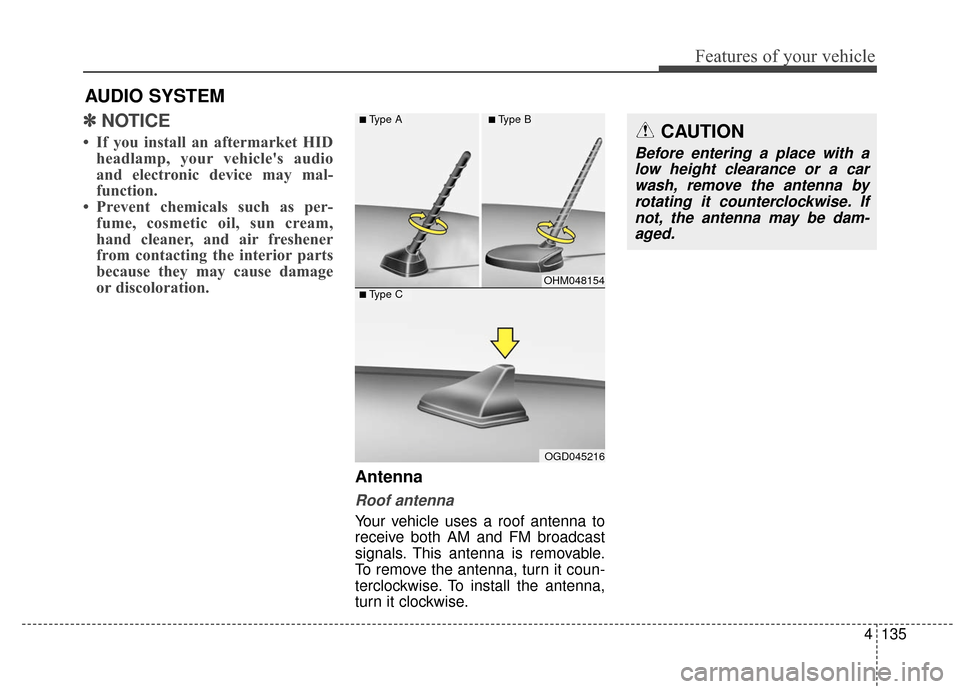
Your vehicle uses a roof antenna to
receive both AM and FM broadcast
signals. This antenna is removable.
To remove the antenna, turn it coun-
terclockwise. To install the antenna,
turn it clockwise.
AUDIO SYSTEM
CAUTION
Before entering a place with a
low height clearance or a carwash, remove the antenna byrotating it counterclockwise. Ifnot, the antenna may be dam-aged.
OHM048154
OGD045216
■Type A■Type B
■Type C
Page 255 of 546
Features of your vehicle
168
4
SiriusXM RADIO
(IF EQUIPPED)
Using SiriusXM Satellite Radio
Your vehicle is equipped with a 3-
month trial subscription to SiriusXM
so you have access to over 140
channels of music, information, and
entertainment programming.
Activation
In order to extend or reactivate your
Sirius Select subscription, you will
need to contact SiriusXM Customer
Care at 1-800-643-2112. Have your
12-digit RID (Radio Identification
Number) / ESN (Electronic Serial
Number) ready. To retrieve the RID /
ESN, turn on the radio, press the key,
and tune to channel zero.
Please note that the vehicle will need
to be turned on, in Sirius mode, and
have an unobstructed view of the sky
in order for the radio to receive the
activation signal.
SEEK
Press the , key
Shortly pressing the key: select
previous or next channel.
Pressing and holding the key (over 0.8 seconds): continuously move
to previous or next channel.
❈ If the “Category” icon is displayed,
channels are changed within the
current category.
SCAN
Press the key
Shortly pressing the key: Previews each broadcast for 10 seconds
each
❈ Press the key again to
continue listening to the current
frequency
❈ If the “Category” icon is displayed,
channels are changed within the
current category.
Category
Press the , key Set
through the
TUNEknob
The display will indicate the cate- gory menus, highlight the category
that the current channel belongs
to.
FOLDERCAT
SCAN
SCAN
TRACKSEEK
Page 406 of 546
What to do in an emergency
26
ROAD WARNING
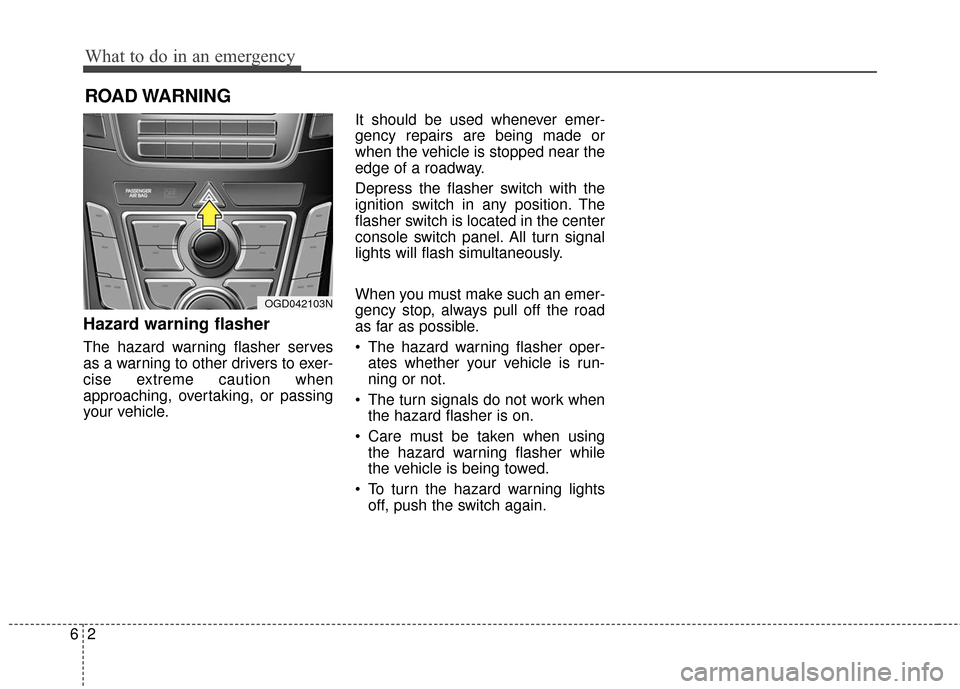
Hazard warning flasher
The hazard warning flasher serves
as a warning to other drivers to exer-
cise extreme caution when
approaching, overtaking, or passing
your vehicle.It should be used whenever emer-
gency repairs are being made or
when the vehicle is stopped near the
edge of a roadway.
Depress the flasher switch with the
ignition switch in any position. The
flasher switch is located in the center
console switch panel. All turn signal
lights will flash simultaneously.
When you must make such an emer-
gency stop, always pull off the road
as far as possible.
• The hazard warning flasher oper-
ates whether your vehicle is run-
ning or not.
The turn signals do not work when the hazard flasher is on.
Care must be taken when using the hazard warning flasher while
the vehicle is being towed.
To turn the hazard warning lights off, push the switch again.
OGD042103N
Page 436 of 546
77
Maintenance
At least monthly:
Check coolant level in the enginecoolant reservoir.
Check the operation of all exterior lights, including the stoplights, turn
signals and hazard warning flash-
ers.
Check the cold inflation pressures of all tires including the spare.
At least twice a year
(i.e., every Spring and Fall):
Check radiator, heater and air con- ditioning hoses for leaks or dam-
age.
Check windshield washer spray and wiper operation. Clean wiper
blades with clean cloth dampened
with washer fluid.
Check headlight alignment.
Check muffler, exhaust pipes, shields and clamps.
Check the lap/shoulder belts for wear and function.
Check for worn tires and loose wheel lug nuts.
At least once a year:
Clean body and door drain holes.
Lubricate door hinges and checks,and hood hinges.
Lubricate door and hood locks and latches.
Lubricate door rubber weather- strips.
Check the air conditioning system.
Inspect and lubricate automatic transaxle linkage and controls.
Clean battery and terminals.
Check the brake fluid level.
Page 502 of 546
773
Maintenance
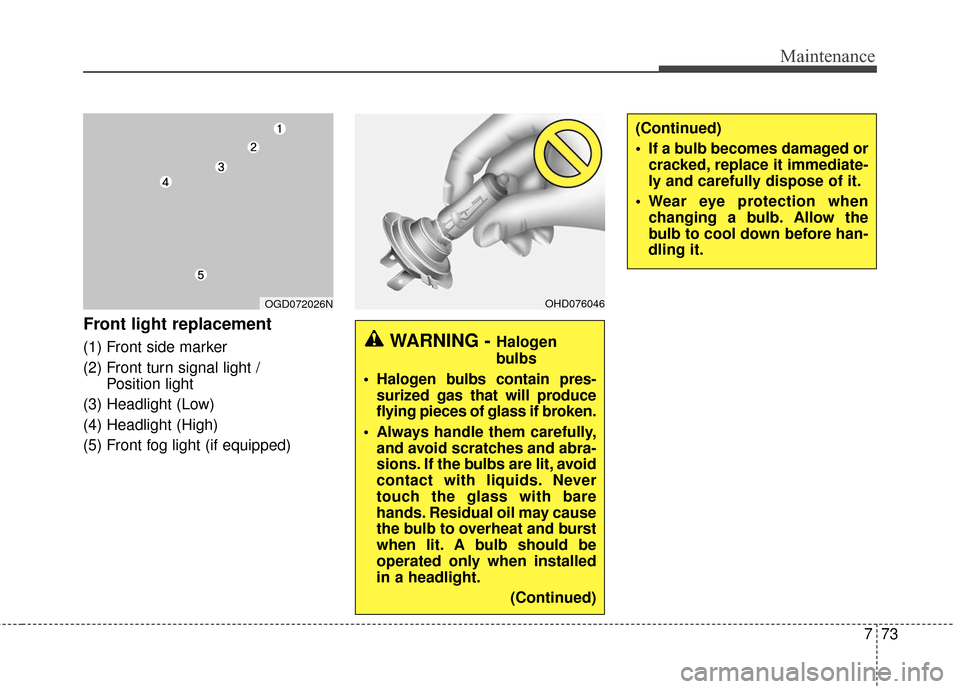
Front light replacement
(1) Front side marker
(2) Front turn signal light / Position light
(3) Headlight (Low)
(4) Headlight (High)
(5) Front fog light (if equipped)WARNING - Halogen
bulbs
Halogen bulbs contain pres- surized gas that will produce
flying pieces of glass if broken.
Always handle them carefully, and avoid scratches and abra-
sions. If the bulbs are lit, avoid
contact with liquids. Never
touch the glass with bare
hands. Residual oil may cause
the bulb to overheat and burst
when lit. A bulb should be
operated only when installed
in a headlight.
(Continued)
OHD076046OGD072026N
(Continued)
If a bulb becomes damaged orcracked, replace it immediate-
ly and carefully dispose of it.
Wear eye protection when changing a bulb. Allow the
bulb to cool down before han-
dling it.
Page 504 of 546
775
Maintenance
12. Connect the headlight bulb socket-connector.
13. Install the headlight bulb cover by turning it clockwise. Headlight (Low)
Follow the steps 1 to 6 from the pre-
vious page.
7. Remove the cover by turning it
counterclockwise.
8. Remove the socket from the assembly by turning the socket
counterclockwise until the tabs on
the socket align with the slots on
the assembly.
9. Pull the bulb out of the socket.
10. Insert a new bulb into the socket.
11. Install the socket in the assembly by aligning the tabs on the sock-
et with the slots in the assembly.
Push the socket into the assem-
bly and turn the socket clockwise.
12. Install the headlight bulb cover by turning it clockwise.
✽ ✽NOTICE
Always have the headlight aiming
adjusted after an accident or the
headlight assembly is reinstalled at
an authorized HYUNDAI dealer.
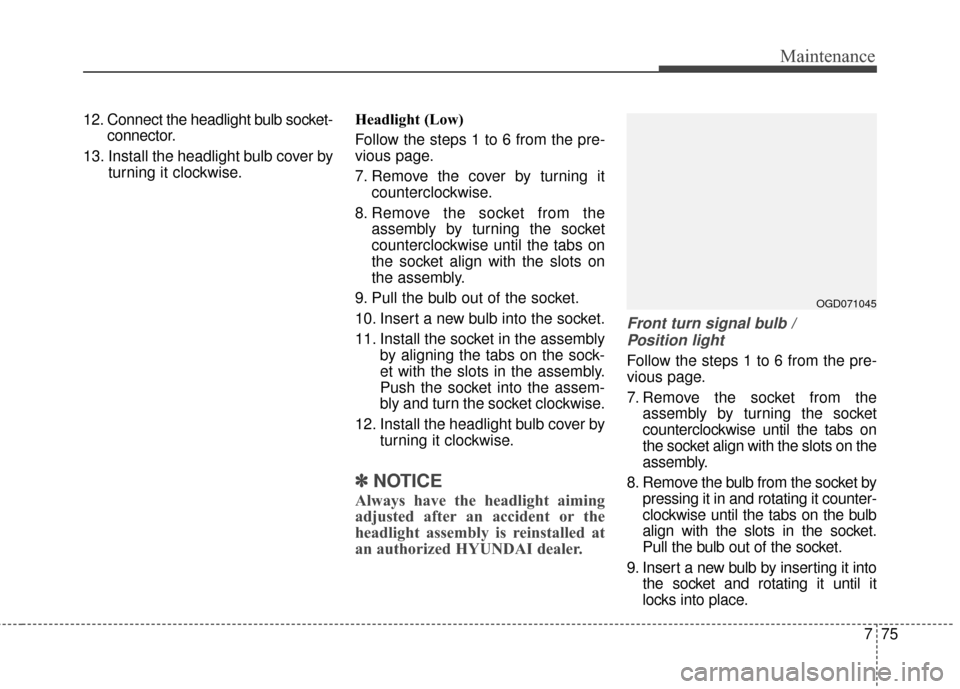
Front turn signal bulb /
Position light
Follow the steps 1 to 6 from the pre-
vious page.
7. Remove the socket from the assembly by turning the socket
counterclockwise until the tabs on
the socket align with the slots on the
assembly.
8. Remove the bulb from the socket by pressing it in and rotating it counter-
clockwise until the tabs on the bulb
align with the slots in the socket.
Pull the bulb out of the socket.
9. Insert a new bulb by inserting it into the socket and rotating it until it
locks into place.
OGD071045
Page 507 of 546
Maintenance
78
7
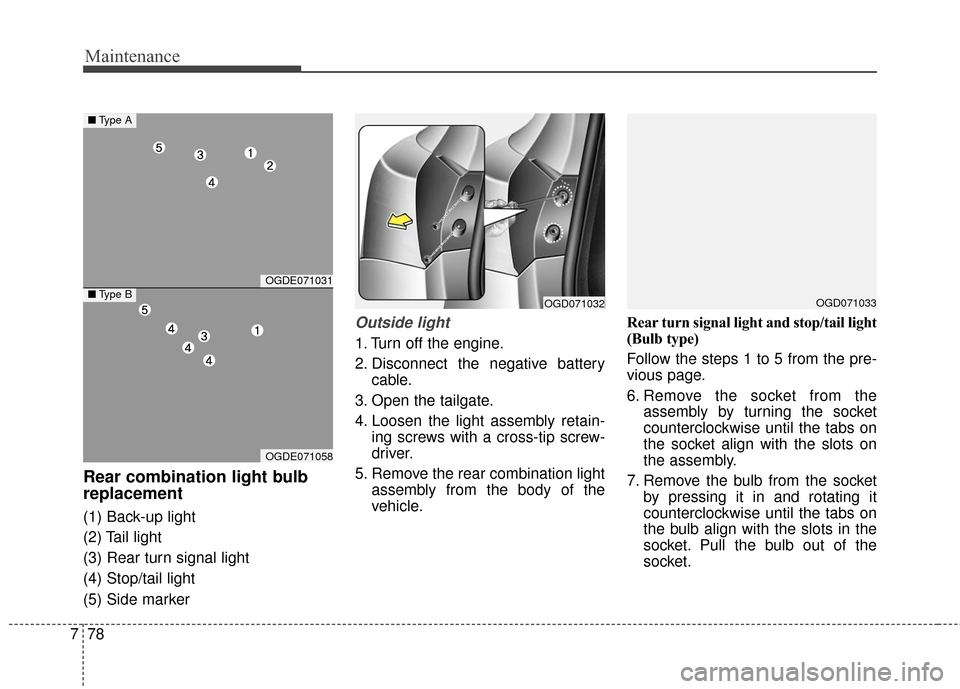
Rear combination light bulb
replacement
(1) Back-up light
(2) Tail light
(3) Rear turn signal light
(4) Stop/tail light
(5) Side marker
Outside light
1. Turn off the engine.
2. Disconnect the negative battery
cable.
3. Open the tailgate.
4. Loosen the light assembly retain- ing screws with a cross-tip screw-
driver.
5. Remove the rear combination light assembly from the body of the
vehicle. Rear turn signal light and stop/tail light
(Bulb type)
Follow the steps 1 to 5 from the pre-
vious page.
6. Remove the socket from the
assembly by turning the socket
counterclockwise until the tabs on
the socket align with the slots on
the assembly.
7. Remove the bulb from the socket by pressing it in and rotating it
counterclockwise until the tabs on
the bulb align with the slots in the
socket. Pull the bulb out of the
socket.
OGDE071031
OGDE071058
■Type A
■Type BOGD071032OGD071033
Page 527 of 546
83
Specifications, Consumer information, Reporting safety defects
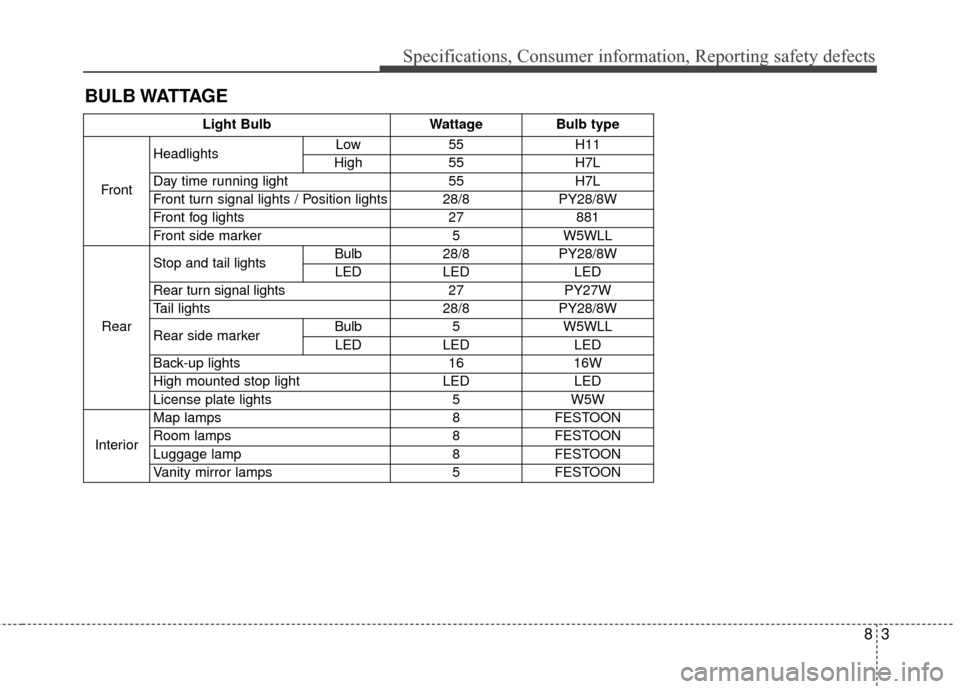
BULB WATTAGE
Light BulbWattageBulb type
Front
HeadlightsLow55H11
High55H7L
Day time running light55H7L
Front turn signal lights / Position lights28/8PY28/8W
Front fog lights27881
Front side marker5W5WLL
Rear
Stop and tail lightsBulb28/8PY28/8W
LEDLEDLED
Rear turn signal lights 27PY27W
Tail lights 28/8PY28/8W
Rear side markerBulb5W5WLL
LEDLEDLED
Back-up lights 1616W
High mounted stop lightLEDLED
License plate lights5W5W
Interior
Map lamps8FESTOON
Room lamps8FESTOON
Luggage lamp8FESTOON
Vanity mirror lamps5FESTOON