Front Hyundai Elantra GT 2016 Repair Manual
[x] Cancel search | Manufacturer: HYUNDAI, Model Year: 2016, Model line: Elantra GT, Model: Hyundai Elantra GT 2016Pages: 546, PDF Size: 14.04 MB
Page 110 of 546
423
Features of your vehicle
If the key is in the ignition switchand front door is open, the doors
will not lock even though the cen-
tral door lock switch (1) is pressed.
If the smart key is in the vehicle and any door is open, the doors
will not lock even though the cen-
tral door lock switch (1) is pressed.✽ ✽ NOTICE
You can select some auto door
lock/unlock features in “User
Settings” as follows;
• Speed sensing auto door lock
• Auto door unlock when the igni-
tion key is removed from the igni-
tion switch or engine is turned off.
• Auto door lock/unlock by shifting the shift lever out of P(Park) or
into P(Park).
For more information, refer to
“User Settings” in this section.
WARNING - Doors
The doors should always be fully closed and locked while
the vehicle is in motion to pre-
vent accidental opening of the
door. Locked doors will also
discourage potential intruders
when the vehicle stops or
slows.
Be careful when opening doors and watch for vehicles,
motorcycles, bicycles or
pedestrians approaching the
vehicle in the path of the door.
Opening a door when some-
thing is approaching can
cause damage or injury.
WARNING - Unlocked
vehicles
Leaving your vehicle unlocked
can invite theft or possible harm
to you or others from someone
hiding in your vehicle while you
are gone. Always remove the
ignition key, engage the parking
brake, close all windows and
lock all doors when leaving
your vehicle unattended.
WARNING - Unattended
children
An enclosed vehicle can become
extremely hot, causing death or
severe injury to unattended chil-
dren or animals who cannot
escape the vehicle. Furthermore,
children might operate features
of the vehicle that could injure
them, or they could encounter
other harm, possibly from some-
one gaining entry to the vehicle.
Never leave children or animals
unattended in your vehicle.
Page 114 of 546
427
Features of your vehicle
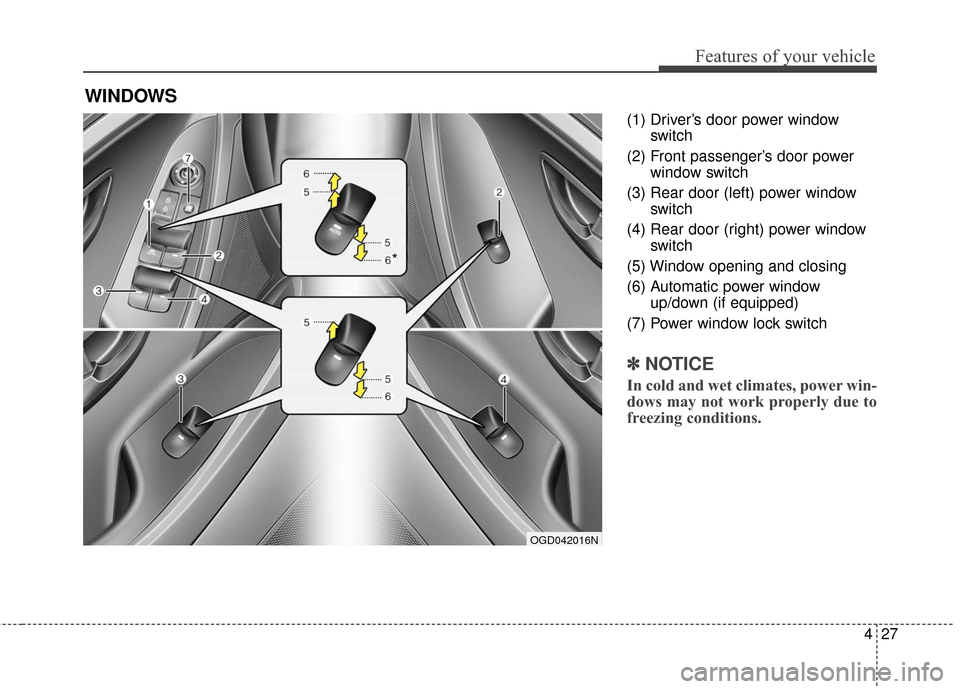
(1) Driver’s door power windowswitch
(2) Front passenger’s door power window switch
(3) Rear door (left) power window switch
(4) Rear door (right) power window switch
(5) Window opening and closing
(6) Automatic power window up/down (if equipped)
(7) Power window lock switch
✽ ✽ NOTICE
In cold and wet climates, power win-
dows may not work properly due to
freezing conditions.
WINDOWS
OGD042016N
*
Page 115 of 546
Features of your vehicle
28
4
Power windows
The ignition switch must be in the ON
position for power windows to operate.
Each door has a power window
switch that controls that door's win-
dow. The driver has a power window
lock switch which can block the oper-
ation of passenger windows. The dri-
ver’s door has a master power win-
dow switch that controls all the win-
dows in the vehicle. The power win-
dows can be operated for approxi-
mately 30 seconds after the ignition
key is removed or turned to the ACC
or LOCK position. However, if the
front doors open, the power windows
cannot be operated within the 30
second period.
✽ ✽
NOTICE
While driving with the rear windows
down or with the sunroof (if
equipped) in an open (or partially
open) position, your vehicle may
demonstrate a wind buffeting or
pulsation noise. This noise is a nor-
mal occurrence and can be reduced
or eliminated by taking the follow-
ing actions. If the noise occurs with
one or both of the rear windows
down, partially lower both front
windows approximately one inch. If
you experience the noise with the
sunroof open, slightly reduce the
size of the sunroof opening.
Window opening and closing
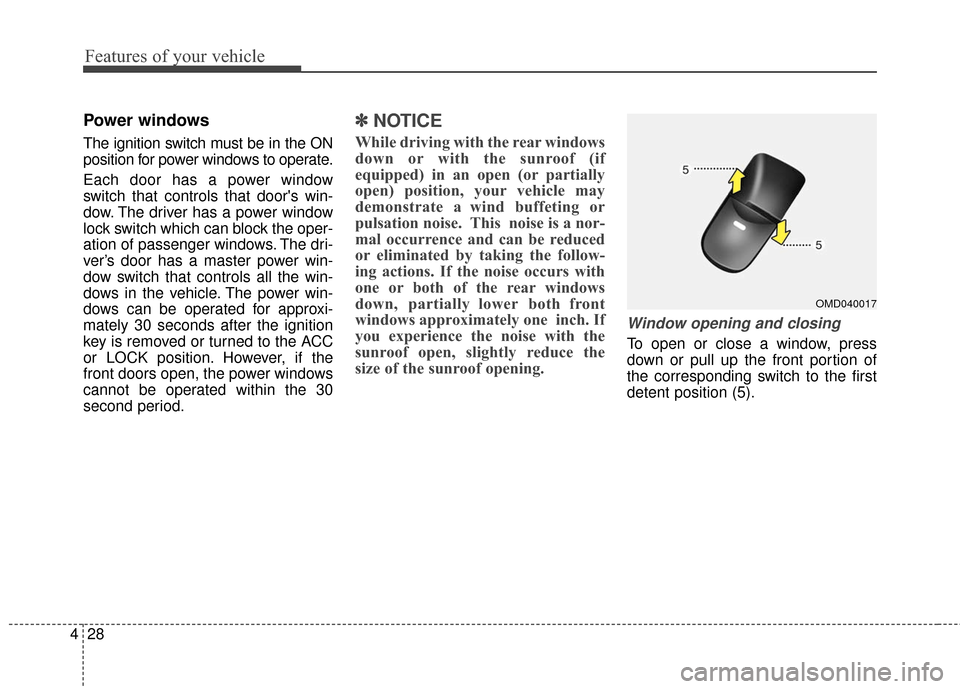
To open or close a window, press
down or pull up the front portion of
the corresponding switch to the first
detent position (5).
OMD040017
Page 118 of 546
431
Features of your vehicle
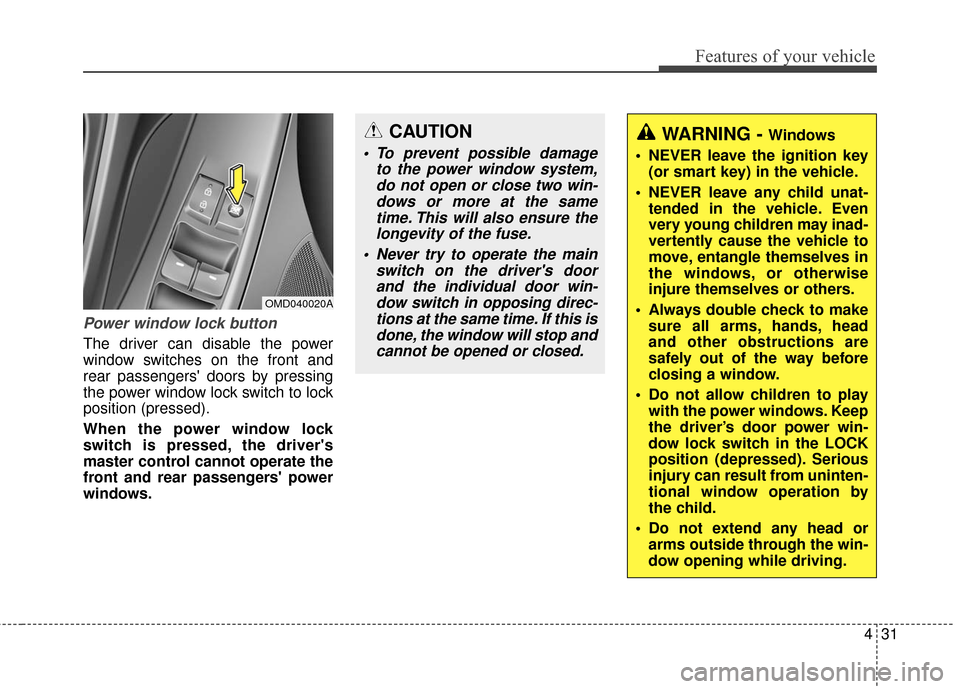
Power window lock button
The driver can disable the power
window switches on the front and
rear passengers' doors by pressing
the power window lock switch to lock
position (pressed).
When the power window lock
switch is pressed, the driver's
master control cannot operate the
front and rear passengers' power
windows.
OMD040020A
CAUTION
To prevent possible damageto the power window system,do not open or close two win-dows or more at the sametime. This will also ensure thelongevity of the fuse.
Never try to operate the main switch on the driver's doorand the individual door win-dow switch in opposing direc-tions at the same time. If this isdone, the window will stop andcannot be opened or closed.
WARNING - Windows
NEVER leave the ignition key (or smart key) in the vehicle.
NEVER leave any child unat- tended in the vehicle. Even
very young children may inad-
vertently cause the vehicle to
move, entangle themselves in
the windows, or otherwise
injure themselves or others.
Always double check to make sure all arms, hands, head
and other obstructions are
safely out of the way before
closing a window.
Do not allow children to play with the power windows. Keep
the driver’s door power win-
dow lock switch in the LOCK
position (depressed). Serious
injury can result from uninten-
tional window operation by
the child.
Do not extend any head or arms outside through the win-
dow opening while driving.
Page 119 of 546
Features of your vehicle
32
4
HOOD
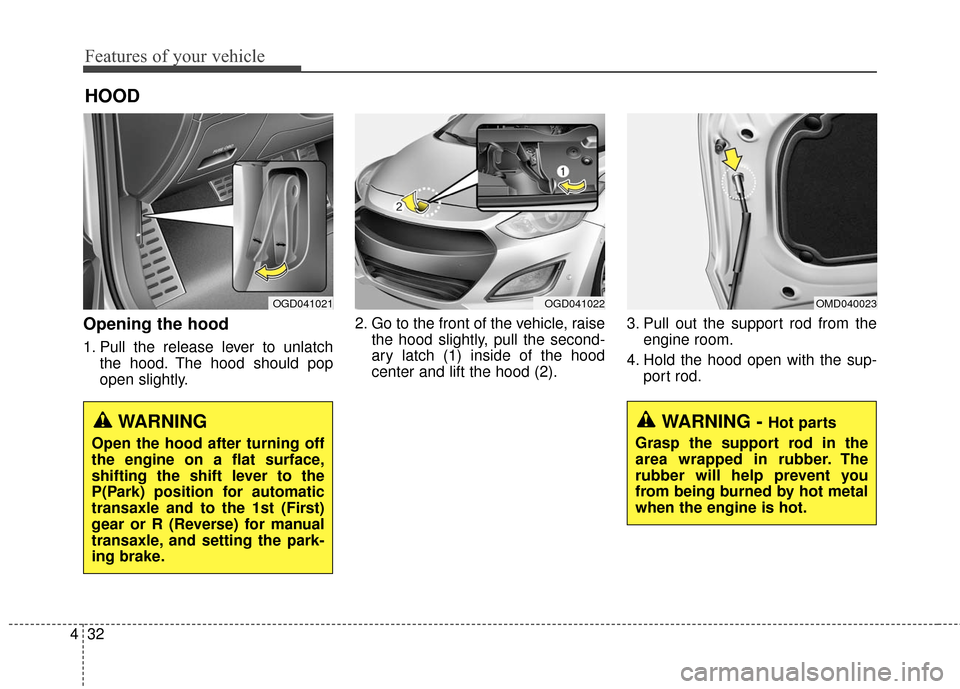
Opening the hood
1. Pull the release lever to unlatch
the hood. The hood should pop
open slightly. 2. Go to the front of the vehicle, raise
the hood slightly, pull the second-
ary latch (1) inside of the hood
center and lift the hood (2). 3. Pull out the support rod from the
engine room.
4. Hold the hood open with the sup- port rod.
OGD041021OGD041022OMD040023
WARNING - Hot parts
Grasp the support rod in the
area wrapped in rubber. The
rubber will help prevent you
from being burned by hot metal
when the engine is hot.WARNING
Open the hood after turning off
the engine on a flat surface,
shifting the shift lever to the
P(Park) position for automatic
transaxle and to the 1st (First)
gear or R (Reverse) for manual
transaxle, and setting the park-
ing brake.
Page 126 of 546
439
Features of your vehicle
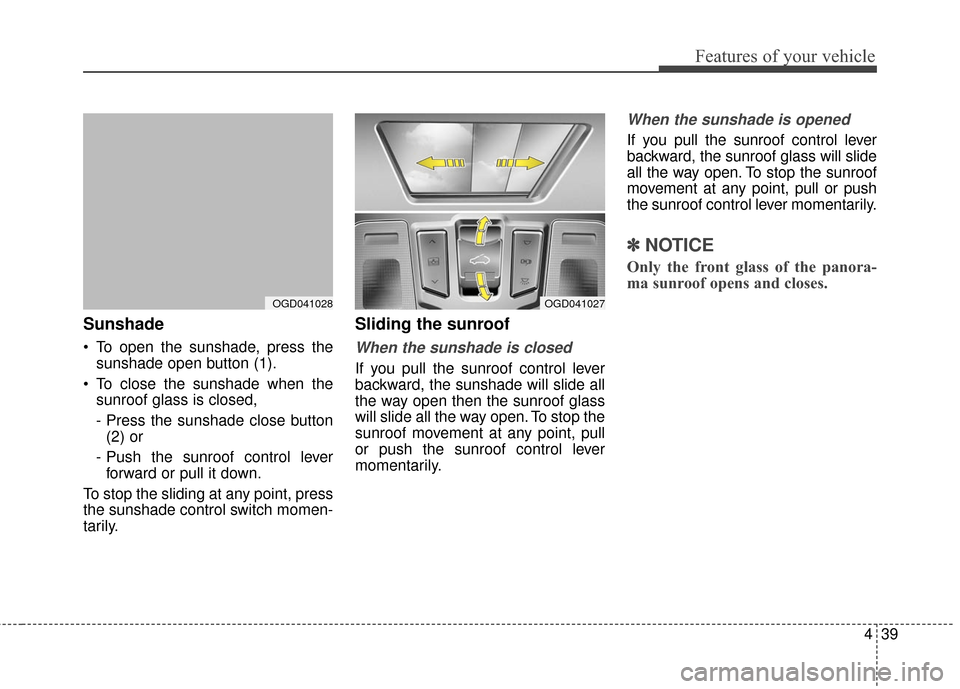
Sunshade
To open the sunshade, press thesunshade open button (1).
To close the sunshade when the sunroof glass is closed,
- Press the sunshade close button(2) or
- Push the sunroof control lever forward or pull it down.
To stop the sliding at any point, press
the sunshade control switch momen-
tarily.
Sliding the sunroof
When the sunshade is closed
If you pull the sunroof control lever
backward, the sunshade will slide all
the way open then the sunroof glass
will slide all the way open. To stop the
sunroof movement at any point, pull
or push the sunroof control lever
momentarily.
When the sunshade is opened
If you pull the sunroof control lever
backward, the sunroof glass will slide
all the way open. To stop the sunroof
movement at any point, pull or push
the sunroof control lever momentarily.
✽ ✽ NOTICE
Only the front glass of the panora-
ma sunroof opens and closes.
OGD041028OGD041027
Page 164 of 546
477
Features of your vehicle
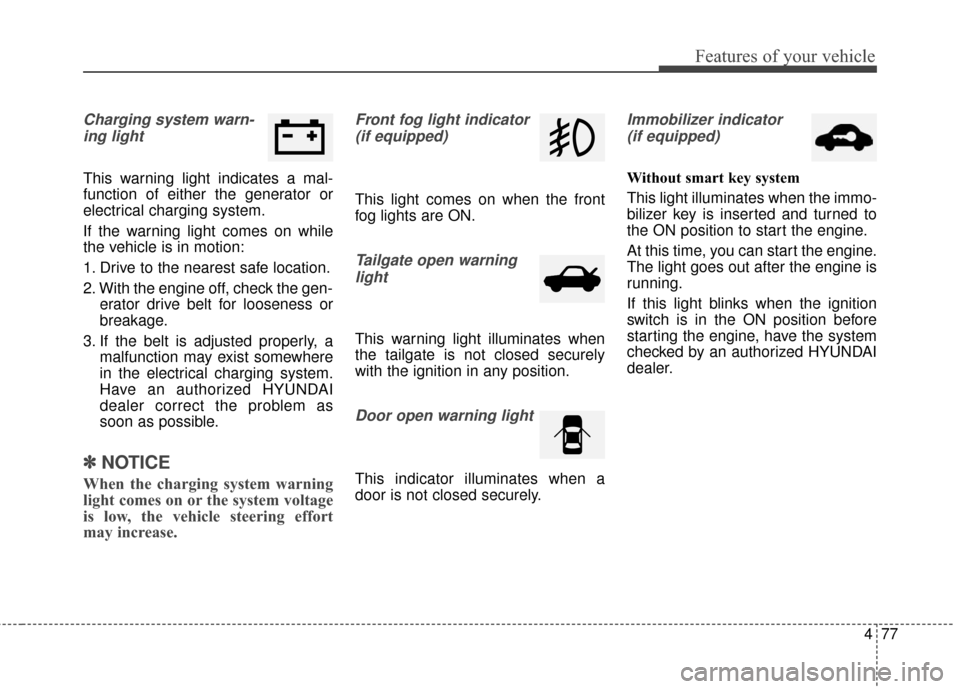
Charging system warn-ing light
This warning light indicates a mal-
function of either the generator or
electrical charging system.
If the warning light comes on while
the vehicle is in motion:
1. Drive to the nearest safe location.
2. With the engine off, check the gen- erator drive belt for looseness or
breakage.
3. If the belt is adjusted properly, a malfunction may exist somewhere
in the electrical charging system.
Have an authorized HYUNDAI
dealer correct the problem as
soon as possible.
✽ ✽NOTICE
When the charging system warning
light comes on or the system voltage
is low, the vehicle steering effort
may increase.
Front fog light indicator
(if equipped)
This light comes on when the front
fog lights are ON.
Tailgate open warninglight
This warning light illuminates when
the tailgate is not closed securely
with the ignition in any position.
Door open warning light
This indicator illuminates when a
door is not closed securely.
Immobilizer indicator(if equipped)
Without smart key system
This light illuminates when the immo-
bilizer key is inserted and turned to
the ON position to start the engine.
At this time, you can start the engine.
The light goes out after the engine is
running.
If this light blinks when the ignition
switch is in the ON position before
starting the engine, have the system
checked by an authorized HYUNDAI
dealer.
Page 176 of 546
489
Features of your vehicle
Daytime running light
(if equipped)
Daytime Running Lights (DRL) can
make it easier for others to see the
front of your vehicle during the day.
DRL can be helpful in many different
driving conditions, and it is especial-
ly helpful after dawn and before sun-
set.
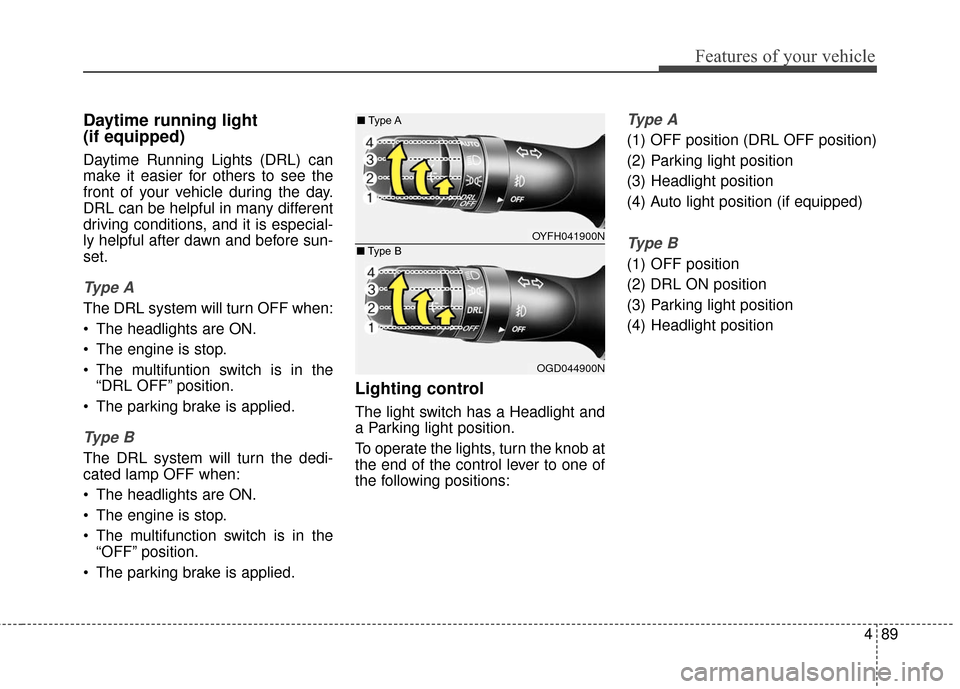
Ty p e A
The DRL system will turn OFF when:
The headlights are ON.
The engine is stop.
The multifuntion switch is in the“DRL OFF” position.
The parking brake is applied.
Ty p e B
The DRL system will turn the dedi-
cated lamp OFF when:
The headlights are ON.
The engine is stop.
The multifunction switch is in the “OFF” position.
The parking brake is applied.
Lighting control
The light switch has a Headlight and
a Parking light position.
To operate the lights, turn the knob at
the end of the control lever to one of
the following positions:
Ty p e A
(1) OFF position (DRL OFF position)
(2) Parking light position
(3) Headlight position
(4) Auto light position (if equipped)
Ty p e B
(1) OFF position
(2) DRL ON position
(3) Parking light position
(4) Headlight position
OYFH041900N
■
Type A
OGD044900N
■
Type B
Page 178 of 546

491
Features of your vehicle
High beam operation
To turn on the high beam headlights,
push the lever away from you. Pull it
back for low beams.
The high beam indicator will light
when the headlight high beams are
switched on.
To prevent the battery from being
discharged, do not leave the lights
on for a prolonged time while the
engine is not running.
WARNING
Do not use the high beams
when there are approaching
vehicles. Using the high beam
could obstruct the other driver's
vision.
CAUTION
Never place anything oversensor (1) located on theinstrument panel. This willensure better auto-light sys-tem control.
Don’t clean the sensor using a window cleaner. The cleanermay leave a light film whichcould interfere with sensoroperation.
If your vehicle has window tint or other types of metallic coat-ing on the front windshield,the Auto light system may notwork properly.
OYFH041904N
■
Type A
OGD044901N
■
Type B
Page 180 of 546
493
Features of your vehicle
One-touch triple turn signal
To activate an one-touch triple turn
signal move the turn signal lever
slightly for less than 1.8 seconds and
then release it. The lane change sig-
nals will blink 3 times.
You can activate or deactivate this
feature. Refer to “User Settings” in
this section.
✽ ✽NOTICE
If an indicator flash is abnormally
quick or slow, a bulb may be burned
out or have a poor electrical connec-
tion in the circuit.
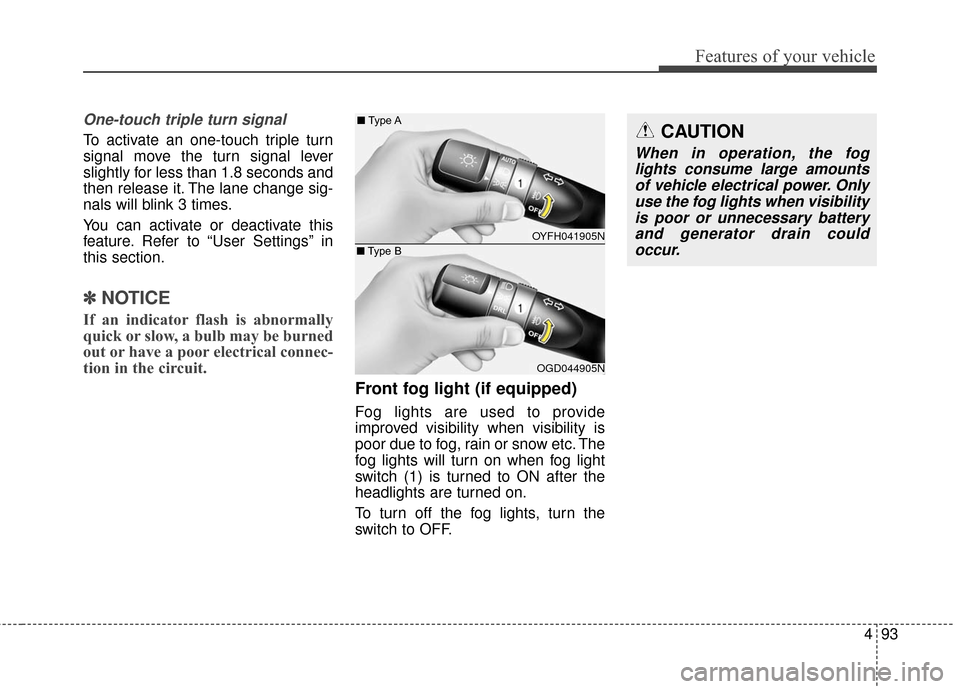
Front fog light (if equipped)
Fog lights are used to provide
improved visibility when visibility is
poor due to fog, rain or snow etc. The
fog lights will turn on when fog light
switch (1) is turned to ON after the
headlights are turned on.
To turn off the fog lights, turn the
switch to OFF.
CAUTION
When in operation, the fog
lights consume large amountsof vehicle electrical power. Onlyuse the fog lights when visibilityis poor or unnecessary batteryand generator drain couldoccur.
OYFH041905N
■
Type A
OGD044905N
■
Type B