light Hyundai Elantra GT 2016 Repair Manual
[x] Cancel search | Manufacturer: HYUNDAI, Model Year: 2016, Model line: Elantra GT, Model: Hyundai Elantra GT 2016Pages: 546, PDF Size: 14.04 MB
Page 168 of 546
481
Features of your vehicle
Electronic power steer-ing (EPS) system warning light
This indicator comes on after the
ignition key is turned to the ON posi-
tion and then it will go out.
This indicator also comes on when
the EPS needs repairs. If it comes on
while driving, have your vehicle
inspected by an authorized HYUNDAI
dealer.
Steering effort may increase if this
lamp illuminates. See EPS system in
this section.
Key reminder warning chime (if equipped)
Without smart key
If the driver’s door is opened while
the ignition key is left in the ignition
switch (ACC or LOCK position), the
key reminder warning chime will
sound. This helps prevent you from
locking your keys in the vehicle. The
chime sounds until the key is
removed from the ignition switch or
the driver’s door is closed.
With smart key
If the driver’s door is opened while
the smart key is in the vehicle with
the engine start/stop button in ACC,
the key reminder warning chime will
sound.
The chime sounds until the driver’s
door is closed.
Engine coolant tempera-ture warning light
The warning light illuminates and
warning sound activates 5 times if
the temperature of the engine
coolant is above 257±4.5°F
(125±2.5°C).
Do not continue driving with an over-
heated engine. If your vehicle over-
heats, refer to “Overheating” in sec-
tion 6.
✽ ✽ NOTICE
If the engine coolant temperature
warning light illuminates, it indi-
cates overheating that may damage
the engine.
Page 174 of 546
487
Features of your vehicle
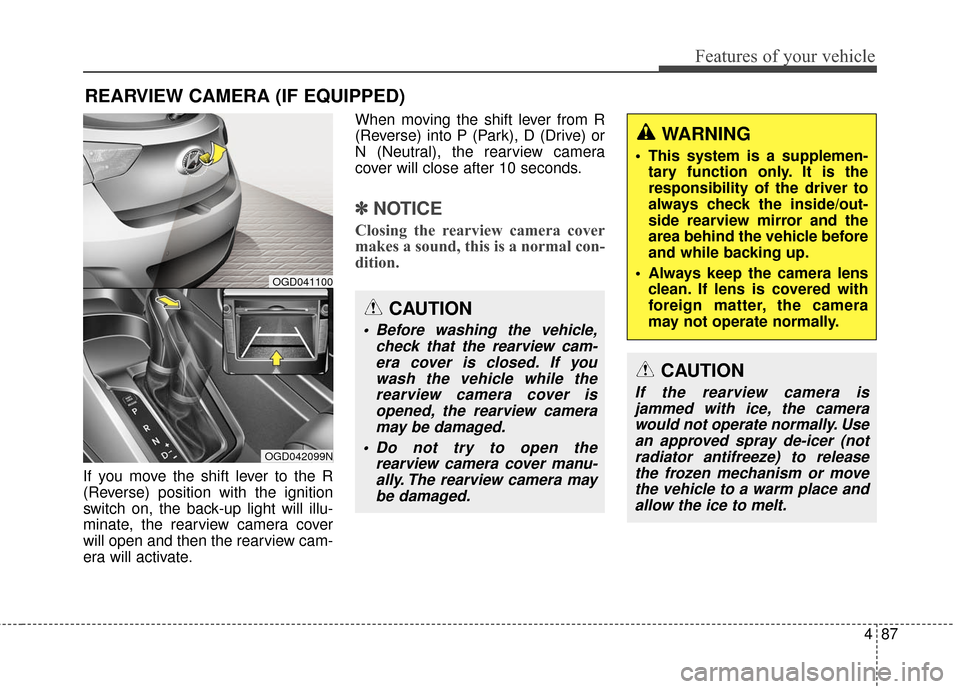
If you move the shift lever to the R
(Reverse) position with the ignition
switch on, the back-up light will illu-
minate, the rearview camera cover
will open and then the rearview cam-
era will activate.When moving the shift lever from R
(Reverse) into P (Park), D (Drive) or
N (Neutral), the rearview camera
cover will close after 10 seconds.
✽ ✽
NOTICE
Closing the rearview camera cover
makes a sound, this is a normal con-
dition.
REARVIEW CAMERA (IF EQUIPPED)
OGD042099N
OGD041100
CAUTION
Before washing the vehicle,
check that the rearview cam-era cover is closed. If youwash the vehicle while therearview camera cover isopened, the rearview cameramay be damaged.
Do not try to open the rearview camera cover manu-ally. The rearview camera maybe damaged.
WARNING
This system is a supplemen- tary function only. It is the
responsibility of the driver to
always check the inside/out-
side rearview mirror and the
area behind the vehicle before
and while backing up.
Always keep the camera lens clean. If lens is covered with
foreign matter, the camera
may not operate normally.
CAUTION
If the rearview camera isjammed with ice, the camerawould not operate normally. Usean approved spray de-icer (notradiator antifreeze) to releasethe frozen mechanism or movethe vehicle to a warm place andallow the ice to melt.
Page 175 of 546
Features of your vehicle
88
4
Battery saver function
The purpose of this feature is to
prevent the battery from being dis-
charged. The system automatically
turns off the parking lights when
the driver removes the ignition key
(smart key : turns off the engine)
and opens the driver-side door.
With this feature, the parking lights will be turned off automatically if
the driver parks on the side of road
at night.
If necessary, to keep the lights on
when the ignition key is removed
(smart key : turns off the engine),
perform the following:
1) Open the driver-side door.
2) Turn the parking lights OFF and ON again using the light switch
on the steering column.
Headlamp delay (if equipped)
If you turn the ignition switch to the
ACC or OFF position with the head-
lights ON, the headlights remain on
for about 5 minutes. However, if the
driver’s door is opened and closed,
the headlights are turned off after 15
seconds.
The headlights can be turned off by
pressing the lock button on the trans-
mitter (or smart key) twice or turning
the light switch to the OFF or Auto
position.
However, if you turn the light switch
to the Auto position when it is dark
outside, the headlights will not be
turned off.
You can activate or deactivate this
feature. Refer to “User Settings” in
this section.
Headlamp welcome function
(if equipped)
When the headlight switch is in the
ON or AUTO position and all doors
(and trunk) are closed and locked, if
you press the door unlock button on
the transmitter (or the smart key), the
headlights will come on for about 15
seconds. At this time, if you press the
door lock button on the transmitter
(or smart key) the headlights will turn
off immediately.
You can activate or deactivate this
feature. Refer to “User Settings” in
this section.
LIGHTING
CAUTION
If the driver gets out of the vehi-cle through other doors (otherthan the driver's door), the bat-tery saver function does notoperate and the headlamp delaydoes not turn off automatically.This will cause the battery to bedischarged. In this case, makesure to turn off the lamp beforegetting out of the vehicle.
Page 176 of 546
489
Features of your vehicle
Daytime running light
(if equipped)
Daytime Running Lights (DRL) can
make it easier for others to see the
front of your vehicle during the day.
DRL can be helpful in many different
driving conditions, and it is especial-
ly helpful after dawn and before sun-
set.
Ty p e A
The DRL system will turn OFF when:
The headlights are ON.
The engine is stop.
The multifuntion switch is in the“DRL OFF” position.
The parking brake is applied.
Ty p e B
The DRL system will turn the dedi-
cated lamp OFF when:
The headlights are ON.
The engine is stop.
The multifunction switch is in the “OFF” position.
The parking brake is applied.
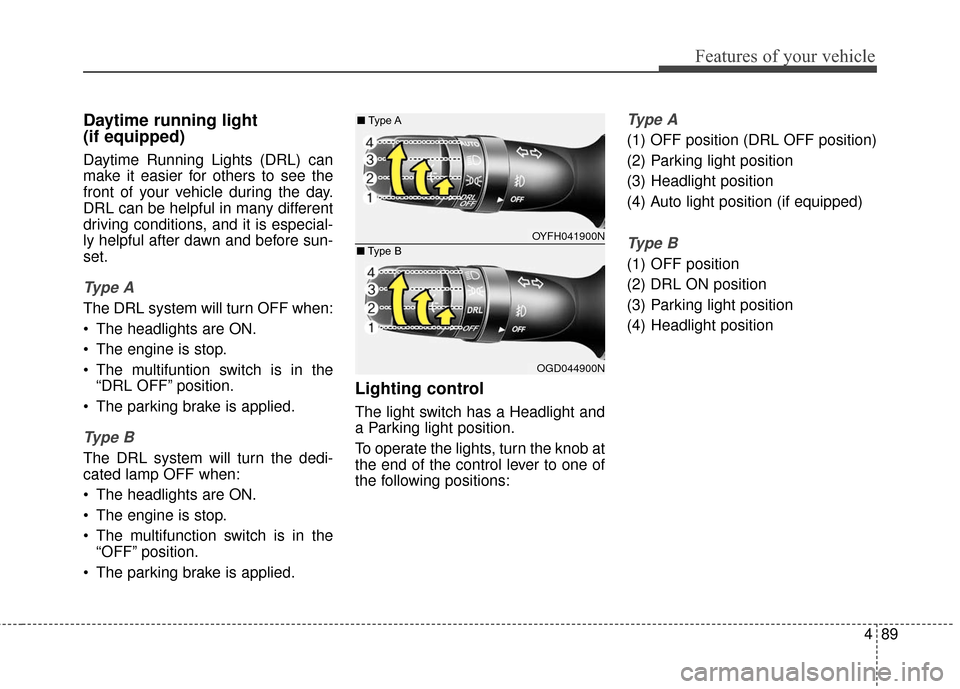
Lighting control
The light switch has a Headlight and
a Parking light position.
To operate the lights, turn the knob at
the end of the control lever to one of
the following positions:
Ty p e A
(1) OFF position (DRL OFF position)
(2) Parking light position
(3) Headlight position
(4) Auto light position (if equipped)
Ty p e B
(1) OFF position
(2) DRL ON position
(3) Parking light position
(4) Headlight position
OYFH041900N
■
Type A
OGD044900N
■
Type B
Page 177 of 546
Features of your vehicle
90
4
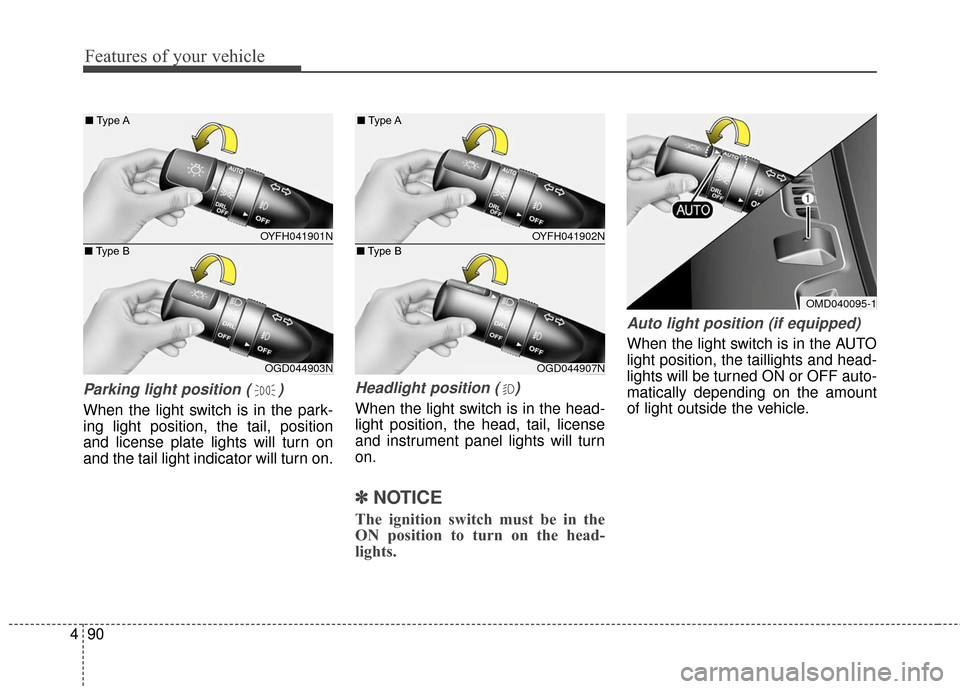
Parking light position ( )
When the light switch is in the park-
ing light position, the tail, position
and license plate lights will turn on
and the tail light indicator will turn on.
Headlight position ( )
When the light switch is in the head-
light position, the head, tail, license
and instrument panel lights will turn
on.
✽ ✽
NOTICE
The ignition switch must be in the
ON position to turn on the head-
lights.
Auto light position (if equipped)
When the light switch is in the AUTO
light position, the taillights and head-
lights will be turned ON or OFF auto-
matically depending on the amount
of light outside the vehicle.
OMD040095-1
OYFH041901N
■
Type A
OGD044903N
■
Type B
OYFH041902N
■
Type A
OGD044907N
■
Type B
Page 178 of 546

491
Features of your vehicle
High beam operation
To turn on the high beam headlights,
push the lever away from you. Pull it
back for low beams.
The high beam indicator will light
when the headlight high beams are
switched on.
To prevent the battery from being
discharged, do not leave the lights
on for a prolonged time while the
engine is not running.
WARNING
Do not use the high beams
when there are approaching
vehicles. Using the high beam
could obstruct the other driver's
vision.
CAUTION
Never place anything oversensor (1) located on theinstrument panel. This willensure better auto-light sys-tem control.
Don’t clean the sensor using a window cleaner. The cleanermay leave a light film whichcould interfere with sensoroperation.
If your vehicle has window tint or other types of metallic coat-ing on the front windshield,the Auto light system may notwork properly.
OYFH041904N
■
Type A
OGD044901N
■
Type B
Page 179 of 546
Features of your vehicle
92
4
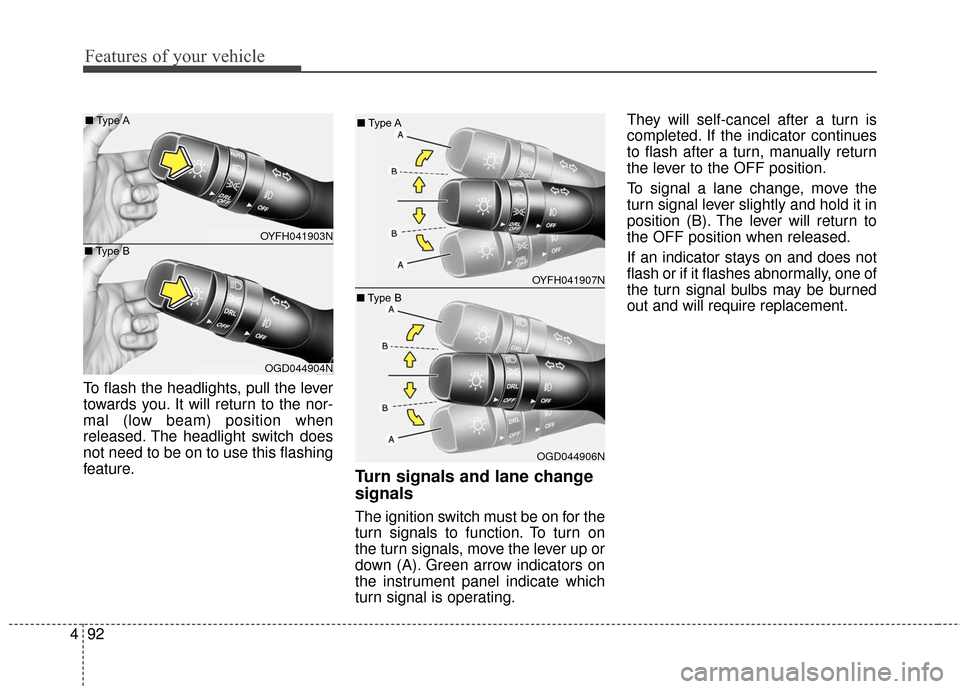
To flash the headlights, pull the lever
towards you. It will return to the nor-
mal (low beam) position when
released. The headlight switch does
not need to be on to use this flashing
feature.
Turn signals and lane change
signals
The ignition switch must be on for the
turn signals to function. To turn on
the turn signals, move the lever up or
down (A). Green arrow indicators on
the instrument panel indicate which
turn signal is operating. They will self-cancel after a turn is
completed. If the indicator continues
to flash after a turn, manually return
the lever to the OFF position.
To signal a lane change, move the
turn signal lever slightly and hold it in
position (B). The lever will return to
the OFF position when released.
If an indicator stays on and does not
flash or if it flashes abnormally, one of
the turn signal bulbs may be burned
out and will require replacement.
OYFH041903N
■
Type A
OGD044904N
■
Type B
OYFH041907N
■
Type A
OGD044906N
■
Type B
Page 180 of 546
493
Features of your vehicle
One-touch triple turn signal
To activate an one-touch triple turn
signal move the turn signal lever
slightly for less than 1.8 seconds and
then release it. The lane change sig-
nals will blink 3 times.
You can activate or deactivate this
feature. Refer to “User Settings” in
this section.
✽ ✽NOTICE
If an indicator flash is abnormally
quick or slow, a bulb may be burned
out or have a poor electrical connec-
tion in the circuit.
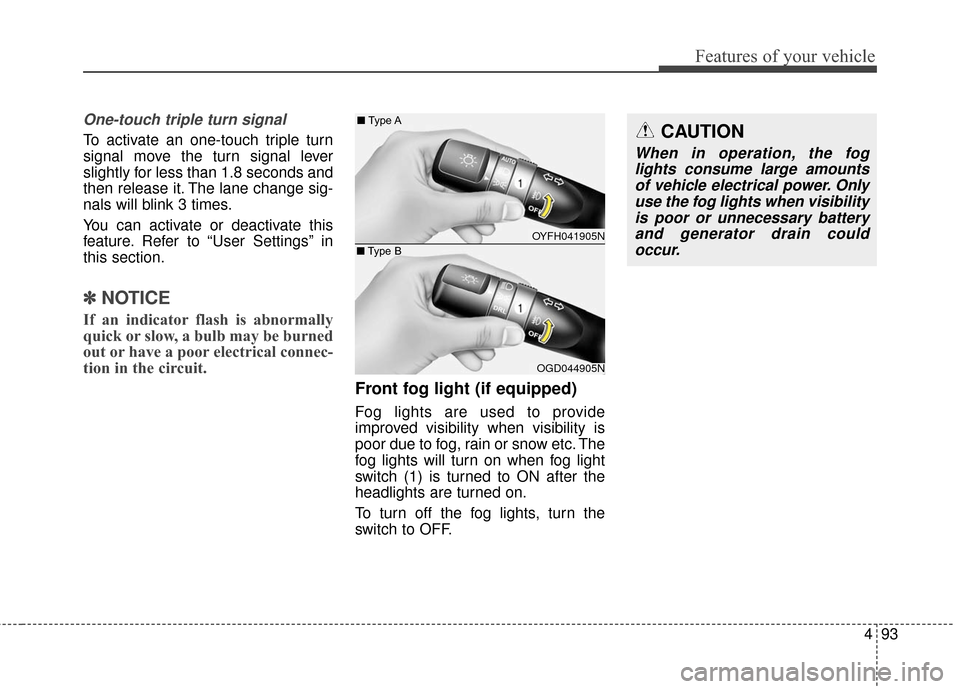
Front fog light (if equipped)
Fog lights are used to provide
improved visibility when visibility is
poor due to fog, rain or snow etc. The
fog lights will turn on when fog light
switch (1) is turned to ON after the
headlights are turned on.
To turn off the fog lights, turn the
switch to OFF.
CAUTION
When in operation, the fog
lights consume large amountsof vehicle electrical power. Onlyuse the fog lights when visibilityis poor or unnecessary batteryand generator drain couldoccur.
OYFH041905N
■
Type A
OGD044905N
■
Type B
Page 181 of 546
Features of your vehicle
94
4
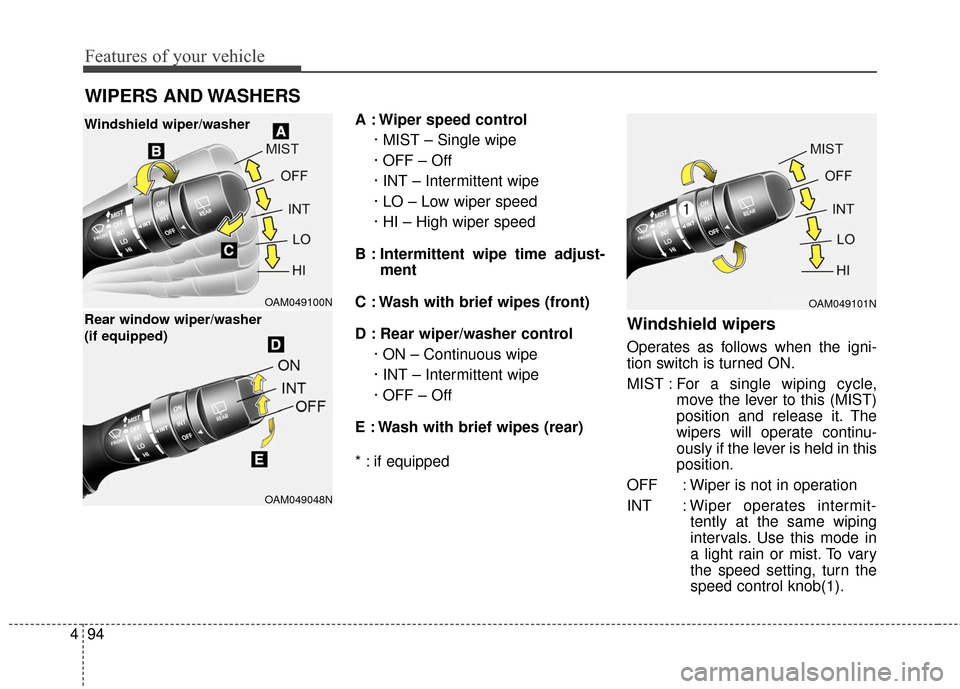
A : Wiper speed control
· MIST – Single wipe
· OFF – Off
· INT – Intermittent wipe
· LO – Low wiper speed
· HI – High wiper speed
B : Intermittent wipe time adjust- ment
C : Wash with brief wipes (front)
D : Rear wiper/washer control · ON – Continuous wipe
· INT – Intermittent wipe
· OFF – Off
E : Wash with brief wipes (rear)
* : if equipped
Windshield wipers
Operates as follows when the igni-
tion switch is turned ON.
MIST : For a single wiping cycle,
move the lever to this (MIST)
position and release it. The
wipers will operate continu-
ously if the lever is held in this
position.
OFF : Wiper is not in operation
INT : Wiper operates intermit- tently at the same wiping
intervals. Use this mode in
a light rain or mist. To vary
the speed setting, turn the
speed control knob(1).
WIPERS AND WASHERS
OAM049100N
OAM049048N
Windshield wiper/washer
Rear window wiper/washer
(if equipped)
OAM049101N
Page 182 of 546
495
Features of your vehicle
LO : Normal wiper speed
HI : Fast wiper speed
✽ ✽NOTICE
If there is heavy accumulation of
snow or ice on the windshield,
defrost the windshield for about 10
minutes, or until the snow and/or ice
is removed before using the wind-
shield wipers to ensure proper oper-
ation.
✽ ✽NOTICE
• When you operate the wipers, if
your vehicle has a problem in any
part of the wiper operation sys-
tem, the wiper may operate in the
LO mode regardless of the wiper
switch position. In this case, have
your vehicle checked by an
authorized HYUNDAI dealer as
soon as possible.
• When the ignition key is removed, the wiper blade sometimes may
move slightly for reducing the
deterioration of the windshield
wipers.
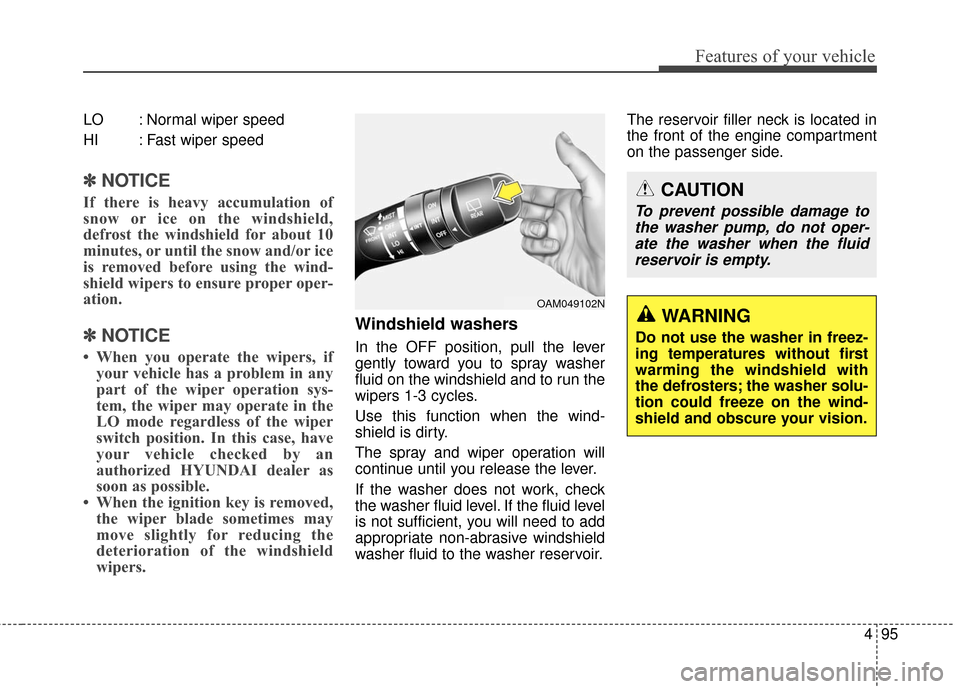
Windshield washers
In the OFF position, pull the lever
gently toward you to spray washer
fluid on the windshield and to run the
wipers 1-3 cycles.
Use this function when the wind-
shield is dirty.
The spray and wiper operation will
continue until you release the lever.
If the washer does not work, check
the washer fluid level. If the fluid level
is not sufficient, you will need to add
appropriate non-abrasive windshield
washer fluid to the washer reservoir. The reservoir filler neck is located in
the front of the engine compartment
on the passenger side.
OAM049102N
CAUTION
To prevent possible damage to
the washer pump, do not oper-ate the washer when the fluidreservoir is empty.
WARNING
Do not use the washer in freez-
ing temperatures without first
warming the windshield with
the defrosters; the washer solu-
tion could freeze on the wind-
shield and obscure your vision.