radio Hyundai Elantra GT 2017 Owner's Guide
[x] Cancel search | Manufacturer: HYUNDAI, Model Year: 2017, Model line: Elantra GT, Model: Hyundai Elantra GT 2017Pages: 493, PDF Size: 11.53 MB
Page 280 of 493
4193
Features of your vehicle
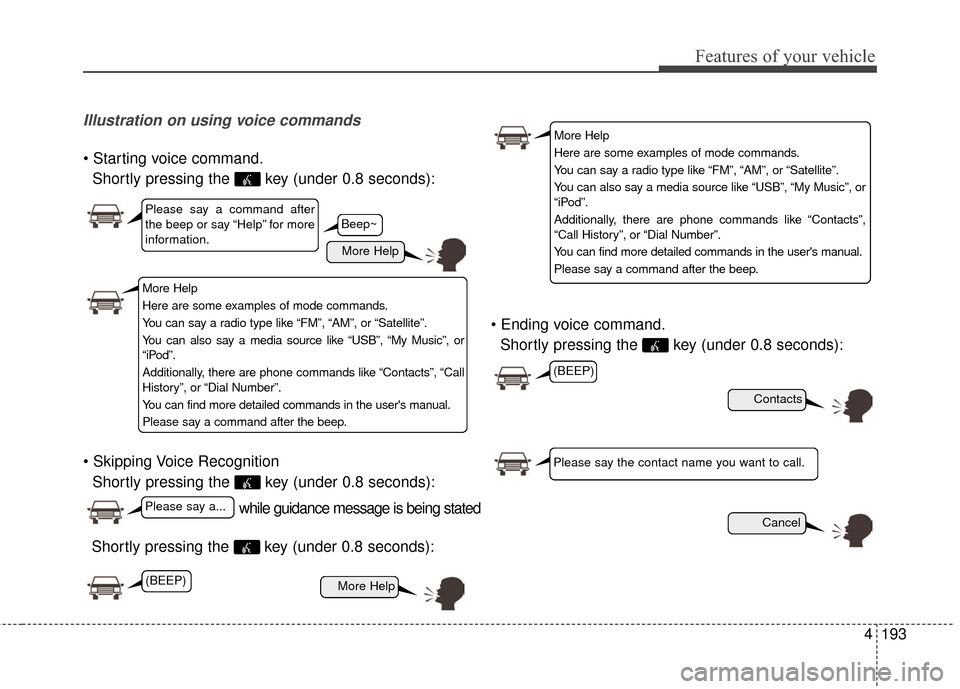
Illustration on using voice commands
Shortly pressing the key (under 0.8 seconds):
Shortly pressing the key (under 0.8 seconds): voice command.
Shortly pressing the key (under 0.8 seconds):
while guidance message is being stated
More Help
Contacts
Cancel
More Help
Please say a command after
the beep or say “Help” for more
information.
Please say a...
Please say the contact name you want to call.
(BEEP)
Shortly pressing the key (under 0.8 seconds):
Beep~
More Help
Here are some examples of mode commands.
You can say a radio type like “FM”, “AM”, or “Satellite”.
You can also say a media source like “USB”, “My Music”, or
“iPod”.
Additionally, there are phone commands like “Contacts”, “Call
History”, or “Dial Number”.
You can find more detailed commands in the user's manual.
Please say a command after the beep.
More Help
Here are some examples of mode commands.
You can say a radio type like “FM”, “AM”, or “Satellite”.
You can also say a media source like “USB”, “My Music”, or
“iPod”.
Additionally, there are phone commands like “Contacts”,
“Call History”, or “Dial Number”.
You can find more detailed commands in the user's manual.
Please say a command after the beep.
(BEEP)
Page 281 of 493
Features of your vehicle
194
4
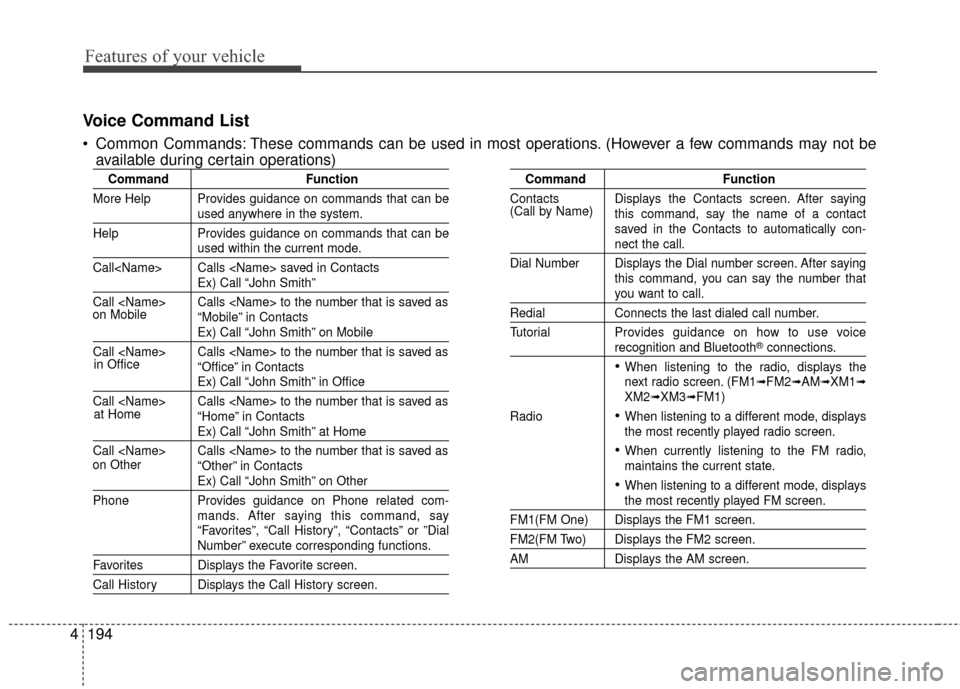
Voice Command List
Common Commands: These commands can be used in most operations. (However a few commands may not be
available during certain operations)
Command Function
More Help Provides guidance on commands that can be
used anywhere in the system.
Help Provides guidance on commands that can be
used within the current mode.
Call
Ex) Call “John Smith”
Call
Ex) Call “John Smith” on Mobile
Call
Ex) Call “John Smith” in Office
Call
Ex) Call “John Smith” at Home
Call
Ex) Call “John Smith” on Other
Phone Provides guidance on Phone related com- mands. After saying this command, say
“Favorites”, “Call History”, “Contacts” or ”Dial
Number” execute corresponding functions.
Favorites Displays the Favorite screen.
Call History Displays the Call History screen.
Command Function
Contacts Displays the Contacts screen. After saying this command, say the name of a contact
saved in the Contacts to automatically con-
nect the call.
Dial Number Displays the Dial number screen. After saying this command, you can say the number that
you want to call.
RedialConnects the last dialed call number.
Tutorial Provides guidance on how to use voice
recognition and Bluetooth®connections.
When listening to the radio, displays the
next radio screen. (FM1➟FM2➟AM➟XM1➟XM2➟XM3➟FM1)
Radio
When listening to a different mode, displays
the most recently played radio screen.
When currently listening to the FM radio,
maintains the current state.
When listening to a different mode, displaysthe most recently played FM screen.
FM1(FM One) Displays the FM1 screen.
FM2(FM Two) Displays the FM2 screen.
AM Displays the AM screen.
(Call by Name)
on Mobile
in Officeat Home
on Other
Page 283 of 493
Features of your vehicle
196
4
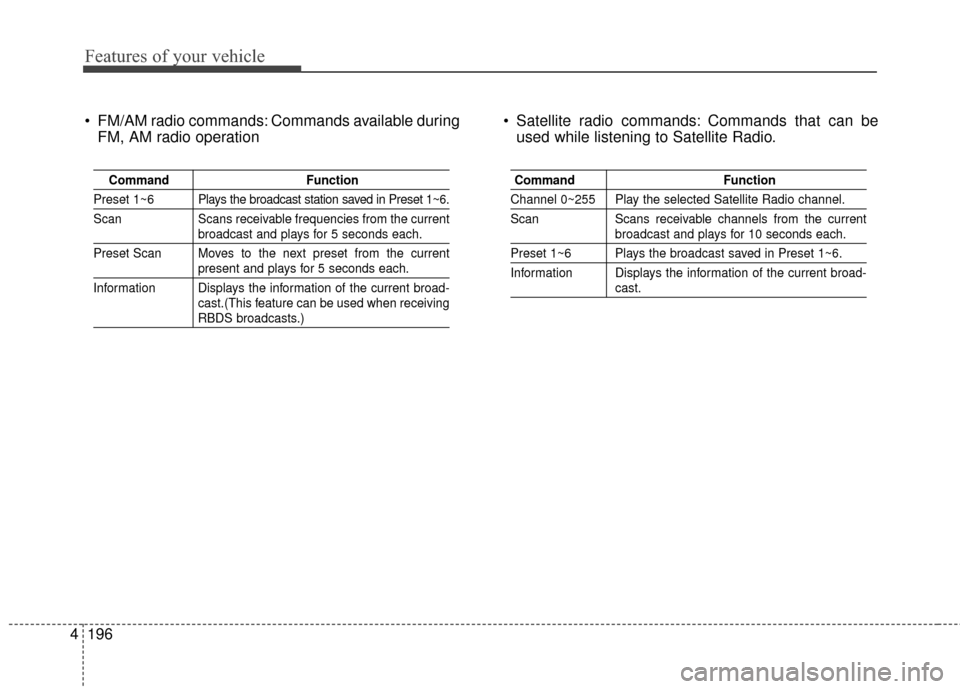
FM/AM radio commands: Commands available during
FM, AM radio operation Satellite radio commands: Commands that can be
used while listening to Satellite Radio.
Command Function
Preset 1~6 Plays the broadcast station saved in Preset 1~6.
Scan Scans receivable frequencies from the current
broadcast and plays for 5 seconds each.
Preset Scan Moves to the next preset from the current
present and plays for 5 seconds each.
Information Displays the information of the current broad- cast.(This feature can be used when receiving
RBDS broadcasts.)
Command Function
Channel 0~255 Play the selected Satellite Radio channel.
Scan Scans receivable channels from the current
broadcast and plays for 10 seconds each.
Preset 1~6 Plays the broadcast saved in Preset 1~6.
Information Displays the information of the current broad-
cast.
Page 290 of 493
4203
Features of your vehicle
iPod®is a registered trademark of
Apple Inc. iPod®mobile digital
device sold separately. The
Bluetooth
®word mark and logos
are registered trademarks owned
by Bluetooth SIG, Inc. and any use
of such marks by Hyundai is
under license. SiriusXM services
require a subscription sold sepa-
rately, or as a package, by Sirius
XM Radio Inc. If you decide to con-
tinue service after your trial, the
subscription plan you choose will
automatically renew thereafter
and you will be charged according
to your chosen payment method
at then-current rates. Fees and
taxes apply. To cancel you must
call SiriusXM at 1-866-635-2349.
See SiriusXM Customer
Agreement for complete terms at
www.siriusxm.com. SiriusXM U.S.
satellite and data services are
available only in the 48 contigu-
ous USA, DC and PR (with cover-
age limitations). SiriusXM satellite
service is also available in
Canada; see www.siriusxm.ca. All
fees and programming subject to
change. Sirius, XM and all related marks
and logos are trademarks of Sirius
XM Radio Inc. Android™ is a
trademark of Google, Inc.
BlackBerry is a registered trade-
mark of Research In Motion
Limited (RIM). All other marks,
channel names and logos are the
property of their respective own-
ers. All rights reserved.
Page 291 of 493
Features of your vehicle
204
4
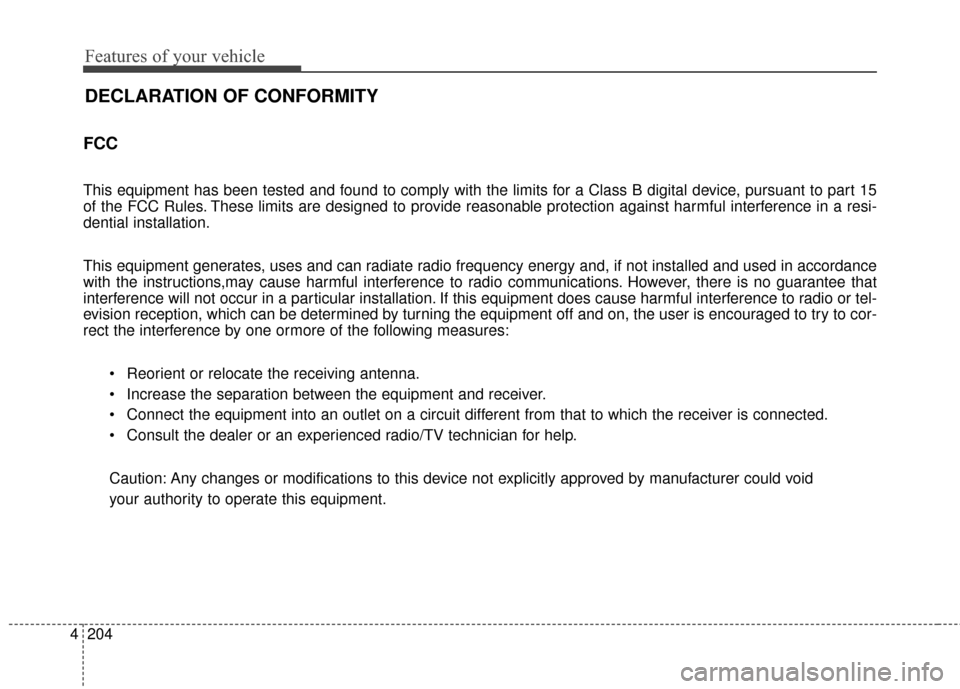
FCC
This equipment has been tested and found to comply with the limits for a Class B digital device, pursuant to part 15
of the FCC Rules. These limits are designed to provide reasonable protection against harmful interference in a resi-
dential installation.
This equipment generates, uses and can radiate radio frequency energy and, if not installed and used in accordance
with the instructions,may cause harmful interference to radio communications. However, there is no guarantee that
interference will not occur in a particular installation. If this equipment does cause harmful interference to radio or tel-
evision reception, which can be determined by turning the equipment off and on, the user is encouraged to try to cor-
rect the interference by one ormore of the following measures:
Reorient or relocate the receiving antenna.
Increase the separation between the equipment and receiver.
Connect the equipment into an outlet on a circuit different from that to which the receiver is connected.
Consult the dealer or an experienced radio/TV technician for help.
Caution: Any changes or modifications to this device not explicitly approved by manufacturer could void
your authority to operate this equipment.
DECLARATION OF CONFORMITY
Page 362 of 493
611
What to do in an emergency
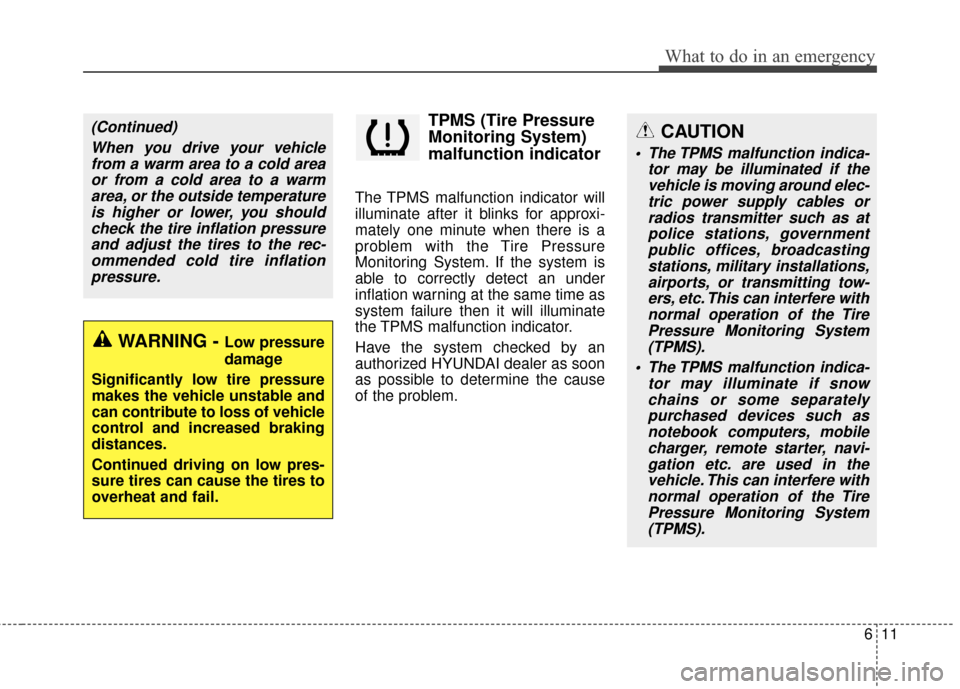
TPMS (Tire Pressure
Monitoring System)
malfunction indicator
The TPMS malfunction indicator will
illuminate after it blinks for approxi-
mately one minute when there is a
problem with the Tire Pressure
Monitoring System. If the system is
able to correctly detect an under
inflation warning at the same time as
system failure then it will illuminate
the TPMS malfunction indicator.
Have the system checked by an
authorized HYUNDAI dealer as soon
as possible to determine the cause
of the problem.
WARNING - Low pressure
damage
Significantly low tire pressure
makes the vehicle unstable and
can contribute to loss of vehicle
control and increased braking
distances.
Continued driving on low pres-
sure tires can cause the tires to
overheat and fail.
(Continued) When you drive your vehiclefrom a warm area to a cold areaor from a cold area to a warmarea, or the outside temperatureis higher or lower, you shouldcheck the tire inflation pressureand adjust the tires to the rec-ommended cold tire inflationpressure.CAUTION
The TPMS malfunction indica- tor may be illuminated if thevehicle is moving around elec-tric power supply cables orradios transmitter such as atpolice stations, governmentpublic offices, broadcastingstations, military installations,airports, or transmitting tow-ers, etc. This can interfere withnormal operation of the TirePressure Monitoring System(TPMS).
The TPMS malfunction indica- tor may illuminate if snowchains or some separatelypurchased devices such asnotebook computers, mobilecharger, remote starter, navi-gation etc. are used in thevehicle. This can interfere withnormal operation of the TirePressure Monitoring System(TPMS).