headlights Hyundai Elantra GT 2017 Owner's Manual
[x] Cancel search | Manufacturer: HYUNDAI, Model Year: 2017, Model line: Elantra GT, Model: Hyundai Elantra GT 2017Pages: 493, PDF Size: 11.53 MB
Page 135 of 493
Features of your vehicle
48
4
Inside rearview mirror
Adjust the rearview mirror so that the
center view through the rear window
is seen. Make this adjustment before
you start driving.
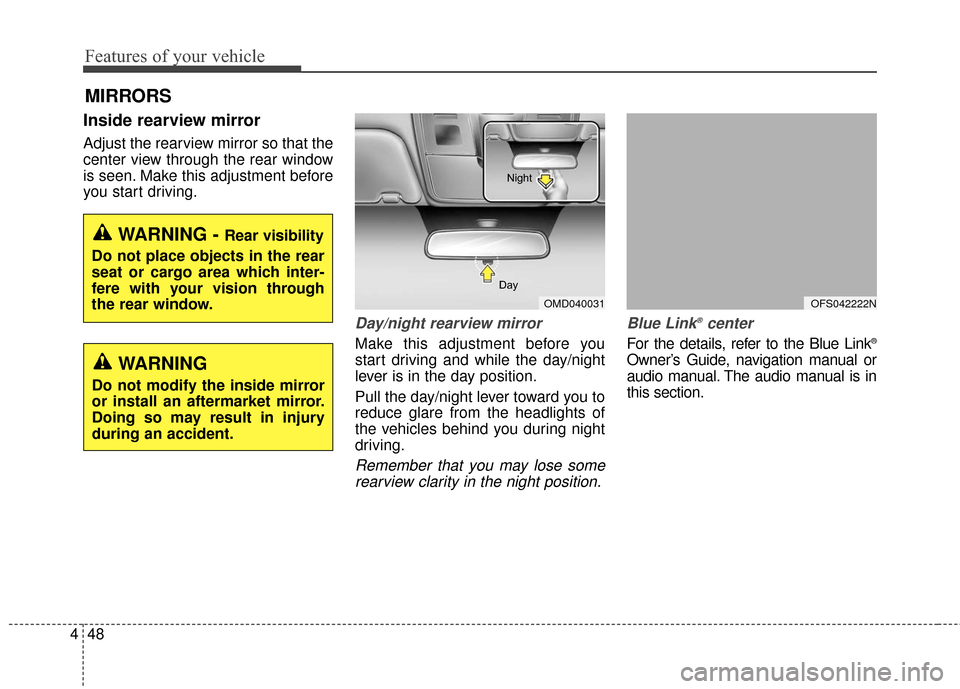
Day/night rearview mirror
Make this adjustment before you
start driving and while the day/night
lever is in the day position.
Pull the day/night lever toward you to
reduce glare from the headlights of
the vehicles behind you during night
driving.
Remember that you may lose some
rearview clarity in the night position. Blue Link
®center
For the details, refer to the Blue Link®
Owner’s Guide, navigation manual or
audio manual. The audio manual is in
this section.
MIRRORS
WARNING - Rear visibility
Do not place objects in the rear
seat or cargo area which inter-
fere with your vision through
the rear window.
OMD040031
Day Night
WARNING
Do not modify the inside mirror
or install an aftermarket mirror.
Doing so may result in injury
during an accident.
OFS042222N
Page 144 of 493
457
Features of your vehicle
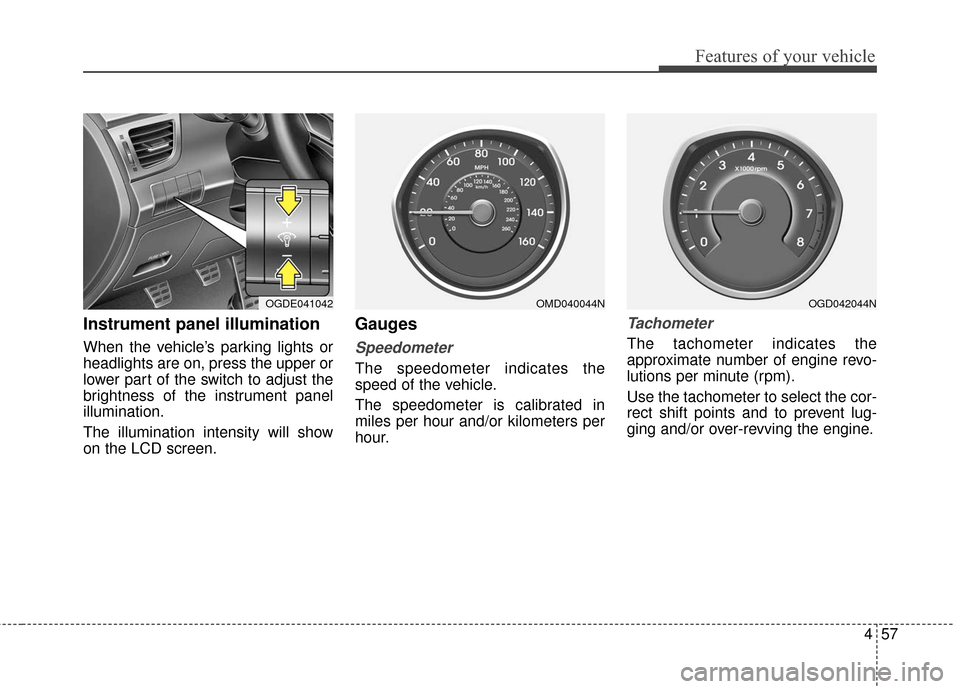
Instrument panel illumination
When the vehicle’s parking lights or
headlights are on, press the upper or
lower part of the switch to adjust the
brightness of the instrument panel
illumination.
The illumination intensity will show
on the LCD screen.
Gauges
Speedometer
The speedometer indicates the
speed of the vehicle.
The speedometer is calibrated in
miles per hour and/or kilometers per
hour.
Tachometer
The tachometer indicates the
approximate number of engine revo-
lutions per minute (rpm).
Use the tachometer to select the cor-
rect shift points and to prevent lug-
ging and/or over-revving the engine.
OGDE041042OMD040044NOGD042044N
Page 161 of 493
Features of your vehicle
74
4
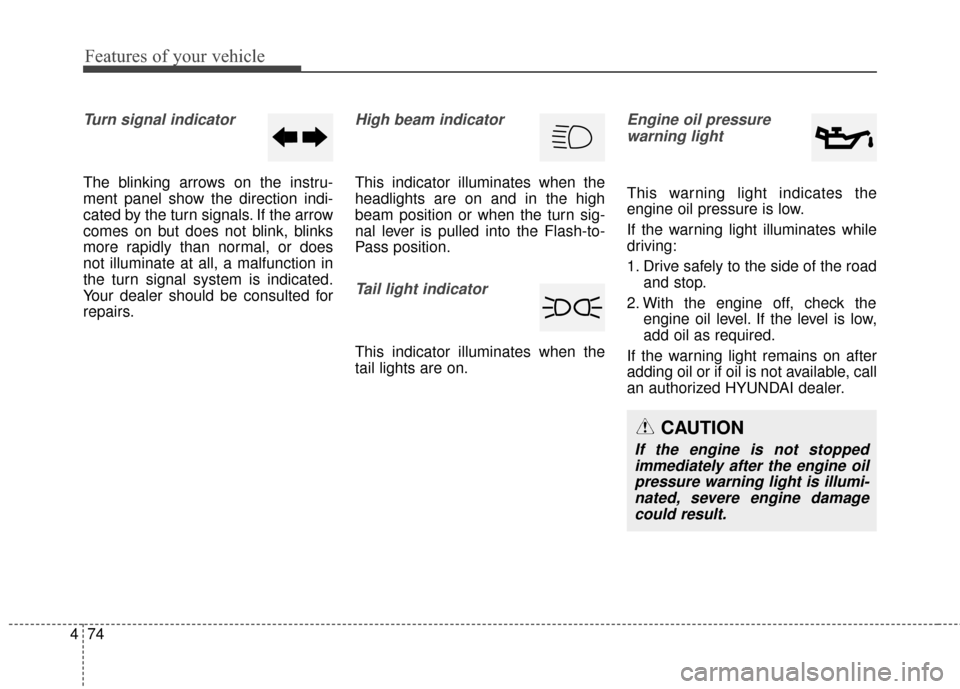
Turn signal indicator
The blinking arrows on the instru-
ment panel show the direction indi-
cated by the turn signals. If the arrow
comes on but does not blink, blinks
more rapidly than normal, or does
not illuminate at all, a malfunction in
the turn signal system is indicated.
Your dealer should be consulted for
repairs.
High beam indicator
This indicator illuminates when the
headlights are on and in the high
beam position or when the turn sig-
nal lever is pulled into the Flash-to-
Pass position.
Tail light indicator
This indicator illuminates when the
tail lights are on.
Engine oil pressure
warning light
This warning light indicates the
engine oil pressure is low.
If the warning light illuminates while
driving:
1. Drive safely to the side of the road and stop.
2. With the engine off, check the engine oil level. If the level is low,
add oil as required.
If the warning light remains on after
adding oil or if oil is not available, call
an authorized HYUNDAI dealer.
CAUTION
If the engine is not stopped immediately after the engine oilpressure warning light is illumi-nated, severe engine damagecould result.
Page 175 of 493
Features of your vehicle
88
4
Battery saver function
The purpose of this feature is to
prevent the battery from being dis-
charged. The system automatically
turns off the parking lights when
the driver removes the ignition key
(smart key : turns off the engine)
and opens the driver-side door.
With this feature, the parking lights will be turned off automatically if
the driver parks on the side of road
at night.
If necessary, to keep the lights on
when the ignition key is removed
(smart key : turns off the engine),
perform the following:
1) Open the driver-side door.
2) Turn the parking lights OFF and ON again using the light switch
on the steering column.
Headlamp delay (if equipped)
If you turn the ignition switch to the
ACC or OFF position with the head-
lights ON, the headlights remain on
for about 5 minutes. However, if the
driver’s door is opened and closed,
the headlights are turned off after 15
seconds.
The headlights can be turned off by
pressing the lock button on the trans-
mitter (or smart key) twice or turning
the light switch to the OFF or Auto
position.
However, if you turn the light switch
to the Auto position when it is dark
outside, the headlights will not be
turned off.
You can activate or deactivate this
feature. Refer to “User Settings” in
this section.
Headlamp welcome function
(if equipped)
When the headlight switch is in the
ON or AUTO position and all doors
(and trunk) are closed and locked, if
you press the door unlock button on
the transmitter (or the smart key), the
headlights will come on for about 15
seconds. At this time, if you press the
door lock button on the transmitter
(or smart key) the headlights will turn
off immediately.
You can activate or deactivate this
feature. Refer to “User Settings” in
this section.
LIGHTING
CAUTION
If the driver gets out of the vehi-cle through other doors (otherthan the driver's door), the bat-tery saver function does notoperate and the headlamp delaydoes not turn off automatically.This will cause the battery to bedischarged. In this case, makesure to turn off the lamp beforegetting out of the vehicle.
Page 176 of 493
489
Features of your vehicle
Daytime running light
(if equipped)
Daytime Running Lights (DRL) can
make it easier for others to see the
front of your vehicle during the day.
DRL can be helpful in many different
driving conditions, and it is especial-
ly helpful after dawn and before sun-
set.
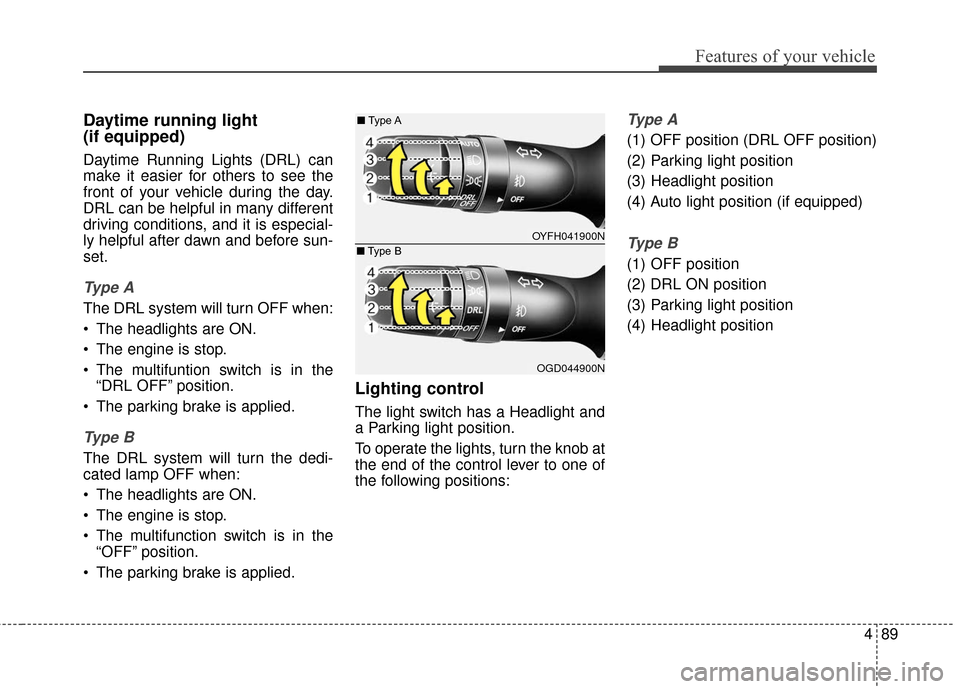
Ty p e A
The DRL system will turn OFF when:
The headlights are ON.
The engine is stop.
The multifuntion switch is in the“DRL OFF” position.
The parking brake is applied.
Ty p e B
The DRL system will turn the dedi-
cated lamp OFF when:
The headlights are ON.
The engine is stop.
The multifunction switch is in the “OFF” position.
The parking brake is applied.
Lighting control
The light switch has a Headlight and
a Parking light position.
To operate the lights, turn the knob at
the end of the control lever to one of
the following positions:
Ty p e A
(1) OFF position (DRL OFF position)
(2) Parking light position
(3) Headlight position
(4) Auto light position (if equipped)
Ty p e B
(1) OFF position
(2) DRL ON position
(3) Parking light position
(4) Headlight position
OYFH041900N
■
Type A
OGD044900N
■
Type B
Page 178 of 493
491
Features of your vehicle
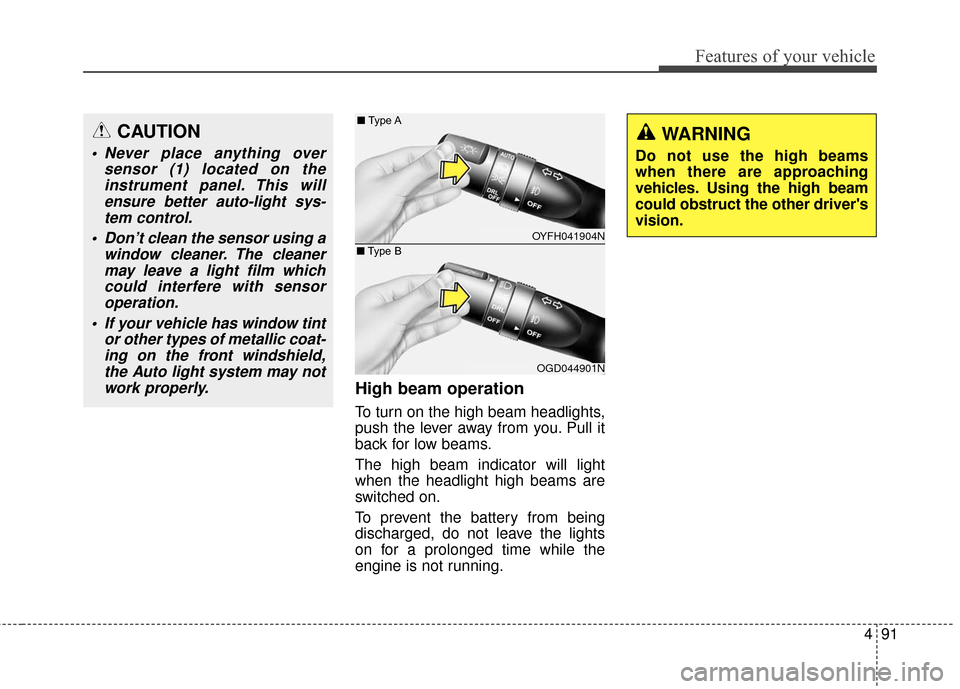
High beam operation
To turn on the high beam headlights,
push the lever away from you. Pull it
back for low beams.
The high beam indicator will light
when the headlight high beams are
switched on.
To prevent the battery from being
discharged, do not leave the lights
on for a prolonged time while the
engine is not running.
WARNING
Do not use the high beams
when there are approaching
vehicles. Using the high beam
could obstruct the other driver's
vision.
CAUTION
Never place anything oversensor (1) located on theinstrument panel. This willensure better auto-light sys-tem control.
Don’t clean the sensor using a window cleaner. The cleanermay leave a light film whichcould interfere with sensoroperation.
If your vehicle has window tint or other types of metallic coat-ing on the front windshield,the Auto light system may notwork properly.
OYFH041904N
■
Type A
OGD044901N
■
Type B
Page 179 of 493
Features of your vehicle
92
4
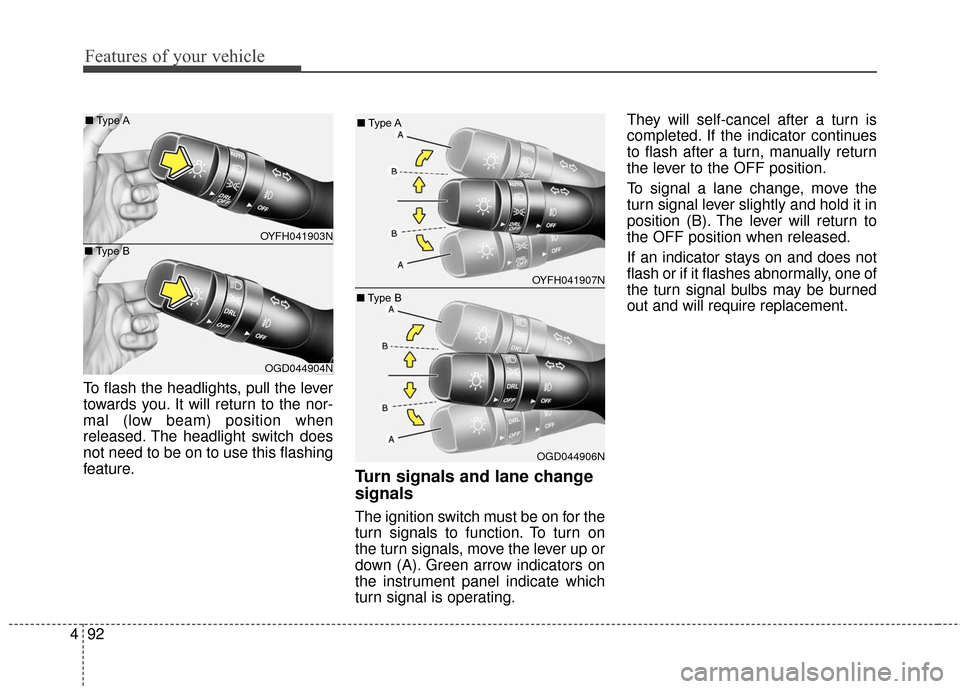
To flash the headlights, pull the lever
towards you. It will return to the nor-
mal (low beam) position when
released. The headlight switch does
not need to be on to use this flashing
feature.
Turn signals and lane change
signals
The ignition switch must be on for the
turn signals to function. To turn on
the turn signals, move the lever up or
down (A). Green arrow indicators on
the instrument panel indicate which
turn signal is operating. They will self-cancel after a turn is
completed. If the indicator continues
to flash after a turn, manually return
the lever to the OFF position.
To signal a lane change, move the
turn signal lever slightly and hold it in
position (B). The lever will return to
the OFF position when released.
If an indicator stays on and does not
flash or if it flashes abnormally, one of
the turn signal bulbs may be burned
out and will require replacement.
OYFH041903N
■
Type A
OGD044904N
■
Type B
OYFH041907N
■
Type A
OGD044906N
■
Type B
Page 180 of 493
493
Features of your vehicle
One-touch triple turn signal
To activate an one-touch triple turn
signal move the turn signal lever
slightly for less than 1.8 seconds and
then release it. The lane change sig-
nals will blink 3 times.
You can activate or deactivate this
feature. Refer to “User Settings” in
this section.
✽ ✽NOTICE
If an indicator flash is abnormally
quick or slow, a bulb may be burned
out or have a poor electrical connec-
tion in the circuit.
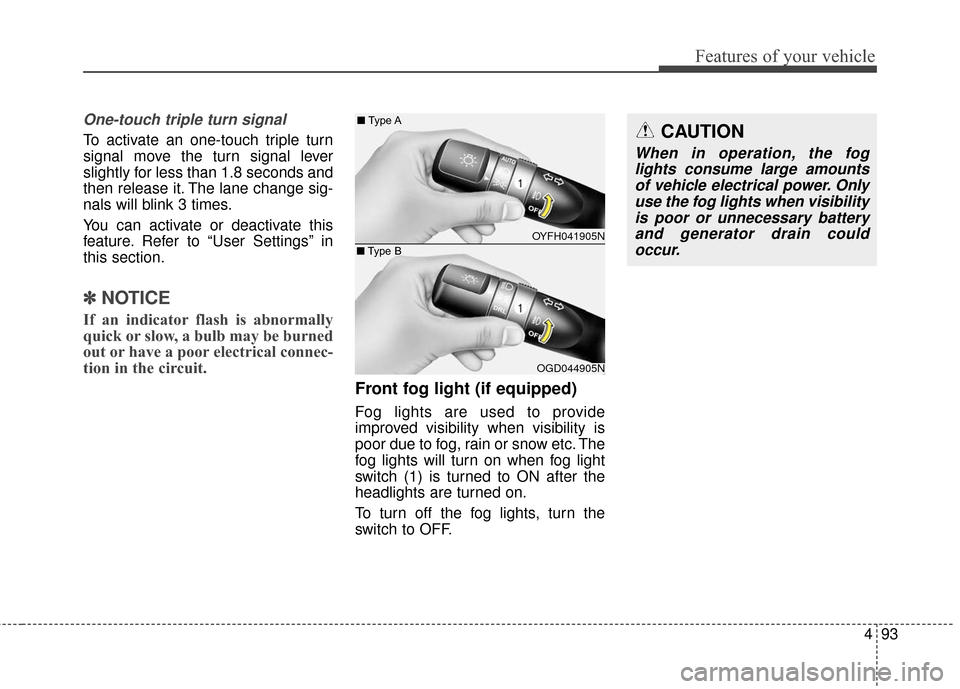
Front fog light (if equipped)
Fog lights are used to provide
improved visibility when visibility is
poor due to fog, rain or snow etc. The
fog lights will turn on when fog light
switch (1) is turned to ON after the
headlights are turned on.
To turn off the fog lights, turn the
switch to OFF.
CAUTION
When in operation, the fog
lights consume large amountsof vehicle electrical power. Onlyuse the fog lights when visibilityis poor or unnecessary batteryand generator drain couldoccur.
OYFH041905N
■
Type A
OGD044905N
■
Type B
Page 338 of 493
Driving your vehicle
46
5
Adjust your mirrors to reduce the
glare from other driver's headlights.
Keep your headlights clean and properly aimed on vehicles not
equipped with the automatic head-
light aiming feature. Dirty or
improperly aimed headlights will
make it much more difficult to see
at night.
Avoid staring directly at the head- lights of oncoming vehicles. You
could be temporarily blinded, and it
will take several seconds for your
eyes to readjust to the darkness.Driving in the rain
Rain and wet roads can make driving
dangerous, especially if you’re not
prepared for the slick pavement.
Here are a few things to consider
when driving in the rain:
A heavy rainfall will make it harderto see and will increase the dis-
tance needed to stop your vehicle,
so slow down.
Keep your windshield wiping equipment in good shape. Replace
your windshield wiper blades when
they show signs of streaking or
missing areas on the windshield.
If your tires are not in good condi- tion, making a quick stop on wet
pavement can cause a skid and
possibly lead to an accident. Be
sure your tires are in good shape.
Turn on your headlights to make it easier for others to see you. Driving too fast through large pud-
dles can affect your brakes. If you
must go through puddles, try to
drive through them slowly.
If you believe you may have gotten your brakes wet, apply them lightly
while driving until normal braking
operation returns.
Page 418 of 493
Maintenance
42
7
Battery recharging
Your vehicle has a maintenance-free,
calcium-based battery.
If the battery becomes discharged in
a short time (because, for example
the headlights or interior lights were
left on while vehicle was not in use)
jump start the vehicle from another
battery and run the engine at least
20 minutes at idle before driving. Do
not turn off the engine for 30 minutes
total of idle and/or driving as the bat-
tery may not have sufficient recharge
to start.CALIFORNIA PROPO-
SITION 65 WARNING
Battery posts, terminals, and
related accessories contain
lead and lead compounds,
chemicals known to the State of
California to cause cancer, birth
defects and reproductive harm.
Batteries also contain other
chemicals known to the State of
California to cause cancer.
Wash hands after handling.
CAUTION
When you don’t use the vehi-
cle for a long time in the lowtemperature, remove the bat-tery and store it indoors.
Always charge the battery fully to prevent the batterycase from being damaged inlow temperatures.
If you connect unauthorized electronic devices to the bat-tery, the battery may be dis-charged. Never use unautho-rized devices.
(Continued)
When lifting a plastic-cased battery, excessive pressure
on the case may cause battery
acid to leak, resulting in per-
sonal injury. Lift with a battery
carrier or with your hands on
opposite corners.
Never attempt to recharge the battery when the battery
cables are connected.
The electrical ignition system works with high voltage.
Never touch these compo-
nents with the engine running
or the ignition switched on.
Failure to follow the above
warnings can result in serious
bodily injury or death.