change time HYUNDAI ELANTRA GT 2019 Owners Manual
[x] Cancel search | Manufacturer: HYUNDAI, Model Year: 2019, Model line: ELANTRA GT, Model: HYUNDAI ELANTRA GT 2019Pages: 486, PDF Size: 78.59 MB
Page 1 of 486
OOWW NNEERR ''SS MM AANN UU AALL
OOppeerraa ttiioo nn
M
M aaiinn ttee nn aann ccee
S
S ppeecciiff iicc aa ttiioo nnss
All information in this Owner's Manual is current at the time of publi-
cation. However, HYUNDAI Auto Canada Corp. reserves the right to
make changes at any time so that our policy of continual product
improvement may be carried out.
This manual applies to all HYUNDAI models and includes descriptions
and explanations of optional as well as standard equipment. As a
result, you may find material in this manual that does not apply to your
specific vehicle.
* Trademarks and tradenames owned in Canada by HYUNDAI Auto Canada Corp. which carries on business as HYUNDAI Auto Canada.
Page 26 of 486
2-8
Safety system of your vehicle
Reclining seatback Sitting in a reclined position when
the vehicle is in motion can be dan-
gerous. Even when buckled up, the
protection of your restraint system
(seat belts and air bags) is greatly
reduced by reclining your seatback.Seat belts must be snug against your
hips and chest to work properly.
When the seatback is reclined, theshoulder belt cannot do its job
because it will not be snug against
your chest. Instead, it will be in front
of you. During an accident, you could
be thrown into the seat belt, causing
neck or other injuries.
The more the seatback is reclined,
the greater chance the passenger'ships will slide under the lap belt or
the passenger's neck will strike theshoulder belt.
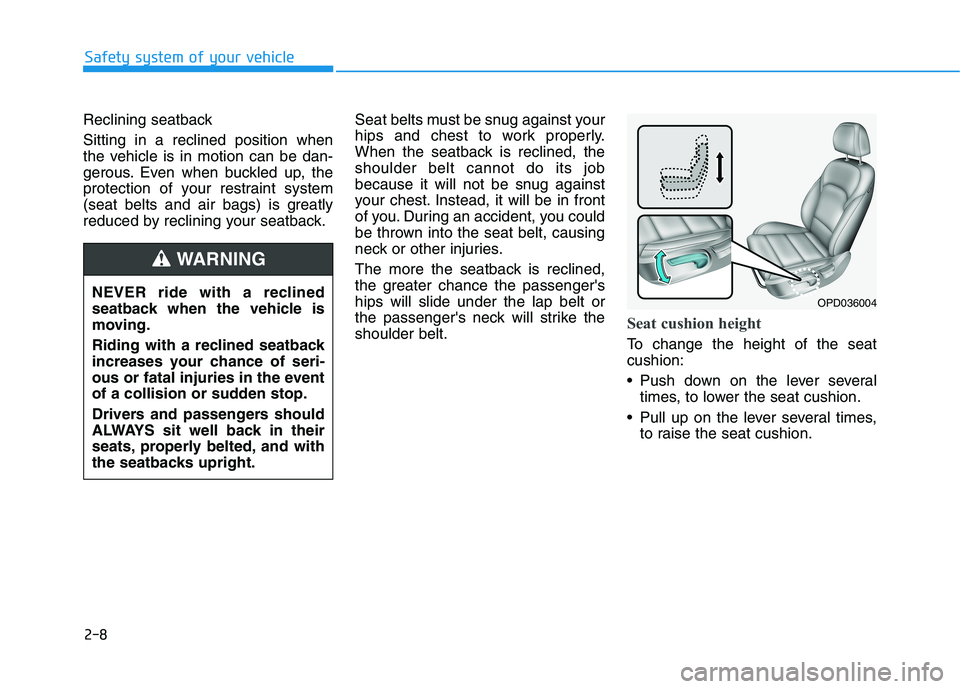
Seat cushion height
To change the height of the seat cushion:
Push down on the lever several
times, to lower the seat cushion.
Pull up on the lever several times, to raise the seat cushion.
OPD036004
NEVER ride with a reclined
seatback when the vehicle is
moving.
Riding with a reclined seatback
increases your chance of seri-
ous or fatal injuries in the event
of a collision or sudden stop.
Drivers and passengers should
ALWAYS sit well back in their
seats, properly belted, and with
the seatbacks upright.
WARNING
Page 37 of 486
2-19
Safety system of your vehicle
2
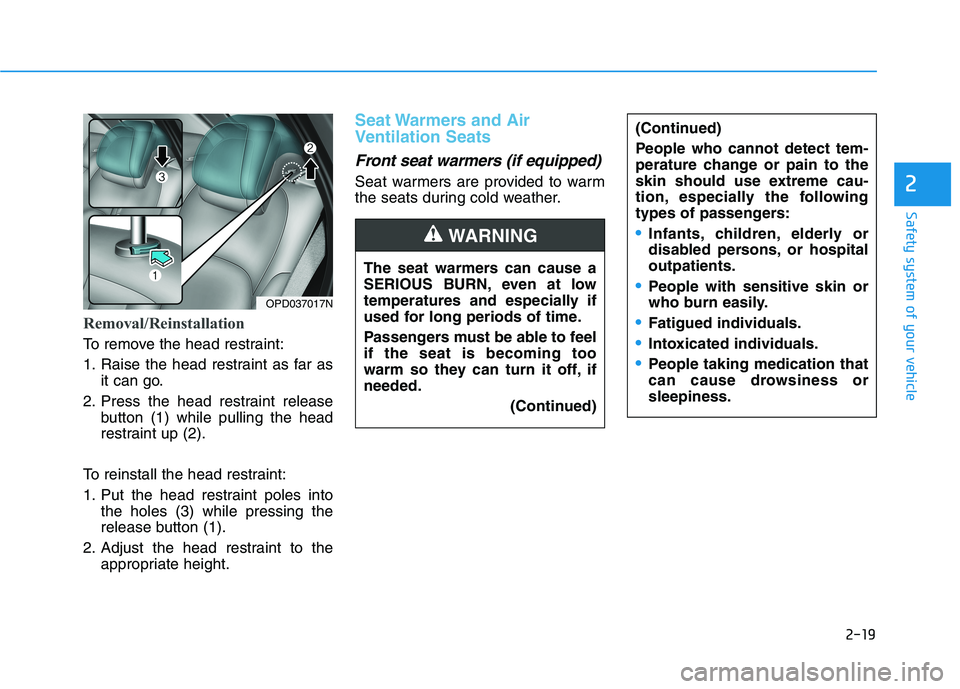
Removal/Reinstallation
To remove the head restraint:
1. Raise the head restraint as far asit can go.
2. Press the head restraint release button (1) while pulling the head
restraint up (2).
To reinstall the head restraint:
1. Put the head restraint poles into the holes (3) while pressing the
release button (1).
2. Adjust the head restraint to the appropriate height.
Seat Warmers and Air
Ventilation Seats
Front seat warmers (if equipped)
Seat warmers are provided to warm
the seats during cold weather.
OPD037017N The seat warmers can cause a
SERIOUS BURN, even at low
temperatures and especially if
used for long periods of time.
Passengers must be able to feel if the seat is becoming too
warm so they can turn it off, ifneeded.
(Continued)
(Continued)
People who cannot detect tem-
perature change or pain to the
skin should use extreme cau-
tion, especially the following
types of passengers:
Infants, children, elderly or
disabled persons, or hospitaloutpatients.
People with sensitive skin or
who burn easily.
Fatigued individuals.
Intoxicated individuals.
People taking medication that
can cause drowsiness orsleepiness.
WARNING
Page 38 of 486
2-20
Safety system of your vehicle
To prevent damage to the seat
warmers and seats:
Never use a solvent such aspaint thinner, benzene, alcohol
or gasoline to clean the seats.
Do not place heavy or sharp objects on seats equipped with
seat warmers.
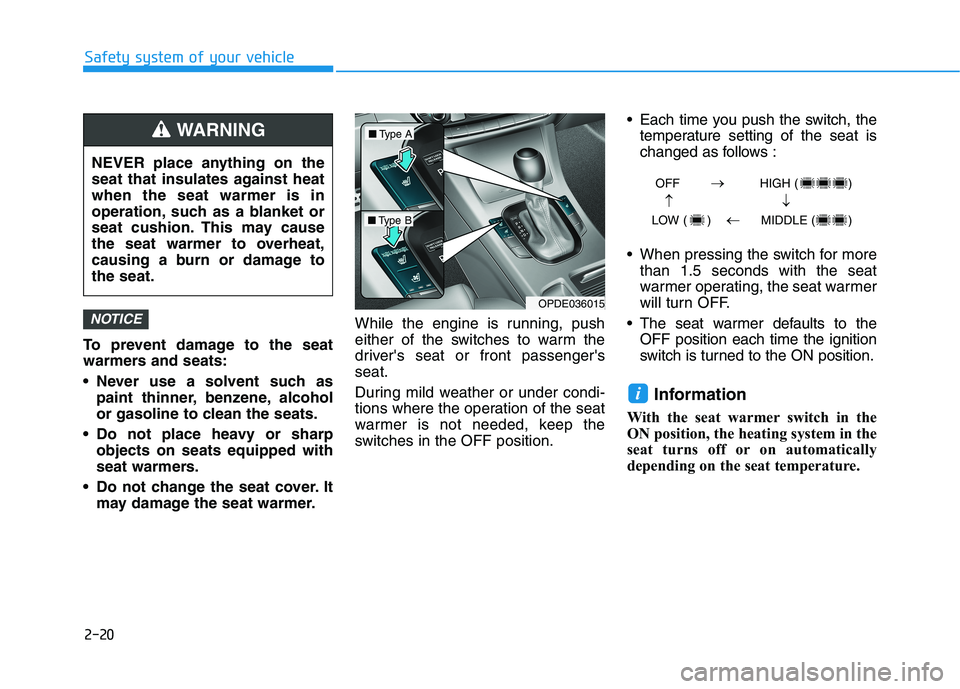
Do not change the seat cover. It may damage the seat warmer. While the engine is running, push
either of the switches to warm the
driver's seat or front passenger'sseat.
During mild weather or under condi-
tions where the operation of the seat
warmer is not needed, keep the
switches in the OFF position. Each time you push the switch, the
temperature setting of the seat is
changed as follows :
When pressing the switch for more than 1.5 seconds with the seat
warmer operating, the seat warmer
will turn OFF.
The seat warmer defaults to the OFF position each time the ignition
switch is turned to the ON position.
Information
With the seat warmer switch in the
ON position, the heating system in the
seat turns off or on automatically
depending on the seat temperature.
i
NOTICE
NEVER place anything on the
seat that insulates against heatwhen the seat warmer is in
operation, such as a blanket or
seat cushion. This may cause
the seat warmer to overheat,
causing a burn or damage tothe seat.
WARNING
OPDE036015
■ Type A
■Type B OFF HIGH ( )
LOW ( ) MIDDLE ( )
Page 39 of 486
2-21
Safety system of your vehicle
2
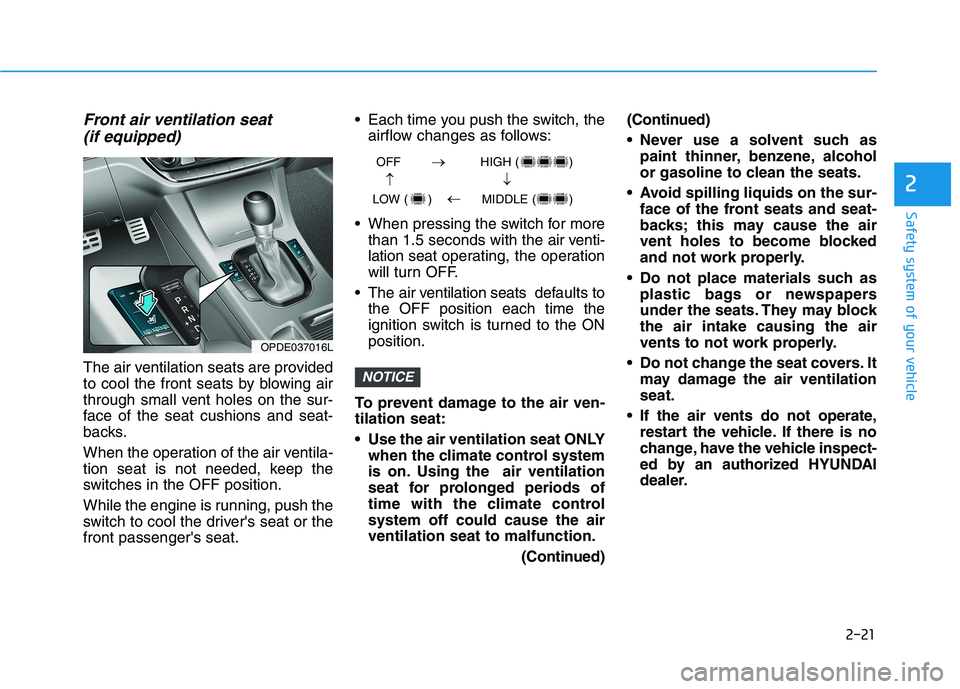
Front air ventilation seat(if equipped)
The air ventilation seats are provided
to cool the front seats by blowing air
through small vent holes on the sur-
face of the seat cushions and seat-
backs.
When the operation of the air ventila-
tion seat is not needed, keep the
switches in the OFF position.
While the engine is running, push the
switch to cool the driver's seat or thefront passenger's seat. Each time you push the switch, the
airflow changes as follows:
When pressing the switch for more than 1.5 seconds with the air venti-lation seat operating, the operation
will turn OFF.
The air v entilation seats def aults to
the OFF position each time the
ignition switch is turned to the ONposition.
To prevent damage to the air ven-tilation seat:
Use the air ventilation seat ONLY when the climate control system
is on. Using the air ventilation
seat for prolonged periods of
time with the climate controlsystem off could cause the airventilation seat to malfunction.
(Continued)(Continued)
Never use a solvent such as
paint thinner, benzene, alcohol
or gasoline to clean the seats.
Avoid spilling liquids on the sur- face of the front seats and seat-
backs; this may cause the air
vent holes to become blocked
and not work properly.
Do not place materials such as plastic bags or newspapers
under the seats. They may blockthe air intake causing the air
vents to not work properly.
Do not change the seat covers. It may damage the air ventilationseat.
If the air vents do not operate, restart the vehicle. If there is no
change, have the vehicle inspect-
ed by an authorized HYUNDAI
dealer.NOTICE
OFF HIGH ( )
LOW ( ) MIDDLE ( )
OPDE037016L
Page 89 of 486
3-4
Unlocking
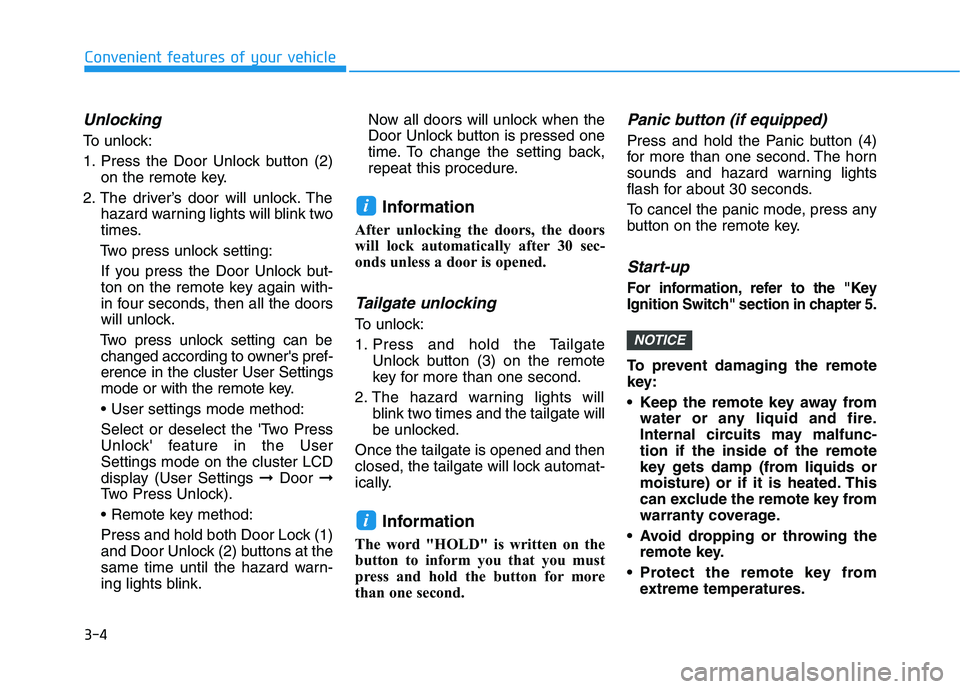
To unlock:
1. Press the Door Unlock button (2)on the remote key.
2. The driver’s door will unlock. The hazard warning lights will blink two
times.
Two press unlock setting:
If you press the Door Unlock but-
ton on the remote key again with-
in four seconds, then all the doors
will unlock.
Two press unlock setting can be changed according to owner's pref-erence in the cluster User Settings
mode or with the remote key.
Select or deselect the 'Two Press
Unlock' feature in the UserSettings mode on the cluster LCD
display (User Settings ➞Door ➞
Two Press Unlock).
Press and hold both Door Lock (1)
and Door Unlock (2) buttons at the
same time until the hazard warn-
ing lights blink. Now all doors will unlock when the
Door Unlock button is pressed one
time. To change the setting back,
repeat this procedure.
Information
After unlocking the doors, the doors
will lock automatically after 30 sec-
onds unless a door is opened.
Tailgate unlocking
To unlock:
1. Press and hold the Tailgate Unlock button (3) on the remote
key for more than one second.
2. The hazard warning lights will blink two times and the tailgate will
be unlocked.
Once the tailgate is opened and then
closed, the tailgate will lock automat-
ically.
Information
The word "HOLD" is written on the
button to inform you that you must
press and hold the button for more
than one second.
Panic button (if equipped)
Press and hold the Panic button (4)
for more than one second. The horn
sounds and hazard warning lights
flash for about 30 seconds.
To cancel the panic mode, press any
button on the remote key.
Start-up
For information, refer to the "Key
Ignition Switch" section in chapter 5.
To prevent damaging the remote
key:
• Keep the remote key away from water or any liquid and fire.
Internal circuits may malfunc-tion if the inside of the remote
key gets damp (from liquids or
moisture) or if it is heated. This
can exclude the remote key from
warranty coverage.
Avoid dropping or throwing the remote key.
Protect the remote key from extreme temperatures.
NOTICE
i
i
Convenient features of your vehicle
Page 93 of 486
3-8
Convenient features of your vehicle
3. The driver's door will unlock. Thehazard warning lights will blink two
times.
Two press unlock setting:
If you press the driver's outside
door handle button or Door Unlock
button on the smart key again
within four seconds, then all the
doors will unlock.
Two press unlock setting can be changed according to owner's
preference in the cluster User
Settings mode or with the smart
key.
Select or deselect the 'Two Press
Unlock' feature in the UserSettings mode on the cluster LCD
display (User Settings ➞Door ➞
Two Press Unlock).
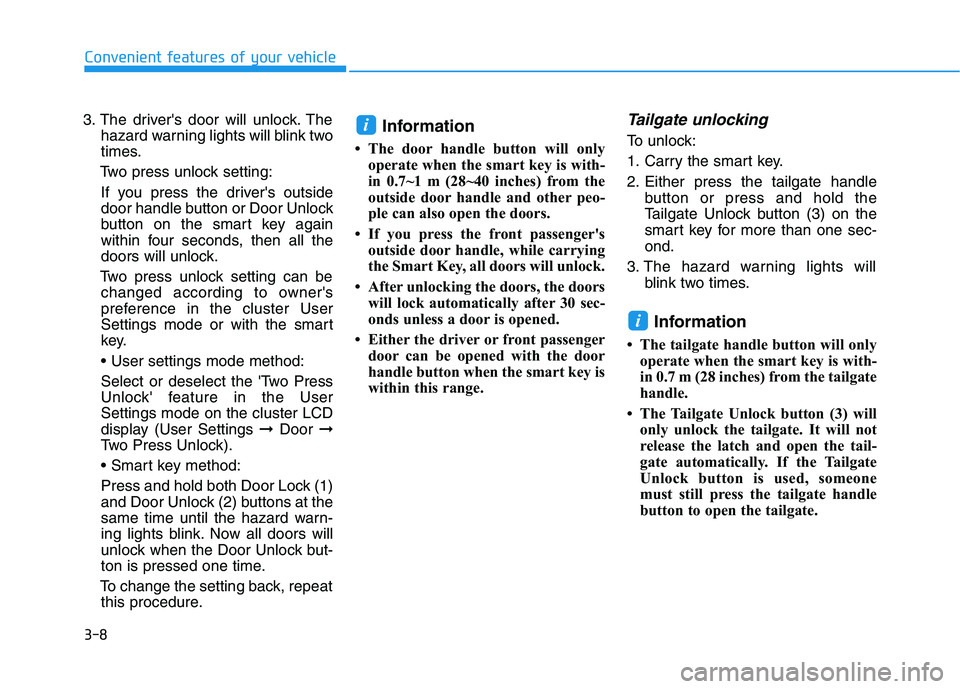
Press and hold both Door Lock (1)
and Door Unlock (2) buttons at the
same time until the hazard warn-
ing lights blink. Now all doors will
unlock when the Door Unlock but-
ton is pressed one time.
To change the setting back, repeat this procedure. Information
The door handle button will only operate when the smart key is with-
in 0.7~1 m (28~40 inches) from the
outside door handle and other peo-
ple can also open the doors.
If you press the front passenger's outside door handle, while carrying
the Smart Key, all doors will unlock.
After unlocking the doors, the doors will lock automatically after 30 sec-
onds unless a door is opened.
Either the driver or front passenger door can be opened with the door
handle button when the smart key is
within this range.Tailgate unlocking
To unlock:
1. Carry the smart key.
2. Either press the tailgate handle button or press and hold the
Tailgate Unlock button (3) on the
smart key for more than one sec-ond.
3. The hazard warning lights will blink two times.
Information
The tailgate handle button will only operate when the smart key is with-
in 0.7 m (28 inches) from the tailgate
handle.
The Tailgate Unlock button (3) will only unlock the tailgate. It will not
release the latch and open the tail-
gate automatically. If the Tailgate
Unlock button is used, someone
must still press the tailgate handle
button to open the tailgate.
i
i
Page 97 of 486
3-12
The transponder in your key is an
important part of the immobilizer
system. It is designed to give
years of trouble-free service, how-
ever you should avoid exposure to
moisture, static electricity and
rough handling. Immobilizer sys-
tem malfunction could occur.
Information
This device complies with Industry
Canada RSS-210 standard.
Operation is subject to the following
three conditions:
1. This device may not cause harmful interference, and
2. This device must accept any inter- ference received, including interfer-
ence that may cause undesired
operation.
3. Changes or modifications not expressly approved by the party
responsible for compliance could
void the user's authority to operate
the device.
"Limp Home" Mode and Related
Procedures
If the immobilizer warning indicator
blinks for five seconds when the igni-
tion key is turned to the "ON" posi-
tion, this indicates the immobilizer
system requires service. The engine
cannot be started without using the
procedure below.
The following procedure describes
how to start the engine using thelimp home function (0, 1, 2, 3 as a
sample password).
You can get a limp home pass-
word when the vehicle is first
delivered to you. If you do not
have a password, consult your
authorized HYUNDAI dealer. 1. To activate the password, turn the
ignition key "ON" and "OFF"
according to the digit numbers.
The immobilizer indicator will blink
along with the operation of the
ignition key. For example, turn the
ignition key once for digit number
"1", and twice for "2", and so on.
For the digit number "0", you must
cycle the ignition key 10 times.
2. Wait for 3~10 seconds.
3. You may set the remaining num- ber of digits by following steps 1 and 2.
4. If all of the four password digits have been successfully entered,
turn the ignition key "ON" and
check that the immobilizer indica-
tor illuminates. From this time, you
have to start your engine within 30
seconds. If you try to start your
engine after 30 seconds, your
engine will not start.
NOTICE
i
NOTICE
Convenient features of your vehicle
Page 100 of 486
3-15
Convenient features of your vehicle
3
If you press the button on the front
passenger's outside door, all doors
will unlock.
Once the doors are unlocked, they
may be opened by pulling the door
handle.
When closing the door, push the
door by hand. Make sure that doors
are closed securely.Information
In cold and wet climates, door lock and door mechanisms may not work
properly due to freezing conditions.
If the door is locked/unlocked multi- ple times in rapid succession with
either the vehicle key or door lock
switch, the system may stop operat-
ing temporarily in order to protect
the circuit and prevent damage to
system components.
Two press unlock setting can be changed in the User Settings mode
on the cluster.
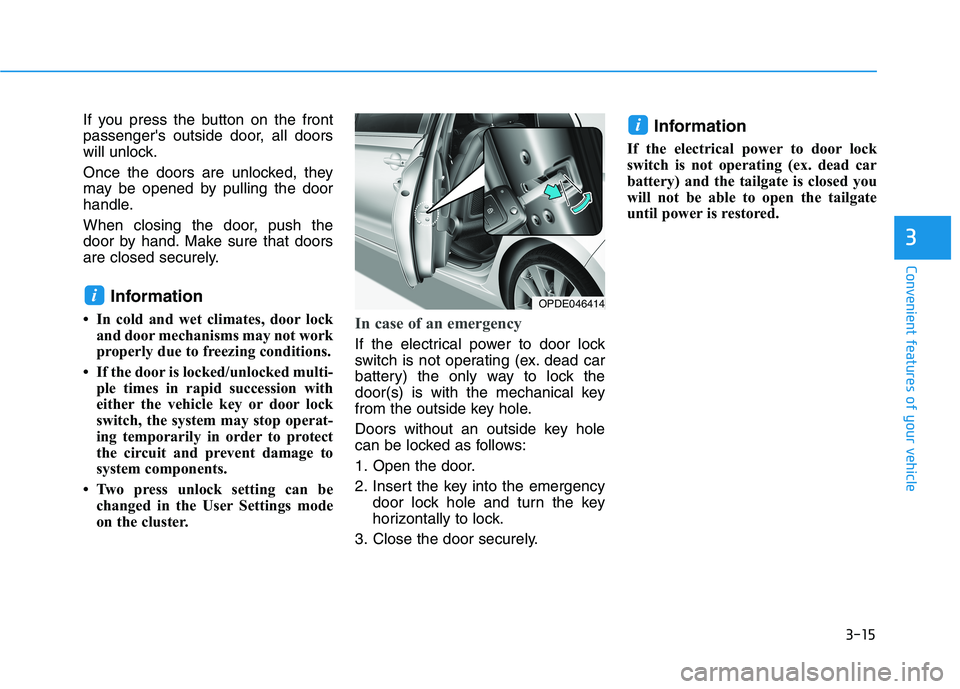
In case of an emergency
If the electrical power to door lock
switch is not operating (ex. dead car
battery) the only way to lock the
door(s) is with the mechanical key
from the outside key hole.
Doors without an outside key hole
can be locked as follows:
1. Open the door.
2. Insert the key into the emergency door lock hole and turn the key
horizontally to lock.
3. Close the door securely. Information
If the electrical power to door lock
switch is not operating (ex. dead car
battery) and the tailgate is closed you
will not be able to open the tailgate
until power is restored.
i
iOPDE046414
Page 105 of 486
3-20
Convenient features of your vehicle
Information
The following symptoms may occur
during normal vehicle operation:
The steering effort may be high immediately after placing the igni-
tion switch in the ON position.
This happens as the system per-
forms the EPS system diagnostics.
When the diagnostics are complet-
ed, the steering wheel will return to
its normal condition.
A click noise may be heard from the EPS relay after the ignition switch is
in the ON or LOCK/OFF position.
Motor noise may be heard when the vehicle is at a stop or at a low driv-
ing speed.
When you operate the steering wheel in low temperatures, abnor-
mal noise may occur. If the temper-
ature rises, the noise will disappear.
This is a normal condition.
When an error is detected from the EPS, the steering effort assist func-
tion will not be activated in order to
prevent fatal accidents. Instrument
cluster warning lights may be on or
the steering effort may be high.
When the following symptoms
occur, immediately drive the vehicle
to a safe area and check it.Tilt Steering / Telescope Steering
Adjust the steering wheel so it points
toward your chest, not toward your
face. Make sure you can see the
instrument cluster warning lights and
gauges. After adjusting, push the
steering wheel both up and down to
be certain it is locked in position.
Always adjust the position of the
steering wheel before driving.
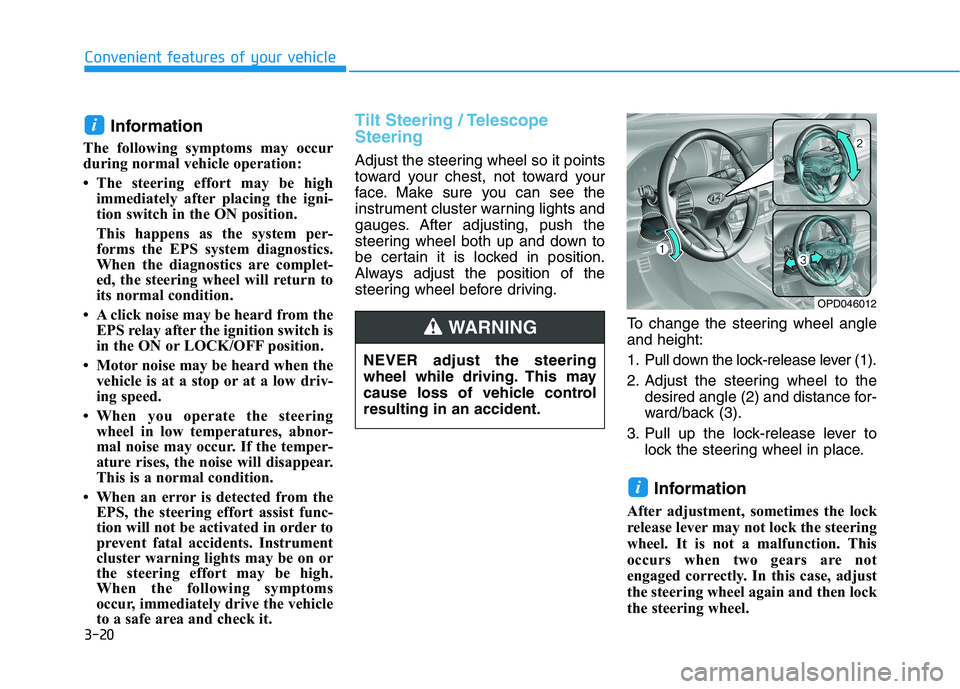
To change the steering wheel angleand height:
1. Pull down the lock-release lever (1).
2. Adjust the steering wheel to thedesired angle (2) and distance for-
ward/back (3).
3. Pull up the lock-release lever to lock the steering wheel in place.
Information
After adjustment, sometimes the lock
release lever may not lock the steering
wheel. It is not a malfunction. This
occurs when two gears are not
engaged correctly. In this case, adjust
the steering wheel again and then lock
the steering wheel.
i
i
OPD046012
NEVER adjust the steering
wheel while driving. This may
cause loss of vehicle controlresulting in an accident.
WARNING