service interval HYUNDAI ELANTRA GT 2019 Owners Manual
[x] Cancel search | Manufacturer: HYUNDAI, Model Year: 2019, Model line: ELANTRA GT, Model: HYUNDAI ELANTRA GT 2019Pages: 486, PDF Size: 78.59 MB
Page 160 of 486
3-75
Convenient features of your vehicle
3
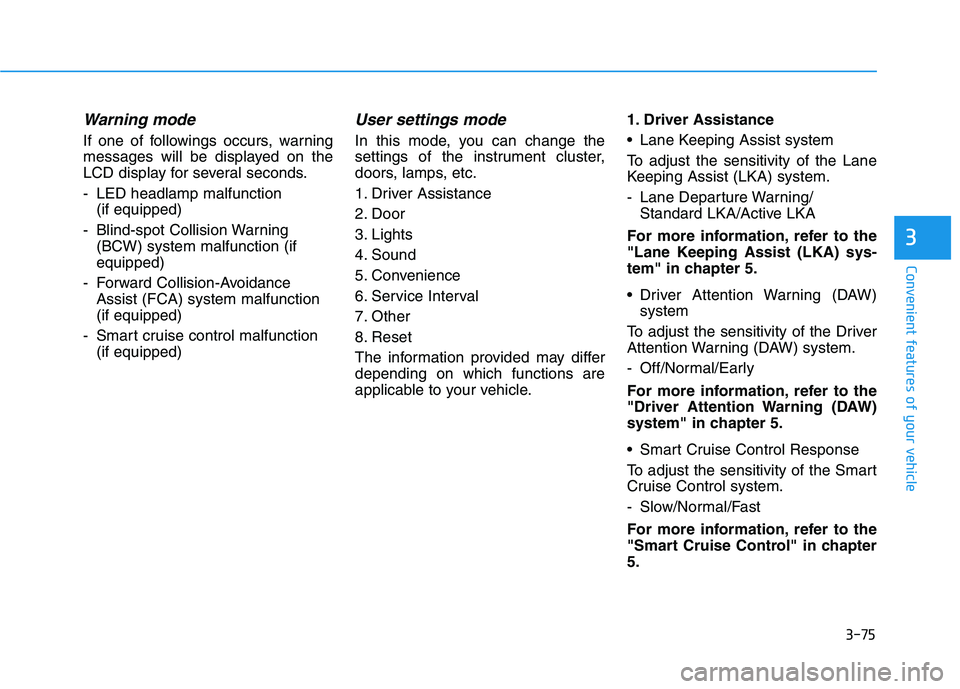
Warning mode
If one of followings occurs, warning
messages will be displayed on the
LCD display for several seconds.
- LED headlamp malfunction (if equipped)
- Blind-spot Collision Warning (BCW) system malfunction (if equipped)
- Forward Collision-Avoidance Assist (FCA) system malfunction(if equipped)
- Smart cruise control malfunction (if equipped)
User settings mode
In this mode, you can change the
settings of the instrument cluster,
doors, lamps, etc.
1. Driver Assistance
2. Door
3. Lights
4. Sound
5. Convenience
6. Service Interval
7. Other
8. Reset
The information provided may differ depending on which functions are
applicable to your vehicle. 1. Driver Assistance
Lane Keeping Assist system
To adjust the sensitivity of the Lane
Keeping Assist (LKA) system.
- Lane Departure Warning/
Standard LKA/Active LKA
For more information, refer to the
"Lane Keeping Assist (LKA) sys-
tem" in chapter 5.
Driver Attention Warning (DAW) system
To adjust the sensitivity of the Driver
Attention Warning (DAW) system.
- Off/Normal/Early
For more information, refer to the
"Driver Attention Warning (DAW)
system" in chapter 5.
Smart Cruise Control Response
To adjust the sensitivity of the Smart
Cruise Control system.
- Slow/Normal/Fast
For more information, refer to the
"Smart Cruise Control" in chapter5.
Page 162 of 486
3-77
Convenient features of your vehicle
3
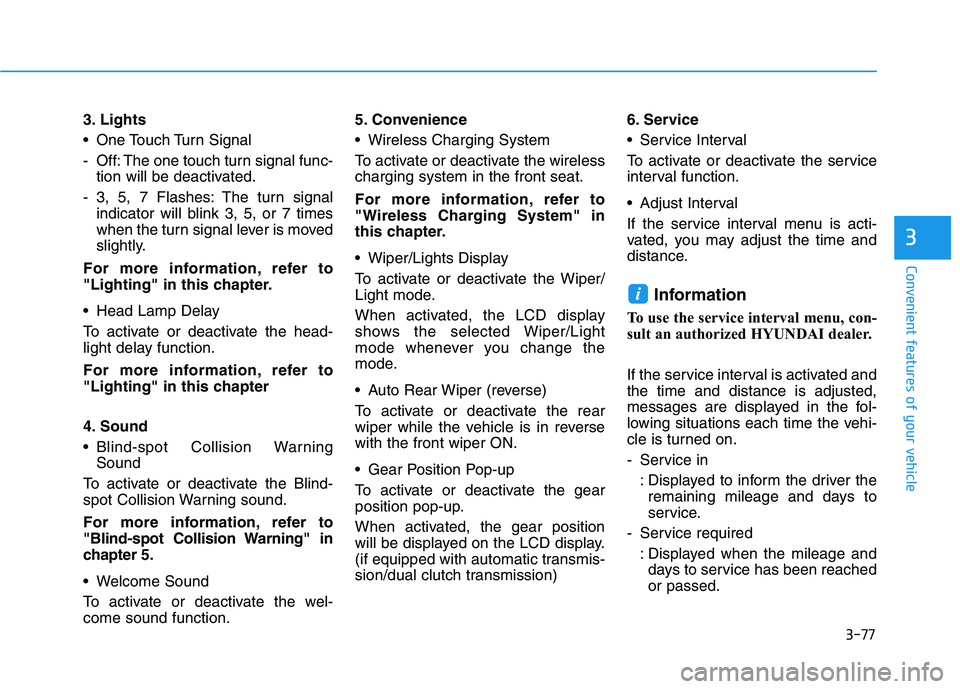
3. Lights
One Touch Turn Signal
- Off: The one touch turn signal func-tion will be deactivated.
- 3, 5, 7 Flashes: The turn signal indicator will blink 3, 5, or 7 times
when the turn signal lever is moved
slightly.
For more information, refer to
"Lighting" in this chapter.
Head Lamp Delay
To activate or deactivate the head-
light delay function.
For more information, refer to
"Lighting" in this chapter
4. Sound
Blind-spot Collision Warning Sound
To activate or deactivate the Blind-
spot Collision Warning sound.
For more information, refer to
"Blind-spot Collision Warning" in
chapter 5.
Welcome Sound
To activate or deactivate the wel- come sound function. 5. Convenience
Wireless Charging System
To activate or deactivate the wireless charging system in the front seat.
For more information, refer to
"Wireless Charging System" in
this chapter.
Wiper/Lights Display
To activate or deactivate the Wiper/
Light mode.
When activated, the LCD display
shows the selected Wiper/Light
mode whenever you change the
mode.
Auto Rear Wiper (reverse)
To activate or deactivate the rear
wiper while the vehicle is in reversewith the front wiper ON.
Gear Position Pop-up
To activate or deactivate the gear
position pop-up.
When activated, the gear position
will be displayed on the LCD display.
(if equipped with automatic transmis-
sion/dual clutch transmission)
6. Service
Service Interval
To activate or deactivate the service
interval function.
Adjust Interval
If the service interval menu is acti-
vated, you may adjust the time and
distance.
Information
To use the service interval menu, con-
sult an authorized HYUNDAI dealer.
If the service interval is activated and the time and distance is adjusted,
messages are displayed in the fol-
lowing situations each time the vehi-
cle is turned on.
- Service in : Displayed to inform the driver theremaining mileage and days to
service.
- Service required : Displayed when the mileage anddays to service has been reachedor passed.
i
Page 163 of 486
3-78
Convenient features of your vehicle
Information
If any of the following conditions
occur, the mileage and number of days
to service may be incorrect.
- The battery cable is disconnected.
- The fuse switch is turned off.
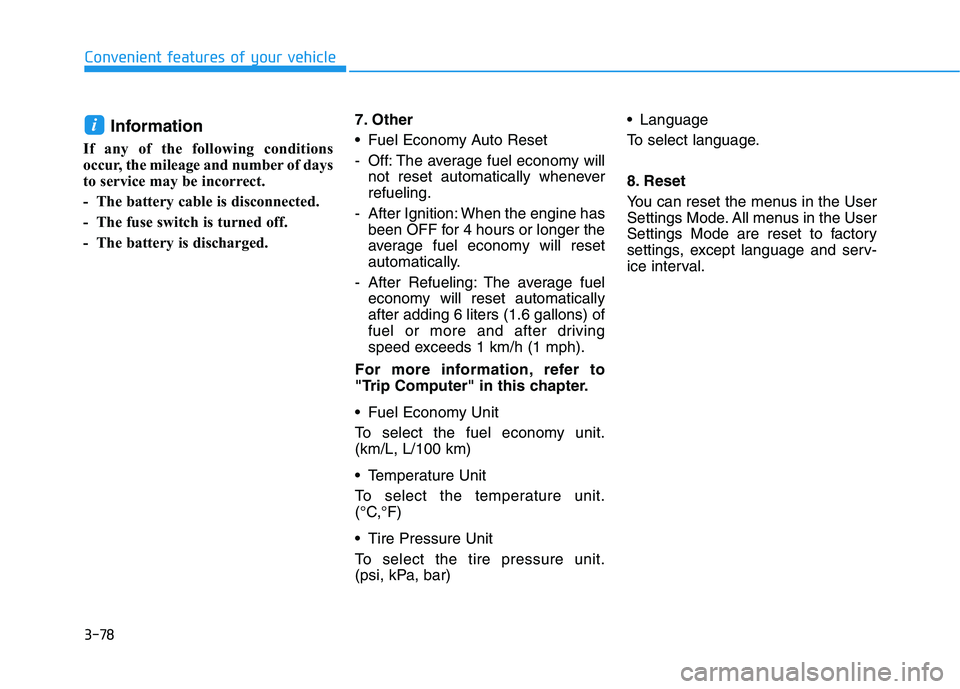
- The battery is discharged. 7. Other
Fuel Economy Auto Reset
- Off: The average fuel economy will
not reset automatically whenever refueling.
- After Ignition: When the engine has been OFF for 4 hours or longer the
average fuel economy will reset
automatically.
- After Refueling: The average fuel economy will reset automaticallyafter adding 6 liters (1.6 gallons) of
fuel or more and after driving
speed exceeds 1 km/h (1 mph).
For more information, refer to
"Trip Computer" in this chapter.
Fuel Economy Unit
To select the fuel economy unit. (km/L, L/100 km)
Temperature Unit
To select the temperature unit.
(°C,°F)
Tire Pressure Unit
To select the tire pressure unit.
(psi, kPa, bar) Language
To select language.
8. Reset
You can reset the menus in the User
Settings Mode. All menus in the User
Settings Mode are reset to factory
settings, except language and serv-
ice interval.i
Page 381 of 486
7-8
Maintenance
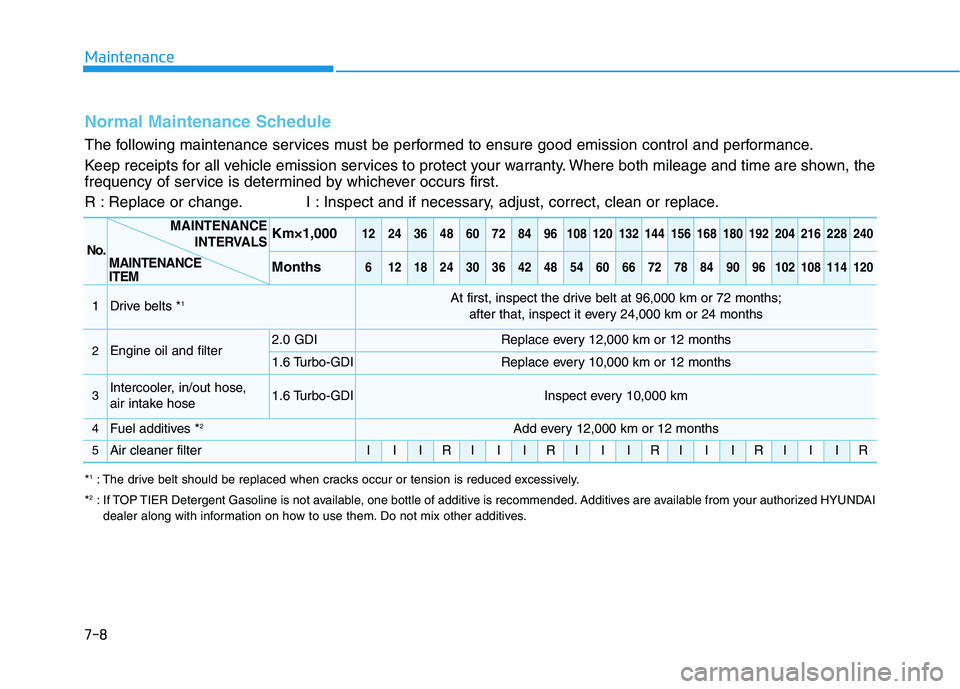
Normal Maintenance Schedule
The following maintenance services must be performed to ensure good emission control and performance.
Keep receipts for all vehicle emission services to protect your warranty. Where both mileage and time are shown, the
frequency of service is determined by whichever occurs first.
R : Replace or change. I : Inspect and if necessary, adjust, correct, clean or replace.
No.
Km×1,0001224364860728496108120132144156168180192204216228240
Months6121824303642485460667278849096102108114120
1Drive belts *1At first, inspect the drive belt at 96,000 km or 72 months;
after that, inspect it every 24,000 km or 24 months
2Engine oil and filter2.0 GDIReplace every 12,000 km or 12 months
1.6 Turbo-GDIReplace every 10,000 km or 12 months
3Intercooler, in/out hose,
air intake hose1.6 Turbo-GDIInspect every 10,000 km
4Fuel additives * 2Add every 12,000 km or 12 months
5Air cleaner filterIIIRIIIRIIIRIIIRIIIR
*
1
: The drive belt should be replaced when cracks occur or tension is reduced excessively.
* 2
: If TOP TIER Detergent Gasoline is not available, one bottle of additive is recommended. Additives are available from your authorized HYUNDAI
dealer along with information on how to use them. Do not mix other additives.
MAINTENANCE
INTERVALS
MAINTENANCE ITEM
Page 384 of 486
7-11
7
Maintenance
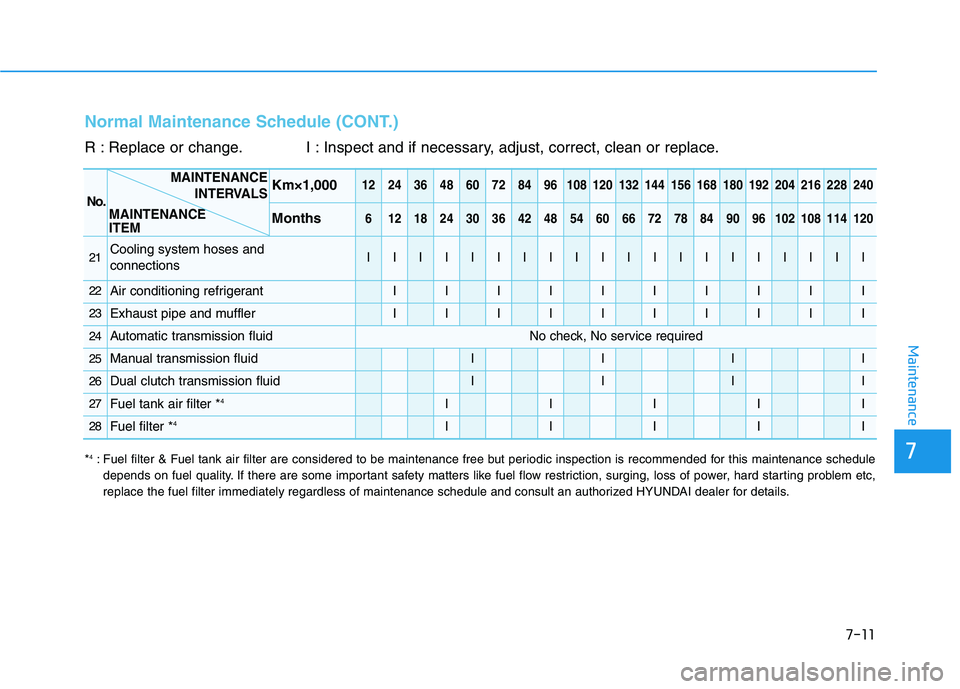
Normal Maintenance Schedule (CONT.)
R : Replace or change. I : Inspect and if necessary, adjust, correct, clean or replace.
No.
Km×1,0001224364860728496108120132144156168180192204216228240
Months6121824303642485460667278849096102108114120
21Cooling system hoses and connectionsIIIIIIIIIIIIIIIIIIII
22Air conditioning refrigerantIIIIIIIIII
23Exhaust pipe and mufflerIIIIIIIIII
24Automatic transmission fluidNo check, No service required
25Manual transmission fluidIIII
26Dual clutch transmission fluidIIII
27Fuel tank air filter *4IIIII
28Fuel filter *4IIIII
MAINTENANCE ITEM MAINTENANCE
INTERVALS
*4
: Fuel filter & Fuel tank air filter are considered to be maintenance free but periodic inspection is recommended for this maintenance schedule
depends on fuel quality. If there are some important safety matters like fuel flow restriction, surging, loss of power, hard starting problem etc,
replace the fuel filter immediately regardless of maintenance schedule and consult an authorized HYUNDAI dealer for details.
Page 386 of 486
7-13
7
Maintenance
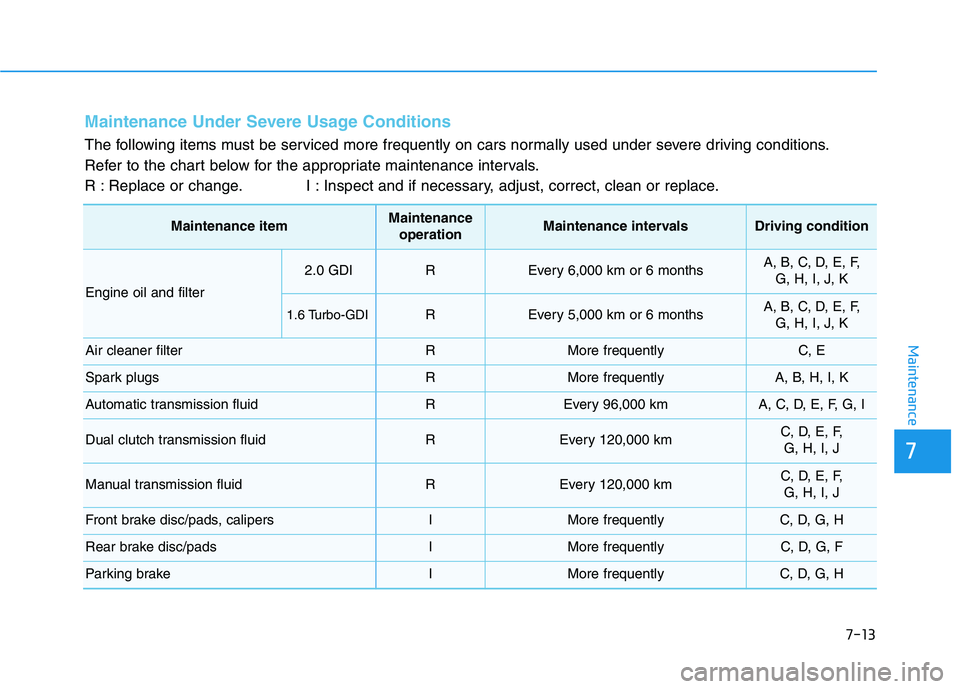
Maintenance Under Severe Usage Conditions
The following items must be serviced more frequently on cars normally used under severe driving conditions.
Refer to the chart below for the appropriate maintenance intervals.
R : Replace or change. I : Inspect and if necessary, adjust, correct, clean or replace.
Maintenance itemMaintenanceoperationMaintenance intervalsDriving condition
Engine oil and filter
2.0 GDIREvery 6,000 km or 6 monthsA, B, C, D, E, F, G, H, I, J, K
1.6 Turbo-GDIREvery 5,000 km or 6 monthsA, B, C, D, E, F, G, H, I, J, K
Air cleaner filterRMore frequentlyC, E
Spark plugsRMore frequentlyA, B, H, I, K
Automatic transmission fluidREvery 96,000 kmA, C, D, E, F, G, I
Dual clutch transmission fluidREvery 120,000 kmC, D, E, F, G, H, I, J
Manual transmission fluidREvery 120,000 kmC, D, E, F,G, H, I, J
Front brake disc/pads, calipersIMore frequentlyC, D, G, H
Rear brake disc/padsIMore frequentlyC, D, G, F
Parking brakeIMore frequentlyC, D, G, H