lock HYUNDAI ELANTRA GT 2020 Owner's Manual
[x] Cancel search | Manufacturer: HYUNDAI, Model Year: 2020, Model line: ELANTRA GT, Model: HYUNDAI ELANTRA GT 2020Pages: 495, PDF Size: 15.22 MB
Page 71 of 495
2-53
Safety system of your vehicle
2
You can take steps to help reduce
the risk of being injured by an inflat-
ing air bag. The greatest risk is sitting
too close to the air bag. An air bag
needs about 10 inches (25 cm) of
space to inflate. NHTSA recom-
mends that drivers allow at least 10
inches (25 cm) between the center of
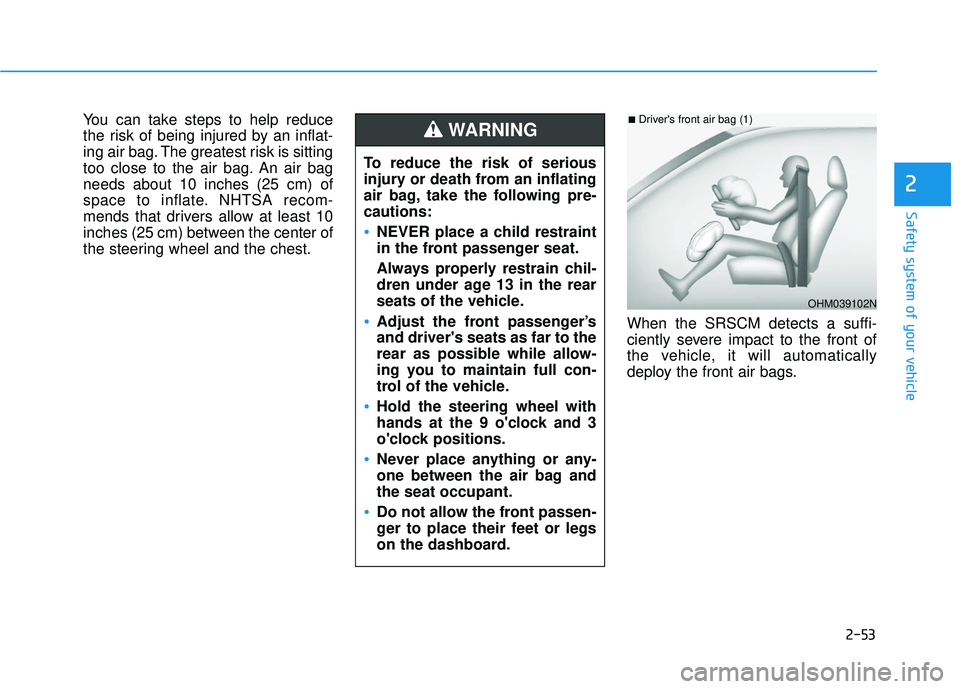
the steering wheel and the chest.When the SRSCM detects a suffi-
ciently severe impact to the front of
the vehicle, it will automatically
deploy the front air bags.
OHM039102N
■Driver's front air bag (1)
To reduce the risk of serious
injury or death from an inflating
air bag, take the following pre-
cautions:
NEVER place a child restraint
in the front passenger seat.
Always properly restrain chil-
dren under age 13 in the rear
seats of the vehicle.
Adjust the front passenger’s
and driver's seats as far to the
rear as possible while allow-
ing you to maintain full con-
trol of the vehicle.
Hold the steering wheel with
hands at the 9 o'clock and 3
o'clock positions.
Never place anything or any-
one between the air bag and
the seat occupant.
Do not allow the front passen-
ger to place their feet or legs
on the dashboard.
WARNING
Page 79 of 495
2-61
Safety system of your vehicle
2
Why Didn't My Air Bag Go Off
in a Collision?
Air bags are not designed to inflate in
every collision.There are certain
types of accidents in which the air bag
would not be expected to provide
additional protection. These include
rear impacts, second or third colli-
sions in multiple impact accidents, as
well as low speed impacts. Damage
to the vehicle indicates a collision
energy absorption, and is not an indi-
cator of whether or not an air bag
should have inflated.
Air bag collision sensors
NEVER place a rear-facing or
front-facing child restraint in
the front passenger's seat of
the vehicle.
An inflating frontal air bag
could forcefully strike a child
resulting in serious injury or
death.
Always properly restrain chil-
dren in an appropriate child
restraint in the rear seat of the
vehicle.
WARNING
To reduce the risk of an air bag
deploying unexpectedly and
causing serious injury or death:
Do not hit or allow any objects
to impact the locations where air
bags or sensors are installed.
(Continued)
WARNING
(Continued)
Do not perform maintenance
on or around the air bag sen-
sors. If the location or angle of
the sensors is altered, the air
bags may deploy when they
should not or may not deploy
when they should.
Do not install bumper guards
or replace the bumper with a
non-genuine HYUNDAI parts.
This may adversely affect the
collision and air bag deploy-
ment performance.
Place the ignition switch in
the LOCK/OFF or ACC posi-
tion when the vehicle is being
towed to prevent inadvertent
air bag deployment.
Have all air bag repairs conduct-
ed by an authorized HYUNDAI
dealer.
Page 86 of 495

Convenient features of your vehicle
Accessing Your Vehicle .........................................3-3
Remote Key........................................................................\
.3-3
Smart Key ........................................................................\
....3-6
Immobilizer System .........................................................3-11
Door Locks ............................................................3-12
Operating Door Locks from Outside the Vehicle ....3-12
Operating Door Locks from Inside the Vehicle .......3-13
Auto Door Lock/Unlock Features ...............................3-15
Child-Protector Rear Door Locks ...............................3-16
Theft-alarm System ............................................3-16
Steering Wheel .....................................................3-17
Electric Power Steering (EPS) .....................................3-17
Tilt Steering/Telescope Steering.................................3-18
Horn ........................................................................\
............3-18
Heated Steering Wheel ..................................................3-19
Mirrors ...................................................................3-19
Inside Rearview Mirror ..................................................3-19
Side View Mirrors ...........................................................3-31
Windows ................................................................3-34
Power Windows ...............................................................3-35
Panoramic Sunroof ..............................................3-38
Sunshade ........................................................................\
...3-39
Sliding the Sunroof .........................................................3-39
Tilting the Sunroof .........................................................3-40
Closing the Sunroof........................................................3-40
Resetting the Sunroof ...................................................3-41
Sunroof Open Warning ..................................................3-42
Exterior Features .................................................3-43
Hood ........................................................................\
...........3-43
Liftgate ........................................................................\
......3-44
Fuel Filler Door ................................................................3-46
Instrument Cluster ...............................................3-49
Instrument Cluster Control............................................3-50
Gauges and Meters ........................................................3-51
Transmission Shift Indicator .........................................3-54
Warning and Indicator Lights .......................................3-56
LCD Display Messages ...................................................3-67
LCD Display ...........................................................3-73
LCD Display Control ........................................................3-73
LCD Display Modes .........................................................3-74
Trip Computer .......................................................3-81
3
Page 87 of 495
Lighting..................................................................3-85
Exterior Lights .................................................................3-85
Interior Lights...................................................................3-91
Welcome System .............................................................3-94
Wipers and Washers ............................................3-95
Windshield Wipers...........................................................3-95
Windshield Washers .......................................................3-96
Rear Window Wiper and Washer ................................3-97
Driver Assist System ...........................................3-98
Rear View Monitor..........................................................3-98
Manual Climate Control System.........................3-99
Heating and Air Conditioning .....................................3-100
System Operation .........................................................3-104
System Maintenance....................................................3-106
Automatic Climate Control System ..................3-108
Automatic Heating and Air Conditioning.................3-109
Manual Heating and Air Conditioning......................3-110
System Operation .........................................................3-116
System Maintenance....................................................3-118
Windshield Defrosting and Defogging ............3-119
Auto Defogging System ..............................................3-122
Rear Window Defroster ..............................................3-123
Climate Control Additional Features ...............3-124
Cluster ionizer ................................................................3-124
Automatic Ventilation ...................................................3-124
Sunroof Inside Air Recirculation ...............................3-124
Storage Compartment .......................................3-125
Center Console Storage ..............................................3-125
Glove Box ........................................................................\
3-125
Sunglass Holder.............................................................3-126
Multi Box (with a cover) .............................................3-126
Interior Features ................................................3-127
Cup Holder ......................................................................3-\
127
Sliding Armrest ..............................................................3-128
Sunvisor ........................................................................\
...3-128
Power Outlet ..................................................................3-129
Wireless Cellular Phone Charging System..............3-130
Clock ........................................................................\
.........3-132
Clothes Hanger ..............................................................3-132
Floor Mat Anchor(s).....................................................3-133
Luggage Net Holder .....................................................3-134
Cargo Area Cover..........................................................3-134
3
Page 88 of 495
3-3
Convenient features of your vehicle
Remote Key (if equipped)
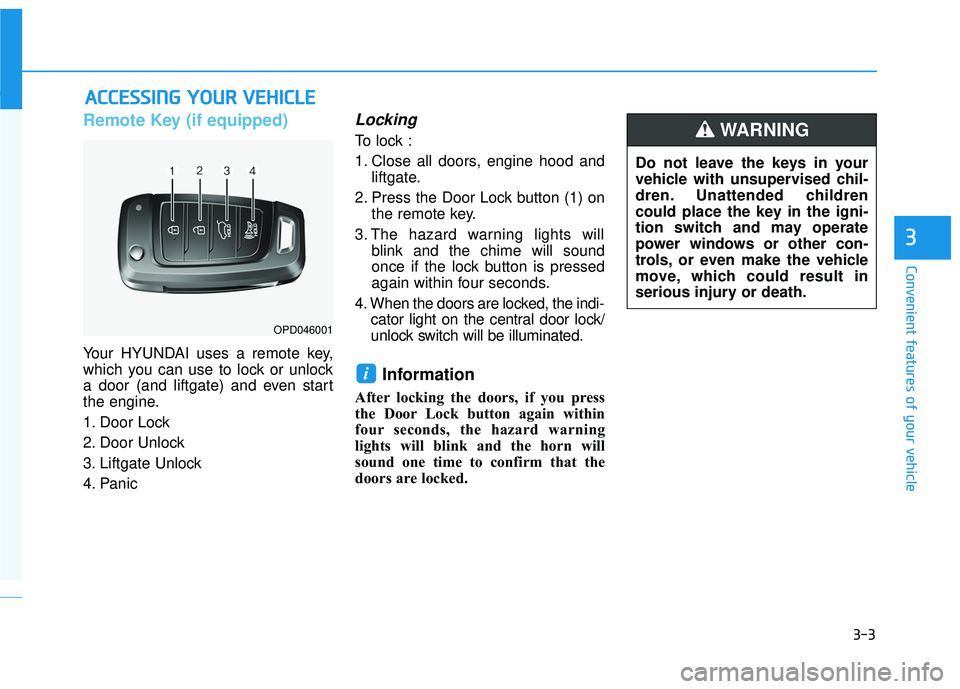
Your HYUNDAI uses a remote key,
which you can use to lock or unlock
a door (and liftgate) and even start
the engine.
1. Door Lock
2. Door Unlock
3. Liftgate Unlock
4. Panic
Locking
To lock :
1. Close all doors, engine hood andliftgate.
2. Press the Door Lock button (1) on the remote key.
3. The hazard warning lights will blink and the chime will sound
once if the lock button is pressed
again within four seconds.
4. When the doors are locked, the indi- cator light on the central door lock/
unlock switch will be illuminated.
Information
After locking the doors, if you press
the Door Lock button again within
four seconds, the hazard warning
lights will blink and the horn will
sound one time to confirm that the
doors are locked.
i
A AC
CC
CE
E S
SS
SI
IN
N G
G
Y
Y O
O U
UR
R
V
V E
EH
H I
IC
C L
LE
E
3
OPD046001
Do not leave the keys in your
vehicle with unsupervised chil-
dren. Unattended children
could place the key in the igni-
tion switch and may operate
power windows or other con-
trols, or even make the vehicle
move, which could result in
serious injury or death.
WARNING
Page 89 of 495
3-4
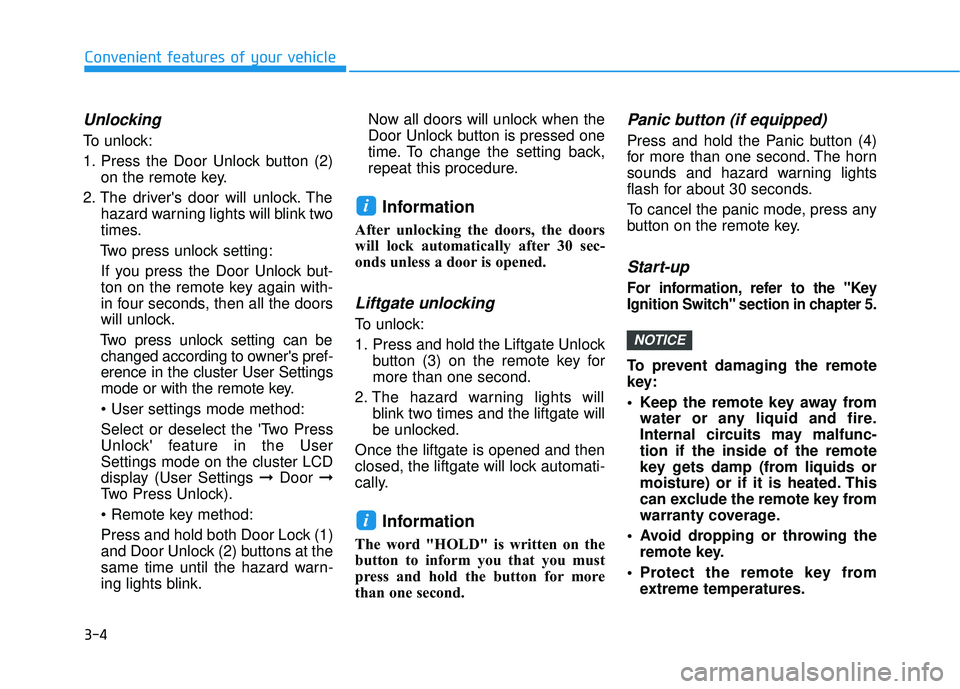
Unlocking
To unlock:
1. Press the Door Unlock button (2)on the remote key.
2. The driver's door will unlock. The hazard warning lights will blink two
times.
Two press unlock setting: If you press the Door Unlock but-
ton on the remote key again with-
in four seconds, then all the doors
will unlock.
Two press unlock setting can be changed according to owner's pref-
erence in the cluster User Settings
mode or with the remote key.
• User settings mode method:
Select or deselect the 'Two Press
Unlock' feature in the User
Settings mode on the cluster LCD
display (User Settings ➞ Door ➞
Two Press Unlock).
Press and hold both Door Lock (1)
and Door Unlock (2) buttons at the
same time until the hazard warn-
ing lights blink. Now all doors will unlock when the
Door Unlock button is pressed one
time. To change the setting back,
repeat this procedure.
Information
After unlocking the doors, the doors
will lock automatically after 30 sec-
onds unless a door is opened.
Liftgate unlocking
To unlock:
1. Press and hold the Liftgate Unlock
button (3) on the remote key for
more than one second.
2. The hazard warning lights will blink two times and the liftgate will
be unlocked.
Once the liftgate is opened and then
closed, the liftgate will lock automati-
cally.
Information
The word "HOLD" is written on the
button to inform you that you must
press and hold the button for more
than one second.
Panic button (if equipped)
Press and hold the Panic button (4)
for more than one second. The horn
sounds and hazard warning lights
flash for about 30 seconds.
To cancel the panic mode, press any
button on the remote key.
Start-up
For information, refer to the "Key
Ignition Switch" section in chapter 5.
To prevent damaging the remote
key:
• Keep the remote key away from water or any liquid and fire.
Internal circuits may malfunc-
tion if the inside of the remote
key gets damp (from liquids or
moisture) or if it is heated. This
can exclude the remote key from
warranty coverage.
Avoid dropping or throwing the remote key.
Protect the remote key from extreme temperatures.
NOTICE
i
i
Convenient features of your vehicle
Page 90 of 495
3-5
Convenient features of your vehicle
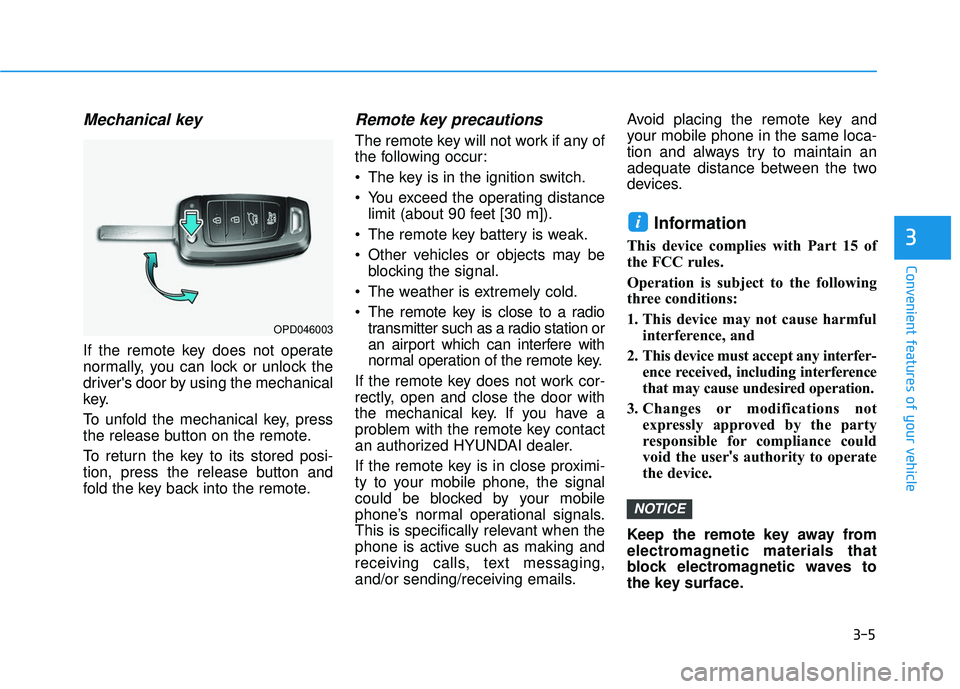
Mechanical key
If the remote key does not operate
normally, you can lock or unlock the
driver's door by using the mechanical
key.
To unfold the mechanical key, press
the release button on the remote.
To return the key to its stored posi-
tion, press the release button and
fold the key back into the remote.
Remote key precautions
The remote key will not work if any of
the following occur:
The key is in the ignition switch.
You exceed the operating distancelimit (about 90 feet [30 m]).
The remote key battery is weak.
Other vehicles or objects may be blocking the signal.
The weather is extremely cold.
The remote key is close to a radio transmitter such as a radio station or
an airport which can interfere with
normal operation of the remote key.
If the remote key does not work cor-
rectly, open and close the door with
the mechanical key. If you have a
problem with the remote key contact
an authorized HYUNDAI dealer.
If the remote key is in close proximi-
ty to your mobile phone, the signal
could be blocked by your mobile
phone’s normal operational signals.
This is specifically relevant when the
phone is active such as making and
receiving calls, text messaging,
and/or sending/receiving emails. Avoid placing the remote key and
your mobile phone in the same loca-
tion and always try to maintain an
adequate distance between the two
devices.
Information
This device complies with Part 15 of
the FCC rules.
Operation is subject to the following
three conditions:
1. This device may not cause harmful
interference, and
2. This device must accept any interfer- ence received, including interference
that may cause undesired operation.
3. Changes or modifications not expressly approved by the party
responsible for compliance could
void the user's authority to operate
the device.
Keep the remote key away from
electromagnetic materials that
block electromagnetic waves to
the key surface.
NOTICE
i
3
OPD046003
Page 91 of 495
3-6
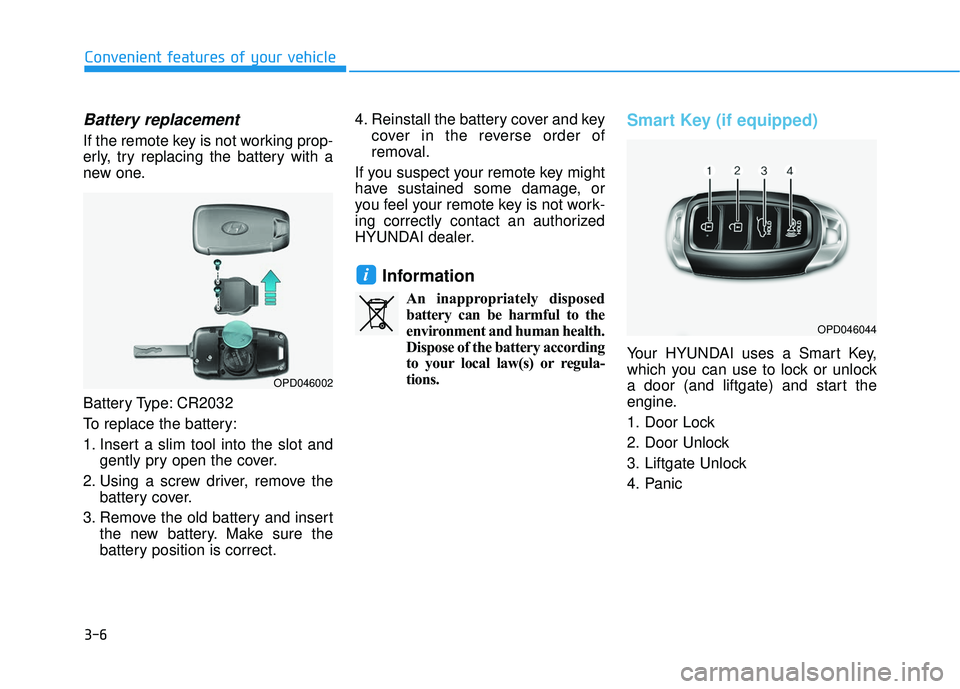
Battery replacement
If the remote key is not working prop-
erly, try replacing the battery with a
new one.
Battery Type: CR2032
To replace the battery:
1. Insert a slim tool into the slot andgently pry open the cover.
2. Using a screw driver, remove the battery cover.
3. Remove the old battery and insert the new battery. Make sure the
battery position is correct. 4. Reinstall the battery cover and key
cover in the reverse order of
removal.
If you suspect your remote key might
have sustained some damage, or
you feel your remote key is not work-
ing correctly contact an authorized
HYUNDAI dealer.
Information
An inappropriately disposed battery can be harmful to the
environment and human health.
Dispose of the battery according
to your local law(s) or regula-
tions.
Smart Key (if equipped)
Your HYUNDAI uses a Smart Key,
which you can use to lock or unlock
a door (and liftgate) and start the
engine.
1. Door Lock
2. Door Unlock
3. Liftgate Unlock
4. Panic
i
Convenient features of your vehicle
OPD046044
OPD046002
Page 92 of 495
3-7
Convenient features of your vehicle
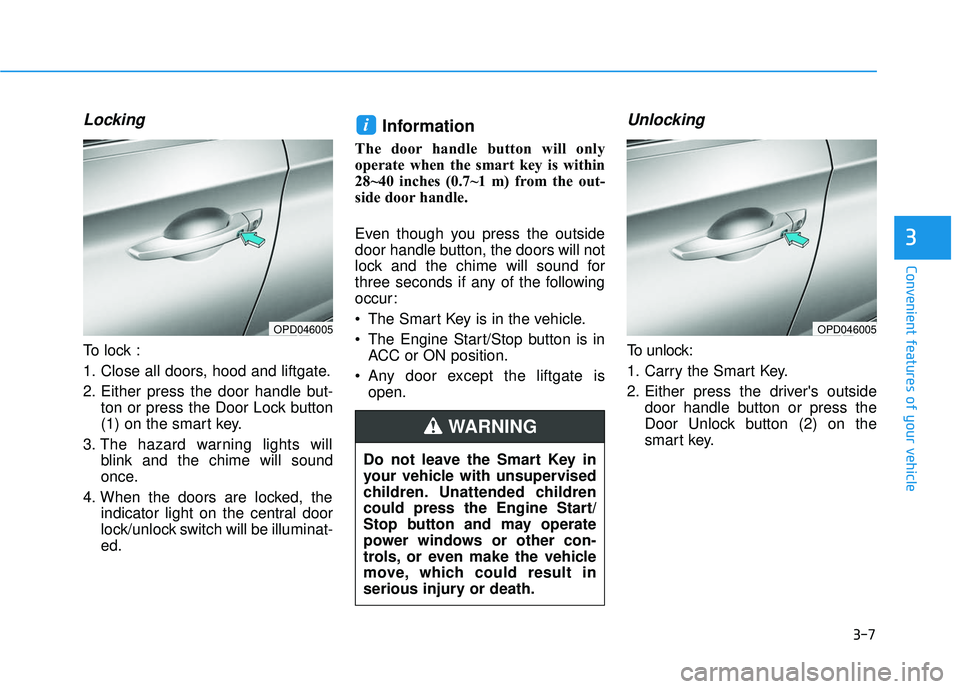
Locking
To lock :
1. Close all doors, hood and liftgate.
2. Either press the door handle but-ton or press the Door Lock button
(1) on the smart key.
3. The hazard warning lights will blink and the chime will sound
once.
4. When the doors are locked, the indicator light on the central door
lock/unlock switch will be illuminat-
ed.
Information
The door handle button will only
operate when the smart key is within
28~40 inches (0.7~1 m) from the out-
side door handle.
Even though you press the outside
door handle button, the doors will not
lock and the chime will sound for
three seconds if any of the following
occur:
The Smart Key is in the vehicle.
The Engine Start/Stop button is inACC or ON position.
Any door except the liftgate is open.
Unlocking
To unlock:
1. Carry the Smart Key.
2. Either press the driver's outside door handle button or press the
Door Unlock button (2) on the
smart key.
i
3
OPD046005OPD046005
Do not leave the Smart Key in
your vehicle with unsupervised
children. Unattended children
could press the Engine Start/
Stop button and may operate
power windows or other con-
trols, or even make the vehicle
move, which could result in
serious injury or death.
WARNING
Page 93 of 495
3-8
Convenient features of your vehicle
3. The driver's door will unlock. The hazard warning lights will blink two
times.
Two press unlock setting: If you press the driver's outside
door handle button or Door Unlock
button on the smart key again
within four seconds, then all the
doors will unlock.
Two press unlock setting can be changed according to owner's
preference in the cluster User
Settings mode or with the smart
key.
Select or deselect the 'Two Press
Unlock' feature in the User
Settings mode on the cluster LCD
display (User Settings ➞ Door ➞
Two Press Unlock).
Press and hold both Door Lock (1)
and Door Unlock (2) buttons at the
same time until the hazard warn-
ing lights blink. Now all doors will
unlock when the Door Unlock but-
ton is pressed one time.
To change the setting back, repeat this procedure.
Information
• The door handle button will only
operate when the smart key is with-
in 28~40 inches (0.7~1 m) from the
outside door handle and other peo-
ple can also open the doors.
• If you press the front passenger's outside door handle, while carrying
the Smart Key, all doors will unlock.
• After unlocking the doors, the doors will lock automatically after 30 sec-
onds unless a door is opened.
• Either the driver or front passenger door can be opened with the door
handle button when the smart key is
within this range.
Liftgate unlocking
To unlock:
1. Carry the smart key.
2. Either press the liftgate handle button or press and hold the
Liftgate Unlock button (3) on the
smart key for more than one sec-
ond.
3. The hazard warning lights will blink two times.
Information
• The liftgate handle button will onlyoperate when the smart key is with-
in 28 inches (0.7 m) from the liftgate
handle.
• The Liftgate Unlock button (3) will only unlock the liftgate. It will not
release the latch and open the lift-
gate automatically. If the Liftgate
Unlock button is used, someone
must still press the liftgate handle
button to open the liftgate.
i
i