warning HYUNDAI ELANTRA GT 2020 Manual PDF
[x] Cancel search | Manufacturer: HYUNDAI, Model Year: 2020, Model line: ELANTRA GT, Model: HYUNDAI ELANTRA GT 2020Pages: 495, PDF Size: 15.22 MB
Page 122 of 495
3-37
Convenient features of your vehicle
3
Information
The automatic reverse feature is only
active when the "Auto Up" feature is
used by fully pulling up the switch to
the second detent.
Do not install any accessories on
the windows. The automatic reverse
feature may not operate.
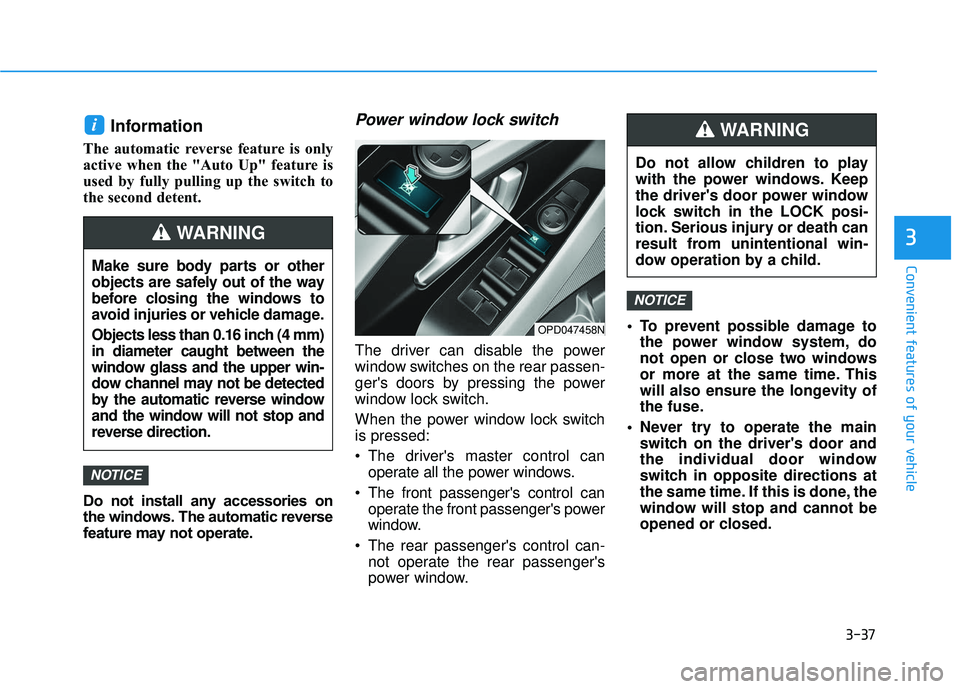
Power window lock switch
The driver can disable the power
window switches on the rear passen-
ger's doors by pressing the power
window lock switch.
When the power window lock switch
is pressed:
The driver's master control canoperate all the power windows.
The front passenger's control can operate the front passenger's power
window.
The rear passenger's control can- not operate the rear passenger's
power window. To prevent possible damage to
the power window system, do
not open or close two windows
or more at the same time. This
will also ensure the longevity of
the fuse.
Never try to operate the main switch on the driver's door and
the individual door window
switch in opposite directions at
the same time. If this is done, the
window will stop and cannot be
opened or closed.
NOTICE
NOTICE
i
OPD047458N
Do not allow children to play
with the power windows. Keep
the driver's door power window
lock switch in the LOCK posi-
tion. Serious injury or death can
result from unintentional win-
dow operation by a child.
WARNING
Make sure body parts or other
objects are safely out of the way
before closing the windows to
avoid injuries or vehicle damage.
Objects less than 0.16 inch (4 mm)
in diameter caught between the
window glass and the upper win-
dow channel may not be detected
by the automatic reverse window
and the window will not stop and
reverse direction.
WARNING
Page 123 of 495
3-38
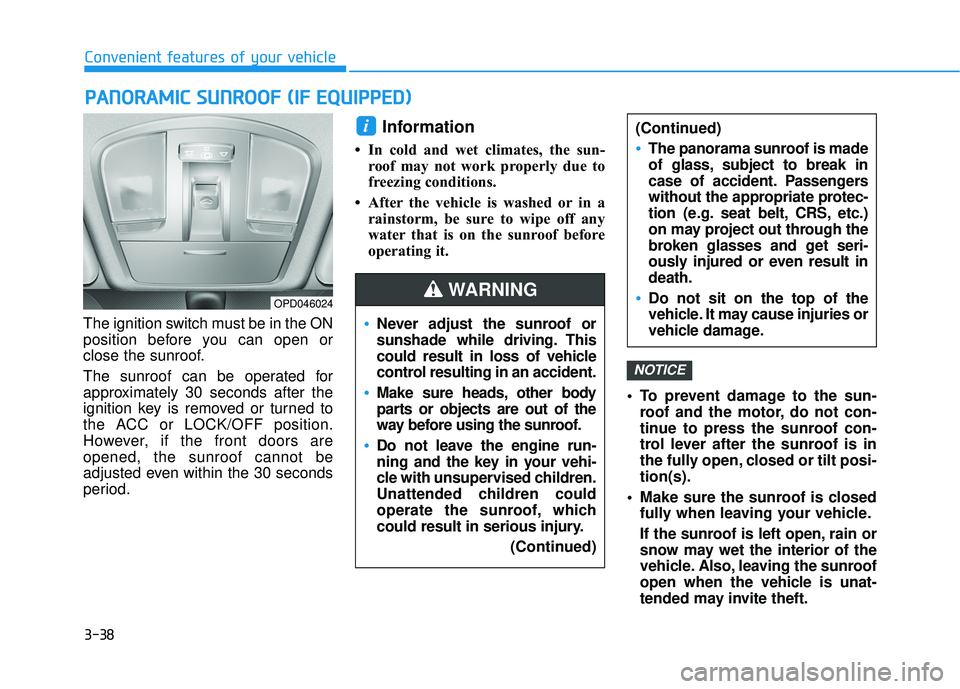
The ignition switch must be in the ON
position before you can open or
close the sunroof.
The sunroof can be operated for
approximately 30 seconds after the
ignition key is removed or turned to
the ACC or LOCK/OFF position.
However, if the front doors are
opened, the sunroof cannot be
adjusted even within the 30 seconds
period.
Information
• In cold and wet climates, the sun-roof may not work properly due to
freezing conditions.
• After the vehicle is washed or in a rainstorm, be sure to wipe off any
water that is on the sunroof before
operating it.
To prevent damage to the sun-roof and the motor, do not con-
tinue to press the sunroof con-
trol lever after the sunroof is in
the fully open, closed or tilt posi-
tion(s).
Make sure the sunroof is closed fully when leaving your vehicle.
If the sunroof is left open, rain or
snow may wet the interior of the
vehicle. Also, leaving the sunroof
open when the vehicle is unat-
tended may invite theft.
NOTICE
i
P PA
A N
N O
O R
RA
A M
M I
IC
C
S
S U
U N
NR
RO
O O
OF
F
(
( I
IF
F
E
E Q
Q U
UI
IP
P P
PE
ED
D )
)
Convenient features of your vehicle
OPD046024
Never adjust the sunroof or
sunshade while driving. This
could result in loss of vehicle
control resulting in an accident.
Make sure heads, other body
parts or objects are out of the
way before using the sunroof.
Do not leave the engine run-
ning and the key in your vehi-
cle with unsupervised children.
Unattended children could
operate the sunroof, which
could result in serious injury.
(Continued)
WARNING
(Continued)
The panorama sunroof is made
of glass, subject to break in
case of accident. Passengers
without the appropriate protec-
tion (e.g. seat belt, CRS, etc.)
on may project out through the
broken glasses and get seri-
ously injured or even result in
death.
Do not sit on the top of the
vehicle. It may cause injuries or
vehicle damage.
Page 127 of 495
3-42
Sunroof Open Warning
(if equipped)
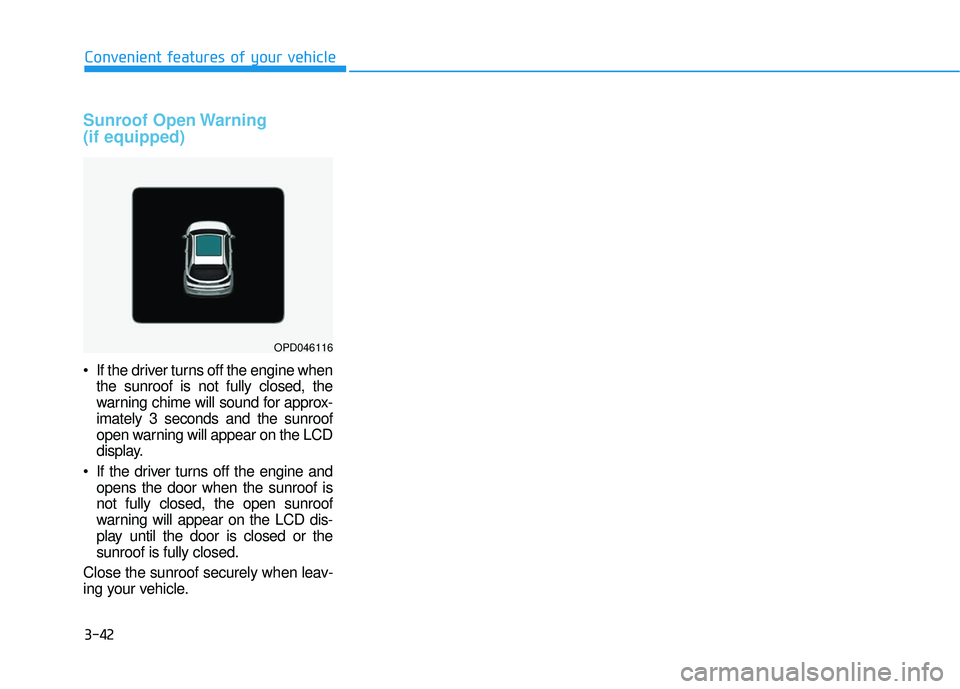
If the driver turns off the engine whenthe sunroof is not fully closed, the
warning chime will sound for approx-
imately 3 seconds and the sunroof
open warning will appear on the LCD
display.
If the driver turns off the engine and opens the door when the sunroof is
not fully closed, the open sunroof
warning will appear on the LCD dis-
play until the door is closed or the
sunroof is fully closed.
Close the sunroof securely when leav-
ing your vehicle.
Convenient features of your vehicle
OPD046116
Page 128 of 495
3-43
Convenient features of your vehicle
Hood
Opening the hood
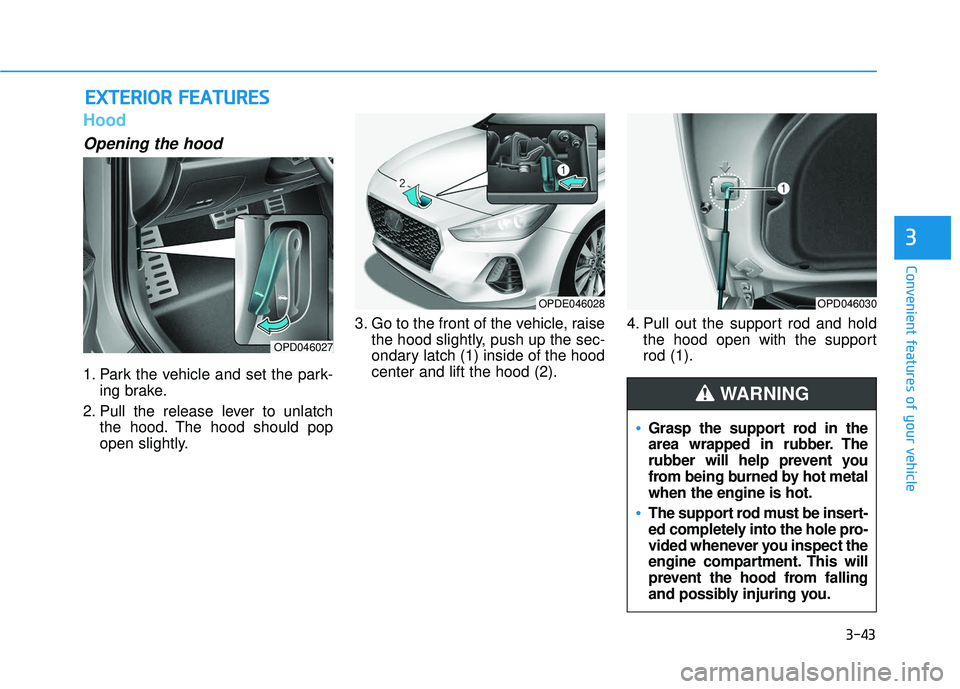
1. Park the vehicle and set the park-ing brake.
2. Pull the release lever to unlatch the hood. The hood should pop
open slightly. 3. Go to the front of the vehicle, raise
the hood slightly, push up the sec-
ondary latch (1) inside of the hood
center and lift the hood (2). 4. Pull out the support rod and hold
the hood open with the support
rod (1).
E EX
X T
TE
ER
R I
IO
O R
R
F
F E
E A
A T
TU
U R
RE
ES
S
3
Grasp the support rod in the
area wrapped in rubber. The
rubber will help prevent you
from being burned by hot metal
when the engine is hot.
The support rod must be insert-
ed completely into the hole pro-
vided whenever you inspect the
engine compartment. This will
prevent the hood from falling
and possibly injuring you.
WARNING
OPD046027
OPDE046028OPD046030
Page 129 of 495
3-44
Convenient features of your vehicle
Closing the hood
1. Before closing the hood, check thefollowing:
ment must be correctly installed.
bustible material must be
removed from the engine com-
partment.
2. Lower the hood halfway (lifted approximately 12 inches (30 cm)
from the closed position) and push
down to securely lock in place.
Then double check to be sure the
hood is secure. If the hood can be
raised slightly, it is not securely
locked. Open it again and close it
with more force.
Liftgate
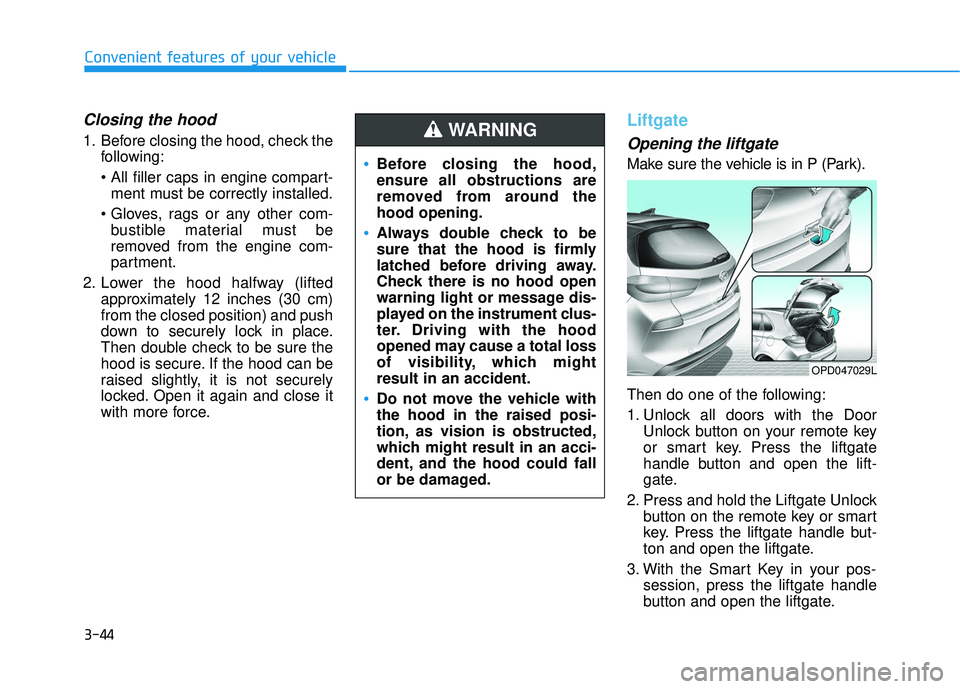
Opening the liftgate
Make sure the vehicle is in P (Park).
Then do one of the following:
1. Unlock all doors with the DoorUnlock button on your remote key
or smart key. Press the liftgate
handle button and open the lift-
gate.
2. Press and hold the Liftgate Unlock button on the remote key or smart
key. Press the liftgate handle but-
ton and open the liftgate.
3. With the Smart Key in your pos- session, press the liftgate handle
button and open the liftgate.Before closing the hood,
ensure all obstructions are
removed from around the
hood opening.
Always double check to be
sure that the hood is firmly
latched before driving away.
Check there is no hood open
warning light or message dis-
played on the instrument clus-
ter. Driving with the hood
opened may cause a total loss
of visibility, which might
result in an accident.
Do not move the vehicle with
the hood in the raised posi-
tion, as vision is obstructed,
which might result in an acci-
dent, and the hood could fall
or be damaged.
WARNING
OPD047029L
Page 130 of 495
3-45
Convenient features of your vehicle
3
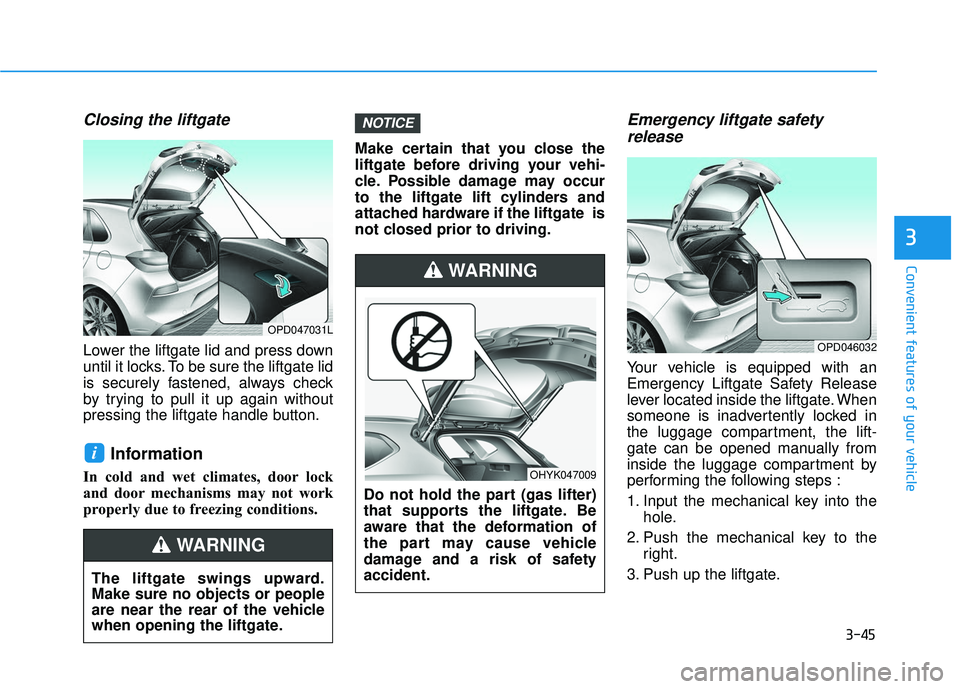
Closing the liftgate
Lower the liftgate lid and press down
until it locks. To be sure the liftgate lid
is securely fastened, always check
by trying to pull it up again without
pressing the liftgate handle button.
Information
In cold and wet climates, door lock
and door mechanisms may not work
properly due to freezing conditions.Make certain that you close the
liftgate before driving your vehi-
cle. Possible damage may occur
to the liftgate lift cylinders and
attached hardware if the liftgate is
not closed prior to driving.
Emergency liftgate safety
release
Your vehicle is equipped with an
Emergency Liftgate Safety Release
lever located inside the liftgate. When
someone is inadvertently locked in
the luggage compartment, the lift-
gate can be opened manually from
inside the luggage compartment by
performing the following steps :
1. Input the mechanical key into the
hole.
2. Push the mechanical key to the right.
3. Push up the liftgate.
NOTICE
i
OPD047031L
The liftgate swings upward.
Make sure no objects or people
are near the rear of the vehicle
when opening the liftgate.
WARNING
Do not hold the part (gas lifter)
that supports the liftgate. Be
aware that the deformation of
the part may cause vehicle
damage and a risk of safety
accident.
WARNING
OHYK047009
OPD046032
Page 131 of 495
3-46
Convenient features of your vehicle
Fuel Filler Door
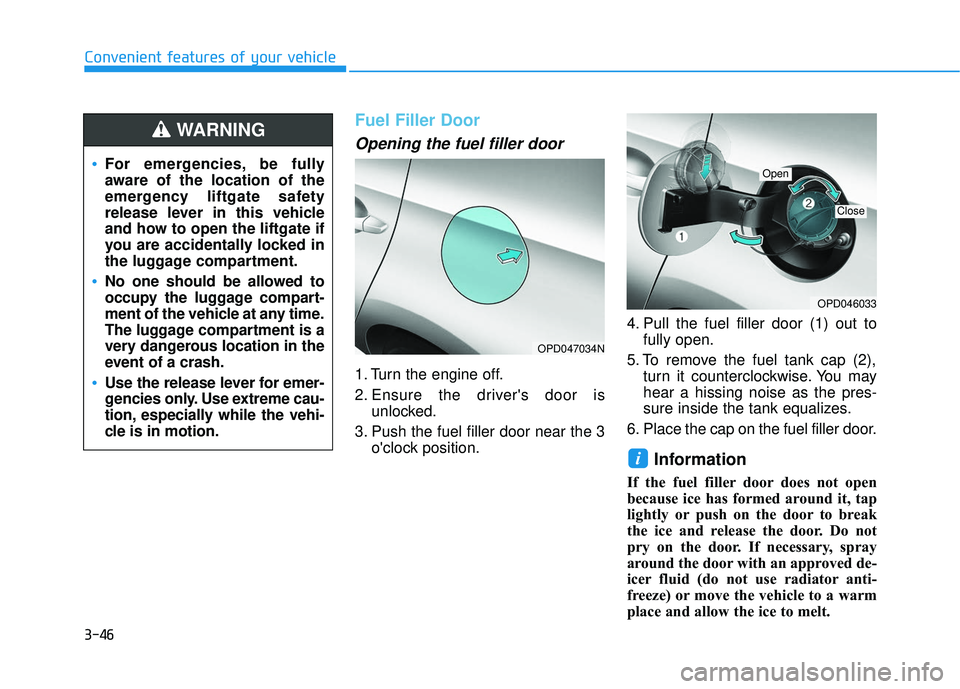
Opening the fuel filler door
1. Turn the engine off.
2. Ensure the driver's door isunlocked.
3. Push the fuel filler door near the 3 o'clock position. 4. Pull the fuel filler door (1) out to
fully open.
5. To remove the fuel tank cap (2), turn it counterclockwise. You may
hear a hissing noise as the pres-
sure inside the tank equalizes.
6. Place the cap on the fuel filler door.
Information
If the fuel filler door does not open
because ice has formed around it, tap
lightly or push on the door to break
the ice and release the door. Do not
pry on the door. If necessary, spray
around the door with an approved de-
icer fluid (do not use radiator anti-
freeze) or move the vehicle to a warm
place and allow the ice to melt.
i
OPD047034N
OPD046033
Open
Close
For emergencies, be fully
aware of the location of the
emergency liftgate safety
release lever in this vehicle
and how to open the liftgate if
you are accidentally locked in
the luggage compartment.
No one should be allowed to
occupy the luggage compart-
ment of the vehicle at any time.
The luggage compartment is a
very dangerous location in the
event of a crash.
Use the release lever for emer-
gencies only. Use extreme cau-
tion, especially while the vehi-
cle is in motion.
WARNING
Page 132 of 495
3-47
Convenient features of your vehicle
3
Closing the fuel filler door
1. To install the fuel tank cap, turn itclockwise until it "clicks" one time.
2. Close the fuel filler door until it is latched securely.
Information
The fuel filler door will not close if the
driver's door is locked. If you lock the
driver's door while fueling, unlock it
before closing the fuel filler door.
i
Gasoline is highly flammable
and explosive. Failure to follow
these guidelines may result in
SERIOUS INJURY or DEATH:
Read and follow all warnings
posted at the gas station.
Before refueling, note the
location of the Emergency
Gasoline Shut-Off, if available,
at the gas station.
Before touching the fuel noz-
zle, you should eliminate the
potential build-up of static
electricity by touching a metal
part of the vehicle, a safe dis-
tance away from the fuel filler
neck, nozzle, or other gas
source, with your bare hand.
Do not use cellular phones
while refueling. Electric cur-
rent and/or electronic interfer-
ence from cellular phones can
potentially ignite fuel vapors
and cause a fire.
(Continued)
WARNING (Continued)
Do not get back into a vehicle
once you have begun refuel-
ing. You can generate a build-
up of static electricity by
touching, rubbing or sliding
against any item or fabric
capable of producing static
electricity. Static electricity
discharge can ignite fuel
vapors causing a fire. If you
must re-enter the vehicle, you
should once again eliminate
potentially dangerous static
electricity discharge by touch-
ing a metal part of the vehicle,
away from the fuel filler neck,
nozzle or other gasoline
source, with your bare hand.
When using an approved
portable fuel container, be
sure to place the container on
the ground prior to refueling.
Static electricity discharge
from the container can ignite
fuel vapors causing a fire.(Continued)
Page 134 of 495
3-49
Convenient features of your vehicle
I
IN
N S
ST
T R
R U
U M
M E
EN
N T
T
C
C L
LU
U S
ST
T E
ER
R
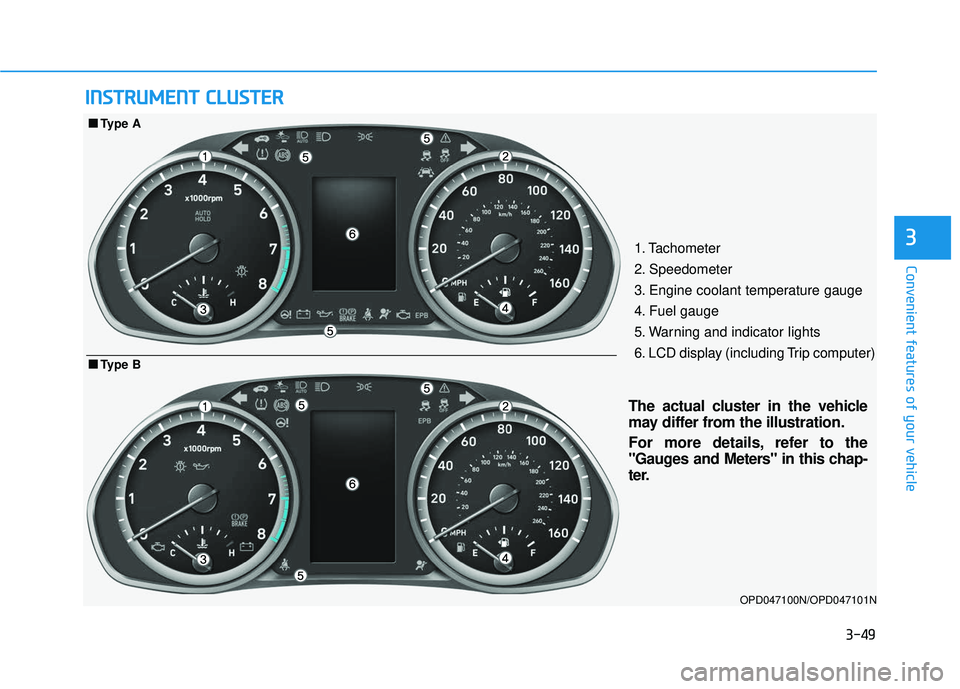
31. Tachometer
2. Speedometer
3. Engine coolant temperature gauge
4. Fuel gauge
5. Warning and indicator lights
6. LCD display (including Trip computer)
OPD047100N/OPD047101N
■
■
Type B
■
■Type A
The actual cluster in the vehicle
may differ from the illustration.
For more details, refer to the
"Gauges and Meters" in this chap-
ter.
Page 135 of 495
3-50
Convenient features of your vehicle
Instrument Cluster Control
Adjusting instrument clusterillumination
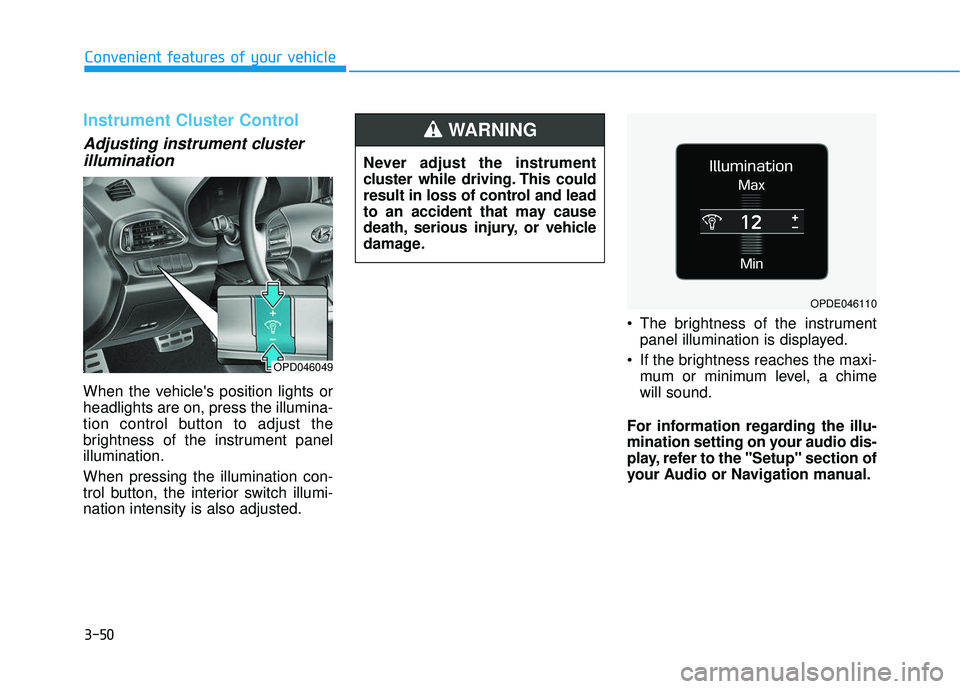
When the vehicle's position lights or
headlights are on, press the illumina-
tion control button to adjust the
brightness of the instrument panel
illumination.
When pressing the illumination con-
trol button, the interior switch illumi-
nation intensity is also adjusted. The brightness of the instrument
panel illumination is displayed.
If the brightness reaches the maxi- mum or minimum level, a chime
will sound.
For information regarding the illu-
mination setting on your audio dis-
play, refer to the "Setup" section of
your Audio or Navigation manual.
Never adjust the instrument
cluster while driving. This could
result in loss of control and lead
to an accident that may cause
death, serious injury, or vehicle
damage.
WARNING
OPD046049
OPDE046110