cruise control HYUNDAI ELANTRA HYBRID 2022 Owner's Guide
[x] Cancel search | Manufacturer: HYUNDAI, Model Year: 2022, Model line: ELANTRA HYBRID, Model: HYUNDAI ELANTRA HYBRID 2022Pages: 529, PDF Size: 38.79 MB
Page 379 of 529
Driver Assistance System
7-82
Navigation-based Smart Cruise Control
can help drive at a certain speed
according to the road conditions when
driving on highways (or motorways)
by using road information from the
navigation system while Smart Cruise
Control is operating.
Information
• Navigation-based Smart Cruise Control
is available only on controlled access
road of certain highways.
à Controlled access road indicates
roads with limited entrances and exits that allow uninterrupted high
speed traffic flow. Only passenger
cars are allowed on controlled access
roads.
Available highway (Controlled access road)
USA Select Interstate Highway
and U.S. (Federal) and State Highways
Canada Select Provincial and Territorial
Highways
• Additional highways may be expanded
by future navigation updates.
Information
Navigation-based Smart Cruise Control
operates on main roads of highways,
and does not operate on interchanges or junctions.
Highway Curve Zone Auto Slowdown
If vehicle speed is high, Highway Curve
Zone Auto Slowdown function can
temporarily decelerate your vehicle
or limit acceleration to help you drive
safely on a curve based on the curve
information from the navigation. Highway Set Speed Auto Change
Highway Set Speed Auto Change
function automatically changes Smart
Cruise Control set speed based on
the speed limit information from the
navigation.
Navigation-Based Smart Cruise
Control Settings
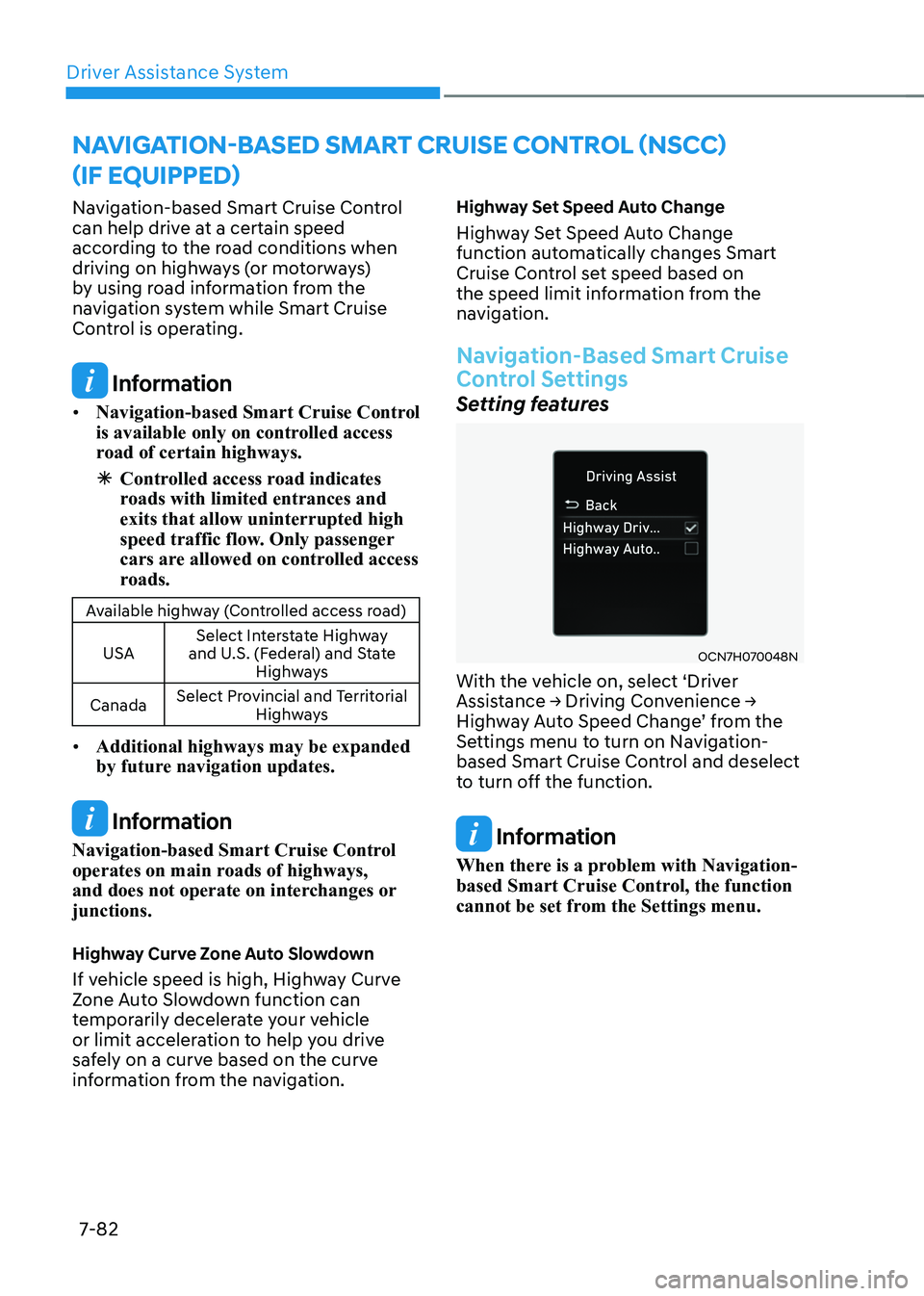
Setting features
OCN7H070048N
With the vehicle on, select ‘Driver
Assistance → Driving Convenience →
Highway Auto Speed Change’ from the
Settings menu to turn on Navigation-
based Smart Cruise Control and deselect
to turn off the function.
Information
When there is a problem with Navigation-
based Smart Cruise Control, the function
cannot be set from the Settings menu.
navigation-Based smart Cruise Control (nsCC)
(iF equipped)
Page 380 of 529
07
7-83
Navigation-Based Smart Cruise
Control Operation
Operating conditions
Navigation-based Smart Cruise Control
is ready to operate if all of the following
conditions are satisfied: • Smart Cruise Control is operating
• Driving on main roads of highways
Information
For more details on how to operate Smart
Cruise Control, refer to “Smart Cruise
Control (SCC)” section in chapter 7.
System display and control
When Navigation-based Smart Cruise
Control operates, it will be displayed on
the cluster as follows:
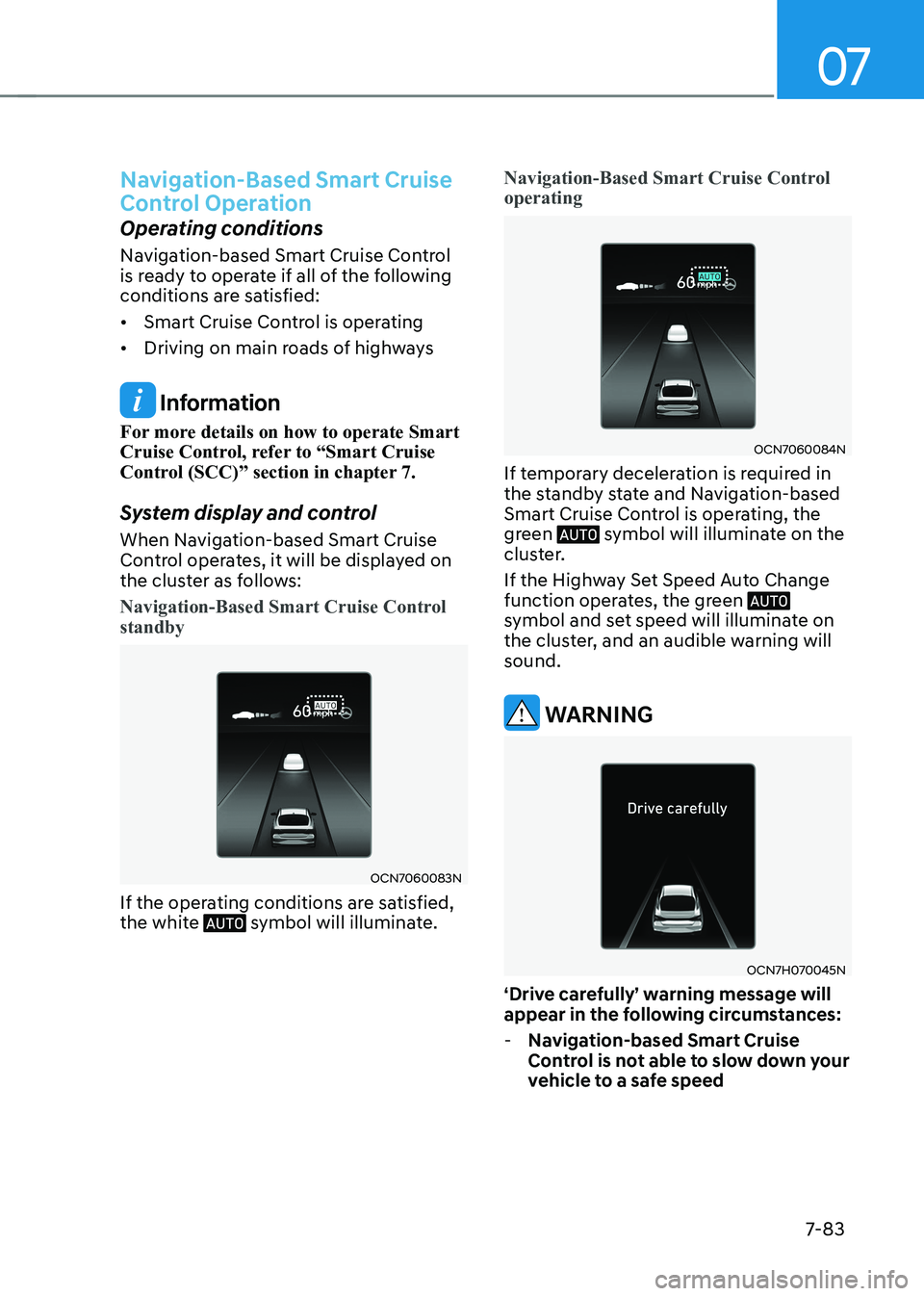
Navigation-Based Smart Cruise Control standby
OCN7060083N
If the operating conditions are satisfied,
the white
symbol will illuminate.
Navigation-Based Smart Cruise Control operating
OCN7060084N
If temporary deceleration is required in
the standby state and Navigation-based
Smart Cruise Control is operating, the
green
symbol will illuminate on the
cluster.
If the Highway Set Speed Auto Change
function operates, the green
symbol and set speed will illuminate on
the cluster, and an audible warning will sound.
WARNINg
OCN7H070045N
‘Drive carefully’ warning message will
appear in the following circumstances:
- Navigation-based Smart Cruise
Control is not able to slow down your
vehicle to a safe speed
Page 381 of 529
Driver Assistance System
7-84
Information
Highway Curve Zone Auto Slowdown and
Highway Set Speed Auto Change function uses the same
symbol.
Highway Curve Zone Auto Slowdown
• Depending on the curve ahead on the
highway, the vehicle will decelerate,
and after passing the curve, the
vehicle will accelerate to Smart Cruise
Control set speed.
• Vehicle deceleration time may differ
depending on the vehicle speed
and the degree of the curve on the
road. The higher the driving speed,
deceleration will start faster.
Highway Set Speed Auto Change
• Highway Set Speed Auto Change
function will operate when Smart
Cruise Control set speed and the
highway speed limit is matched.
• While Highway Set Speed Auto
Change function is operating, when
the highway speed limit changes,
Smart Cruise Control set speed
automatically changes to the changed speed limit.
• If Smart Cruise Control set speed is
adjusted different from the speed
limit, Highway Set Speed Auto Change
function will be in the standby state.
• If Highway Set Speed Auto Change
function has changed to the standby
state by driving on a road other than
the highway main road, Highway Set
Speed Auto Change function will
operate again when you drive on the
main road again without setting the
set speed. •
If Highway Set Speed Auto Change
function has changed to the standby
state by depressing the brake pedal
or pressing the
switch on the
steering wheel, press the switch
to restart the function.
• Highway Set Speed Auto Change
function does not operate on highway
interchanges or junctions.
Information
• Highway Set Speed Auto Change function only operates based on the
speed limits of the highway, it does not work with speed cameras.
• When Highway Set Speed Auto Change function is operating, the vehicle
automatically accelerates or decelerates when the highway speed limit changes.
• The maximum set speed for Highway
Set Speed Auto Change function is 140 km/h (86 mph).
• If the speed limit of a new road is not updated in the navigation, Highway Set
Speed Auto Change function may not
operate properly.
• If the speed unit is set to a unit other
than the speed unit used in your
country, Highway Set Speed Auto Change function may not operate
properly.
Page 382 of 529
07
7-85
Limitations of Navigation-Based
Smart Cruise Control
Navigation-based Smart Cruise Control
may not operate properly under the
following circumstances: •
The navigation is not working properly
• Speed limit and road information in
the navigation is not updated
• The map information and the actual
road is different because of real-time
GPS data or map information error
• The navigation searches for a route while driving
• GPS signals are blocked in areas such as a tunnel
• The navigation is updated while driving
• Map information is not transmitted
due to infotainment system's
abnormal operation
• A road that divides into two or more
roads and joins again
• The driver goes off course the route
set in the navigation
• The route to the destination is
changed or canceled by resetting the
navigation •
The vehicle enters a service station or
rest area
• The speed limit of some sections
changes according to the road
situations
• Android Auto or Car Play is operating
• The navigation cannot detect the
current vehicle position (for example,
elevated roads including overpass
adjacent to general roads or nearby
roads exist in a parallel way)
• The navigation is being updated while driving
• The navigation is being restarted while driving
• There is bad weather, such as heavy
rain, heavy snow, etc.
• Driving on a road under construction
• Driving on a road that is controlled
• Driving on a road that is sharply
curved
Page 383 of 529
Driver Assistance System
7-86
WARNINg
• Navigation-based Smart Cruise
Control is not a substitute for safe
driving practices, but a convenience
function. Always have your eyes on
the road, and it is the responsibility
of the driver to avoid violating traffic
laws.
• The navigation’s speed limit
information may differ from the
actual speed limit information on the
road. It is the driver's responsibility
to check the speed limit on the
actual driving road or lane.
• Navigation-based Smart Cruise
Control will automatically be
canceled when you leave the
highway main road. Always pay
attention to road and driving
conditions while driving.
• Navigation-based Smart Cruise
Control may not operate due to the
existence of leading vehicles and
the driving conditions of the vehicle.
Always pay attention to road and
driving conditions while driving.
• When you are towing a trailer or
another vehicle, we recommend
that Navigation-based Smart Cruise
Control is turned off due to safety
reasons. •
After you pass through a tollgate on
a highway, Navigation-based Smart
Cruise Control will operate based on
the first lane. If you enter one of the
other lanes, Navigation-Based Smart
Cruise Control may not operate
properly.
• The vehicle will accelerate if the
driver depresses the accelerator
pedal while Navigation-based Smart
Cruise Control is operating, and
the function will not decelerate the
vehicle. However, if the accelerator
pedal is depressed insufficiently, the
vehicle may decelerate.
• If the driver accelerates and
releases the accelerator pedal while
Navigation-based Smart Cruise
Control is operating, the vehicle may
not decelerate sufficiently or may
rapidly decelerate to a safe speed.
• If the curve is too large or too small,
Navigation-based Smart Cruise
Control may not operate.
Page 384 of 529
07
7-87
Information
• A time gap could occur between the
navigation’s guidance and when
Navigation-based Smart Cruise Control operation starts and ends.
• The speed information on the cluster
and navigation may differ.
• Even if you are driving at a speed lower
than Smart Cruise Control set speed, acceleration may be limited by the curve sections ahead.
• If Navigation-based Smart Cruise
Control is operating while leaving the
main road to enter an interchange,
junction, rest area, etc., the system may
operate for a certain period of time.
• Deceleration by Navigation-based
Smart Cruise Control may feel it is not
sufficient due to road conditions such
as uneven road surfaces, narrow lanes, etc. Information
This device complies with Industry Canada RSS-210 standard.
Operation is subject to the following three conditions: 1. This device may not cause harmful
interference, and
2. This device must accept any
interference received, including
interference that may cause undesired operation.
3. Changes or modifications not expressly
approved by the party responsible
for compliance could void the user's authority to operate the device.
Information
Radio frequency radiation exposure information: This equipment complies with RSS- 210
radiation exposure limits set forth for an
uncontrolled environment. This equipment should be installed and operated with minimum distance of 20cm
(8 in.) between the radiator (antenna) and
your body.
This transmitter must not be co-located or
operating in conjunction with any other
antenna or transmitter.
Page 391 of 529
Driver Assistance System
7-94
Highway Driving Assist
Operation
Display and control
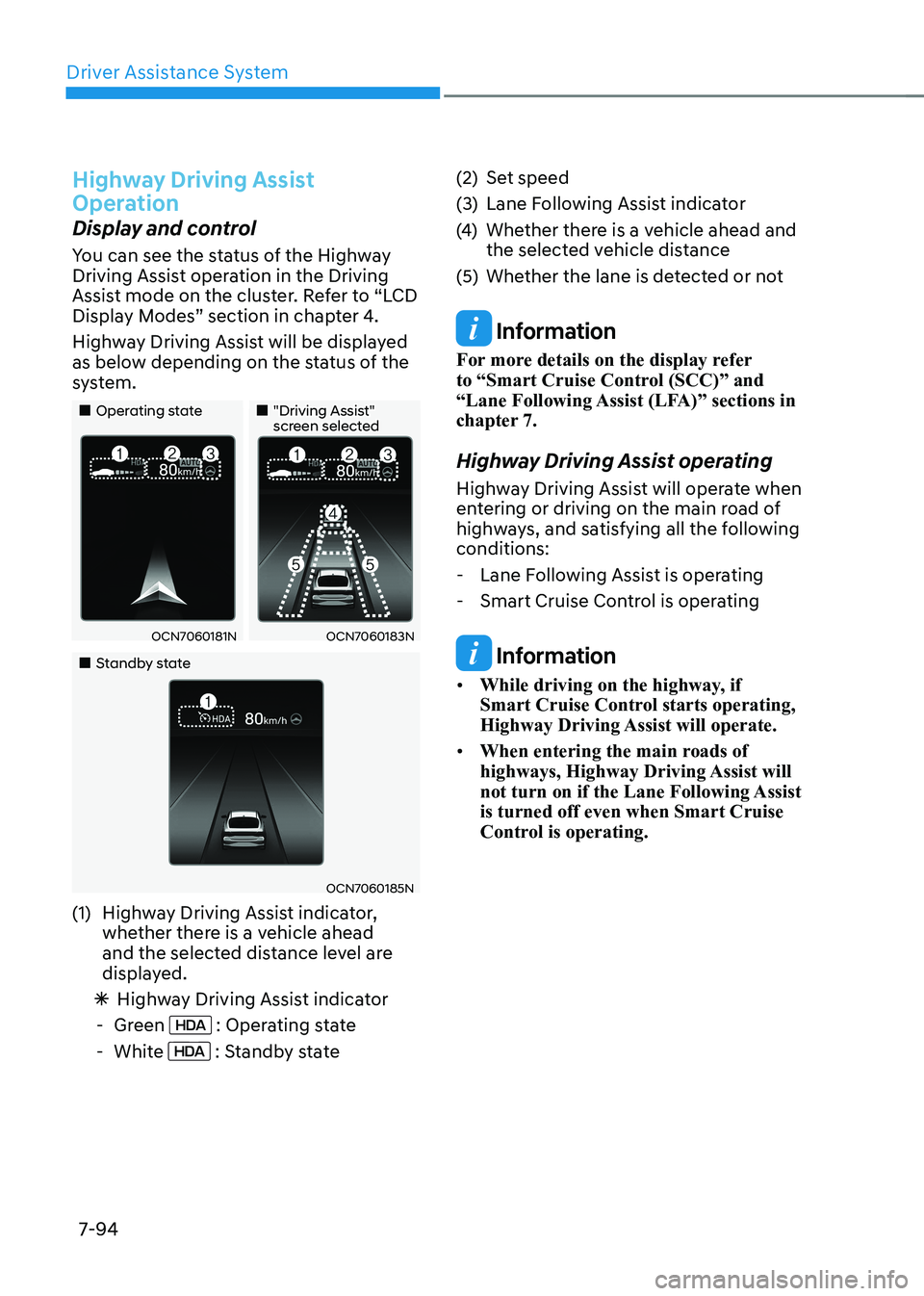
You can see the status of the Highway
Driving Assist operation in the Driving
Assist mode on the cluster. Refer to “LCD
Display Modes” section in chapter 4.
Highway Driving Assist will be displayed
as below depending on the status of the
system.
„„Operating state„„"Driving Assist" screen selected
OCN7060181NOCN7060183N
„„Standby state
OCN7060185N
(1) Highway Driving Assist indicator, whether there is a vehicle ahead
and the selected distance level are
displayed.
à Highway Driving Assist indicator
- Green
: Operating state
- White
: Standby state (2) Set speed
(3) Lane Following Assist indicator
(4)
Whether there is a vehicle ahead and
the selected vehicle distance
(5) Whether the lane is detected or not
Information
For more details on the display refer
to “Smart Cruise Control (SCC)” and
“Lane Following Assist (LFA)” sections in
chapter 7.
Highway Driving Assist operating
Highway Driving Assist will operate when
entering or driving on the main road of
highways, and satisfying all the following conditions: - Lane Following Assist is operating
- Smart Cruise Control is operating
Information
• While driving on the highway, if
Smart Cruise Control starts operating,
Highway Driving Assist will operate.
• When entering the main roads of
highways, Highway Driving Assist will
not turn on if the Lane Following Assist is turned off even when Smart Cruise
Control is operating.
Page 393 of 529
Driver Assistance System
7-96
Highway Driving Assist standby
When Smart Cruise Control is
temporarily canceled while Highway
Driving Assist is operating, Highway
Driving Assist will be in the standby state.
At this time, Lane Following Assist will
operate properly.
Highway Driving Assist
Malfunction and Limitations
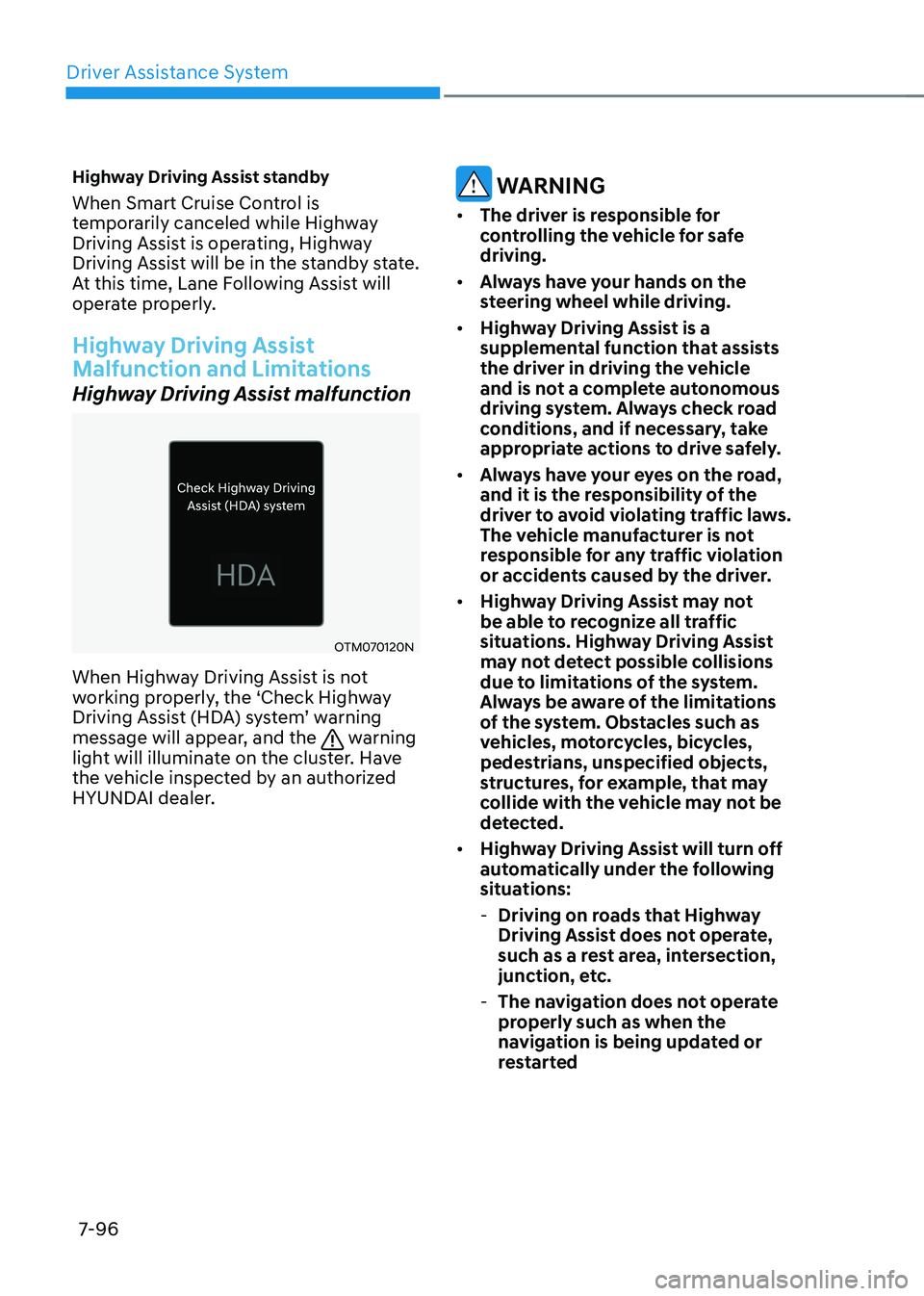
Highway Driving Assist malfunction
OTM070120N
When Highway Driving Assist is not
working properly, the ‘Check Highway
Driving Assist (HDA) system’ warning
message will appear, and the
warning
light will illuminate on the cluster. Have
the vehicle inspected by an authorized
HYUNDAI dealer.
WARNINg
• The driver is responsible for
controlling the vehicle for safe driving.
• Always have your hands on the
steering wheel while driving.
• Highway Driving Assist is a
supplemental function that assists
the driver in driving the vehicle
and is not a complete autonomous
driving system. Always check road
conditions, and if necessary, take
appropriate actions to drive safely.
• Always have your eyes on the road,
and it is the responsibility of the
driver to avoid violating traffic laws.
The vehicle manufacturer is not
responsible for any traffic violation
or accidents caused by the driver.
• Highway Driving Assist may not
be able to recognize all traffic
situations. Highway Driving Assist
may not detect possible collisions
due to limitations of the system.
Always be aware of the limitations
of the system. Obstacles such as
vehicles, motorcycles, bicycles,
pedestrians, unspecified objects,
structures, for example, that may
collide with the vehicle may not be
detected.
• Highway Driving Assist will turn off
automatically under the following
situations:
- Driving on roads that Highway
Driving Assist does not operate,
such as a rest area, intersection,
junction, etc.
- The navigation does not operate
properly such as when the
navigation is being updated or
restarted
Page 520 of 529

I
I-3
Brake System ....................................................................................................... 6-24
Auto Hold ......................................................................................................... 6-29
Disc Brakes Wear Indicator .............................................................................. 6-24
Electronic Parking Brake (EPB) ...................................................................... 6-25
Power Brakes .................................................................................................... 6-24
Brake/Clutch Fluid .............................................................................................. 9-20
Checking the Brake/Clutch Fluid Level ...........................................................9-20
Bulb Wattage .......................................................................................................... 2-8
CABIN Air Filter ................................................................................................. 9-24
Filter Inspection ................................................................................................ 9-24
Filter Replacement ........................................................................................... 9-24
C Child Restraint System (CRS) ............................................................................. 3-28
Children Always in the Rear ............................................................................ 3-28
Installing a Child Restraint System (CRS) .......................................................3-30
Selecting a Child Restraint System (CRS) .......................................................3-29
Climate Control Additional Features ................................................................... 5-85
Auto Comfort Control (for driver’s seat) ........................................................5-85
Automatic Ventilation ...................................................................................... 5-85
Sunroof Inside Air Recirculation ...................................................................... 5-85
Coasting Guide .................................................................................................... 6-23
Cruise Control (CC) ............................................................................................ 7-61
DDeclaration of Conormity .................................................................................. 7-124
Dimensions ............................................................................................................ 2-7
Door Locks .......................................................................................................... 5-16
Automatic Door Lock and Unlock Features ....................................................5-20
Child-Protector Rear Door Locks .................................................................... 5-20
Operating Door Locks from Inside the Vehicle................................................ 5-17
Operating Door Locks from Outside the Vehicle .............................................5-16
Drive Mode Integrated Control System ............................................................... 6-38
Drive Mode ...................................................................................................... 6-38
Smart shift on trip computer ............................................................................. 6-41
Driver Attention Warning (DAW) ...................................................................... 7-55
Detecting sensor ............................................................................................... 7-55
Limitations of Driver Attention Warning ........................................................7-58
Driver position memory system........................................................................... 5-23
Page 525 of 529

Index
I-8
High Mounted Stop Lamp Replacement ..........................................................9-55
Interior Light Bulb Replacement ...................................................................... 9-56
License Plate Light Bulb Replacement ............................................................9-55
Rear Combination Lamp Bulb Replacement ...................................................9-52
Side Repeater Lamp Replacement (if equipped) ..............................................9-52
M Maintenance Services ............................................................................................ 9-4
Owner Maintenance Precautions ........................................................................ 9-4
Owner’s Responsibility ...................................................................................... 9-4
Mirrors ................................................................................................................. 5-30
Inside Rearview Mirror .................................................................................... 5-30
Side View Mirrors ............................................................................................ 5-37
NNavigation-Based Smart Cruise Control (NSCC) ..............................................7-82
Limitations of Navigation-Based Smart Cruise Control .................................7-85
System display and control .............................................................................. 7-83
OOwner Maintenance ............................................................................................... 9-5
Owner Maintenance Schedule ............................................................................ 9-5
R
Rear Cross-Traffic Collision-Avoidance Assist (RCCA) ..................................7-103
Limitations of Rear Cross-Traffic Collision-Avoidance Assist ......................7-110
Rear Occupant Alert (ROA) System.................................................................... 5-21
Rear Occupant Alert Operation ....................................................................... 5-21
Rear View Monitor (RVM) ................................................................................. 7-99
Detecting sensor ............................................................................................... 7-99
Limitations of the Rear View Monitor ..........................................................7-102
Maintaining rear view ................................................................................... 7-101
Rear top view ................................................................................................. 7-102
Rear view while driving ................................................................................. 7-101
Rear view with parking guidance .................................................................. 7-100
Recommended Lubricants and Capacities ...........................................................2-11
Recommended SAE Viscosity Number ...........................................................2-12
Reporting Safety Defects ..................................................................................... 2-15
Reverse Parking Collision-Avoidance Assist (PCA) ........................................7-116