service HYUNDAI ELANTRA LIMITED 2017 User Guide
[x] Cancel search | Manufacturer: HYUNDAI, Model Year: 2017, Model line: ELANTRA LIMITED, Model: HYUNDAI ELANTRA LIMITED 2017Pages: 586, PDF Size: 15.29 MB
Page 186 of 586
3-92
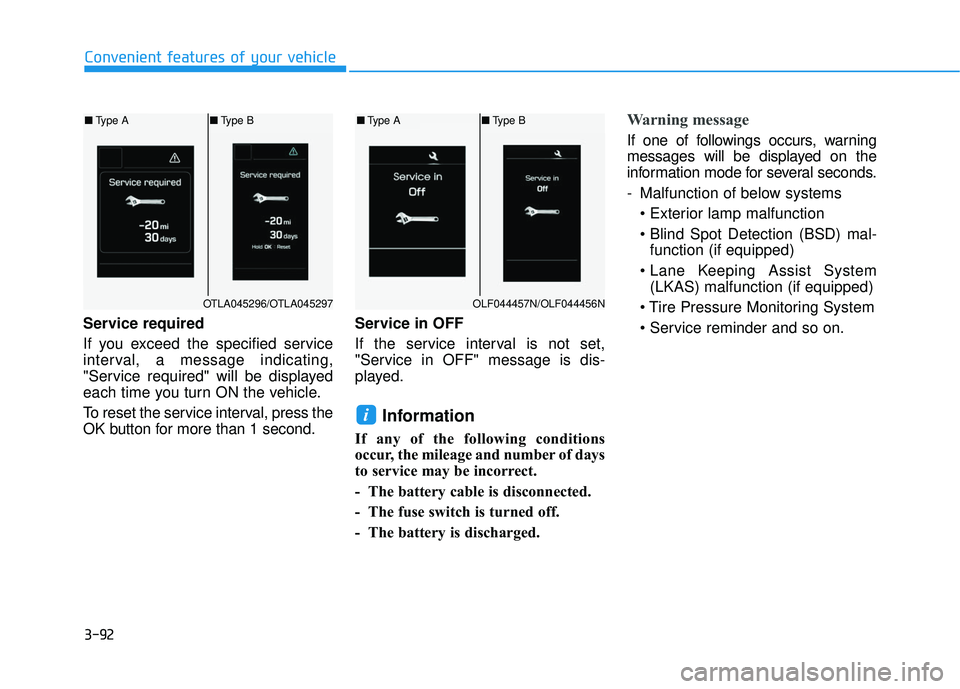
Service required
If you exceed the specified service
interval, a message indicating,
"Service required" will be displayed
each time you turn ON the vehicle.
To reset the service interval, press the
OK button for more than 1 second.Service in OFF
If the service interval is not set,
"Service in OFF" message is dis-
played.
Information
If any of the following conditions
occur, the mileage and number of days
to service may be incorrect.
- The battery cable is disconnected.
- The fuse switch is turned off.
- The battery is discharged.
Warning message
If one of followings occurs, warning
messages will be displayed on the
information mode for several seconds.
- Malfunction of below systems
function (if equipped)
(LKAS) malfunction (if equipped)
i
Convenient features of your vehicle
OTLA045296/OTLA045297
■ Type A ■Type B
OLF044457N/OLF044456N
■Type A ■Type B
Page 190 of 586
3-96
Convenient features of your vehicle
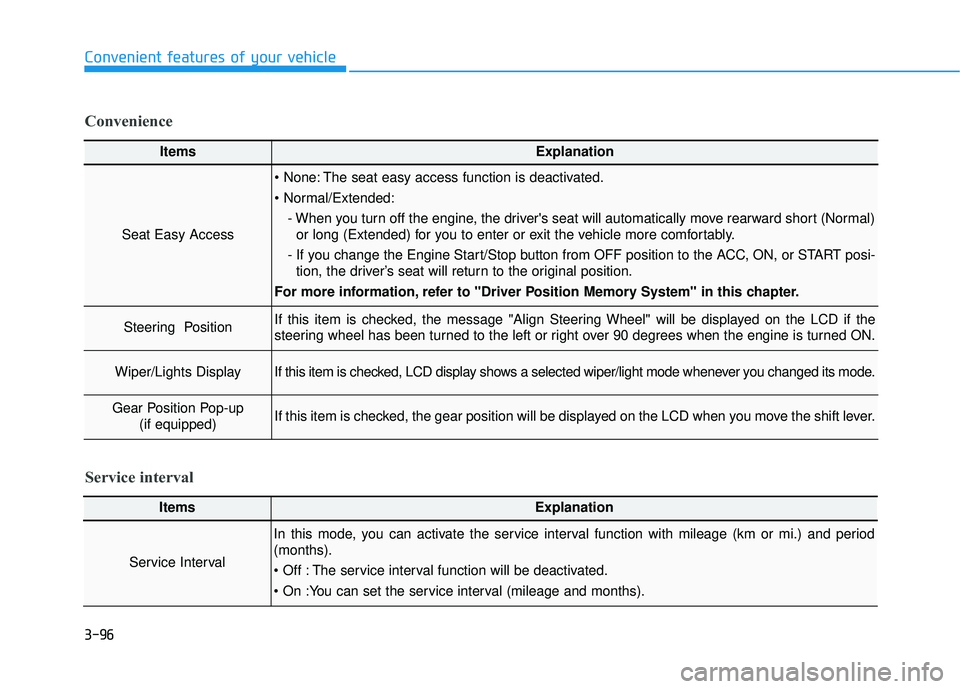
ItemsExplanation
Seat Easy Access
The seat easy access function is deactivated.
- When you turn off the engine, the driver's seat will automatically move rearward short (Normal)or long (Extended) for you to enter or exit the vehicle more comfortably.
- If you change the Engine Start/Stop button from OFF position to the ACC, ON, or START posi- tion, the driver’s seat will return to the original position.
For more information, refer to "Driver Position Memory System" in this chapter.
Steering Position If this item is checked, the message "Align Steering Wheel" will be displayed on the LCD if the
steering wheel has been turned to the left or right over 90 degrees when the engine is turned ON.
Wiper/Lights DisplayIf this item is checked, LCD display shows a selected wiper/light mode whenever you changed its mode.
Gear Position Pop-up (if equipped)If this item is checked, the gear position will be displayed on the LCD when you move the shift lever.
Convenience
ItemsExplanation
Service Interval
In this mode, you can activate the service interval function with mileage (km or mi.) and period
(months).
The service interval function will be deactivated.
Service interval
Page 192 of 586
3-98
Conventional Cluster
The trip computer is a microcomput-
er-controlled driver information sys-
tem that displays information related
to driving.
Information
Some driving information stored in
the trip computer (for example
Average Vehicle Speed) resets if the
battery is disconnected.
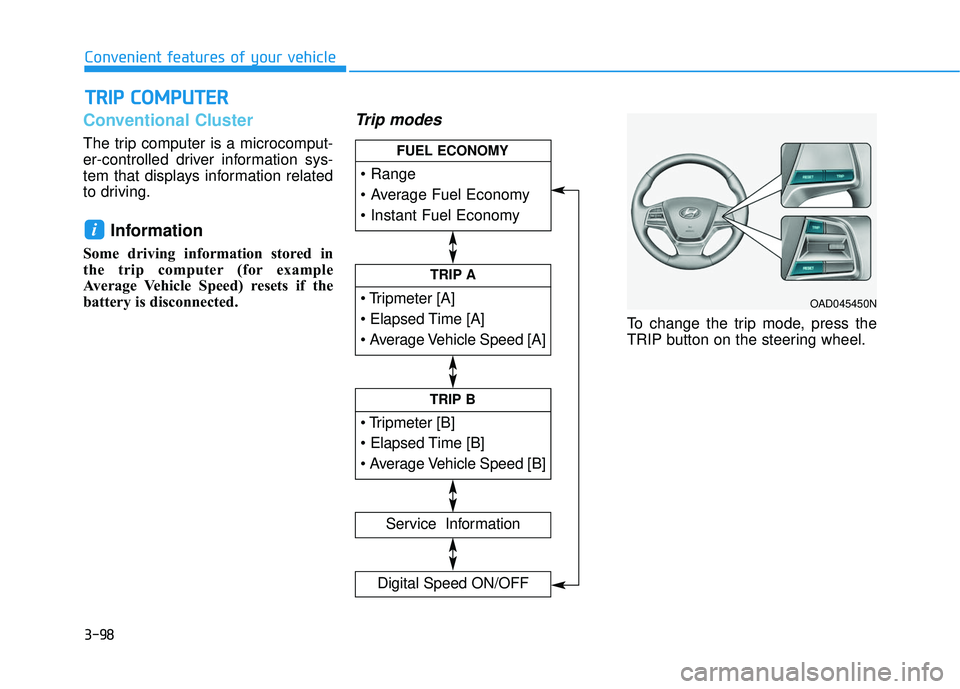
Trip modes
To change the trip mode, press the
TRIP button on the steering wheel.
i
T TR
R I
IP
P
C
C O
O M
M P
PU
U T
TE
ER
R
Convenient features of your vehicle
TRIP A
Service Information
Digital Speed ON/OFF
TRIP B
FUEL ECONOMY
OAD045450N
Page 195 of 586
3-101
Convenient features of your vehicle
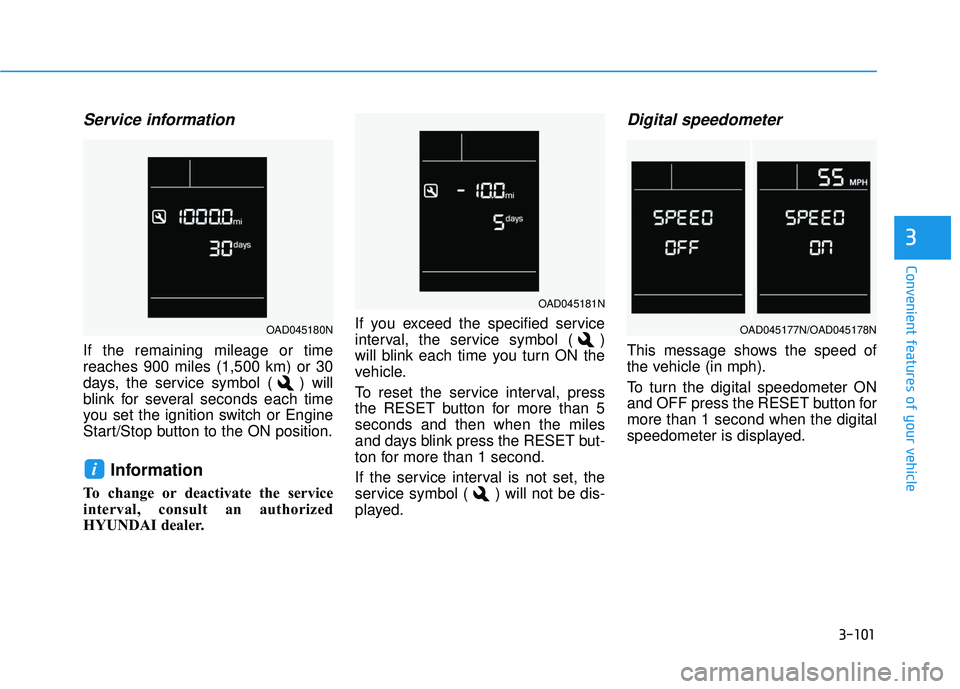
Service information
If the remaining mileage or time
reaches 900 miles (1,500 km) or 30
days, the service symbol ( ) will
blink for several seconds each time
you set the ignition switch or Engine
Start/Stop button to the ON position.
Information
To change or deactivate the service
interval, consult an authorized
HYUNDAI dealer.If you exceed the specified service
interval, the service symbol ( )
will blink each time you turn ON the
vehicle.
To reset the service interval, press
the RESET button for more than 5
seconds and then when the miles
and days blink press the RESET but-
ton for more than 1 second.
If the service interval is not set, the
service symbol ( ) will not be dis-
played.
Digital speedometer
This message shows the speed of
the vehicle (in mph).
To turn the digital speedometer ON
and OFF press the RESET button for
more than 1 second when the digital
speedometer is displayed.
i
3
OAD045181N
OAD045177N/OAD045178NOAD045180N
Page 225 of 586
3-131
Convenient features of your vehicle
3
System Maintenance
Climate control air filter
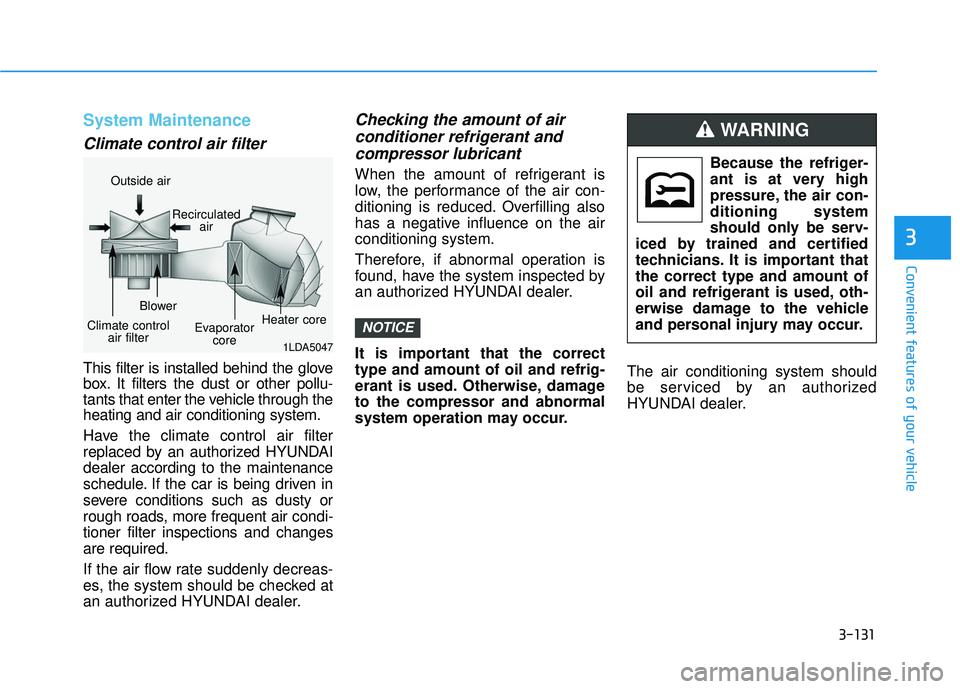
This filter is installed behind the glove
box. It filters the dust or other pollu-
tants that enter the vehicle through the
heating and air conditioning system.
Have the climate control air filter
replaced by an authorized HYUNDAI
dealer according to the maintenance
schedule. If the car is being driven in
severe conditions such as dusty or
rough roads, more frequent air condi-
tioner filter inspections and changes
are required.
If the air flow rate suddenly decreas-
es, the system should be checked at
an authorized HYUNDAI dealer.
Checking the amount of air conditioner refrigerant andcompressor lubricant
When the amount of refrigerant is
low, the performance of the air con-
ditioning is reduced. Overfilling also
has a negative influence on the air
conditioning system.
Therefore, if abnormal operation is
found, have the system inspected by
an authorized HYUNDAI dealer.
It is important that the correct
type and amount of oil and refrig-
erant is used. Otherwise, damage
to the compressor and abnormal
system operation may occur. The air conditioning system should
be serviced by an authorized
HYUNDAI dealer.
NOTICE
Because the refriger-
ant is at very high
pressure, the air con-
ditioning system
should only be serv-
iced by trained and certified
technicians. It is important that
the correct type and amount of
oil and refrigerant is used, oth-
erwise damage to the vehicle
and personal injury may occur.
WARNING
1LDA5047
Outside air
Recirculatedair
Climate control air filter Blower
Evaporatorcore Heater core
Page 238 of 586
3-144
Convenient features of your vehicle
The air conditioning system should
be serviced by an authorized
HYUNDAI dealer.
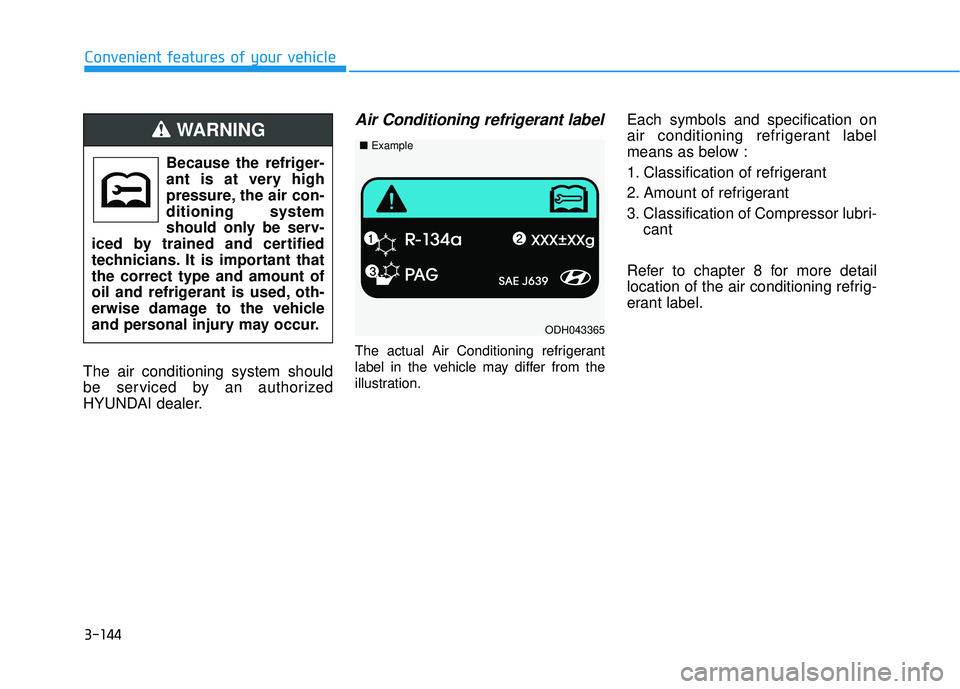
Air Conditioning refrigerant label
The actual Air Conditioning refrigerant
label in the vehicle may differ from the
illustration.
Each symbols and specification on
air conditioning refrigerant label
means as below :
1. Classification of refrigerant
2. Amount of refrigerant
3. Classification of Compressor lubri- cant
Refer to chapter 8 for more detail
location of the air conditioning refrig-
erant label.
Because the refriger-
ant is at very high
pressure, the air con-
ditioning system
should only be serv-
iced by trained and certified
technicians. It is important that
the correct type and amount of
oil and refrigerant is used, oth-
erwise damage to the vehicle
and personal injury may occur.WARNING
ODH043365
■ Example
Page 279 of 586
4-27
Multimedia System
4
Information
Turn on the car ignition before using
this device. Do not operate the audio
system for long periods of time with
the ignition turned off as such opera-
tions may lead to battery discharge. Do not subject the device to
severe shock or impact. Direct
pressure onto the front side of
the monitor may cause damage
to the LCD or touch screen.
When cleaning the device, make sure to turn off the device and
use a dry and smooth cloth.
Never use rough materials,
chemical cloths, or solvents
(alcohol, benzene, thinners, etc.)
as such materials may damage
the device panel or cause
color/quality deterioration.
Do not place beverages close to the audio system. Spilling bever-
ages may lead to system mal-
function.
Placing the audio system within an electromagnetic environment
may result in noise interference.
Information
In case of product malfunction, please
contact your dealer or vehicle service
center.
Information
- Using the USB Devices
• To use an external USB device, make sure the device is not connect-
ed when starting up the vehicle.
Connect the device after starting up.
• If you start the engine when the USB device is connected, it may
damage the USB device. (USB flash-
drives are very sensitive to electric
shock.)
• If the engine is started up or turned off while the external USB device is
connected, the external USB device
may not work.
• The System may not play unauthen- ticated MP3 or WMA files.
1) It can only play MP3 files with the compression rate between 8Kbps ~
320Kbps.
2) It can only play WMA music files with the compression rate between
8Kbps ~ 320Kbps.
• Take precautions for static electricity when connecting or disconnecting
the external USB device.
(Continued)
i
i
NOTICEi
Page 283 of 586
4-31
Multimedia System
4
(Continued)
• Before using Bluetooth
®Wireless
Technology related features of the
audio system, refer your phone’s
User’s Manual for phone-side
Bluetooth
®Wireless Technology
operations.
• The phone must be paired to the audio system to use Bluetooth
®
Wireless Technology related fea-
tures.
• Pairing and connecting a Bluetooth
®
Wireless Technology enabled mobile
phone will work only when the
Bluetooth
®Wireless Technology
option within your mobile phone
has been turned on. (Methods of
turning on the Bluetooth
®Wireless
Technology enabled feature may
differ depending on the mobile
phone.)
• Do not use a cellular phone or per- form Bluetooth
®Wireless Technology
settings (e.g. pairing a phone) while
driving.
(Continued)(Continued)
• Even if the phone supports
Bluetooth
®Wireless Technology, the
phone will not be found during
device searches if the phone has
been set to hidden state or the
Bluetooth
®Wireless Technology
power is turned off. Disable the hid-
den state or turn on the Bluetooth
®
Wireless Technology power prior to
searching/connecting with the car
audio system.
• You will not be able to use the hands-free feature when your phone
(in the car) is outside of the cellular
service area (e.g. in a tunnel, in an
underground location, in a moun-
tainous area, etc.).
• If the cellular phone signal is poor or the vehicle’s interior noise is too
loud, it may be difficult to hear the
other person’s voice during a call.
• Do not place the phone near or inside metallic objects, otherwise
communications with Bluetooth
®
Wireless Technology system or cel-
lular service stations can be dis-
turbed.
(Continued)(Continued)
• Placing the audio system within an
electromagnetic environment may
result in noise interference.
• Some cellular phones or other devices may cause interference noise
or a malfunction to the audio sys-
tem. In this case, storing the device
in a different location may resolve
the condition.
• While a phone is connected through Bluetooth
®Wireless Technology
your phone may discharge quicker
than usual for additional Bluetooth
®
Wireless Technology-related opera-
tions.
• If Priority is set upon vehicle igni- tion (IGN/ACC ON), the Bluetooth
®
Wireless Technology phone will be
automatically connected. Even if
you are outside, the Bluetooth
®
Wireless Technology phone will be
automatically connected once you
are in the vicinity of the vehicle. If
you do not want to automatically
connect yourBluetooth
®Wireless
Technology phone, try the following.
(Continued)
Page 287 of 586
4-35
Multimedia System
4
SiriusXM®Satellite Radio
information (if equipped)
Satellite Radio channels :
Enjoy SiriusXM Satellite Radio with a
3-month trial subscription to the
SiriusXM Select package. You’ll get
over 140 channels, including com-
mercial-free music, plus all your
favorite sports, exclusive talk, enter-
tainment, and a selection of premium
programming. For more information
and a complete list of SiriusXM
channels, visit siriusxm.com in the
United States, siriusxm.ca in
Canada, or call SiriusXM at 1-888-
539-7474.
Satellite Radio reception factors :
To receive the satellite signal, your
vehicle has been equipped with a
satellite radio antenna located on the
roof of your vehicle. The vehicle roof
provides the best location for an
unobstructed, open view of the sky, a
requirement of a satellite radio sys-
tem. Like AM/FM, there are several
factors that can affect satellite radio
reception performance :
Antenna obstructions : For optimal
reception performance, keep the
antenna clear of snow and ice
build-up and keep luggage and
other material as far away from the
antenna as possible.
Terrain : Hills, mountains, tall build- ings, bridges, tunnels, freeway
overpasses, parking garages,
dense tree foliage and thunder-
storms can interfere with your
reception.
SiriusXM Satellite Radio service :
SiriusXM is a subscription-based
satellite radio service that broad-
casts music, sports, news and enter-
tainment programming to radio
receivers, which are available for
installation in motor vehicles or facto-
ry installed, as well as for the home,
portable and wireless devices, and
through an Internet connection on a
personal computer.
Vehicles that are equipped with a
factory installed SiriusXM Satellite
Radio system include :
Hardware and an introductory trialsubscription term, which begins on
the date of sale or lease of the
vehicle.
For a small upgrade fee, access to SiriusXM music channels, and
other select channels over the
Internet using any computer con-
nected to the Internet (U.S. cus-
tomers only).
For information on extended sub-
scription terms, contact SiriusXM
at 1-888-539-7474.
Page 288 of 586
NOTE :
SiriusXM services require a sub-
scription sold separately, or as a
package, by Sirius XM Radio Inc. If
you decide to continue service
after your trial, the subscription
plan you choose will automatical-
ly renew thereafter and you will be
charged according to your chosen
payment method at then-current
rates. Fees and taxes apply. To
cancel you must call SiriusXM at
1-866-635-2349. See SiriusXM
Customer Agreement for com-
plete terms at www.siriusxm.com.
SiriusXM U.S. satellite and data
services are available only in the
48 contiguous states, DC and
Puerto Rico (with coverage limita-
tions). SiriusXM satellite service is
also available in Canada; see
www.siriusxm.ca. All fees and pro-
gramming subject to change.
Sirius, XM and all related marks
and logos are trademarks of Sirius
XM Radio Inc.
4-36
Multimedia System