steering HYUNDAI ELANTRA LIMITED 2017 Workshop Manual
[x] Cancel search | Manufacturer: HYUNDAI, Model Year: 2017, Model line: ELANTRA LIMITED, Model: HYUNDAI ELANTRA LIMITED 2017Pages: 586, PDF Size: 15.29 MB
Page 360 of 586
5-40
Driving your vehicle
When the ECO mode is activated:
The acceleration response may be slightly reduced if the accelerator
pedal is depressed moderately.
The air conditioner performance may be limited.
The shift pattern of the automatic transmission may change.
The engine noise may get louder.
The above situations are normal
conditions when the ECO mode is
activated to improve fuel efficiency. Limitation of the ECO mode oper-
ation:
If the following conditions occur while
the ECO mode is operating, the sys-
tem operation is limited even though
there is no change in the ECO indi-
cator.
When the coolant temperature is
low:
The system will be limited until
engine performance becomes nor-
mal.
When driving up a hill: The system will be limited to gain
power when driving uphill because
engine torque is restricted.
When driving the vehicle with the automatic transmission gear shift
lever in manual shift mode.
The system will be limited accord-
ing to the shift location.
SPORT mode
SPORT mode manages
the driving dynamics by
automatically adjusting the
steering effort, and the
engine and transmission control
logic for enhanced driver perform-
ance.
When SPORT mode is selected by pressing the DRIVE MODE button,
the SPORT indicator (orange
color) will illuminate.
Whenever the engine is restarted, the Drive Mode will revert back to
NORMAL mode. If SPORT mode is
desired, re-select SPORT mode
from the DRIVE MODE button.
When SPORT mode is activated: - The engine rpm will tend toremain raised over a certain
length of time even after releas-
ing the accelerator
- Upshifts are delayed when accel- erating
Information
In SPORT mode, the fuel efficiency
may decrease.
i
Page 371 of 586
5-51
Driving your vehicle
5
Prerequisite for activation
The AEB system is on and ready
when AEB is selected on the LCD
display and when the following pre-
requisites are satisfied:
- The ESC (Electronic StabilityControl) or TCS (Traction Control
System) is activated.
- Driving speed exceeds approxi- mately 6mph (10km/h). (The AEB
is only activated within a certain
speed range.)
- The system detects a pedestrian or a vehicle in front, which may collide
with your vehicle. (The AEB may
not be activated or may sound a
warning alarm in accordance with
the driving situation or vehicle con-
dition.)
AEB Warning Message and
System Control
The AEB produces warning mes-
sages and warning alarms in accor-
dance with the collision risk levels,
such as abrupt stopping of the vehi-
cle in front, insufficient braking dis-
tance, or pedestrian detection. Also,
it controls the brakes in accordance
with the collision risk levels.Completely stop the vehicle
on a safe location before
operating the switch on the
steering wheel to activate
/deactivate the AEB system.
The AEB automatically acti-
vates upon placing the igni-
tion switch to the ON position.
The driver can deactivate the
AEB by canceling the system
setting on the LCD display.
The AEB automatically deacti-
vates upon canceling the ESC
(Electronic Stability Control)
or TCS (Traction Control
System). When the ESC is
canceled, the AEB cannot be
activated on the LCD display.
WARNING
Page 373 of 586
5-53
Driving your vehicle
5
Brake operation
In an urgent situation, the brakingsystem enters into the ready status
for prompt reaction against the dri-
ver’s depressing the brake pedal.
The AEB provides additional brak- ing power for optimum braking per-
formance, when the driver depress-
es the brake pedal.
The braking control is automatical- ly deactivated, when the driver
sharply depresses the brake pedal,
or when the driver abruptly oper-
ates the steering wheel.
The AEB braking control is auto- matically canceled, when risk fac-
tors disappear. The driver should always use
extreme caution while operating
the vehicle, whether or not there
is a warning message or alarm
from the AEB system.CAUTION
The AEB system logic operates
within certain parameters, such
as the distance from the vehicle
or pedestrian ahead, the speed
of the vehicle ahead, and the
driver's vehicle speed. Certain
conditions such as inclement
weather and road conditions
may affect the operation of the
AEB system.
WARNING
The AEB braking control cannot
completely stop the vehicle nor
avoid all collisions. The driver
should hold the responsibility
to safely drive and control the
vehicle.
WARNING
Page 381 of 586
5-61
Driving your vehicle
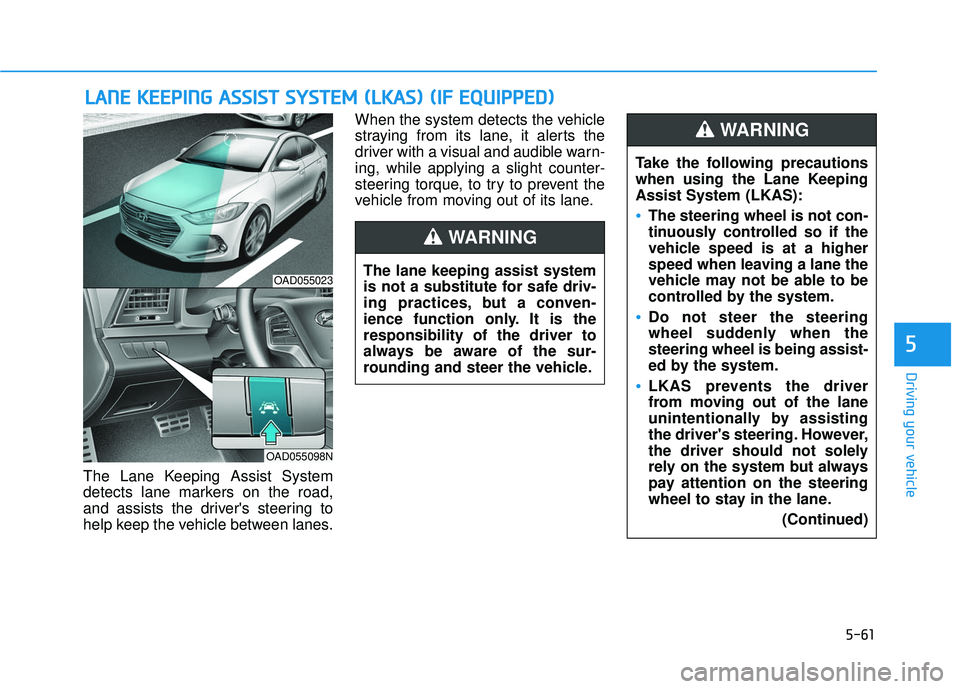
The Lane Keeping Assist System
detects lane markers on the road,
and assists the driver's steering to
help keep the vehicle between lanes.When the system detects the vehicle
straying from its lane, it alerts the
driver with a visual and audible warn-
ing, while applying a slight counter-
steering torque, to try to prevent the
vehicle from moving out of its lane.
L L
A
A N
N E
E
K
K E
EE
EP
P I
IN
N G
G
A
A S
SS
SI
IS
S T
T
S
S Y
Y S
ST
T E
EM
M
(
( L
L K
K A
A S
S)
)
(
( I
IF
F
E
E Q
Q U
UI
IP
P P
PE
ED
D )
)
5
OAD055023
OAD055098N
The lane keeping assist system
is not a substitute for safe driv-
ing practices, but a conven-
ience function only. It is the
responsibility of the driver to
always be aware of the sur-
rounding and steer the vehicle.
WARNING
Take the following precautions
when using the Lane Keeping
Assist System (LKAS):
The steering wheel is not con-
tinuously controlled so if the
vehicle speed is at a higher
speed when leaving a lane the
vehicle may not be able to be
controlled by the system.
Do not steer the steering
wheel suddenly when the
steering wheel is being assist-
ed by the system.
LKAS prevents the driver
from moving out of the lane
unintentionally by assisting
the driver's steering. However,
the driver should not solely
rely on the system but always
pay attention on the steering
wheel to stay in the lane.
(Continued)
WARNING
Page 382 of 586
5-62
LKAS Operation
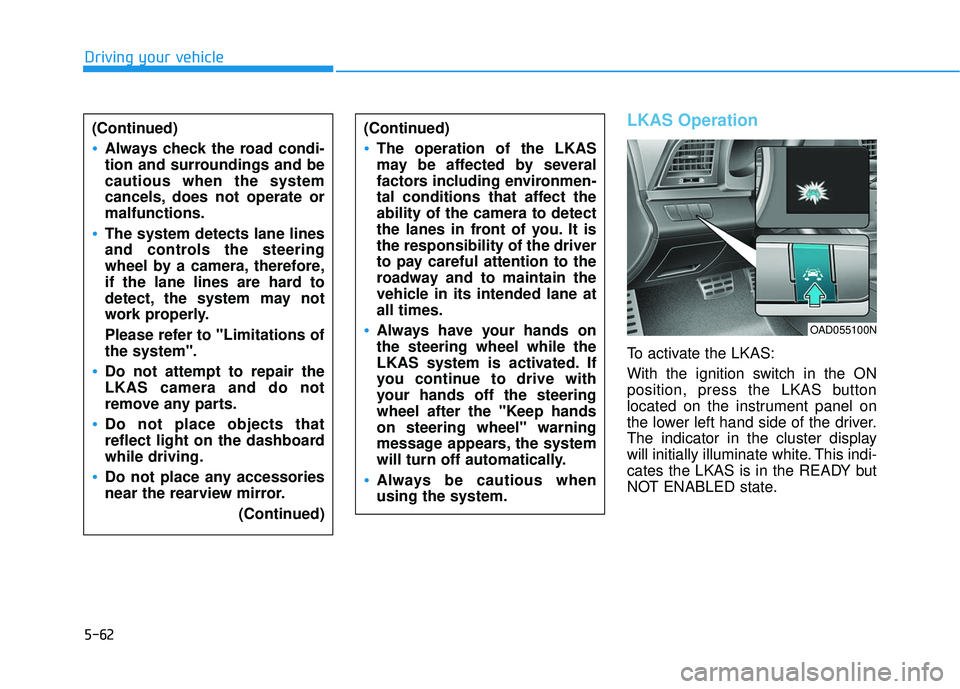
To activate the LKAS:
With the ignition switch in the ON
position, press the LKAS button
located on the instrument panel on
the lower left hand side of the driver.
The indicator in the cluster display
will initially illuminate white. This indi-
cates the LKAS is in the READY but
NOT ENABLED state.
Driving your vehicle(Continued)
Always check the road condi-
tion and surroundings and be
cautious when the system
cancels, does not operate or
malfunctions.
The system detects lane lines
and controls the steering
wheel by a camera, therefore,
if the lane lines are hard to
detect, the system may not
work properly.
Please refer to "Limitations of
the system".
Do not attempt to repair the
LKAS camera and do not
remove any parts.
Do not place objects that
reflect light on the dashboard
while driving.
Do not place any accessories
near the rearview mirror. (Continued)
(Continued)
The operation of the LKAS
may be affected by several
factors including environmen-
tal conditions that affect the
ability of the camera to detect
the lanes in front of you. It is
the responsibility of the driver
to pay careful attention to the
roadway and to maintain the
vehicle in its intended lane at
all times.
Always have your hands on
the steering wheel while the
LKAS system is activated. If
you continue to drive with
your hands off the steering
wheel after the "Keep hands
on steering wheel" warning
message appears, the system
will turn off automatically.
Always be cautious when
using the system.
OAD055100N
Page 383 of 586
5-63
Driving your vehicle
LKAS activation
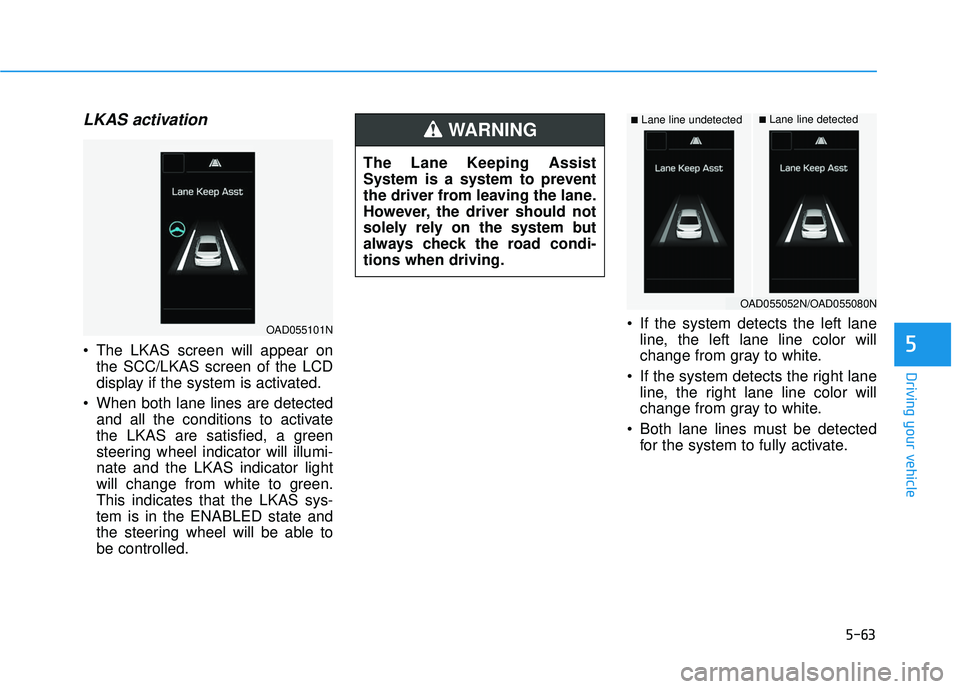
The LKAS screen will appear onthe SCC/LKAS screen of the LCD
display if the system is activated.
When both lane lines are detected and all the conditions to activate
the LKAS are satisfied, a green
steering wheel indicator will illumi-
nate and the LKAS indicator light
will change from white to green.
This indicates that the LKAS sys-
tem is in the ENABLED state and
the steering wheel will be able to
be controlled. If the system detects the left lane
line, the left lane line color will
change from gray to white.
If the system detects the right lane line, the right lane line color will
change from gray to white.
Both lane lines must be detected for the system to fully activate.5
■Lane line undetected■Lane line detected
OAD055101N
OAD055052N/OAD055080N
The Lane Keeping Assist
System is a system to prevent
the driver from leaving the lane.
However, the driver should not
solely rely on the system but
always check the road condi-
tions when driving.
WARNING
Page 384 of 586
5-64
Warning
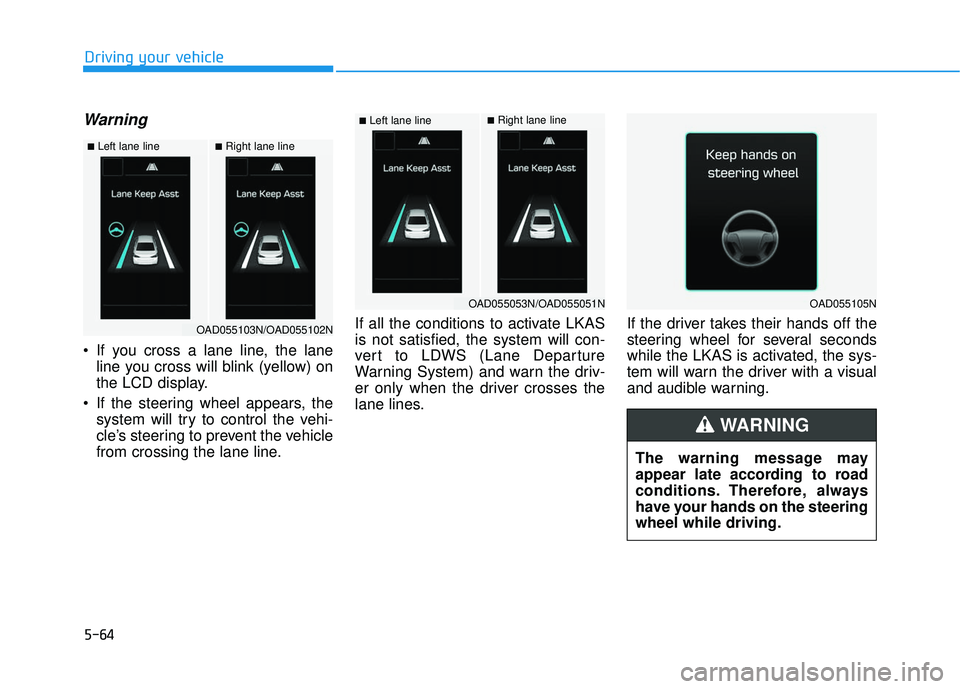
If you cross a lane line, the laneline you cross will blink (yellow) on
the LCD display.
If the steering wheel appears, the system will try to control the vehi-
cle’s steering to prevent the vehicle
from crossing the lane line. If all the conditions to activate LKAS
is not satisfied, the system will con-
vert to LDWS (Lane Departure
Warning System) and warn the driv-
er only when the driver crosses the
lane lines.
If the driver takes their hands off the
steering wheel for several seconds
while the LKAS is activated, the sys-
tem will warn the driver with a visual
and audible warning.
Driving your vehicle
■Left lane line■Right lane line
OAD055103N/OAD055102N
■Left lane line■Right lane line
OAD055053N/OAD055051NOAD055105N
The warning message may
appear late according to road
conditions. Therefore, always
have your hands on the steering
wheel while driving.
WARNING
Page 385 of 586
5-65
Driving your vehicle
If the driver still does not have their
hands on the steering wheel after
several seconds, the system will not
control the steering wheel and warn
the driver only when the driver cross-
es the lane lines.
Information
• Even though the steering is assistedby the system, the driver can still
steer to control the steering wheel.
• The steering wheel may feel heavier when the steering wheel is assisted
by the system than when it is not.
The LKAS system will not be in the
ENABLED state and the steering
wheel will not be assisted when:
Vehicle speed is below 40 mph (60 km/h) and over 110 mph (180
km/h).
Only one lane line is detected.
The turn signal is turned on before changing a lane. If you change
lanes without the turn signal on,
the steering wheel might be con-
trolled.
The hazard warning flasher is on.
The width of the lane is below 10 feet (3.1 m) and over 15 feet
(4.5 m).
ESC (Electronic Stability Control) is activated.
The vehicle is driven on a sharp curve.
The vehicle brakes suddenly.
The vehicle makes sharp lane changes.
Information
When the system is turned on or right
after changing a lane, drive in the
middle of the lane. If not, the system
will not provide steering assist func-
tion.
i
i
5
The driver is responsible for
accurate steering.
Turn off the system in below
situations.
- In bad weather
- In bad road condition
- When the steering wheelneeds to be controlled by the
driver frequently.
WARNING
Page 388 of 586
5-68
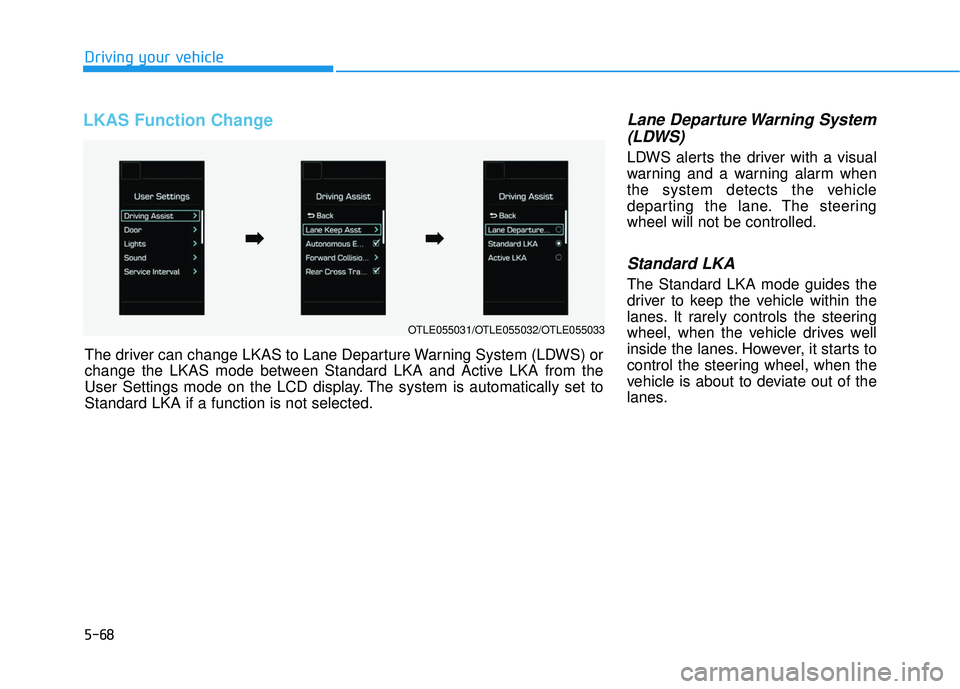
LKAS Function Change Lane Departure Warning System(LDWS)
LDWS alerts the driver with a visual
warning and a warning alarm when
the system detects the vehicle
departing the lane. The steering
wheel will not be controlled.
Standard LKA
The Standard LKA mode guides the
driver to keep the vehicle within the
lanes. It rarely controls the steering
wheel, when the vehicle drives well
inside the lanes. However, it starts to
control the steering wheel, when the
vehicle is about to deviate out of the
lanes.
Driving your vehicle
OTLE055031/OTLE055032/OTLE055033
The driver can change LKAS to Lane Departure Warning System (LDWS) or
change the LKAS mode between Standard LKA and Active LKA from the
User Settings mode on the LCD display. The system is automatically set to
Standard LKA if a function is not selected.
➡ ➡ ➡
➡
Page 389 of 586
5-69
Driving your vehicle
Active LKA
The Active LKA mode provides more
frequent steering wheel control in
comparison with the Standard LKA
mode. The driver may not feel the
onset of the steering wheel control,
because the Active LKA may be con-
stantly controlling the steering with
lighter corrections.Information
This device complies with Part 15 of
the FCC rules.
Operation is subject to the following
two conditions:
1. This device may not cause harmfulinterference, and
2. This device must accept any inter- ference received, including interfer-
ence that may cause undesired
operation.
i
5