Battery HYUNDAI ELANTRA SEL 2021 Owner's Manual
[x] Cancel search | Manufacturer: HYUNDAI, Model Year: 2021, Model line: ELANTRA SEL, Model: HYUNDAI ELANTRA SEL 2021Pages: 570, PDF Size: 52.21 MB
Page 211 of 570
05
5-75
WARNING
Do not use the interior lights when
driving in the dark. The interior lights
may obscure your view and cause an
accident.
NOTICE
Do not use the interior lights for
extended periods when the vehicle is
turned off or the battery will discharge.
Interior lamp AUTO cut
The interior lamps will automatically go
off approximately 20 minutes after the
engine is turned off and the doors are
closed. If a door is opened, the lamp
will go off 40 minutes after the engine is
turned off. If the doors are locked by the
remote key or smart key and the vehicle
enters the armed stage of the theft
alarm system, the lamps will go off five
seconds later.
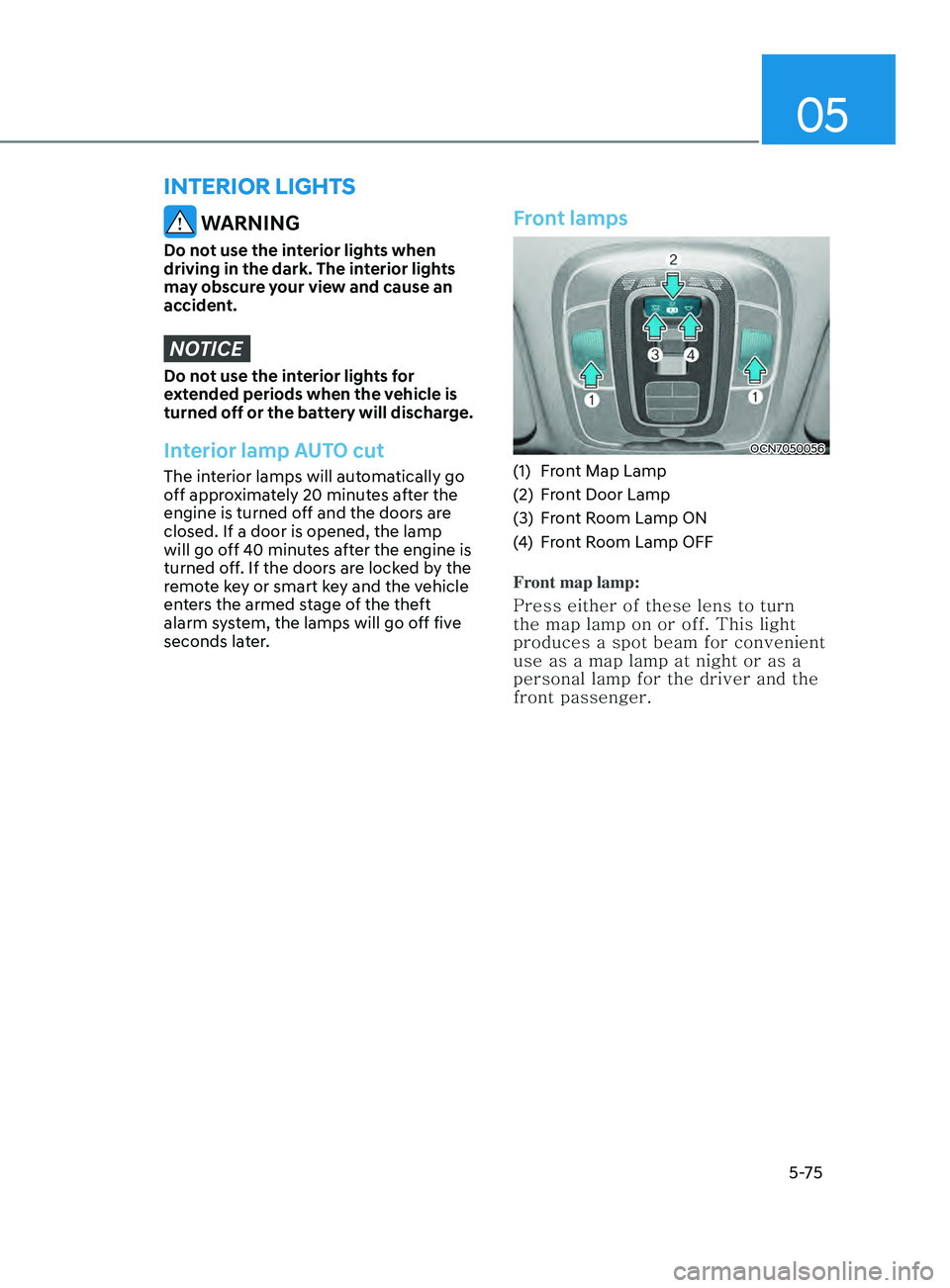
Front lamps
OCN7050056
(1) Front Map Lamp
(2)
Fr
ont Door Lamp
(3)
Fr
ont Room Lamp ON
(4)
Fr
ont Room Lamp OFF
Front map lamp:
Press either of these lens to turn
the map lamp on or off. This light
produces a spot beam for convenient
use as a map lamp at night or as a
personal lamp for the driver and the
front passenger.
interior lights
Page 213 of 570
05
5-77
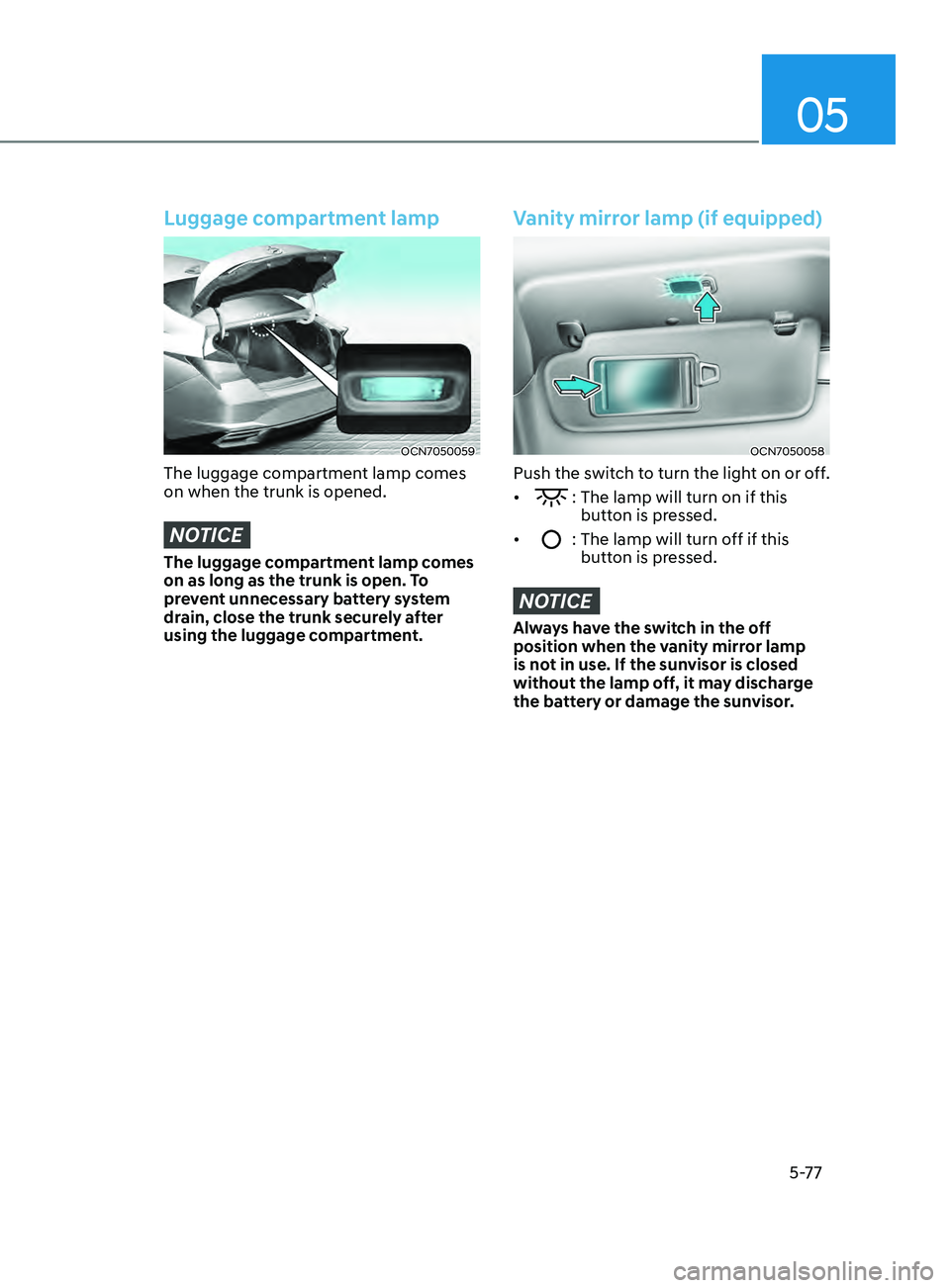
Luggage compartment lamp
OCN7050059
The luggage compartment lamp comes
on when the trunk is opened.
NOTICE
The luggage compartment lamp comes
on as long as the trunk is open. To
prevent unnecessary battery system
drain, close the trunk securely after
using the luggage compartment.
Vanity mirror lamp (if equipped)
OCN7050058
Push the switch to turn the light on or off.
•
: The lamp will turn on if this
button is pressed.
•
: The lamp will turn off if this
butt on is pressed.
NOTICE
Always have the switch in the off
position when the vanity mirror lamp
is not in use. If the sunvisor is closed
without the lamp off, it may discharge
the battery or damage the sunvisor.
Page 223 of 570
05
5-87
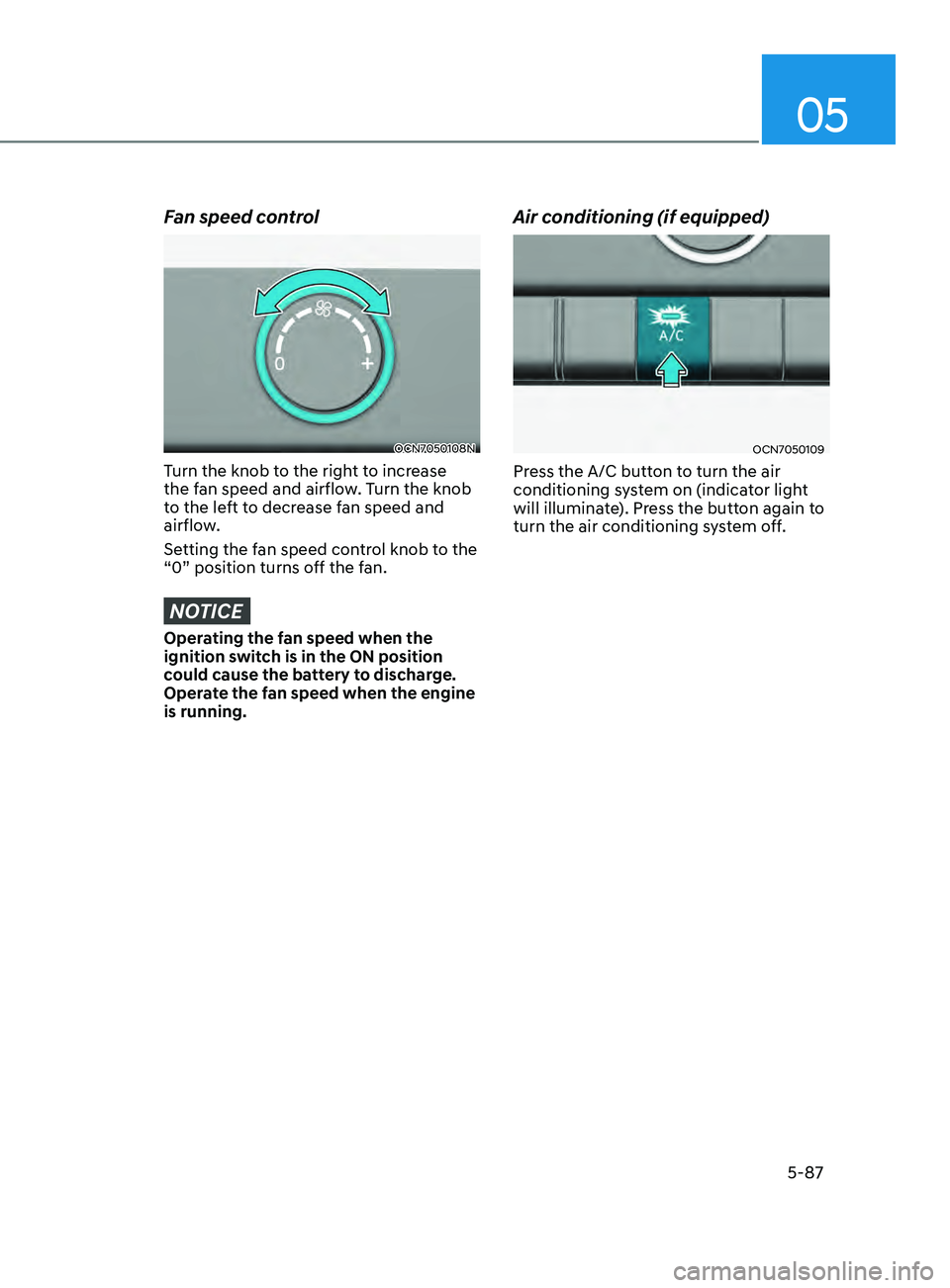
Fan speed control
OCN7050108N
Turn the knob to the right to increase
the fan speed and airflow. Turn the knob
to the left to decrease fan speed and
airflow.
Setting the fan speed control knob to the
“0” position turns off the fan.
NOTICE
Operating the fan speed when the
ignition switch is in the ON position
could cause the battery to discharge.
Operate the fan speed when the engine
is running.
Air conditioning (if equipped)
OCN7050109
Press the A/C button to turn the air
conditioning system on (indicator light
will illuminate). Press the button again to
turn the air conditioning system off.
Page 234 of 570
Convenient Features
5-98
OCN7050117
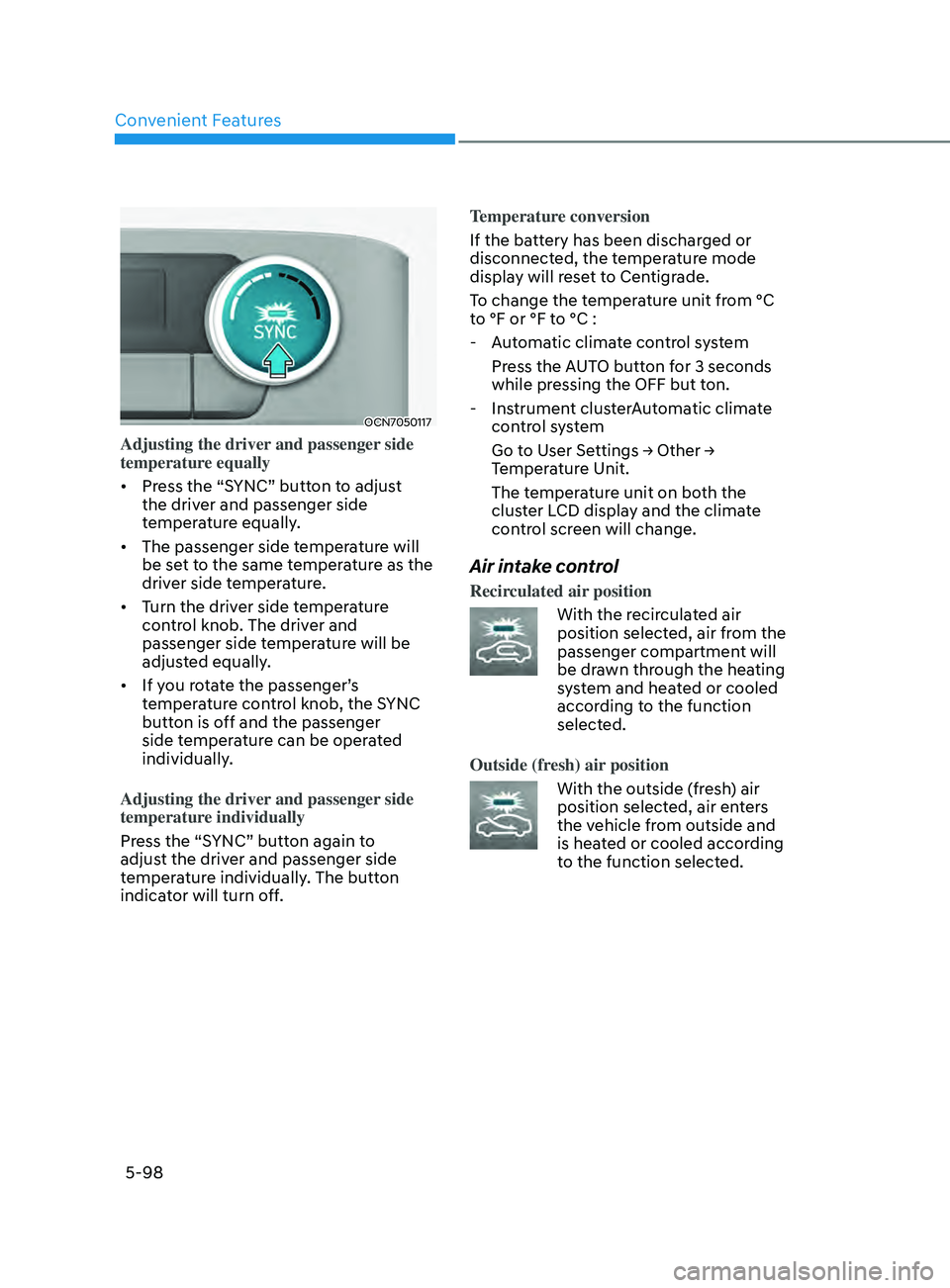
Adjusting the driver and passenger side
temperature equally
• Press the “SYNC” button to adjust
the driver and passenger side
temperature equally.
• The passenger side temperature will
be set to the same temperature as the
driver side temperature.
• Turn the driver side temperature
control knob. The driver and
passenger side temperature will be
adjusted equally.
• If you rotate the passenger’s
temperature control knob, the SYNC
button is off and the passenger
side temperature can be operated
individually.
Adjusting the driver and passenger side
temperature individually
Press the “SYNC” button again to
adjust the driver and passenger side
temperature individually. The button
indicator will turn off. Temperature conversion
If the battery has been discharged or
disconnected, the temperature mode
display will reset to Centigrade.
To change the temperature unit from °C
to °F or °F to °C :
- Aut
omatic climate control system
Press the AUTO button for 3 seconds
while pressing the OFF but ton.
- Instrumen
t clusterAutomatic climate
control system
Go t o U ser Se ttings → Other → Temper
ature Unit.
The temperature unit on both the
cluster LCD display and the climate
control screen will change.
Air intake control
Recirculated air position
With the recirculated air
position selected, air from the
passenger compartment will
be drawn through the heating
system and heated or cooled
according to the function
selected.
Outside (fresh) air position
With the outside (fresh) air
position selected, air enters
the vehicle from outside and
is heated or cooled according
to the function selected.
Page 235 of 570
05
5-99
Information
Operating the system primarily in Fresh
mode is recommended. Use Recirculation
mode temporarily only when needed.
Prolonged operation of the heater in
Recirculation mode and without the A/C
ON can cause fogging of the windshield.
In addition, prolonged use of the A/C
ON in Recirculation mode may result in
excessively dry, dehumidified air in the
cabin and may promote formation of
musty vent odor due to stagnant air.
WARNING
• Continued use of the climate control
system operation in Recirculation
mode for a prolonged period of
time may cause drowsiness to the
occupants in the cabin. This may lead
to loss of vehicle control which may
lead to an accident.
• Continued use of the climate control
system operation in Recirculation
mode with the A/C OFF may allow
humidity to increase inside the
cabin. This may cause condensation
to accumulate on the windshield and
obscure visibility.
• Do not sleep in your vehicle or
remain parked in your vehicle with
the windows up and either the
heater or the air conditioning ON for
prolonged periods of time. Doing so
may increase the levels of carbon
dioxide in the cabin which may lead
to serious injury or death.
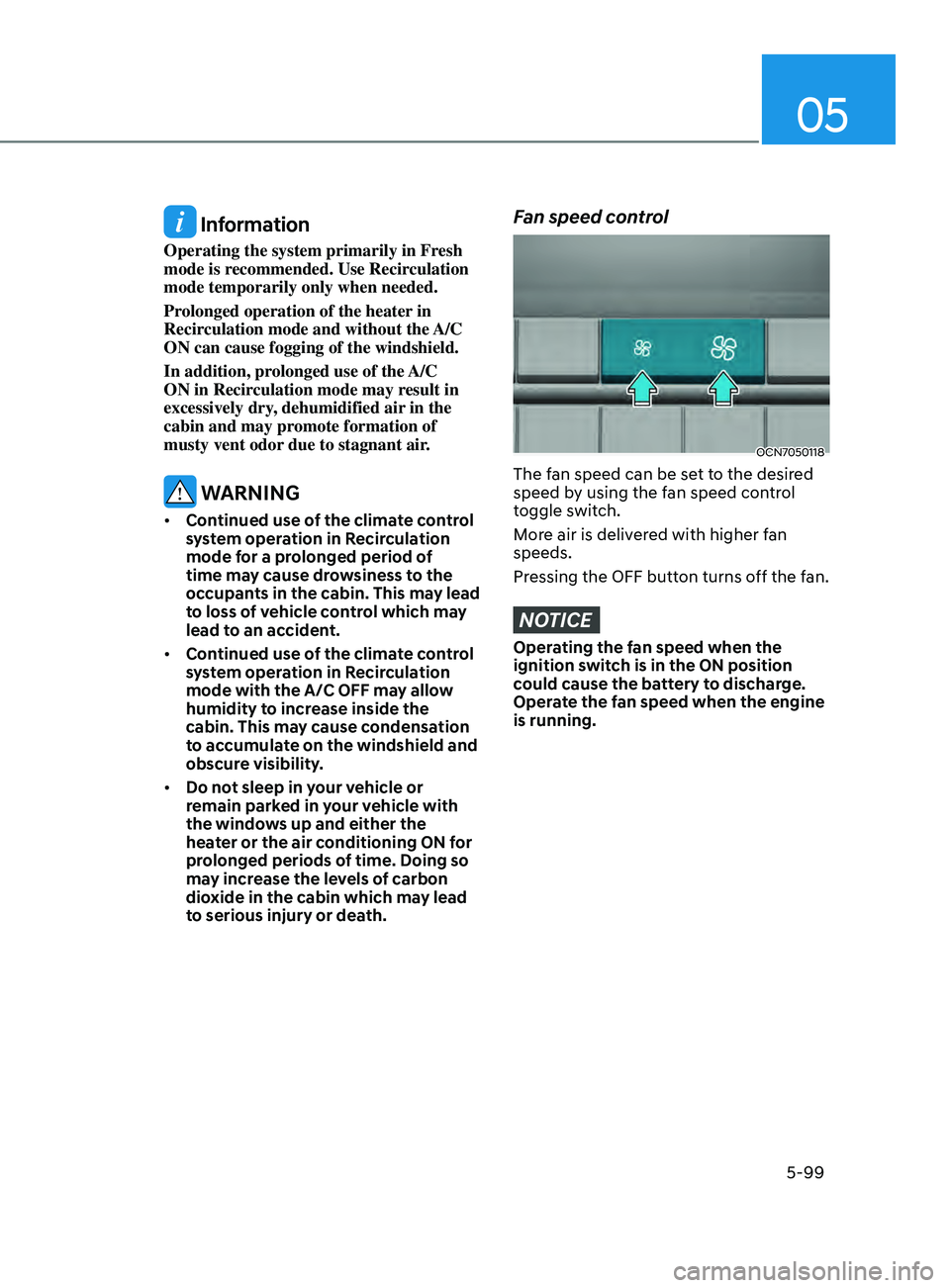
Fan speed control
OCN7050118
The fan speed can be set to the desired
speed by using the fan speed control
toggle switch.
More air is delivered with higher fan
speeds.
Pressing the OFF button turns off the fan.
NOTICE
Operating the fan speed when the
ignition switch is in the ON position
could cause the battery to discharge.
Operate the fan speed when the engine
is running.
Page 242 of 570
Convenient Features
5-106
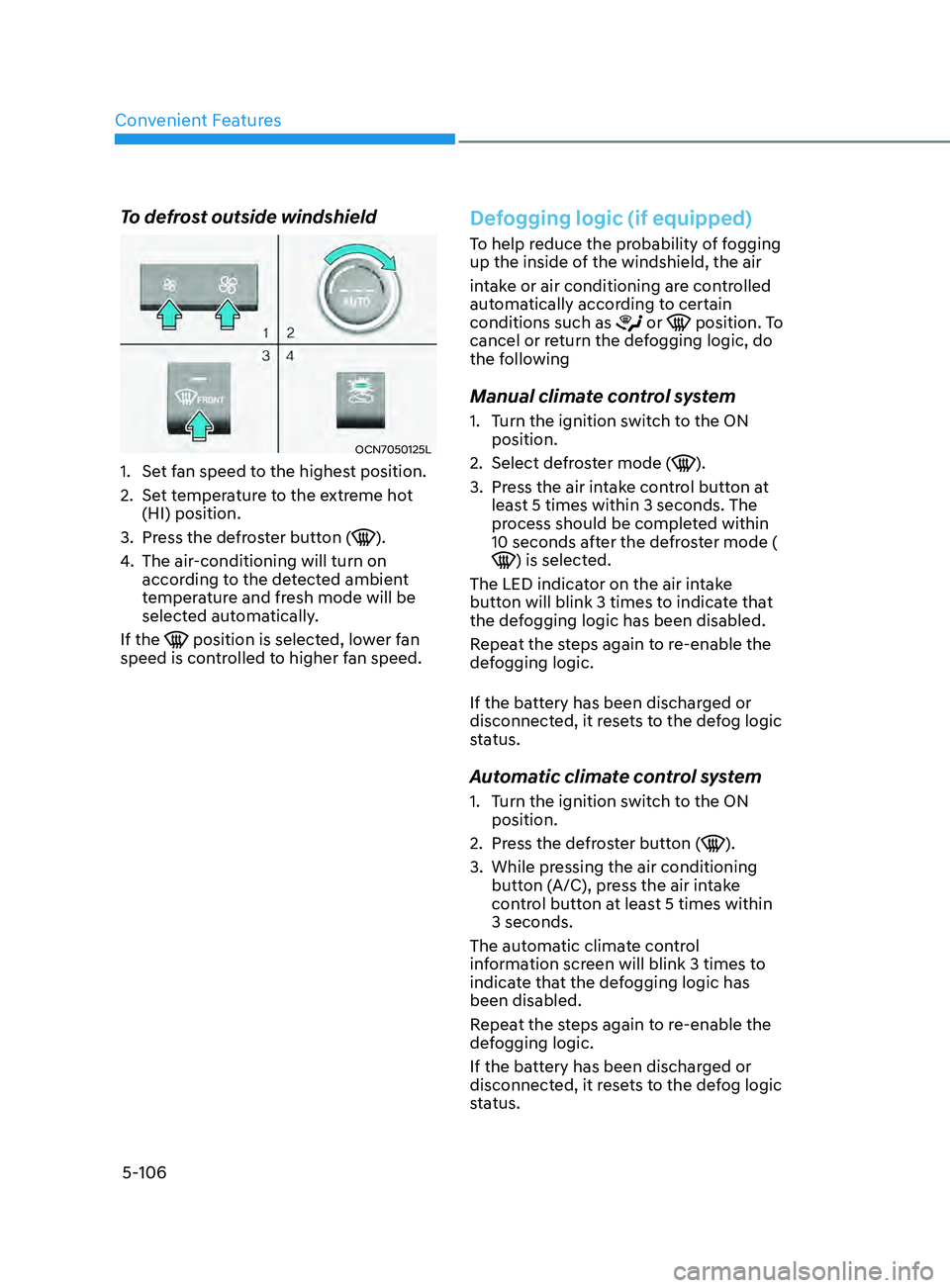
To defrost outside windshield
OCN7050125L
1. Set fan speed to the highest position.
2.
Set t
emperature to the extreme hot
(HI) position.
3.
Press the de
froster button (
).
4.
The air-conditioning will turn on
accor
ding to the detected ambient
temperature and fresh mode will be
selected automatically.
If the
position is selected, lower fan
speed is controlled to higher fan speed.
Defogging logic (if equipped)
To help reduce the probability of fogging
up the inside of the windshield, the air
intake or air conditioning are controlled
automatically according to certain
conditions such as
or position. To
cancel or return the defogging logic, do
the following
Manual climate control system
1. Turn the ignition switch to the ON
position.
2.
Select defr
oster mode (
).
3.
Press the air in
take control button at
least 5 times within 3 seconds. The
process should be completed within
10 seconds after the defroster mode (
) is selected.
The LED indicator on the air intake
button will blink 3 times to indicate that
the defogging logic has been disabled.
Repeat the steps again to re-enable the
defogging logic.
If the battery has been discharged or
disconnected, it resets to the defog logic
status.
Automatic climate control system
1. Turn the ignition switch to the ON
position.
2.
Press the de
froster button (
).
3.
While pressing the air conditioning
butt
on (A/C), press the air intake
control button at least 5 times within
3 seconds.
The automatic climate control
information screen will blink 3 times to
indicate that the defogging logic has
been disabled.
Repeat the steps again to re-enable the
defogging logic.
If the battery has been discharged or
disconnected, it resets to the defog logic
status.
Page 249 of 570
05
5-113
NOTICE
To prevent damage to the Power
Outlets:
• Use the power outlet only when the
engine is running and remove the
accessory plug after use. Using the
accessory plug for prolonged periods
of time with the engine off could
cause the battery to discharge.
• Only use 12V electric accessories
which are less than 180 W in electric
capacity.
• Adjust the air-conditioner or heater
to the lowest operating level when
using the power outlet.
• Close the cover when not in use.
• Some electronic devices can
cause electronic interference
when plugged into a vehicle’s
power outlet. These devices may
cause excessive audio static and
malfunctions in other electronic
systems or devices used in your
vehicle.
• Push the plug in as far as it will go. If
good contact is not made, the plug
may overheat and the fuse may open.
• Plug in battery equipped electrical/
electronic devices with reverse
current protection. The current
from the battery may flow into the
vehicle’s electrical/electronic system
and cause system malfunction.
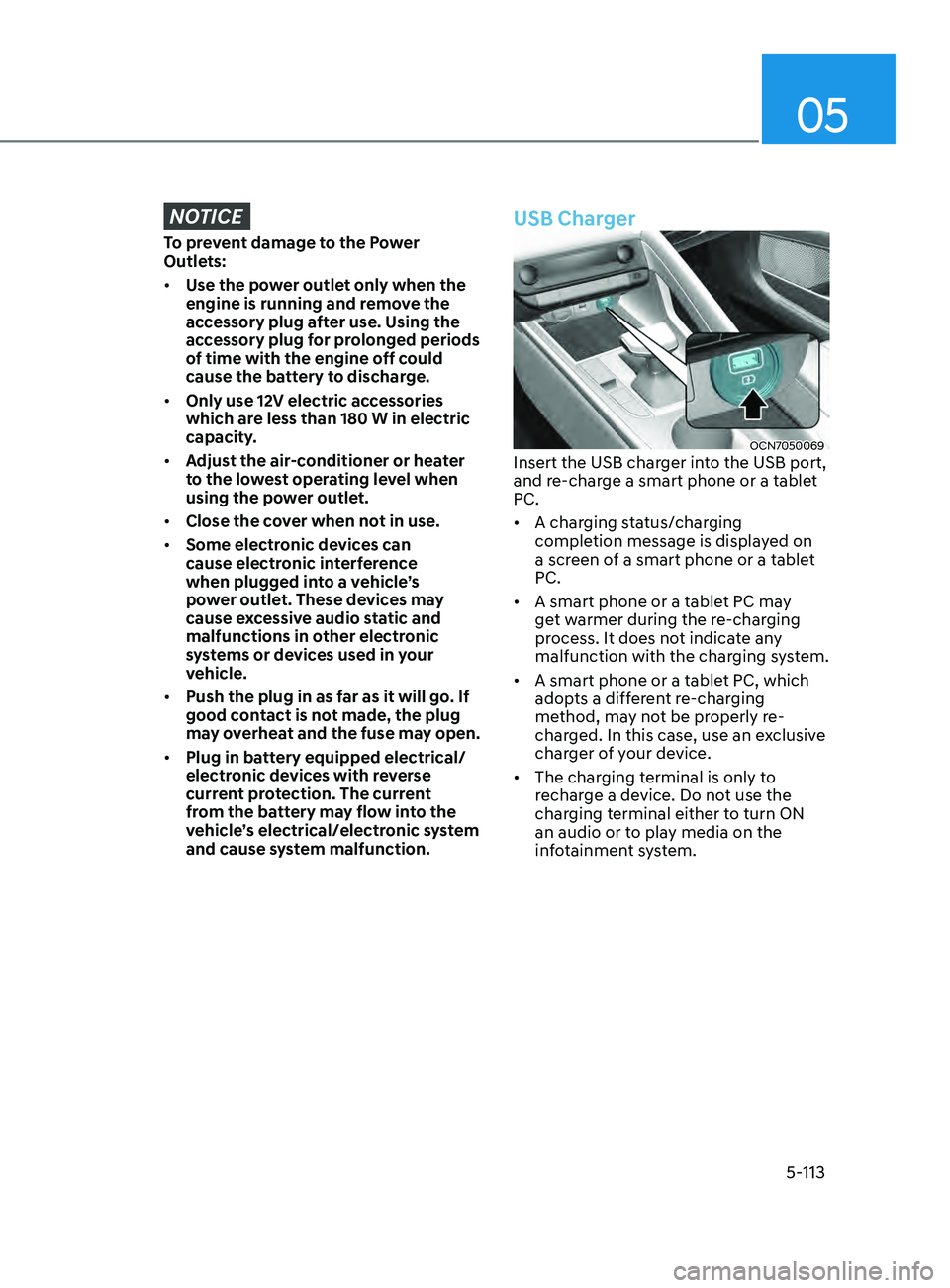
USB Charger
OCN7050069Insert the USB charger into the USB port,
and re-charge a smart phone or a tablet
PC.
• A charging status/charging
completion message is displayed on
a screen of a smart phone or a tablet
PC.
• A smart phone or a tablet PC may
get warmer during the re-charging
process. It does not indicate any
malfunction with the charging system.
• A smart phone or a tablet PC, which
adopts a different re-charging
method, may not be properly re-
charged. In this case, use an exclusive
charger of your device.
• The charging terminal is only to
recharge a device. Do not use the
charging terminal either to turn ON
an audio or to play media on the
infotainment system.
Page 260 of 570

6
6. While Driving
Before Driving ........................................................................\
........................6-4Before Entering the Vehicle ........................................................................\
.............6-4
Bef ore Starting ........................................................................\
................................. 6-4
Ignition Switch ........................................................................\
.......................6-5Key Ignition Switch ........................................................................\
.......................... 6-5
Engine S tart/Stop Button ........................................................................\
................ 6-8
Intelligent variable transmission ..................................................................6-12Intelligent variable transmission operation ...........................................................6-12
P arking ........................................................................\
............................................. 6-
17
Good driving practices
........................................................................\
.................... 6-
18
Brake System ........................................................................\
........................6-19Power Brakes ........................................................................\
...................................6-19
Disc Brak es Wear Indicator........................................................................\
.............6-19
Parking brake
........................................................................\
.................................. 6-
20
Electronic Parking Brake (EPB)
........................................................................\
..... 6-22
A
uto Hold
........................................................................\
.....................................
...6-26
Anti-lock Brake System (ABS) ..................................................................... 6-29Electronic Stability Control (ESC) ........................................................................\
.. 6-31
V ehicle Stability Management (VSM) .................................................................. 6-
33
Hill-Start Assist Control (HAC)
........................................................................\
....... 6-
34
Good Braking Practices
........................................................................\
................. 6-
34
ISG (Idle Stop and Go) system..................................................................... 6-35To Activate the ISG System ........................................................................\
............6-35
T o Deactivate the ISG System ........................................................................\
....... 6-37
ISG System Malfunction
........................................................................\
................ 6-
37
Battery Sensor Deactivation
........................................................................\
.......... 6-
38
Drive Mode Integrated Control System ......................................................6-39Drive Mode ........................................................................\
..................................... 6-39
Smart shift on trip comput er ........................................................................\
......... 6-42
Special Driving Conditions ........................................................................\
..6-43Hazardous Driving Conditions ........................................................................\
...... 6-43
Rocking the V ehicle ........................................................................\
....................... 6-43
Smoo
th Cornering
........................................................................\
.......................... 6-44
Driving a
t Night
........................................................................\
.............................. 6-44
Driving in the Rain ........................................................................\
.......................... 6-44
Driving in Flooded Ar
eas
........................................................................\
................ 6-45
High
way Driving
........................................................................\
............................. 6-45
Page 265 of 570
6-6
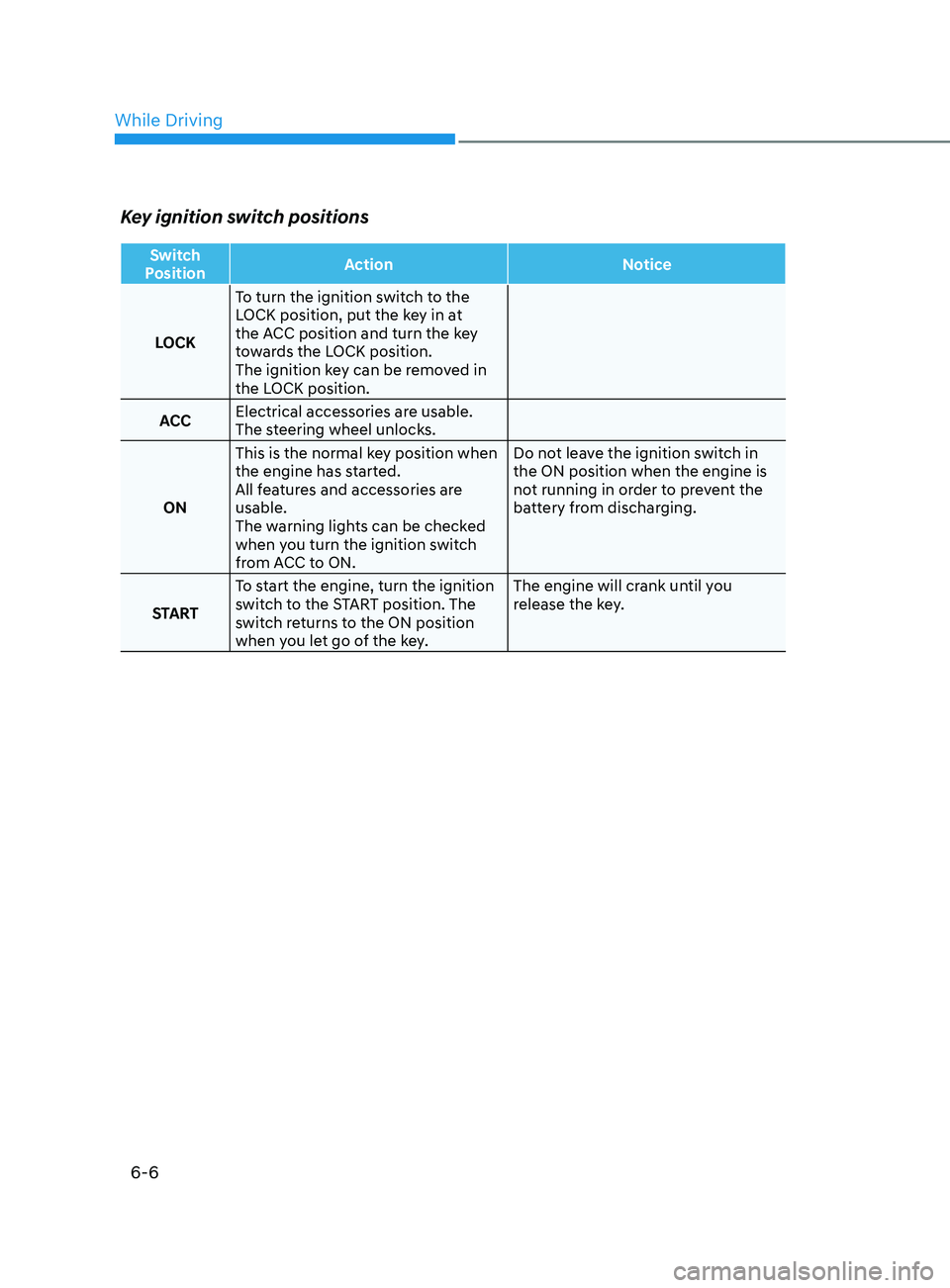
Key ignition switch positions
Switch
Position Action
Notice
LOCK To turn the ignition switch to the
LOCK position, put the key in at
the ACC position and turn the key
towards the LOCK position.
The ignition key can be removed in
the LOCK position.
ACC Electrical accessories are usable.
The steering wheel unlocks.
ON This is the normal key position when
the engine has started.
All features and accessories are
usable.
The warning lights can be checked
when you turn the ignition switch
from ACC to ON. Do not leave the ignition switch in
the ON position when the engine is
not running in order to prevent the
battery from discharging.
START To start the engine, turn the ignition
switch to the START position. The
switch returns to the ON position
when you let go of the key. The engine will crank until you
release the key.
While Driving
Page 268 of 570
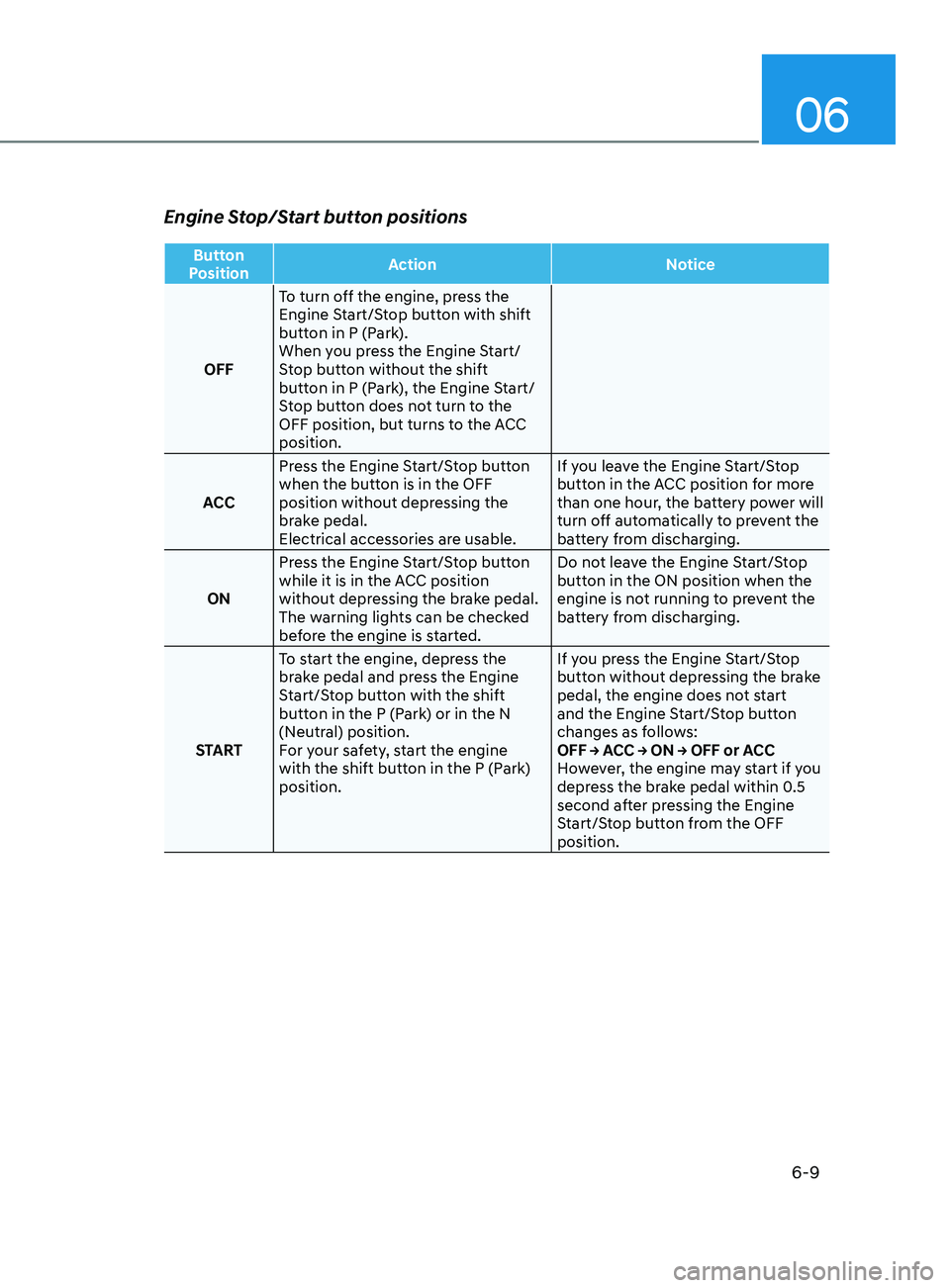
06
6-9
Engine Stop/Start button positions
Button
Position Action
Notice
OFF To turn off the engine, press the
Engine Start/Stop button with shift
button in P (Park).
When you press the Engine Start/
Stop button without the shift
button in P (Park), the Engine Start/
Stop button does not turn to the
OFF position, but turns to the ACC
position.
ACC Press the Engine Start/Stop button
when the button is in the OFF
position without depressing the
brake pedal.
Electrical accessories are usable. If you leave the Engine Start/Stop
button in the ACC position for more
than one hour, the battery power will
turn off automatically to prevent the
battery from discharging.
ON Press the Engine Start/Stop button
while it is in the ACC position
without depressing the brake pedal.
The warning lights can be checked
before the engine is started. Do not leave the Engine Start/Stop
button in the ON position when the
engine is not running to prevent the
battery from discharging.
START To start the engine, depress the
brake pedal and press the Engine
Start/Stop button with the shift
button in the P (Park) or in the N
(Neutral) position.
For your safety, start the engine
with the shift button in the P (Park)
position. If you press the Engine Start/Stop
button without depressing the brake
pedal, the engine does not start
and the Engine Start/Stop button
changes as follows:
OFF → ACC → ON → OFF or ACC
However, the engine may start if you
depress the brake pedal within 0.5
second after pressing the Engine
Start/Stop button from the OFF
position.