fuel HYUNDAI ELANTRA SPORT 2018 Owner's Guide
[x] Cancel search | Manufacturer: HYUNDAI, Model Year: 2018, Model line: ELANTRA SPORT, Model: HYUNDAI ELANTRA SPORT 2018Pages: 534, PDF Size: 51.51 MB
Page 262 of 534
5-21
Driving your vehicle
5
N (Neutral)
The wheels and transmission are not engaged.
Use N (Neutral) if you need to restart
a stalled engine. Shift into P (Park) if
you need to leave your vehicle for
any reason.
Always depress the brake pedal
when you are shifting from N
(Neutral) to another gear.
D (Drive)
This is the normal driving position.
The transmission will automatically
shift through a six-gear sequence,
providing the best fuel economy and
power.
For extra power when passing anoth-
er vehicle or driving uphill depress
the accelerator pedal further until
you feel the transmission downshift
to a lower gear.
The DRIVE MODE switch, located
on the shift lever console, allows the
driver to switch from NORMAL mode
to SPORT mode.
For more details, refer to "Drive
Mode Integrated Control System"
later in this chapter.
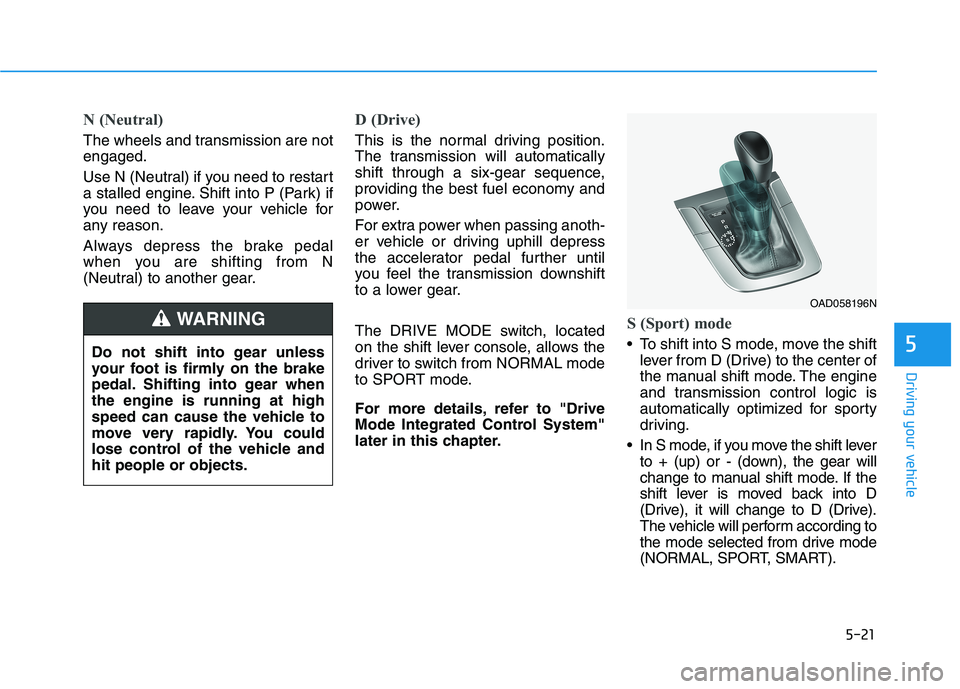
S (Sport) mode
To shift into S mode, move the shiftlever from D (Drive) to the center of
the manual shift mode. The engine
and transmission control logic is
automatically optimized for sporty
driving.
In S mode, if you move the shift lever to + (up) or - (down), the gear will
change to manual shift mode. If the
shift lever is moved back into D
(Drive), it will change to D (Drive).
The vehicle will perform according to
the mode selected from drive mode
(NORMAL, SPORT, SMART).
Do not shift into gear unless
your foot is firmly on the brake
pedal. Shifting into gear whenthe engine is running at high
speed can cause the vehicle to
move very rapidly. You could
lose control of the vehicle andhit people or objects.
WARNING
OAD058196N
Page 267 of 534
5-26
Driving your vehicle
The dual clutch transmission canbe thought of as an automatically
shifting manual transmission. It
gives the driving feel of a manual
transmission, yet provides the
ease of a fully automatic transmis-sion.
When D (Drive) is selected, the transmission will automatically shiftthrough the gears similar to a con-
ventional automatic transmission.
Unlike a traditional automatic
transmission, the gear shifting can
sometimes be felt and heard as theactuators engage the clutches andthe gears are selected.
The dual clutch transmission incor- porates a dry-type dual clutch
mechanism, which allows for better
acceleration performance and
increased fuel efficiency while driv-
ing. But it differs from a conven-
tional automatic transmission
because it does not incorporate a
torque converter. Instead, the tran-
sition from one gear to the next is
managed by clutch slip, especially
at lower speeds.
DDUU AALL CC LLUU TTCCHH TT RR AA NN SSMM IISS SSIIOO NN (( IIFF EE QQ UUIIPP PP EEDD ))
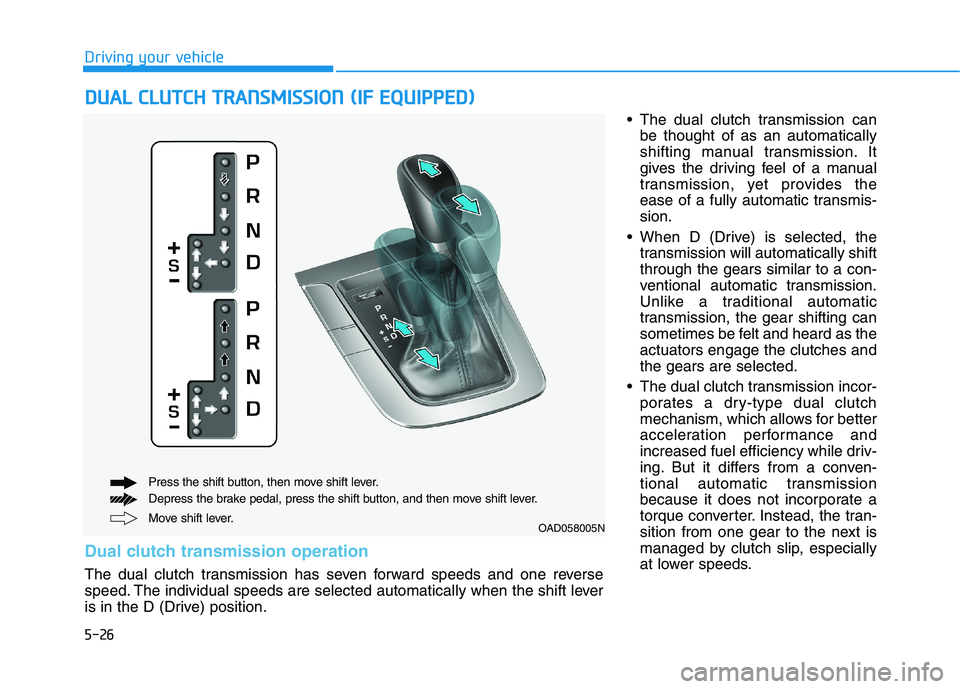
Move shift lever.
Press the shift button, then move shift lever.
Depress the brake pedal, press the shift button, and then move shift lever.OAD058005N
Dual clutch transmission operation
The dual clutch transmission has seven forward speeds and one reverse
speed. The individual speeds are selected automatically when the shift lever
is in the D (Drive) position.
Page 275 of 534
5-34
Driving your vehicle
N (Neutral)
The wheels and transmission are not engaged.
Use N (Neutral) if you need to restart
a stalled engine, or if it is necessaryto stop with the engine ON.
Shift into P (Park) if you need to
leave your vehicle for any reason.
Always depress the brake pedal
when you are shifting from N
(Neutral) to another gear.
D (Drive)
This is the normal driving position.
The transmission will automatically
shift through a seven-gear
sequence, providing the best fuel
economy and power.
For extra power when passing anoth-
er vehicle or driving uphill depress
the accelerator pedal further until
you feel the transmission downshift
to a lower gear.
The DRIVE MODE switch, located
on the shift lever console, allows the
driver to switch from NORMAL mode
to SPORT mode.
For more details, refer to "Drive
Mode Integrated Control System"
later in this chapter.Always make sure the vehicle is
stationary, at a complete stop,
before selecting D (Drive).
NOTICE
Do not shift into gear unless
your foot is firmly on the brake
pedal. Shifting into gear whenthe engine is running at high
speed can cause the vehicle to
move very rapidly. You could
lose control of the vehicle andhit people or objects.
WARNING
Do not shift into gear unless
your foot is firmly on the
brake pedal. Shifting into gearwhen the engine is running athigh speed can cause the
vehicle to move very rapidly.
You may lose control of the
vehicle and cause accidents.
Do not drive with the shift
lever in N (Neutral). The
engine brake will not work
and may lead to an accident.
WARNING
Page 293 of 534
5-52
Driving your vehicle
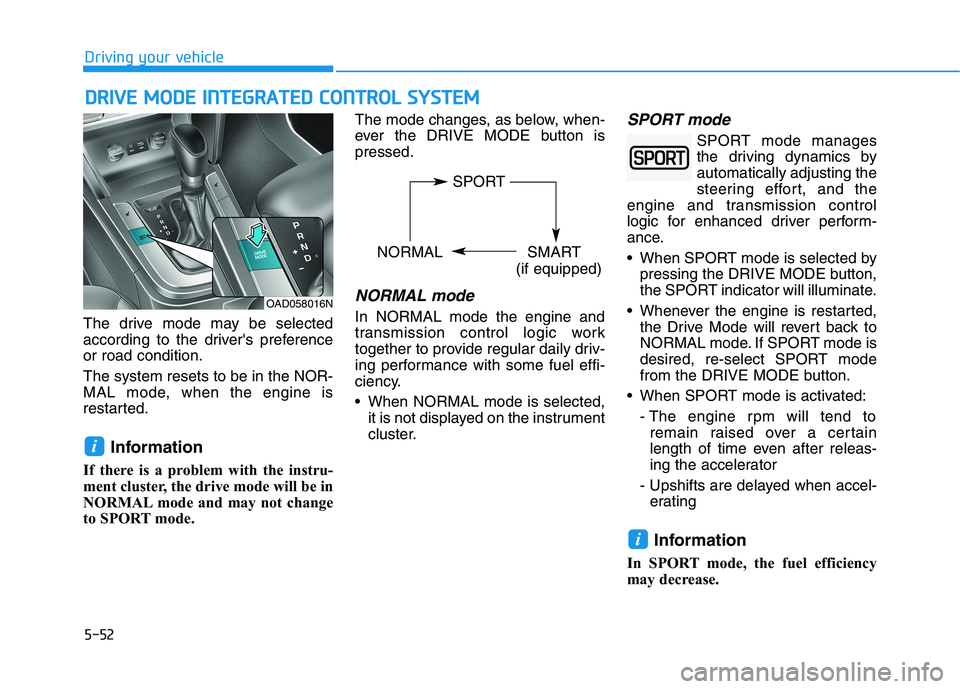
The drive mode may be selected
according to the driver's preferenceor road condition. The system resets to be in the NOR-
MAL mode, when the engine is
restarted.Information
If there is a problem with the instru-
ment cluster, the drive mode will be in
NORMAL mode and may not change
to SPORT mode. The mode changes, as below, when-
ever the DRIVE MODE button ispressed.
NORMAL mode
In NORMAL mode the engine and
transmission control logic work
together to provide regular daily driv-
ing performance with some fuel effi-
ciency.
When NORMAL mode is selected,
it is not displayed on the instrument
cluster.
SPORT mode
SPORT mode manages
the driving dynamics byautomatically adjusting the
steering effort, and the
engine and transmission control
logic for enhanced driver perform-
ance.
When SPORT mode is selected by pressing the DRIVE MODE button,
the SPORT indicator will illuminate.
Whenever the engine is restarted, the Drive Mode will revert back to
NORMAL mode. If SPORT mode is
desired, re-select SPORT mode
from the DRIVE MODE button.
When SPORT mode is activated:
- The engine rpm will tend toremain raised over a certain
length of time even after releas-
ing the accelerator
- Upshifts are delayed when accel- erating
Information
In SPORT mode, the fuel efficiency
may decrease.
i
i
DD RRIIVV EE MM OODDEE IINN TTEEGG RRAA TTEEDD CC OO NNTTRR OO LL SS YY SSTT EEMM
OAD058016N
SPORT
NORMAL SMART
(if equipped)
Page 294 of 534
5-53
Driving your vehicle
5
SMART mode
SMART mode selects the
proper driving mode
between NORMAL and
SPORT by judging the
driver's driving habits (i.e.
Economical or Aggressive) from the
brake pedal depression or the steer-
ing wheel operation.
Press the DRIVE MODE button to select SMART mode. When
SMART mode is activated, the
indicator illuminates on the instru-
ment cluster.
Vehicle's equipped with a supervi- sion cluster the indicator illumi-
nates in green, when the driver's
driving is categorized to be eco-
nomic. It illuminates in white, when
the driver's driving is categorized
to be normal. It illuminates in yel-
low, when the driver's driving is
categorized to be sportive during
abrupt braking or sharp curving.
Whenever the engine is restarted, the drive mode will revert back to
NORMAL mode. If SMART mode
is desired, re-select SMART mode. SMART mode automatically con-
trols gear shifting patterns, engine
torque, in accordance with the dri-
ver's driving habits.
Information
When you dynamically drive the vehi-
cle in SMART mode by abruptly
decelerating or sharply turning the
driving mode changes to SPORT
mode. However, it may adversely
affect fuel economy.
Various driving situations, which
you may encounter in SMART
mode
The driving mode automatically changes to SMART SPORT, when
you abruptly accelerate the vehicle
or repetitively operate the steering
wheel (Your driving is categorized
to be sporty.). In this mode, your
vehicle drives in a lower gear for
abrupt accelerating/decelerating
and increases the engine brake
performance.
You may still sense the engine braking performance, even when
you release the accelerator pedal
in SMART SPORT mode. It is
because your vehicle remains in
lower gear over a certain period of
time for next acceleration. Thus, it
is a normal driving situation, not
indicating any malfunction.
The driving mode automatically changes to SMART SPORT mode
only in harsh driving situations. In
most of the normal driving situa-
tions, the driving mode sets to be
in SMART NORMAL mode.
i
60$57
Page 379 of 534
5-138
Driving your vehicle
Turn on your headlamps to make iteasier for others to see you.
Driving too fast through large pud- dles can affect your brakes. If you
must go through puddles, try to
drive through them slowly.
If you believe your brakes may be wet, apply them lightly while driv-
ing until normal braking operation
returns.
Hydroplaning
If the road is wet enough and you are
going fast enough, your vehicle may
have little or no contact with the road
surface and actually ride on the
water. The best advice is SLOW
DOWN when the road is wet.
The risk of hydroplaning increas- es as the depth of tire tread
decreases, refer to "Tire
Replacement" in chapter 7.
Driving in Flooded Areas
Avoid driving through flooded areas
unless you are sure the water is nohigher than the bottom of the wheel
hub. Drive through any water slowly.
Allow adequate stopping distance
because brake performance may bereduced.
After driving through water, dry the
brakes by gently applying them sev-
eral times while the vehicle is moving
slowly.
Highway Driving
Tires
Adjust the tire inflation, as specified.
Under-inflation may overheat or
damage the tires.
Do not install worn-out or damaged
tires, which may reduce traction or
adversely affect vehicle handling.
This could lead to sudden tire failure
that may cause loss of vehicle con-trol resulting in an accident.
Information
Never over-inflate your tires above the
maximum inflation pressure, as speci-
fied on your tires.
Fuel, engine coolant and engine oil
Driving at higher speeds on the high-
way consumes more fuel and is less
efficient than driving at a slower,
more moderate speed. Maintain a
moderate speed in order to conserve
fuel when driving on the highway.
Be sure to check both the engine
coolant level and the engine oil
before driving.
Drive belt
A loose or damaged drive belt may
overheat the engine.
i
Page 383 of 534
5-142
Driving your vehicle
Two labels on your driver's door sill
show how much weight your vehicle
was designed to carry: the Tire and
Loading Information Label and the
Certification Label.
Before loading your vehicle, familiar-
ize yourself with the following terms
for determining your vehicle’s weight
ratings, from the vehicle's specifica-
tions and the Certification Label:
Base Curb Weight
This is the weight of the vehicle including a full tank of fuel and all
standard equipment. It does not
include passengers, cargo, or option-al equipment.
Vehicle Curb Weight
This is the weight of your new vehicle
when you picked it up from your deal-
er plus any aftermarket equipment.Cargo Weight
This figure includes all weight added
to the Base Curb Weight, includingcargo and optional equipment.
GAW (Gross Axle Weight)
This is the total weight placed on each axle (front and rear) - including
vehicle curb weight and all payload.
GAWR (Gross Axle Weight Rating)
This is the maximum allowable
weight that can be carried by a single
axle (front or rear). These numbers
are shown on the Certification Label.
The total load on each axle must
never exceed its GAWR.
GVW (Gross Vehicle Weight)
This is the Base Curb Weight plus
actual Cargo Weight plus passen-
gers.GVWR (Gross Vehicle WeightRating)
This is the maximum allowable
weight of the fully loaded vehicle
(including all options, equipment,
passengers and cargo). The GVWR
is shown on the Certification Label
located on the driver’s door sill.
VV
EEHH IICC LLEE LL OO AADD LL IIMM IITT
Page 388 of 534
5-147
Driving your vehicle
5
Certification label
The certification label is located on
the driver’s door sill at the center pil-
lar and shows the maximum allow-
able weight of the fully loaded vehi-
cle. This is called the GVWR (Gross
Vehicle Weight Rating). The GVWR
includes the weight of the vehicle, all
occupants, fuel and cargo.
This label also tells you the maxi-
mum weight that can be supported
by the front and rear axles, called
Gross Axle Weight Rating (GAWR).
The total weight of the vehicle,
including all occupants, accessories,
cargo, and trailer tongue load must
not exceed the Gross Vehicle WeightRating (GVWR) or the Gross Axle
Weight Rating (GAWR). To find out
the actual loads on your front and
rear axles, you need to go to a weigh
station and weigh your vehicle. Be
sure to spread out your load equally
on both sides of the centerline.Overloading your vehicle may
cause damage. Repairs would not
be covered by your warranty. Do
not overload your vehicle.
NOTICE
If you carry items inside your
vehicle (e.g., suitcases, tools,
packages, or anything else),
they are moving as fast as the
vehicle. If you have to stop or
turn quickly, or if there is a
crash, the items will keep going
and can cause an injury if they
strike the driver or a passenger.
Put items in the cargo area of
your vehicle. Try to spread the
weight evenly.
Do not stack items, like suit-
cases, inside the vehicle
above the tops of the seats.
Do not leave an unsecured
child restraint in your vehicle.
When you carry something
inside the vehicle, secure it.
WARNING
Overloading
Never exceed the GVWR for
your vehicle, the GAWR for
either the front or rear axle
and vehicle capacity weight.Exceeding these ratings can
affect your vehicle's handling
and braking ability, and causean accident.
Do not overload your vehicle.
Overloading your vehicle can
cause heat buildup in your
vehicle's tires and possible
tire failure, increased stop-ping distances and poor vehi-
cle handling-all of which mayresult in a crash.
WARNING
Page 393 of 534
6-4
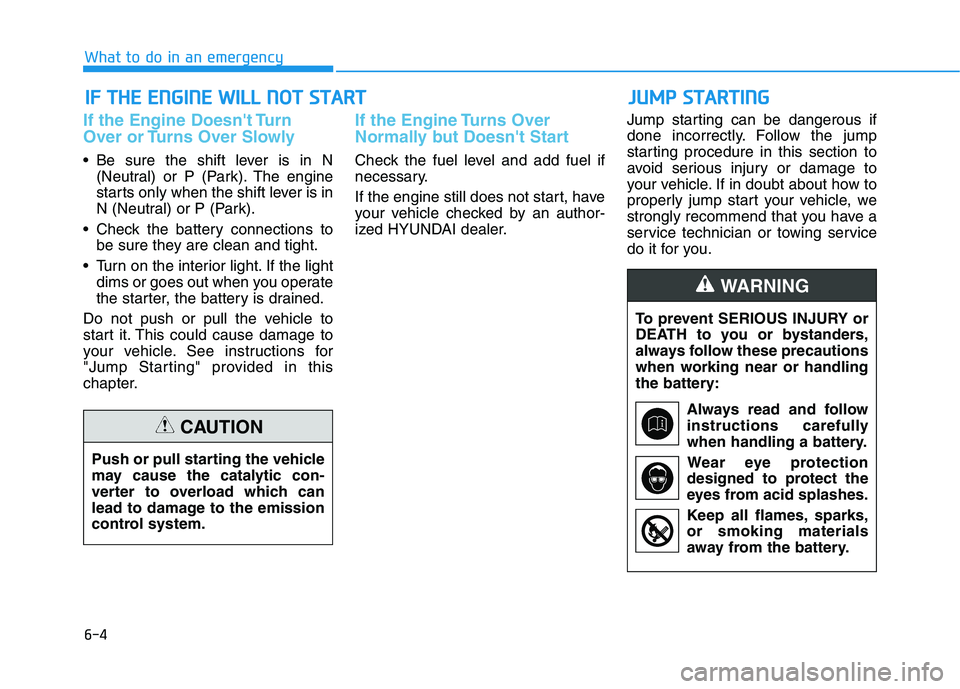
If the Engine Doesn't Turn
Over or Turns Over Slowly
Be sure the shift lever is in N(Neutral) or P (Park). The engine
starts only when the shift lever is in
N (Neutral) or P (Park).
Check the battery connections to be sure they are clean and tight.
Turn on the interior light. If the light dims or goes out when you operate
the starter, the battery is drained.
Do not push or pull the vehicle to
start it. This could cause damage to
your vehicle. See instructions for
"Jump Starting" provided in this
chapter.
If the Engine Turns Over
Normally but Doesn't Start
Check the fuel level and add fuel if
necessary.
If the engine still does not start, have
your vehicle checked by an author-
ized HYUNDAI dealer. Jump starting can be dangerous if
done incorrectly. Follow the jump
starting procedure in this section to
avoid serious injury or damage to
your vehicle. If in doubt about how to
properly jump start your vehicle, we
strongly recommend that you have a
service technician or towing service
do it for you.
II
FF TT HH EE EE NN GGIINN EE WW IILL LL NN OO TT SS TT AA RRTT
What to do in an emergency
Push or pull starting the vehicle
may cause the catalytic con-
verter to overload which can
lead to damage to the emission
control system.
CAUTION
JJUU MM PP SS TT AA RRTTIINN GG
To prevent SERIOUS INJURY or
DEATH to you or bystanders,
always follow these precautions
when working near or handling
the battery:
Always read and follow
instructions carefully
when handling a battery.Wear eye protection
designed to protect the
eyes from acid splashes.
Keep all flames, sparks, or smoking materials
away from the battery.
WARNING
Page 424 of 534
6-35
What to do in an emergency
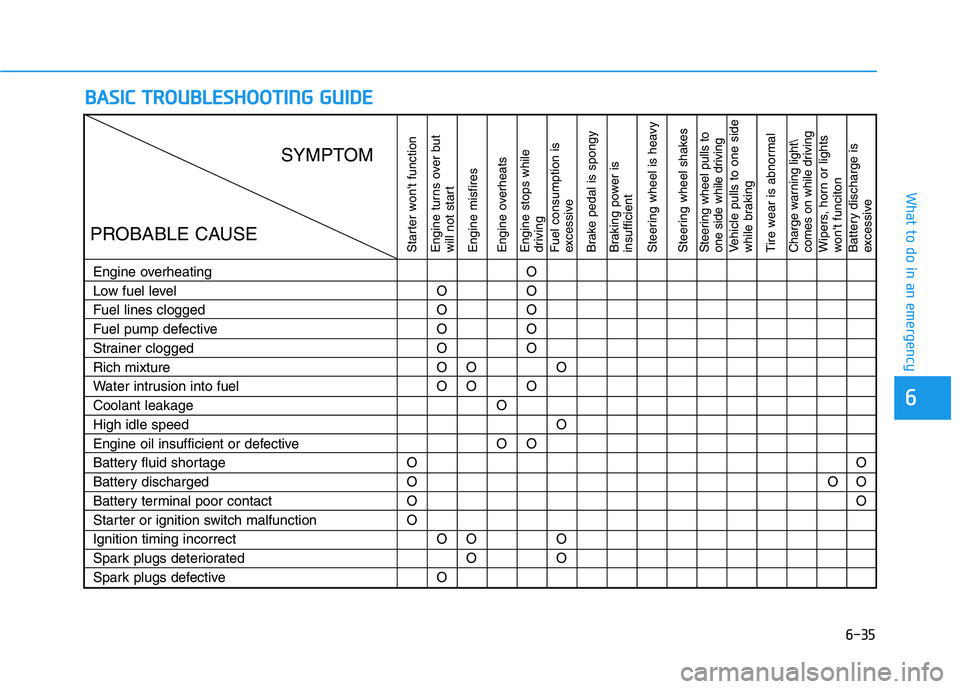
BBAA SSIICC TT RR OO UUBBLLEE SSHH OO OOTTIINN GG GG UU IIDD EE
6
Starter won't function
Engine turns over but
will not start Engine misfires
Engine overheats Engine stops while
driving Fuel consumption is
excessive
Brake pedal is spongy
Braking power is insufficient
Steering wheel is heavy
Steering wheel shakesSteering wheel pulls to
one side while drivingVehicle pulls to one side
while braking
Tire wear is abnormalCharge warning light\
comes on while drivingWipers, horn or lights
won't funciton
Battery discharge is
excessive
Engine overheating
Low fuel levelFuel lines clogged
Fuel pump defective
Strainer cloggedRich mixture
Water intrusion into fuelCoolant leakageHigh idle speed
Engine oil insufficient or defective
Battery fluid shortage
Battery discharged
Battery terminal poor contact
Starter or ignition switch malfunctionIgnition timing incorrect
Spark plugs deteriorated
Spark plugs defective OOOOOOOOOO O O
O O O O
O OO OOOO O O
OO O O
O
OOO
SYMPTOM
PROBABLE CAUSE