clutch HYUNDAI ELANTRA SPORT 2019 Owners Manual
[x] Cancel search | Manufacturer: HYUNDAI, Model Year: 2019, Model line: ELANTRA SPORT, Model: HYUNDAI ELANTRA SPORT 2019Pages: 534, PDF Size: 51.51 MB
Page 17 of 534
1-6
Your vehicle at a glanceE
E NN GGIINN EE CC OO MM PPAA RRTTMM EENN TT
OAD078151N
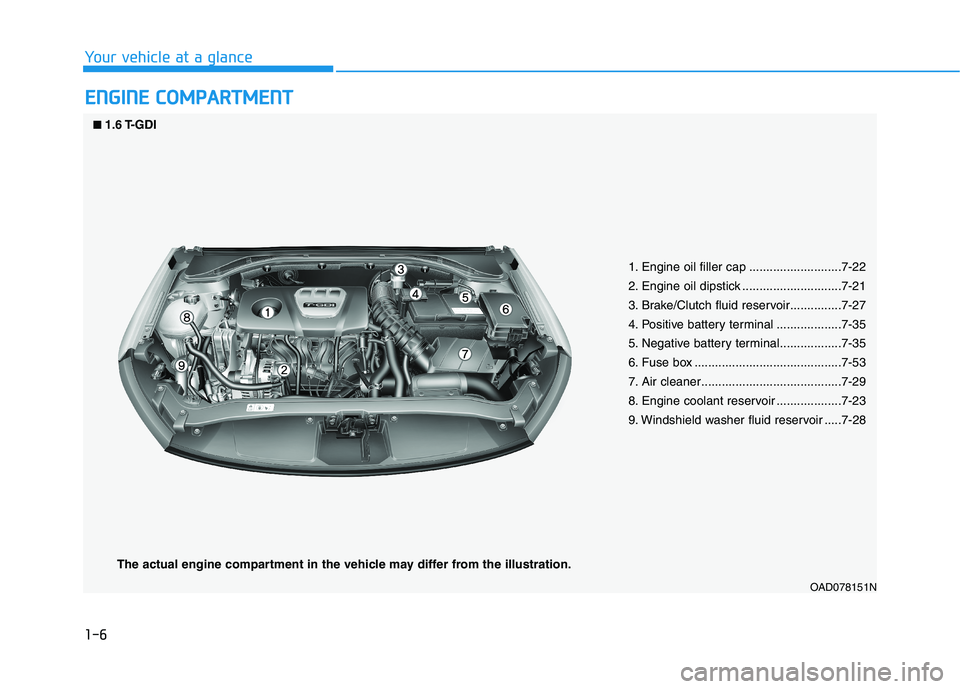
1. Engine oil filler cap ...........................7-22
2. Engine oil dipstick .............................7-21
3. Brake/Clutch fluid reservoir...............7-27
4. Positive battery terminal ...................7-35
5. Negative battery terminal..................7-35
6. Fuse box ...........................................7-53
7. Air cleaner.........................................7-29
8. Engine coolant reservoir ...................7-23
9. Windshield washer fluid reservoir .....7-28
■
■
1.6 T-GDI
The actual engine compartment in the vehicle may differ from the illustration.
Page 18 of 534
1-7
Your vehicle at a glance
1
OAD078100L
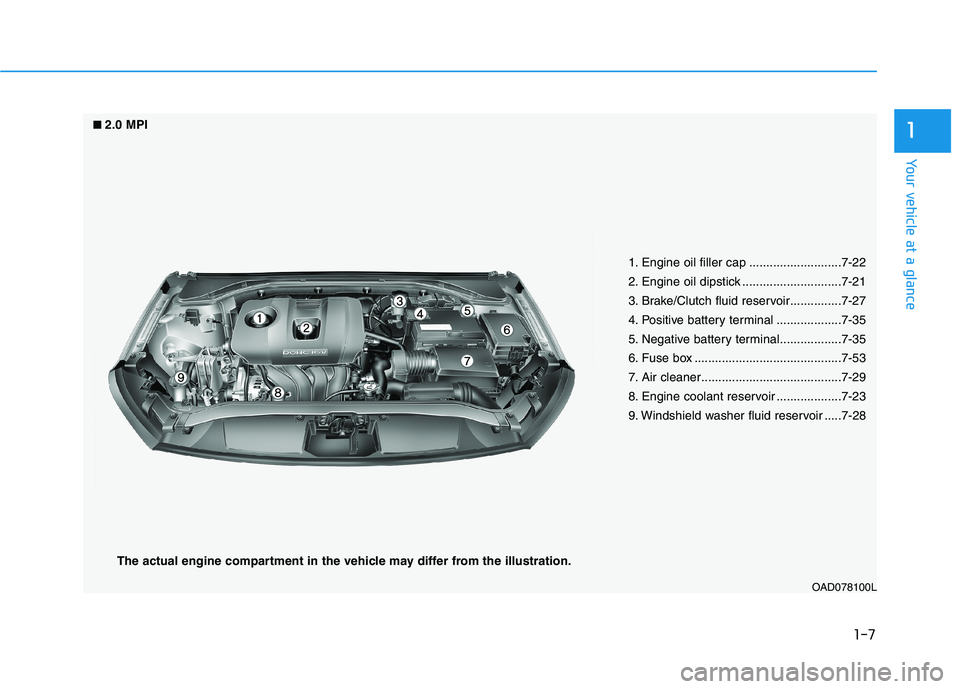
1. Engine oil filler cap ...........................7-22
2. Engine oil dipstick .............................7-21
3. Brake/Clutch fluid reservoir...............7-27
4. Positive battery terminal ...................7-35
5. Negative battery terminal..................7-35
6. Fuse box ...........................................7-53
7. Air cleaner.........................................7-29
8. Engine coolant reservoir ...................7-23
9. Windshield washer fluid reservoir .....7-28
■
■
2.0 MPI
The actual engine compartment in the vehicle may differ from the illustration.
Page 148 of 534
3-63
Convenient features of your vehicle
3
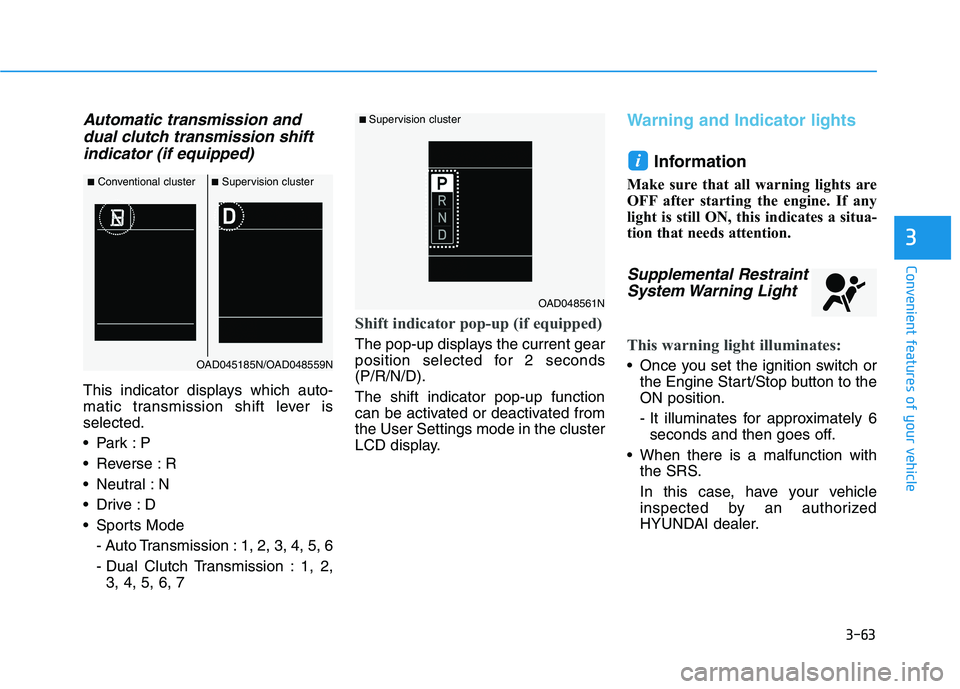
Automatic transmission anddual clutch transmission shift
indicator (if equipped)
This indicator displays which auto-
matic transmission shift lever isselected.
Reverse : R
Neutral : N
Sports Mode
- Auto Transmission : 1, 2, 3, 4, 5, 6
- Dual Clutch Transmission : 1, 2,3, 4, 5, 6, 7
Shift indicator pop-up (if equipped)
The pop-up displays the current gear
position selected for 2 seconds(P/R/N/D). The shift indicator pop-up function
can be activated or deactivated fromthe User Settings mode in the cluster
LCD display.
Warning and Indicator lights
Information
Make sure that all warning lights are
OFF after starting the engine. If any
light is still ON, this indicates a situa-
tion that needs attention.
Supplemental Restraint System Warning Light
This warning light illuminates:
Once you set the ignition switch or the Engine Start/Stop button to the ON position.
- It illuminates for approximately 6seconds and then goes off.
When there is a malfunction with the SRS.
In this case, have your vehicle
inspected by an authorized
HYUNDAI dealer.
i
■Conventional cluster ■Supervision cluster
OAD045185N/OAD048559N
■ Supervision cluster
OAD048561N
Page 160 of 534
3-75
Convenient features of your vehicle
3
LCD Display Messages (if equipped)
Shift to P or N to start engine(for smart key system and auto-
matic transmission/dual clutch transmission)
This warning message is displayed if
you try to start the engine with the
shift lever not in the P (Park) or N
(Neutral) position.
Information
You can start the engine with the shift
lever in the N (Neutral) position. But,
for your safety, we recommend that
you start the engine with the shift
lever in the P (Park) position.
Shift to P (for smart key system)
This message is displayed if you try
to turn off the engine without the shift
lever in P (Park) position.
At this time, the Engine Start/Stop
button turns to the ACC position (If
you press the Engine Start/Stop but-
ton once more, it will turn to the ONposition).
Press START button again (for smart key system)
This message is displayed if you
were unable to start the vehicle when
the Start/Stop button was pressed.
If this occurs, attempt to start the
engine by pressing the Start/Stop
button again.
If the warning message appears
each time you press the Start/Stop
button, have your vehicle inspected
by an authorized Hyundai dealer.
Press brake pedal to start engine
(for smart key systemand auto-matic transmission/dual clutch
transmission)
This warning message is displayed if
the Engine Start/Stop button
changes to the ACC position twice
by pressing the button repeatedly
without depressing the brake pedal.
In order to start the vehicle, press the
brake pedal to start the engine.
Press clutch pedal to startengine (for smart key system
and manual transmission)
This warning message is displayed if
the Engine Start/Stop button is in the
ACC position twice by pressing the
button repeatedly without depressingthe clutch pedal.
Depress the clutch pedal to start the
engine.
Press START button with key(for smart key system)
This warning message is displayed if
you press the Engine Start/Stop but-
ton while the warning message "Key
not detected" is shown.
At this time, the immobilizer indicator
light blinks.
Low Key Battery
(for smart key system)
This warning message is displayed if
the battery of the smart key is dis-
charged when the Engine Start/Stop
button changes to the OFF position.
i
Page 242 of 534
Driving your vehicle
5
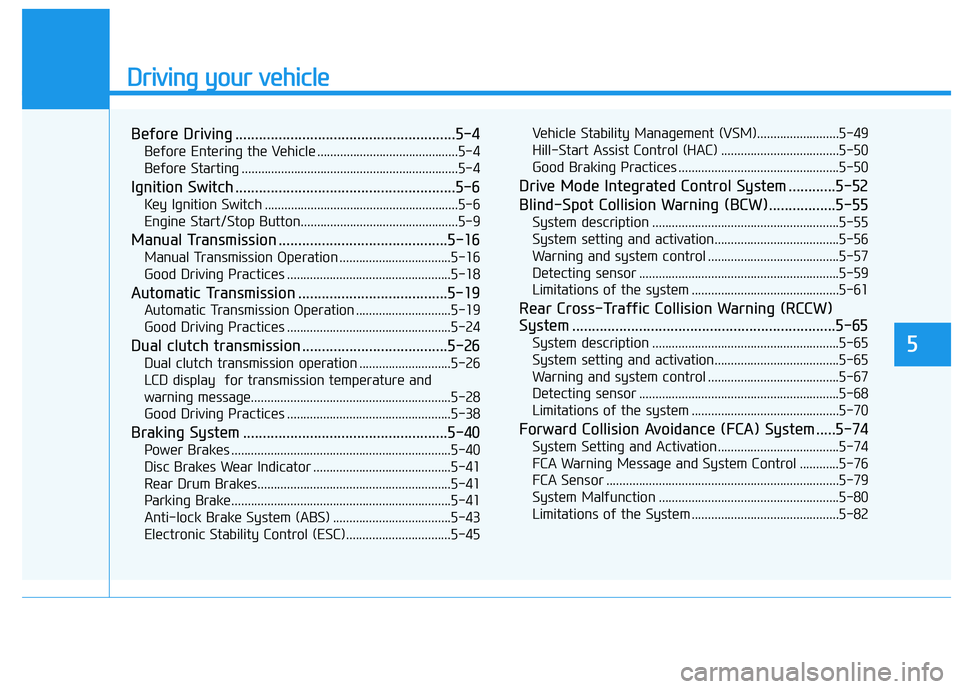
Before Driving ........................................................5-4Before Entering the Vehicle ...........................................5-4
Before Starting ..................................................................5-4
Ignition Switch ........................................................5-6 Key Ignition Switch ...........................................................5-6
Engine Start/Stop Button................................................5-9
Manual Transmission ...........................................5-16 Manual Transmission Operation ..................................5-16
Good Driving Practices ..................................................5-18
Automatic Transmission ......................................5-19 Automatic Transmission Operation .............................5-19
Good Driving Practices ..................................................5-24
Dual clutch transmission .....................................5-26 Dual clutch transmission operation ............................5-26
LCD display for transmission temperature and
warning message.............................................................5-28 Good Driving Practices ..................................................5-38
Braking System ....................................................5-40 Power Brakes ...................................................................5-40
Disc Brakes Wear Indicator ..........................................5-41
Rear Drum Brakes...........................................................5-41
Parking Brake...................................................................5-41
Anti-lock Brake System (ABS) ....................................5-43
Electronic Stability Control (ESC)................................5-45 Vehicle Stability Management (VSM).........................5-49
Hill-Start Assist Control (HAC) ....................................5-50
Good Braking Practices .................................................5-50
Drive Mode Integrated Control System ............5-52
Blind-Spot Collision Warning (BCW).................5-55 System description .........................................................5-55
System setting and activation......................................5-56
Warning and system control ........................................5-57
Detecting sensor .............................................................5-59
Limitations of the system .............................................5-61
Rear Cross-Traffic Collision Warning (RCCW)
System ...................................................................5-65 System description .........................................................5-65
System setting and activation......................................5-65
Warning and system control ........................................5-67
Detecting sensor .............................................................5-68
Limitations of the system .............................................5-70
Forward Collision Avoidance (FCA) System .....5-74 System Setting and Activation.....................................5-74
FCA Warning Message and System Control ............5-76
FCA Sensor .......................................................................5-79
System Malfunction .......................................................5-80
Limitations of the System .............................................5-82
Page 247 of 534
5-6
Key Ignition Switch
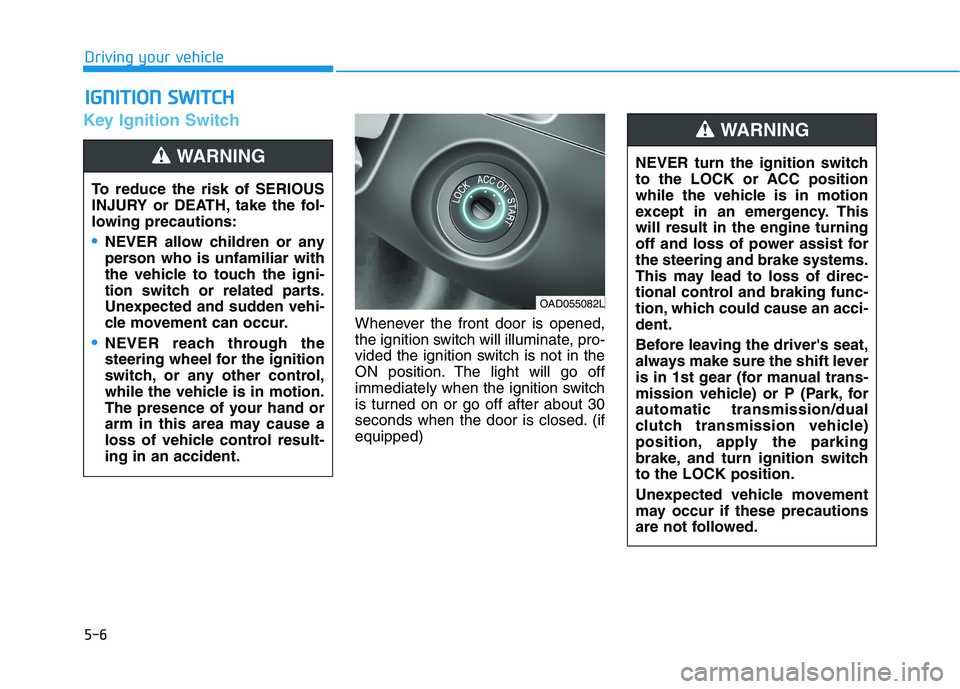
Whenever the front door is opened,
the ignition switch will illuminate, pro-
vided the ignition switch is not in the
ON position. The light will go off
immediately when the ignition switch
is turned on or go off after about 30
seconds when the door is closed. (ifequipped)
IIGG NN IITT IIOO NN SS WW IITT CCHH
Driving your vehicle
To reduce the risk of SERIOUS
INJURY or DEATH, take the fol-
lowing precautions:
NEVER allow children or any
person who is unfamiliar with
the vehicle to touch the igni-
tion switch or related parts.
Unexpected and sudden vehi-
cle movement can occur.
NEVER reach through the
steering wheel for the ignition
switch, or any other control,
while the vehicle is in motion.
The presence of your hand or
arm in this area may cause a
loss of vehicle control result-ing in an accident.
WARNING NEVER turn the ignition switch
to the LOCK or ACC position
while the vehicle is in motion
except in an emergency. Thiswill result in the engine turning
off and loss of power assist forthe steering and brake systems.
This may lead to loss of direc-
tional control and braking func-
tion, which could cause an acci-dent.
Before leaving the driver's seat,
always make sure the shift lever
is in 1st gear (for manual trans-
mission vehicle) or P (Park, forautomatic transmission/dual
clutch transmission vehicle)
position, apply the parking
brake, and turn ignition switchto the LOCK position.
Unexpected vehicle movement
may occur if these precautions
are not followed.
WARNING
OAD055082L
Page 248 of 534
5-7
Driving your vehicle
5
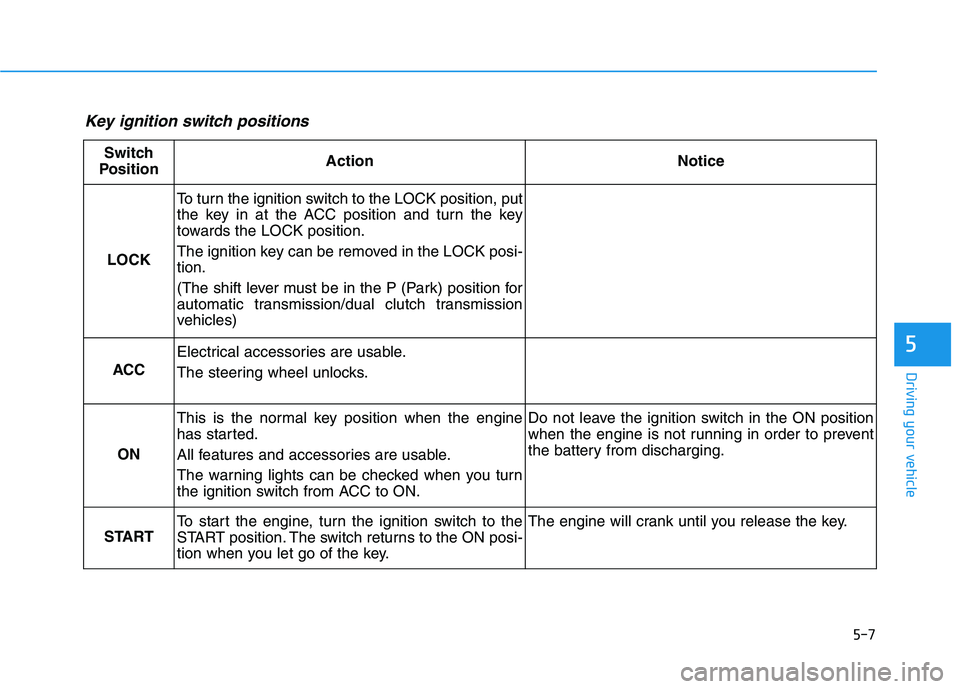
Key ignition switch positions
Switch
PositionActionNotice
LOCK
To turn the ignition switch to the LOCK position, put
the key in at the ACC position and turn the key
towards the LOCK position.
The ignition key can be removed in the LOCK posi- tion.
(The shift lever must be in the P (Park) position for
automatic transmission/dual clutch transmission
vehicles)
ACC
Electrical accessories are usable.
The steering wheel unlocks.
ON
This is the normal key position when the engine
has started.
All features and accessories are usable.
The warning lights can be checked when you turn
the ignition switch from ACC to ON.Do not leave the ignition switch in the ON position
when the engine is not running in order to prevent
the battery from discharging.
START
To start the engine, turn the ignition switch to the
START position. The switch returns to the ON posi-
tion when you let go of the key.The engine will crank until you release the key.
Page 249 of 534
5-8
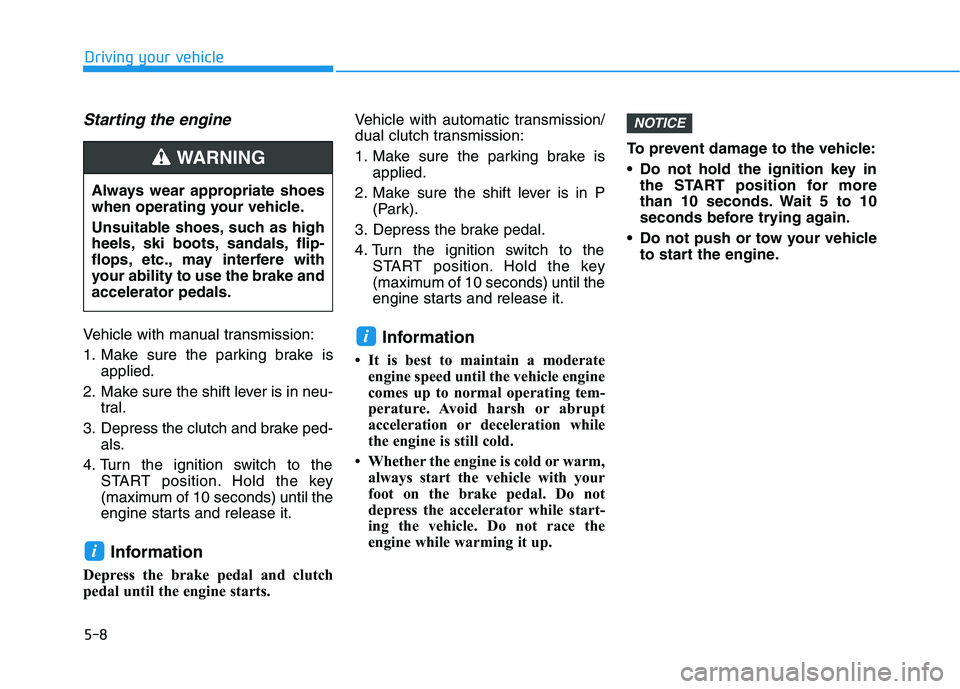
Starting the engine
Vehicle with manual transmission:
1. Make sure the parking brake isapplied.
2. Make sure the shift lever is in neu- tral.
3. Depress the clutch and brake ped- als.
4. Turn the ignition switch to the START position. Hold the key
(maximum of 10 seconds) until the
engine starts and release it.
Information
Depress the brake pedal and clutch
pedal until the engine starts. Vehicle with automatic transmission/
dual clutch transmission:
1. Make sure the parking brake is
applied.
2. Make sure the shift lever is in P (Park).
3. Depress the brake pedal.
4. Turn the ignition switch to the START position. Hold the key
(maximum of 10 seconds) until the
engine starts and release it.
Information
It is best to maintain a moderate engine speed until the vehicle engine
comes up to normal operating tem-
perature. Avoid harsh or abrupt
acceleration or deceleration while
the engine is still cold.
Whether the engine is cold or warm, always start the vehicle with your
foot on the brake pedal. Do not
depress the accelerator while start-
ing the vehicle. Do not race the
engine while warming it up. To prevent damage to the vehicle:
Do not hold the ignition key in
the START position for more
than 10 seconds. Wait 5 to 10
seconds before trying again.
Do not push or tow your vehicle to start the engine.
NOTICE
i
i
Driving your vehicle
Always wear appropriate shoes
when operating your vehicle.
Unsuitable shoes, such as high
heels, ski boots, sandals, flip-
flops, etc., may interfere with
your ability to use the brake andaccelerator pedals.
WARNING
Page 251 of 534
5-10
Driving your vehicle
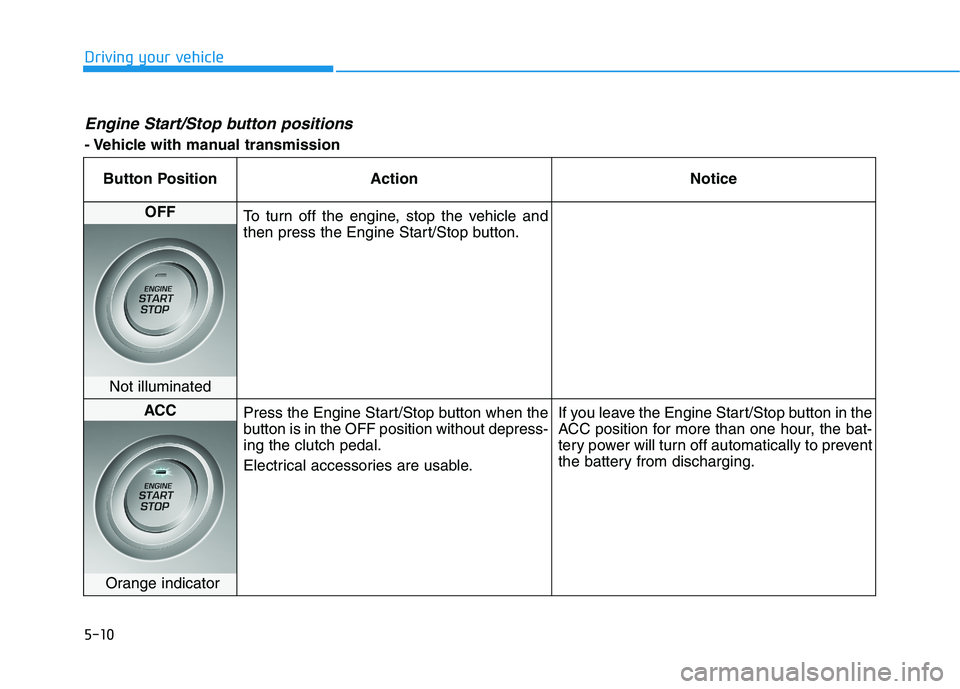
Engine Start/Stop button positions
- Vehicle with manual transmissionButton Position Action Notice
OFF
To turn off the engine, stop the vehicle and
then press the Engine Start/Stop button.
Not illuminated
ACC Press the Engine Start/Stop button when the
button is in the OFF position without depress-ing the clutch pedal.
Electrical accessories are usable. If you leave the Engine Start/Stop button in the
ACC position for more than one hour, the bat-
tery power will turn off automatically to prevent
the battery from discharging.
Orange indicator
Page 252 of 534
5-11
Driving your vehicle
5
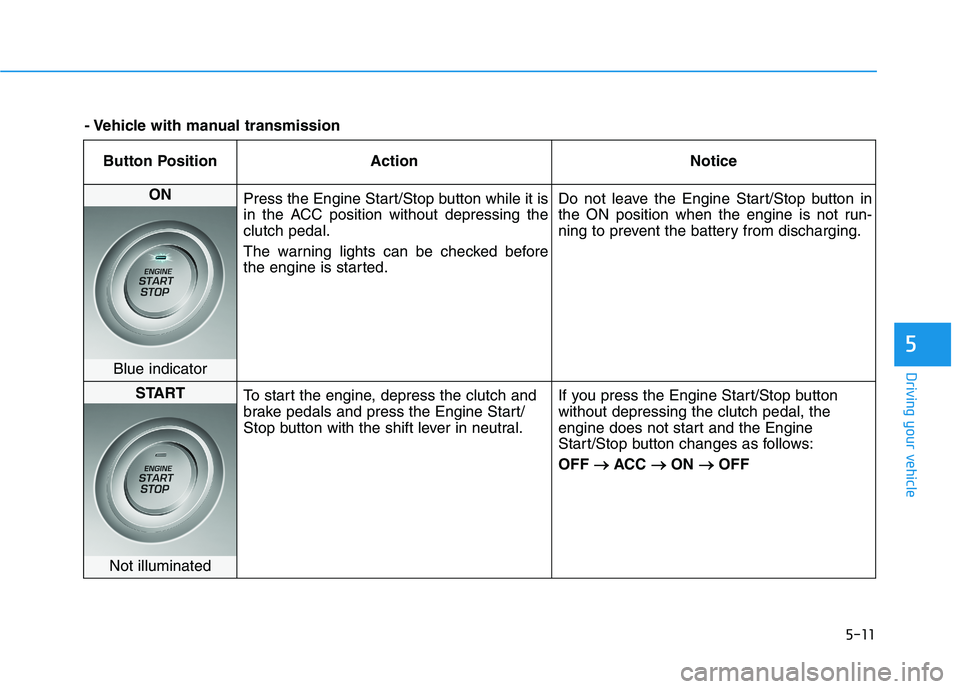
Button Position ActionNotice
ON
Press the Engine Start/Stop button while it is
in the ACC position without depressing theclutch pedal.
The warning lights can be checked before
the engine is started. Do not leave the Engine Start/Stop button in
the ON position when the engine is not run-
ning to prevent the battery from discharging.
Blue indicator
START
To start the engine, depress the clutch and
brake pedals and press the Engine Start/
Stop button with the shift lever in neutral. If you press the Engine Start/Stop buttonwithout depressing the clutch pedal, the
engine does not start and the Engine
Start/Stop button changes as follows: OFF
ACC
ON
OFF
Not illuminated
- Vehicle with manual transmission