ESP HYUNDAI ENTOURAGE 2007 User Guide
[x] Cancel search | Manufacturer: HYUNDAI, Model Year: 2007, Model line: ENTOURAGE, Model: HYUNDAI ENTOURAGE 2007Pages: 398, PDF Size: 8.03 MB
Page 88 of 398
Features of your vehicle72 3
Using a child restraint systemFor small children and babies, the use of
a child seat or infant seat is required. This
child seat or infant seat should be of
appropriate size for the child and should
be installed in accordance with the man-
ufacturer's instructions. It is further
required that the seat be placed in the
vehicle's rear seat. Your vehicle is provid-
ed with three child restraint hook holders
for installing the child seat or infant seat.
(Continued)
Never leave children unattended
in a vehicle – not even for a short
time. The car can heat up very
quickly, resulting in serious
injuries to children inside. Even
very young children may inadver-
tently cause the vehicle to move,
entangle themselves in the win-
dows, or lock themselves or oth-
ers inside the vehicle.
Never allow two children, or any
two persons, to use the same seat
belt.
Children often squirm and reposi-
tion themselves improperly.
Never let a child ride with the
shoulder belt under their arm or
behind their back. Always prop-
erly position and secure children
in rear seat.
Never allow a child to stand-up or
kneel on the seat or floorboard of
a moving vehicle. During a colli-
sion or sudden stop, the child can
be violently thrown against the
vehicles interior, resulting in seri-
ous injury.
(Continued)
(Continued)
Never use an infant carrier or a
child safety seat that "hooks"
over a seatback, it may not pro-
vide adequate security in an acci-
dent.
Seat belts can become very hot,
especially when the car is parked
in direct sunlight. Always check
seat belt buckles before fastening
them over a child.
Always store or secure a child
seat, even when it is not in use.
During a collision or sudden stop,
the child seat could be thrown
inside the vehicle.
Page 121 of 398
3 105
Features of your vehicle
Outside rearview mirror heater
(if equipped) The outside rearview mirror heater is
actuated in connection with the rear win-
dow defroster. To heat the outside
rearview mirror glass, push the button for
the rear window defroster.
The rearview mirror heater (and rear win-
dow defroster) will not operate unless the
engine is running.
The outside rearview mirror glass will be
heated for defrosting or defogging and
will give you improved rear vision in
inclement weather conditions. Push the
button again to turn the heater off. The
outside rearview mirror heater automati-
cally turns off after 20 minutes.
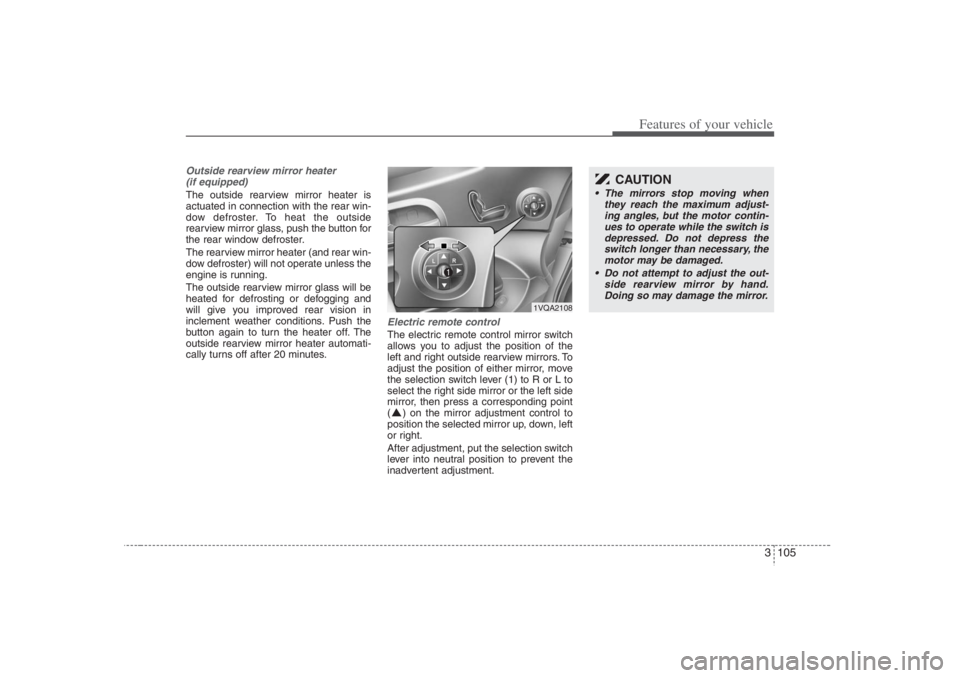
Electric remote control The electric remote control mirror switch
allows you to adjust the position of the
left and right outside rearview mirrors. To
adjust the position of either mirror, move
the selection switch lever (1) to R or L to
select the right side mirror or the left side
mirror, then press a corresponding point
( ) on the mirror adjustment control to
position the selected mirror up, down, left
or right.
After adjustment, put the selection switch
lever into neutral position to prevent the
inadvertent adjustment.
CAUTION
The mirrors stop moving when
they reach the maximum adjust-
ing angles, but the motor contin-
ues to operate while the switch is
depressed. Do not depress the
switch longer than necessary, the
motor may be damaged.
Do not attempt to adjust the out-
side rearview mirror by hand.
Doing so may damage the mirror.
1VQA2108
Page 140 of 398
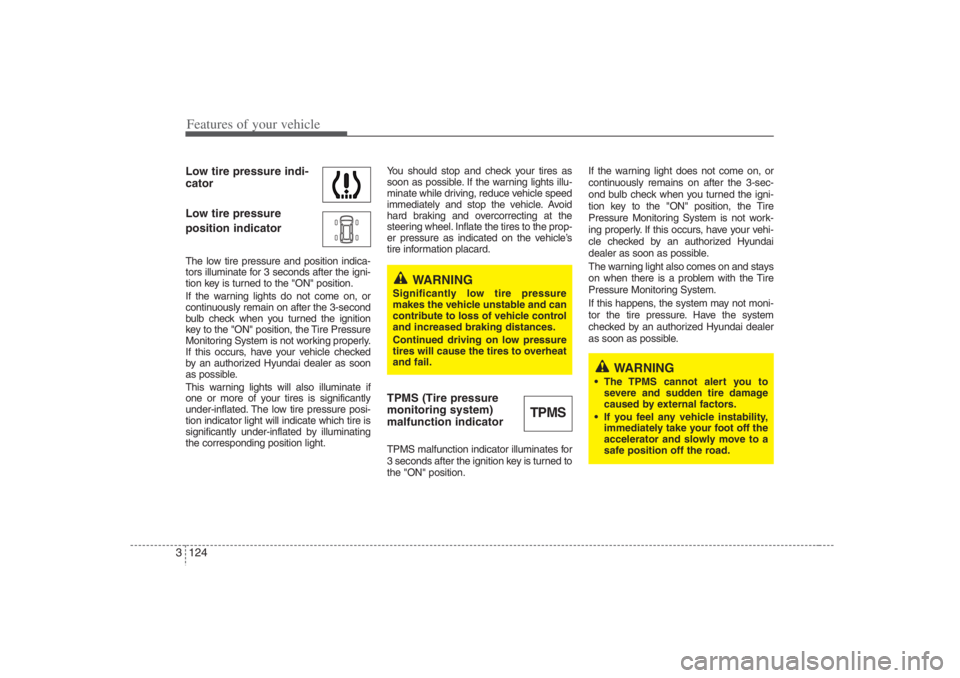
Features of your vehicle124 3Low tire pressure indi-
cator
Low tire pressure
position indicatorThe low tire pressure and position indica-
tors illuminate for 3 seconds after the igni-
tion key is turned to the "ON" position.
If the warning lights do not come on, or
continuously remain on after the 3-second
bulb check when you turned the ignition
key to the "ON" position, the Tire Pressure
Monitoring System is not working properly.
If this occurs, have your vehicle checked
by an authorized Hyundai dealer as soon
as possible.
This warning lights will also illuminate if
one or more of your tires is significantly
under-inflated. The low tire pressure posi-
tion indicator light will indicate which tire is
significantly under-inflated by illuminating
the corresponding position light.You should stop and check your tires as
soon as possible. If the warning lights illu-
minate while driving, reduce vehicle speed
immediately and stop the vehicle. Avoid
hard braking and overcorrecting at the
steering wheel. Inflate the tires to the prop-
er pressure as indicated on the vehicle’s
tire information placard.
TPMS (Tire pressure
monitoring system)
malfunction indicatorTPMS malfunction indicator illuminates for
3 seconds after the ignition key is turned to
the "ON" position.If the warning light does not come on, or
continuously remains on after the 3-sec-
ond bulb check when you turned the igni-
tion key to the "ON" position, the Tire
Pressure Monitoring System is not work-
ing properly. If this occurs, have your vehi-
cle checked by an authorized Hyundai
dealer as soon as possible.
The warning light also comes on and stays
on when there is a problem with the Tire
Pressure Monitoring System.
If this happens, the system may not moni-
tor the tire pressure. Have the system
checked by an authorized Hyundai dealer
as soon as possible.
TPMS
WARNING
Significantly low tire pressure
makes the vehicle unstable and can
contribute to loss of vehicle control
and increased braking distances.
Continued driving on low pressure
tires will cause the tires to overheat
and fail.
WARNING
The TPMS cannot alert you to
severe and sudden tire damage
caused by external factors.
If you feel any vehicle instability,
immediately take your foot off the
accelerator and slowly move to a
safe position off the road.
Page 141 of 398
3 125
Features of your vehicle
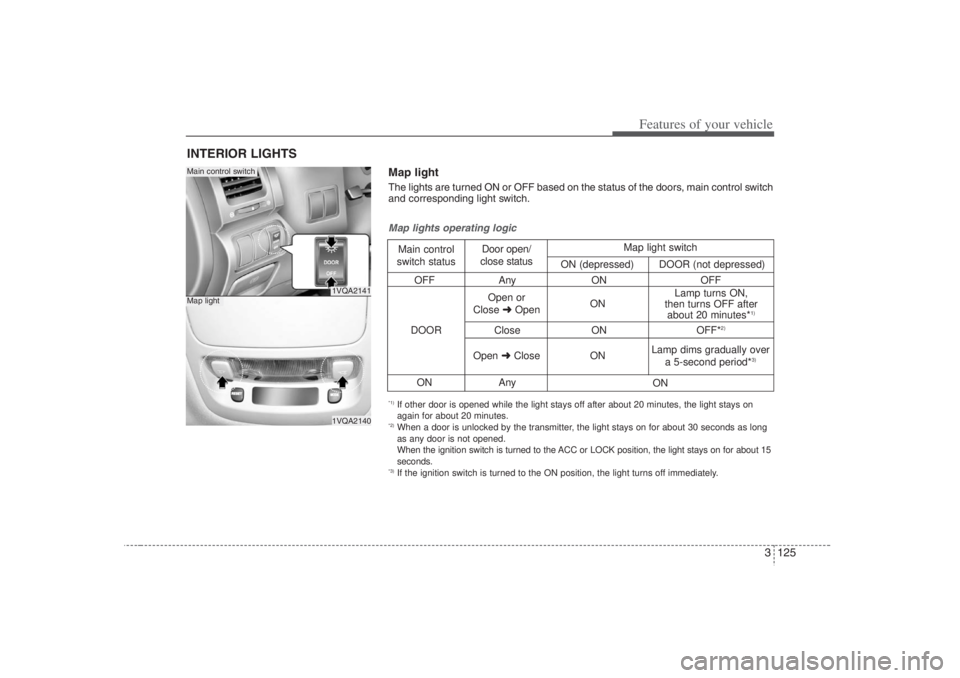
INTERIOR LIGHTS
1VQA21411VQA2140
Main control switchMap light
OFF Any ON OFF
Close ON OFF*
2)
ON Any
Map lights operating logicMain control
switch statusDoor open/
close status
DOOROpen or
Close ➜OpenONLamp turns ON,
then turns OFF after
about 20 minutes*
1)
Open ➜Close
ON
ON Lamp dims gradually over
a 5-second period*
3)
Map light switch
ON (depressed)DOOR (not depressed)
*1) If other door is opened while the light stays off after about 20 minutes, the light stays on
again for about 20 minutes.*2) When a door is unlocked by the transmitter, the light stays on for about 30 seconds as long
as any door is not opened.
When the ignition switch is turned to the ACC or LOCK position, the light stays on for about 15
seconds.*3) If the ignition switch is turned to the ON position, the light turns off immediately.Map lightThe lights are turned ON or OFF based on the status of the doors, main control switch
and corresponding light switch.
Page 142 of 398
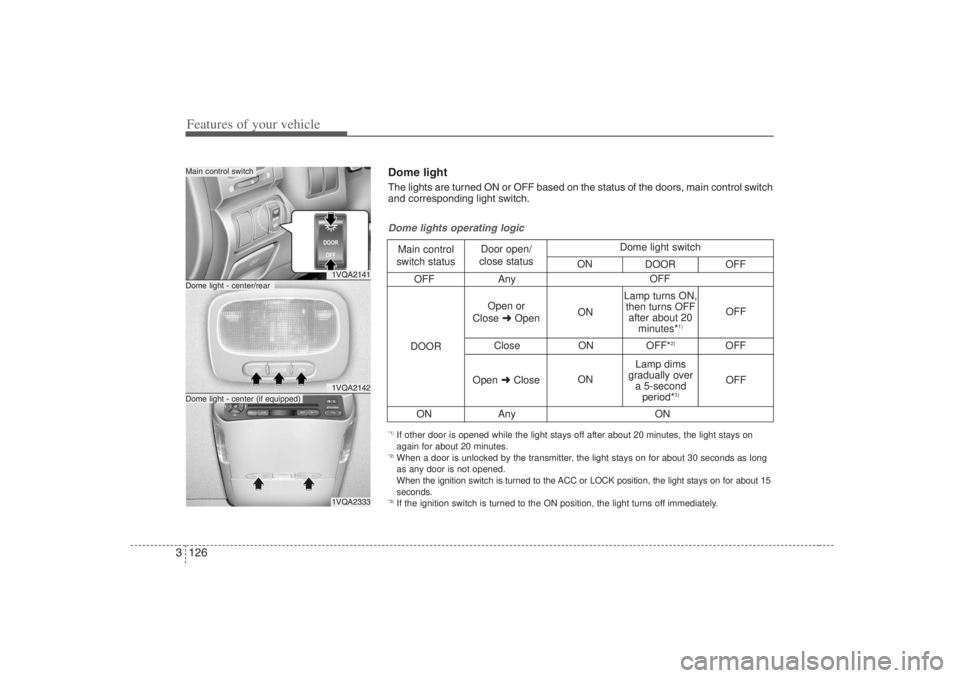
Features of your vehicle126 3
1VQA21411VQA21421VQA2333
Dome light - center/rearMain control switchDome light - center (if equipped)
OFF Any
Close ON OFF*
2)
OFF
ON Any
Dome lights operating logicMain control
switch statusDoor open/
close status
DOOROpen or
Close ➜OpenON
ONOFF
OFF Lamp turns ON,
then turns OFF
after about 20
minutes*
1)
Lamp dims
gradually over
a 5-second
period*
3)
Open ➜CloseOFF
ON Dome light switch
ON
DOOR OFF
*1) If other door is opened while the light stays off after about 20 minutes, the light stays on
again for about 20 minutes.*2) When a door is unlocked by the transmitter, the light stays on for about 30 seconds as long
as any door is not opened.
When the ignition switch is turned to the ACC or LOCK position, the light stays on for about 15
seconds.*3) If the ignition switch is turned to the ON position, the light turns off immediately.Dome lightThe lights are turned ON or OFF based on the status of the doors, main control switch
and corresponding light switch.
Page 143 of 398
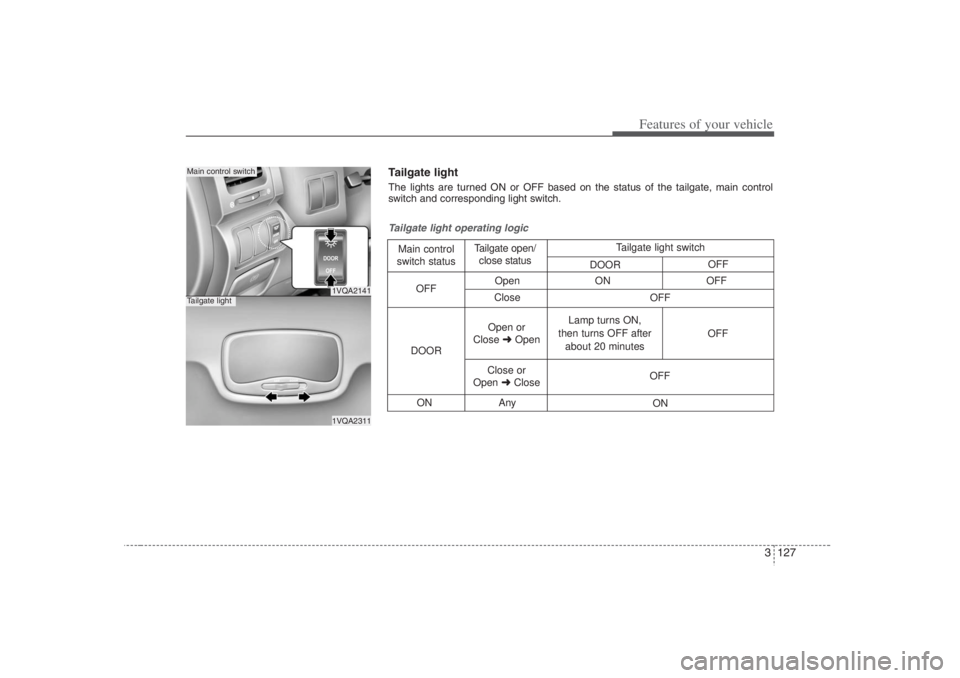
3 127
Features of your vehicle
1VQA21411VQA2311
Main control switchTailgate light
Open ON OFF
Close
ON Any
Tailgate light operating logicMain control
switch statusTailgate open/
close status
DOOROFF
Open or
Close ➜OpenLamp turns ON,
then turns OFF after
about 20 minutesOFF
Close or
Open ➜CloseOFF
ON OFF Tailgate light switch
DOOROFFTailgate light The lights are turned ON or OFF based on the status of the tailgate, main control
switch and corresponding light switch.
Page 182 of 398
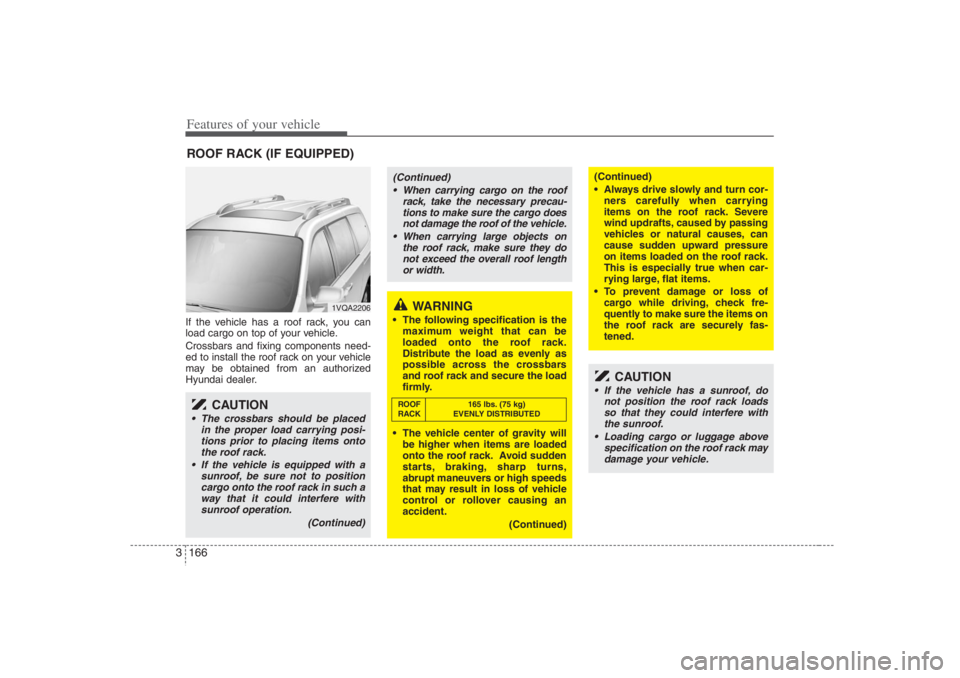
Features of your vehicle166 3If the vehicle has a roof rack, you can
load cargo on top of your vehicle.
Crossbars and fixing components need-
ed to install the roof rack on your vehicle
may be obtained from an authorized
Hyundai dealer.ROOF RACK (IF EQUIPPED)
1VQA2206
CAUTION
• The crossbars should be placed
in the proper load carrying posi-
tions prior to placing items onto
the roof rack.
If the vehicle is equipped with a
sunroof, be sure not to position
cargo onto the roof rack in such a
way that it could interfere with
sunroof operation.
(Continued)
WARNING
The following specification is the
maximum weight that can be
loaded onto the roof rack.
Distribute the load as evenly as
possible across the crossbars
and roof rack and secure the load
firmly.
The vehicle center of gravity will
be higher when items are loaded
onto the roof rack. Avoid sudden
starts, braking, sharp turns,
abrupt maneuvers or high speeds
that may result in loss of vehicle
control or rollover causing an
accident.
(Continued)
(Continued)
Always drive slowly and turn cor-
ners carefully when carrying
items on the roof rack. Severe
wind updrafts, caused by passing
vehicles or natural causes, can
cause sudden upward pressure
on items loaded on the roof rack.
This is especially true when car-
rying large, flat items.
To prevent damage or loss of
cargo while driving, check fre-
quently to make sure the items on
the roof rack are securely fas-
tened.
CAUTION
If the vehicle has a sunroof, do
not position the roof rack loads
so that they could interfere with
the sunroof.
Loading cargo or luggage above
specification on the roof rack may
damage your vehicle.
(Continued)
When carrying cargo on the roof
rack, take the necessary precau-
tions to make sure the cargo does
not damage the roof of the vehicle.
When carrying large objects on
the roof rack, make sure they do
not exceed the overall roof length
or width.ROOF 165 lbs. (75 kg)
RACK EVENLY DISTRIBUTED
Page 186 of 398
Features of your vehicle170 3Reprogramming a single
HomeLink buttonTo program a device to HomeLink using
a HomeLink button previously trained,
follow these steps:
1. Press and hold the desired HomeLink
button. Do NOT release until step 4
has been completed.
2. When the indicator light begins to flash
slowly (after 20 seconds), position the
hand-held transmitter 1 to 3 inches
away from the HomeLink surface.
3. Press and hold the hand-held trans-
mitter button (or press and “cycle” - as
described in “Canadian Programming”
above).
4. The HomeLink indicator light will flash,
first slowly and then rapidly. When the
indicator light begins to flash rapidly,
release both buttons.
The previous device has now been
erased and the new device can be acti-
vated by pushing the HomeLink button
that has just been programmed. This pro-
cedure will not affect any other pro-
grammed HomeLink buttons.
Gate operator programming &
canadian programmingDuring programming, your hand-held
transmitter may automatically stop trans-
mitting. Continue to press and hold the
HomeLink button (note steps 2 through 4
in the “Programming” portion of this text)
while you press and re-press (“cycle”)
your handheld transmitter every two sec-
onds until the frequency signal has been
learned. The indicator light will flash
slowly and then rapidly after several sec-
onds upon successful training.
AccessoriesIf you would like additional information on
the HomeLink Wireless Control System,
HomeLink compatible products, or to
purchase other accessories such as the
HomeLink® Lighting Package, please
contact HomeLink at 1-800-355-3515 or
on the internet at www.homelink.com.
This device complies with Part 15 of
the FCC rules.Operation is subject to
the following two conditions:
1. This device may not cause harmful
interference, and
2. This device must accept any interfer-
ence received, including interference
that may cause undesired operation.
CAUTION
If programming a garage door
opener or gate, it is advised to
unplug the device during the
“cycling” process to prevent possi-
ble motor burn-up.
WARNING
The HomeLink transmitter has been
tested and complies with FCC and
DOC/MDC rules. Changes or modifi-
cations not expressly approved by
the party responsible for compli-
ance could void the user’s authority
to operate the equipment.
IC: 4112104541A Gentex
MODEL/FCC ID: NZLSTDHL3
Page 203 of 398
3187
Features of your vehicle
5. SCAN ButtonWhen you Press the button, frequency is
changed and the next channel is
received automatically.
To stay on a station, press the SCAN
button again.6. EQUILIZER (EQ) ButtonPress the EQ button to select the CLAS-
SIC, POPS, ROCK, JAZZ and OFF
MODE for the desired tone quality. Each
press of the button changes the display
as follows;7. PRESET STATION Select
ButtonsSix stations for AM, FM1 and FM2
respectively can be preset in the elec-
tronic memory circuit.HOW TO PRESET STATIONSSix AM and twelve FM stations may be
programmed into the memory of the
radio. Then, by simply pressing the AM/
FM band select buttons and/or one of the
six station select buttons, you may recall
any of these stations instantly.To program the stations, follow these
steps:
Press AM/FM selector to set the band
for AM, FM1 and FM2.
Select the desired station to be stored
by seek or manual tuning.
Determine the preset station select
button you wish to use to access that
station.
Press and hold the station select but-
ton for more than 1 second. A select
button indicator will show in the display
indicating which select button you have
depressed. The frequency display will
flash after it has been stored into the
memory. You should then release the
button, and proceed to program the
next desired station. A total of 18 sta-
tions can be programmed by selecting
one AM and two FM stations per but-
ton.
When completed, any preset station
may be recalled by selecting AM, FM1
or FM2 band and the appropriate sta-
tion button.
CAUTION
• Do not place beverages close to
the audio system. The audio sys-
tem mechanism may be damaged
if you spill them.
Do not strike or allow anything to
impact the audio system; damage
to the system mechanisms could
occur.
CLASSIC➟POPS➟ROCK➟JAZZ➟OFF
Page 209 of 398
3193
Features of your vehicle
7. TUNE Select/Audio Control KnobRotate the knob clockwise to increase
the frequency and turn the knob counter-
clockwise to reduce the frequency.8. PRESET STATION Select
ButtonsSix stations for AM, FM1 and FM2
respectively can be preset in the elec-
tronic memory circuit.HOW TO PRESET STATIONSSix AM and twelve FM stations may be
programmed into the memory of the
radio. Then, by simply pressing the
AM/FM band select button and/or one of
the six station select buttons, you may
recall any of these stations instantly. To
program the stations, follow these steps:
Press AM/FM selector to set the band
for AM, FM1 and FM2.
Select the desired station to be stored
by seek or manual tuning.
Determine the preset station select
button you wish to use to access that
station. Press and hold the station select button
for more than 0.8 seconds. A select but-
ton indicator will show in the display indi-
cating which select button you have
depressed. The frequency display will
flash after it has been stored in to the
memory. You should then release the but-
ton, and proceed to program the next
desired station. A total of 18 stations can
be programmed by selecting one AM and
two FM stations per button.
When completed, any preset station
may be recalled by selecting AM, FM1
or FM2 band and the appropriate sta-
tion button.
CAUTION
Do not place beverages close to
the audio system. The playback
mechanism may be damaged if
you spill them.
Do not strike or allow anything to
impact the audio system, damage
to the system mechanisms could
occur.