height HYUNDAI ENTOURAGE 2007 User Guide
[x] Cancel search | Manufacturer: HYUNDAI, Model Year: 2007, Model line: ENTOURAGE, Model: HYUNDAI ENTOURAGE 2007Pages: 398, PDF Size: 8.03 MB
Page 241 of 398
3225
Features of your vehicle
Using the Remote ControlIn addition to having all the buttons and
functionality listed in the DVD and CD
Controls section, the remote control has
several other buttons that offer additional
functions. It is an infrared remote control,
and must be pointed at the face of the
RSE at a 45° angle for best results. It
requires a CR2025 battery (included).
The remote control has the following
additional buttons:✽ ✽
NOTICEThe RSE system is always “awake”
when the vehicle's ignition is turned on
or when the vehicle is in “accessory”
power mode.1. StopPressing this button once will stop DVD
or CD play. To eject a disc, you must use
the eject button on the control panel.2. Speaker Volume “+” and “-”These buttons control the volume of the
audio of a DVD or CD through the vehicle
speakers, not the volume from head-
phones. Press “+” to turn the volume up
and “-” to turn the volume down.
3. Play/PauseWhen an audio CD(VCD/DVD) is insert-
ed, the RSE will display the HYUNDAI
logo, then automatically begin playing
the first track. The track number and time
elapsed for the current track is displayed.
If a CD(VCD/DVD) is loaded and playing,
press the PLAY/PAUSE( ) button to
pause the CD(VCD/DVD). Press the but-
ton again to resume play.
If a CD(VCD/DVD) is already loaded,
stopping and playing the CD(VCD/ DVD)
by pressing PLAY/PAUSE( ) button
on the remote control; cycling the ignition
and pressing play; or changing the
source will cause the CD(VCD/DVD) to
begin playing at the point where it was
stopped during the previous play. The
player will automatically play this previ-
ous play position unless the
STOP/EJECT( ) button is pressed.
At the end of the CD(VCD/DVD), the
player will automatically return to the first
track and continue playing.4. DisplayWhen the player is in DVD mode, press
the DISP button to view the DVD title,
chapter number and elapsed time and
other information about the DVD current-
ly playing.It will also display brightness. There are
“Day Time” brightness with brightest level
and “Night Time” brightness which has
70% level of “Day Time” brightness. Adjust
the level of brightness by pressing the
REV(dimmer) or FWD(brighter) buttons.
The next time the player is turned on, it
will return to the brightness level it was
adjusted to when last used.
The RSE unit has two presets of display
brightness. When the headlamp is turned
on, the display brightness level will be
dimmed as the preset. However, when
the headlamp is turned off, the display
brightness will return to the daytime
brightness.
Press DISP to adjust the image format.
The image format, also known as the
aspect ratio, is a ratio of the height to
width of the image on the screen. For
example, a 4:3 ratio would mean an
image that is 4 units by 3 units. You have
two options: 4:3 (normal) and 16:9
(widescreen). Press the display button to
select the preferred aspect ratio.
When the RSE unit receives video sig-
nals from the AUX, the aspect ratio can
be changed to 16:9 or 4:3 by the DISP
button.
The aspect ratio information will auto-
matically disappear if no button is
pressed for three seconds.
Page 266 of 398
Driving your vehicle20 4Check the brake warning light by turning
the ignition switch ON (do not start the
engine). This light will be illuminated
when the parking brake is applied with
the ignition switch in the START or ON
position.
Before driving, be sure the parking brake
is fully released and the brake warning
light is off.
If the brake warning light remains on
after the parking brake is released, there
may be a malfunction in the brake sys-
tem. Immediate attention is necessary.
If at all possible, cease driving the vehi-
cle immediately. If that is not possible,
use extreme caution while operating the
vehicle and only continue to drive the
vehicle until you can reach a safe loca-
tion or repair shop.
Anti-lock brake system (ABS)
The ABS continuously senses the speed
of the wheels. If the wheels are going to
lock, the ABS system repeatedly modu-
lates the hydraulic brake pressure to the
wheels.
When you apply your brakes under con-
ditions which may lock the wheels, you
may hear a “tik-tik’’ sound from the
brakes, or feel a corresponding sensation
in the brake pedal. This is normal and it
means your ABS is active.
In order to obtain the maximum benefit
from your ABS in an emergency situa-
tion, do not attempt to modulate your
brake pressure and do not try to pump
your brakes. Press your brake pedal as
hard as possible or as hard as the situa-
tion warrants and allow the ABS to con-
trol the force being delivered to the
brakes.
W-75
WARNING
- ABS
ABS (ESC) will not prevent acci-
dents due to improper or danger-
ous driving maneuvers. Even
though vehicle control is improved
during emergency braking, always
maintain a safe distance between
you and objects ahead. Vehicle
speeds should always be reduced
during extreme road conditions.
The braking distance for cars
equipped with an anti-lock braking
system (Electronic Stability Control
System) may be longer than for
those without it in the following
road conditions.
During these conditions the vehicle
should be driven at reduced
speeds:
Rough, gravel or snow-covered
roads.
With tire chains installed.
On roads where the road surface
is pitted or has different surface
height.
(Continued)
(Continued)
The safety features of an ABS (ESC)
equipped vehicle should not be
tested by high speed driving or cor-
nering. This could endanger the
safety of yourself or others.
Page 272 of 398
Driving your vehicle26 4Non-operational conditions of
back warning systemThe back warning system may not
operate properly when:1. Moisture is frozen to the sensor. (It will
operate normally when the moisture
has been cleared.)
2. The sensor is covered with foreign
matter, such as snow or water, or the
sensor cover is blocked. (It will operate
normally when the material is removed
or the sensor is no longer blocked.)
3. Driving on uneven road surfaces
(unpaved roads, gravel, bumps, gradi-
ent).
4. Objects generating excessive noise
(vehicle horns, loud motorcycle
engines, or truck air brakes) are within
range of the sensor.
5. Heavy rain or water spray exists.
6. Wireless transmitters or mobile phones
are within range of the sensor.
7. The sensor is covered with snow.
8. Trailer towing
The detecting range may decrease
when:1. The sensor is stained with foreign mat-
ter such as snow or water. (The sens-
ing range will return to normal when
removed.)
2. Outside air temperature is extremely
hot or cold.The following objects may not be rec-
ognized by the sensor:1. Sharp or slim objects such as ropes,
chains or small poles.
2. Objects which tend to absorb the sen-
sor frequency such as clothes, spongy
material or snow.
3. Undetectable objects smaller than 40 in.
(1 m) and narrower than 6 in. (14 cm) in
diameter.
CAUTION
1. The back warning may not sound
sequentially depending on the
speed and shapes of the objects
detected.
2. The back warning system may
malfunction if the vehicle bumper
height or sensor installation has
been modified or damaged. Any
non-factory installed equipment
or accessories may also interfere
with the sensor performance.
3. The sensor may not recognize
objects less than 15 in. (40 cm)
from the sensor, or it may sense
an incorrect distance. Use cau-
tion.
4. When the sensor is frozen or
stained with snow, dirt, or water,
the sensor may be inoperative
until the stains are removed
using a soft cloth.
5. Do not push, scratch or strike the
sensor. Sensor damage could
occur.
Page 356 of 398
Maintenance42 6Compact spare tire replace-
mentA compact spare tire has a shorter
tread life than a regular size tire.
Replace it when you can see the
tread wear indicator bars on the tire.
The replacement compact spare tire
should be the same size and design
tire as the one provided with your
new Hyundai and should be mount-
ed on the same compact spare tire
wheel. The compact spare tire is not
designed to be mounted on a regular
size wheel, and the compact spare
tire wheel is not designed for mount-
ing a regular size tire.
Wheel replacement When replacing the metal wheels for
any reason, make sure the new
wheels are equivalent to the original
factory units in diameter, rim width
and offset.
Wheel alignment and tire
balance The wheels on your vehicle were
aligned and balanced carefully at the
factory to give you the longest tire life
and best overall performance.
In most cases, you will not need to
have your wheels aligned again.
However, if you notice unusual tire
wear or your vehicle pulling one way
or the other, the alignment may need
to be reset.
If you notice your vehicle vibrating
when driving on a smooth road, your
wheels may need to be rebalanced.
WARNING
A wheel that is not the correct
size may adversely affect wheel
and bearing life, braking and
stopping abilities, handling char-
acteristics, ground clearance,
body-to-tire clearance, snow
chain clearance, speedometer
calibration, headlight aim and
bumper height.
Page 358 of 398
Maintenance44 6Tire tractionTire traction can be reduced if you
drive on worn tires, tires that are
improperly inflated or on slippery
road surfaces. Tires should be
replaced when tread wear indicators
appear. To reduce the possibility of
losing control, slow down whenever
there is rain, snow or ice on the road.Tire maintenance In addition to proper inflation, correct
wheel alignment helps to decrease
tire wear. If you find a tire is worn
unevenly, have your dealer check the
wheel alignement.
When you have new tires installed,
make sure they are balanced. This
will increase vehicle ride comfort and
tire life. Additionally, a tire should
always be rebalanced if it is removed
from the wheel.
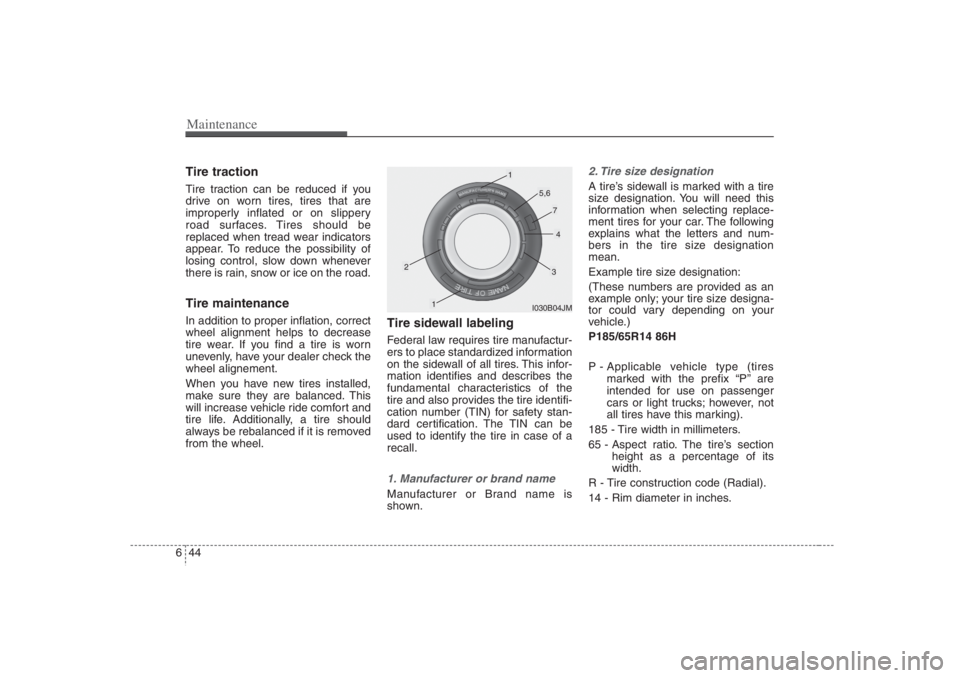
Tire sidewall labelingFederal law requires tire manufactur-
ers to place standardized information
on the sidewall of all tires. This infor-
mation identifies and describes the
fundamental characteristics of the
tire and also provides the tire identifi-
cation number (TIN) for safety stan-
dard certification. The TIN can be
used to identify the tire in case of a
recall.1. Manufacturer or brand nameManufacturer or Brand name is
shown.
2. Tire size designation A tire’s sidewall is marked with a tire
size designation. You will need this
information when selecting replace-
ment tires for your car. The following
explains what the letters and num-
bers in the tire size designation
mean.
Example tire size designation:
(These numbers are provided as an
example only; your tire size designa-
tor could vary depending on your
vehicle.)
P185/65R14 86H
P - Applicable vehicle type (tires
marked with the prefix “P’’ are
intended for use on passenger
cars or light trucks; however, not
all tires have this marking).
185 - Tire width in millimeters.
65 - Aspect ratio. The tire’s section
height as a percentage of its
width.
R - Tire construction code (Radial).
14 - Rim diameter in inches.
I030B04JM
1
1
2
34
5,6
7
Page 361 of 398
647
Maintenance
Traction - AA, A, B & C
The traction grades, from highest to
lowest, are AA, A, B and C. The
grades represent the tires ability to
stop on wet pavement as measured
under controlled conditions on spec-
ified government test surfaces of
asphalt and concrete. A tire marked
C may have poor traction perform-
ance.
Temperature -A, B & C
The temperature grades are A (the
highest), B and C. The grades repre-
sent the tire’s resistance to the gen-
eration of heat and its ability to dissi-
pate heat when tested under con-
trolled conditions on a specified
indoor laboratory test wheel.
Sustained high temperature can
cause the material of the tire to degen-
erate and reduce tire life, and exces-
sive temperature can lead to sudden
tire failure. Grade C corresponds to a
level of performance which all passen-
ger vehicle tires must meet under the
Federal Motor Vehicle Safety
Standard No. 109. Grades A and B
represent higher levels of perform-
ance on the laboratory test wheel than
the minimum required by the law.
Tire terminology and defini-
tionsAir Pressure: The amount of air
inside the tire pressing outward on
the tire. Air pressure is expressed in
pounds per square inch (psi) or kilo-
pascal (kPa).
Accessory Weight: This means the
combined weight of optional acces-
sories. Some examples of optional
accessories are, automatic transmis-
sion, power seats, and air condition-
ing.
Aspect Ratio: The relationship of a
tire's height to its width.
Belt:A rubber coated layer of cords
that is located between the plies and
the tread. Cords may be made from
steel or other reinforcing materials.
Bead: The tire bead contains steel
wires wrapped by steel cords that
hold the tire onto the rim.
Bias Ply Tire: A pneumatic tire in
which the plies are laid at alternate
angles less than 90 degrees to the
centerline of the tread.
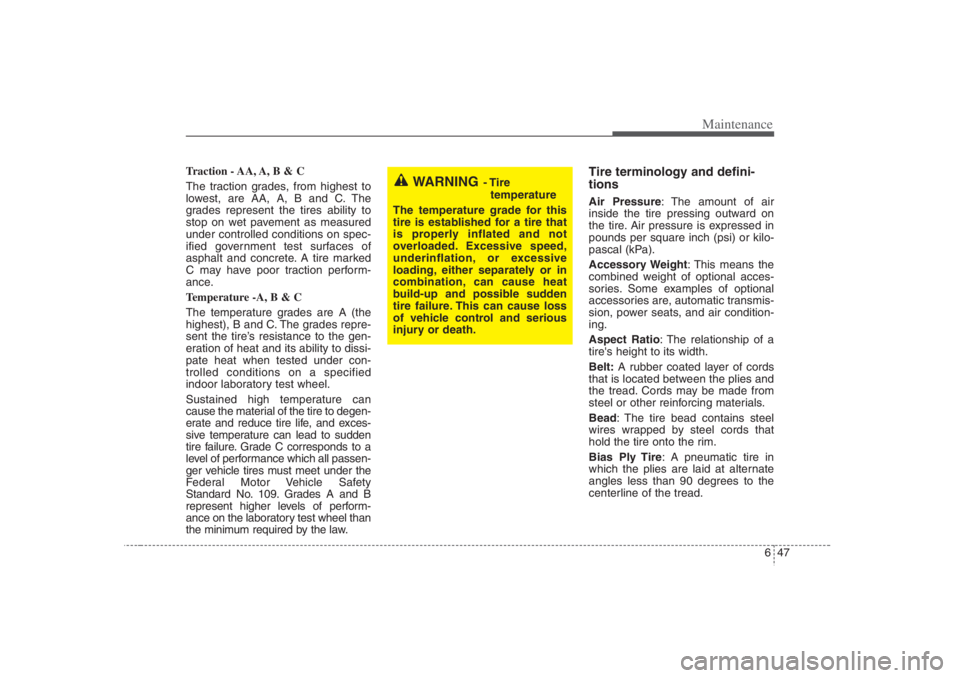
WARNING
- Tire
temperature
The temperature grade for this
tire is established for a tire that
is properly inflated and not
overloaded. Excessive speed,
underinflation, or excessive
loading, either separately or in
combination, can cause heat
build-up and possible sudden
tire failure. This can cause loss
of vehicle control and serious
injury or death.
Page 389 of 398
Specifications2 8
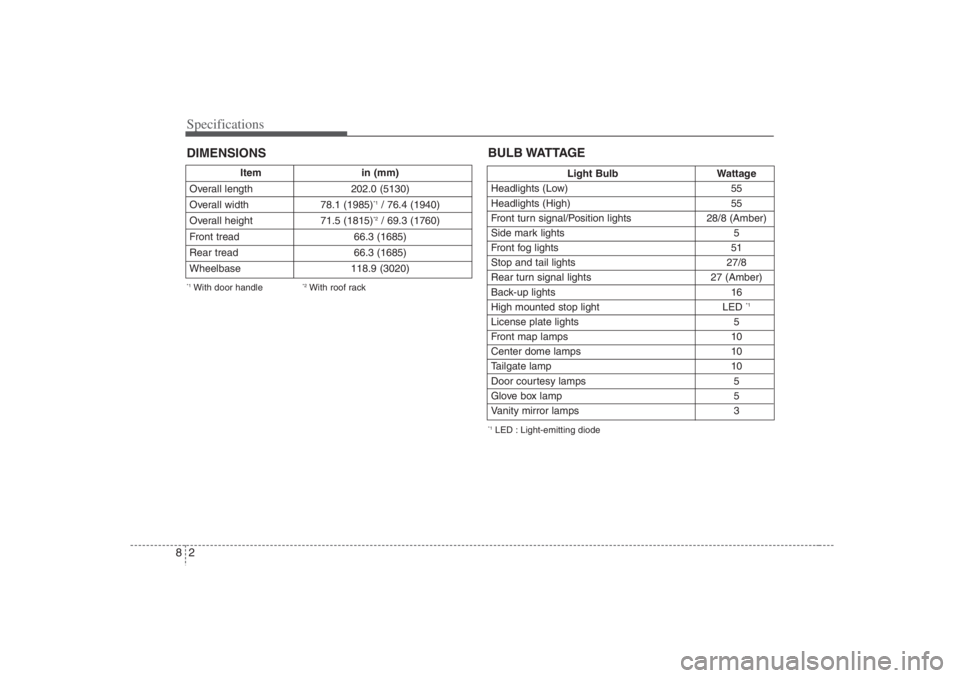
Item in (mm)
Overall length 202.0 (5130)
Overall width 78.1 (1985)
*1/ 76.4 (1940)
Overall height 71.5 (1815)*2/ 69.3 (1760)
Front tread 66.3 (1685)
Rear tread 66.3 (1685)
Wheelbase 118.9 (3020)
DIMENSIONS*1With door handle
*2With roof rack
Light Bulb Wattage
Headlights (Low) 55
Headlights (High) 55
Front turn signal/Position lights 28/8 (Amber)
Side mark lights 5
Front fog lights 51
Stop and tail lights 27/8
Rear turn signal lights 27 (Amber)
Back-up lights 16
High mounted stop light LED
*1
License plate lights 5
Front map lamps 10
Center dome lamps 10
Tailgate lamp 10
Door courtesy lamps 5
Glove box lamp 5
Vanity mirror lamps 3BULB WATTAGE*1LED : Light-emitting diode
Page 395 of 398
95
Index
Armrest ····································································· 3-44
Headrest ···································································· 3-42
Front seat adjustment - manual ································ 3-39
Front seat adjustment - power ·································· 3-40
Lumbar support ························································ 3-45
Rear seat adjustment ················································ 3-46
Seatback pocket ························································ 3-44
Seat warmer ······························································ 3-45
Seat belts ······································································ 3-59
Seat belt precautions ················································ 3-59
Care of seat belts ······················································ 3-61
Height adjustable shoulder belts ······························ 3-62
Driver's 3-point system ············································ 3-62
Passenger's 3-point system ······································· 3-63
3-point rear center belt ············································· 3-65
Proper use and care of the seat belt system ············· 3-67
Pre-tensioner safety belt ··········································· 3-68
Special driving conditions ··········································· 4-30
Starting the engine ························································· 4-6
Steering wheel ··························································· 3-102
Storage compartments ··············································· 3-171
Center console storage ··········································· 3-172
Glove box ······························································· 3-173
Side table ································································ 3-174
Sunglass holder ······················································ 3-174
Sunroof ········································································ 3-33
Theft-alarm system ························································ 3-7
Tire pressure monitoring system (TPMS) ····················· 5-6Tires ··············································································· 8-3
Tires and wheels ·························································· 6-37
Towing ········································································· 5-19
Tie-down hook ························································· 5-22
Trailer towing ······························································ 4-34
Hitches ······································································ 4-35
Safety chains ···························································· 4-35
Trailer brakes ···························································· 4-35
Weight of the trailer (tongue) ··································· 4-39
Trip computer ···························································· 3-113
Vehicle break-in process ················································ 1-3
Vehicle data collection and event data recorders ·········· 1-4
Vehicle load limit ························································· 4-41
Compliance label ······················································ 4-43
Tire and loading information label ·························· 4-41
Vehicle capacity weight ··········································· 4-41
Seating capacity ······················································· 4-41
Towing capacity ······················································· 4-41
Cargo capacity ·························································· 4-41
Warnings and indicators ············································ 3-119
Warranties for your Hyundai vehicle ···························· 7-3
Weight of the vehicle ··················································· 4-40
Window ········································································ 3-26
Rear quarter window (manual flip - open) ·············· 3-28
Power window lock switch ······································ 3-28
VW
T