lock HYUNDAI ENTOURAGE 2008 Workshop Manual
[x] Cancel search | Manufacturer: HYUNDAI, Model Year: 2008, Model line: ENTOURAGE, Model: HYUNDAI ENTOURAGE 2008Pages: 393, PDF Size: 8.78 MB
Page 102 of 393
Features of your vehicle86 3
Occupant classification systemYour vehicle is equipped with an occu-
pant classification system in the front
passenger's seat.
The occupant classification system is
designed to detect the presence of a
properly-seated front passenger and
determine if the passenger's front air bag
should be enabled (may inflate) or not.
The driver's front air bag is not affected
or controlled by the occupant classifica-
tion system.If the front passenger seat is occupied by
a person that the system determines to
be of adult size, and he/she sits properly
(sitting upright with the seatback in an
upright position, centered on the seat
cushion with their seat belt on, legs com-
fortably extended and their feet on the
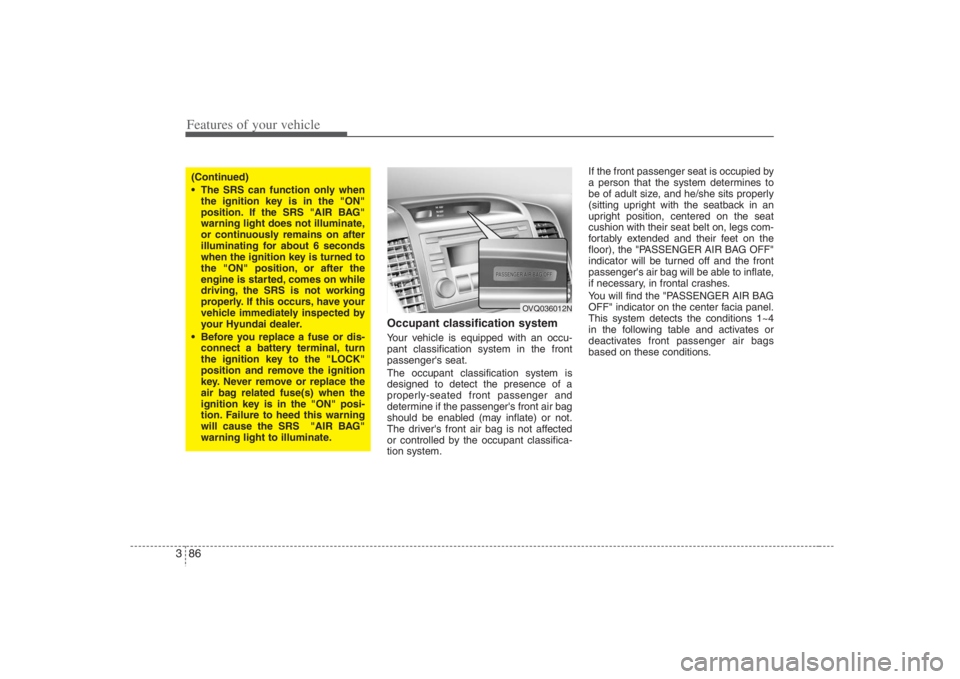
floor), the "PASSENGER AIR BAG OFF"
indicator will be turned off and the front
passenger's air bag will be able to inflate,
if necessary, in frontal crashes.
You will find the "PASSENGER AIR BAG
OFF" indicator on the center facia panel.
This system detects the conditions 1~4
in the following table and activates or
deactivates front passenger air bags
based on these conditions.
(Continued)
The SRS can function only when
the ignition key is in the "ON"
position. If the SRS "AIR BAG"
warning light does not illuminate,
or continuously remains on after
illuminating for about 6 seconds
when the ignition key is turned to
the "ON" position, or after the
engine is started, comes on while
driving, the SRS is not working
properly. If this occurs, have your
vehicle immediately inspected by
your Hyundai dealer.
Before you replace a fuse or dis-
connect a battery terminal, turn
the ignition key to the "LOCK"
position and remove the ignition
key. Never remove or replace the
air bag related fuse(s) when the
ignition key is in the "ON" posi-
tion. Failure to heed this warning
will cause the SRS "AIR BAG"
warning light to illuminate.
OVQ036012N
Page 105 of 393
389
Features of your vehicle
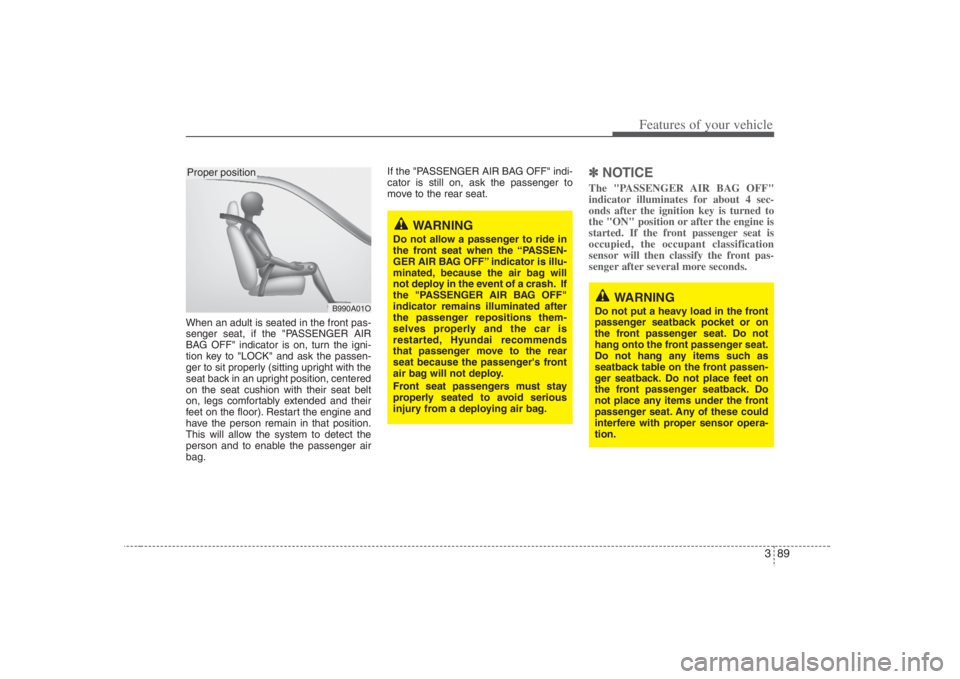
When an adult is seated in the front pas-
senger seat, if the "PASSENGER AIR
BAG OFF" indicator is on, turn the igni-
tion key to "LOCK" and ask the passen-
ger to sit properly (sitting upright with the
seat back in an upright position, centered
on the seat cushion with their seat belt
on, legs comfortably extended and their
feet on the floor). Restart the engine and
have the person remain in that position.
This will allow the system to detect the
person and to enable the passenger air
bag.If the "PASSENGER AIR BAG OFF" indi-
cator is still on, ask the passenger to
move to the rear seat.
✽ ✽
NOTICEThe "PASSENGER AIR BAG OFF"
indicator illuminates for about 4 sec-
onds after the ignition key is turned to
the "ON" position or after the engine is
started. If the front passenger seat is
occupied, the occupant classification
sensor will then classify the front pas-
senger after several more seconds.
B990A01O
Proper position
WARNING
Do not allow a passenger to ride in
the front seat when the “PASSEN-
GER AIR BAG OFF” indicator is illu-
minated, because the air bag will
not deploy in the event of a crash. If
the "PASSENGER AIR BAG OFF"
indicator remains illuminated after
the passenger repositions them-
selves properly and the car is
restarted, Hyundai recommends
that passenger move to the rear
seat because the passenger's front
air bag will not deploy.
Front seat passengers must stay
properly seated to avoid serious
injury from a deploying air bag.
WARNING
Do not put a heavy load in the front
passenger seatback pocket or on
the front passenger seat. Do not
hang onto the front passenger seat.
Do not hang any items such as
seatback table on the front passen-
ger seatback. Do not place feet on
the front passenger seatback. Do
not place any items under the front
passenger seat. Any of these could
interfere with proper sensor opera-
tion.
Page 109 of 393
393
Features of your vehicle
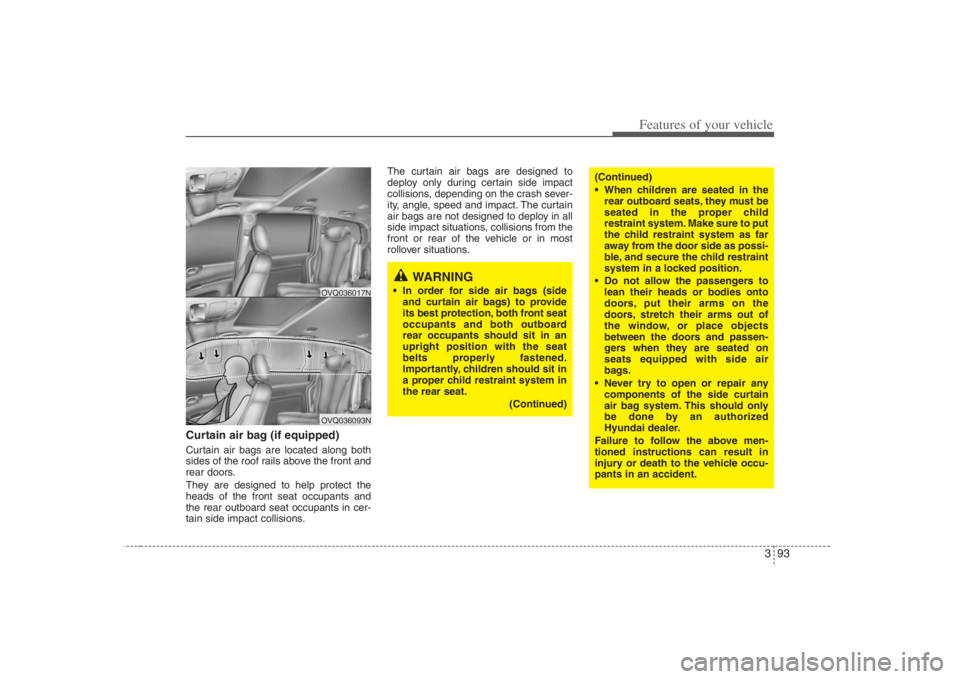
Curtain air bag (if equipped)Curtain air bags are located along both
sides of the roof rails above the front and
rear doors.
They are designed to help protect the
heads of the front seat occupants and
the rear outboard seat occupants in cer-
tain side impact collisions.The curtain air bags are designed to
deploy only during certain side impact
collisions, depending on the crash sever-
ity, angle, speed and impact. The curtain
air bags are not designed to deploy in all
side impact situations, collisions from the
front or rear of the vehicle or in most
rollover situations.
OVQ036093NOVQ036017N
WARNING
In order for side air bags (side
and curtain air bags) to provide
its best protection, both front seat
occupants and both outboard
rear occupants should sit in an
upright position with the seat
belts properly fastened.
Importantly, children should sit in
a proper child restraint system in
the rear seat.
(Continued)
(Continued)
When children are seated in the
rear outboard seats, they must be
seated in the proper child
restraint system. Make sure to put
the child restraint system as far
away from the door side as possi-
ble, and secure the child restraint
system in a locked position.
Do not allow the passengers to
lean their heads or bodies onto
doors, put their arms on the
doors, stretch their arms out of
the window, or place objects
between the doors and passen-
gers when they are seated on
seats equipped with side air
bags.
Never try to open or repair any
components of the side curtain
air bag system. This should only
be done by an authorized
Hyundai dealer.
Failure to follow the above men-
tioned instructions can result in
injury or death to the vehicle occu-
pants in an accident.
Page 119 of 393
3 103
Features of your vehicle
Tilt steering A tilt steering wheel allows you to adjust
the steering wheel before you drive. You
can also raise it to the highest level to
give your legs more room when you exit
and enter the vehicle.
The steering wheel should be positioned
so that it is comfortable for you to drive,
while permitting you to see the instru-
ment panel warning lights and gauges.
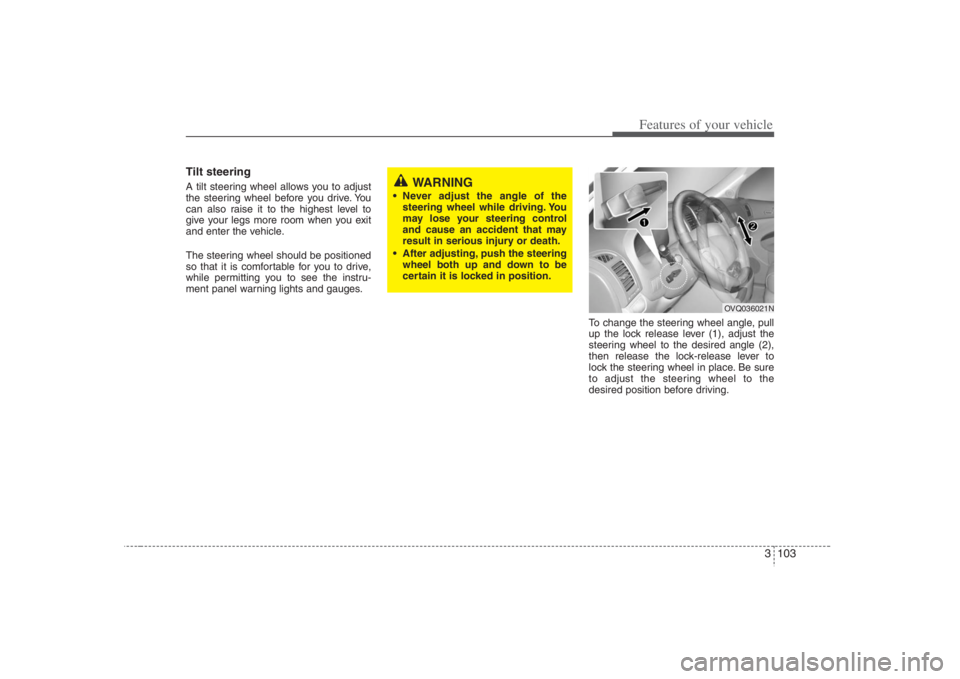
To change the steering wheel angle, pull
up the lock release lever (1), adjust the
steering wheel to the desired angle (2),
then release the lock-release lever to
lock the steering wheel in place. Be sure
to adjust the steering wheel to the
desired position before driving.
WARNING
Never adjust the angle of the
steering wheel while driving. You
may lose your steering control
and cause an accident that may
result in serious injury or death.
After adjusting, push the steering
wheel both up and down to be
certain it is locked in position.
OVQ036021N
Page 130 of 393
Features of your vehicle114 3✽
✽
NOTICEPerform the calibration procedure for a
new vehicle as follows.Calibration procedureThe compass may not indicate the cor-
rect compass direction when you are
driving in certain areas (tunnels, parking
garages, underground parking lots, near
transformer substations, etc.), and the
following may occur:
The compass headings become inac-
curate.
The compass heading doesn't change
when the vehicle changes direction.
Some compass headings are not dis-
played.
The compass headings are inaccurate
in long distance driving.
If the vehicle's compass headings
become inaccurate continuously, the
compass should be manually calibrated
as follows:1. Move the vehicle away from any large
steel structures or power generating
cables or equipment and into a safe
open location, such as an abandoned
parking lot.
2. Check the terrestrial deviation angle
value by pressing and holding the
MODE button for 4.5 seconds until the
current terrestrial deviation angle
value appears in the display.
3. If the terrestrial deviation angle value
is different for your country, set the cor-
rect angle referring to “Setting the
compass zone” and perform the
“Calibration procedure” again.
4. Make sure the vehicle windshield
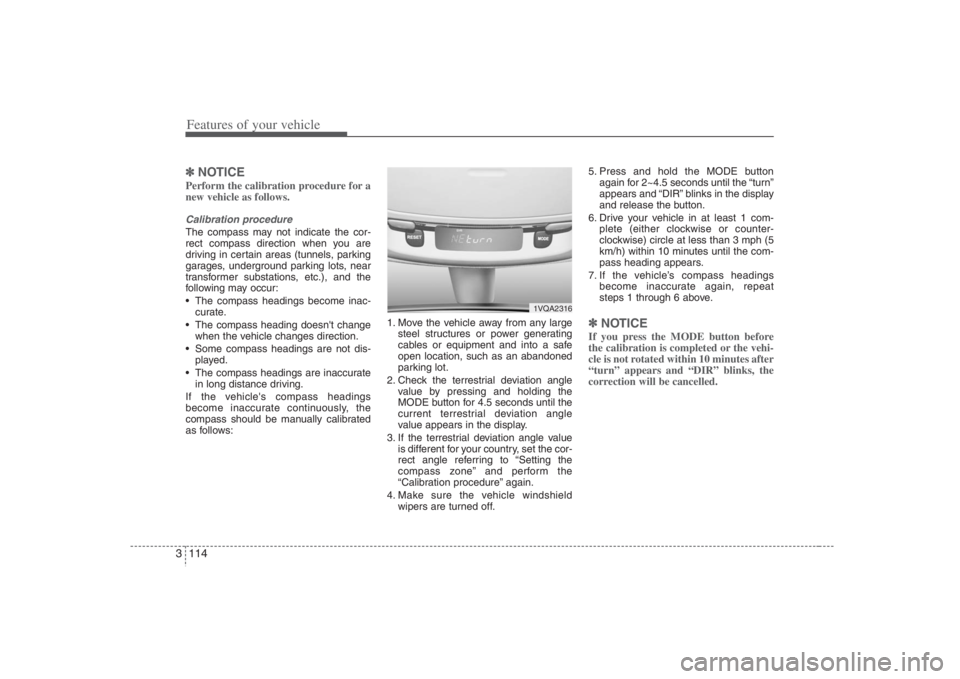
wipers are turned off.5. Press and hold the MODE button
again for 2~4.5 seconds until the “turn”
appears and “DIR” blinks in the display
and release the button.
6. Drive your vehicle in at least 1 com-
plete (either clockwise or counter-
clockwise) circle at less than 3 mph (5
km/h) within 10 minutes until the com-
pass heading appears.
7. If the vehicle’s compass headings
become inaccurate again, repeat
steps 1 through 6 above.
✽ ✽
NOTICEIf you press the MODE button before
the calibration is completed or the vehi-
cle is not rotated within 10 minutes after
“turn” appears and “DIR” blinks, the
correction will be cancelled.
1VQA2316
Page 135 of 393
3 119
Features of your vehicle
Checking operation All warning lights are checked by turning
the ignition switch ON (do not start the
engine). Any light that does not illuminate
should be checked by an Authorized
Hyundai Dealer.
After starting the engine, check to make
sure that all warning lights are off. If any
are still on, this indicates a situation that
needs attention. When releasing the
parking brake, the brake system warning
light should go off. The fuel warning light
will stay on if the fuel level is low.
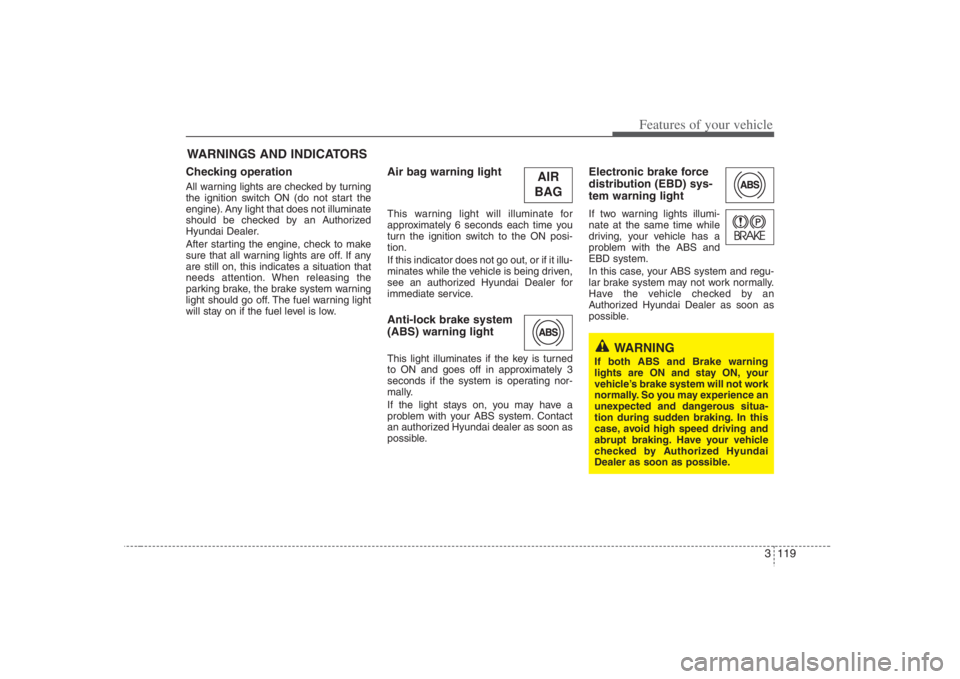
Air bag warning lightThis warning light will illuminate for
approximately 6 seconds each time you
turn the ignition switch to the ON posi-
tion.
If this indicator does not go out, or if it illu-
minates while the vehicle is being driven,
see an authorized Hyundai Dealer for
immediate service.Anti-lock brake system
(ABS) warning light This light illuminates if the key is turned
to ON and goes off in approximately 3
seconds if the system is operating nor-
mally.
If the light stays on, you may have a
problem with your ABS system. Contact
an authorized Hyundai dealer as soon as
possible.
Electronic brake force
distribution (EBD) sys-
tem warning lightIf two warning lights illumi-
nate at the same time while
driving, your vehicle has a
problem with the ABS and
EBD system.
In this case, your ABS system and regu-
lar brake system may not work normally.
Have the vehicle checked by an
Authorized Hyundai Dealer as soon as
possible.
WARNINGS AND INDICATORS
WARNING
If both ABS and Brake warning
lights are ON and stay ON, your
vehicle’s brake system will not work
normally. So you may experience an
unexpected and dangerous situa-
tion during sudden braking. In this
case, avoid high speed driving and
abrupt braking. Have your vehicle
checked by Authorized Hyundai
Dealer as soon as possible.
AIR
BAG
Page 139 of 393
3 123
Features of your vehicle
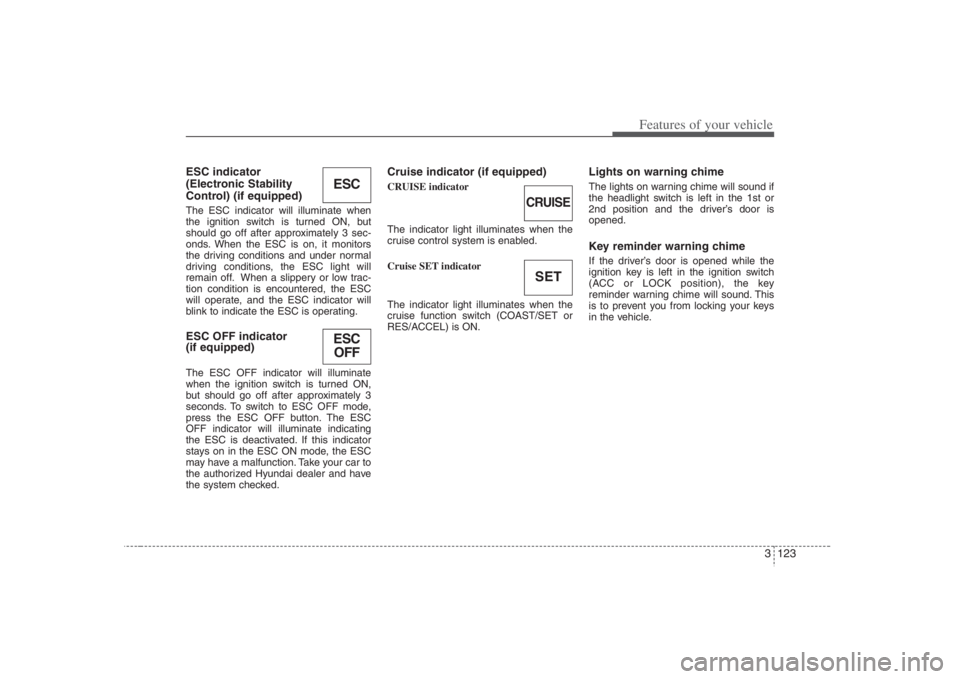
ESC indicator
(Electronic Stability
Control) (if equipped)The ESC indicator will illuminate when
the ignition switch is turned ON, but
should go off after approximately 3 sec-
onds. When the ESC is on, it monitors
the driving conditions and under normal
driving conditions, the ESC light will
remain off. When a slippery or low trac-
tion condition is encountered, the ESC
will operate, and the ESC indicator will
blink to indicate the ESC is operating.ESC OFF indicator
(if equipped)The ESC OFF indicator will illuminate
when the ignition switch is turned ON,
but should go off after approximately 3
seconds. To switch to ESC OFF mode,
press the ESC OFF button. The ESC
OFF indicator will illuminate indicating
the ESC is deactivated. If this indicator
stays on in the ESC ON mode, the ESC
may have a malfunction. Take your car to
the authorized Hyundai dealer and have
the system checked.
Cruise indicator (if equipped)CRUISE indicator
The indicator light illuminates when the
cruise control system is enabled.
Cruise SET indicator
The indicator light illuminates when the
cruise function switch (COAST/SET or
RES/ACCEL) is ON.
Lights on warning chimeThe lights on warning chime will sound if
the headlight switch is left in the 1st or
2nd position and the driver’s door is
opened.Key reminder warning chimeIf the driver’s door is opened while the
ignition key is left in the ignition switch
(ACC or LOCK position), the key
reminder warning chime will sound. This
is to prevent you from locking your keys
in the vehicle.
ESCESC
OFF
CRUISESET
Page 141 of 393
3 125
Features of your vehicle
INTERIOR LIGHTS
1VQA21411VQA2140
Main control switchMap light
OFF Any ON OFF
Close ON OFF*
2)
ON ( ) Any
Map lights operating logicMain control
switch statusDoor open/
close status
DOOROpen or
Close ➜OpenONLamp turns ON,
then turns OFF after
about 20 minutes*
1)
Open ➜Close
ON
ON Lamp dims gradually over
a 5-second period*
3)
Map light switch
ON (depressed)DOOR (not depressed)
*1) If other door is opened while the light stays off after about 20 minutes, the light stays on
again for about 20 minutes.*2) When a door is unlocked by the transmitter, the light stays on for about 30 seconds as long
as any door is not opened.
When the ignition switch is turned to the ACC or LOCK position, the light stays on for about 15
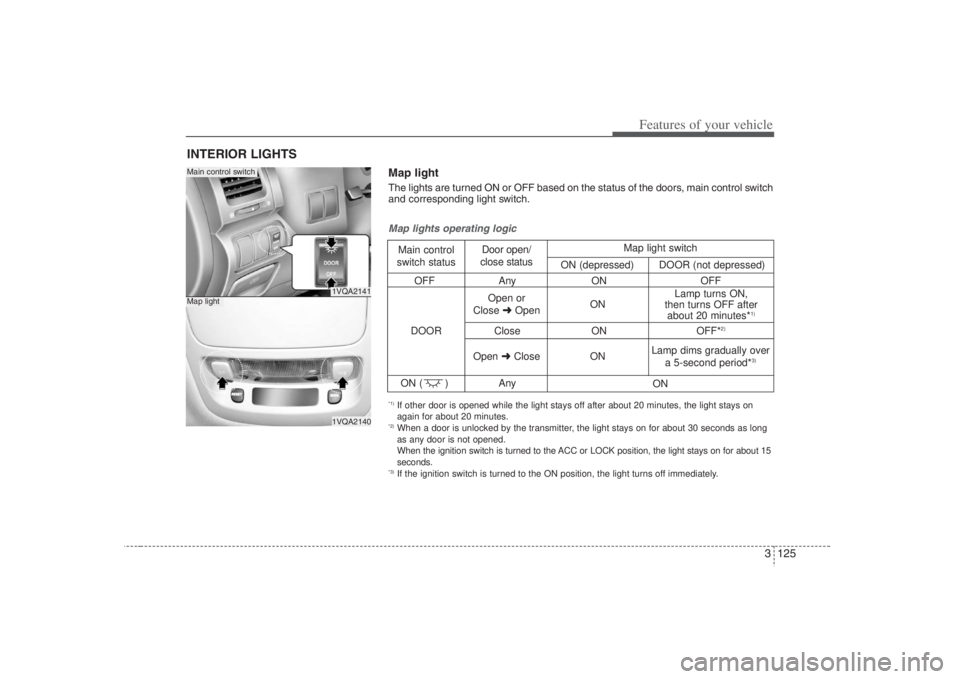
seconds.*3) If the ignition switch is turned to the ON position, the light turns off immediately.Map lightThe lights are turned ON or OFF based on the status of the doors, main control switch
and corresponding light switch.
Page 142 of 393

Features of your vehicle126 3
1VQA2141
1VQA2142/OUN026245
1VQA2333
Main control switchDome light - center (if equipped)
OFF Any
Close ON OFF*
2)
OFF
ON ( ) Any
Dome lights operating logicMain control
switch statusDoor open/
close status
DOOROpen or
Close ➜OpenON
ONOFF
OFF Lamp turns ON,
then turns OFF
after about 20
minutes*
1)
Lamp dims
gradually over
a 5-second
period*
3)
Open ➜CloseOFF
ON Dome light switch
ON
DOOR OFF
*1) If other door is opened while the light stays off after about 20 minutes, the light stays on
again for about 20 minutes.*2) When a door is unlocked by the transmitter, the light stays on for about 30 seconds as long
as any door is not opened.
When the ignition switch is turned to the ACC or LOCK position, the light stays on for about 15
seconds.*3) If the ignition switch is turned to the ON position, the light turns off immediately.Dome lightThe lights are turned ON or OFF based on the status of the doors, main control switch
and corresponding light switch.
Dome light - center/rear (if equipped)
Page 185 of 393
3 169
Features of your vehicle
Rolling code programmingTo train a garage door opener (or other
rolling code equipped devices) with the
rolling code feature, follow these instruc-
tions after completing the “Programming”
portion of this text. (A second person
may make the following training proce-
dures quicker & easier.)
4. Locate the “learn” or “smart” button on
the device’s motor head unit. Exact
location and color of the button may
vary by product brand. If there is diffi-
culty locating the “learn” or “smart” but-
ton, reference the device’s owner’s
manual or contact HomeLink at 1-800-
355-3515 or on the internet at
www.homelink.com.
5. Press and release the “learn” or
“smart” button on the device’s motor
head unit. You have 30 seconds to
complete step number 6.
6. Return to the vehicle and firmly press
and release the programmed
HomeLink button up to three times.
The rolling code equipped device
should now recognize the HomeLink
signal and activate when the
HomeLink button is pressed. The
remaining two buttons may now be
programmed if this has not previously
been done. Refer to the
“Programming” portion of this text.
Operating HomeLink To operate, simply press the pro-
grammed HomeLink button. Activation
will now occur for the trained product
(garage door, security system, entry door
lock, estate gate, or home or office light-
ing). For convenience, the hand-held
transmitter of the device may also be
used at any time. The HomeLink
Wireless Controls System (once pro-
grammed) or the original hand-held
transmitter may be used to activate the
device (e.g. garage door, entry door lock,
etc.). In the event that there are still pro-
gramming difficulties, contact HomeLink
at 1-800-355-3515 or on the internet at
www.homelink.com.
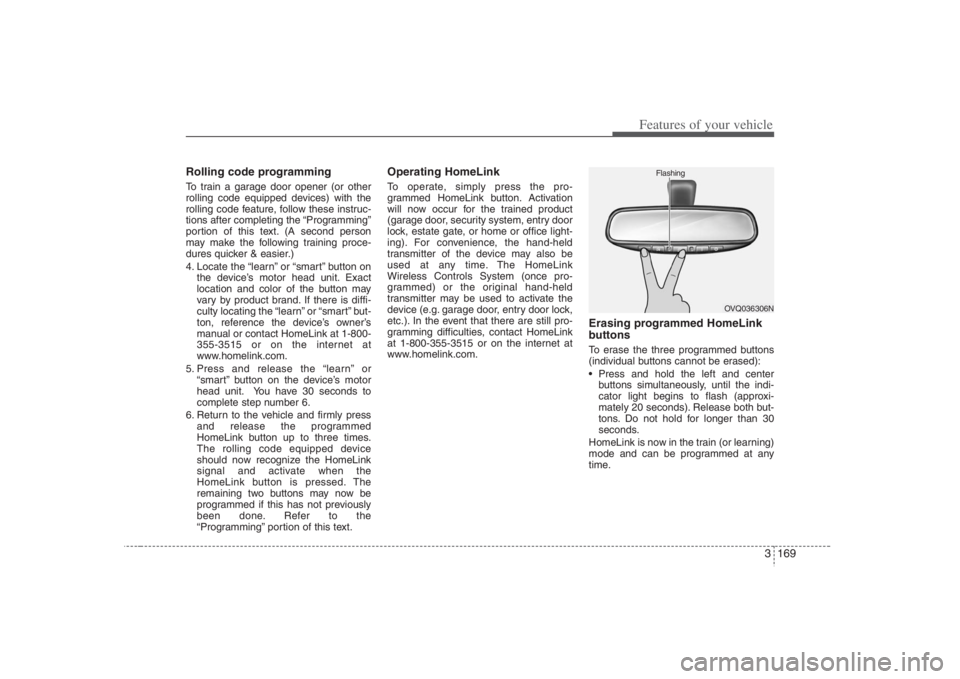
Erasing programmed HomeLink
buttonsTo erase the three programmed buttons
(individual buttons cannot be erased):
Press and hold the left and center
buttons simultaneously, until the indi-
cator light begins to flash (approxi-
mately 20 seconds). Release both but-
tons. Do not hold for longer than 30
seconds.
HomeLink is now in the train (or learning)
mode and can be programmed at any
time.
OVQ036306N Flashing