warning Hyundai Equus 2010 Owners Manual
[x] Cancel search | Manufacturer: HYUNDAI, Model Year: 2010, Model line: Equus, Model: Hyundai Equus 2010Pages: 374, PDF Size: 41.29 MB
Page 145 of 374
467
Features of your vehicle
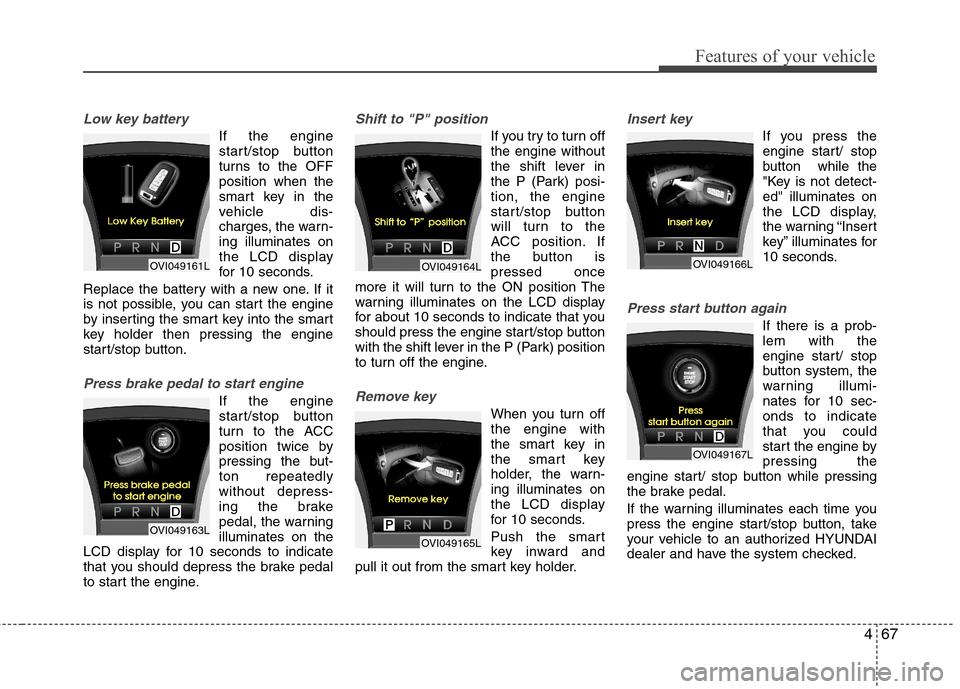
Low key battery
If the engine
start/stop button
turns to the OFFposition when the
smart key in the
vehicle dis-
charges, the warn-ing illuminates on
the LCD display
for 10 seconds.
Replace the battery with a new one. If it
is not possible, you can start the engine
by inserting the smart key into the smart
key holder then pressing the engine
start/stop button.
Press brake pedal to start engine
If the engine
start/stop button
turn to the ACC
position twice by
pressing the but-ton repeatedlywithout depress-
ing the brake
pedal, the warningilluminates on the
LCD display for 10 seconds to indicate
that you should depress the brake pedal
to start the engine.
Shift to "P" position
If you try to turn off the engine without
the shift lever in
the P (Park) posi-tion, the engine
start/stop button
will turn to the
ACC position. If
the button ispressed once
more it will turn to the ON position The
warning illuminates on the LCD display
for about 10 seconds to indicate that you
should press the engine start/stop button
with the shift lever in the P (Park) position
to turn off the engine.
Remove key
When you turn off the engine with
the smart key in
the smart key
holder, the warn-ing illuminates on
the LCD display
for 10 seconds.
Push the smart
key inward and
pull it out from the smart key holder.
Insert key
If you press the
engine start/ stop
button while the
"Key is not detect-ed" illuminates on
the LCD display,
the warning “Insert
key” illuminates for
10 seconds.
Press start button again
If there is a prob- lem with the
engine start/ stop
button system, the
warning illumi-
nates for 10 sec-onds to indicate
that you could
start the engine bypressing the
engine start/ stop button while pressing
the brake pedal.
If the warning illuminates each time you
press the engine start/stop button, take
your vehicle to an authorized HYUNDAI
dealer and have the system checked.
OVI049161L
OVI049163L
OVI049164L
OVI049165L
OVI049166L
OVI049167L
Page 146 of 374
Features of your vehicle
68
4
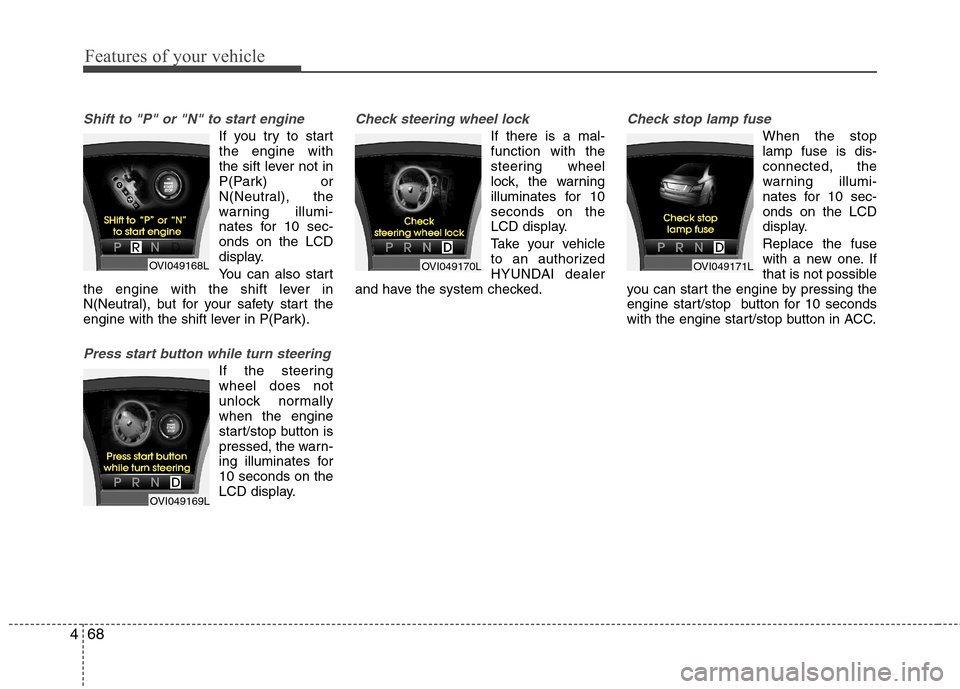
Shift to "P" or "N" to start engine
If you try to start the engine with
the sift lever not in
P(Park) or
N(Neutral), the
warning illumi-
nates for 10 sec-onds on the LCD
display.
You can also start
the engine with the shift lever in
N(Neutral), but for your safety start the
engine with the shift lever in P(Park).
Press start button while turn steering
If the steering wheel does not
unlock normallywhen the engine
start/stop button is
pressed, the warn-
ing illuminates for10 seconds on the
LCD display.
Check steering wheel lock
If there is a mal- function with the
steering wheel
lock, the warning
illuminates for 10seconds on the
LCD display.
Take your vehicle
to an authorized
HYUNDAI dealer
and have the system checked.
Check stop lamp fuse
When the stop lamp fuse is dis-connected, the
warning illumi-
nates for 10 sec-onds on the LCD
display. Replace the fuse
with a new one. If
that is not possible
you can start the engine by pressing the
engine start/stop button for 10 seconds
with the engine start/stop button in ACC.
OVI049168L
OVI049169L
OVI049170LOVI049171L
Page 147 of 374
469
Features of your vehicle
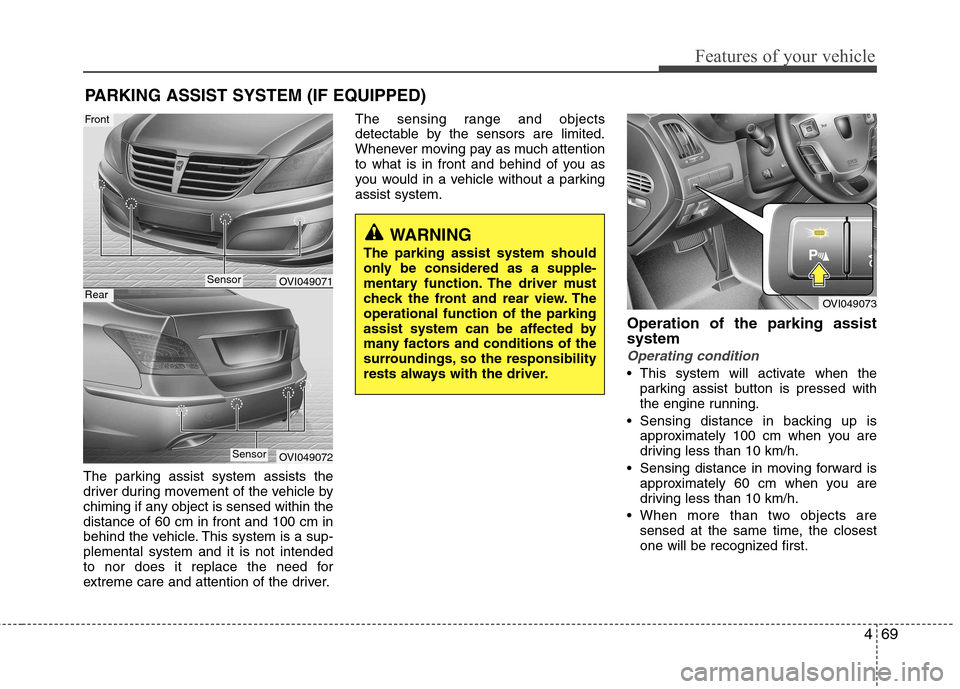
The parking assist system assists the
driver during movement of the vehicle by
chiming if any object is sensed within thedistance of 60 cm in front and 100 cm in
behind the vehicle. This system is a sup-plemental system and it is not intended
to nor does it replace the need for
extreme care and attention of the driver.The sensing range and objects
detectable by the sensors are limited.
Whenever moving pay as much attention
to what is in front and behind of you as
you would in a vehicle without a parkingassist system.
Operation of the parking assistsystem
Operating condition
This system will activate when theparking assist button is pressed with
the engine running.
Sensing distance in backing up is approximately 100 cm when you are
driving less than 10 km/h.
Sensing distance in moving forward is approximately 60 cm when you are
driving less than 10 km/h.
When more than two objects are sensed at the same time, the closest
one will be recognized first.
PARKING ASSIST SYSTEM (IF EQUIPPED)
OVI049071
OVI049072
WARNING
The parking assist system should
only be considered as a supple-
mentary function. The driver must
check the front and rear view. Theoperational function of the parking
assist system can be affected by
many factors and conditions of the
surroundings, so the responsibility
rests always with the driver.
OVI049073
Sensor
Front
Rear
Sensor
Page 148 of 374
Features of your vehicle
70
4
If you move the shift lever to the R
position with the engine start/stop but-
ton in the ON position and the parking
assist system in OFF, the parking
assist system will operate automatical-
ly. But it will turn off automatically,
when the vehicle speed exceeds than20km/h.
✽✽ NOTICE
It may not operate if it’s distance from
the object is already less than approxi-
mately 25 cm when the system is ON.
Types of warning sound
When an object is 100 cm to 61 cm from the rear bumper : Buzzer beeps
intermittently
When an object is 60 cm to 31 cm from the front or rear bumper : Buzzer
sounds two beeps intermittently
When an object is within 30 cm of the front or rear bumper : Buzzer sounds
continuously. Non-operational conditions ofparking assist system
Parking assist system may not oper-
ate normally when:
1. Moisture is frozen to the sensor. (It will operate normally when moisture
melts.)
2. Sensor is covered with foreign matter, such as snow or water, or the sensor
cover is blocked. (It will operate nor-
mally when the material is removed or
the sensor is no longer blocked.)
3. Sensor is stained with foreign matter such as snow or water. (Sensing range
will return to normal when removed.)
There is a possibility of parking
assist system malfunction when:
1. Driving on uneven road surfaces such as unpaved roads, gravel, bumps, or
gradient.
2. Objects generating excessive noise such as vehicle horns, loud motorcycle
engines, or truck air brakes can inter-
fere with the sensor.
3. Heavy rain or water spray.
4. Wireless transmitters or mobile phones present near the sensor.
5. Sensor is covered with snow.
Detecting range may decrease when:
1. Outside air temperature is extremely hot or cold.
2. Undetectable objects smaller than 1 m and narrower than 14 cm in diameter.
The following objects may not be rec-
ognized by the sensor:
1. Sharp or slim objects such as ropes, chains or small poles.
2. Objects, which tend to absorb sensor frequency such as clothes, spongy
material or snow.
Page 149 of 374
471
Features of your vehicle
✽✽NOTICE
1. The warning may not sound sequen- tially depending on the speed and
shapes of the objects detected.
2. The parking assist system may mal-
function if the vehicle bumper height
or sensor installation has been modi-
fied. Any non-factory installed equip-
ment or accessories may also interfere
with the sensor performance.
3. Sensor may not recognize objects less
than 30 cm from the sensor, or it may
sense an incorrect distance. Use with
caution.
4. When the sensor is frozen or stained
with snow or water, the sensor may be
inoperative until the stains are
removed using a soft cloth.
5. Do not push, scratch or strike the sen-
sor with any hard objects that could
damage the surface of the sensor.
Sensor damage could occur. ✽✽
NOTICE
This system can only sense objects with-
in the range and location of the sensors,
it can not detect objects in other areas
where sensors are not installed. Also,
small or slim objects, or objects located
between sensors may not be detected.
Always visually check in front and
behind the vehicle when driving.
Be sure to inform any drivers in the
vehicle that may be unfamiliar with the
system regarding the systems capabili-
ties and limitations.Self-diagnosis
If you don’t hear an audible warning
sound or if the buzzer sounds intermit-
tently when shifting the shift lever into the
R (Reverse) position, this may indicate a
malfunction in the rear parking assist sys-
tem. If this occurs, have your vehicle
checked by an authorized HYUNDAI
dealer as soon as possible.
WARNING
Pay close attention when the vehi-
cle is driven close to objects on the
road, particularly pedestrians, and
especially children. Be aware that
some objects may not be detected
by the sensors, due to the objects
distance, size or material, all of
which can limit the effectiveness of
the sensor. Always perform a visual
inspection to make sure the vehicle
is clear of all obstructions before
moving the vehicle in any direction.
WARNING
Your new vehicle warranty does not
cover any accidents or damage to
the vehicle or injuries to its occu-pants related to a parking assist
system. Always drive safely and
cautiously.
Page 150 of 374
Features of your vehicle
72
4
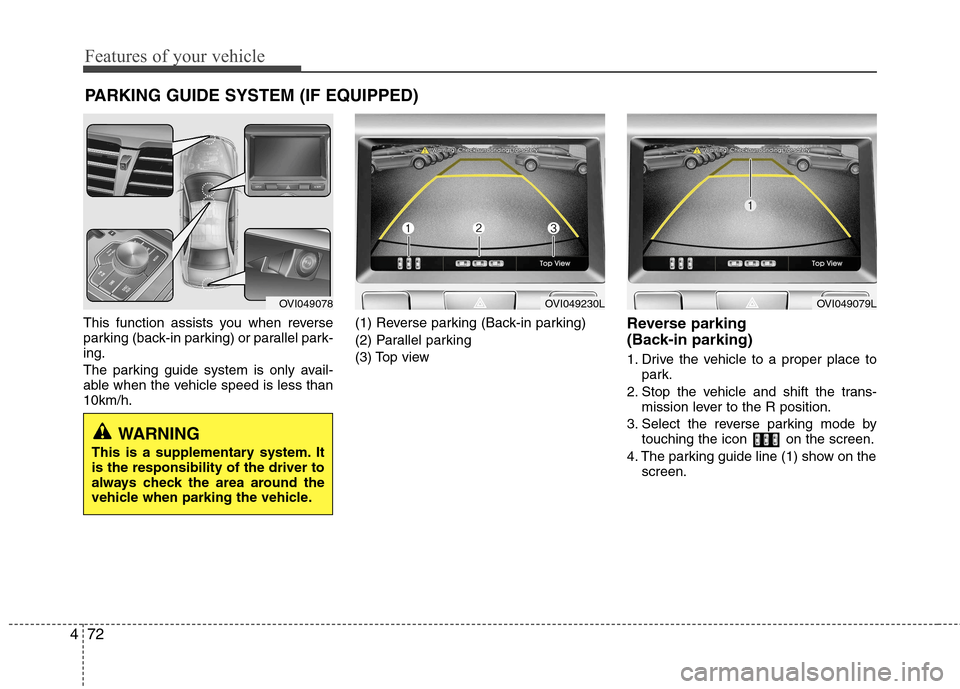
This function assists you when reverse
parking (back-in parking) or parallel park-ing.
The parking guide system is only avail-
able when the vehicle speed is less than10km/h. (1) Reverse parking (Back-in parking)
(2) Parallel parking
(3) Top view
Reverse parking
(Back-in parking)
1. Drive the vehicle to a proper place to
park.
2. Stop the vehicle and shift the trans- mission lever to the R position.
3. Select the reverse parking mode by touching the icon on the screen.
4. The parking guide line (1) show on the screen.
PARKING GUIDE SYSTEM (IF EQUIPPED)
WARNING
This is a supplementary system. It is the responsibility of the driver to
always check the area around the
vehicle when parking the vehicle.
OVI049078OVI049230LOVI049079L
Page 154 of 374
Features of your vehicle
76
4
FRONT BLIND SPOT MONITORING SYSTEM (IF EQUIPPED)
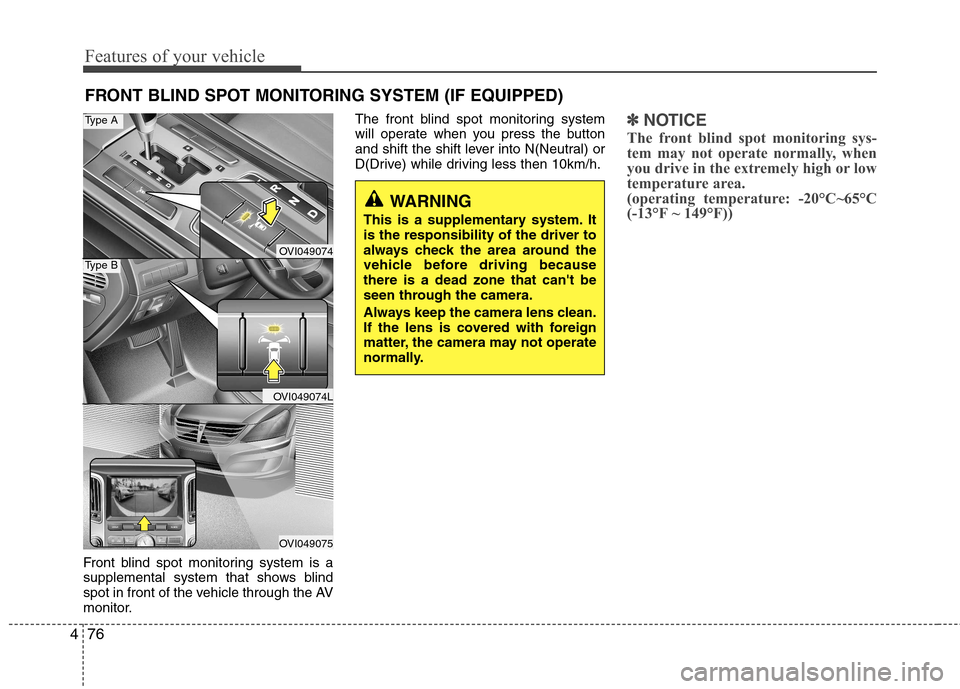
Front blind spot monitoring system is a
supplemental system that shows blind
spot in front of the vehicle through the AV
monitor. The front blind spot monitoring system
will operate when you press the buttonand shift the
shift lever into N(Neutral) or
D(Drive) while driving less then 10km/h.
✽✽ NOTICE
The front blind spot monitoring sys-
tem may not operate normally, when
you drive in the extremely high or low
temperature area.
(operating temperature: -20°C~65°C
(-13°F ~ 149°F))
WARNING
This is a supplementary system. It is the responsibility of the driver to
always check the area around the
vehicle before driving becausethere is a dead zone that can't be
seen through the camera.
Always keep the camera lens clean.
If the lens is covered with foreign
matter, the camera may not operate
normally.
OVI049074
OVI049074L
OVI049075
Type A
Type B
Page 155 of 374
477
Features of your vehicle
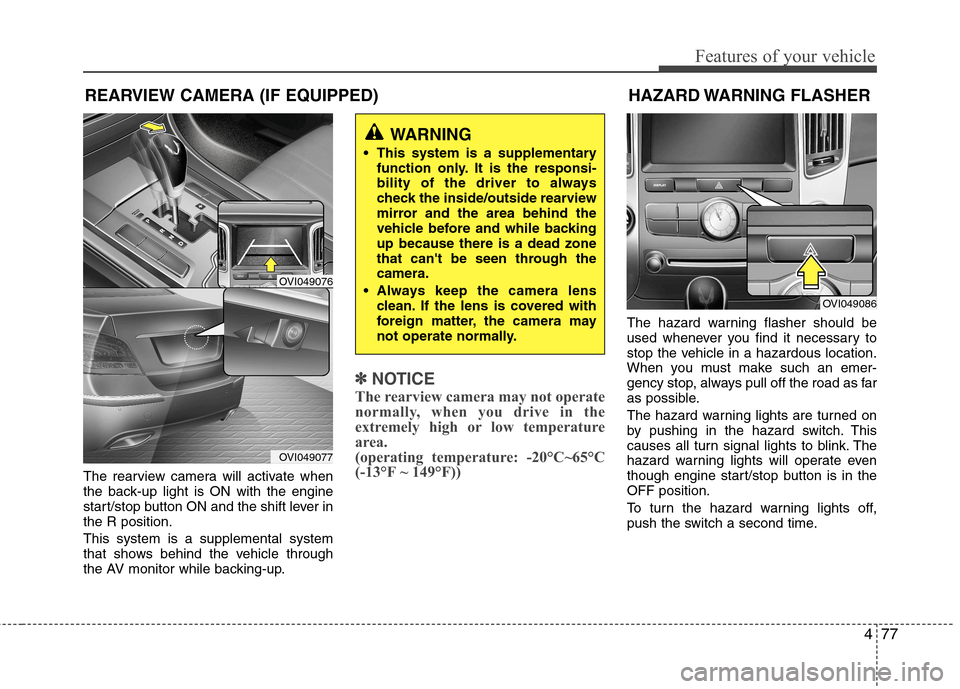
The rearview camera will activate when
the back-up light is ON with the engine
start/stop button ON and the shift lever inthe R position. This system is a supplemental system
that shows behind the vehicle through
the AV monitor while backing-up.
✽✽NOTICE
The rearview camera may not operate
normally, when you drive in the
extremely high or low temperature
area.
(operating temperature: -20°C~65°C
(-13°F ~ 149°F))
The hazard warning flasher should be
used whenever you find it necessary to
stop the vehicle in a hazardous location.
When you must make such an emer-
gency stop, always pull off the road as far
as possible.
The hazard warning lights are turned on
by pushing in the hazard switch. This
causes all turn signal lights to blink. The
hazard warning lights will operate even
though engine start/stop button is in theOFF position.
To turn the hazard warning lights off,
push the switch a second time.
WARNING
This system is a supplementary function only. It is the responsi-
bility of the driver to always
check the inside/outside rearview
mirror and the area behind the
vehicle before and while backingup because there is a dead zone
that can't be seen through thecamera.
Always keep the camera lens clean. If the lens is covered with
foreign matter, the camera may
not operate normally.
OVI049086
REARVIEW CAMERA (IF EQUIPPED)
OVI049076
OVI049077
HAZARD WARNING FLASHER
Page 160 of 374
Features of your vehicle
82
4
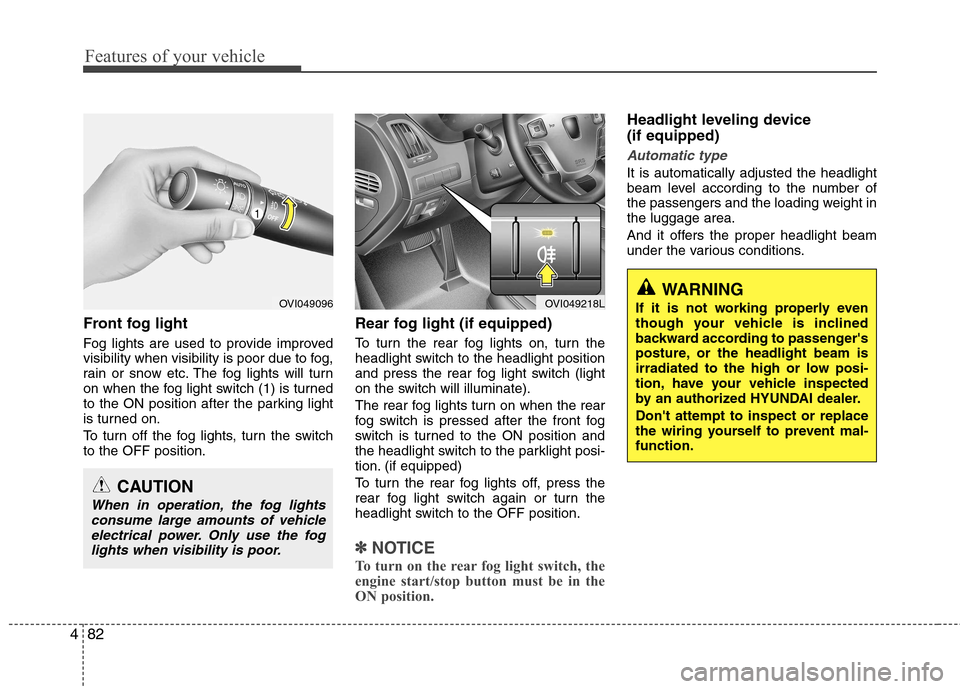
Front fog light
Fog lights are used to provide improved
visibility when visibility is poor due to fog,
rain or snow etc. The fog lights will turn
on when the fog light switch (1) is turned
to the ON position after the parking light
is turned on.
To turn off the fog lights, turn the switch to the OFF position. Rear fog light (if equipped)
To turn the rear fog lights on, turn the
headlight switch to the headlight position
and press the rear fog light switch (light
on the switch will illuminate).
The rear fog lights turn on when the rear
fog switch is pressed after the front fog
switch is turned to the ON position and
the headlight switch to the parklight posi-
tion. (if equipped)
To turn the rear fog lights off, press the
rear fog light switch again or turn the
headlight switch to the OFF position.
✽✽
NOTICE
To turn on the rear fog light switch, the
engine start/stop button must be in the
ON position.
Headlight leveling device (if equipped)
Automatic type
It is automatically adjusted the headlight
beam level according to the number of
the passengers and the loading weight inthe luggage area.
And it offers the proper headlight beam
under the various conditions.
OVI049096
CAUTION
When in operation, the fog lights consume large amounts of vehicle
electrical power. Only use the foglights when visibility is poor.
OVI049218LWARNING
If it is not working properly even
though your vehicle is inclined
backward according to passenger's
posture, or the headlight beam is
irradiated to the high or low posi-
tion, have your vehicle inspected
by an authorized HYUNDAI dealer. Don't attempt to inspect or replace
the wiring yourself to prevent mal-function.
Page 165 of 374
487
Features of your vehicle
The spray and wiper operation will con-
tinue until you release the lever.
If the washer does not work, check the
washer fluid level. If the fluid level is not
sufficient, you will need to add appropri-
ate non-abrasive windshield washer fluid
to the washer reservoir.
The reservoir filler neck is located in the
front of the engine compartment on the
passenger side.
CAUTION
To prevent possible damage to thewasher pump, do not operate thewasher when the fluid reservoir is
empty.
WARNING
Do not use the washer in freezing
temperatures without first warming
the windshield with the defrosters;
the washer solution could freeze on
the windshield and obscure yourvision.
CAUTION
To prevent possible damage to the wipers or windshield, do notoperate the wipers when the
windshield is dry.
To prevent damage to the wiper blades, do not use gasoline,
kerosene, paint thinner, or othersolvents on or near them.
To prevent damage to the wiper arms and other components, do
not attempt to move the wipersmanually.