check engine light Hyundai Equus 2010 Owner's Guide
[x] Cancel search | Manufacturer: HYUNDAI, Model Year: 2010, Model line: Equus, Model: Hyundai Equus 2010Pages: 374, PDF Size: 41.29 MB
Page 163 of 374
485
Features of your vehicle
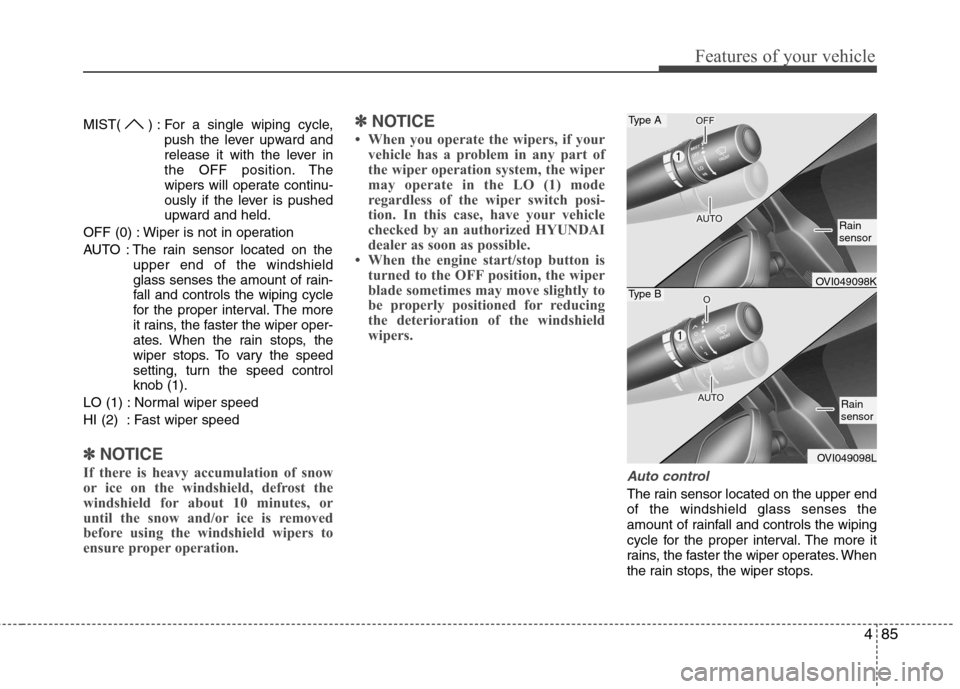
MIST( ) : For a single wiping cycle,push the lever upward and
release it with the lever in
the OFF position. The
wipers will operate continu-
ously if the lever is pushed
upward and held.
OFF (0) : Wiper is not in operation
AUTO : The rain sensor located on the upper end of the windshield
glass senses the amount of rain-
fall and controls the wiping cycle
for the proper interval. The more
it rains, the faster the wiper oper-
ates. When the rain stops, the
wiper stops. To vary the speed
setting, turn the speed controlknob (1).
LO (1) : Normal wiper speed
HI (2) : Fast wiper speed
✽✽ NOTICE
If there is heavy accumulation of snow
or ice on the windshield, defrost the
windshield for about 10 minutes, or
until the snow and/or ice is removed
before using the windshield wipers to
ensure proper operation. ✽
✽
NOTICE
When you operate the wipers, if your vehicle has a problem in any part of
the wiper operation system, the wiper
may operate in the LO (1) mode
regardless of the wiper switch posi-
tion. In this case, have your vehicle
checked by an authorized HYUNDAI
dealer as soon as possible.
When the engine start/stop button is turned to the OFF position, the wiper
blade sometimes may move slightly to
be properly positioned for reducing
the deterioration of the windshield
wipers.
Auto control
The rain sensor located on the upper end of the windshield glass senses the
amount of rainfall and controls the wiping
cycle for the proper interval. The more it
rains, the faster the wiper operates. When
the rain stops, the wiper stops.
Type A
Type BOVI049098K
OVI049098L
Rain sensor
Rain sensor
Page 207 of 374
53
Driving your vehicle
Before entering vehicle
• Be sure that all windows, outside mir-ror(s), and outside lights are clean.
Check the condition of the tires.
Check under the vehicle for any sign of leaks.
Be sure there are no obstacles behind you if you intend to back up.
Necessary inspections
Fluid levels, such as engine oil, engine
coolant, brake fluid, and washer fluid
should be checked on a regular basis,
with the exact interval depending on the
fluid. Further details are provided in sec-
tion 7, “Maintenance”. Before starting
Close and lock all doors.
Position the seat so that all controls are
easily reached.
Adjust the inside and outside rearview mirrors.
Be sure that all lights work.
Check all gauges.
Check the operation of warning lights when the engine start/stop button is
turned to the ON position.
Release the parking brake and make sure the brake warning light goes out.
For safe operation, be sure you are famil-
iar with your vehicle and its equipment.
BEFORE DRIVING
WARNING
All passengers must be properly
belted whenever the vehicle is mov-
ing. Refer to “Seat belts” in section
3 for more information on their
proper use.
WARNING
Always check the surrounding
areas near your vehicle for people,
especially children, before putting a
vehicle into D (Drive) or R
(Reverse).
WARNING
When you intend to park or stop the
vehicle with the engine on, be care-ful not to depress the accelerator
pedal for a long period of time. It
may overheat the engine or exhaust
system and cause fire.
WARNING - Driving under
the influence of alcohol or drugs
Drinking and driving is dangerous.
Drunk driving is the number one
contributor to the highway death
toll each year. Even a small amount
of alcohol will affect your reflexes,
perceptions and judgment. Drivingwhile under the influence of drugs
is as dangerous or more dangerousthan driving drunk.
You are much more likely to have a
serious accident if you drink or
take drugs and drive.
If you are drinking or taking drugs,
don’t drive. Do not ride with a driv-er who has been drinking or taking
drugs. Choose a designated driveror call a cab.
Page 209 of 374
55
Driving your vehicle
ON
Press the engine start/stop button while it
is in the ACC position without depressing
the brake pedal.
The warning lights can be checked before
the engine is started. Do not leave the
button in the ON position for a long time.
Do not leave the engine start/stop button
in the ON position for a long time. The
battery may discharge, because the
engine is not running.
START
To start the engine, depress the brake
pedal and press the engine start/stop
button with the shift lever in the P(Park)
or the N(Neutral) position. For your safe-
ty, start the engine with the shift lever in
the P (Park) position.
✽✽NOTICE
If you press the engine start/stop but- ton without depressing the brake
pedal, the engine will not start and the
engine start/stop button changes as
follow :
OFF →
→
ACC →→
ON →→
OFF
If you leave the engine start/stop but-
ton in the ACC or the ON position for
a long time, the battery will discharge.
WARNING
Never press the engine start/stop button while the vehicle is in
motion. This would result in theengine turning off and loss of
power assist for the steering and
brakes, which may lead to loss of
directional control and braking
function, which could cause anaccident.
The anti-theft steering column lock is not a substitute for the
parking brake. Before leaving the
driver’s seat, always make sure
the shift lever is engaged in P
(Park),set the parking brake fully
and shut the engine off.
Unexpected and sudden vehicle
movement may occur if theseprecautions are not taken.
(Continued)
(Continued)
Never reach for the enginestart/stop button, or any other
controls through the steering
wheel while the vehicle is in
motion. The presence of yourhand or arm in this area could
cause a loss of vehicle control,
an accident and serious bodily
injury or death.
Do not place any movable objects around the driver’s seat as they
may move while driving, interferewith the driver and lead to anaccident.
Page 219 of 374
515
Driving your vehicle
Disc brakes wear indicator
Your vehicle has disc brakes.
When your brake pads are worn and new
pads are required, you will hear a high-
pitched warning sound from your front
brakes or rear brakes. You may hear this
sound come and go or it may occur
whenever you depress the brake pedal.
Please remember that some driving con-
ditions or climates may cause a brake
squeal when you first apply (or lightly
apply) the brakes. This is normal and
does not indicate a problem with your
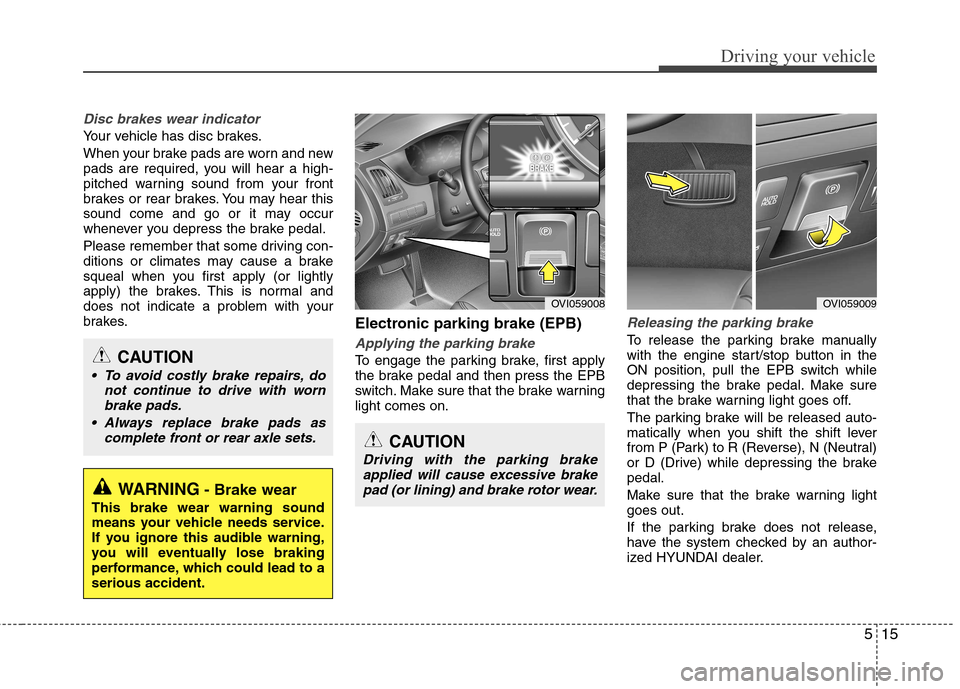
brakes.Electronic parking brake (EPB)
Applying the parking brake
To engage the parking brake, first apply
the brake pedal and then press the EPB
switch. Make sure that the brake warninglight comes on.
Releasing the parking brake
To release the parking brake manually
with the engine start/stop button in the
ON position, pull the EPB switch while
depressing the brake pedal. Make sure
that the brake warning light goes off.
The parking brake will be released auto-
matically when you shift the shift lever
from P (Park) to R (Reverse), N (Neutral)
or D (Drive) while depressing the brakepedal.
Make sure that the brake warning light goes out.
If the parking brake does not release,
have the system checked by an author-
ized HYUNDAI dealer.
WARNING- Brake wear
This brake wear warning sound
means your vehicle needs service.
If you ignore this audible warning,
you will eventually lose braking
performance, which could lead to aserious accident.
CAUTION
To avoid costly brake repairs, do not continue to drive with wornbrake pads.
Always replace brake pads as complete front or rear axle sets.
OVI059008OVI059009
CAUTION
Driving with the parking brakeapplied will cause excessive brakepad (or lining) and brake rotor wear.
Page 221 of 374
517
Driving your vehicle
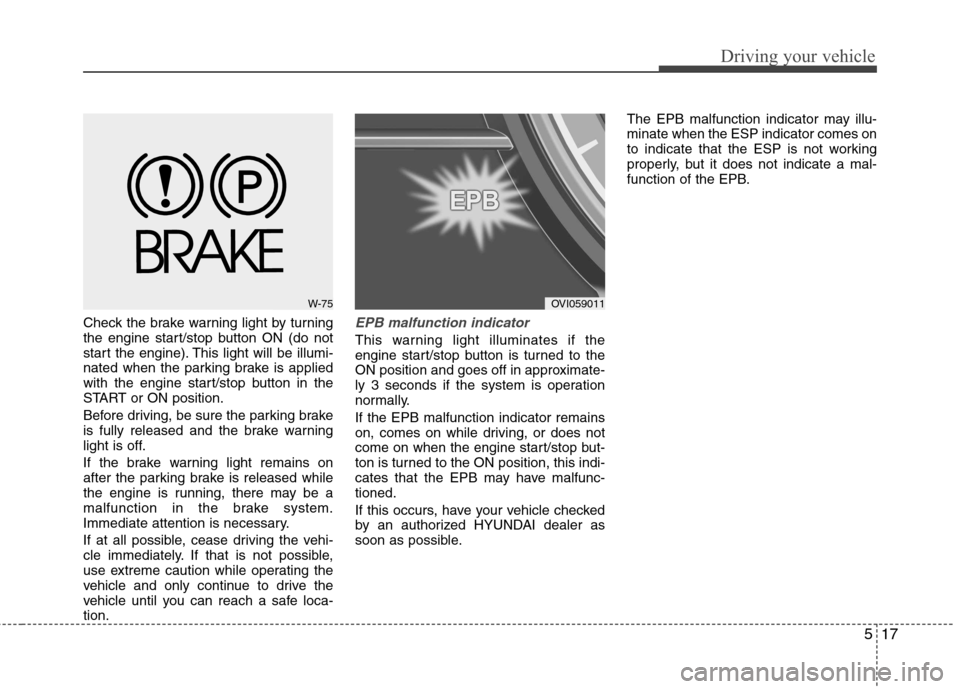
Check the brake warning light by turning
the engine start/stop button ON (do not
start the engine). This light will be illumi-
nated when the parking brake is applied
with the engine start/stop button in the
START or ON position.
Before driving, be sure the parking brake
is fully released and the brake warning
light is off.
If the brake warning light remains on
after the parking brake is released while
the engine is running, there may be a
malfunction in the brake system.
Immediate attention is necessary.
If at all possible, cease driving the vehi-
cle immediately. If that is not possible,
use extreme caution while operating the
vehicle and only continue to drive the
vehicle until you can reach a safe loca-tion.EPB malfunction indicator
This warning light illuminates if the
engine start/stop button is turned to the
ON position and goes off in approximate-
ly 3 seconds if the system is operation
normally. If the EPB malfunction indicator remains
on, comes on while driving, or does not
come on when the engine start/stop but-
ton is turned to the ON position, this indi-
cates that the EPB may have malfunc-tioned.
If this occurs, have your vehicle checked
by an authorized HYUNDAI dealer as
soon as possible.The EPB malfunction indicator may illu-minate when the ESP indicator comes on
to indicate that the ESP is not working
properly, but it does not indicate a mal-
function of the EPB.
W-75OVI059011
Page 228 of 374
Driving your vehicle
24
5
ESP operation
ESP ON condition
button is turned ON, ESP and ESP OFF indicator lights illu-
minate for approximately 3
seconds, then ESP is turnedon.
Press the ESP OFF button for at least half a second after
turning the engine start/stop
button ON to turn ESP off.(ESP OFF indicator will illumi-
nate). To turn the ESP on,
press the ESP OFF button(ESP OFF indicator light willgo off).
you may hear a slight ticking
sound. This is the ESP per-
forming an automatic system
self-check and does not indi-
cate a problem. When operating
When the ESP is in operation,
ESP indicator light blinks.
Program is operating proper-
ly, you can feel a slight pulsa-
tion in the vehicle. This is only
the effect of brake control and
indicates nothing unusual.
or slippery road, the engine
rpm (revolution per minute)
may not be increased even if
you press the accelerator
pedal deeply. This is to main-
tain the stability and traction
of the vehicle and does not
indicate a problem.
ESP operation off
ESP OFF state
press the ESP OFF button for
more than 0.5 second. (ESPOFF indicator light illumi-nates).
is off, ESP remains off. Upon
restarting the engine, theESP will be automatically
turned on again.
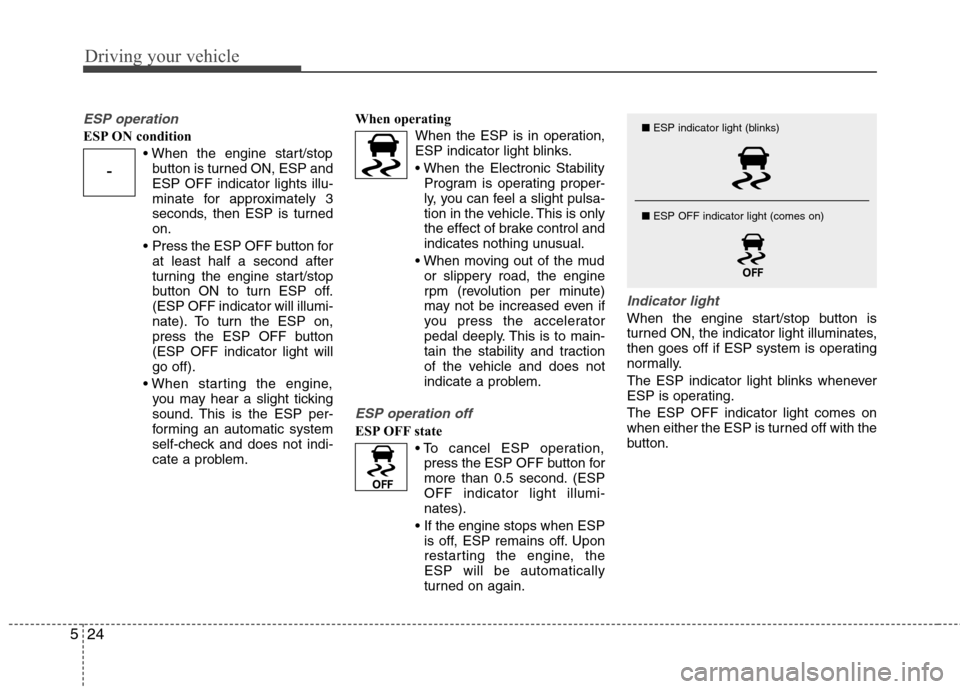
Indicator light
When the engine start/stop button is
turned ON, the indicator light illuminates,
then goes off if ESP system is operating
normally.
The ESP indicator light blinks whenever
ESP is operating. The ESP OFF indicator light comes on
when either the ESP is turned off with the
button.
-
■ ESP indicator light (blinks)
■ ESP OFF indicator light (comes on)
Page 234 of 374
Driving your vehicle
30
5
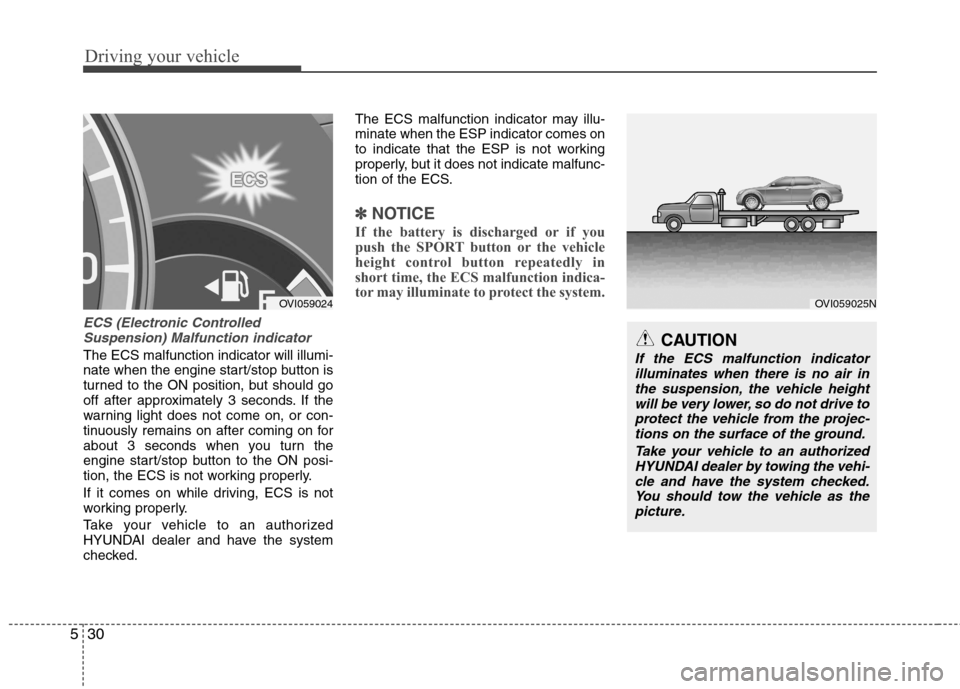
ECS (Electronic Controlled
Suspension) Malfunction indicator
The ECS malfunction indicator will illumi-
nate when the engine start/stop button is
turned to the ON position, but should go
off after approximately 3 seconds. If the
warning light does not come on, or con-
tinuously remains on after coming on for
about 3 seconds when you turn the
engine start/stop button to the ON posi-
tion, the ECS is not working properly.
If it comes on while driving, ECS is not
working properly.
Take your vehicle to an authorized
HYUNDAI dealer and have the system
checked. The ECS malfunction indicator may illu-minate when the ESP indicator comes on
to indicate that the ESP is not working
properly, but it does not indicate malfunc-
tion of the ECS.
✽✽
NOTICE
If the battery is discharged or if you
push the SPORT button or the vehicle
height control button repeatedly in
short time, the ECS malfunction indica-
tor may illuminate to protect the system.
CAUTION
If the ECS malfunction indicator illuminates when there is no air inthe suspension, the vehicle height
will be very lower, so do not drive toprotect the vehicle from the projec-tions on the surface of the ground.
Take your vehicle to an authorizedHYUNDAI dealer by towing the vehi-
cle and have the system checked.You should tow the vehicle as the picture.
OVI059025NOVI059024
Page 239 of 374
535
Driving your vehicle
Operating the EPB switch. Do notoperate the parking brake while driving
except in an emergency situation.
Each of these actions will cancel cruise
control operation (the SET indicator light
in the instrument cluster will go off), but itwill not turn the system off. If you wish toresume cruise control operation, push
the RES+ switch located on your steering wheel. You will return to your previouslypreset speed.
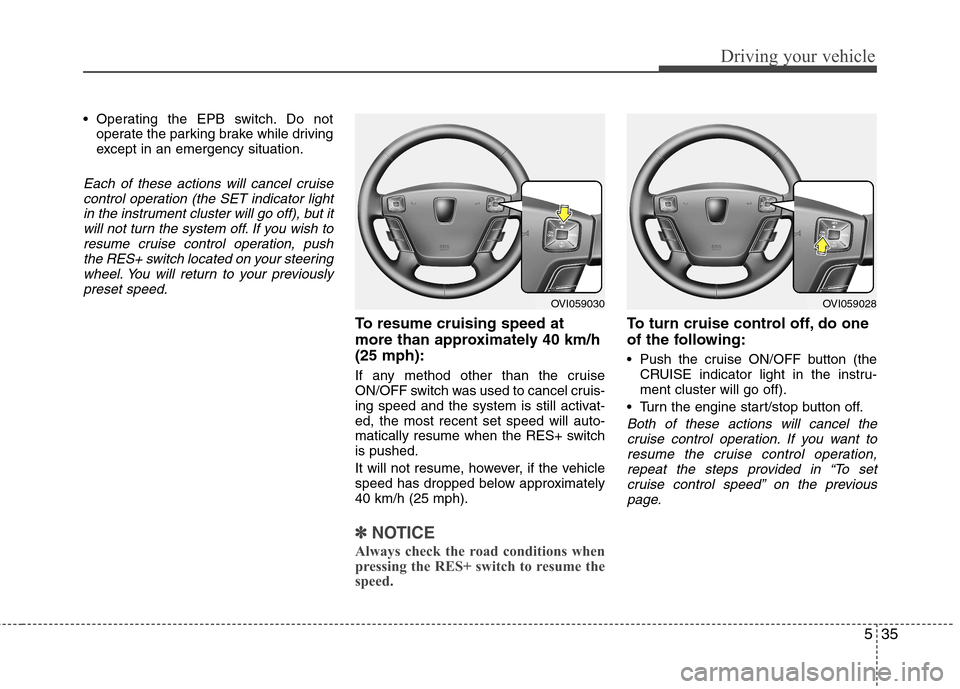
To resume cruising speed at
more than approximately 40 km/h(25 mph):
If any method other than the cruise
ON/OFF switch was used to cancel cruis-
ing speed and the system is still activat-ed, the most recent set speed will auto-
matically resume when the RES+ switchis pushed.
It will not resume, however, if the vehicle
speed has dropped below approximately40 km/h (25 mph).
✽✽ NOTICE
Always check the road conditions when
pressing the RES+ switch to resume the
speed.
To turn cruise control off, do one
of the following:
Push the cruise ON/OFF button (the CRUISE indicator light in the instru- ment cluster will go off).
Turn the engine start/stop button off.
Both of these actions will cancel the cruise control operation. If you want to resume the cruise control operation,repeat the steps provided in “To set
cruise control speed” on the previouspage.
OVI059030OVI059028
Page 243 of 374

539
Driving your vehicle
Decreasing the vehicle speed to lessthan approximately 10km/h (6.2mph)
as the vehicle in front of you.
Accelerating the vehicle speed to more than approximately 180km/h(113mph).
The ESP is turned off.
The sensor or the cover is stained with foreign matter.
Each of these actions will cancel smart
cruise control operation (the SET indica-
tor light, set speed and vehicle to vehicledistance on the LCD screen will go out),but it will not turn the system off. If youwish to resume smart cruise control
operation, push the RES+ switch locatedon your steering wheel. You will return toyour previously preset speed.
To resume cruising speed at
more than approximately 10 km/h(6.2 mph):
If any method other than the cruise
ON/OFF switch was used to cancel cruis-
ing speed and the system is still activat-ed, the most recent set speed will auto-
matically resume when the RES+ switchis pushed.
It will not resume, however, if the vehicle
speed has dropped below approximately10 km/h (6.2 mph) when the sensor
detects the vehicle ahead or if the vehicle
speed has dropped below approximately30 km/h (18.6 mph) when there is no
vehicle in front of your vehicle.
✽✽ NOTICE
Always check the road conditions when
pressing the RES+ switch to resume the
speed.
To turn cruise control off, do one
of the following:
Push the cruise ON/OFF button (the CRUISE indicator light in the instru- ment cluster will go out).
Turn the engine off.
Both of these actions cancel smart cruise control operation. If you want to resume smart cruise control operation, repeat
the steps provided in “To set cruise con- trol speed” on the previous page.OVI059030
CAUTION
If the sensor cover is dirty orobstructed, the smart cruise control
operation will cancel automatically.
Page 250 of 374

Driving your vehicle
46
5
This system detects the lane with the
sensor at the front windshield and warns
you when your vehicle leaves the lane. To operate the LDWS, pull the switch or
press the switch with the engine
start/stop button in the ON position. The
indicator illuminates on the cluster. To
cancel the LDWS, pull the switch or
press the switch again.
LANE DEPARTURE WARNING SYSTEM (LDWS) (IF EQUIPPED)
OVI059012
OVI059013
WARNING
The LDWS does not make the vehicle change lanes. It is driver's
responsibility to always check
the road conditions.
Do not turn the steering wheel suddenly, when the LDWS warns
that your vehicle leaving the lane.
If the sensor can not detect the lane or if the vehicle speed does
not exceed 60km/h, the LDWS
won't warn you even though vehi-
cle leaves the lane.
If your vehicle has window tint or other types of coating on the
front windshield, the LDWS may
not work properly.
Prevent the LDWS sensor from water or any liquid.
Do not remove the LDWS parts and do not affect the sensor by a
strong impact.
Do not put objects that reflect light on the dash board.
Always check the road conditions because you may not hear the
warning chime because of audio,
and external conditions.
OVI059062L
Type AType B