steering wheel Hyundai Equus 2010 Owner's Guide
[x] Cancel search | Manufacturer: HYUNDAI, Model Year: 2010, Model line: Equus, Model: Hyundai Equus 2010Pages: 374, PDF Size: 41.29 MB
Page 146 of 374
Features of your vehicle
68
4
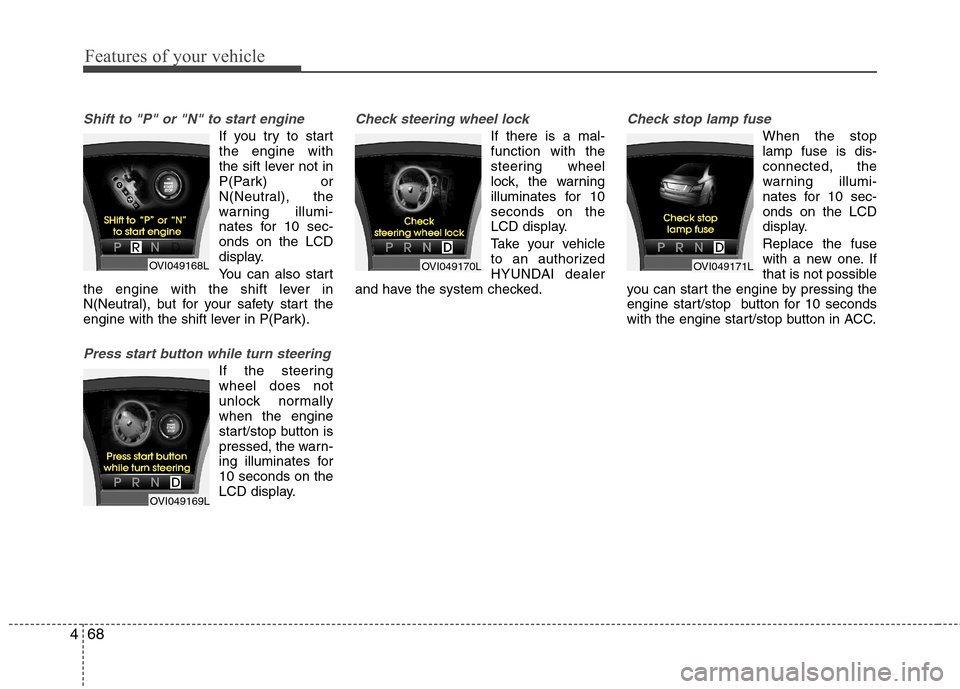
Shift to "P" or "N" to start engine
If you try to start the engine with
the sift lever not in
P(Park) or
N(Neutral), the
warning illumi-
nates for 10 sec-onds on the LCD
display.
You can also start
the engine with the shift lever in
N(Neutral), but for your safety start the
engine with the shift lever in P(Park).
Press start button while turn steering
If the steering wheel does not
unlock normallywhen the engine
start/stop button is
pressed, the warn-
ing illuminates for10 seconds on the
LCD display.
Check steering wheel lock
If there is a mal- function with the
steering wheel
lock, the warning
illuminates for 10seconds on the
LCD display.
Take your vehicle
to an authorized
HYUNDAI dealer
and have the system checked.
Check stop lamp fuse
When the stop lamp fuse is dis-connected, the
warning illumi-
nates for 10 sec-onds on the LCD
display. Replace the fuse
with a new one. If
that is not possible
you can start the engine by pressing the
engine start/stop button for 10 seconds
with the engine start/stop button in ACC.
OVI049168L
OVI049169L
OVI049170LOVI049171L
Page 151 of 374
473
Features of your vehicle
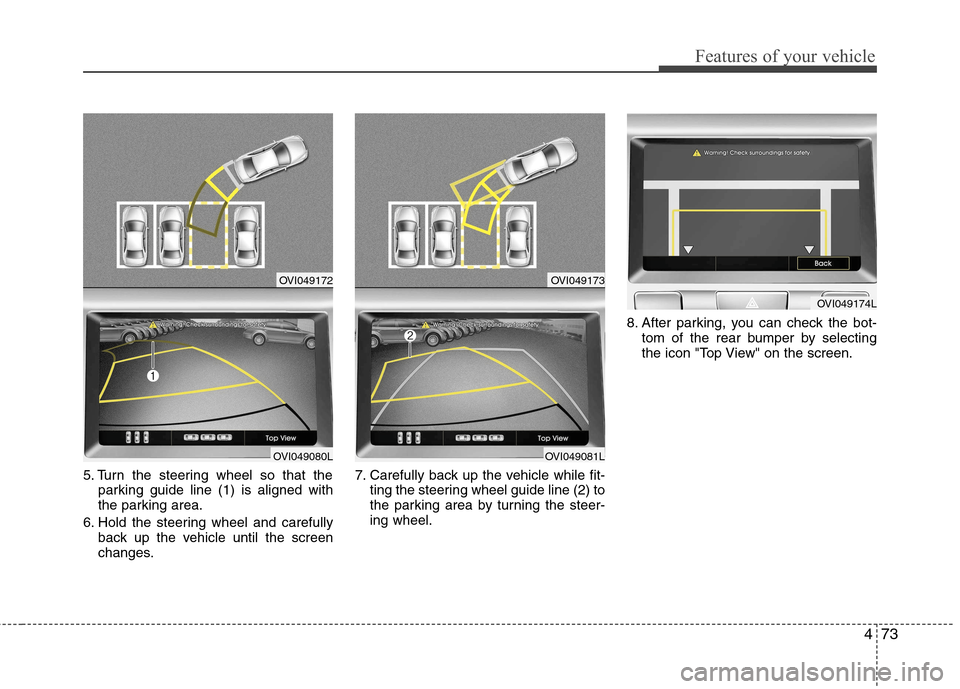
5. Turn the steering wheel so that theparking guide line (1) is aligned with
the parking area.
6. Hold the steering wheel and carefully back up the vehicle until the screen
changes. 7. Carefully back up the vehicle while fit-
ting the steering wheel guide line (2) to
the parking area by turning the steer-ing wheel. 8. After parking, you can check the bot-
tom of the rear bumper by selecting
the icon "Top View" on the screen.
OVI049172
OVI049080L
OVI049173
OVI049081L
OVI049174L
Page 152 of 374
Features of your vehicle
74
4
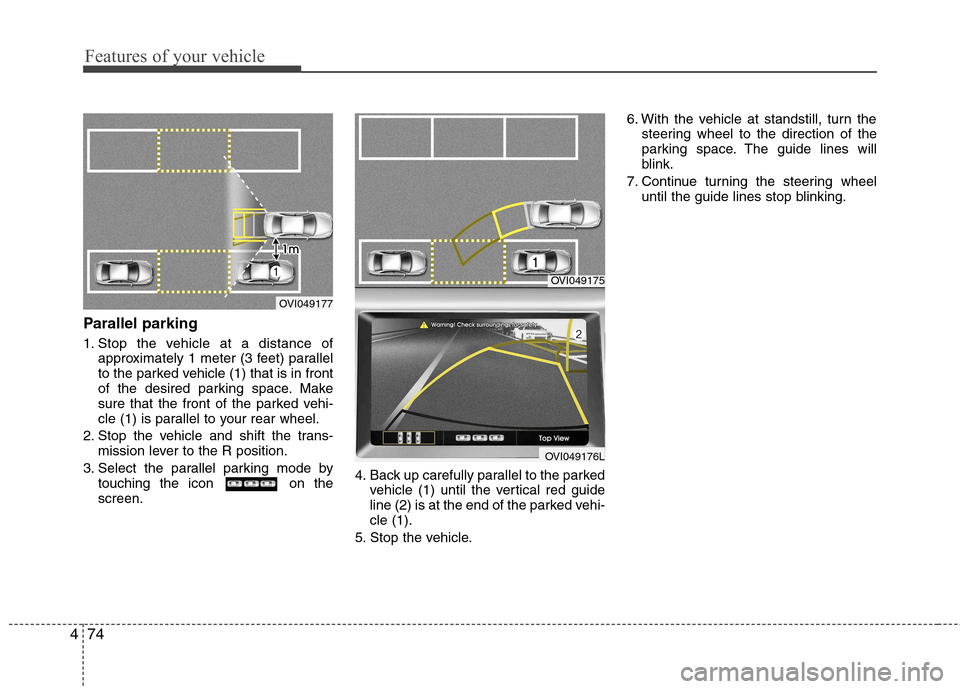
Parallel parking
1. Stop the vehicle at a distance of
approximately 1 meter (3 feet) parallel
to the parked vehicle (1) that is in front
of the desired parking space. Make
sure that the front of the parked vehi-
cle (1) is parallel to your rear wheel.
2. Stop the vehicle and shift the trans- mission lever to the R position.
3. Select the parallel parking mode by touching the icon on thescreen. 4. Back up carefully parallel to the parked
vehicle (1) until the vertical red guide
line (2) is at the end of the parked vehi-cle (1).
5. Stop the vehicle. 6. With the vehicle at standstill, turn the
steering wheel to the direction of the
parking space. The guide lines will
blink.
7. Continue turning the steering wheel until the guide lines stop blinking.
OVI049175
OVI049176L
OVI049177
Page 153 of 374
475
Features of your vehicle
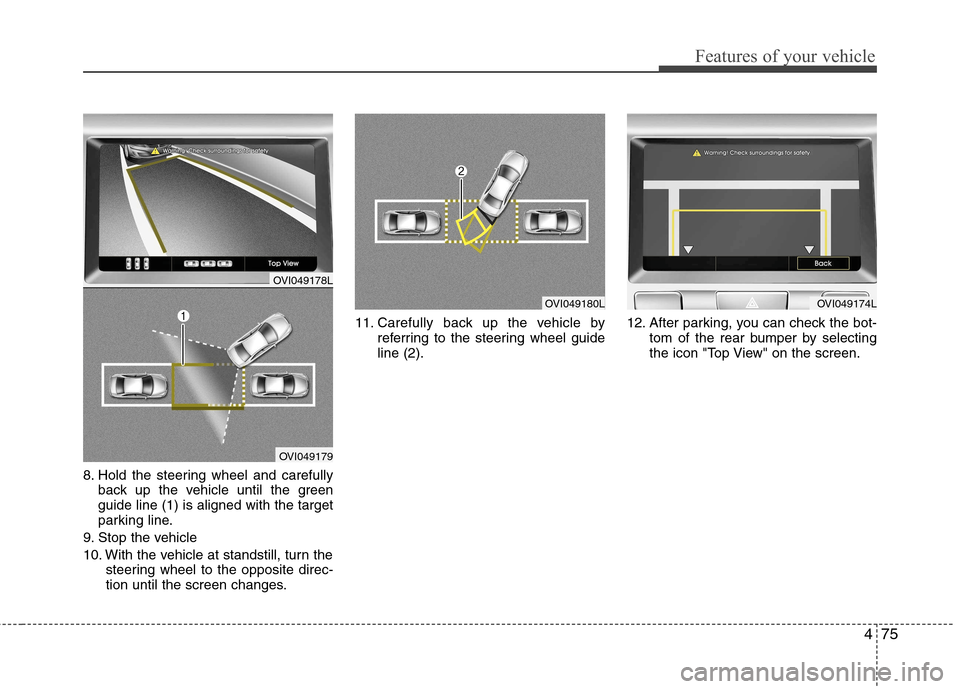
8. Hold the steering wheel and carefullyback up the vehicle until the green guide line (1) is aligned with the target
parking line.
9. Stop the vehicle
10. With the vehicle at standstill, turn the steering wheel to the opposite direc-
tion until the screen changes. 11. Carefully back up the vehicle by
referring to the steering wheel guideline (2). 12. After parking, you can check the bot-
tom of the rear bumper by selecting
the icon "Top View" on the screen.
OVI049180LOVI049174L
OVI049178L
OVI049179
Page 203 of 374
4125
Features of your vehicle
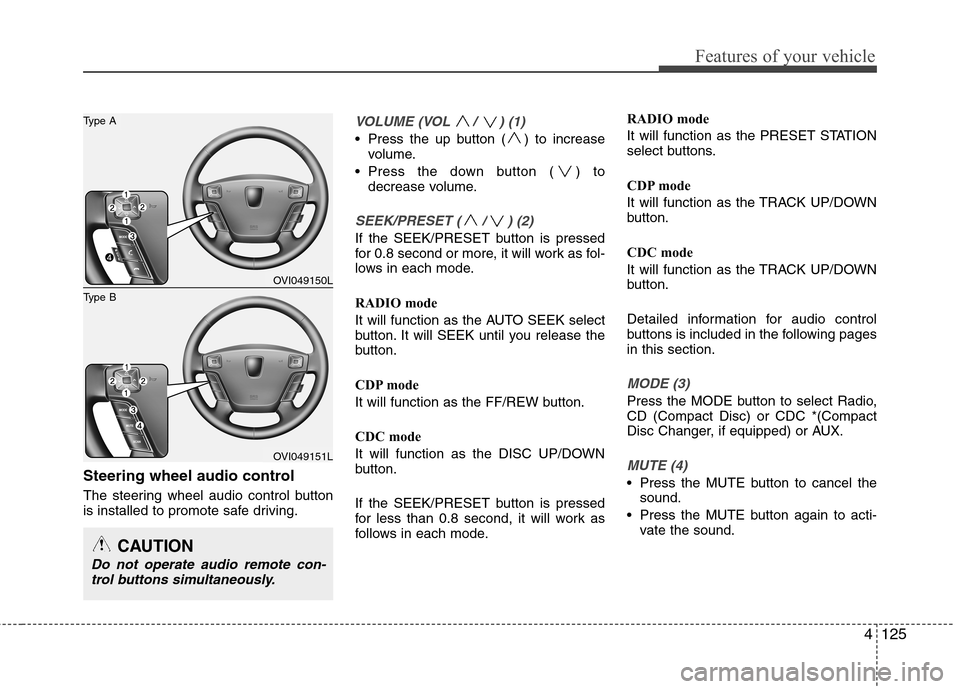
Steering wheel audio control
The steering wheel audio control button
is installed to promote safe driving.
VOLUME (VOL / ) (1)
Press the up button ( ) to increasevolume.
Press the down button ( ) to decrease volume.
SEEK/PRESET ( / ) (2)
If the SEEK/PRESET button is pressed
for 0.8 second or more, it will work as fol-
lows in each mode.
RADIO mode
It will function as the AUTO SEEK select
button. It will SEEK until you release the
button.
CDP mode
It will function as the FF/REW button.
CDC mode
It will function as the DISC UP/DOWN
button.
If the SEEK/PRESET button is pressed
for less than 0.8 second, it will work as
follows in each mode. RADIO mode
It will function as the PRESET STATION
select buttons.
CDP mode
It will function as the TRACK UP/DOWN
button.
CDC mode
It will function as the TRACK UP/DOWN
button.
Detailed information for audio control
buttons is included in the following pagesin this section.
MODE (3)
Press the MODE button to select Radio, CD (Compact Disc) or CDC *(Compact
Disc Changer, if equipped) or AUX.
MUTE (4)
Press the MUTE button to cancel the
sound.
Press the MUTE button again to acti- vate the sound.
CAUTION
Do not operate audio remote con-
trol buttons simultaneously.
OVI049150L
OVI049151L
Type B
Type A
Page 208 of 374
Driving your vehicle
4
5
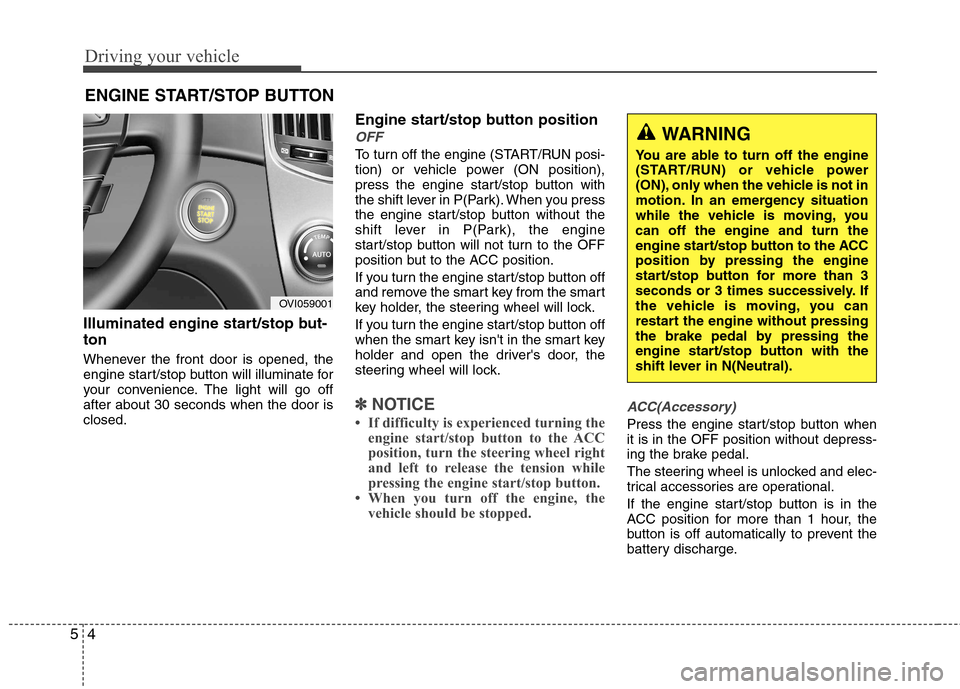
Illuminated engine start/stop but- ton
Whenever the front door is opened, the
engine start/stop button will illuminate for
your convenience. The light will go offafter about 30 seconds when the door isclosed. Engine start/stop button position
OFF
To turn off the engine (START/RUN posi-
tion) or vehicle power (ON position),
press the engine start/stop button with
the shift lever in P(Park). When you press
the engine start/stop button without the
shift lever in P(Park), the engine
start/stop button will not turn to the OFF
position but to the ACC position.
If you turn the engine start/stop button off
and remove the smart key from the smart
key holder, the steering wheel will lock.
If you turn the engine start/stop button off
when the smart key isn't in the smart key
holder and open the driver's door, the
steering wheel will lock.
✽✽
NOTICE
If difficulty is experienced turning the engine start/stop button to the ACC
position, turn the steering wheel right
and left to release the tension while
pressing the engine start/stop button.
When you turn off the engine, the vehicle should be stopped. ACC(Accessory)
Press the engine start/stop button when it is in the OFF position without depress-
ing the brake pedal.
The steering wheel is unlocked and elec-
trical accessories are operational.
If the engine start/stop button is in the
ACC position for more than 1 hour, the
button is off automatically to prevent the
battery discharge.
ENGINE START/STOP BUTTON
WARNING
You are able to turn off the engine
(START/RUN) or vehicle power
(ON), only when the vehicle is not in
motion. In an emergency situation
while the vehicle is moving, youcan off the engine and turn the
engine start/stop button to the ACC
position by pressing the engine
start/stop button for more than 3
seconds or 3 times successively. If
the vehicle is moving, you can
restart the engine without pressing
the brake pedal by pressing the
engine start/stop button with the
shift lever in N(Neutral).
OVI059001
Page 209 of 374
55
Driving your vehicle
ON
Press the engine start/stop button while it
is in the ACC position without depressing
the brake pedal.
The warning lights can be checked before
the engine is started. Do not leave the
button in the ON position for a long time.
Do not leave the engine start/stop button
in the ON position for a long time. The
battery may discharge, because the
engine is not running.
START
To start the engine, depress the brake
pedal and press the engine start/stop
button with the shift lever in the P(Park)
or the N(Neutral) position. For your safe-
ty, start the engine with the shift lever in
the P (Park) position.
✽✽NOTICE
If you press the engine start/stop but- ton without depressing the brake
pedal, the engine will not start and the
engine start/stop button changes as
follow :
OFF →
→
ACC →→
ON →→
OFF
If you leave the engine start/stop but-
ton in the ACC or the ON position for
a long time, the battery will discharge.
WARNING
Never press the engine start/stop button while the vehicle is in
motion. This would result in theengine turning off and loss of
power assist for the steering and
brakes, which may lead to loss of
directional control and braking
function, which could cause anaccident.
The anti-theft steering column lock is not a substitute for the
parking brake. Before leaving the
driver’s seat, always make sure
the shift lever is engaged in P
(Park),set the parking brake fully
and shut the engine off.
Unexpected and sudden vehicle
movement may occur if theseprecautions are not taken.
(Continued)
(Continued)
Never reach for the enginestart/stop button, or any other
controls through the steering
wheel while the vehicle is in
motion. The presence of yourhand or arm in this area could
cause a loss of vehicle control,
an accident and serious bodily
injury or death.
Do not place any movable objects around the driver’s seat as they
may move while driving, interferewith the driver and lead to anaccident.
Page 216 of 374
Driving your vehicle
12
5
Good driving practices
Never move the shift lever from P
(Park) or N (Neutral) to any other posi-
tion with the accelerator pedaldepressed.
Never move the shift lever into P (Park) when the vehicle is in motion.
Be sure the vehicle is completely stopped before you attempt to shift into
R (Reverse) or D (Drive).
Never take the vehicle out of gear and coast down a hill. This may be
extremely hazardous. Always leave the
vehicle in gear when moving.
Do not "ride" the brakes. This can cause them to overheat and malfunc-
tion. Instead, when you are driving
down a long hill, slow down and shift to
a lower gear. When you do this, engine
braking will help slow the vehicle.
Slow down before shifting to a lower gear. Otherwise, the lower gear maynot be engaged. Always use the parking brake. Do not
depend on placing the transmission in
P (Park) to keep the vehicle from mov-ing.
Exercise extreme caution when driving on a slippery surface. Be especially
careful when braking, accelerating or
shifting gears. On a slippery surface,
an abrupt change in vehicle speed can
cause the drive wheels to lose traction
and the vehicle to go out of control.
Optimum vehicle performance and economy is obtained by smoothly
depressing and releasing the accelera-tor pedal.
WARNING
Always buckle-up! In a collision, an unbelted occupant is signifi-
cantly more likely to be seriously
injured or killed than a properlybelted occupant.
Avoid high speeds when corner- ing or turning.
Do not make quick steering wheel movements, such as sharp
lane changes or fast, sharp turns.
The risk of rollover is greatly increased if you lose control of
your vehicle at highway speeds.
Lossing control often occurs if two or more wheels drop off the
roadway and the driver over-
steers to reenter the roadway.
In the event your vehicle leaves the roadway, do not steer sharply.
Instead, slow down before pulling
back into the travel lanes.
Never exceed posted speed lim- its.
Page 227 of 374
523
Driving your vehicle
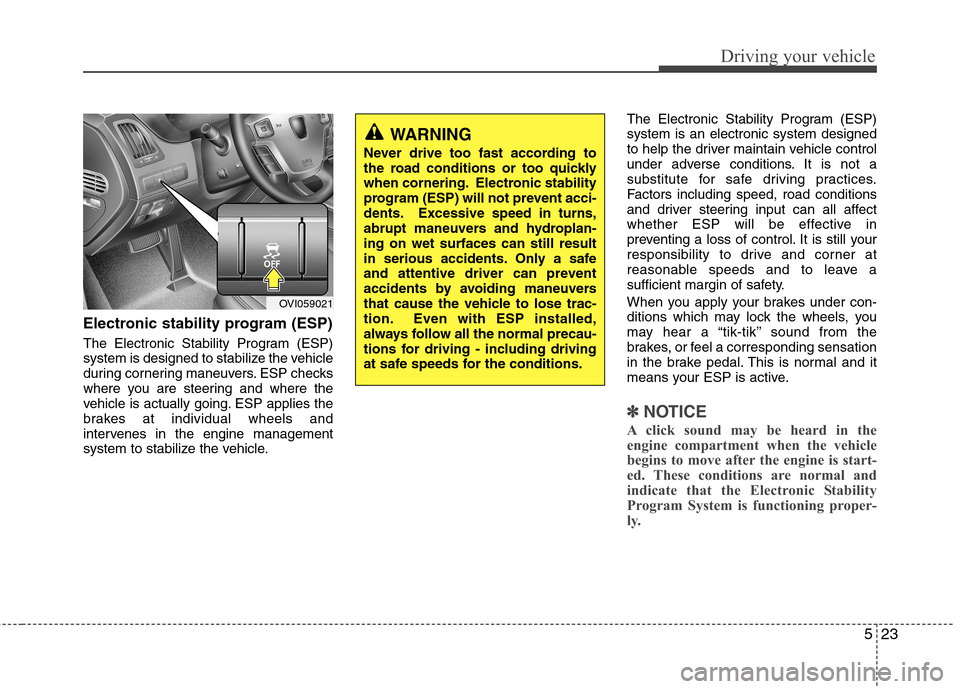
Electronic stability program (ESP)
The Electronic Stability Program (ESP)
system is designed to stabilize the vehicle
during cornering maneuvers. ESP checks
where you are steering and where the
vehicle is actually going. ESP applies the
brakes at individual wheels and
intervenes in the engine management
system to stabilize the vehicle.The Electronic Stability Program (ESP)system is an electronic system designed
to help the driver maintain vehicle control
under adverse conditions. It is not a
substitute for safe driving practices.
Factors including speed, road conditions
and driver steering input can all affect
whether ESP will be effective in
preventing a loss of control. It is still your
responsibility to drive and corner at
reasonable speeds and to leave a
sufficient margin of safety.
When you apply your brakes under con-
ditions which may lock the wheels, you
may hear a “tik-tik’’ sound from the
brakes, or feel a corresponding sensation
in the brake pedal. This is normal and it
means your ESP is active.
✽✽
NOTICE
A click sound may be heard in the
engine compartment when the vehicle
begins to move after the engine is start-
ed. These conditions are normal and
indicate that the Electronic Stability
Program System is functioning proper-
ly.
WARNING
Never drive too fast according to
the road conditions or too quickly
when cornering. Electronic stability
program (ESP) will not prevent acci-
dents. Excessive speed in turns,
abrupt maneuvers and hydroplan-ing on wet surfaces can still result
in serious accidents. Only a safe
and attentive driver can prevent
accidents by avoiding maneuvers
that cause the vehicle to lose trac-
tion. Even with ESP installed,
always follow all the normal precau-
tions for driving - including driving
at safe speeds for the conditions.
OVI059021
Page 237 of 374
533
Driving your vehicle
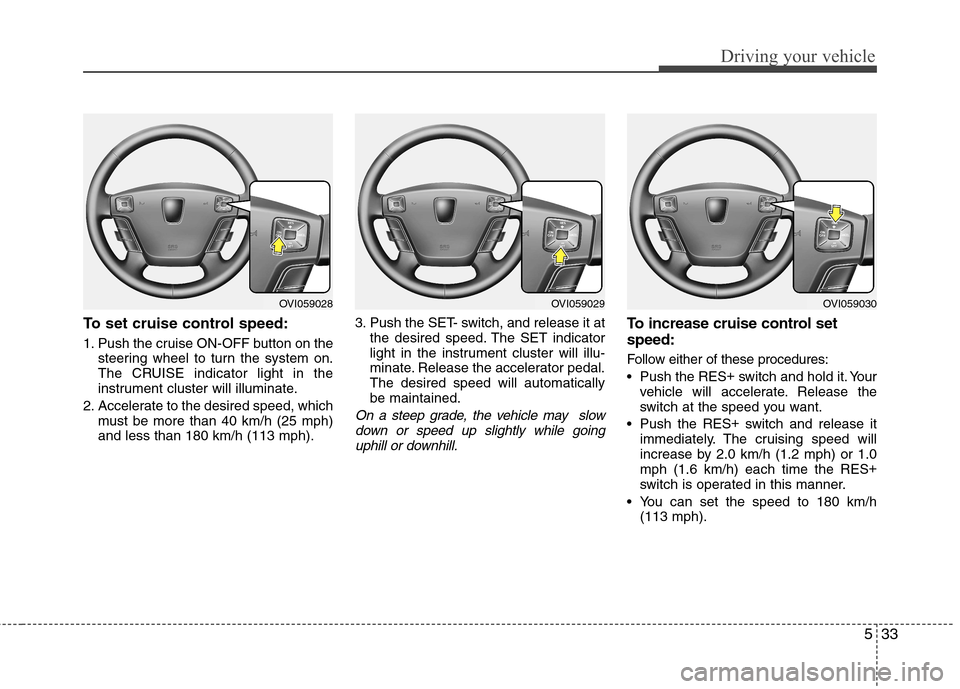
To set cruise control speed:
1. Push the cruise ON-OFF button on thesteering wheel to turn the system on.
The CRUISE indicator light in the
instrument cluster will illuminate.
2. Accelerate to the desired speed, which must be more than 40 km/h (25 mph)and less than 180 km/h (113 mph). 3. Push the SET- switch, and release it at
the desired speed. The SET indicator
light in the instrument cluster will illu-
minate. Release the accelerator pedal.The desired speed will automaticallybe maintained.
On a steep grade, the vehicle may slow
down or speed up slightly while goinguphill or downhill.
To increase cruise control set speed:
Follow either of these procedures:
Push the RES +
switch and hold it. Your
vehicle will accelerate. Release the
switch at the speed you want.
Push the RES +
switch and release it
immediately. The cruising speed will
increase by 2.0 km/h (1.2 mph) or 1.0mph (1.6 km/h) each time the RES +
switch is operated in this manner.
You can set the speed to 180 km/h (113 mph).
OVI059029OVI059030OVI059028