back up Hyundai Equus 2011 Owner's Guide
[x] Cancel search | Manufacturer: HYUNDAI, Model Year: 2011, Model line: Equus, Model: Hyundai Equus 2011Pages: 385, PDF Size: 10.67 MB
Page 126 of 385
Features of your vehicle
44 4
3. To re-calibrate the compass, drive the
vehicle in 2 complete circles at less
than 8km/h (5mph).
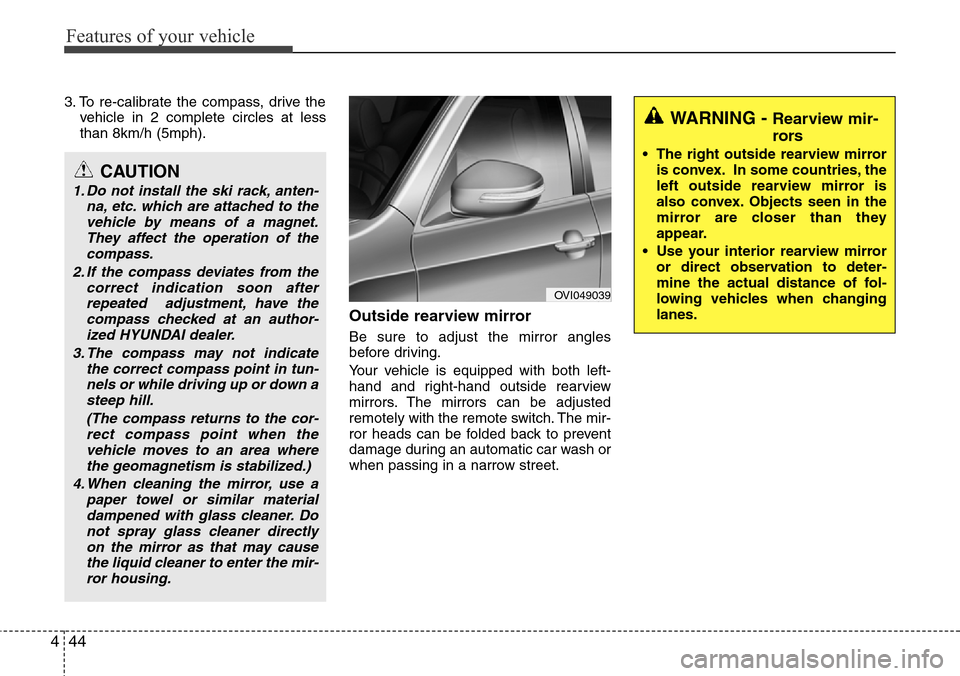
Outside rearview mirror
Be sure to adjust the mirror angles
before driving.
Your vehicle is equipped with both left-
hand and right-hand outside rearview
mirrors. The mirrors can be adjusted
remotely with the remote switch. The mir-
ror heads can be folded back to prevent
damage during an automatic car wash or
when passing in a narrow street.
CAUTION
1. Do not install the ski rack, anten-
na, etc. which are attached to the
vehicle by means of a magnet.
They affect the operation of the
compass.
2. If the compass deviates from the
correct indication soon after
repeated adjustment, have the
compass checked at an author-
ized HYUNDAI dealer.
3. The compass may not indicate
the correct compass point in tun-
nels or while driving up or down a
steep hill.
(The compass returns to the cor-
rect compass point when the
vehicle moves to an area where
the geomagnetism is stabilized.)
4. When cleaning the mirror, use a
paper towel or similar material
dampened with glass cleaner. Do
not spray glass cleaner directly
on the mirror as that may cause
the liquid cleaner to enter the mir-
ror housing.
OVI049039
WARNING - Rearview mir-
rors
• The right outside rearview mirror
is convex. In some countries, the
left outside rearview mirror is
also convex. Objects seen in the
mirror are closer than they
appear.
• Use your interior rearview mirror
or direct observation to deter-
mine the actual distance of fol-
lowing vehicles when changing
lanes.
Page 154 of 385
Features of your vehicle
72 4
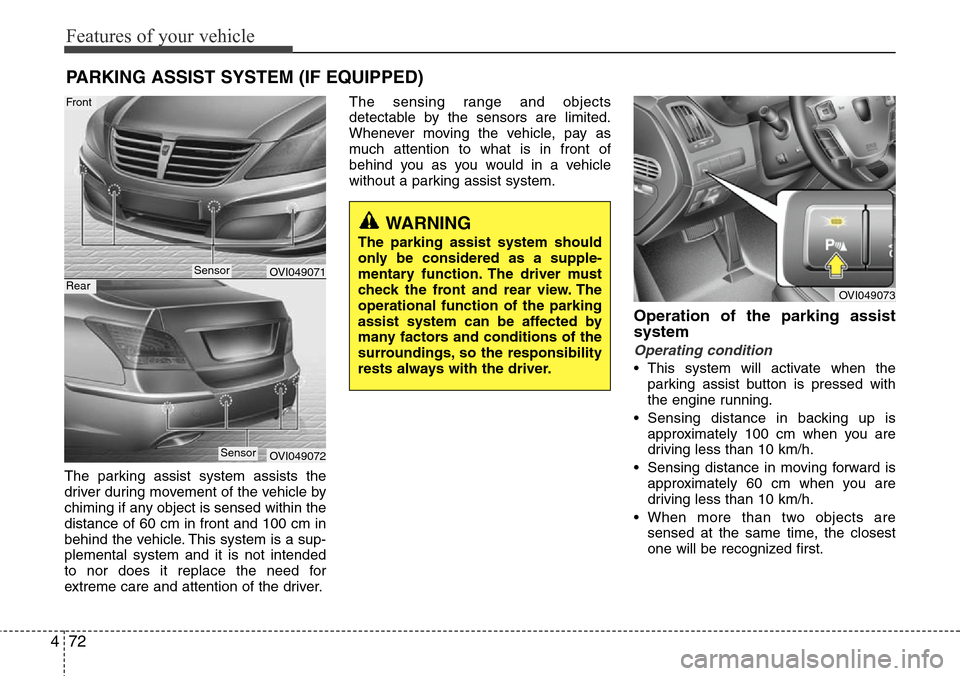
The parking assist system assists the
driver during movement of the vehicle by
chiming if any object is sensed within the
distance of 60 cm in front and 100 cm in
behind the vehicle. This system is a sup-
plemental system and it is not intended
to nor does it replace the need for
extreme care and attention of the driver.The sensing range and objects
detectable by the sensors are limited.
Whenever moving the vehicle, pay as
much attention to what is in front of
behind you as you would in a vehicle
without a parking assist system.
Operation of the parking assist
system
Operating condition
• This system will activate when the
parking assist button is pressed with
the engine running.
• Sensing distance in backing up is
approximately 100 cm when you are
driving less than 10 km/h.
• Sensing distance in moving forward is
approximately 60 cm when you are
driving less than 10 km/h.
• When more than two objects are
sensed at the same time, the closest
one will be recognized first.
PARKING ASSIST SYSTEM (IF EQUIPPED)
OVI049071
OVI049072
WARNING
The parking assist system should
only be considered as a supple-
mentary function. The driver must
check the front and rear view. The
operational function of the parking
assist system can be affected by
many factors and conditions of the
surroundings, so the responsibility
rests always with the driver.
OVI049073
Sensor
Front
Rear
Sensor
Page 157 of 385
475
Features of your vehicle
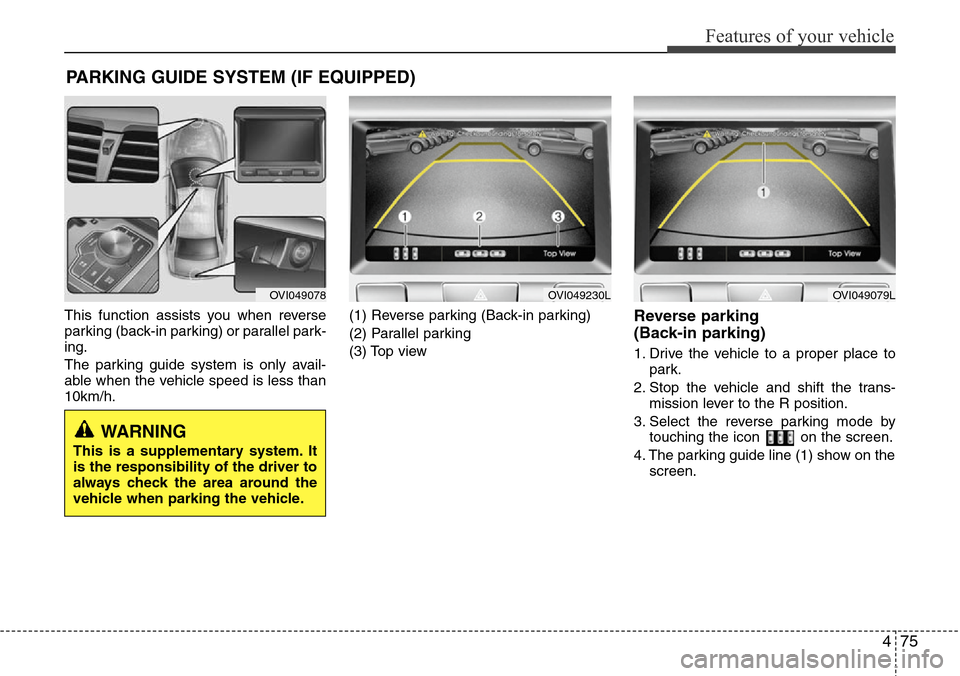
This function assists you when reverse
parking (back-in parking) or parallel park-
ing.
The parking guide system is only avail-
able when the vehicle speed is less than
10km/h.(1) Reverse parking (Back-in parking)
(2) Parallel parking
(3) Top viewReverse parking
(Back-in parking)
1. Drive the vehicle to a proper place to
park.
2. Stop the vehicle and shift the trans-
mission lever to the R position.
3. Select the reverse parking mode by
touching the icon on the screen.
4. The parking guide line (1) show on the
screen.
PARKING GUIDE SYSTEM (IF EQUIPPED)
WARNING
This is a supplementary system. It
is the responsibility of the driver to
always check the area around the
vehicle when parking the vehicle.
OVI049078OVI049230LOVI049079L
Page 158 of 385
Features of your vehicle
76 4
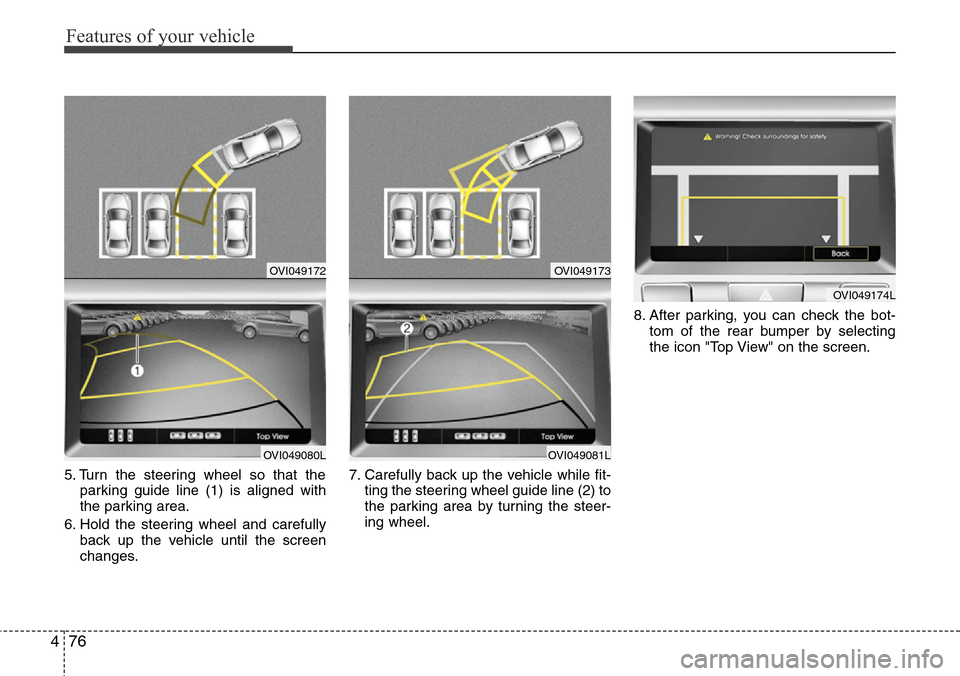
5. Turn the steering wheel so that the
parking guide line (1) is aligned with
the parking area.
6. Hold the steering wheel and carefully
back up the vehicle until the screen
changes.7. Carefully back up the vehicle while fit-
ting the steering wheel guide line (2) to
the parking area by turning the steer-
ing wheel.8. After parking, you can check the bot-
tom of the rear bumper by selecting
the icon "Top View" on the screen.
OVI049172
OVI049080L
OVI049173
OVI049081L
OVI049174L
Page 159 of 385
477
Features of your vehicle
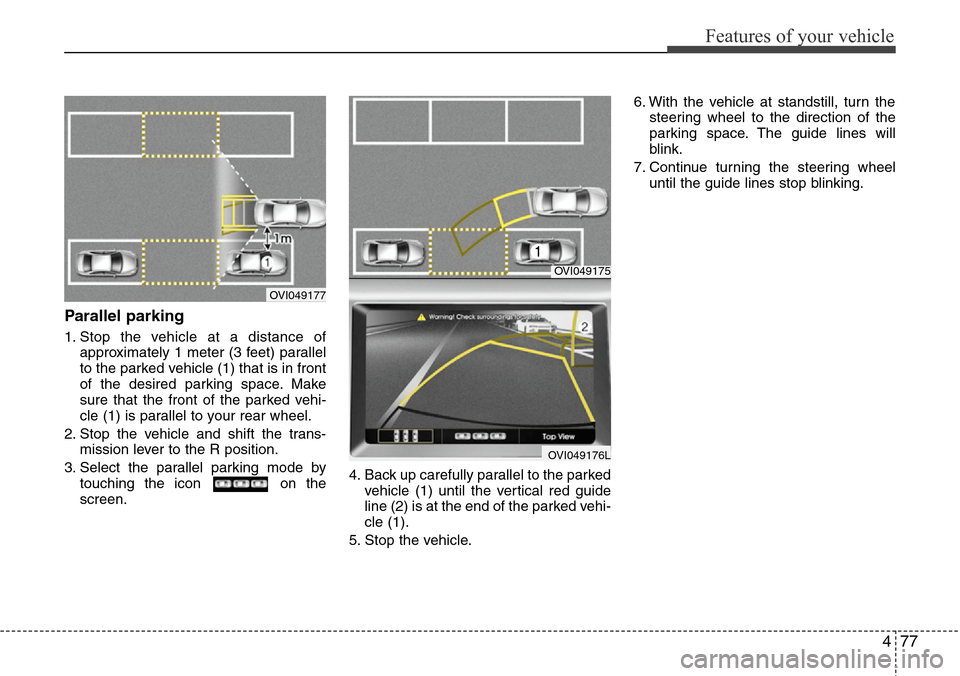
Parallel parking
1. Stop the vehicle at a distance of
approximately 1 meter (3 feet) parallel
to the parked vehicle (1) that is in front
of the desired parking space. Make
sure that the front of the parked vehi-
cle (1) is parallel to your rear wheel.
2. Stop the vehicle and shift the trans-
mission lever to the R position.
3. Select the parallel parking mode by
touching the icon on the
screen.4. Back up carefully parallel to the parked
vehicle (1) until the vertical red guide
line (2) is at the end of the parked vehi-
cle (1).
5. Stop the vehicle.6. With the vehicle at standstill, turn the
steering wheel to the direction of the
parking space. The guide lines will
blink.
7. Continue turning the steering wheel
until the guide lines stop blinking.
OVI049175
OVI049176L
OVI049177
Page 160 of 385
Features of your vehicle
78 4
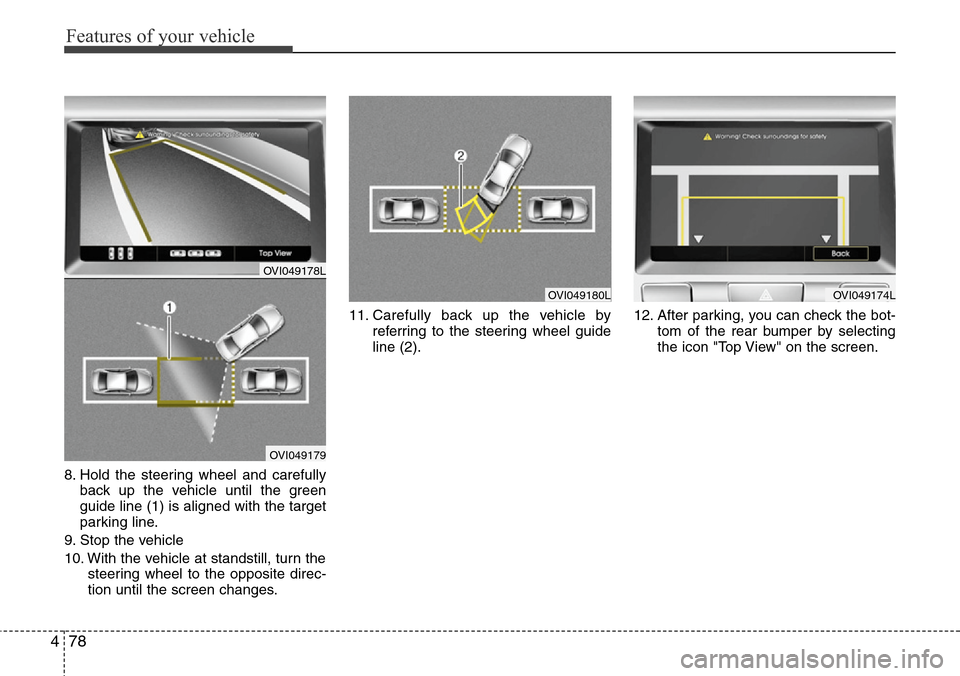
8. Hold the steering wheel and carefully
back up the vehicle until the green
guide line (1) is aligned with the target
parking line.
9. Stop the vehicle
10. With the vehicle at standstill, turn the
steering wheel to the opposite direc-
tion until the screen changes.11. Carefully back up the vehicle by
referring to the steering wheel guide
line (2).12. After parking, you can check the bot-
tom of the rear bumper by selecting
the icon "Top View" on the screen.
OVI049180LOVI049174L
OVI049178L
OVI049179
Page 162 of 385
Features of your vehicle
80 4
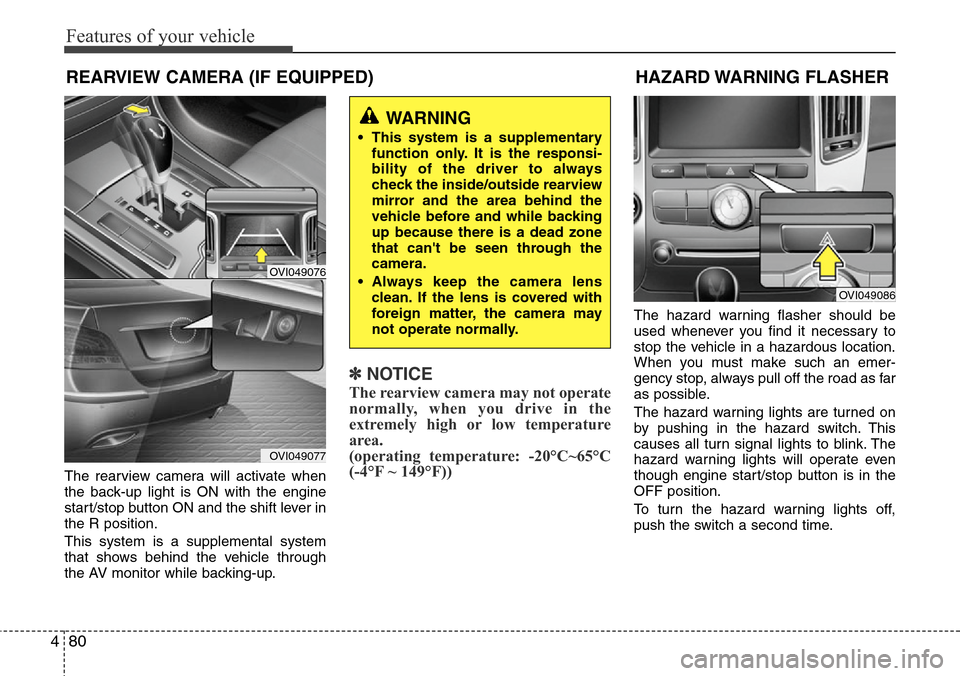
The rearview camera will activate when
the back-up light is ON with the engine
start/stop button ON and the shift lever in
the R position.
This system is a supplemental system
that shows behind the vehicle through
the AV monitor while backing-up.
✽NOTICE
The rearview camera may not operate
normally, when you drive in the
extremely high or low temperature
area.
(operating temperature: -20°C~65°C
(-4°F ~ 149°F))
The hazard warning flasher should be
used whenever you find it necessary to
stop the vehicle in a hazardous location.
When you must make such an emer-
gency stop, always pull off the road as far
as possible.
The hazard warning lights are turned on
by pushing in the hazard switch. This
causes all turn signal lights to blink. The
hazard warning lights will operate even
though engine start/stop button is in the
OFF position.
To turn the hazard warning lights off,
push the switch a second time.
WARNING
• This system is a supplementary
function only. It is the responsi-
bility of the driver to always
check the inside/outside rearview
mirror and the area behind the
vehicle before and while backing
up because there is a dead zone
that can't be seen through the
camera.
• Always keep the camera lens
clean. If the lens is covered with
foreign matter, the camera may
not operate normally.
OVI049086
REARVIEW CAMERA (IF EQUIPPED)
OVI049076
OVI049077
HAZARD WARNING FLASHER
Page 165 of 385
483
Features of your vehicle
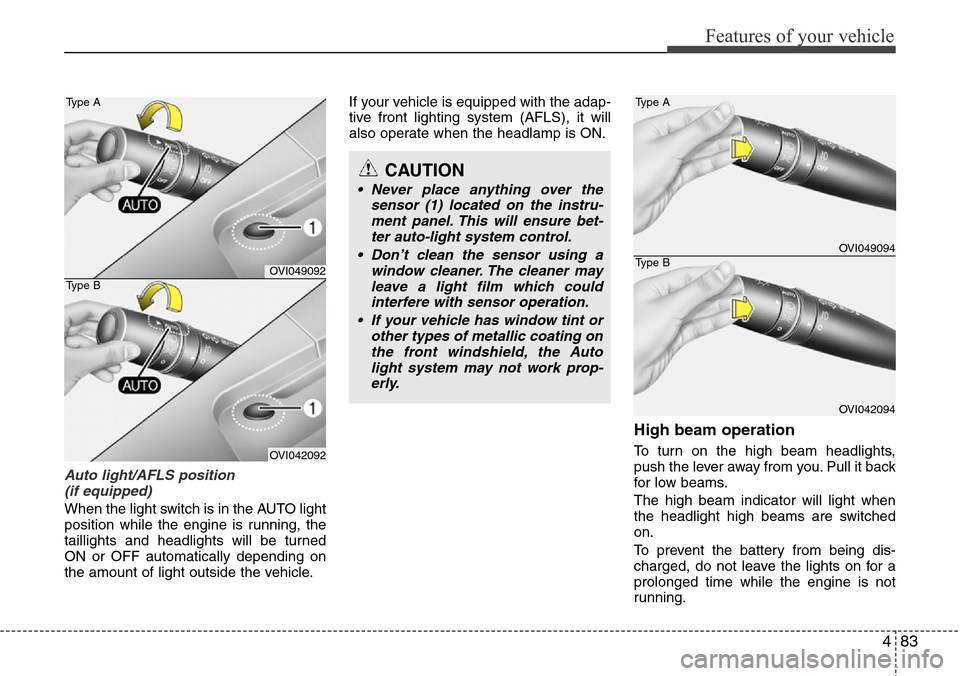
Auto light/AFLS position
(if equipped)
When the light switch is in the AUTO light
position while the engine is running, the
taillights and headlights will be turned
ON or OFF automatically depending on
the amount of light outside the vehicle.If your vehicle is equipped with the adap-
tive front lighting system (AFLS), it will
also operate when the headlamp is ON.
High beam operation
To turn on the high beam headlights,
push the lever away from you. Pull it back
for low beams.
The high beam indicator will light when
the headlight high beams are switched
on.
To prevent the battery from being dis-
charged, do not leave the lights on for a
prolonged time while the engine is not
running.
CAUTION
• Never place anything over the
sensor (1) located on the instru-
ment panel. This will ensure bet-
ter auto-light system control.
• Don’t clean the sensor using a
window cleaner. The cleaner may
leave a light film which could
interfere with sensor operation.
• If your vehicle has window tint or
other types of metallic coating on
the front windshield, the Auto
light system may not work prop-
erly.
OVI049092
OVI042092 Type A
Type B
OVI049094
OVI042094 Type A
Type B
Page 168 of 385
Features of your vehicle
86 4
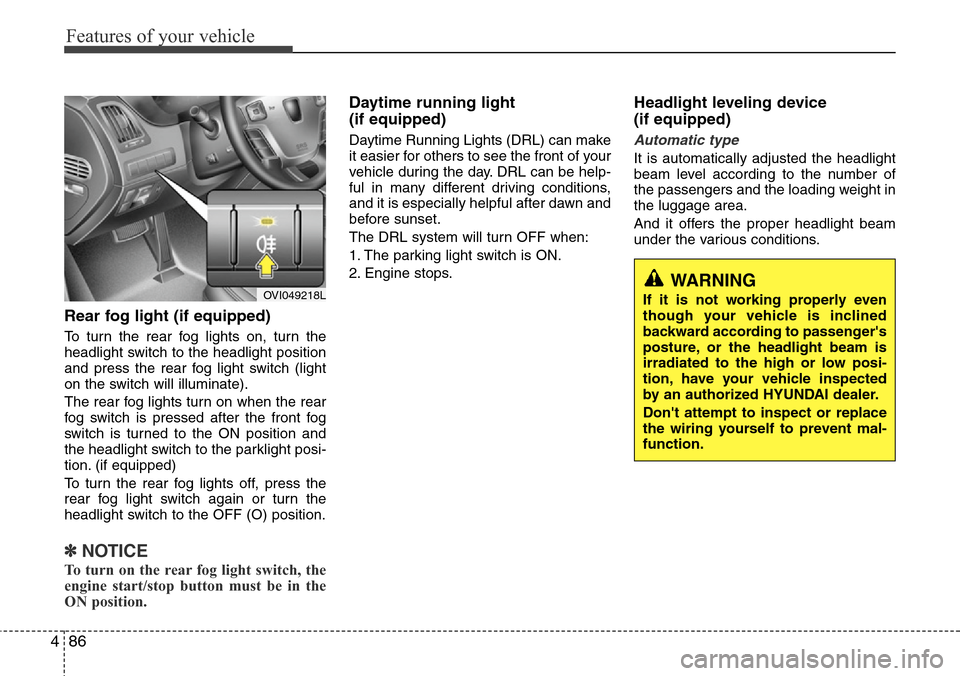
Rear fog light (if equipped)
To turn the rear fog lights on, turn the
headlight switch to the headlight position
and press the rear fog light switch (light
on the switch will illuminate).
The rear fog lights turn on when the rear
fog switch is pressed after the front fog
switch is turned to the ON position and
the headlight switch to the parklight posi-
tion. (if equipped)
To turn the rear fog lights off, press the
rear fog light switch again or turn the
headlight switch to the OFF (O) position.
✽NOTICE
To turn on the rear fog light switch, the
engine start/stop button must be in the
ON position.
Daytime running light
(if equipped)
Daytime Running Lights (DRL) can make
it easier for others to see the front of your
vehicle during the day. DRL can be help-
ful in many different driving conditions,
and it is especially helpful after dawn and
before sunset.
The DRL system will turn OFF when:
1. The parking light switch is ON.
2. Engine stops.
Headlight leveling device
(if equipped)
Automatic type
It is automatically adjusted the headlight
beam level according to the number of
the passengers and the loading weight in
the luggage area.
And it offers the proper headlight beam
under the various conditions.
OVI049218LWARNING
If it is not working properly even
though your vehicle is inclined
backward according to passenger's
posture, or the headlight beam is
irradiated to the high or low posi-
tion, have your vehicle inspected
by an authorized HYUNDAI dealer.
Don't attempt to inspect or replace
the wiring yourself to prevent mal-
function.
Page 201 of 385
4119
Features of your vehicle
Front
To open the cover, press the cover and it
will slowly open.
Rear (A)
To open the cover, press the button and
it will slowly open.
Rear (B) (if equipped)
To open the cover, press the cover and it
will slowly open.
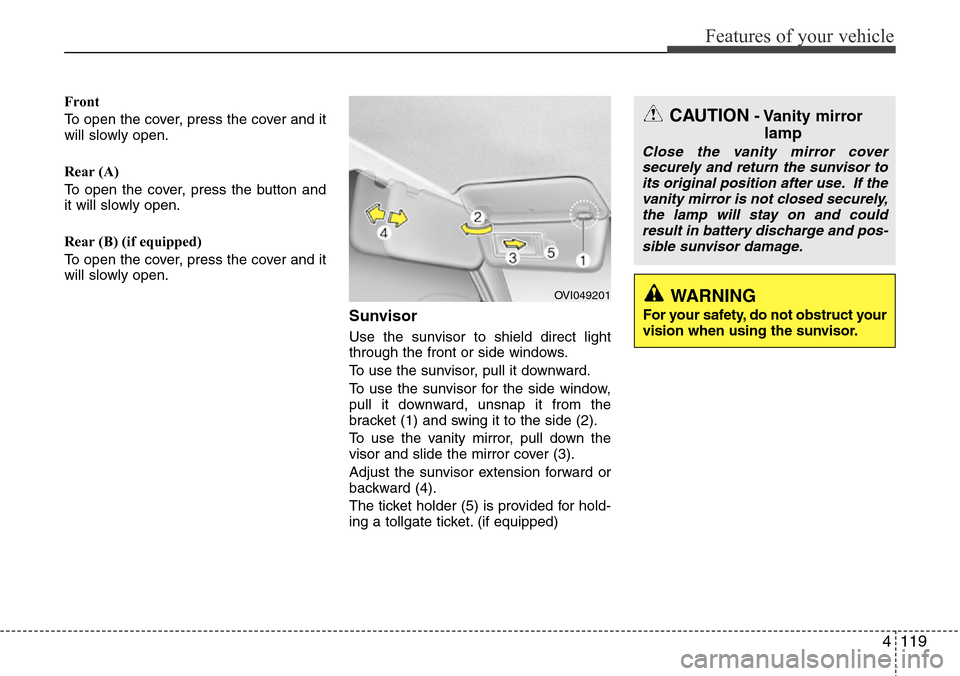
Sunvisor
Use the sunvisor to shield direct light
through the front or side windows.
To use the sunvisor, pull it downward.
To use the sunvisor for the side window,
pull it downward, unsnap it from the
bracket (1) and swing it to the side (2).
To use the vanity mirror, pull down the
visor and slide the mirror cover (3).
Adjust the sunvisor extension forward or
backward (4).
The ticket holder (5) is provided for hold-
ing a tollgate ticket. (if equipped)
OVI049201
CAUTION- Vanity mirror
lamp
Close the vanity mirror cover
securely and return the sunvisor to
its original position after use. If the
vanity mirror is not closed securely,
the lamp will stay on and could
result in battery discharge and pos-
sible sunvisor damage.
WARNING
For your safety, do not obstruct your
vision when using the sunvisor.