display Hyundai Equus 2012 User Guide
[x] Cancel search | Manufacturer: HYUNDAI, Model Year: 2012, Model line: Equus, Model: Hyundai Equus 2012Pages: 385, PDF Size: 10.67 MB
Page 145 of 385
463
Features of your vehicle
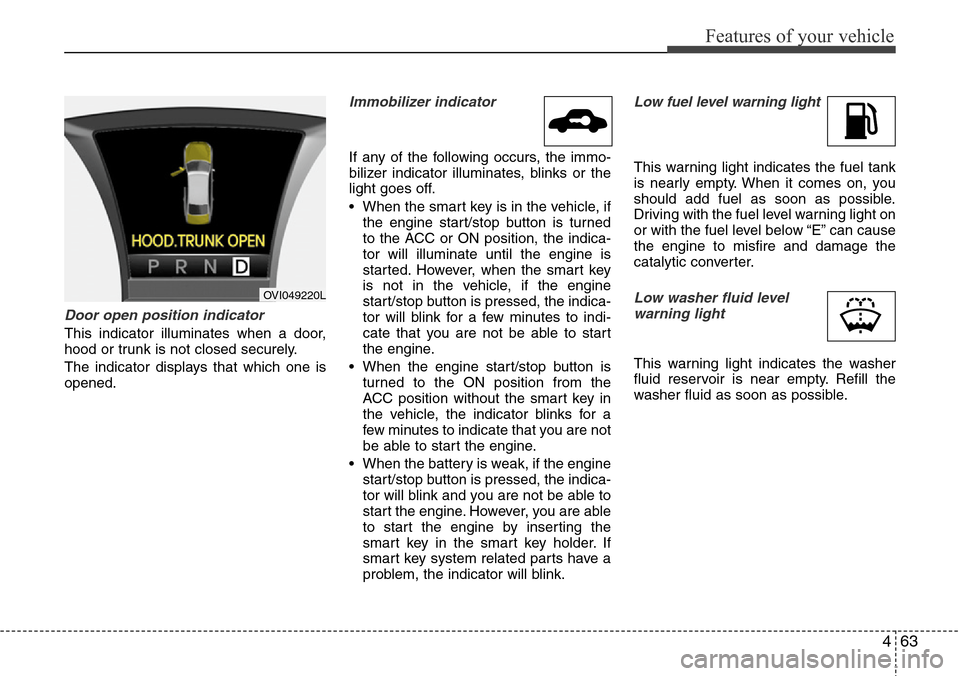
Door open position indicator
This indicator illuminates when a door,
hood or trunk is not closed securely.
The indicator displays that which one is
opened.
Immobilizer indicator
If any of the following occurs, the immo-
bilizer indicator illuminates, blinks or the
light goes off.
• When the smart key is in the vehicle, if
the engine start/stop button is turned
to the ACC or ON position, the indica-
tor will illuminate until the engine is
started. However, when the smart key
is not in the vehicle, if the engine
start/stop button is pressed, the indica-
tor will blink for a few minutes to indi-
cate that you are not be able to start
the engine.
• When the engine start/stop button is
turned to the ON position from the
ACC position without the smart key in
the vehicle, the indicator blinks for a
few minutes to indicate that you are not
be able to start the engine.
• When the battery is weak, if the engine
start/stop button is pressed, the indica-
tor will blink and you are not be able to
start the engine. However, you are able
to start the engine by inserting the
smart key in the smart key holder. If
smart key system related parts have a
problem, the indicator will blink.
Low fuel level warning light
This warning light indicates the fuel tank
is nearly empty. When it comes on, you
should add fuel as soon as possible.
Driving with the fuel level warning light on
or with the fuel level below “E” can cause
the engine to misfire and damage the
catalytic converter.
Low washer fluid level
warning light
This warning light indicates the washer
fluid reservoir is near empty. Refill the
washer fluid as soon as possible.
OVI049220L
Page 151 of 385
469
Features of your vehicle
AFLS (Adaptive Front
Lighting System)
malfunction indicator
(if equipped)
If the AFLS malfunction indicator comes
on, the AFLS is not working properly.
Drive to the nearest safe location and
restart the engine. If the indicator contin-
uously remains on, take your vehicle to
an authorized HYUNDAI dealer and have
the system checked.
SPORT mode indicator
(if equipped)
The SPORT indicator light will illuminate
when the SPORT button is pressed. It
enables you to drive dynamically. The
indicator light turns off when the SPORT
button is pressed again. The sporty driv-
ing mode returns to the normal mode.
For more information, refer to "Electronic
controlled suspension" in section 5.
ECS (Electronic Control
Suspension) malfunction
indicator (if equipped)
The ECS malfunction indicator will illumi-
nate when the engine start/stop button is
turned to ON, but should go off after
approximately 3 seconds. If the warning
light does not come on, or continuously
remains on after coming on for about 3
seconds when you turn the engine
start/stop button to the ON position, the
ECS is not working properly.
If it comes on while driving, the electron-
ic control suspension is not working
properly.
Take your vehicle to an authorized
HYUNDAI dealer and have the system
checked.
Warning on the LCD screen
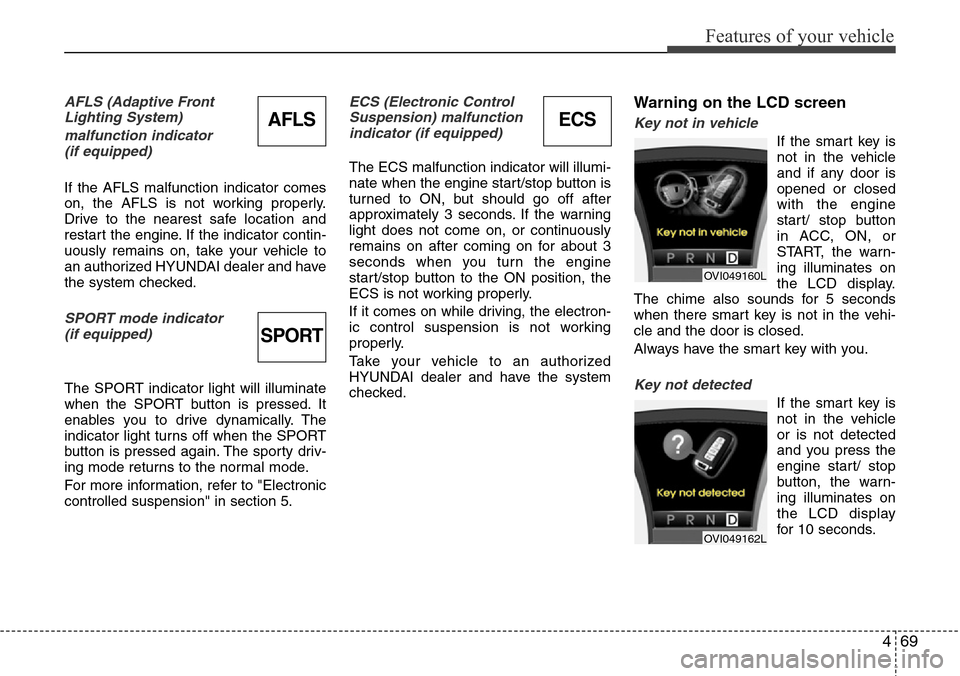
Key not in vehicle
If the smart key is
not in the vehicle
and if any door is
opened or closed
with the engine
start/ stop button
in ACC, ON, or
START, the warn-
ing illuminates on
the LCD display.
The chime also sounds for 5 seconds
when there smart key is not in the vehi-
cle and the door is closed.
Always have the smart key with you.
Key not detected
If the smart key is
not in the vehicle
or is not detected
and you press the
engine start/ stop
button, the warn-
ing illuminates on
the LCD display
for 10 seconds.
OVI049160L
OVI049162L
ECSAFLS
SPORT
Page 152 of 385
Features of your vehicle
70 4
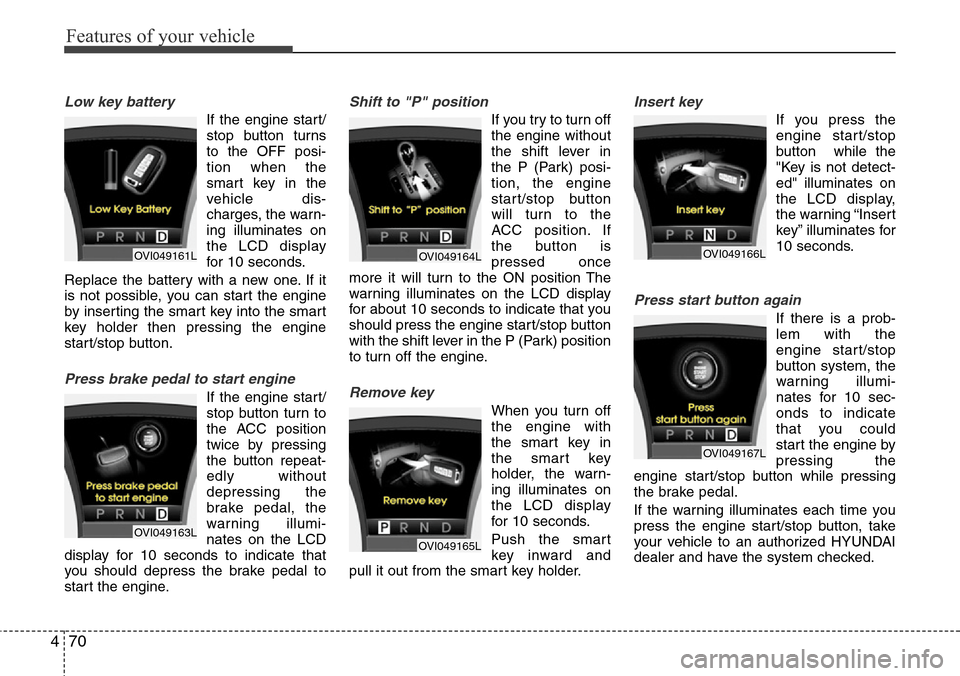
Low key battery
If the engine start/
stop button turns
to the OFF posi-
tion when the
smart key in the
vehicle dis-
charges, the warn-
ing illuminates on
the LCD display
for 10 seconds.
Replace the battery with a new one. If it
is not possible, you can start the engine
by inserting the smart key into the smart
key holder then pressing the engine
start/stop button.
Press brake pedal to start engine
If the engine start/
stop button turn to
the ACC position
twice by pressing
the button repeat-
edly without
depressing the
brake pedal, the
warning illumi-
nates on the LCD
display for 10 seconds to indicate that
you should depress the brake pedal to
start the engine.
Shift to "P" position
If you try to turn off
the engine without
the shift lever in
the P (Park) posi-
tion, the engine
start/stop button
will turn to the
ACC position. If
the button is
pressed once
more it will turn to the ON position The
warning illuminates on the LCD display
for about 10 seconds to indicate that you
should press the engine start/stop button
with the shift lever in the P (Park) position
to turn off the engine.
Remove key
When you turn off
the engine with
the smart key in
the smart key
holder, the warn-
ing illuminates on
the LCD display
for 10 seconds.
Push the smart
key inward and
pull it out from the smart key holder.
Insert key
If you press the
engine start/stop
button while the
"Key is not detect-
ed" illuminates on
the LCD display,
the warning “Insert
key” illuminates for
10 seconds.
Press start button again
If there is a prob-
lem with the
engine start/stop
button system, the
warning illumi-
nates for 10 sec-
onds to indicate
that you could
start the engine by
pressing the
engine start/stop button while pressing
the brake pedal.
If the warning illuminates each time you
press the engine start/stop button, take
your vehicle to an authorized HYUNDAI
dealer and have the system checked.
OVI049161L
OVI049163L
OVI049164L
OVI049165L
OVI049166L
OVI049167L
Page 153 of 385
471
Features of your vehicle
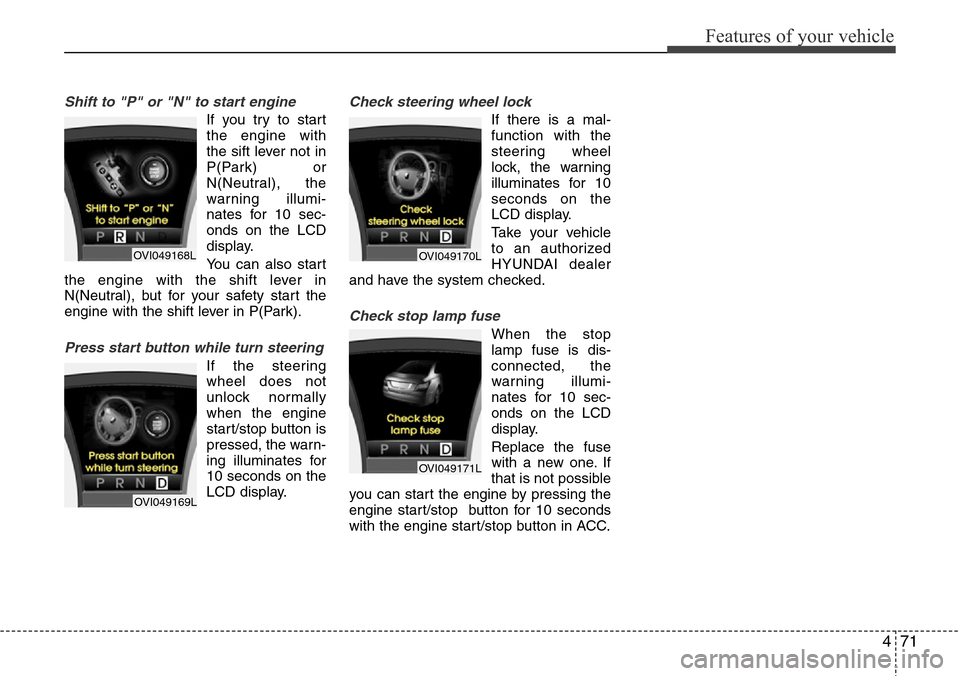
Shift to "P" or "N" to start engine
If you try to start
the engine with
the sift lever not in
P(Park) or
N(Neutral), the
warning illumi-
nates for 10 sec-
onds on the LCD
display.
You can also start
the engine with the shift lever in
N(Neutral), but for your safety start the
engine with the shift lever in P(Park).
Press start button while turn steering
If the steering
wheel does not
unlock normally
when the engine
start/stop button is
pressed, the warn-
ing illuminates for
10 seconds on the
LCD display.
Check steering wheel lock
If there is a mal-
function with the
steering wheel
lock, the warning
illuminates for 10
seconds on the
LCD display.
Take your vehicle
to an authorized
HYUNDAI dealer
and have the system checked.
Check stop lamp fuse
When the stop
lamp fuse is dis-
connected, the
warning illumi-
nates for 10 sec-
onds on the LCD
display.
Replace the fuse
with a new one. If
that is not possible
you can start the engine by pressing the
engine start/stop button for 10 seconds
with the engine start/stop button in ACC.
OVI049168L
OVI049169L
OVI049170L
OVI049171L
Page 183 of 385
4101
Features of your vehicle
The temperature will increase to the
maximum (HI) by turning the knob to the
right extremly. The temperature will
decrease to the minimum (Lo) by turning
the knob to the left extremly. When turn-
ing the knob, the temperature will
increase or decrease by 0.5°C/1°F. When
set to the lowest temperature setting, the
air conditioning will operate continuously.
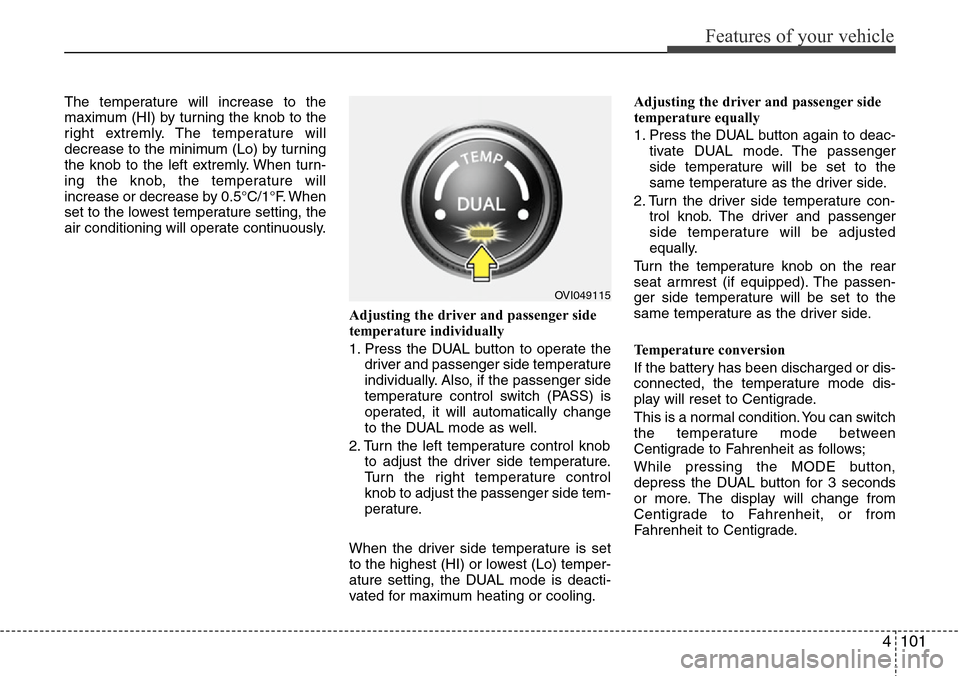
Adjusting the driver and passenger side
temperature individually
1. Press the DUAL button to operate the
driver and passenger side temperature
individually. Also, if the passenger side
temperature control switch (PASS) is
operated, it will automatically change
to the DUAL mode as well.
2. Turn the left temperature control knob
to adjust the driver side temperature.
Turn the right temperature control
knob to adjust the passenger side tem-
perature.
When the driver side temperature is set
to the highest (HI) or lowest (Lo) temper-
ature setting, the DUAL mode is deacti-
vated for maximum heating or cooling.Adjusting the driver and passenger side
temperature equally
1. Press the DUAL button again to deac-
tivate DUAL mode. The passenger
side temperature will be set to the
same temperature as the driver side.
2. Turn the driver side temperature con-
trol knob. The driver and passenger
side temperature will be adjusted
equally.
Turn the temperature knob on the rear
seat armrest (if equipped). The passen-
ger side temperature will be set to the
same temperature as the driver side.
Temperature conversion
If the battery has been discharged or dis-
connected, the temperature mode dis-
play will reset to Centigrade.
This is a normal condition. You can switch
the temperature mode between
Centigrade to Fahrenheit as follows;
While pressing the MODE button,
depress the DUAL button for 3 seconds
or more. The display will change from
Centigrade to Fahrenheit, or from
Fahrenheit to Centigrade.
OVI049115
Page 204 of 385
Features of your vehicle
122 4
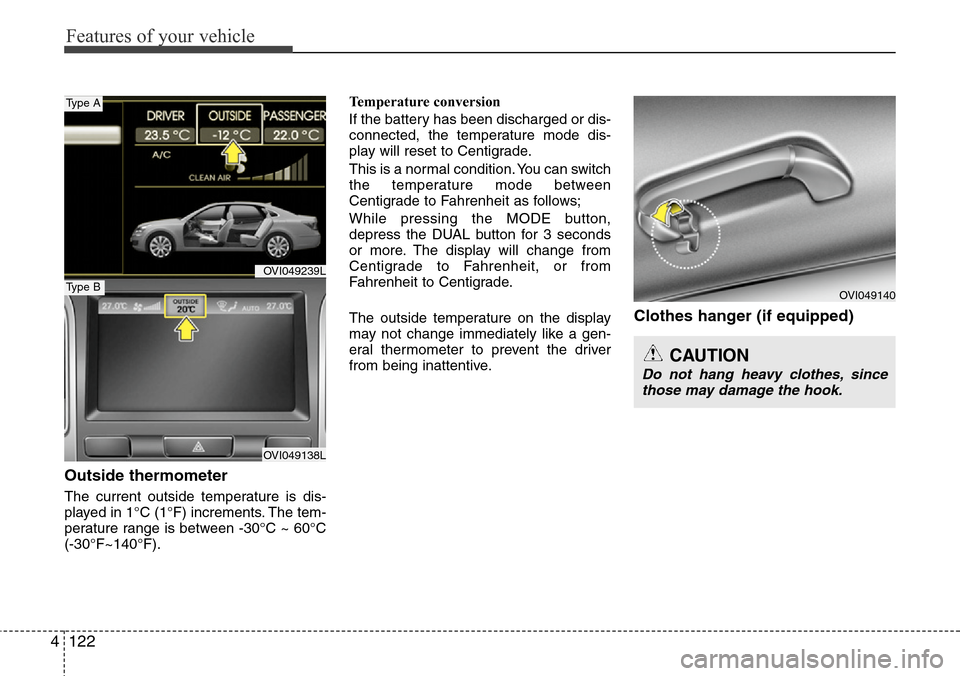
Outside thermometer
The current outside temperature is dis-
played in 1°C (1°F) increments. The tem-
perature range is between -30°C ~ 60°C
(-30°F~140°F).Temperature conversion
If the battery has been discharged or dis-
connected, the temperature mode dis-
play will reset to Centigrade.
This is a normal condition. You can switch
the temperature mode between
Centigrade to Fahrenheit as follows;
While pressing the MODE button,
depress the DUAL button for 3 seconds
or more. The display will change from
Centigrade to Fahrenheit, or from
Fahrenheit to Centigrade.
The outside temperature on the display
may not change immediately like a gen-
eral thermometer to prevent the driver
from being inattentive.
Clothes hanger (if equipped)
CAUTION
Do not hang heavy clothes, since
those may damage the hook.
OVI049140
OVI049239L
OVI049138L
Type A
Type B
Page 219 of 385
Driving your vehicle
6 5
1. Carry the smart key or leave it inside
the vehicle.
2. Make sure the parking brake is firmly
applied.
3. Place the shift lever in the P(Park)
position.
4. Press the engine start/stop button
while depressing the brake pedal.
5. In extremely cold weather (below -
18°C / 0°F) or after the vehicle has not
been operated for several days, let the
engine warm up without depressing
the accelerator.
Whether the engine is cold or warm, it
should be started without depressing
the accelerator.•Even if the smart key is in the vehicle,
if it is far away from you, the engine
may not start.
•When the engine start/stop button is in
the ACC or above, if any door is
opened, the system checks for the
smart key. If the smart key is not in the
vehicle, the warning, "Key not in vehi-
cle" will illuminate on the LCD display.
And if all doors are closed, the chime
will sound for about 5 seconds. The
indicator will turn off while the vehicle
is moving. Keep the smart key in the
vehicle, when using the ACC position
or if the vehicle engine is on.
STARTING THE ENGINE
WARNING
Always wear appropriate shoes
when operating your vehicle.
Unsuitable shoes (high heels, ski
boots, etc.) may interfere with your
ability to use the brake and acceler-
ator pedal.
(Continued)
• Do not place any movable objects
around the driver’s seat as they
may move while driving, interfere
with the driver and lead to an
accident.
Page 222 of 385
59
Driving your vehicle
For smooth operation, depress the brake
pedal when shifting from N (Neutral) to a
forward or reverse gear.Transmission ranges
The indicator in the instrument cluster
displays the shift lever position when the
engine start/stop button is in the ON
position.
P (Park)
Always come to a complete stop before
shifting into P (Park). This position locks
the transmission and prevents the drive
wheels from rotating.
WARNING- Automatic
transmission
• Always check the surrounding
areas near your vehicle for peo-
ple, especially children, before
shifting the shift lever into D
(Drive) or R (Reverse).
• Before leaving the driver’s seat,
always make sure the shift lever
is in the P (Park) position; then
set the parking brake fully and
shut the engine off. Unexpected
and sudden vehicle movement
can occur if these precautions
are not followed in the order iden-
tified.
CAUTION
• To avoid damage to your trans-
mission, do not accelerate the
engine in R (Reverse) or any for-
ward gear position with the
brakes on.
• When stopped on an incline, do
not hold the vehicle with the
engine power. Use the service
brake or the parking brake.
• Do not shift from N (Neutral) or P
(Park) into D (Drive), or R
(Reverse) when the engine is
above idle speed.
WARNING
• Shifting into P (Park) while the
vehicle is in motion will cause the
drive wheels to lock which will
cause you to lose control of the
vehicle.
• Do not use the P (Park) position
in place of the parking brake.
Always make sure the shift lever
is latched in the P (Park) position
and set the parking brake fully.
• Never leave a child unattended in
a vehicle.
CAUTION
The transmission may be damaged
if you shift into P (Park) while the
vehicle is in motion.
Page 260 of 385
547
Driving your vehicle
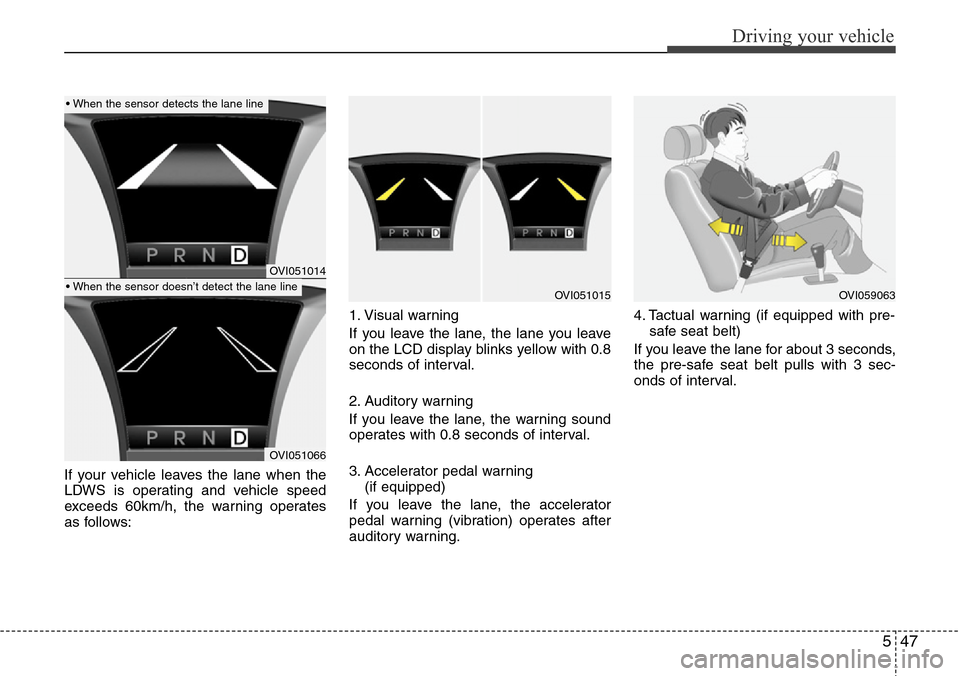
If your vehicle leaves the lane when the
LDWS is operating and vehicle speed
exceeds 60km/h, the warning operates
as follows:1. Visual warning
If you leave the lane, the lane you leave
on the LCD display blinks yellow with 0.8
seconds of interval.
2. Auditory warning
If you leave the lane, the warning sound
operates with 0.8 seconds of interval.
3. Accelerator pedal warning
(if equipped)
If you leave the lane, the accelerator
pedal warning (vibration) operates after
auditory warning.4. Tactual warning (if equipped with pre-
safe seat belt)
If you leave the lane for about 3 seconds,
the pre-safe seat belt pulls with 3 sec-
onds of interval.
OVI051014
OVI051066
OVI051015OVI059063
• When the sensor detects the lane line
• When the sensor doesn’t detect the lane line
Page 285 of 385
67
What to do in an emergency
TIRE PRESSURE MONITORING SYSTEM (TPMS) (IF EQUIPPED)
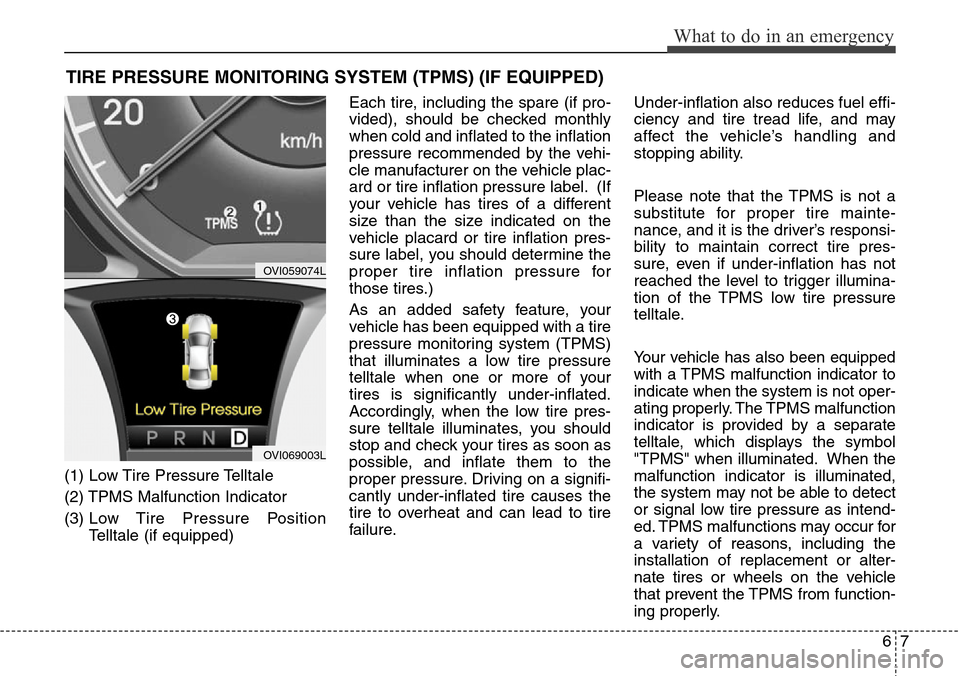
(1) Low Tire Pressure Telltale
(2) TPMS Malfunction Indicator
(3) Low Tire Pressure Position
Telltale (if equipped)Each tire, including the spare (if pro-
vided), should be checked monthly
when cold and inflated to the inflation
pressure recommended by the vehi-
cle manufacturer on the vehicle plac-
ard or tire inflation pressure label. (If
your vehicle has tires of a different
size than the size indicated on the
vehicle placard or tire inflation pres-
sure label, you should determine the
proper tire inflation pressure for
those tires.)
As an added safety feature, your
vehicle has been equipped with a tire
pressure monitoring system (TPMS)
that illuminates a low tire pressure
telltale when one or more of your
tires is significantly under-inflated.
Accordingly, when the low tire pres-
sure telltale illuminates, you should
stop and check your tires as soon as
possible, and inflate them to the
proper pressure. Driving on a signifi-
cantly under-inflated tire causes the
tire to overheat and can lead to tire
failure.Under-inflation also reduces fuel effi-
ciency and tire tread life, and may
affect the vehicle’s handling and
stopping ability.
Please note that the TPMS is not a
substitute for proper tire mainte-
nance, and it is the driver’s responsi-
bility to maintain correct tire pres-
sure, even if under-inflation has not
reached the level to trigger illumina-
tion of the TPMS low tire pressure
telltale.
Your vehicle has also been equipped
with a TPMS malfunction indicator to
indicate when the system is not oper-
ating properly. The TPMS malfunction
indicator is provided by a separate
telltale, which displays the symbol
"TPMS" when illuminated. When the
malfunction indicator is illuminated,
the system may not be able to detect
or signal low tire pressure as intend-
ed. TPMS malfunctions may occur for
a variety of reasons, including the
installation of replacement or alter-
nate tires or wheels on the vehicle
that prevent the TPMS from function-
ing properly.
OVI059074L
OVI069003L