height Hyundai Equus 2014 User Guide
[x] Cancel search | Manufacturer: HYUNDAI, Model Year: 2014, Model line: Equus, Model: Hyundai Equus 2014Pages: 479, PDF Size: 10.15 MB
Page 131 of 479
Features of your vehicle
42 4
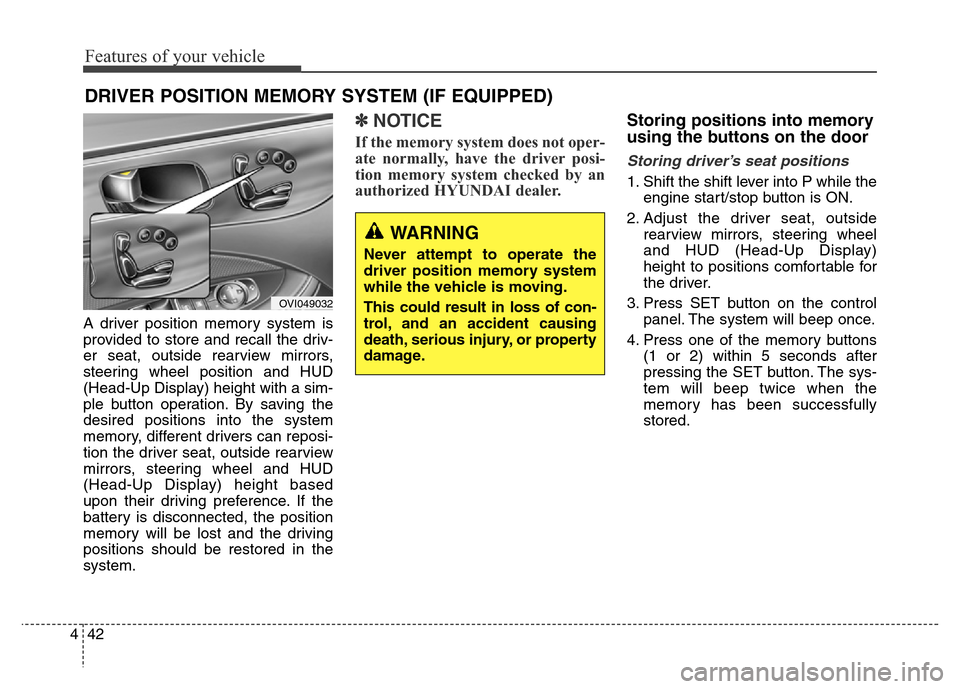
A driver position memory system is
provided to store and recall the driv-
er seat, outside rearview mirrors,
steering wheel position and HUD
(Head-Up Display) height with a sim-
ple button operation. By saving the
desired positions into the system
memory, different drivers can reposi-
tion the driver seat, outside rearview
mirrors, steering wheel and HUD
(Head-Up Display) height based
upon their driving preference. If the
battery is disconnected, the position
memory will be lost and the driving
positions should be restored in the
system.
✽NOTICE
If the memory system does not oper-
ate normally, have the driver posi-
tion memory system checked by an
authorized HYUNDAI dealer.
Storing positions into memory
using the buttons on the door
Storing driver’s seat positions
1. Shift the shift lever into P while the
engine start/stop button is ON.
2. Adjust the driver seat, outside
rearview mirrors, steering wheel
and HUD (Head-Up Display)
height to positions comfortable for
the driver.
3. Press SET button on the control
panel. The system will beep once.
4. Press one of the memory buttons
(1 or 2) within 5 seconds after
pressing the SET button. The sys-
tem will beep twice when the
memory has been successfully
stored.
DRIVER POSITION MEMORY SYSTEM (IF EQUIPPED)
WARNING
Never attempt to operate the
driver position memory system
while the vehicle is moving.
This could result in loss of con-
trol, and an accident causing
death, serious injury, or property
damage.
OVI049032
Page 132 of 479
443
Features of your vehicle
Recalling positions from memory
1. Shift the shift lever into P while the
engine start/stop button is ON.
2. To recall the position in memory,
press the desired memory button
(1 or 2). The system will beep
once, and then the driver seat,
outside rearview mirrors, steering
wheel and HUD (Head-Up
Display) height will automatically
adjust to the stored positions.
Adjusting one of the control knobs for
the driver seat, outside rearview mir-
ror and steering wheel while the sys-
tem is recalling the stored positions
will cause the movement for that
component to stop and move in the
direction that the control knob is
moved. Other components will con-
tinue to the recalled position.
Easy access function
(if equipped)
The steering wheel will move away
from the driver and the seat will
move rearward, when the engine
start/stop button is turned to the OFF
position.
The steering wheel will move toward
the driver and the seat will move for-
ward, when the engine start/stop but-
ton is turned to the ACC or ON posi-
tion.
WARNING
Use caution when recalling
adjustment memory while sitting
in the vehicle. Push the seat posi-
tion control knob to the desired
position immediately if the seat
moves too far in any direction.
Page 157 of 479
Features of your vehicle
68 4
User Settings Mode
HUD Settings (if equipped)
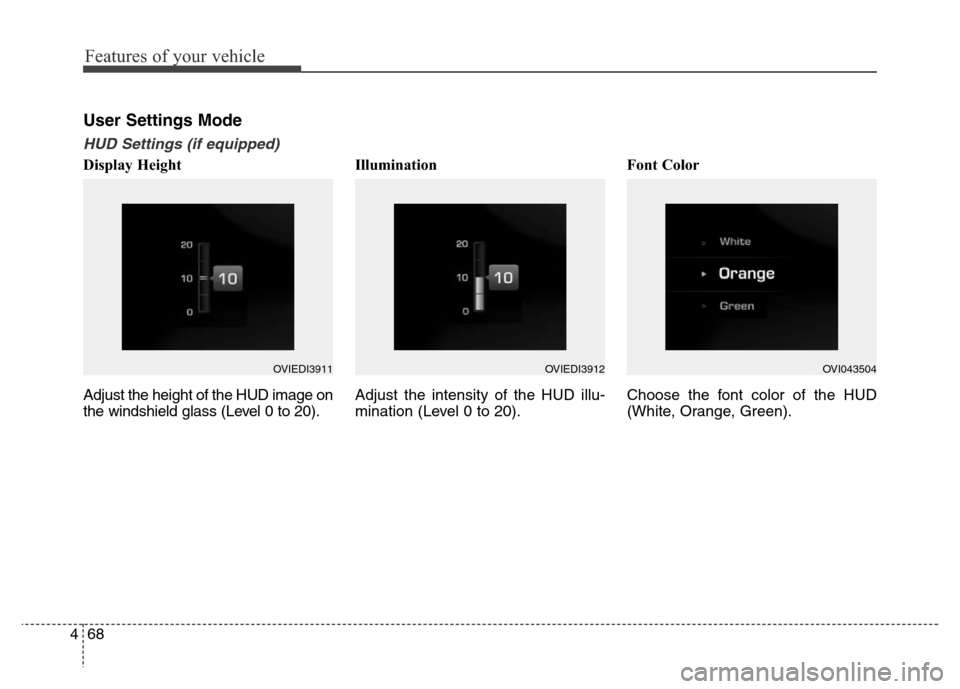
Display Height
Adjust the height of the HUD image on
the windshield glass (Level 0 to 20).Illumination
Adjust the intensity of the HUD illu-
mination (Level 0 to 20).Font Color
Choose the font color of the HUD
(White, Orange, Green).
OVIEDI3911OVIEDI3912OVI043504
Page 174 of 479
485
Features of your vehicle
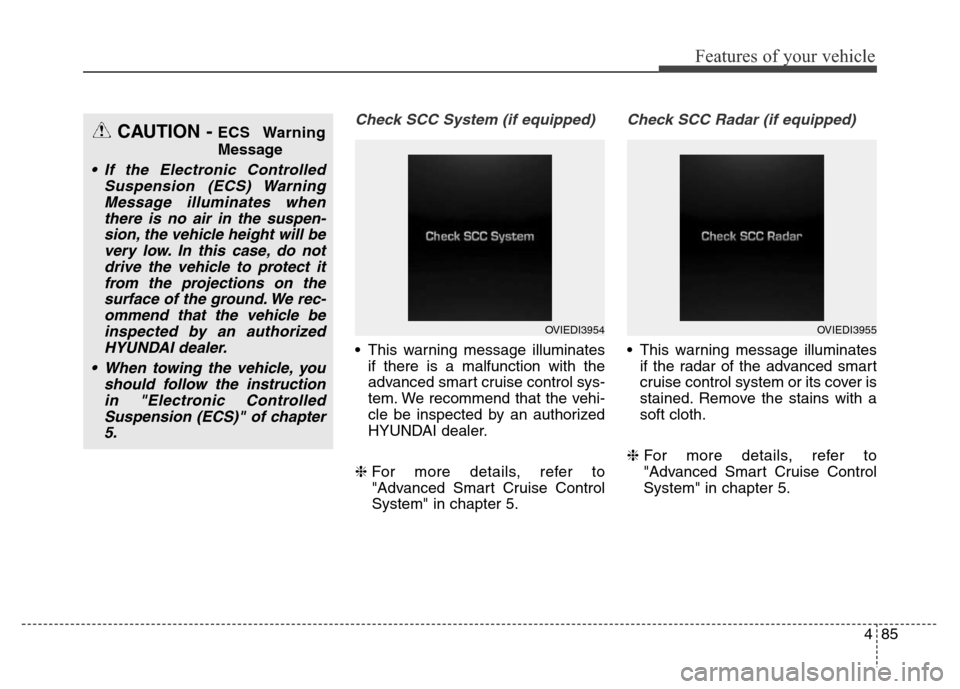
Check SCC System (if equipped)
• This warning message illuminates
if there is a malfunction with the
advanced smart cruise control sys-
tem. We recommend that the vehi-
cle be inspected by an authorized
HYUNDAI dealer.
❈For more details, refer to
"Advanced Smart Cruise Control
System" in chapter 5.
Check SCC Radar (if equipped)
• This warning message illuminates
if the radar of the advanced smart
cruise control system or its cover is
stained. Remove the stains with a
soft cloth.
❈For more details, refer to
"Advanced Smart Cruise Control
System" in chapter 5.
CAUTION - ECS Warning
Message
• If the Electronic Controlled
Suspension (ECS) Warning
Message illuminates when
there is no air in the suspen-
sion, the vehicle height will be
very low. In this case, do not
drive the vehicle to protect it
from the projections on the
surface of the ground. We rec-
ommend that the vehicle be
inspected by an authorized
HYUNDAI dealer.
• When towing the vehicle, you
should follow the instruction
in "Electronic Controlled
Suspension (ECS)" of chapter
5.
OVIEDI3954OVIEDI3955
Page 193 of 479
Features of your vehicle
104 4
Description
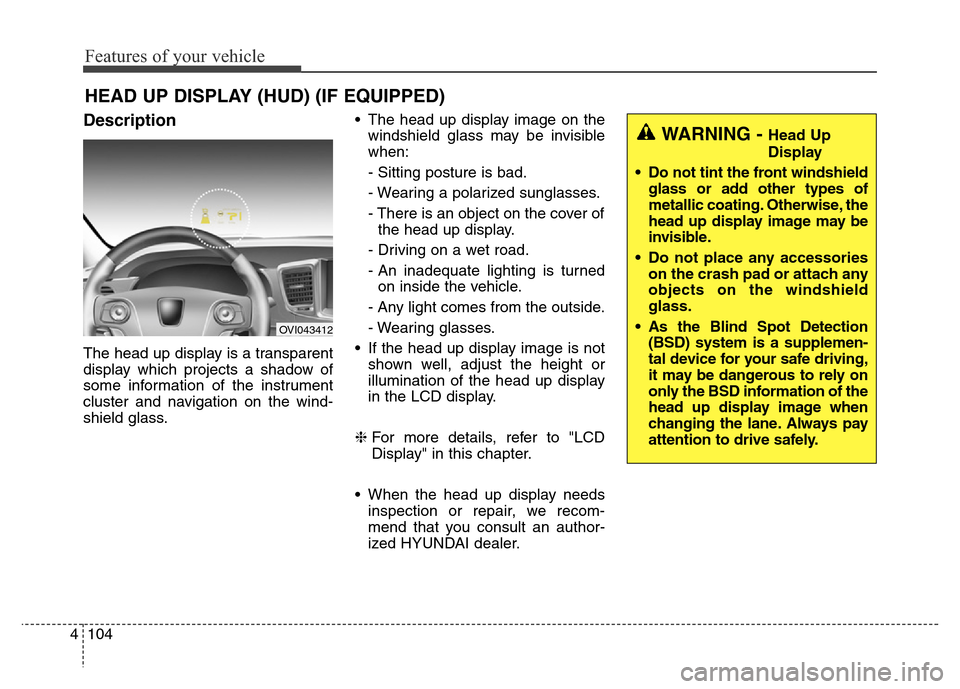
The head up display is a transparent
display which projects a shadow of
some information of the instrument
cluster and navigation on the wind-
shield glass.• The head up display image on the
windshield glass may be invisible
when:
- Sitting posture is bad.
- Wearing a polarized sunglasses.
- There is an object on the cover of
the head up display.
- Driving on a wet road.
- An inadequate lighting is turned
on inside the vehicle.
- Any light comes from the outside.
- Wearing glasses.
• If the head up display image is not
shown well, adjust the height or
illumination of the head up display
in the LCD display.
❈For more details, refer to "LCD
Display" in this chapter.
• When the head up display needs
inspection or repair, we recom-
mend that you consult an author-
ized HYUNDAI dealer.
HEAD UP DISPLAY (HUD) (IF EQUIPPED)
OVI043412
WARNING - Head Up
Display
• Do not tint the front windshield
glass or add other types of
metallic coating. Otherwise, the
head up display image may be
invisible.
• Do not place any accessories
on the crash pad or attach any
objects on the windshield
glass.
• As the Blind Spot Detection
(BSD) system is a supplemen-
tal device for your safe driving,
it may be dangerous to rely on
only the BSD information of the
head up display image when
changing the lane. Always pay
attention to drive safely.
Page 195 of 479
Features of your vehicle
106 4
On the "User settings Mode" of the
LCD display, you can activate or
deactive the Turn By Turn (TBT) nav-
igation, Smart Cruise Control (SCC),
Lane Departure Warning System
(LDWS), and Blind Spot Detection
(BSD) system information.
✽NOTICE
If you select the Turn By Turn (TBT)
navigation information as HUD con-
tents, the Turn By Turn (TBT) navi-
gation information will not be dis-
played on the LCD Display.
Head Up Display Setting
On the LCD display, you can change
the head up display settings as fol-
lows.
1. Display height
2. Illumination
3. Font color
4. Font size
5. Contents setting
❈For more details, refer to "LCD
Display" in this chapter.
Page 199 of 479
Features of your vehicle
110 4
✽NOTICE
1. The warning may not sound
sequentially depending on the
speed and shapes of the objects
detected.
2. The parking assist system may
malfunction if the vehicle bumper
height or sensor installation has
been modified. Any non-factory
installed equipment or accessories
may also interfere with the sensor
performance.
3. Sensor may not recognize objects
less than 30 cm from the sensor,
or it may sense an incorrect dis-
tance. Use with caution.
4. When the sensor is frozen or
stained with snow or water, the
sensor may be inoperative until
the stains are removed using a
soft cloth.
5. Do not push, scratch or strike the
sensor with any hard objects that
could damage the surface of the
sensor. Sensor damage could
occur.
✽NOTICE
This system can only sense objects
within the range and location of the
sensors, it can not detect objects in
other areas where sensors are not
installed. Also, small or slim objects,
or objects located between sensors
may not be detected.
Always visually check in front and
behind the vehicle when driving.
Be sure to inform any drivers in the
vehicle that may be unfamiliar with
the system regarding the systems
capabilities and limitations.WARNING
Pay close attention when the
vehicle is driven close to
objects on the road, particularly
pedestrians, and especially
children. Be aware that some
objects may not be detected by
the sensors, due to the objects
distance, size or material, all of
which can limit the effective-
ness of the sensor. Always per-
form a visual inspection to
make sure the vehicle is clear of
all obstructions before moving
the vehicle in any direction.
Page 258 of 479
Driving your vehicle
Before driving . . . . . . . . . . . . . . . . . . . . . . . . . . . . . . 5-4
• Before entering vehicle . . . . . . . . . . . . . . . . . . . . . . . . . 5-4
• Necessary inspections . . . . . . . . . . . . . . . . . . . . . . . . . 5-4
• Before starting . . . . . . . . . . . . . . . . . . . . . . . . . . . . . . . 5-4
Engine start/stop button . . . . . . . . . . . . . . . . . . . . . 5-6
• Illuminated engine start/stop button . . . . . . . . . . . . . . 5-6
• Engine start/stop button position. . . . . . . . . . . . . . . . . 5-6
Starting the engine . . . . . . . . . . . . . . . . . . . . . . . . . . 5-9
Automatic transmission (Shift by wire) . . . . . . . . 5-11
• Automatic transmission operation . . . . . . . . . . . . . . . 5-11
• Good driving practices . . . . . . . . . . . . . . . . . . . . . . . . 5-20
Brake system . . . . . . . . . . . . . . . . . . . . . . . . . . . . . 5-23
• Power brakes . . . . . . . . . . . . . . . . . . . . . . . . . . . . . . . 5-23
• Electric parking brake (EPB) . . . . . . . . . . . . . . . . . . 5-26
• Emergency braking . . . . . . . . . . . . . . . . . . . . . . . . . . . 5-29
• Auto hold . . . . . . . . . . . . . . . . . . . . . . . . . . . . . . . . . . . 5-30
• Anti-lock brake system (ABS) . . . . . . . . . . . . . . . . . . 5-34
• Electronic Stability Control (ESC) . . . . . . . . . . . . . . 5-36
• Hill-start assist control (HAC) . . . . . . . . . . . . . . . . . . 5-41
• Emergency Stop Signal (ESS) . . . . . . . . . . . . . . . . . . 5-41
• Good braking practices. . . . . . . . . . . . . . . . . . . . . . . . 5-42
Drive mode integrated control system . . . . . . . . . 5-44
• Drive mode / Snow mode . . . . . . . . . . . . . . . . . . . . . . 5-44
Electronic controlled suspension (ECS) . . . . . . . . 5-46
• To control the vehicle height . . . . . . . . . . . . . . . . . . . 5-46• ECS (electronic controlled suspension) malfunction
warning message . . . . . . . . . . . . . . . . . . . . . . . . . . . . 5-47
• Towing your vehicle. . . . . . . . . . . . . . . . . . . . . . . . . . . 5-48
Cruise control system. . . . . . . . . . . . . . . . . . . . . . . 5-50
• Cruise control speed . . . . . . . . . . . . . . . . . . . . . . . . . . 5-51
Advanced smart cruise control system. . . . . . . . . 5-55
• Smart cruise control speed . . . . . . . . . . . . . . . . . . . . . 5-56
• Smart cruise control vehicle to vehicle distance. . . . 5-60
• Distance to distance vehicle sensor . . . . . . . . . . . . . . 5-62
• To convert to cruise control mode . . . . . . . . . . . . . . . 5-63
• Limitations of the system . . . . . . . . . . . . . . . . . . . . . . 5-64
Lane departure warning system (LDWS) . . . . . . 5-70
• LDWS operation . . . . . . . . . . . . . . . . . . . . . . . . . . . . . 5-71
Intelligent accelerator pedal . . . . . . . . . . . . . . . . . 5-74
Advanced vehicle safety management (AVSM) . . 5-75
Blind spot detection system (BSD) . . . . . . . . . . . . 5-78
• Operating conditions . . . . . . . . . . . . . . . . . . . . . . . . . . 5-79
• Warning type . . . . . . . . . . . . . . . . . . . . . . . . . . . . . . . . 5-79
• Detecting sensor . . . . . . . . . . . . . . . . . . . . . . . . . . . . . . 5-80
• Warning message . . . . . . . . . . . . . . . . . . . . . . . . . . . . . 5-81
• Rear cross traffic alert . . . . . . . . . . . . . . . . . . . . . . . . 5-81
• Operating conditions . . . . . . . . . . . . . . . . . . . . . . . . . . 5-81
• Warning type . . . . . . . . . . . . . . . . . . . . . . . . . . . . . . . . 5-82
• Non-operating condition . . . . . . . . . . . . . . . . . . . . . . . 5-83
5
Page 291 of 479
Driving your vehicle
34 5
Anti-lock brake system (ABS)The ABS continuously senses the
speed of the wheels. If the wheels
are going to lock, the ABS system
repeatedly modulates the hydraulic
brake pressure to the wheels.
When you apply your brakes under
conditions which may lock the
wheels, you may hear a “tik-tik’’
sound from the brakes, or feel a cor-
responding sensation in the brake
pedal. This is normal and it means
your ABS is active.
In order to obtain the maximum ben-
efit from your ABS in an emergency
situation, do not attempt to modulate
your brake pressure and do not try to
pump your brakes. Press your brake
pedal as hard as possible or as hard
as the situation allow the ABS to
control the force being delivered to
the brakes.
WARNING
ABS (or ESC) will not prevent
accidents due to improper or
dangerous driving maneuvers.
Even though vehicle control is
improved during emergency
braking, always maintain a safe
distance between you and
objects ahead. Vehicle speeds
should always be reduced dur-
ing extreme road conditions.
The braking distance for vehicle
equipped with an anti-lock brak-
ing system (or Electronic
Stability Control) may be longer
than for those without it in the
following road conditions.
During these conditions the
vehicle should be driven at
reduced speeds:
• Rough, gravel or snow-cov-
ered roads.
• With tire chains installed.
(Continued)
(Continued)
• On roads where the road sur-
face is pitted or has different
surface height.
The safety features of an ABS
(or ESC) equipped vehicle
should not be tested by high
speed driving or cornering. This
could endanger the safety of
yourself or others.
Page 303 of 479
Driving your vehicle
46 5
ECS controls the vehicle suspension
automatically to maximize passenger
comfort by using the air spring in the
suspension.
You can also control the vehicle sus-
pension manually in NORMAL mode
or HIGH mode.
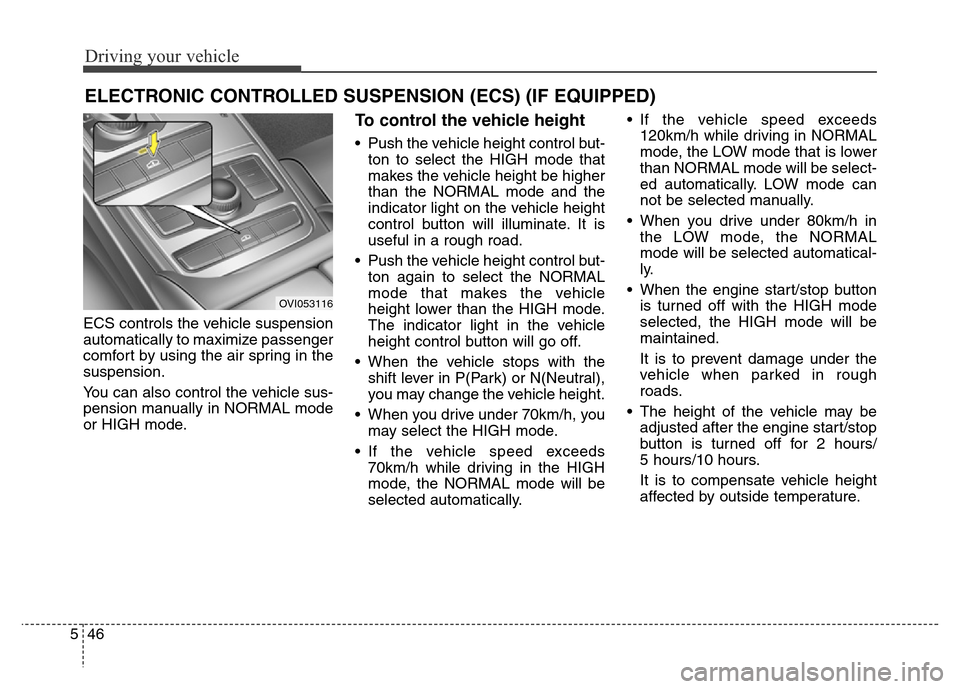
To control the vehicle height
• Push the vehicle height control but-
ton to select the HIGH mode that
makes the vehicle height be higher
than the NORMAL mode and the
indicator light on the vehicle height
control button will illuminate. It is
useful in a rough road.
• Push the vehicle height control but-
ton again to select the NORMAL
mode that makes the vehicle
height lower than the HIGH mode.
The indicator light in the vehicle
height control button will go off.
• When the vehicle stops with the
shift lever in P(Park) or N(Neutral),
you may change the vehicle height.
• When you drive under 70km/h, you
may select the HIGH mode.
• If the vehicle speed exceeds
70km/h while driving in the HIGH
mode, the NORMAL mode will be
selected automatically.• If the vehicle speed exceeds
120km/h while driving in NORMAL
mode, the LOW mode that is lower
than NORMAL mode will be select-
ed automatically. LOW mode can
not be selected manually.
• When you drive under 80km/h in
the LOW mode, the NORMAL
mode will be selected automatical-
ly.
• When the engine start/stop button
is turned off with the HIGH mode
selected, the HIGH mode will be
maintained.
It is to prevent damage under the
vehicle when parked in rough
roads.
• The height of the vehicle may be
adjusted after the engine start/stop
button is turned off for 2 hours/
5 hours/10 hours.
It is to compensate vehicle height
affected by outside temperature.
ELECTRONIC CONTROLLED SUSPENSION (ECS) (IF EQUIPPED)
OVI053116