Manual ty Hyundai Equus 2014 Owner's Guide
[x] Cancel search | Manufacturer: HYUNDAI, Model Year: 2014, Model line: Equus, Model: Hyundai Equus 2014Pages: 479, PDF Size: 10.15 MB
Page 160 of 479
471
Features of your vehicle
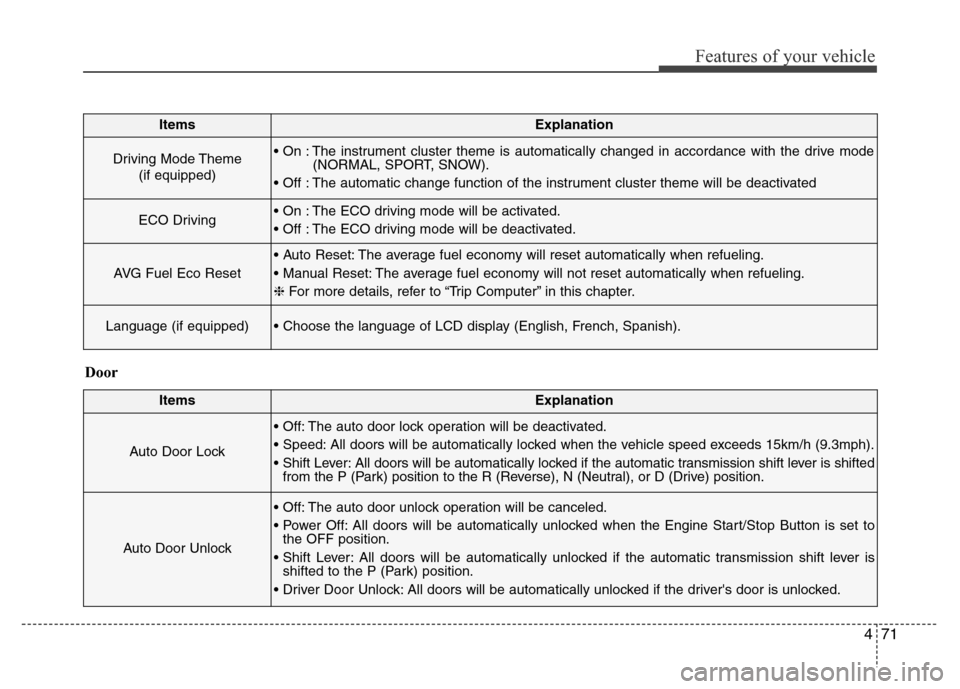
ItemsExplanation
Driving Mode Theme
(if equipped)• On : The instrument cluster theme is automatically changed in accordance with the drive mode
(NORMAL, SPORT, SNOW).
• Off : The automatic change function of the instrument cluster theme will be deactivated
ECO Driving• On : The ECO driving mode will be activated.
• Off : The ECO driving mode will be deactivated.
AVG Fuel Eco Reset
• Auto Reset: The average fuel economy will reset automatically when refueling.
• Manual Reset: The average fuel economy will not reset automatically when refueling.
❈For more details, refer to “Trip Computer” in this chapter.
Language (if equipped)• Choose the language of LCD display (English, French, Spanish).
ItemsExplanation
Auto Door Lock
• Off: The auto door lock operation will be deactivated.
• Speed: All doors will be automatically locked when the vehicle speed exceeds 15km/h (9.3mph).
• Shift Lever: All doors will be automatically locked if the automatic transmission shift lever is shifted
from the P (Park) position to the R (Reverse), N (Neutral), or D (Drive) position.
Auto Door Unlock
• Off: The auto door unlock operation will be canceled.
• Power Off: All doors will be automatically unlocked when the Engine Start/Stop Button is set to
the OFF position.
• Shift Lever: All doors will be automatically unlocked if the automatic transmission shift lever is
shifted to the P (Park) position.
• Driver Door Unlock: All doors will be automatically unlocked if the driver's door is unlocked.
Door
Page 163 of 479
Features of your vehicle
74 4
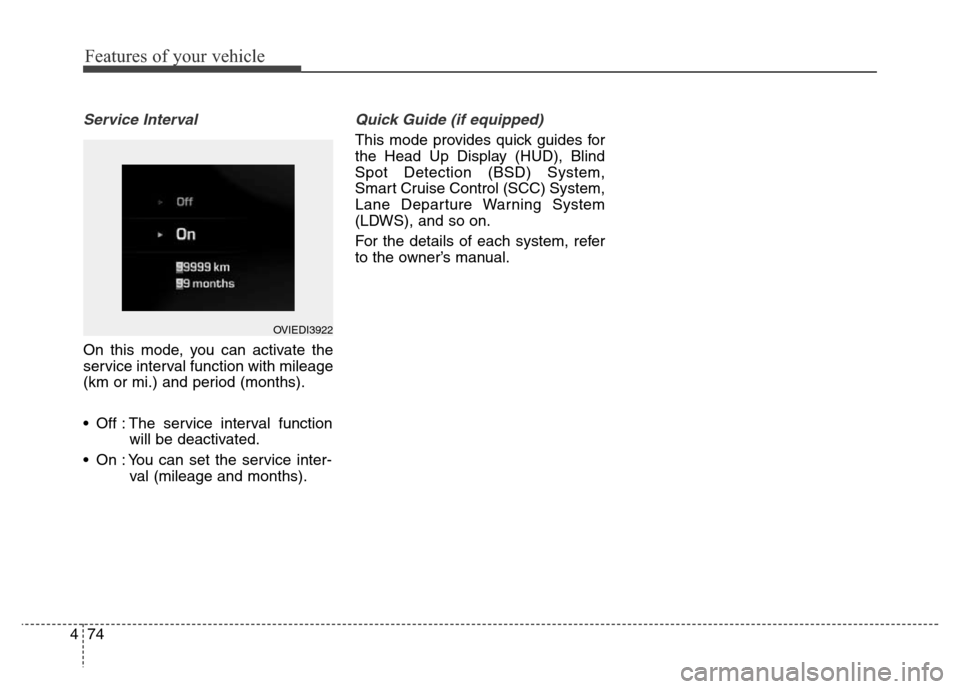
Service Interval
On this mode, you can activate the
service interval function with mileage
(km or mi.) and period (months).
• Off : The service interval function
will be deactivated.
• On : You can set the service inter-
val (mileage and months).
Quick Guide (if equipped)
This mode provides quick guides for
the Head Up Display (HUD), Blind
Spot Detection (BSD) System,
Smart Cruise Control (SCC) System,
Lane Departure Warning System
(LDWS), and so on.
For the details of each system, refer
to the owner’s manual.
OVIEDI3922
Page 177 of 479
Features of your vehicle
88 4
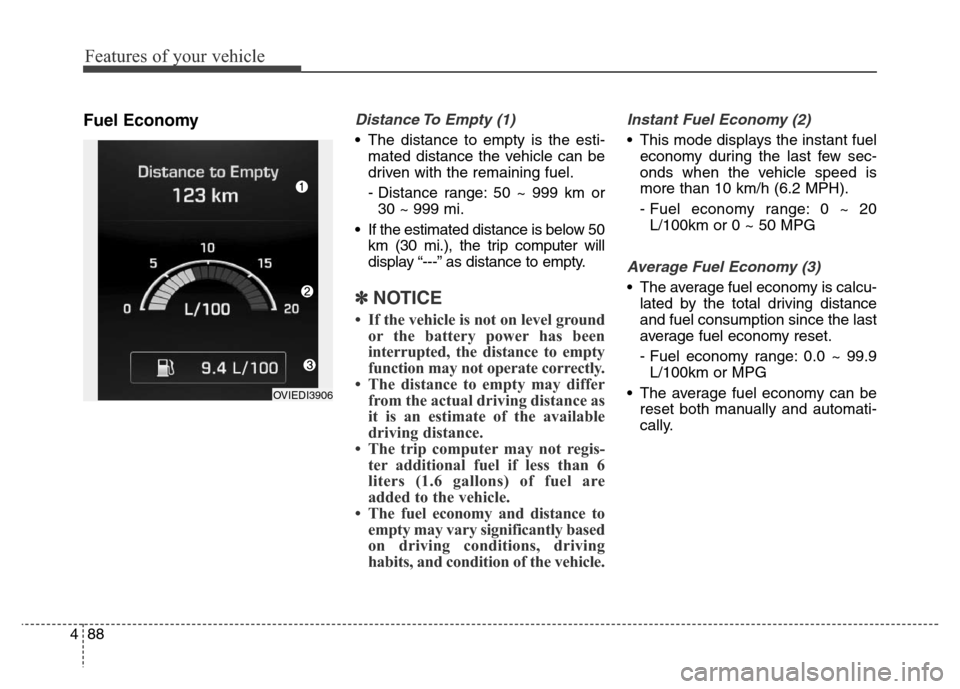
Fuel EconomyDistance To Empty (1)
• The distance to empty is the esti-
mated distance the vehicle can be
driven with the remaining fuel.
- Distance range: 50 ~ 999 km or
30 ~ 999 mi.
• If the estimated distance is below 50
km (30 mi.), the trip computer will
display “---” as distance to empty.
✽NOTICE
• If the vehicle is not on level ground
or the battery power has been
interrupted, the distance to empty
function may not operate correctly.
• The distance to empty may differ
from the actual driving distance as
it is an estimate of the available
driving distance.
• The trip computer may not regis-
ter additional fuel if less than 6
liters (1.6 gallons) of fuel are
added to the vehicle.
• The fuel economy and distance to
empty may vary significantly based
on driving conditions, driving
habits, and condition of the vehicle.
Instant Fuel Economy (2)
• This mode displays the instant fuel
economy during the last few sec-
onds when the vehicle speed is
more than 10 km/h (6.2 MPH).
- Fuel economy range: 0 ~ 20
L/100km or 0 ~ 50 MPG
Average Fuel Economy (3)
• The average fuel economy is calcu-
lated by the total driving distance
and fuel consumption since the last
average fuel economy reset.
- Fuel economy range: 0.0 ~ 99.9
L/100km or MPG
• The average fuel economy can be
reset both manually and automati-
cally.
OVIEDI3906
Page 178 of 479
489
Features of your vehicle
Manual reset
To clear the average fuel economy
manually, press the OK button on the
steering wheel for more than 1 sec-
ond when the average fuel economy
is displayed.
❈For more details of OK button,
refer to the "LCD Display Control"
in this chapterAutomatic reset
To make the average fuel economy
be reset automatically whenever refu-
eling, select the "Auto Reset" mode in
User Setting menu of the LCD display
(Refer to "LCD Display").
Under "Auto Reset" mode, the aver-
age fuel economy will be cleared to
zero (---) when the vehicle speed
exceeds 1 km/h after refueling more
than 6 liters (1.6 gallons).
✽NOTICE
The average fuel economy is not dis-
played for more accurate calculation
if the vehicle does not drive more
than 300 meters (0.19 miles) since
the Engine Start/Stop button is
turned to ON.
Page 210 of 479
4121
Features of your vehicle
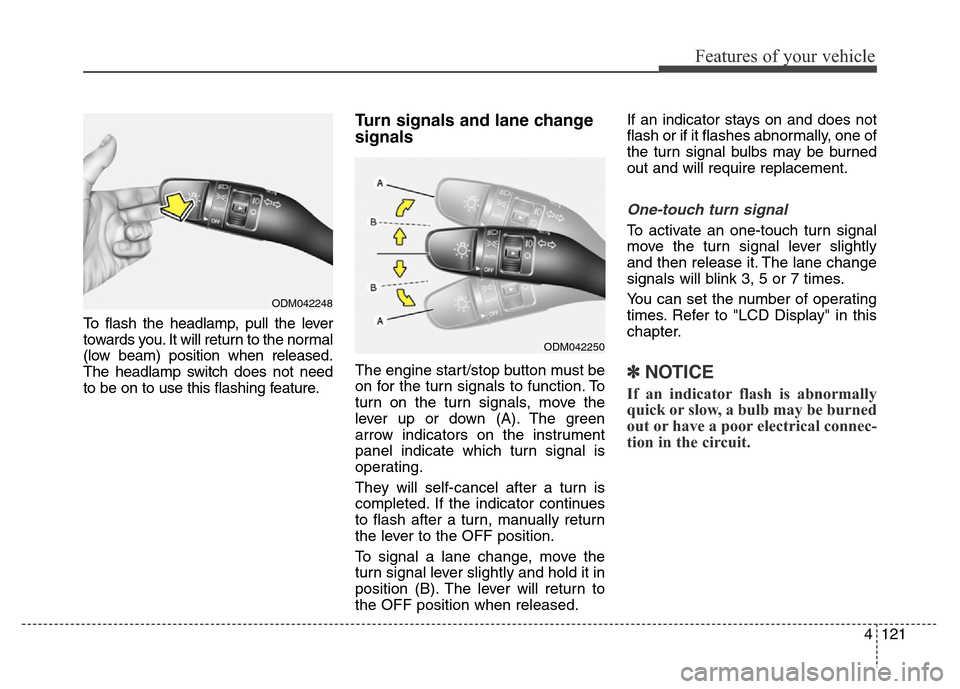
To flash the headlamp, pull the lever
towards you. It will return to the normal
(low beam) position when released.
The headlamp switch does not need
to be on to use this flashing feature.
Turn signals and lane change
signals
The engine start/stop button must be
on for the turn signals to function. To
turn on the turn signals, move the
lever up or down (A). The green
arrow indicators on the instrument
panel indicate which turn signal is
operating.
They will self-cancel after a turn is
completed. If the indicator continues
to flash after a turn, manually return
the lever to the OFF position.
To signal a lane change, move the
turn signal lever slightly and hold it in
position (B). The lever will return to
the OFF position when released.If an indicator stays on and does not
flash or if it flashes abnormally, one of
the turn signal bulbs may be burned
out and will require replacement.
One-touch turn signal
To activate an one-touch turn signal
move the turn signal lever slightly
and then release it. The lane change
signals will blink 3, 5 or 7 times.
You can set the number of operating
times. Refer to "LCD Display" in this
chapter.
✽NOTICE
If an indicator flash is abnormally
quick or slow, a bulb may be burned
out or have a poor electrical connec-
tion in the circuit.
ODM042248
ODM042250
Page 215 of 479
Features of your vehicle
126 4
The spray and wiper operation will
continue until you release the lever.
If the washer does not work, check
the washer fluid level. If the fluid level
is not sufficient, you will need to add
appropriate non-abrasive windshield
washer fluid to the washer reservoir.
The reservoir filler neck is located in
the front of the engine compartment
on the passenger side.CAUTION
• To prevent possible damage
to the wipers or windshield,
do not operate the wipers
when the windshield is dry.
• To prevent damage to the
wiper blades, do not use gaso-
line, kerosene, paint thinner,
or other solvents on or near
them.
• To prevent damage to the
wiper arms and other compo-
nents, do not attempt to move
the wipers manually.
• To prevent possible damage
to the wipers and washer sys-
tem, use anti-freezing washer
fluids in the winter season or
cold weather.
CAUTION
To prevent possible damage to
the washer pump, do not oper-
ate the washer when the fluid
reservoir is empty.
WARNING
Do not use the washer in freez-
ing temperatures without first
warming the windshield with
the defrosters; the washer solu-
tion could freeze on contact
with the windshield and
obscure your vision.
Page 223 of 479
Features of your vehicle
134 4
Automatic heating and air con-
ditioning
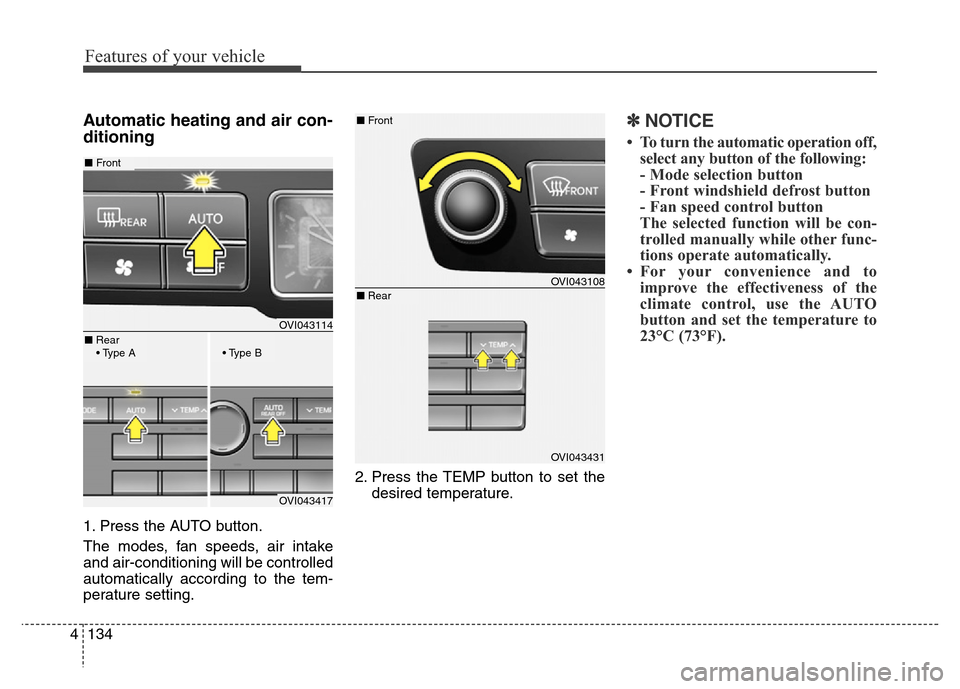
1. Press the AUTO button.
The modes, fan speeds, air intake
and air-conditioning will be controlled
automatically according to the tem-
perature setting.2. Press the TEMP button to set the
desired temperature.
✽NOTICE
• To turn the automatic operation off,
select any button of the following:
- Mode selection button
- Front windshield defrost button
- Fan speed control button
The selected function will be con-
trolled manually while other func-
tions operate automatically.
• For your convenience and to
improve the effectiveness of the
climate control, use the AUTO
button and set the temperature to
23°C (73°F).
OVI043114
OVI043417
■Front
■Rear
• Type A• Type B
OVI043108
OVI043431
■Front
■Rear
Page 224 of 479
4135
Features of your vehicle
✽NOTICE
Never place anything near the sensor
to ensure better control of the heating
and cooling system.
Manual heating and air condi-
tioning
The heating and cooling system can be
controlled manually by pushing buttons
other than the AUTO button. In this
case, the system works sequentially
according to the order of buttons select-
ed. When pressing any button except
the AUTO button while using automatic
operation, the functions not selected
will be controlled automatically.
1. Start the engine.
2. Set the mode to the desired position.
For improving the effectiveness of
heating and cooling;
- Heating:
- Cooling:
3. Set the temperature control to the
desired position.
4. Set the air intake control to the
outside (fresh) air position.
5. Set the fan speed control to the
desired speed.
6. If air conditioning is desired, turn
the air conditioning system on.
Press the AUTO button in order to
convert to full automatic control of
the system.
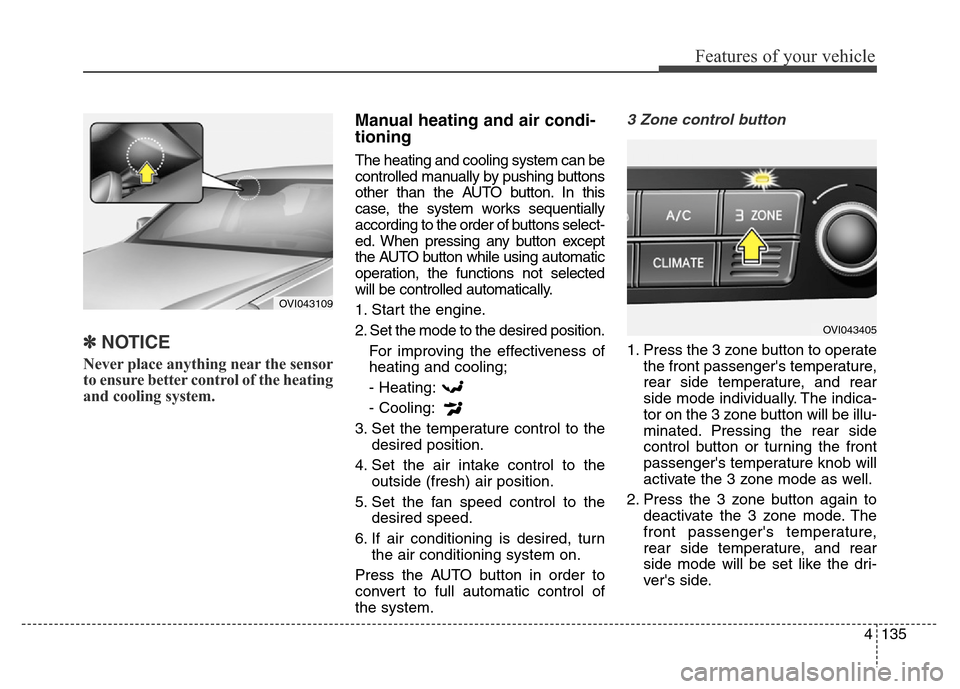
3 Zone control button
1. Press the 3 zone button to operate
the front passenger's temperature,
rear side temperature, and rear
side mode individually. The indica-
tor on the 3 zone button will be illu-
minated. Pressing the rear side
control button or turning the front
passenger's temperature knob will
activate the 3 zone mode as well.
2. Press the 3 zone button again to
deactivate the 3 zone mode. The
front passenger's temperature,
rear side temperature, and rear
side mode will be set like the dri-
ver's side.
OVI043109
OVI043405
Page 225 of 479
Features of your vehicle
136 4
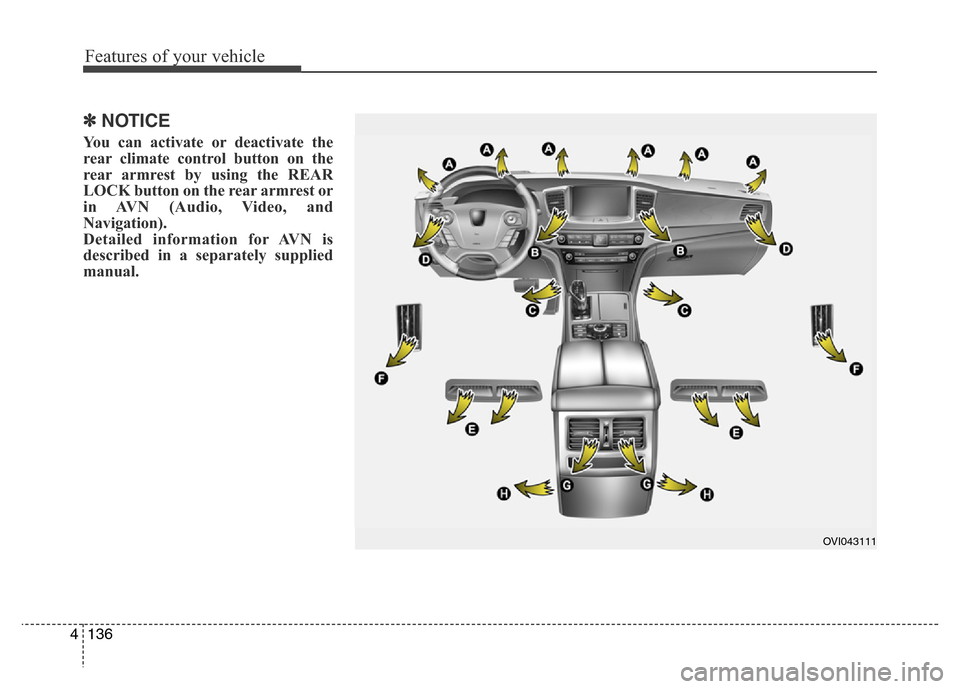
✽NOTICE
You can activate or deactivate the
rear climate control button on the
rear armrest by using the REAR
LOCK button on the rear armrest or
in AVN (Audio, Video, and
Navigation).
Detailed information for AVN is
described in a separately supplied
manual.
OVI043111
Page 238 of 479
4149
Features of your vehicle
If the air conditioning and outside
(fresh) air position are not selected
automatically, adjust the correspon-
ding button manually. If the posi-
tion is selected, lower fan speed is
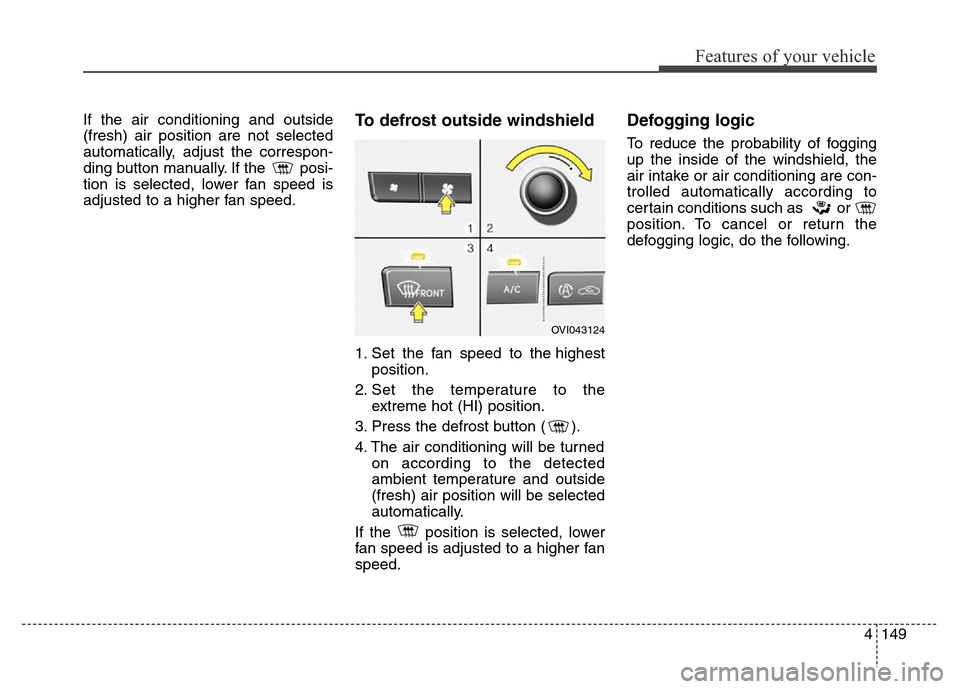
adjusted to a higher fan speed.To defrost outside windshield
1. Set the fan speed to the highest
position.
2. Set the temperature to the
extreme hot (HI) position.
3. Press the defrost button ( ).
4. The air conditioning will be turned
on according to the detected
ambient temperature and outside
(fresh) air position will be selected
automatically.
If the position is selected, lower
fan speed is adjusted to a higher fan
speed.
Defogging logic
To reduce the probability of fogging
up the inside of the windshield, the
air intake or air conditioning are con-
trolled automatically according to
certain conditions such as or
position. To cancel or return the
defogging logic, do the following.
OVI043124