lcd display Hyundai Equus 2014 Owner's Guide
[x] Cancel search | Manufacturer: HYUNDAI, Model Year: 2014, Model line: Equus, Model: Hyundai Equus 2014Pages: 479, PDF Size: 10.15 MB
Page 210 of 479
4121
Features of your vehicle
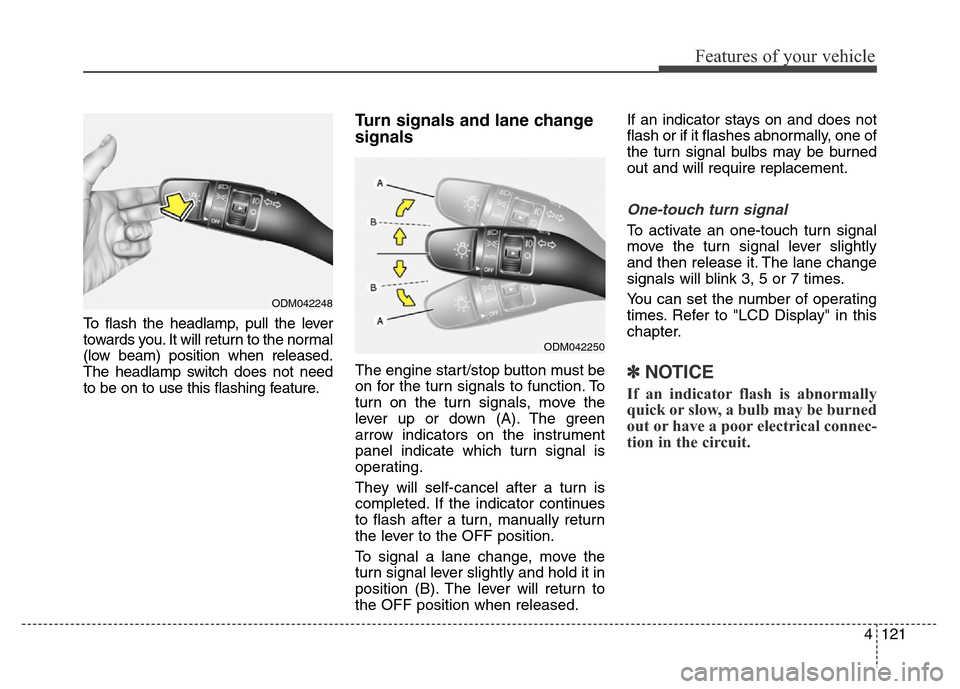
To flash the headlamp, pull the lever
towards you. It will return to the normal
(low beam) position when released.
The headlamp switch does not need
to be on to use this flashing feature.
Turn signals and lane change
signals
The engine start/stop button must be
on for the turn signals to function. To
turn on the turn signals, move the
lever up or down (A). The green
arrow indicators on the instrument
panel indicate which turn signal is
operating.
They will self-cancel after a turn is
completed. If the indicator continues
to flash after a turn, manually return
the lever to the OFF position.
To signal a lane change, move the
turn signal lever slightly and hold it in
position (B). The lever will return to
the OFF position when released.If an indicator stays on and does not
flash or if it flashes abnormally, one of
the turn signal bulbs may be burned
out and will require replacement.
One-touch turn signal
To activate an one-touch turn signal
move the turn signal lever slightly
and then release it. The lane change
signals will blink 3, 5 or 7 times.
You can set the number of operating
times. Refer to "LCD Display" in this
chapter.
✽NOTICE
If an indicator flash is abnormally
quick or slow, a bulb may be burned
out or have a poor electrical connec-
tion in the circuit.
ODM042248
ODM042250
Page 222 of 479
4133
Features of your vehicle
AUTOMATIC CLIMATE CONTROL SYSTEM (IF EQUIPPED)
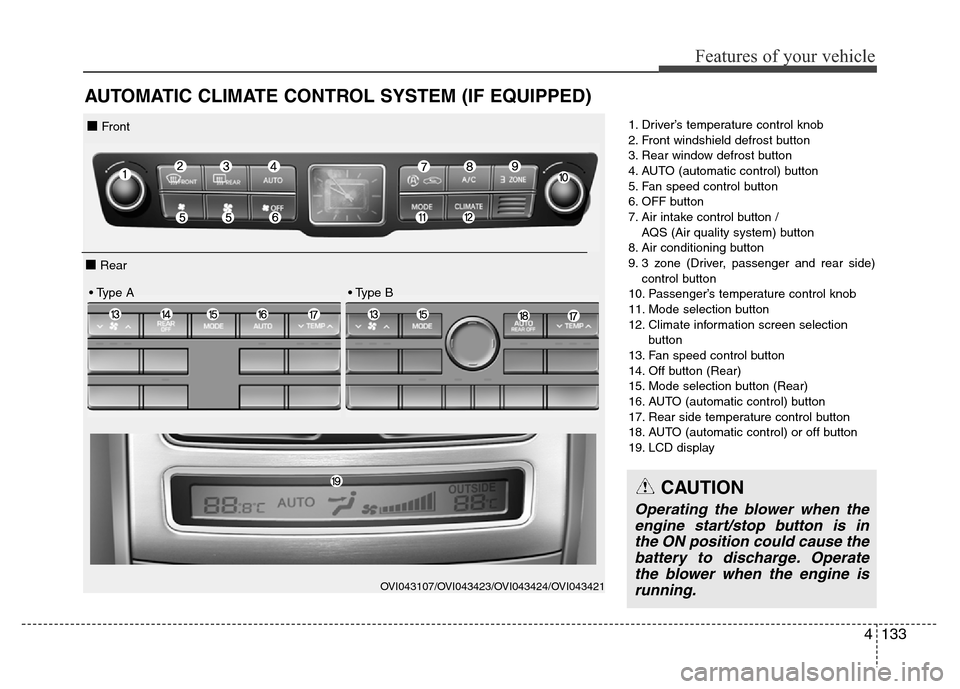
1. Driver’s temperature control knob
2. Front windshield defrost button
3. Rear window defrost button
4. AUTO (automatic control) button
5. Fan speed control button
6. OFF button
7. Air intake control button /
AQS (Air quality system) button
8. Air conditioning button
9. 3 zone (Driver, passenger and rear side)
control button
10. Passenger’s temperature control knob
11. Mode selection button
12. Climate information screen selection
button
13. Fan speed control button
14. Off button (Rear)
15. Mode selection button (Rear)
16. AUTO (automatic control) button
17. Rear side temperature control button
18. AUTO (automatic control) or off button
19. LCD display
OVI043107/OVI043423/OVI043424/OVI043421
■ Front
■ Rear
• Type A • Type B
CAUTION
Operating the blower when the
engine start/stop button is in
the ON position could cause the
battery to discharge. Operate
the blower when the engine is
running.
Page 266 of 479
59
Driving your vehicle
STARTING THE ENGINE
1. Carry the smart key or leave it
inside the vehicle.
2. Make sure the parking brake is
firmly applied.
3. Place the shift lever in the P(Park)
position.4. Press the engine start/stop button
while depressing the brake pedal.
It should be started without
depressing the accelerator.
5. Do not wait for the engine to warm
up while the vehicle remains sta-
tionary.
Start driving at moderate engine
speeds. (Steep accelerating and
decelerating should be avoided.)
• Even if the smart key is in the vehi-
cle, if it is far away from you, the
engine may not start.
• When the engine start/stop button
is in the ACC or above, if any door
is opened, the system checks for
the smart key. If the smart key is
not in the vehicle, the warning,
"Key not in vehicle" will illuminate
on the LCD display. And if all doors
are closed, the chime will sound for
about 5 seconds. The indicator will
turn off while the vehicle is moving.
Keep the smart key in the vehicle,
when using the ACC position or if
the vehicle engine is on.
WARNING
The engine will start, only when
the smart key is in the vehicle.
Never allow children or any per-
son who is unfamiliar with the
vehicle to touch the engine
start/stop button or related
parts.
CAUTION
If the engine stalls while you are
in motion, do not attempt to
move the shift lever to the P
(Park) position. If traffic and
road conditions permit, you may
put the shift lever in the
N(Neutral) position while the
vehicle is still moving and press
the engine start/stop button in
an attempt to restart the engine.
WARNING
• Always wear appropriate
shoes when operating your
vehicle. Unsuitable shoes (high
heels, ski boots, etc.) may
interfere with your ability to
use the brake and accelerator
pedal.
• Do not start the vehicle with the
accelerator pedal depressed.
The vehicle can move and
lead to an accident.
• Wait until the engine rpm is nor-
mal. The vehicle may suddenly
move if the brake pedal is
released when the rpm is high.
Page 289 of 479
Driving your vehicle
32 5
(Continued)
Before driving off again, press foot
brake pedal, check the surround-
ing area near your vehicle and
release parking brake manually
with the EPB switch.
• If the AUTO HOLD indicator
lights up yellow, the Auto Hold is
not working properly. We recom-
mend that you contact an author-
ized HYUNDAI dealer.
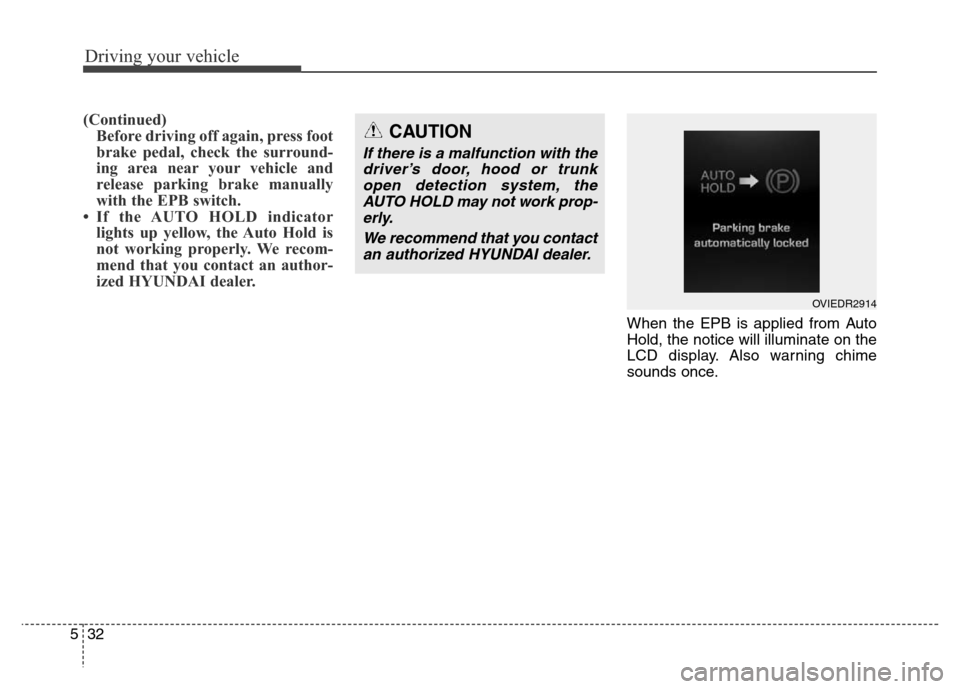
When the EPB is applied from Auto
Hold, the notice will illuminate on the
LCD display. Also warning chime
sounds once.
CAUTION
If there is a malfunction with the
driver’s door, hood or trunk
open detection system, the
AUTO HOLD may not work prop-
erly.
We recommend that you contact
an authorized HYUNDAI dealer.
OVIEDR2914
Page 290 of 479
533
Driving your vehicle
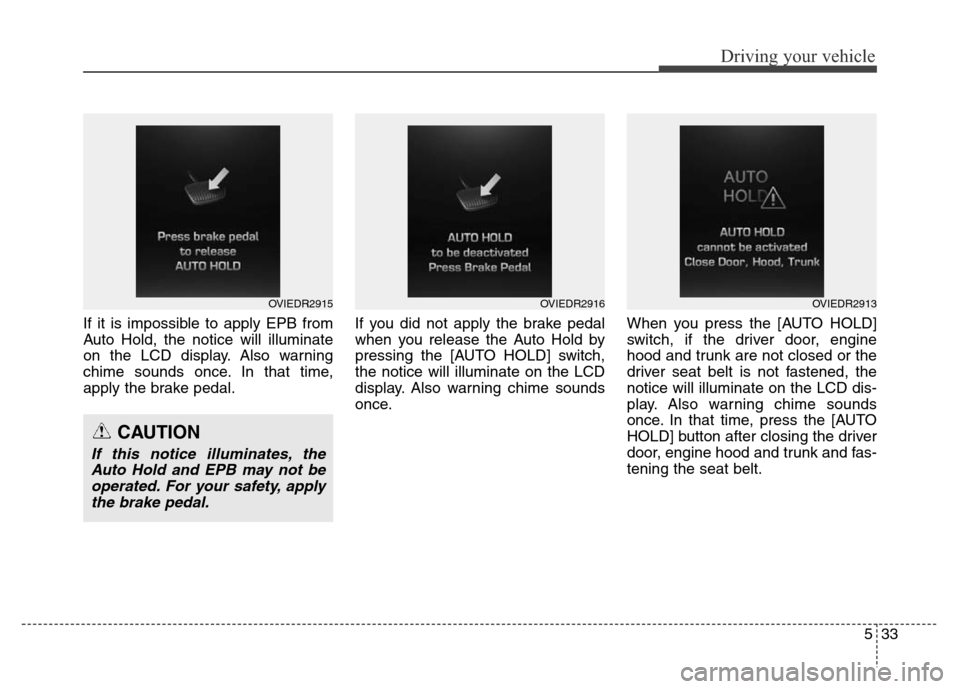
If it is impossible to apply EPB from
Auto Hold, the notice will illuminate
on the LCD display. Also warning
chime sounds once. In that time,
apply the brake pedal.If you did not apply the brake pedal
when you release the Auto Hold by
pressing the [AUTO HOLD] switch,
the notice will illuminate on the LCD
display. Also warning chime sounds
once.When you press the [AUTO HOLD]
switch, if the driver door, engine
hood and trunk are not closed or the
driver seat belt is not fastened, the
notice will illuminate on the LCD dis-
play. Also warning chime sounds
once. In that time, press the [AUTO
HOLD] button after closing the driver
door, engine hood and trunk and fas-
tening the seat belt.
OVIEDR2915OVIEDR2916
CAUTION
If this notice illuminates, the
Auto Hold and EPB may not be
operated. For your safety, apply
the brake pedal.
OVIEDR2913
Page 302 of 479
545
Driving your vehicle
SPORT mode
SPORT mode focuses on dynamic
driving by automatically controlling
the steering wheel, engine and
transaxle system.
• When the DRIVE MODE
button is pressed and
the SPORT mode is
selected, the SPORT
indicator will illuminate.
• If the SPORT mode is activated,
and the engine start/stop button is
turned off and on DRIVE MODE
would be changed to NORMAL
mode. To turn on the SPORT mode
press DRIVE MODE button again.
• If the system is activated:
- Deceleration from release of
accelerator pedal will result in less
rapid fall in RPM (revolutions per
minute) than in the NORMAL
mode.
- Up-shifting is delayed.
✽ NOTICE
In Sport drive mode, the fuel effi-
ciency may decrease.
✽ NOTICE
If you activate the Driving Mode
Theme on the User Settings Mode of
the LCD display (if equipped), the
SPORT and SNOW indicators will
not turn on the instrument cluster.
SNOW mode (if equipped)
Snow mode helps the driver to drive
more effectively on slippery roads
such as snowy or muddy roads.
• When the DRIVE MODE
button is pressed and
the SNOW mode is
selected, the SNOW
indicator will illuminate.
SPORTSNOW
Page 315 of 479
Driving your vehicle
58 5
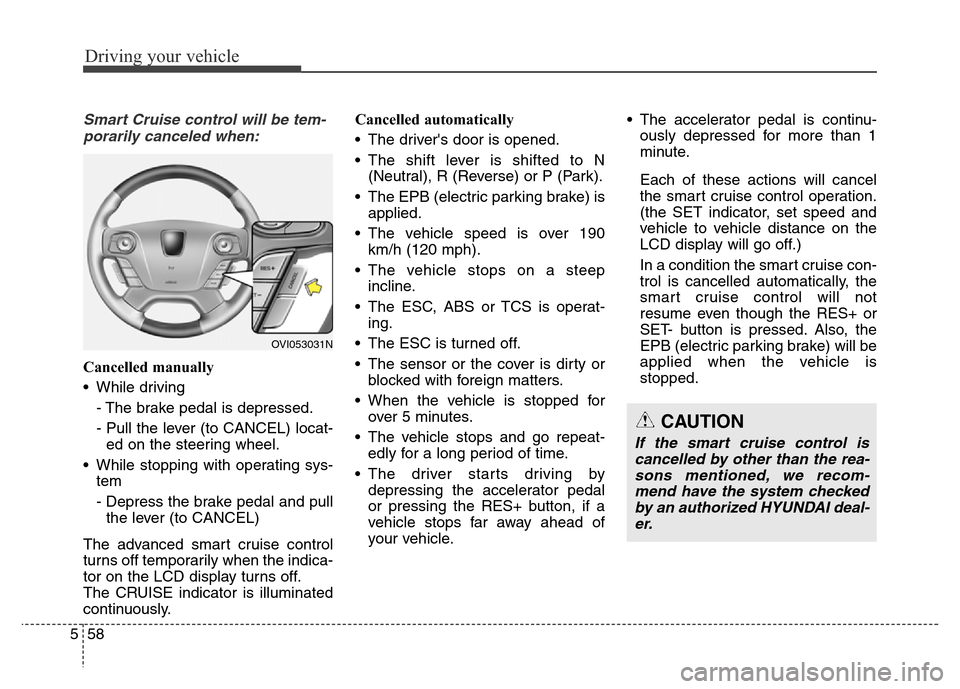
Smart Cruise control will be tem-
porarily canceled when:
Cancelled manually
• While driving
- The brake pedal is depressed.
- Pull the lever (to CANCEL) locat-
ed on the steering wheel.
• While stopping with operating sys-
tem
- Depress the brake pedal and pull
the lever (to CANCEL)
The advanced smart cruise control
turns off temporarily when the indica-
tor on the LCD display turns off.
The CRUISE indicator is illuminated
continuously.Cancelled automatically
• The driver's door is opened.
• The shift lever is shifted to N
(Neutral), R (Reverse) or P (Park).
• The EPB (electric parking brake) is
applied.
• The vehicle speed is over 190
km/h (120 mph).
• The vehicle stops on a steep
incline.
• The ESC, ABS or TCS is operat-
ing.
• The ESC is turned off.
• The sensor or the cover is dirty or
blocked with foreign matters.
• When the vehicle is stopped for
over 5 minutes.
• The vehicle stops and go repeat-
edly for a long period of time.
• The driver starts driving by
depressing the accelerator pedal
or pressing the RES+ button, if a
vehicle stops far away ahead of
your vehicle.• The accelerator pedal is continu-
ously depressed for more than 1
minute.
Each of these actions will cancel
the smart cruise control operation.
(the SET indicator, set speed and
vehicle to vehicle distance on the
LCD display will go off.)
In a condition the smart cruise con-
trol is cancelled automatically, the
smart cruise control will not
resume even though the RES+ or
SET- button is pressed. Also, the
EPB (electric parking brake) will be
applied when the vehicle is
stopped.
OVI053031N
CAUTION
If the smart cruise control is
cancelled by other than the rea-
sons mentioned, we recom-
mend have the system checked
by an authorized HYUNDAI deal-
er.
Page 318 of 479
561
Driving your vehicle
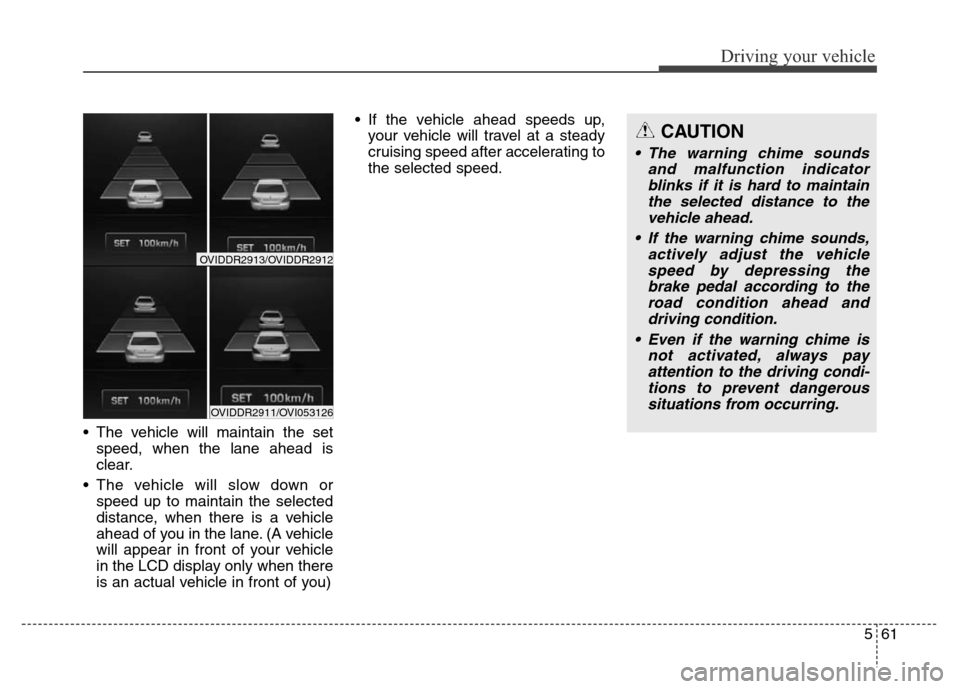
• The vehicle will maintain the set
speed, when the lane ahead is
clear.
• The vehicle will slow down or
speed up to maintain the selected
distance, when there is a vehicle
ahead of you in the lane. (A vehicle
will appear in front of your vehicle
in the LCD display only when there
is an actual vehicle in front of you) • If the vehicle ahead speeds up,
your vehicle will travel at a steady
cruising speed after accelerating to
the selected speed.
CAUTION
• The warning chime sounds
and malfunction indicator
blinks if it is hard to maintain
the selected distance to the
vehicle ahead.
• If the warning chime sounds,
actively adjust the vehicle
speed by depressing the
brake pedal according to the
road condition ahead and
driving condition.
• Even if the warning chime is
not activated, always pay
attention to the driving condi-
tions to prevent dangerous
situations from occurring.
OVIDDR2911/OVI053126
OVIDDR2913/OVIDDR2912
Page 329 of 479
Driving your vehicle
72 5
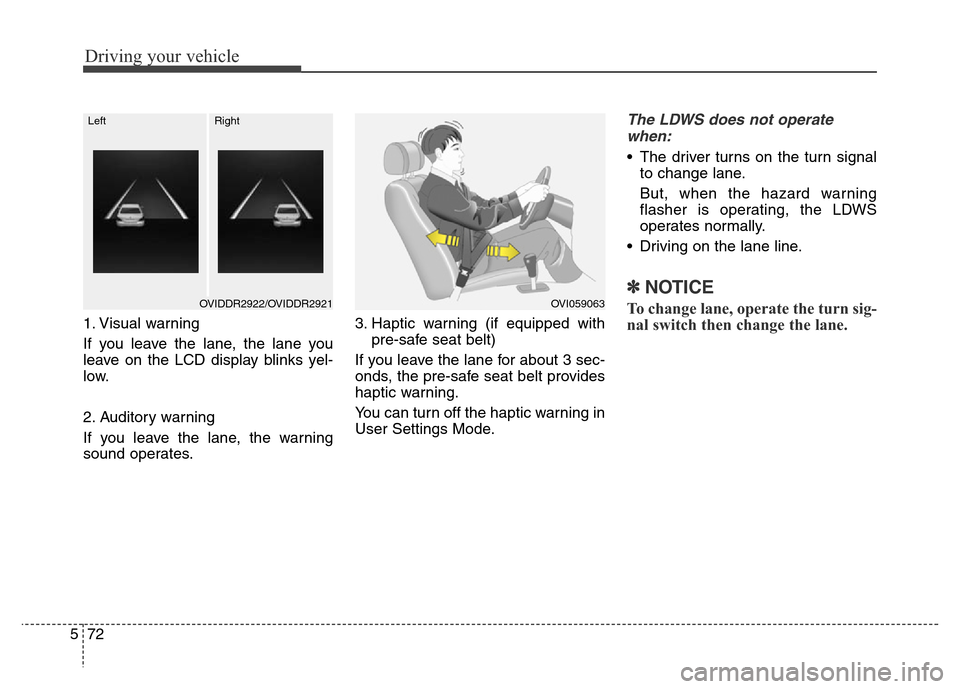
1. Visual warning
If you leave the lane, the lane you
leave on the LCD display blinks yel-
low.
2. Auditory warning
If you leave the lane, the warning
sound operates.3. Haptic warning (if equipped with
pre-safe seat belt)
If you leave the lane for about 3 sec-
onds, the pre-safe seat belt provides
haptic warning.
You can turn off the haptic warning in
User Settings Mode.
The LDWS does not operate
when:
• The driver turns on the turn signal
to change lane.
But, when the hazard warning
flasher is operating, the LDWS
operates normally.
• Driving on the lane line.
✽NOTICE
To change lane, operate the turn sig-
nal switch then change the lane.OVI059063OVIDDR2922/OVIDDR2921
LeftRight
Page 364 of 479
69
What to do in an emergency
TIRE PRESSURE MONITORING SYSTEM (TPMS) (IF EQUIPPED)
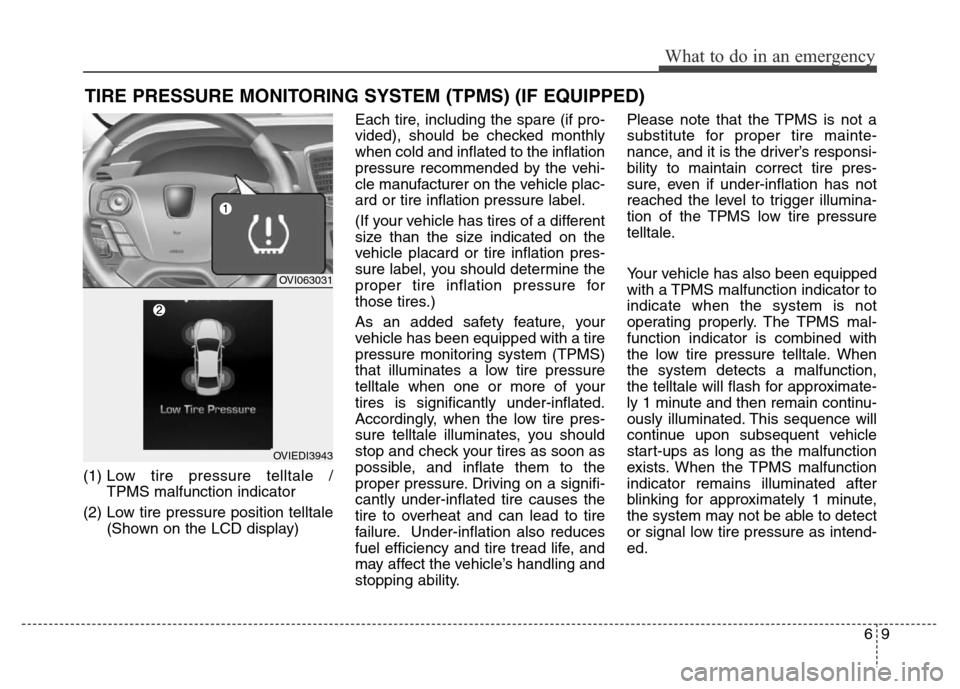
(1) Low tire pressure telltale /
TPMS malfunction indicator
(2) Low tire pressure position telltale
(Shown on the LCD display)Each tire, including the spare (if pro-
vided), should be checked monthly
when cold and inflated to the inflation
pressure recommended by the vehi-
cle manufacturer on the vehicle plac-
ard or tire inflation pressure label.
(If your vehicle has tires of a different
size than the size indicated on the
vehicle placard or tire inflation pres-
sure label, you should determine the
proper tire inflation pressure for
those tires.)
As an added safety feature, your
vehicle has been equipped with a tire
pressure monitoring system (TPMS)
that illuminates a low tire pressure
telltale when one or more of your
tires is significantly under-inflated.
Accordingly, when the low tire pres-
sure telltale illuminates, you should
stop and check your tires as soon as
possible, and inflate them to the
proper pressure. Driving on a signifi-
cantly under-inflated tire causes the
tire to overheat and can lead to tire
failure. Under-inflation also reduces
fuel efficiency and tire tread life, and
may affect the vehicle’s handling and
stopping ability.Please note that the TPMS is not a
substitute for proper tire mainte-
nance, and it is the driver’s responsi-
bility to maintain correct tire pres-
sure, even if under-inflation has not
reached the level to trigger illumina-
tion of the TPMS low tire pressure
telltale.
Your vehicle has also been equipped
with a TPMS malfunction indicator to
indicate when the system is not
operating properly. The TPMS mal-
function indicator is combined with
the low tire pressure telltale. When
the system detects a malfunction,
the telltale will flash for approximate-
ly 1 minute and then remain continu-
ously illuminated. This sequence will
continue upon subsequent vehicle
start-ups as long as the malfunction
exists. When the TPMS malfunction
indicator remains illuminated after
blinking for approximately 1 minute,
the system may not be able to detect
or signal low tire pressure as intend-
ed.
OVI063031
OVIEDI3943