cruise control Hyundai Equus 2015 Owner's Guide
[x] Cancel search | Manufacturer: HYUNDAI, Model Year: 2015, Model line: Equus, Model: Hyundai Equus 2015Pages: 483, PDF Size: 13.26 MB
Page 320 of 483
559
Driving your vehicle
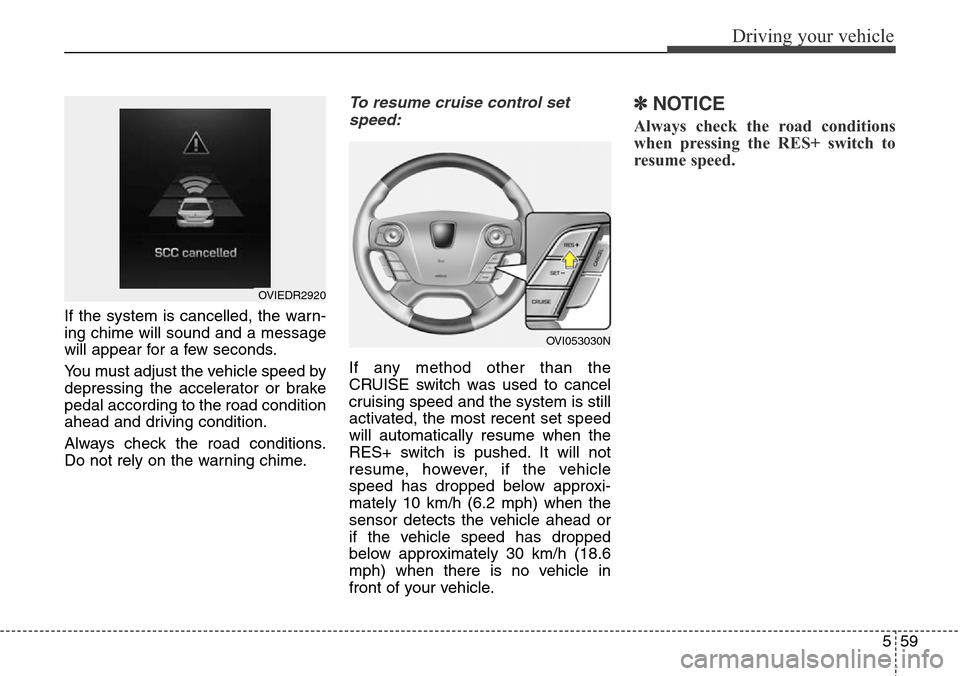
If the system is cancelled, the warn-
ing chime will sound and a message
will appear for a few seconds.
You must adjust the vehicle speed by
depressing the accelerator or brake
pedal according to the road condition
ahead and driving condition.
Always check the road conditions.
Do not rely on the warning chime.
To resume cruise control set
speed:
If any method other than the
CRUISE switch was used to cancel
cruising speed and the system is still
activated, the most recent set speed
will automatically resume when the
RES+ switch is pushed. It will not
resume, however, if the vehicle
speed has dropped below approxi-
mately 10 km/h (6.2 mph) when the
sensor detects the vehicle ahead or
if the vehicle speed has dropped
below approximately 30 km/h (18.6
mph) when there is no vehicle in
front of your vehicle.
✽NOTICE
Always check the road conditions
when pressing the RES+ switch to
resume speed.
OVIEDR2920
OVI053030N
Page 321 of 483
Driving your vehicle
60 5
To turn cruise control off:
• While driving
- Push the CRUISE button
• While stopping with operating sys-
tem
- Depress the brake pedal and
push the CRUISE button
Both of these actions cancel smart
cruise control operation. If you want
to resume smart cruise control oper-
ation, repeat the steps provided in
“To set cruise control speed” on the
previous page.
Smart cruise control vehicle to
vehicle distance
To set vehicle to vehicle distance:
This function allows you to program
the vehicle to maintain relative dis-
tance to the vehicle ahead without
depressing the accelerator pedal or
brake pedal.The vehicle to vehicle distance will
automatically activate when the
smart cruise control system is on.
Select the appropriate distance
according to road conditions and
vehicle speed.
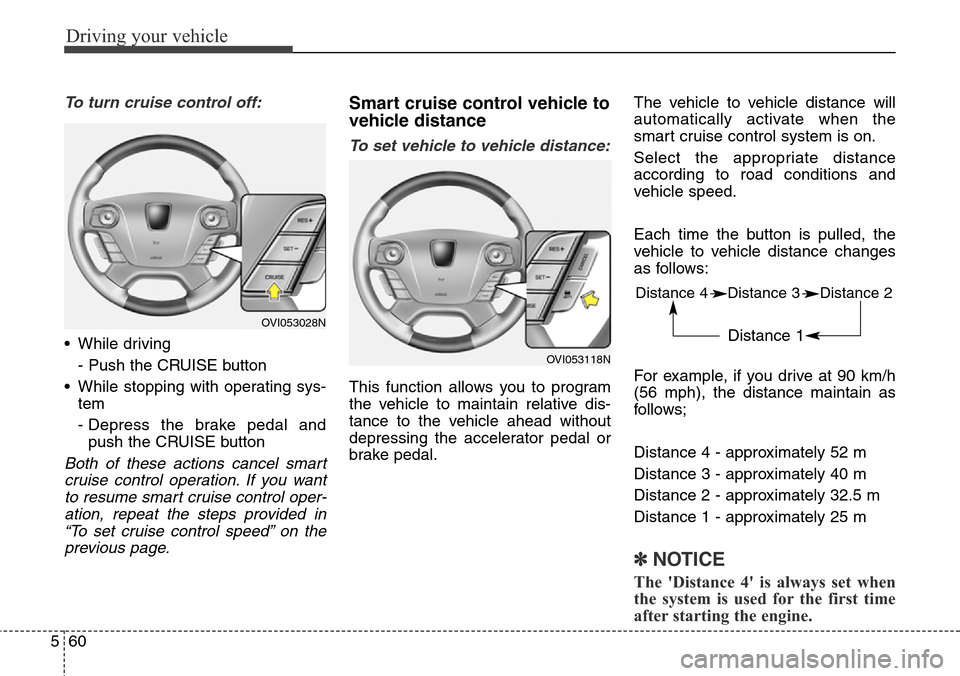
Each time the button is pulled, the
vehicle to vehicle distance changes
as follows:
For example, if you drive at 90 km/h
(56 mph), the distance maintain as
follows;
Distance 4 - approximately 52 m
Distance 3 - approximately 40 m
Distance 2 - approximately 32.5 m
Distance 1 - approximately 25 m
✽NOTICE
The 'Distance 4' is always set when
the system is used for the first time
after starting the engine.
OVI053028N
OVI053118N
Distance 4 Distance 3 Distance 2
Distance 1
Page 324 of 483
563
Driving your vehicle
SCC (Smart cruise control) mal-
function indicator
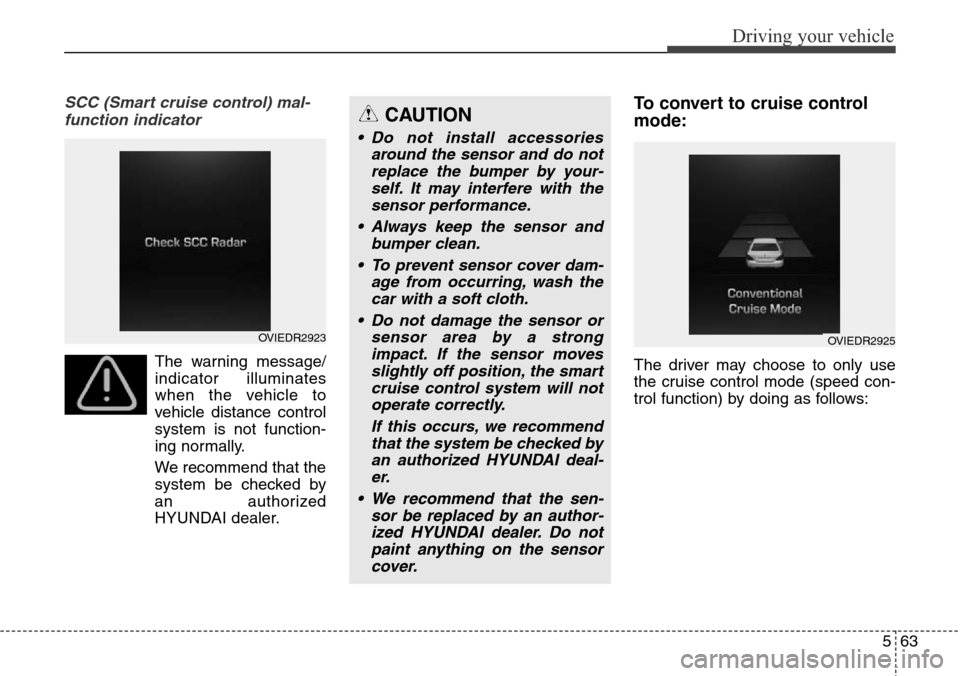
The warning message/
indicator illuminates
when the vehicle to
vehicle distance control
system is not function-
ing normally.
We recommend that the
system be checked by
an authorized
HYUNDAI dealer.
To convert to cruise control
mode:
The driver may choose to only use
the cruise control mode (speed con-
trol function) by doing as follows:
CAUTION
• Do not install accessories
around the sensor and do not
replace the bumper by your-
self. It may interfere with the
sensor performance.
• Always keep the sensor and
bumper clean.
• To prevent sensor cover dam-
age from occurring, wash the
car with a soft cloth.
• Do not damage the sensor or
sensor area by a strong
impact. If the sensor moves
slightly off position, the smart
cruise control system will not
operate correctly.
If this occurs, we recommend
that the system be checked by
an authorized HYUNDAI deal-
er.
• We recommend that the sen-
sor be replaced by an author-
ized HYUNDAI dealer. Do not
paint anything on the sensor
cover.
OVIEDR2923OVIEDR2925
Page 325 of 483
Driving your vehicle
64 5
1.Turn the smart cruise control sys-
tem on (the cruise indicator light
will be on but the system will not be
activated).
2.Pull the distance to distance switch
for more than 2 seconds.
3.Choose between "Smart cruise
control(SCC) mode" and "Cruise
control(CC) mode".Limitations of the system
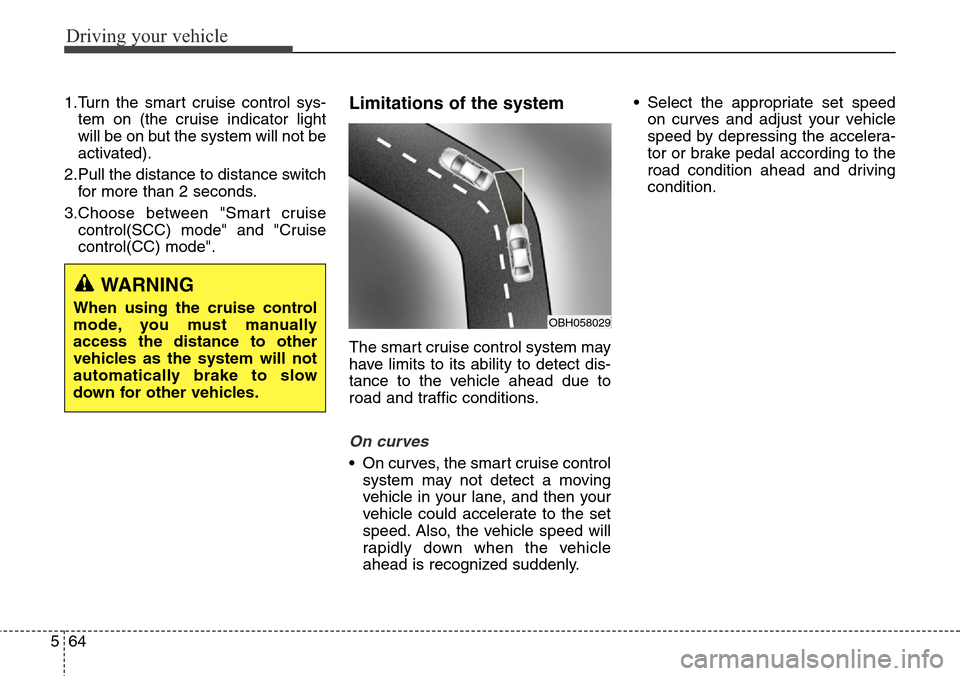
The smart cruise control system may
have limits to its ability to detect dis-
tance to the vehicle ahead due to
road and traffic conditions.
On curves
• On curves, the smart cruise control
system may not detect a moving
vehicle in your lane, and then your
vehicle could accelerate to the set
speed. Also, the vehicle speed will
rapidly down when the vehicle
ahead is recognized suddenly.• Select the appropriate set speed
on curves and adjust your vehicle
speed by depressing the accelera-
tor or brake pedal according to the
road condition ahead and driving
condition.
WARNING
When using the cruise control
mode, you must manually
access the distance to other
vehicles as the system will not
automatically brake to slow
down for other vehicles.OBH058029
Page 326 of 483
565
Driving your vehicle
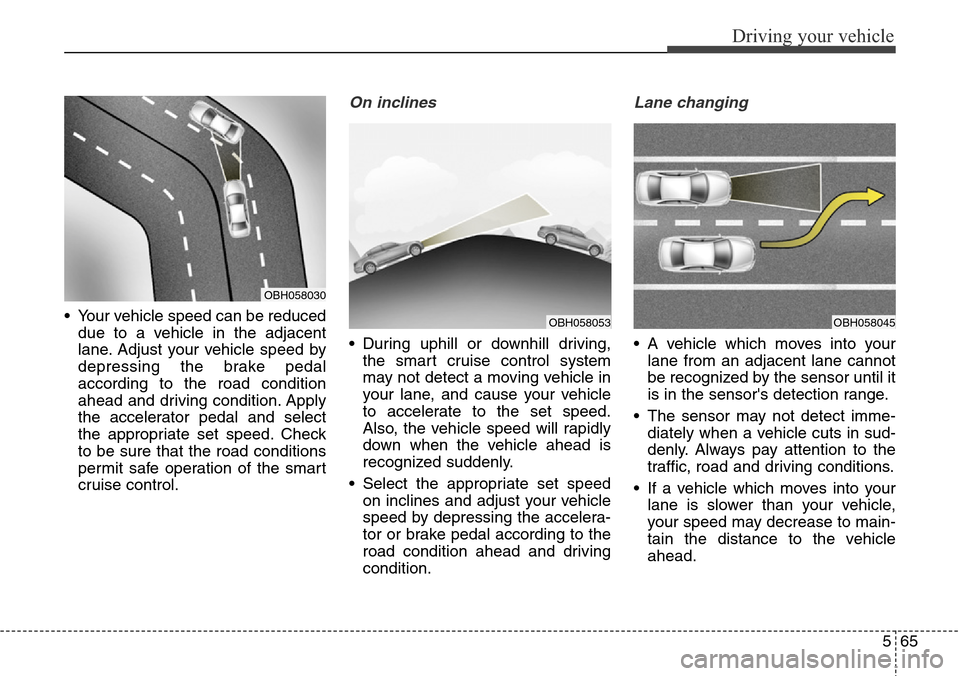
• Your vehicle speed can be reduced
due to a vehicle in the adjacent
lane. Adjust your vehicle speed by
depressing the brake pedal
according to the road condition
ahead and driving condition. Apply
the accelerator pedal and select
the appropriate set speed. Check
to be sure that the road conditions
permit safe operation of the smart
cruise control.
On inclines
• During uphill or downhill driving,
the smart cruise control system
may not detect a moving vehicle in
your lane, and cause your vehicle
to accelerate to the set speed.
Also, the vehicle speed will rapidly
down when the vehicle ahead is
recognized suddenly.
• Select the appropriate set speed
on inclines and adjust your vehicle
speed by depressing the accelera-
tor or brake pedal according to the
road condition ahead and driving
condition.
Lane changing
• A vehicle which moves into your
lane from an adjacent lane cannot
be recognized by the sensor until it
is in the sensor's detection range.
• The sensor may not detect imme-
diately when a vehicle cuts in sud-
denly. Always pay attention to the
traffic, road and driving conditions.
• If a vehicle which moves into your
lane is slower than your vehicle,
your speed may decrease to main-
tain the distance to the vehicle
ahead.
OBH058053
OBH058030
OBH058045
Page 329 of 483
Driving your vehicle
68 5
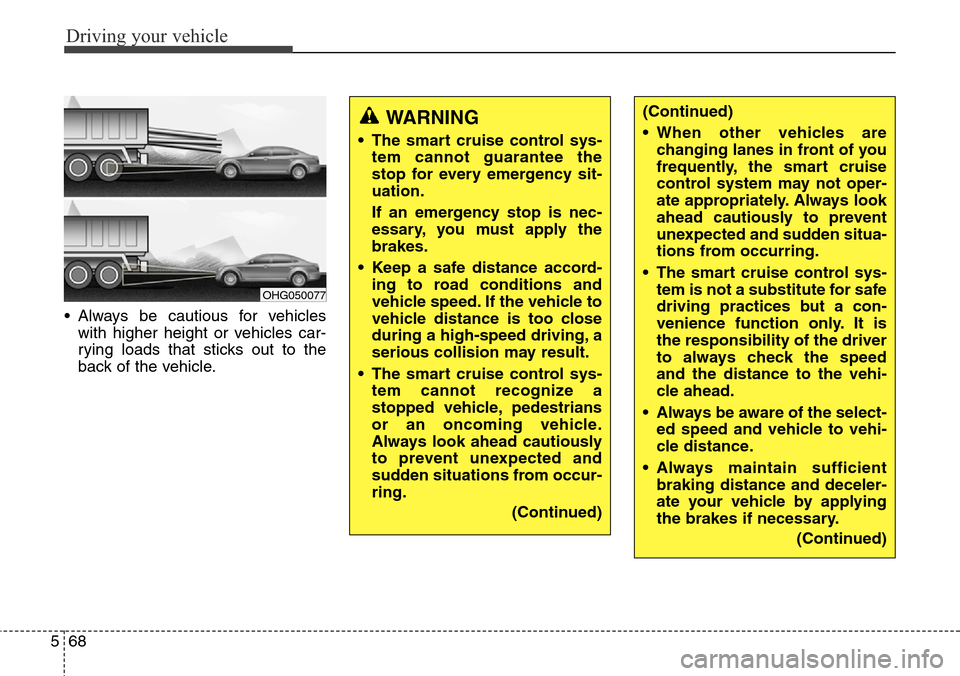
• Always be cautious for vehicles
with higher height or vehicles car-
rying loads that sticks out to the
back of the vehicle.
OHG050077
WARNING
• The smart cruise control sys-
tem cannot guarantee the
stop for every emergency sit-
uation.
If an emergency stop is nec-
essary, you must apply the
brakes.
• Keep a safe distance accord-
ing to road conditions and
vehicle speed. If the vehicle to
vehicle distance is too close
during a high-speed driving, a
serious collision may result.
• The smart cruise control sys-
tem cannot recognize a
stopped vehicle, pedestrians
or an oncoming vehicle.
Always look ahead cautiously
to prevent unexpected and
sudden situations from occur-
ring.
(Continued)
(Continued)
• When other vehicles are
changing lanes in front of you
frequently, the smart cruise
control system may not oper-
ate appropriately. Always look
ahead cautiously to prevent
unexpected and sudden situa-
tions from occurring.
• The smart cruise control sys-
tem is not a substitute for safe
driving practices but a con-
venience function only. It is
the responsibility of the driver
to always check the speed
and the distance to the vehi-
cle ahead.
• Always be aware of the select-
ed speed and vehicle to vehi-
cle distance.
• Always maintain sufficient
braking distance and deceler-
ate your vehicle by applying
the brakes if necessary.
(Continued)
Page 330 of 483
569
Driving your vehicle
CAUTION
The smart cruise control system
may not operate temporarily
due to electrical interference.
(Continued)
• As the smart cruise control
system may not recognize
complex driving situations,
always pay attention to driv-
ing conditions and control
your vehicle speed.
• For safe operation, carefully
read and follow the instruc-
tions in this manual before
use.
Page 444 of 483
755
Maintenance
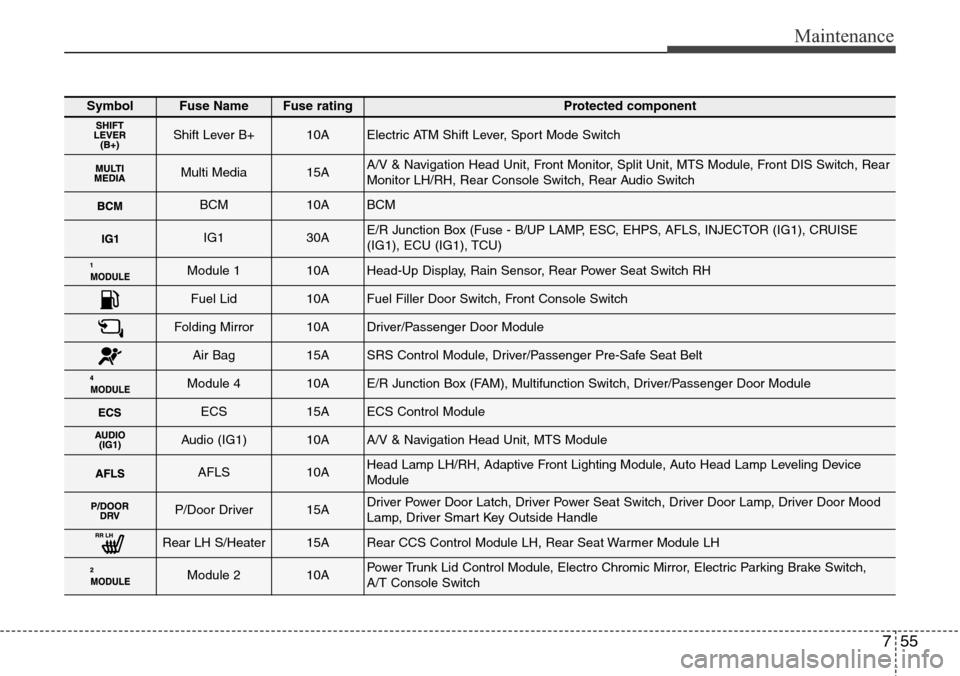
SymbolFuse NameFuse ratingProtected component
Shift Lever B+10AElectric ATM Shift Lever, Sport Mode Switch
Multi Media15AA/V & Navigation Head Unit, Front Monitor, Split Unit, MTS Module, Front DIS Switch, Rear
Monitor LH/RH, Rear Console Switch, Rear Audio Switch
BCM10ABCM
IG130AE/R Junction Box (Fuse - B/UP LAMP, ESC, EHPS, AFLS, INJECTOR (IG1), CRUISE
(IG1), ECU (IG1), TCU)
Module 110AHead-Up Display, Rain Sensor, Rear Power Seat Switch RH
Fuel Lid10AFuel Filler Door Switch, Front Console Switch
Folding Mirror10ADriver/Passenger Door Module
Air Bag15ASRS Control Module, Driver/Passenger Pre-Safe Seat Belt
Module 410AE/R Junction Box (FAM), Multifunction Switch, Driver/Passenger Door Module
ECS15AECS Control Module
Audio (IG1)10AA/V & Navigation Head Unit, MTS Module
AFLS10AHead Lamp LH/RH, Adaptive Front Lighting Module, Auto Head Lamp Leveling Device
Module
P/Door Driver15ADriver Power Door Latch, Driver Power Seat Switch, Driver Door Lamp, Driver Door Mood
Lamp, Driver Smart Key Outside Handle
Rear LH S/Heater15ARear CCS Control Module LH, Rear Seat Warmer Module LH
Module 210APower Trunk Lid Control Module, Electro Chromic Mirror, Electric Parking Brake Switch,
A/T Console Switch
Page 452 of 483
763
Maintenance
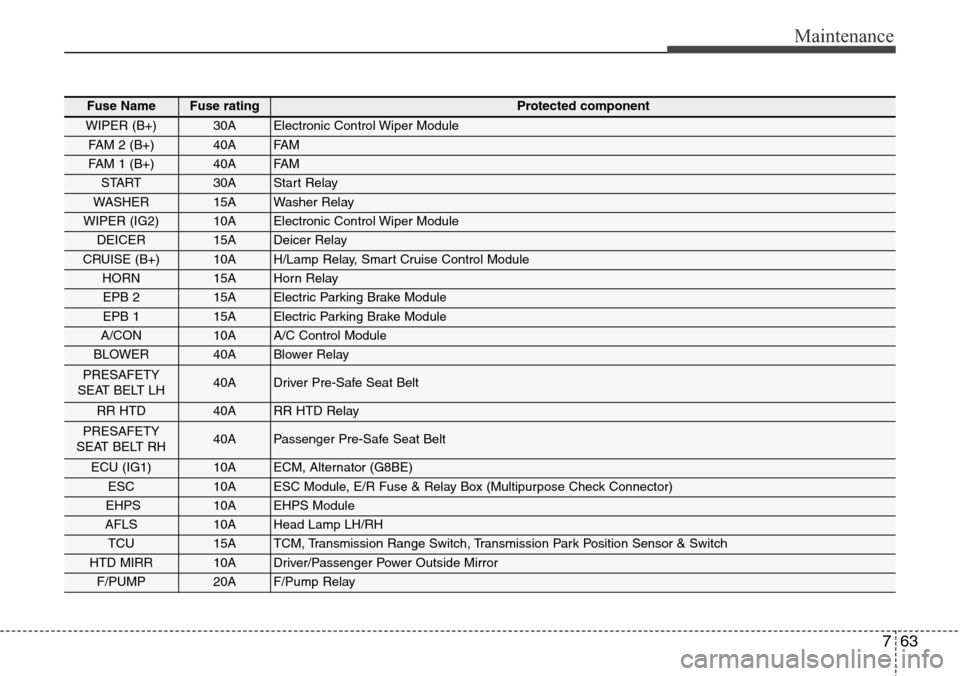
Fuse NameFuse ratingProtected component
WIPER (B+)30AElectronic Control Wiper Module
FAM 2 (B+)40AFA M
FAM 1 (B+)40AFA M
START30AStart Relay
WASHER15AWasher Relay
WIPER (IG2)10AElectronic Control Wiper Module
DEICER15ADeicer Relay
CRUISE (B+)10AH/Lamp Relay, Smart Cruise Control Module
HORN15AHorn Relay
EPB 215AElectric Parking Brake Module
EPB 115AElectric Parking Brake Module
A/CON10AA/C Control Module
BLOWER40ABlower Relay
PRESAFETY
SEAT BELT LH40ADriver Pre-Safe Seat Belt
RR HTD40ARR HTD Relay
PRESAFETY
SEAT BELT RH40APassenger Pre-Safe Seat Belt
ECU (IG1)10AECM, Alternator (G8BE)
ESC10AESC Module, E/R Fuse & Relay Box (Multipurpose Check Connector)
EHPS10AEHPS Module
AFLS10AHead Lamp LH/RH
TCU15ATCM, Transmission Range Switch, Transmission Park Position Sensor & Switch
HTD MIRR10ADriver/Passenger Power Outside Mirror
F/PUMP20AF/Pump Relay
Page 453 of 483
Maintenance
64 7
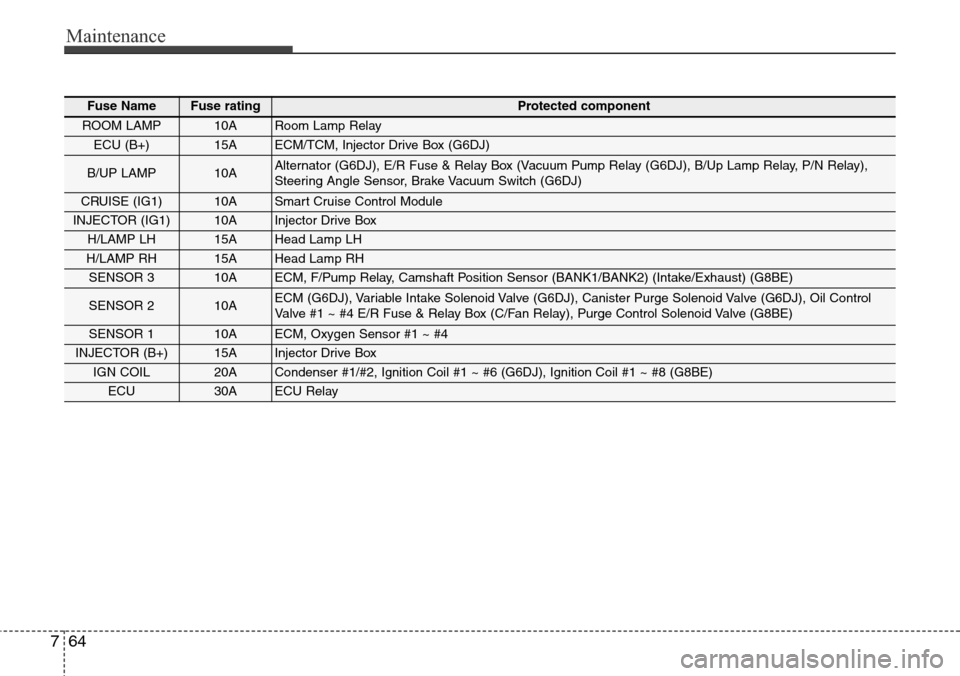
Fuse NameFuse ratingProtected component
ROOM LAMP10ARoom Lamp Relay
ECU (B+)15AECM/TCM, Injector Drive Box (G6DJ)
B/UP LAMP10AAlternator (G6DJ), E/R Fuse & Relay Box (Vacuum Pump Relay (G6DJ), B/Up Lamp Relay, P/N Relay),
Steering Angle Sensor, Brake Vacuum Switch (G6DJ)
CRUISE (IG1)10ASmart Cruise Control Module
INJECTOR (IG1)10AInjector Drive Box
H/LAMP LH15AHead Lamp LH
H/LAMP RH15AHead Lamp RH
SENSOR 310AECM, F/Pump Relay, Camshaft Position Sensor (BANK1/BANK2) (Intake/Exhaust) (G8BE)
SENSOR 210AECM (G6DJ), Variable Intake Solenoid Valve (G6DJ), Canister Purge Solenoid Valve (G6DJ), Oil Control
Valve #1 ~ #4 E/R Fuse & Relay Box (C/Fan Relay), Purge Control Solenoid Valve (G8BE)
SENSOR 110AECM, Oxygen Sensor #1 ~ #4
INJECTOR (B+)15AInjector Drive Box
IGN COIL20ACondenser #1/#2, Ignition Coil #1 ~ #6 (G6DJ), Ignition Coil #1 ~ #8 (G8BE)
ECU30AECU Relay