Seat Hyundai Equus 2015 Manual Online
[x] Cancel search | Manufacturer: HYUNDAI, Model Year: 2015, Model line: Equus, Model: Hyundai Equus 2015Pages: 483, PDF Size: 13.26 MB
Page 288 of 483
527
Driving your vehicle
✽NOTICE
• For your safety, you can engage
the EPB even though the engine
start/stop button is in the OFF
position, but you cannot release it.
• For your safety, press the brake
pedal and release the parking
brake manually with EPB switch
when you drive downhill or back
up the vehicle.
EPB (electric parking brake) may be
automatically applied when:
• The EPB is overheated
• Requested by other systems
• The engine is turned off with the
EPB applied
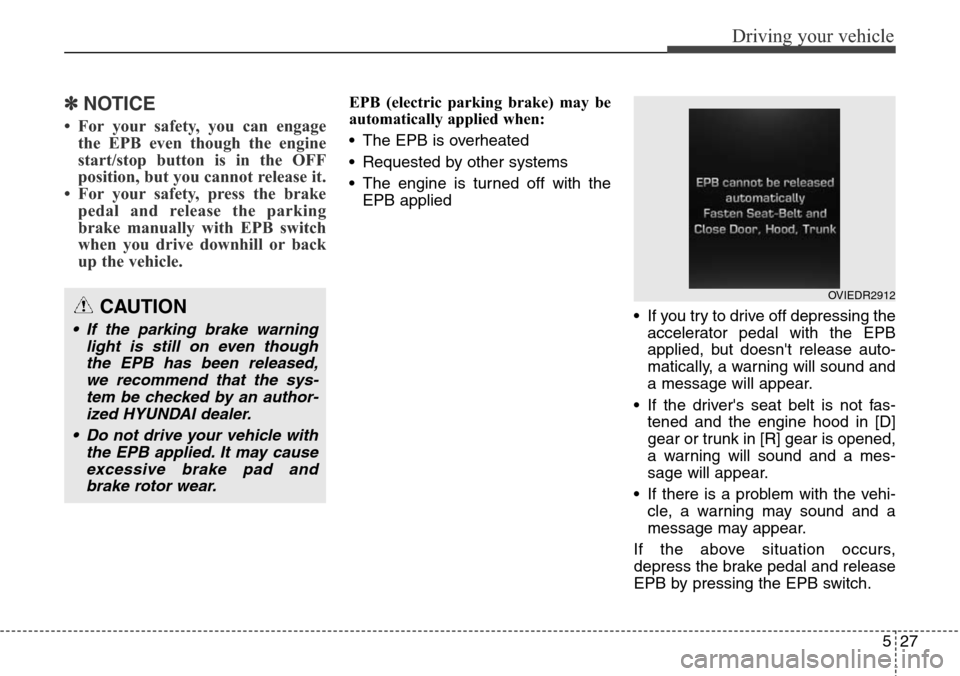
• If you try to drive off depressing the
accelerator pedal with the EPB
applied, but doesn't release auto-
matically, a warning will sound and
a message will appear.
• If the driver's seat belt is not fas-
tened and the engine hood in [D]
gear or trunk in [R] gear is opened,
a warning will sound and a mes-
sage will appear.
• If there is a problem with the vehi-
cle, a warning may sound and a
message may appear.
If the above situation occurs,
depress the brake pedal and release
EPB by pressing the EPB switch.
CAUTION
• If the parking brake warning
light is still on even though
the EPB has been released,
we recommend that the sys-
tem be checked by an author-
ized HYUNDAI dealer.
• Do not drive your vehicle with
the EPB applied. It may cause
excessive brake pad and
brake rotor wear.
OVIEDR2912
Page 291 of 483
Driving your vehicle
30 5
When the EPB (electric parking
brake) is not released
If the EPB does not release normal-
ly, we recommend that you contact
an authorized HYUNDAI dealer by
loading the vehicle on a flatbed tow
truck and have the system checked.
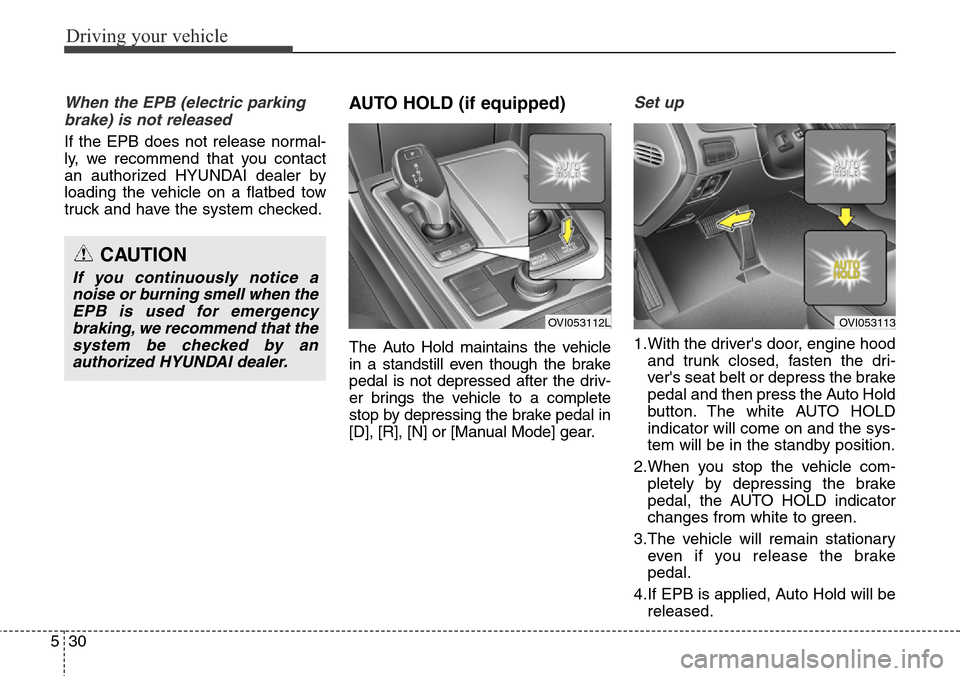
AUTO HOLD (if equipped)
The Auto Hold maintains the vehicle
in a standstill even though the brake
pedal is not depressed after the driv-
er brings the vehicle to a complete
stop by depressing the brake pedal in
[D], [R], [N] or [Manual Mode] gear.
Set up
1.With the driver's door, engine hood
and trunk closed, fasten the dri-
ver's seat belt or depress the brake
pedal and then press the Auto Hold
button. The white AUTO HOLD
indicator will come on and the sys-
tem will be in the standby position.
2.When you stop the vehicle com-
pletely by depressing the brake
pedal, the AUTO HOLD indicator
changes from white to green.
3.The vehicle will remain stationary
even if you release the brake
pedal.
4.If EPB is applied, Auto Hold will be
released.
CAUTION
If you continuously notice a
noise or burning smell when the
EPB is used for emergency
braking, we recommend that the
system be checked by an
authorized HYUNDAI dealer.
OVI053112LOVI053113
Page 292 of 483
531
Driving your vehicle
Leaving
If you press the accelerator pedal
with the shift lever in R (Reverse), D
(Drive) or manual mode, the Auto
Hold will be released automatically
and the vehicle will start to move.
The indicator changes from green to
white.
If you want to release it manually, pull
the EPB switch while depressing the
brake pedal. The AUTO HOLD indi-
cator changes from green to white
and the system changes to the
standby position.
For your safety, release the AUTO
HOLD operation manually if the vehi-
cle ahead is too close.Cancel
To cancel the Auto Hold operation,
press the Auto Hold switch while
depressing the brake pedal. The
AUTO HOLD indicator will go out.
✽NOTICE
• The Auto Hold does not operate
when:
- The driver's seat belt is unfas-
tened and driver's door is opened
- The engine hood is opened
- The trunk is opened
- The shift lever is in P (Park)
- The EPB is applied
• For your safety, the Auto Hold
automatically switches to EPB in
such cases:
- The driver's seat belt is unfas-
tened and driver's door is opened
- The engine hood is opened in [D]
gear
- The trunk is opened in [R] gear
- The vehicle is in a standstill for
more than 10 minutes
- The vehicle is standing on a steep
slope
- The vehicle moved several times
In these cases, the brake warning
light comes on, the AUTO HOLD
indicator changes from green to
white, and a warning sounds and a
message will appear to inform you
that EPB has been automatically
engaged.
(Continued)
WARNING
When driving off from Auto
Hold by depressing the acceler-
ator pedal, always check the
surrounding area near your
vehicle.
Slowly depress the accelerator
pedal for a smooth launch.
CAUTION
For your safety, cancel the Auto
Hold operation when:
• Driving downhill.
• Driving slowly, parking, or
backing up.
• Washing the vehicle in an
automatic car wash.
Page 294 of 483
533
Driving your vehicle
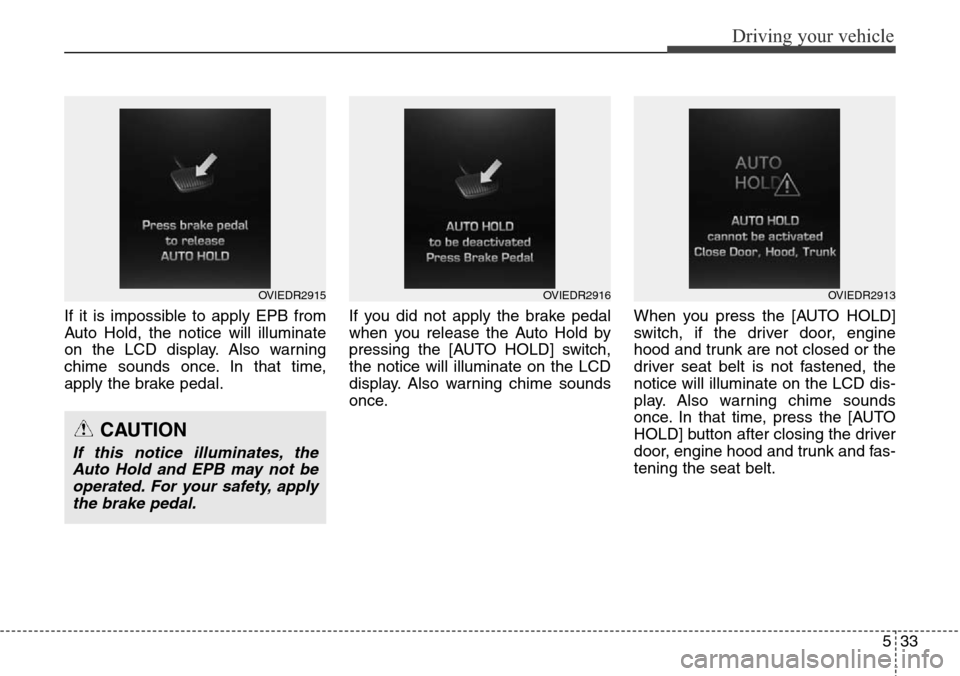
If it is impossible to apply EPB from
Auto Hold, the notice will illuminate
on the LCD display. Also warning
chime sounds once. In that time,
apply the brake pedal.If you did not apply the brake pedal
when you release the Auto Hold by
pressing the [AUTO HOLD] switch,
the notice will illuminate on the LCD
display. Also warning chime sounds
once.When you press the [AUTO HOLD]
switch, if the driver door, engine
hood and trunk are not closed or the
driver seat belt is not fastened, the
notice will illuminate on the LCD dis-
play. Also warning chime sounds
once. In that time, press the [AUTO
HOLD] button after closing the driver
door, engine hood and trunk and fas-
tening the seat belt.
OVIEDR2915OVIEDR2916
CAUTION
If this notice illuminates, the
Auto Hold and EPB may not be
operated. For your safety, apply
the brake pedal.
OVIEDR2913
Page 333 of 483
Driving your vehicle
72 5
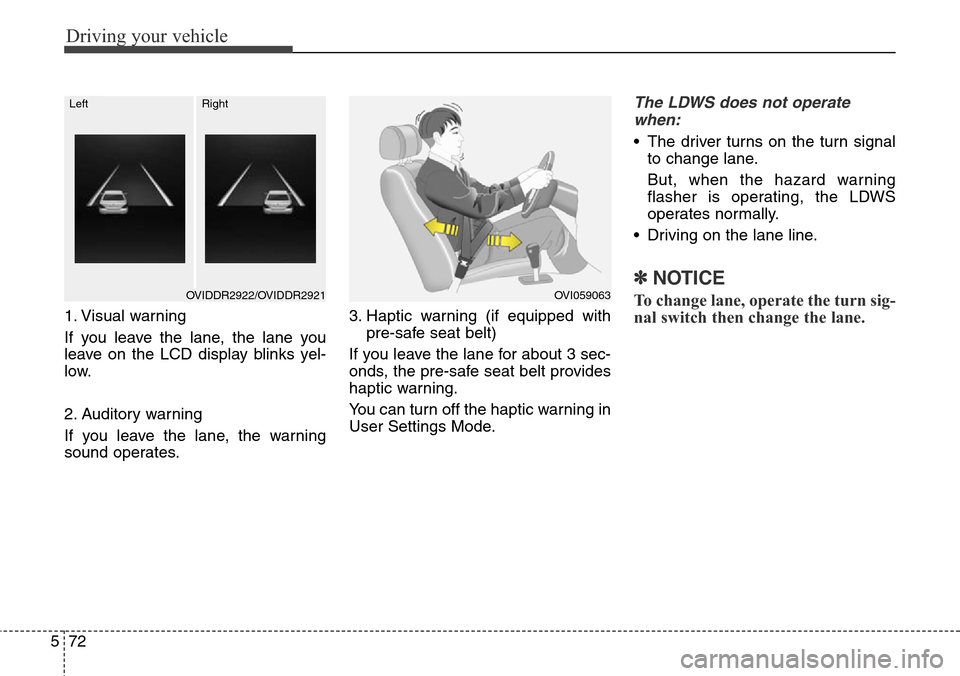
1. Visual warning
If you leave the lane, the lane you
leave on the LCD display blinks yel-
low.
2. Auditory warning
If you leave the lane, the warning
sound operates.3. Haptic warning (if equipped with
pre-safe seat belt)
If you leave the lane for about 3 sec-
onds, the pre-safe seat belt provides
haptic warning.
You can turn off the haptic warning in
User Settings Mode.
The LDWS does not operate
when:
• The driver turns on the turn signal
to change lane.
But, when the hazard warning
flasher is operating, the LDWS
operates normally.
• Driving on the lane line.
✽NOTICE
To change lane, operate the turn sig-
nal switch then change the lane.OVI059063OVIDDR2922/OVIDDR2921
LeftRight
Page 336 of 483
575
Driving your vehicle
AVSM detects the distance from the
vehicle ahead with the sensor, to
warn you before collision and protect
you in certain hazardous situations
by using warning message, warning
sound and seat belt vibration (if
equipped).
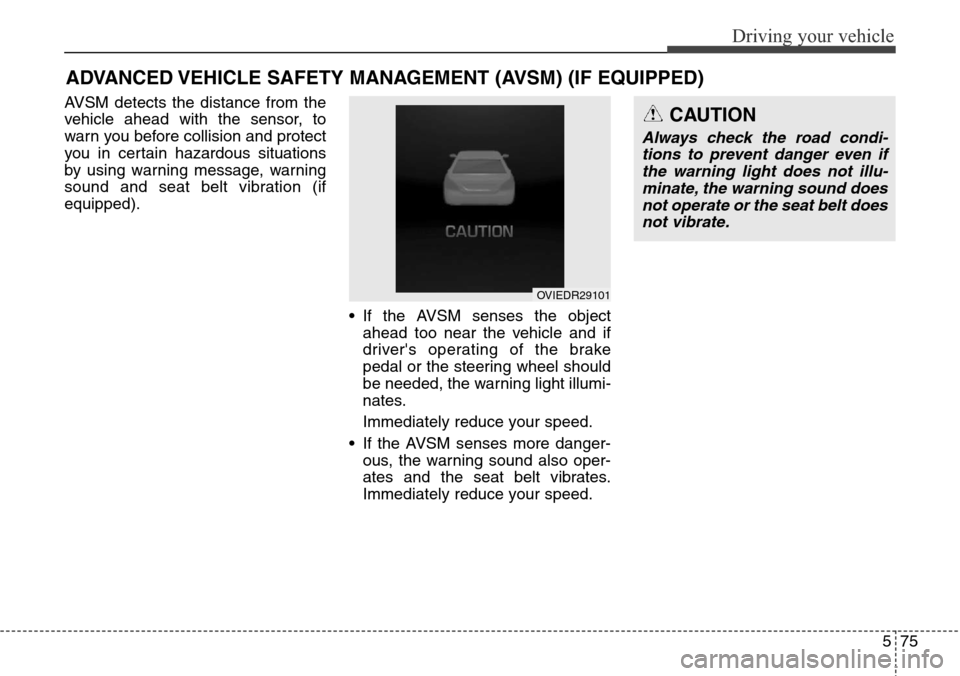
• If the AVSM senses the object
ahead too near the vehicle and if
driver's operating of the brake
pedal or the steering wheel should
be needed, the warning light illumi-
nates.
Immediately reduce your speed.
• If the AVSM senses more danger-
ous, the warning sound also oper-
ates and the seat belt vibrates.
Immediately reduce your speed.
ADVANCED VEHICLE SAFETY MANAGEMENT (AVSM) (IF EQUIPPED)
CAUTION
Always check the road condi-
tions to prevent danger even if
the warning light does not illu-
minate, the warning sound does
not operate or the seat belt does
not vibrate.
OVIEDR29101
Page 337 of 483
Driving your vehicle
76 5
Brake operating
• If the AVSM senses the collision,
the brake system comes to stan-
dard mode to react promptly when
the driver operates the brake
pedal.
• If the driver releases the accelera-
tor after warning in hazardous situ-
ations, the AVSM automatically
brakes the vehicle gently.
• If the driver hits the brake to reduce
vehicle speed, the brake assistant
system operates to raise efficiency
of braking.
• If danger disappears, if the driver
depresses the accelerator or if the
driver releases the brake pedal,
the brake operating stop.
Seat belt operating
The seat belt tightens when the vehi-
cle senses a collision.
WARNING
The AVSM does not stop the
vehicle completely and does
not avoid collision. Always look
ahead cautiously to prevent
unexpected and sudden situa-
tions from occurring.
WARNING
The AVSM operates according
to the distance from the vehicle
ahead, relative velocity and dri-
ver's operation of the brake or
accelerator pedal. Do not drive
dangerously to operate the
AVSM.
CAUTION
• When the AVSM is controlled
or turned off, make sure that
the vehicle is stopped.
• When the engine is running by
turning on, the AVSM is auto-
matically turned on. If is not
required, select the AVSM OFF
in USM.
• If the AVSM ON is selected in
USM (User Settings Mode), if
the ESC is cancelled by press-
ing the ESC OFF button, the
AVSM function is automatical-
ly cancelled. And then it is
impossible to control the
AVSM by manually.
Page 378 of 483
619
What to do in an emergency
10. Loosen the wheel nuts and
remove them with your fingers.
Slide the wheel off the studs and
lay it flat so it cannot roll away. To
put the wheel on the hub, pick up
the spare tire, line up the holes
with the studs and slide the
wheel onto them. If this is diffi-
cult, tip the wheel slightly and get
the top hole in the wheel lined up
with the top stud. Then jiggle the
wheel back and forth until the
wheel can be slid over the other
studs.11. To reinstall the wheel, hold it on
the studs, put the wheel nuts on
the studs and tighten them finger
tight. The nuts should be installed
with their tapered small diameter
ends directed inward. Jiggle the
tire to be sure it is completely
seated, then tighten the nuts as
much as possible with your fin-
gers again.
12. Lower the vehicle to the ground
by turning the wheel nut wrench
counterclockwise.
WARNING
Wheels may have sharp edges.
Handle them carefully to avoid
possible severe injury. Before
putting the wheel into place, be
sure that there is nothing on the
hub or wheel (such as mud, tar,
gravel, etc.) that interferes with
the wheel from fitting solidly
against the hub.
If there is, remove it. If there is
not good contact on the mount-
ing surface between the wheel
and hub, the wheel nuts could
come loose and cause the loss
of a wheel. Loss of a wheel may
result in loss of control of the
vehicle. This may cause serious
injury or death.
Page 379 of 483
What to do in an emergency
20 6
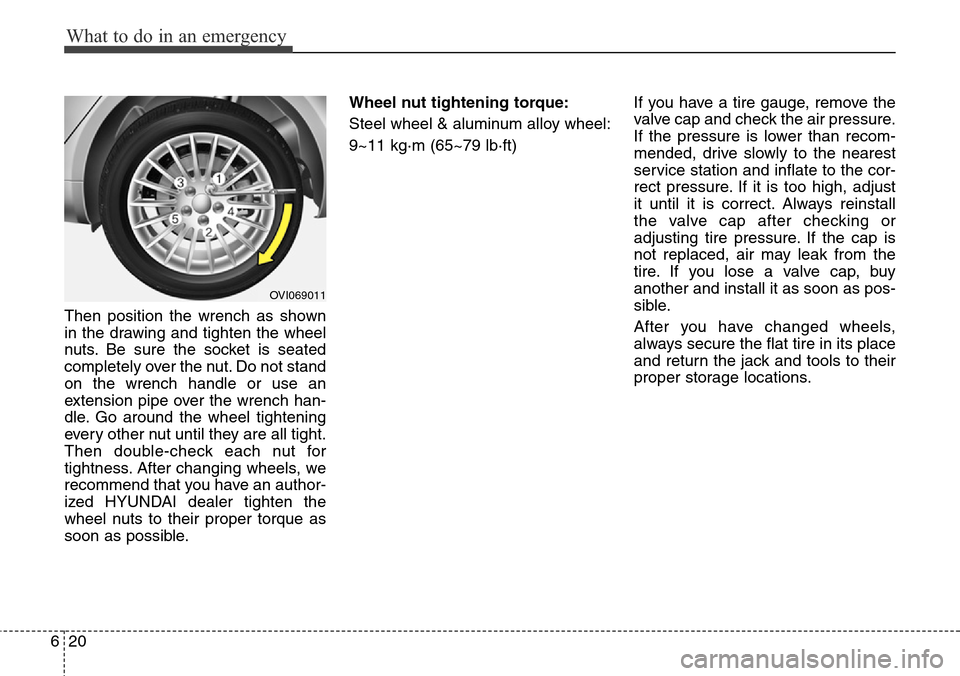
Then position the wrench as shown
in the drawing and tighten the wheel
nuts. Be sure the socket is seated
completely over the nut. Do not stand
on the wrench handle or use an
extension pipe over the wrench han-
dle. Go around the wheel tightening
every other nut until they are all tight.
Then double-check each nut for
tightness. After changing wheels, we
recommend that you have an author-
ized HYUNDAI dealer tighten the
wheel nuts to their proper torque as
soon as possible.Wheel nut tightening torque:
Steel wheel & aluminum alloy wheel:
9~11 kg·m (65~79 lb·ft)If you have a tire gauge, remove the
valve cap and check the air pressure.
If the pressure is lower than recom-
mended, drive slowly to the nearest
service station and inflate to the cor-
rect pressure. If it is too high, adjust
it until it is correct. Always reinstall
the valve cap after checking or
adjusting tire pressure. If the cap is
not replaced, air may leak from the
tire. If you lose a valve cap, buy
another and install it as soon as pos-
sible.
After you have changed wheels,
always secure the flat tire in its place
and return the jack and tools to their
proper storage locations.
OVI069011
Page 444 of 483
755
Maintenance
SymbolFuse NameFuse ratingProtected component
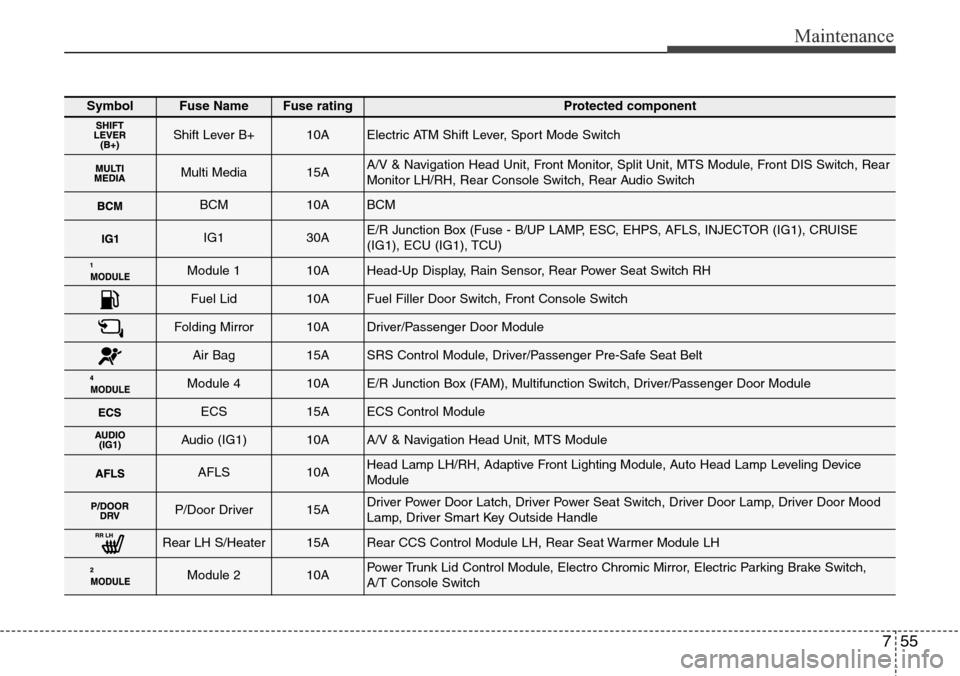
Shift Lever B+10AElectric ATM Shift Lever, Sport Mode Switch
Multi Media15AA/V & Navigation Head Unit, Front Monitor, Split Unit, MTS Module, Front DIS Switch, Rear
Monitor LH/RH, Rear Console Switch, Rear Audio Switch
BCM10ABCM
IG130AE/R Junction Box (Fuse - B/UP LAMP, ESC, EHPS, AFLS, INJECTOR (IG1), CRUISE
(IG1), ECU (IG1), TCU)
Module 110AHead-Up Display, Rain Sensor, Rear Power Seat Switch RH
Fuel Lid10AFuel Filler Door Switch, Front Console Switch
Folding Mirror10ADriver/Passenger Door Module
Air Bag15ASRS Control Module, Driver/Passenger Pre-Safe Seat Belt
Module 410AE/R Junction Box (FAM), Multifunction Switch, Driver/Passenger Door Module
ECS15AECS Control Module
Audio (IG1)10AA/V & Navigation Head Unit, MTS Module
AFLS10AHead Lamp LH/RH, Adaptive Front Lighting Module, Auto Head Lamp Leveling Device
Module
P/Door Driver15ADriver Power Door Latch, Driver Power Seat Switch, Driver Door Lamp, Driver Door Mood
Lamp, Driver Smart Key Outside Handle
Rear LH S/Heater15ARear CCS Control Module LH, Rear Seat Warmer Module LH
Module 210APower Trunk Lid Control Module, Electro Chromic Mirror, Electric Parking Brake Switch,
A/T Console Switch