cooling Hyundai Equus 2016 Owner's Manual
[x] Cancel search | Manufacturer: HYUNDAI, Model Year: 2016, Model line: Equus, Model: Hyundai Equus 2016Pages: 477, PDF Size: 16.25 MB
Page 16 of 477
F16
LCD display .........................3-69
LCD Modes ...............................3-69
Trip Computer Mode..............3-70
ASCC/LDWS Mode .................3-70
A/V Mode.................................3-70
Turn By Turn (TBT) Mode....3-70
Information Mode ..................3-71
User Settings Mode ...............3-72
Warning Messages.................3-78
Trip computer .....................3-86
Overview ...................................3-86
Trip A/B ....................................3-86
Fuel Economy..........................3-87
Warning and indicator
lights ....................................3-89
Warning lights .........................3-89
Indicator Lights .......................3-96
Head Up Display (HUD)...3-100
Description .............................3-100
Head Up Display ON/OFF ..3-101
Head Up Display
Information ............................3-101
Head Up Display Setting ....3-101
Parking assist system......3-102
Operation of the parking
assist system .........................3-103
Inoperable conditions of the
Parking Assist System ........3-105
Self-diagnosis .......................3-106
Rearview camera .............3-107
Multi-view camera
system ...............................3-108
Lighting..............................3-109
Battery saver function .......3-109
Headlamp escort function ..3-109
Lighting control ....................3-110
High beam operation...........3-111
Turn signals and lane
change signals ......................3-112
Front fog light.......................3-113
Daytime running light .........3-113 Headlight leveling device ...3-113
AFLS (Adaptive Front
Lighting System)...................3-114
Wipers and washer ..........3-115
Windshield wipers ................3-115
Windshield washer ...............3-117
Interior light......................3-118
Front........................................3-118
Rear .........................................3-119
Trunk room lamp ..................3-119
Door courtesy lamp .............3-119
Glove box lamp .....................3-120
Vanity mirror lamp ...............3-120
Welcome system ..............3-121
Puddle lamp ...........................3-121
Headlamp................................3-121
Interior light .........................3-121
Defroster ...........................3-122
Rear window defroster ......3-122
Front wiper deicer ...............3-122
Automatic climate control
system ...............................3-123
Automatic heating and air
conditioning ...........................3-124
Manual air heating and
cooling ....................................3-126
System operation .................3-135
Climate control air filter .....3-136
Checking the amount of air
conditioner refrigerant and
compressor lubricant ..........3-137
Windshield defrosting and
defogging ..........................3-138
Defogging logic.....................3-139
Storage compartments ....3-141
Center console storage .....3-141
Glove box ...............................3-141
Sunglass holder ....................3-142
Rear console storage ..........3-142
Cool and warm box ..............3-143
Page 37 of 477
The climate control system seatis a supplementary cooling and
warming system. Operate the
climate control system seat after
turning ON the climate control
system. Operate the climate
control seat for a prolonged
period of time without turning
ON the climate control system
may reduce performance of the
climate control system seat.
When cleaning the seats, do not use an organic solvent such as
thinner, benzene, alcohol and
gasoline. Such solvent may
damage the seat surface.
Do not spill liquid such as water or beverages over the front seat
cushions and seatbacks.
Otherwise, the air vent holes
may be blocked and prevent the
system from working properly.
Do not leave materials, such as plastic bags or newspapers,
under the seats. The air vent
hole may not properly operate,
because the air intake is
blocked.
When the air vent hole does not operate, restart the vehicle. If a
problem persists, we recom-
mend that the system be
inspected by an authorized
EQUUS dealer.
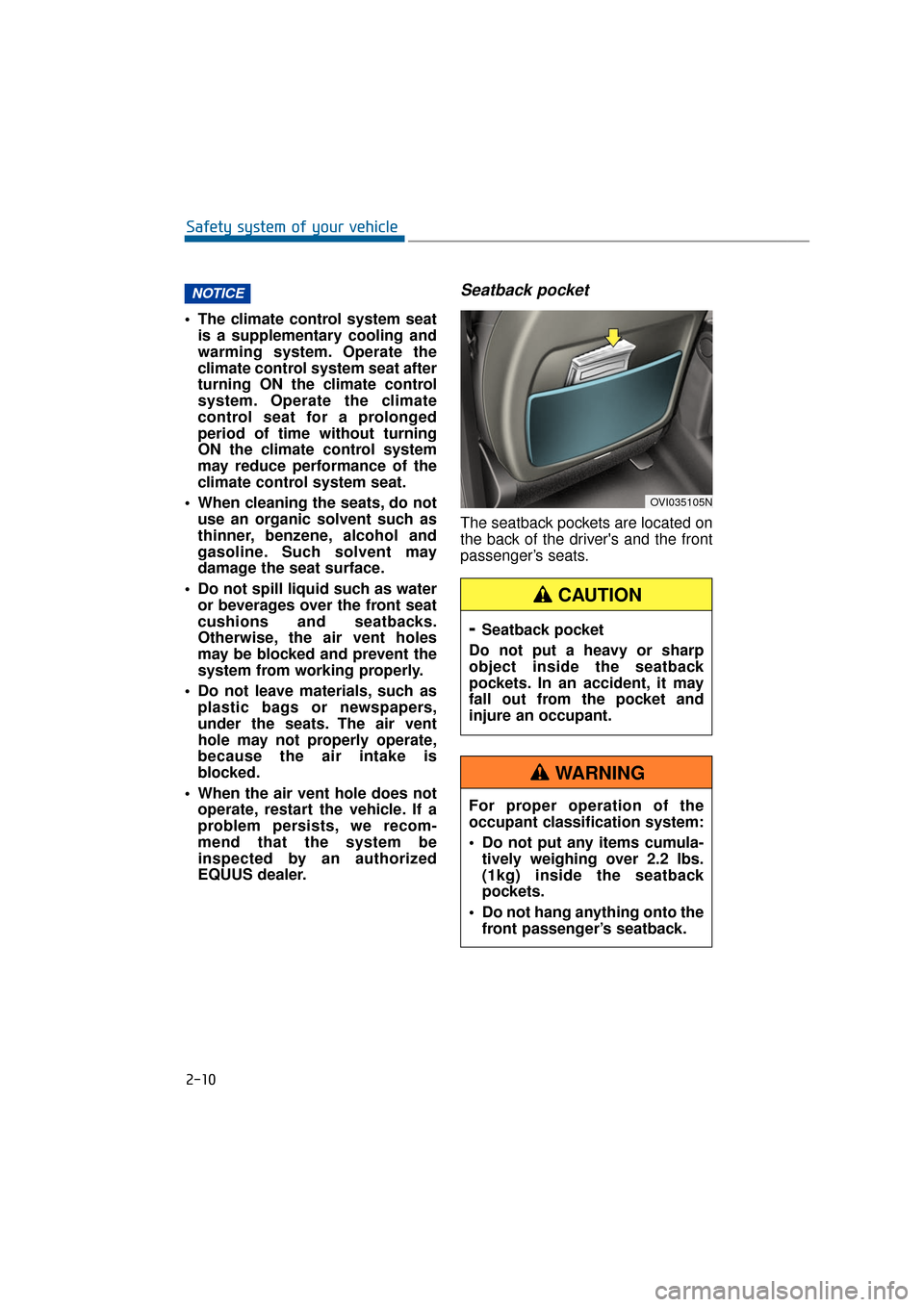
Seatback pocket
The seatback pockets are located on
the back of the driver's and the front
passenger’s seats.
NOTICE
2-10
Safety system of your vehicle
OVI035105N
- Seatback pocket
Do not put a heavy or sharp
object inside the seatback
pockets. In an accident, it may
fall out from the pocket and
injure an occupant.
CAUTION
For proper operation of the
occupant classification system:
Do not put any items cumula- tively weighing over 2.2 lbs.
(1kg) inside the seatback
pockets.
Do not hang anything onto the front passenger’s seatback.
WARNING
Page 47 of 477
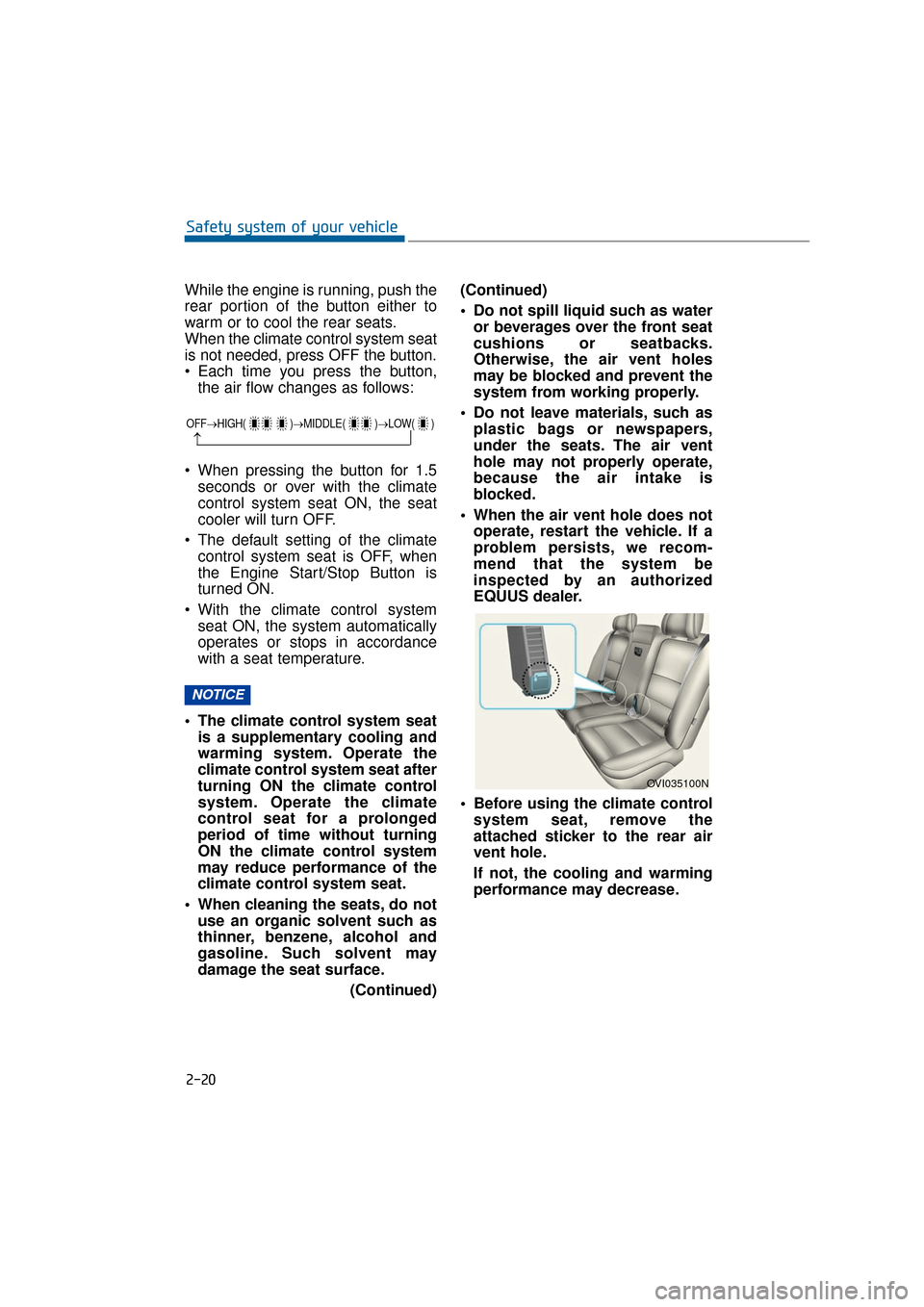
While the engine is running, push the
rear portion of the button either to
warm or to cool the rear seats.
When the climate control system seat
is not needed, press OFF the button.
Each time you press the button,the air flow changes as follows:
When pressing the button for 1.5 seconds or over with the climate
control system seat ON, the seat
cooler will turn OFF.
The default setting of the climate control system seat is OFF, when
the Engine Start/Stop Button is
turned ON.
With the climate control system seat ON, the system automatically
operates or stops in accordance
with a seat temperature.
The climate control system seat is a supplementary cooling and
warming system. Operate the
climate control system seat after
turning ON the climate control
system. Operate the climate
control seat for a prolonged
period of time without turning
ON the climate control system
may reduce performance of the
climate control system seat.
When cleaning the seats, do not use an organic solvent such as
thinner, benzene, alcohol and
gasoline. Such solvent may
damage the seat surface.
(Continued)(Continued)
Do not spill liquid such as water
or beverages over the front seat
cushions or seatbacks.
Otherwise, the air vent holes
may be blocked and prevent the
system from working properly.
Do not leave materials, such as plastic bags or newspapers,
under the seats. The air vent
hole may not properly operate,
because the air intake is
blocked.
When the air vent hole does not operate, restart the vehicle. If a
problem persists, we recom-
mend that the system be
inspected by an authorized
EQUUS dealer.
Before using the climate control system seat, remove the
attached sticker to the rear air
vent hole.
If not, the cooling and warming
performance may decrease.
OVI035100N
NOTICE
2-20
Safety system of your vehicle
OFF→ HIGH( )→ MIDDLE( )→LOW( )
→
Page 100 of 477
Automatic climate control system ...................3-123
Automatic heating and air conditioning ..................3-124
Manual air heating and cooling ................................3-126
System operation ..........................................................3-135
Climate control air filter ..............................................3-136
Checking the amount of air conditioner
refrigerant and compressor lubricant .....................3-137
Windshield defrosting and defogging ............3-138
Defogging logic..............................................................3-139
Storage compartments ......................................3-141
Center console storage ..............................................3-141
Glove box ........................................................................\
3-141
Sunglass holder ............................................................3-142
Rear console storage ...................................................3-142
Cool and warm box.......................................................3-143
Interior features.................................................3-145
Ashtray ........................................................................\
....3-145
Cup holder.......................................................................3\
-146
Sunvisor ........................................................................\
...3-147
Rear vanity mirror ........................................................3-147
Power outlet ...................................................................3-148\
Clock ........................................................................\
.........3-149
Clothes hanger ..............................................................3-150
Bag hanger .....................................................................3-1\
50
Floor mat anchor(s)......................................................3-150
Luggage net (holder) ...................................................3-151
Rear curtain....................................................................3-15\
2
AUX, USB and iPod
®port ...........................................3-153
Page 220 of 477
3-125
Convenient features of your vehicle03
Information
• To turn the automatic operation OFF,select any button among the follow-
ings and press:
- Mode selection button
- Front windshield defrost button(Press the button one more time to
deselect the front windshield
defroster function. The 'AUTO'
sign will illuminate on the infor-
mation display once again.)
- Fan speed control button
The selected function will be con-
trolled manually while other func-
tions operate automatically.
• For your convenience and improved climate control effects, use the
AUTO button and set the tempera-
ture at 73°F (23°C).
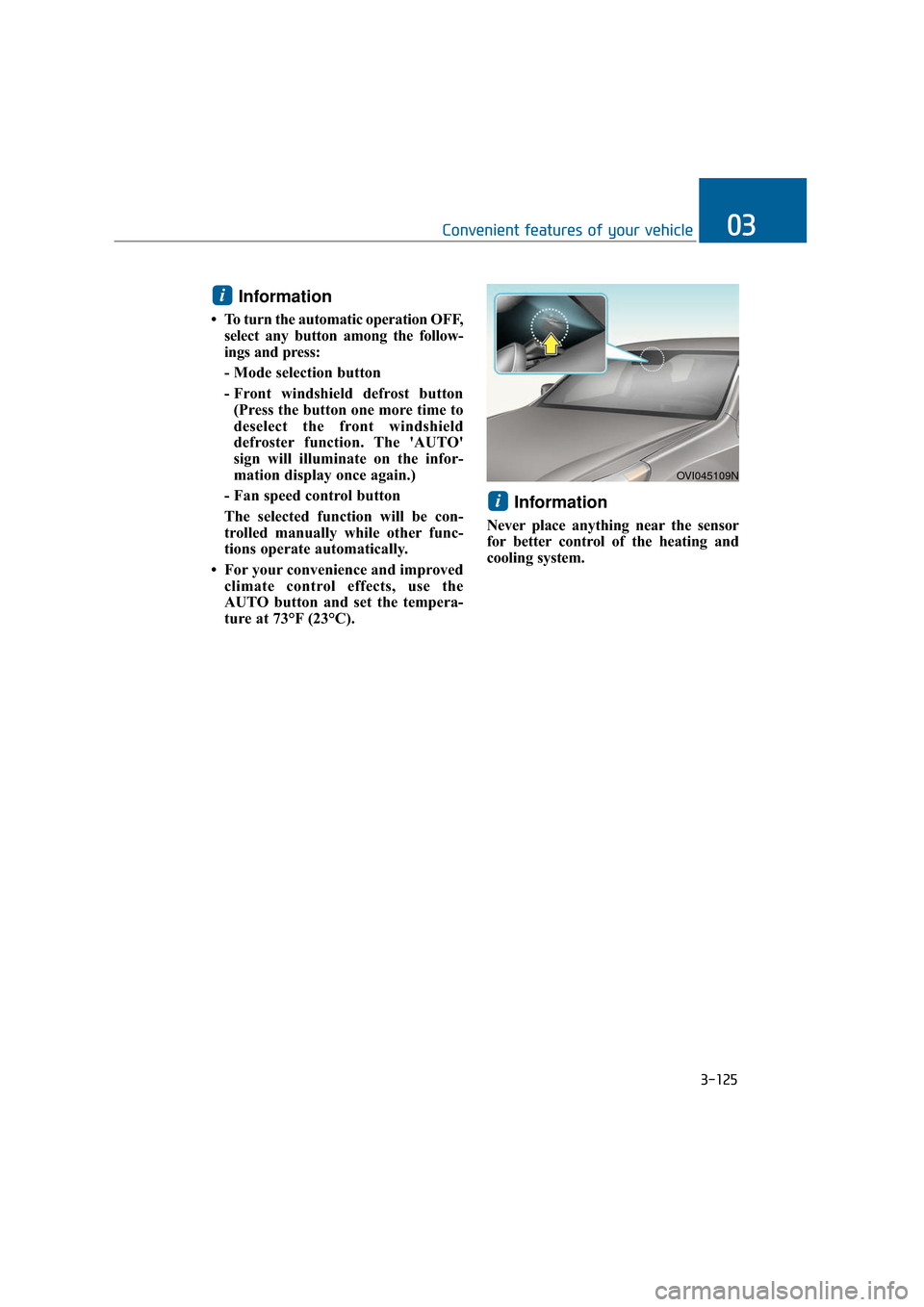
Information
Never place anything near the sensor
for better control of the heating and
cooling system.
i
i
OVI045109N
Page 221 of 477
3-126
Convenient features of your vehicle
Manual air heating and cooling
The heating and cooling system can
be controlled manually by pushing
buttons except the AUTO button. In
this case, the system works sequen-
tially according to the order of button
selection. When pressing any button
except the AUTO button in automatic
mode, the selected function will
changed not to be controlled auto-
matically.
1. Start the engine.
2. Set the mode, as desired.For improved heating and cooling
effects:- Heating:
- Cooling:
3. Set the temperature control, as desired.
4. Set the air intake control to the outside (fresh) air position.
5. Set the fan speed control, as desired.
6. If air conditioning operation is needed, turn the air conditioning
system ON.
Press the AUTO button in order to
convert to the full automatic mode of
the climate control system.
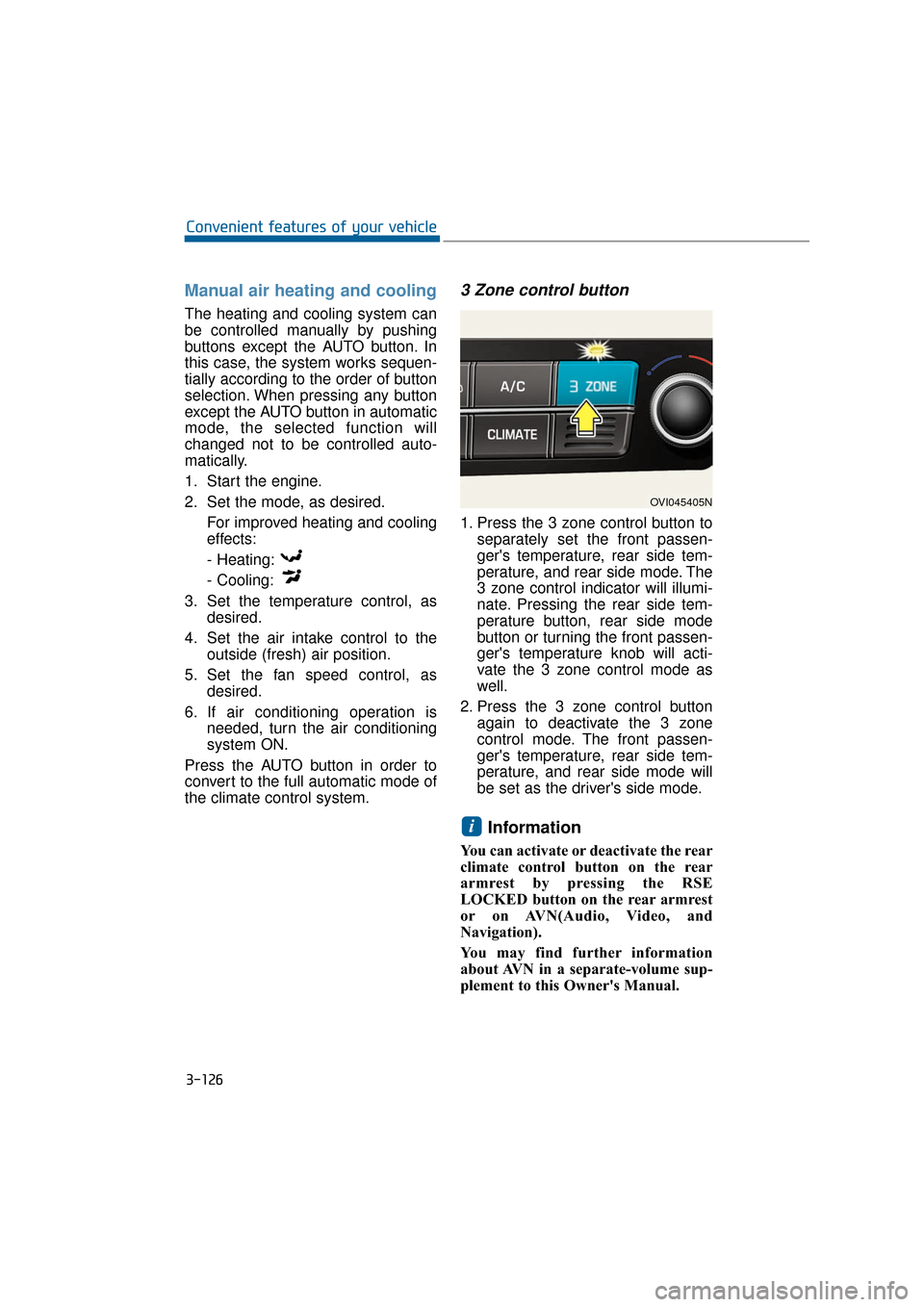
3 Zone control button
1. Press the 3 zone control button to separately set the front passen-
ger's temperature, rear side tem-
perature, and rear side mode. The
3 zone control indicator will illumi-
nate. Pressing the rear side tem-
perature button, rear side mode
button or turning the front passen-
ger's temperature knob will acti-
vate the 3 zone control mode as
well.
2. Press the 3 zone control button again to deactivate the 3 zone
control mode. The front passen-
ger's temperature, rear side tem-
perature, and rear side mode will
be set as the driver's side mode.
Information
You can activate or deactivate the rear
climate control button on the rear
armrest by pressing the RSE
LOCKED button on the rear armrest
or on AVN(Audio, Video, and
Navigation).
You may find further information
about AVN in a separate-volume sup-
plement to this Owner's Manual.
i
OVI045405N
Page 230 of 477
3-135
Convenient features of your vehicle03
System operation
Ventilation
1. Set in the mode.
2. Set the air intake control in the(fresh) air intake mode.
3. Set the temperature, as desired.
4. Set the fan speed, as desired.
Heating
1. Set in the mode.
2. Set the air intake control in the (fresh) air intake mode.
3. Set the temperature, as desired.
4. Set the fan speed, as desired.
5. In order to get dehumidified heat- ing, turn ON the A/C.
If the windshield is fogged up, set in the mode or press the front
defrost button .
Operation Tips
To keep dust or unpleasant fumesfrom entering the vehicle through
the ventilation system, temporarily
set the air intake control in the air
recirculation mode. Make sure to
return to be in the (fresh) air intake
mode when the irritating dust and
gas fade away and the fresh air
intake is possible. This will keep
the driver alert and comfortable.
Air needed for the heating/cooling system is taken inside through the
grilles in front of the windshield.
Care should be taken that these
are not blocked by leaves, snow,
ice or other substances. To prevent fogging on the inside of
the windshield, set the air intake
control in the (fresh) air intake
mode, set the fan speed as
desired, turn ON the A/C, and
adjust the temperature as desired.
Air conditioning
1. Start the engine. Press the A/Cbutton.
2. Set in the mode.
3. Set the air intake control either in the (fresh) air intake mode or in
the air recirculation mode.
4. Adjust the fan speed and tempera- ture for your greatest comfort.
Information
• When using the A/C system, closelymonitor the engine temperature
gauge while driving up hills or in
heavy traffic when the outside tem-
perature is high. A/C operation may
overheat the engine. Continuously
use the blower fan. However, turn
the air conditioning system OFF if
the engine temperature gauge indi-
cates engine overheating.
• When opening the windows in humid weather, A/C operation may
create dew condensation inside the
vehicle. Since excessive dew conden-
sation may cause damage to electri-
cal equipment, A/C should be oper-
ated only with the windows closed.
i
Page 231 of 477
3-136
Convenient features of your vehicle
Air conditioning system operation
tips
When the vehicle is parked underthe direct sunlight in hot weather,
open the windows for a short time
to expel the hot air inside from the
vehicle.
To reduce the dew condensation on the inside of the windows on
rainy or humid days, lower the
humidity inside the vehicle by
operating the A/C system.
During the A/C operation, you may occasionally notice a slight
change in the engine speed, as
the A/C compressor cycles. This is
a normal condition.
Test the A/C system every month only for a few minutes to maximize
the system performance.
After the inside temperature becomes sufficiently cool, change
the air intake control from the air
recirculation mode to the (fresh)
air intake mode.
When operating the A/C system, you may notice clear water drip-
ping (or even puddling) from the
passenger side of the vehicle. This
does not indicate a system failure.
The air recirculation mode of the A/C provides the maximum cool-
ing. However, a prolonged period
of the A/C operation in this mode
may make the air stale inside the
vehicle.
While operating the A/C system, you may occasionally notice the
dew condensation because of the
rapid cooling process and humid
air intake. This does not mean
there is not a system failure.
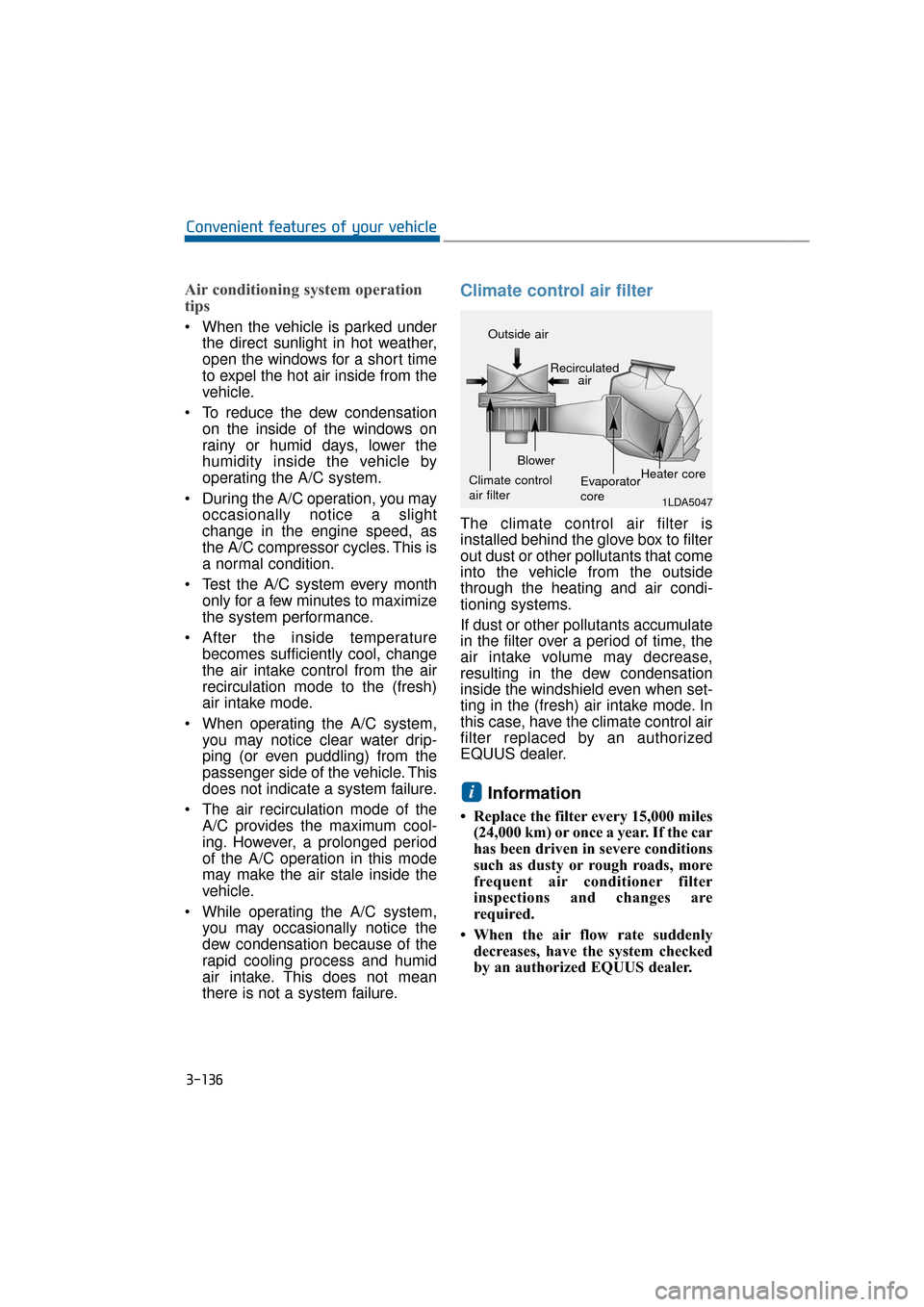
Climate control air filter
The climate control air filter is
installed behind the glove box to filter
out dust or other pollutants that come
into the vehicle from the outside
through the heating and air condi-
tioning systems.
If dust or other pollutants accumulate
in the filter over a period of time, the
air intake volume may decrease,
resulting in the dew condensation
inside the windshield even when set-
ting in the (fresh) air intake mode. In
this case, have the climate control air
filter replaced by an authorized
EQUUS dealer.
Information
• Replace the filter every 15,000 miles(24,000 km) or once a year. If the car
has been driven in severe conditions
such as dusty or rough roads, more
frequent air conditioner filter
inspections and changes are
required.
• When the air flow rate suddenly decreases, have the system checked
by an authorized EQUUS dealer.
i
1LDA5047
Outside air
Recirculatedair
Climate control
air filter Blower
Evaporator
coreHeater core
Page 238 of 477
3-143
Convenient features of your vehicle03
Cool and warm box
(if equipped)
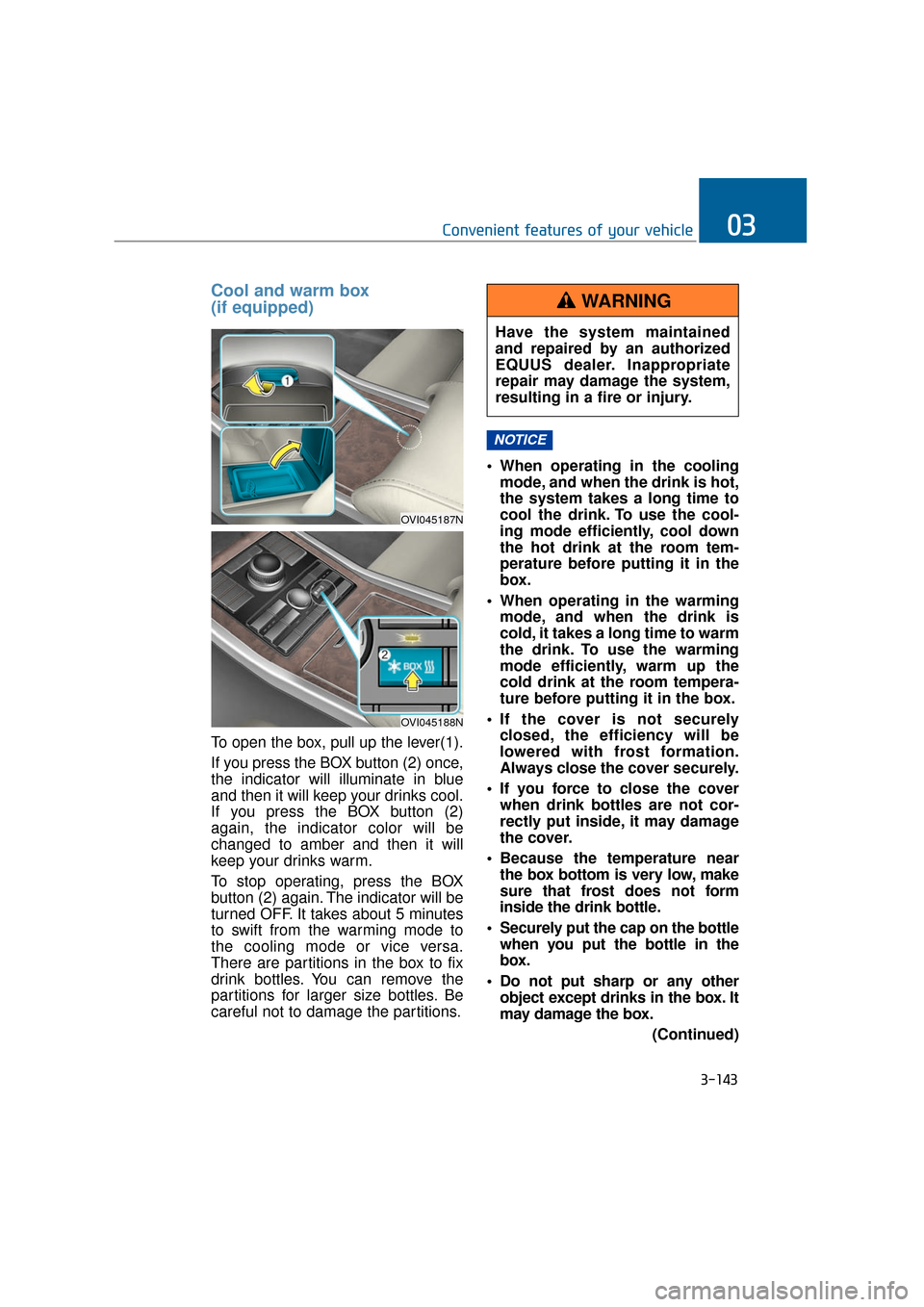
To open the box, pull up the lever(1).
If you press the BOX button (2) once,
the indicator will illuminate in blue
and then it will keep your drinks cool.
If you press the BOX button (2)
again, the indicator color will be
changed to amber and then it will
keep your drinks warm.
To stop operating, press the BOX
button (2) again. The indicator will be
turned OFF. It takes about 5 minutes
to swift from the warming mode to
the cooling mode or vice versa.
There are partitions in the box to fix
drink bottles. You can remove the
partitions for larger size bottles. Be
careful not to damage the partitions. When operating in the cooling
mode, and when the drink is hot,
the system takes a long time to
cool the drink. To use the cool-
ing mode efficiently, cool down
the hot drink at the room tem-
perature before putting it in the
box.
When operating in the warming mode, and when the drink is
cold, it takes a long time to warm
the drink. To use the warming
mode efficiently, warm up the
cold drink at the room tempera-
ture before putting it in the box.
If the cover is not securely closed, the efficiency will be
lowered with frost formation.
Always close the cover securely.
If you force to close the cover when drink bottles are not cor-
rectly put inside, it may damage
the cover.
Because the temperature near the box bottom is very low, make
sure that frost does not form
inside the drink bottle.
Securely put the cap on the bottle when you put the bottle in the
box.
Do not put sharp or any other object except drinks in the box. It
may damage the box.
(Continued)
NOTICE
OVI045187N
OVI045188N
Have the system maintained
and repaired by an authorized
EQUUS dealer. Inappropriate
repair may damage the system,
resulting in a fire or injury.
WARNING
Page 325 of 477
5-74
Driving your vehicle
An AutoSock, which is in the wrong size or is improperly
installed, may damage brake
lines, suspension, body and
wheels of your vehicle.
Stop driving and retighten the AutoSock, whenever there are
snapping sounds between the
vehicle and the AutoSock.
Use high quality ethylene gly-
col coolant
The cooling system of your vehicle is
filled with the high-quality ethylene
glycol coolant when being delivered.
It is the only type of coolant that your
vehicle is filled with, because it pre-
vents corrosion of the cooling sys-
tem, lubricates the water pump and
prevents freezing. Refill the cooling
system in accordance with your
maintenance schedule in the chapter
7. Before winter, check your coolant
to assure that the freezing point is
sufficiently lower than the expected
winter temperature.
Check battery and cables
The winter temperature increases
the battery consumption. Inspect the
battery and cables, as described in
the chapter 7. The battery charging
level can be checked by an author-
ized EQUUS dealer or in a service
station.
Change to "winter weight" oil,
if necessary
In some regions during the cold win-
ter, it is recommended to use the
"winter weight" oil with lower viscosi-
ty. For further information about this,
refer to the chapter 8. When you can-
not be sure about a type of winter
weight oil, consult an authorized
EQUUS dealer.
Check spark plugs and ignition
system
Inspect your spark plugs and, if nec-
essary, replace them. Also check all
ignition wirings and components for
any cracks, wear-out, and damage.
NOTICE
- Chain installation
When installing the AutoSock,
park the vehicle on level ground
away from other vehicles. Press
ON the Hazard Warning flasher
and place a warning triangle
behind your vehicle, if available.
Place the shift lever in P(Park),
set the parking brake and turn
OFF the engine, before
installing the AutoSock.
WARNING
- Tire chains
The use of the AutoSock may
adversely affect vehicle han-
dling.
Do not drive faster than the lower of the two - 20 mph (30
km/h) and the AutoSock manu-
facturer’s recommended
speed limit.
Drive carefully and avoid bumps, holes, sharp turns, and
other road hazards, which may
bounce the vehicle.
Avoid turning sharply or lock- ing the wheel brake.
WARNING