trip computer Hyundai Equus 2016 Owner's Manual
[x] Cancel search | Manufacturer: HYUNDAI, Model Year: 2016, Model line: Equus, Model: Hyundai Equus 2016Pages: 477, PDF Size: 16.25 MB
Page 16 of 477
F16
LCD display .........................3-69
LCD Modes ...............................3-69
Trip Computer Mode..............3-70
ASCC/LDWS Mode .................3-70
A/V Mode.................................3-70
Turn By Turn (TBT) Mode....3-70
Information Mode ..................3-71
User Settings Mode ...............3-72
Warning Messages.................3-78
Trip computer .....................3-86
Overview ...................................3-86
Trip A/B ....................................3-86
Fuel Economy..........................3-87
Warning and indicator
lights ....................................3-89
Warning lights .........................3-89
Indicator Lights .......................3-96
Head Up Display (HUD)...3-100
Description .............................3-100
Head Up Display ON/OFF ..3-101
Head Up Display
Information ............................3-101
Head Up Display Setting ....3-101
Parking assist system......3-102
Operation of the parking
assist system .........................3-103
Inoperable conditions of the
Parking Assist System ........3-105
Self-diagnosis .......................3-106
Rearview camera .............3-107
Multi-view camera
system ...............................3-108
Lighting..............................3-109
Battery saver function .......3-109
Headlamp escort function ..3-109
Lighting control ....................3-110
High beam operation...........3-111
Turn signals and lane
change signals ......................3-112
Front fog light.......................3-113
Daytime running light .........3-113 Headlight leveling device ...3-113
AFLS (Adaptive Front
Lighting System)...................3-114
Wipers and washer ..........3-115
Windshield wipers ................3-115
Windshield washer ...............3-117
Interior light......................3-118
Front........................................3-118
Rear .........................................3-119
Trunk room lamp ..................3-119
Door courtesy lamp .............3-119
Glove box lamp .....................3-120
Vanity mirror lamp ...............3-120
Welcome system ..............3-121
Puddle lamp ...........................3-121
Headlamp................................3-121
Interior light .........................3-121
Defroster ...........................3-122
Rear window defroster ......3-122
Front wiper deicer ...............3-122
Automatic climate control
system ...............................3-123
Automatic heating and air
conditioning ...........................3-124
Manual air heating and
cooling ....................................3-126
System operation .................3-135
Climate control air filter .....3-136
Checking the amount of air
conditioner refrigerant and
compressor lubricant ..........3-137
Windshield defrosting and
defogging ..........................3-138
Defogging logic.....................3-139
Storage compartments ....3-141
Center console storage .....3-141
Glove box ...............................3-141
Sunglass holder ....................3-142
Rear console storage ..........3-142
Cool and warm box ..............3-143
Page 98 of 477
Instrument cluster................................................3-62
Instrument Cluster Control............................................3-64
LCD Display Control ........................................................3-64
Gauges ........................................................................\
.......3-65
LCD display ...........................................................3-69
LCD Modes ........................................................................\
3-69
Trip Computer Mode.......................................................3-70
ASCC/LDWS Mode ..........................................................3-70
A/V Mode........................................................................\
..3-70
Turn By Turn (TBT) Mode ............................................3-70
Information Mode ...........................................................3-71
User Settings Mode ........................................................3-72
Warning Messages..........................................................3-78
Trip computer .......................................................3-86
Overview........................................................................\
....3-86
Trip A/B ........................................................................\
.....3-86
Fuel Economy...................................................................3-87
Warning and indicator lights ..............................3-89
Warning lights ..................................................................3-89
Indicator Lights ................................................................3-96
Head Up Display (HUD).....................................3-100
Description ......................................................................3-\
100
Head Up Display ON/OFF ...........................................3-101
Head Up Display Information .....................................3-101
Head Up Display Setting .............................................3-101
Parking assist system........................................3-102
Operation of the parking assist system..................3-103
Inoperable conditions of the Parking Assist
System ........................................................................\
.....3-105
Self-diagnosis ................................................................3-106
Page 157 of 477
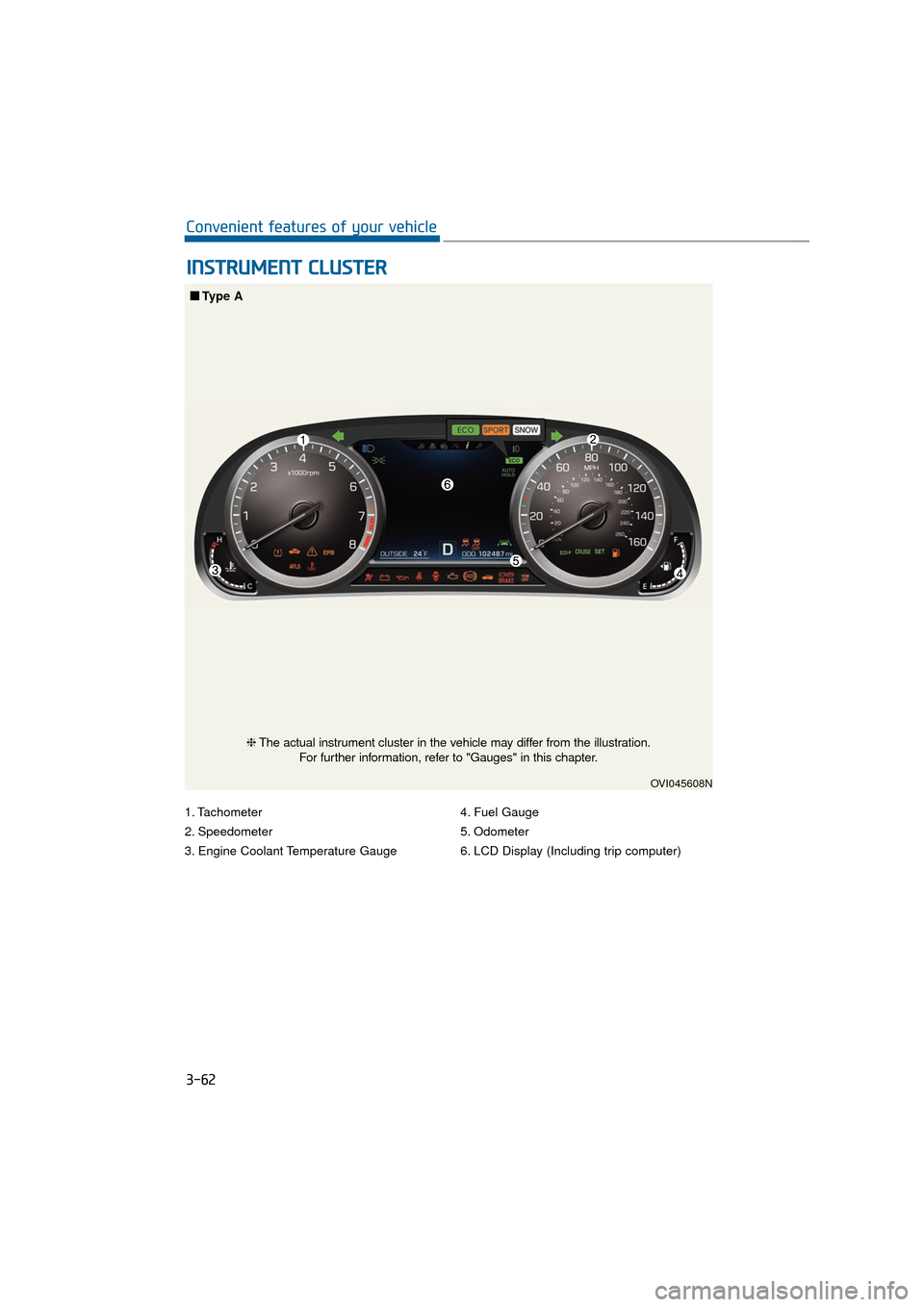
1. Tachometer
2. Speedometer
3. Engine Coolant Temperature Gauge4. Fuel Gauge
5. Odometer
6. LCD Display (Including trip computer)
I I
N
N S
ST
T R
R U
U M
M E
EN
N T
T
C
C L
LU
U S
ST
T E
ER
R
3-62
Convenient features of your vehicle
OVI045608N
■
■
Type A
❈The actual instrument cluster in the vehicle may differ from the illustration.
For further information, refer to "Gauges" in this chapter.
Page 158 of 477
3-63
Convenient features of your vehicle03
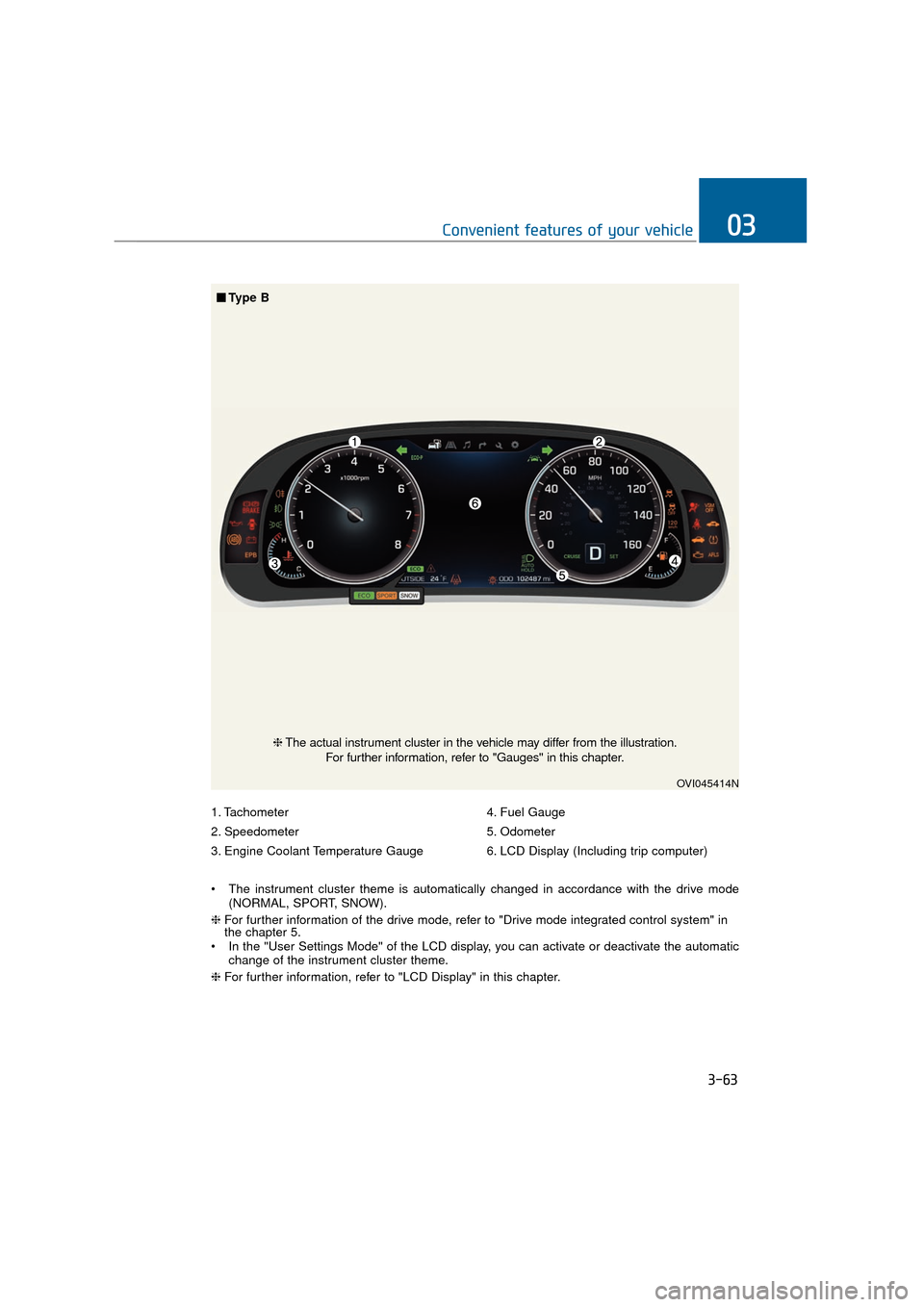
1. Tachometer
2. Speedometer
3. Engine Coolant Temperature Gauge4. Fuel Gauge
5. Odometer
6. LCD Display (Including trip computer)
The instrument cluster theme is automatically changed in accordance with the drive mode (NORMAL, SPORT, SNOW).
❈ For further information of the drive mode, refer to "Drive mode integrated control system" in
the chapter 5.
In the "User Settings Mode" of the LCD display, you can activate or deactivate the automatic change of the instrument cluster theme.
❈ For further information, refer to "LCD Display" in this chapter.
OVI045414N
❈The actual instrument cluster in the vehicle may differ from the illustration.
For further information, refer to "Gauges" in this chapter.
■ ■
Type B
Page 164 of 477
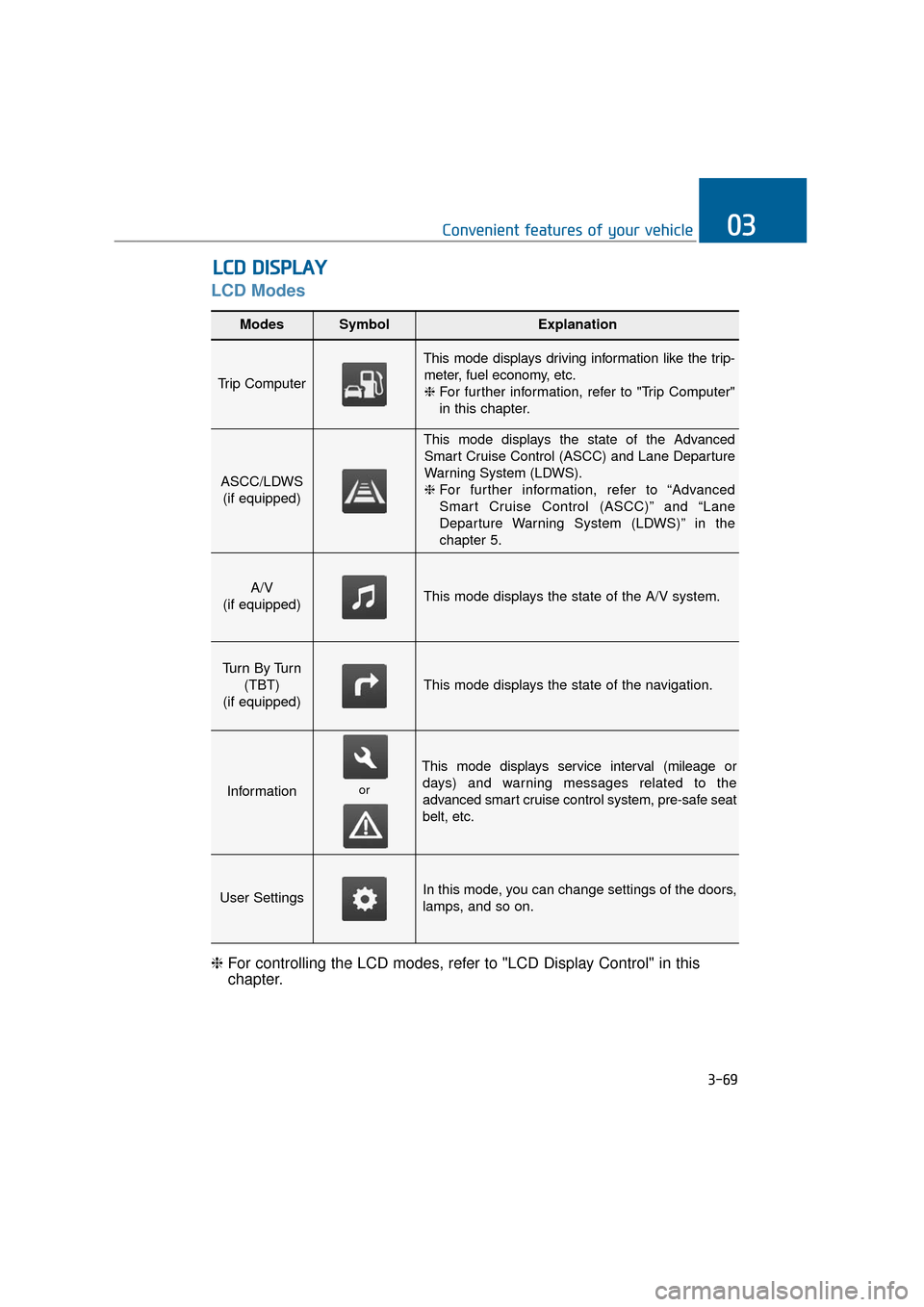
LCD Modes
L
LC
C D
D
D
D I
IS
S P
P L
LA
A Y
Y
3-69
Convenient features of your vehicle03
Modes SymbolExplanation
Trip Computer
This mode displays driving information like the trip-
meter, fuel economy, etc.❈ For further information, refer to "Trip Computer"
in this chapter.
ASCC/LDWS
(if equipped)
This mode displays the state of the AdvancedSmart Cruise Control (ASCC) and Lane Departure
Warning System (LDWS).
❈ For further information, refer to “Advanced
Smart Cruise Control (ASCC)” and “Lane
Departure Warning System (LDWS)” in the
chapter 5.
A/V
(if equipped)This mode displays the state of the A/V system.
Tu r n B y Tu r n (TBT)
(if equipped)
This mode displays the state of the navigation.
Information
This mode displays service interval (mileage or days) and warning messages related to the
advanced smart cruise control system, pre-safe seat
belt, etc.
User SettingsIn this mode, you can change settings of the doors,
lamps, and so on.
❈ For controlling the LCD modes, refer to "LCD Display Control" in this
chapter.
or
Page 165 of 477
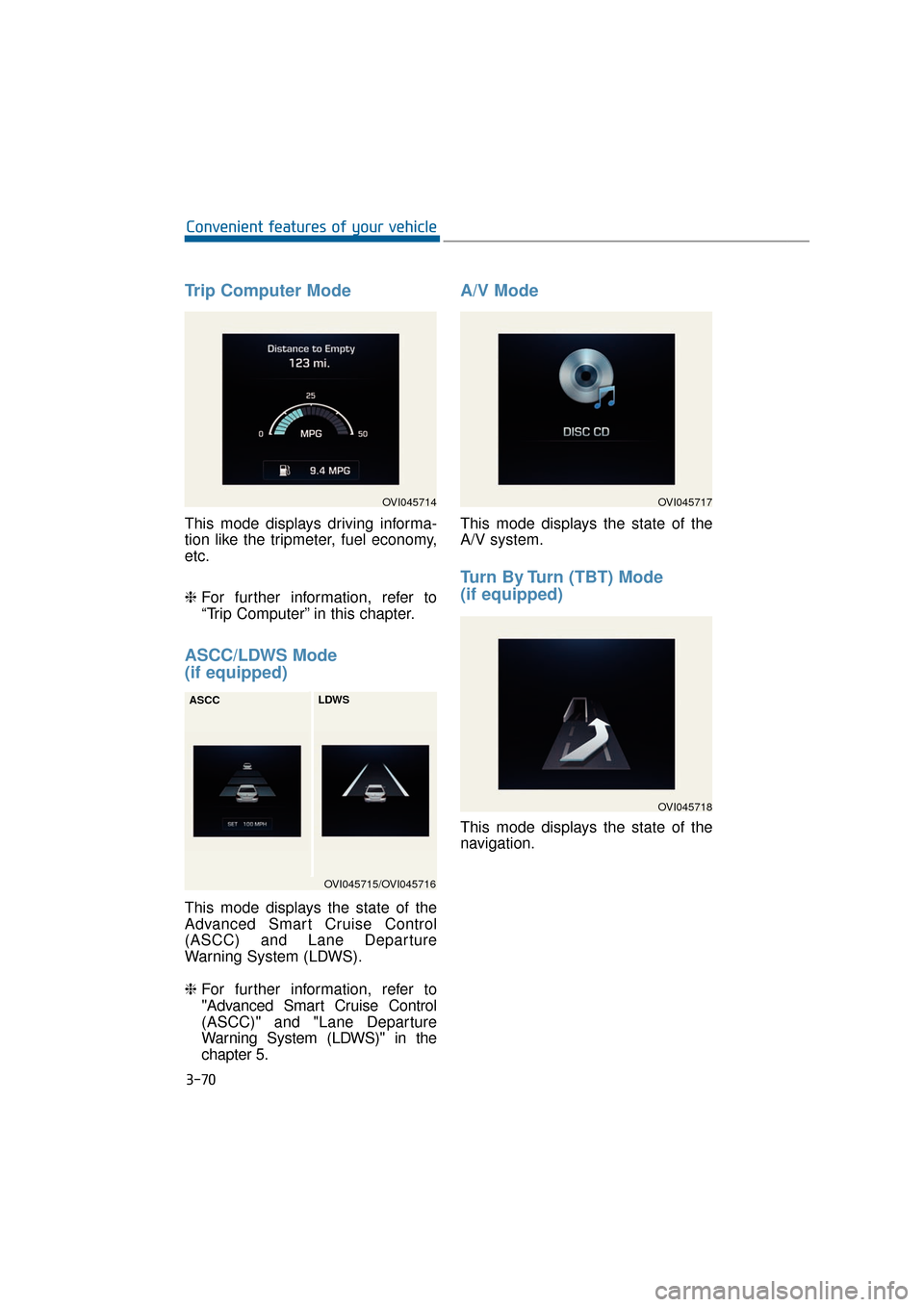
Trip Computer Mode
This mode displays driving informa-
tion like the tripmeter, fuel economy,
etc.
❈For further information, refer to
“Trip Computer” in this chapter.
ASCC/LDWS Mode
(if equipped)
This mode displays the state of the
Advanced Smart Cruise Control
(ASCC) and Lane Departure
Warning System (LDWS).
❈ For further information, refer to
"Advanced Smart Cruise Control
(ASCC)" and "Lane Departure
Warning System (LDWS)" in the
chapter 5.
A/V Mode
This mode displays the state of the
A/V system.
Turn By Turn (TBT) Mode
(if equipped)
This mode displays the state of the
navigation.
3-70
Convenient features of your vehicle
OVI045714
OVI045715/OVI045716
ASCC
LDWS
OVI045717
OVI045718
Page 170 of 477
3-75
Convenient features of your vehicle03
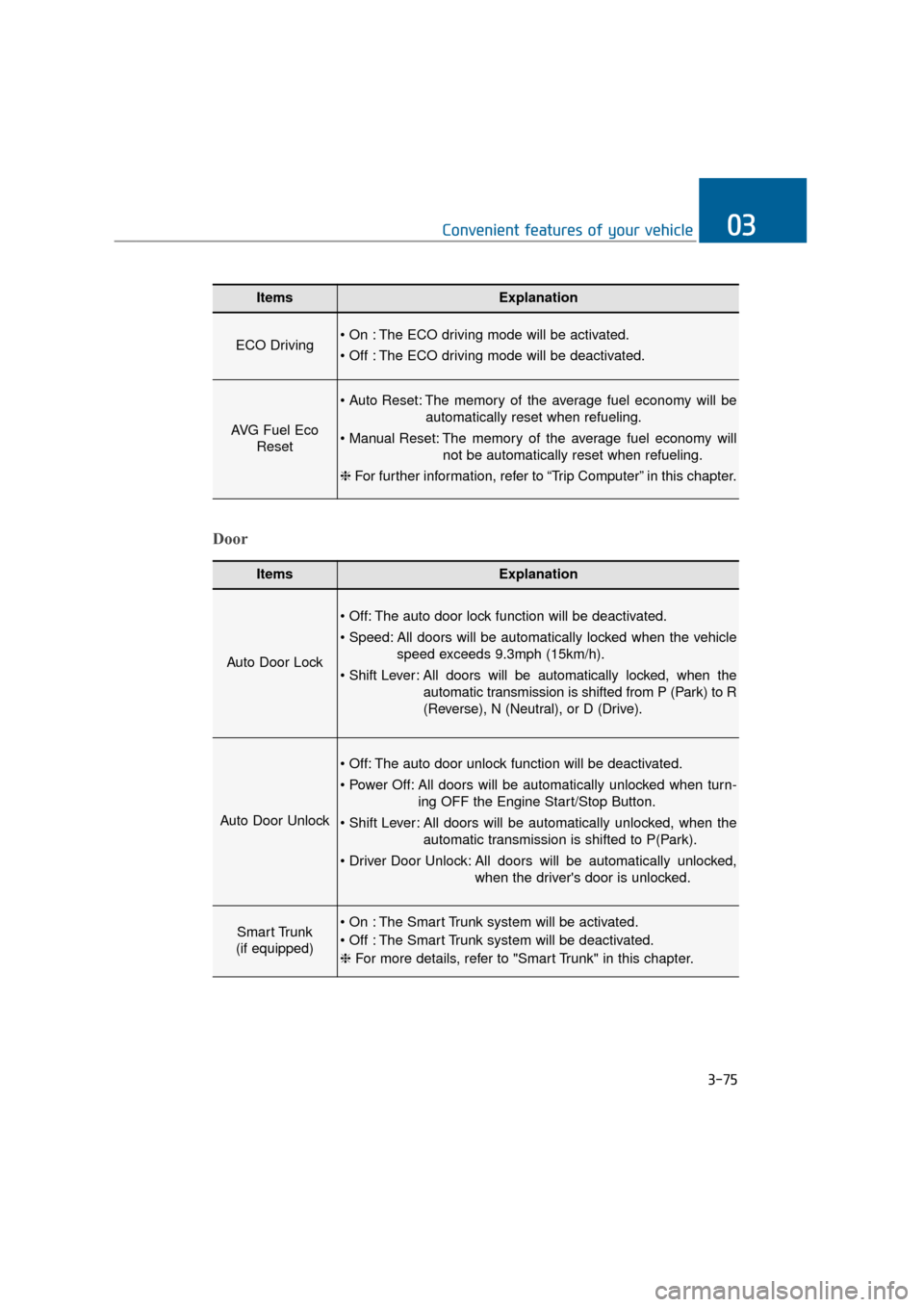
ItemsExplanation
ECO Driving The ECO driving mode will be activated.
The ECO driving mode will be deactivated.
AVG Fuel EcoReset
The memory of the average fuel economy will be
automatically reset when refueling.
The memory of the average fuel economy will not be automatically reset when refueling.
❈ For further information, refer to “Trip Computer” in this chapter.
ItemsExplanation
Auto Door Lock
The auto door lock function will be deactivated.
All doors will be automatically locked when the vehicle
speed exceeds 9.3mph (15km/h).
All doors will be automatically locked, when the
automatic transmission is shifted from P (Park) to R
(Reverse), N (Neutral), or D (Drive).
Auto Door Unlock
The auto door unlock function will be deactivated.
All doors will be automatically unlocked when turn- ing OFF the Engine Start/Stop Button.
All doors will be automatically unlocked, when the automatic transmission is shifted to P(Park).
All doors will be automatically unlocked, when the driver's door is unlocked.
Smart Trunk
(if equipped) The Smart Trunk system will be activated.
The Smart Trunk system will be deactivated.
❈ For more details, refer to "Smart Trunk" in this chapter.
Door
Page 181 of 477
Overview
Description
The trip computer is a driving infor-
mation system, controlled by a
micro-computer. This displays driv-
ing-related information.
Information
Some driving information, stored in
the trip computer (i.e. average vehicle
speed), is reset, when the battery is
disconnected.
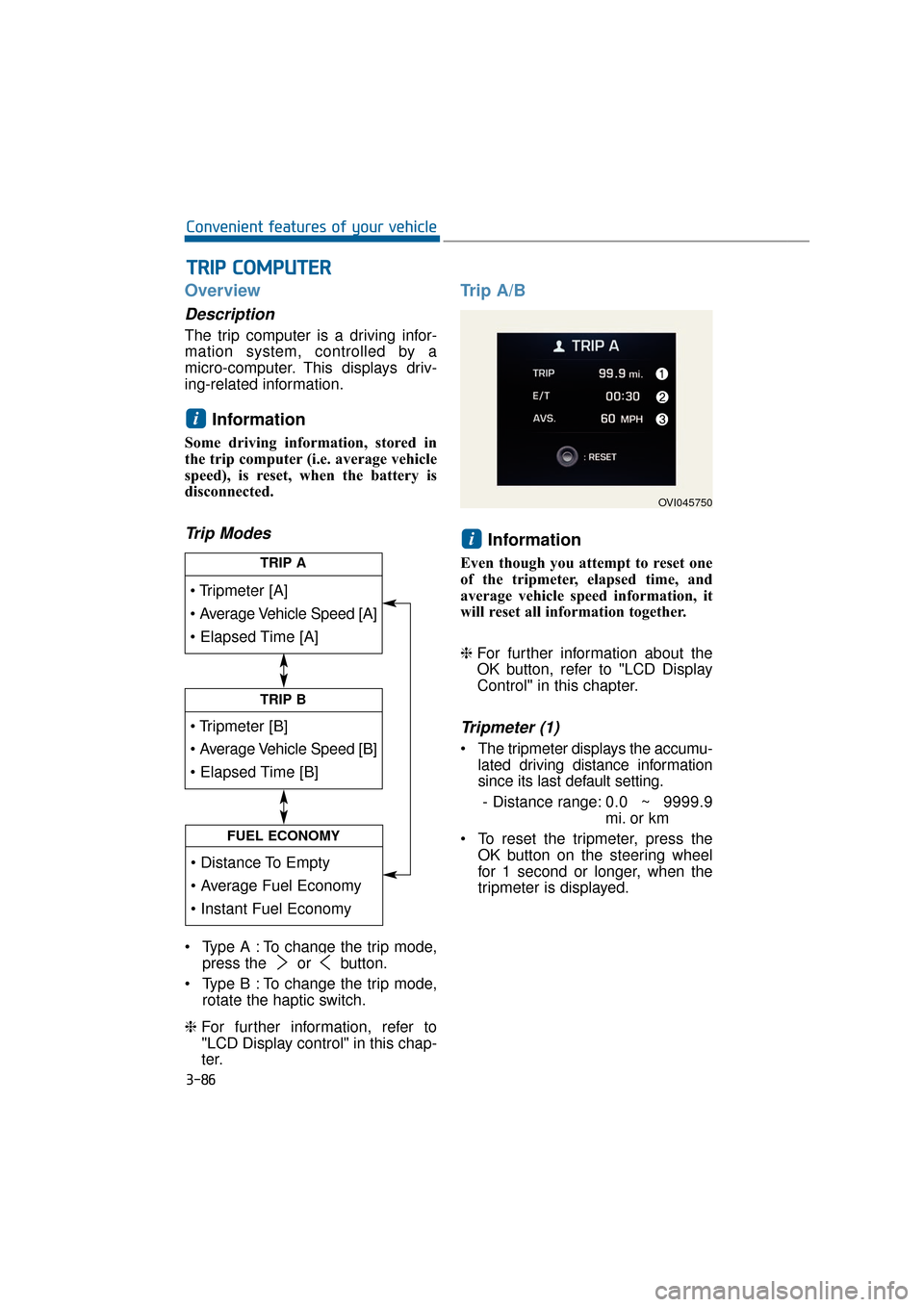
Trip Modes
Type A : To change the trip mode,press the or button.
Type B : To change the trip mode, rotate the haptic switch.
❈ For further information, refer to
"LCD Display control" in this chap-
ter.
Trip A/B
Information
Even though you attempt to reset one
of the tripmeter, elapsed time, and
average vehicle speed information, it
will reset all information together.
❈For further information about the
OK button, refer to "LCD Display
Control" in this chapter.
Tripmeter (1)
The tripmeter displays the accumu-
lated driving distance information
since its last default setting.
- Distance range: 0.0 ~ 9999.9
mi. or km
To reset the tripmeter, press the OK button on the steering wheel
for 1 second or longer, when the
tripmeter is displayed.
i
i
T
TR
R I
IP
P
C
C O
O M
M P
PU
U T
TE
ER
R
3-86
Convenient features of your vehicle
TRIP A
TRIP B
FUEL ECONOMY
OVI045750
Page 182 of 477
Elapsed Time (2)
The elapsed time displays theaccumulated driving hour informa-
tion since its last default setting.
- Time range (hh:mm): 00:00 ~99:59
To reset the elapsed time, press the OK button on the steering
wheel for 1 second or longer, when
the elapsed time is displayed.
Information
Even though the vehicle is not in
motion, the elapsed time keeps being
recorded, while the engine is running.
Average Vehicle Speed (3)
The average vehicle speed is cal-culated by dividing the accumulat-
ed driving distance by the accu-
mulated driving hour since its last
default setting.
- Speed range: 0 ~ 999 MPH orkm/h
To reset the average vehicle speed, press the OK button on the
steering wheel for 1 second or
over, when the average vehicle
speed is displayed.
Information
• The average vehicle speed is not dis-played, when the vehicle drives
shorter than 0.19 miles (300 meters)
after turning ON the Engine
Start/Stop button.
• Even though the vehicle is not in motion, the average vehicle speed
keeps being recorded while the
engine is running.
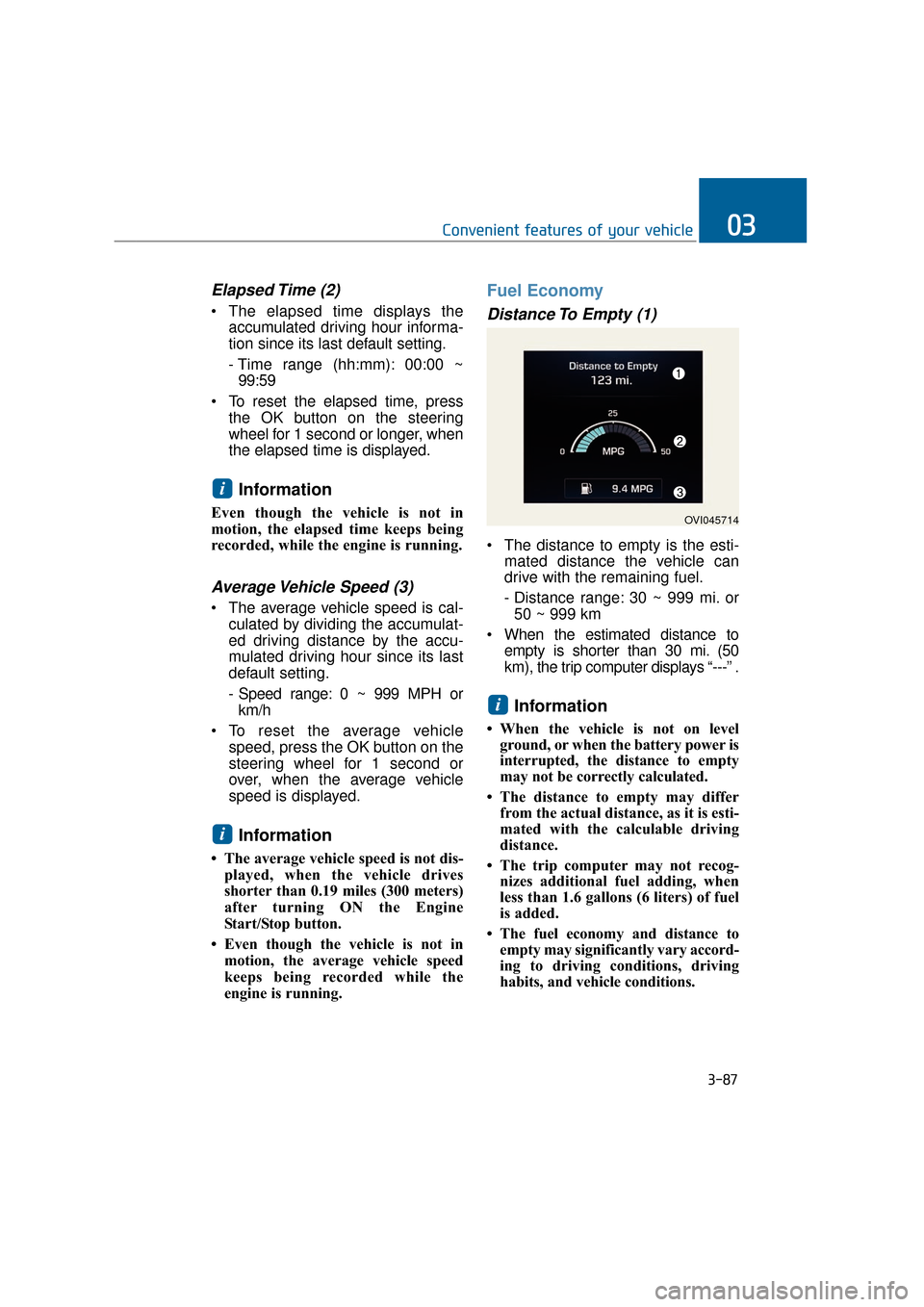
Fuel Economy
Distance To Empty (1)
The distance to empty is the esti- mated distance the vehicle can
drive with the remaining fuel.
- Distance range: 30 ~ 999 mi. or50 ~ 999 km
When the estimated distance to empty is shorter than 30 mi. (50
km), the trip computer displays “---” .
Information
• When the vehicle is not on levelground, or when the battery power is
interrupted, the distance to empty
may not be correctly calculated.
• The distance to empty may differ from the actual distance, as it is esti-
mated with the calculable driving
distance.
• The trip computer may not recog- nizes additional fuel adding, when
less than 1.6 gallons (6 liters) of fuel
is added.
• The fuel economy and distance to empty may significantly vary accord-
ing to driving conditions, driving
habits, and vehicle conditions.
i
i
i
3-87
Convenient features of your vehicle03
OVI045714
Page 194 of 477
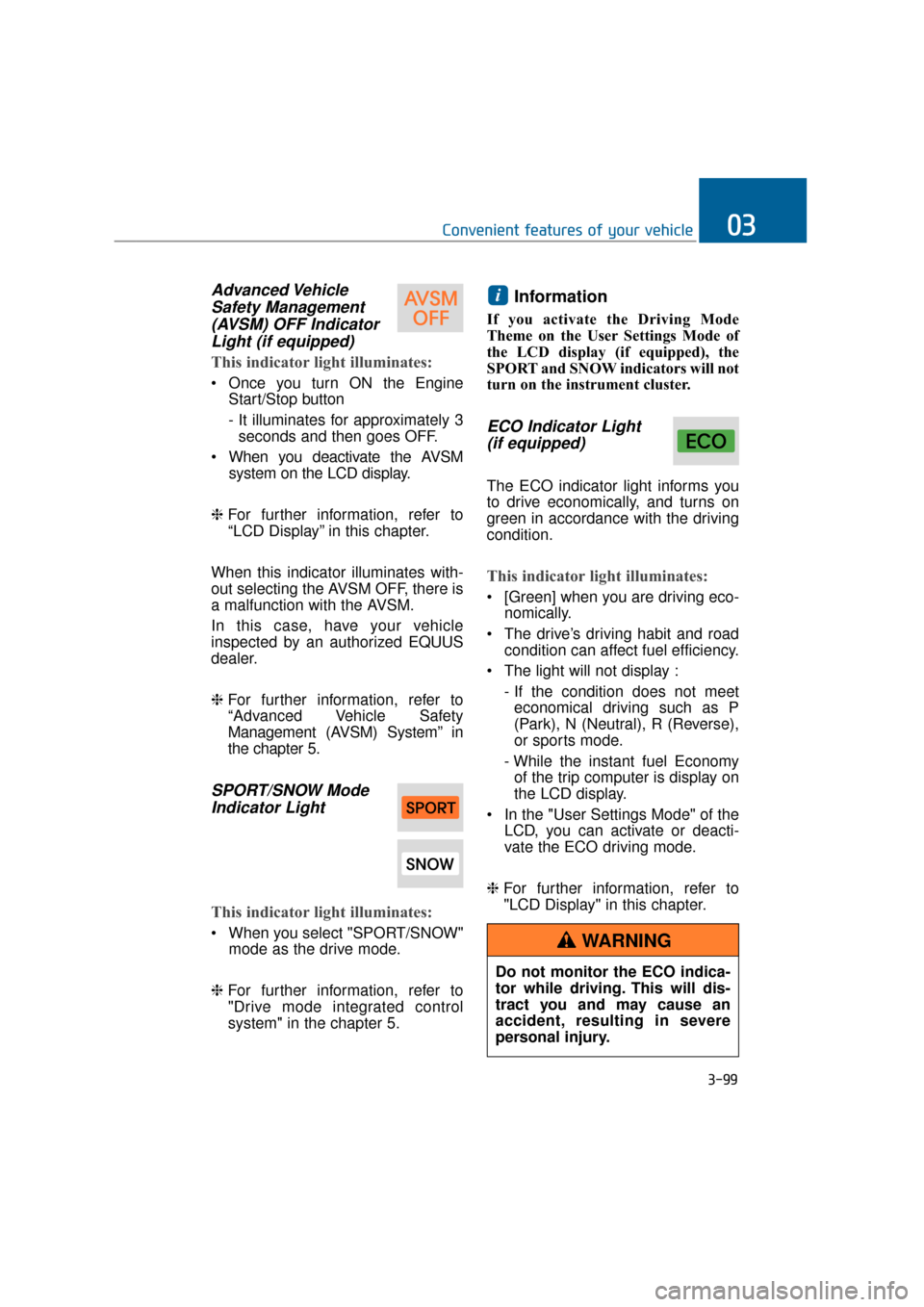
Advanced VehicleSafety Management(AVSM) OFF IndicatorLight (if equipped)
This indicator light illuminates:
Once you turn ON the Engine
Start/Stop button
- It illuminates for approximately 3seconds and then goes OFF.
When you deactivate the AVSM system on the LCD display.
❈ For further information, refer to
“LCD Display” in this chapter.
When this indicator illuminates with-
out selecting the AVSM OFF, there is
a malfunction with the AVSM.
In this case, have your vehicle
inspected by an authorized EQUUS
dealer.
❈ For further information, refer to
“Advanced Vehicle Safety
Management (AVSM) System” in
the chapter 5.
SPORT/SNOW Mode
Indicator Light
This indicator light illuminates:
When you select "SPORT/SNOW"
mode as the drive mode.
❈ For further information, refer to
"Drive mode integrated control
system" in the chapter 5.
Information
If you activate the Driving Mode
Theme on the User Settings Mode of
the LCD display (if equipped), the
SPORT and SNOW indicators will not
turn on the instrument cluster.
ECO Indicator Light
(if equipped)
The ECO indicator light informs you
to drive economically, and turns on
green in accordance with the driving
condition.
This indicator light illuminates:
[Green] when you are driving eco-
nomically.
The drive’s driving habit and road condition can affect fuel efficiency.
The light will not display : - If the condition does not meeteconomical driving such as P
(Park), N (Neutral), R (Reverse),
or sports mode.
- While the instant fuel Economy of the trip computer is display on
the LCD display.
In the "User Settings Mode" of the LCD, you can activate or deacti-
vate the ECO driving mode.
❈ For further information, refer to
"LCD Display" in this chapter.
i
3-99
Convenient features of your vehicle03
Do not monitor the ECO indica-
tor while driving. This will dis-
tract you and may cause an
accident, resulting in severe
personal injury.
WARNING