audio Hyundai Genesis 2010 User Guide
[x] Cancel search | Manufacturer: HYUNDAI, Model Year: 2010, Model line: Genesis, Model: Hyundai Genesis 2010Pages: 399, PDF Size: 10 MB
Page 210 of 399
4133
Features of your vehicle
(Continued)
If USB device is divided by logical
drives, only the music files on the
highest-priority drive are recog-
nized by the car audio.
Devices, such as MP3 players,
cellular phones, or digital cam-
eras not recognized by standard
USB I/F may not be recognized.
USB devices other than standard-
ized goods (METAL COVER TYPE
USB) can be unrecognizable.
USB flash memory reader (such
as CF, SD, microSD, etc.) or exter-
nal-HDD type devices may be
unrecognized.
Music files protected by DRM
(DIGITAL RIGHTS MANAGEMENT)
are not recognizable.
The data in the USB memory may
be lost while using this AUDIO. It
is recommeded to back up impor-
tant data on a personal storage
device.
(Continued)(Continued)
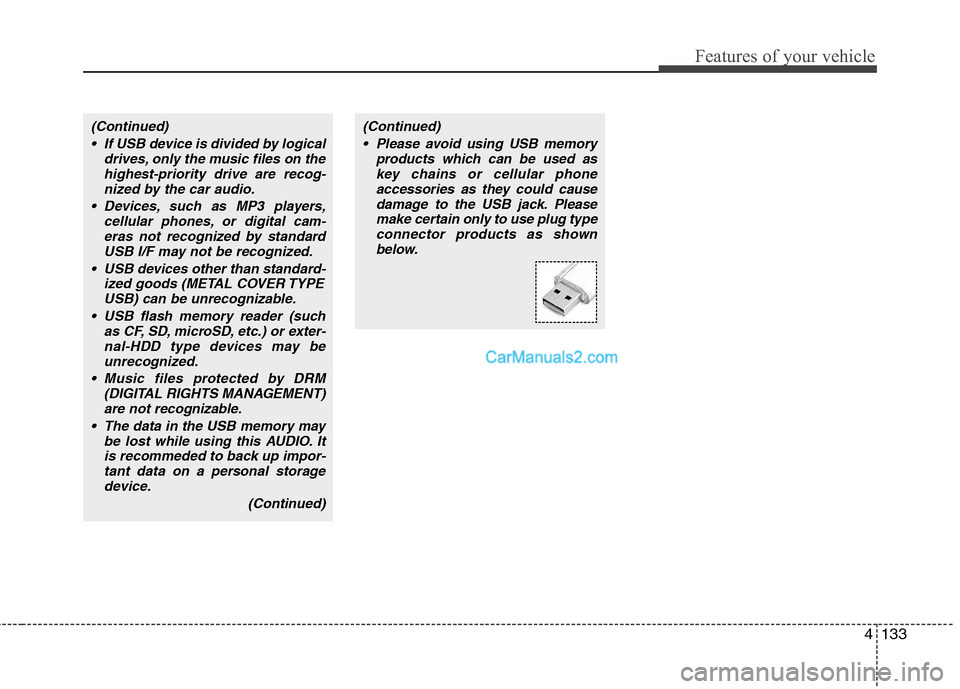
Please avoid using USB memory
products which can be used as
key chains or cellular phone
accessories as they could cause
damage to the USB jack. Please
make certain only to use plug type
connector products as shown
below.
Page 215 of 399
Features of your vehicle
138 4
✽
✽
NOTICE FOR USING iPod
DEVICE
• Some iPod models might not sup-
port the communication protocol
and the files will not be played.
(iPod models supported: Mini, 4G,
Photo, Nano, 5G)
• The order of search or playback of
songs in the iPod can be different
from the order searched in the
audio system.
• If the iPod crashes due to its own
trouble, reset the iPod. (Reset:
Refer to iPod manual)
• An iPod may not operate normally
on low battery.
CAUTION IN USING
iPod DEVICE
You need the power cable exclu-
sive for an iPod in order to oper-
ate an iPod with the buttons on
the audio system. The PC cable
provided by Apple may cause a
malfunction and do not use it for
vehicle use.
When connecting the device with
an iPod cable, push in the jack
fully to not interfere with commu-
nication.
When adjusting the sound effects
of an iPod and the audio system,
the sound effects of both devices
will overlap and might reduce or
distort the quality of the sound.
Deactivate (turn off) the equalizer
function of an iPod when adjust-
ing the audio system’s volume,
and turn off the equalizer of the
audio system when using the
equalizer of an iPod.
(Continued)
(Continued)
When the iPod cable is connected,
the system can be switched to the
AUX mode even without the iPod
device and can cause noise.
Disconnect iPod cable when you
are not using the iPod device.
When the iPod is not used for the
audio system, the iPod cable has
to be separate from the iPod
device. Origin display of iPod may
not be displayed.
Page 219 of 399
Features of your vehicle
142 4
HD RADIOTMINFORMATION
Licensing information
HD RadioTMTechnology Manufactured is
Under License From iBiquity Digital
Corporation. U.S. and Foreign Patents.
HD Radio
TMand the HD and HD Radio
logos are proprietary trademarks of
iBiquity Digital Corporation.
Availability information
HD RadioTM reception is available in the
United States, including Alaska and
Hawaii.
What is HD RadioTMtechnology?
This audio system is able to receive stan-
dard analog FM/AM radio broadcasting
as well as digital HD Radio
TMFM/AM
broadcasting.
HD Radio
TMtechnology provides digital
and analog reception using existing FM
and AM broadcasting frequencies.Currently, radio stations broadcasting an
HD Radio
TMsignal are operating in a
hybrid mode of both, analog and digital,
in order to reach both receivers. In both
modes, analog and digital, the broad-
casted program contents is the
same(except of multicasting, see below).
Eventually, as analog receivers are
replaced by digital ones, radio stations
may be able to turn off their analog
broadcasting and use only the digital
one.
Multicasting
HD RadioTMFM stations are able to
broadcast multiple digital program
streams(channels) over a single FM fre-
quency. For example, a HD Radio
TMFM
station can run a main channel of music
and a sub channel of news(or even two
different music channels) at one frequen-
cy.
Only the program content of the main
channel is also broadcasted analog.
HD RadioTMsignal delay
To overcome the delay that digital sys-
tems inherently produce, HD RadioTM
technology first uses the audio signal of
the analog broadcasting when you tune
to an AM station or to the main channel
of a FM station. After that, the system will
blend from analog to digital signal.
Normally, this blending is very smooth. If
you experience a skip in program content
of several seconds, the radio station has
not implemented HD Radio
TMbroadcast-
ing correctly. This is not a problem with
your audio system.
Due to the fact that sub channels are only
broadcasting digital, blending from analog
to digital signal is not possible if you tune
to a sub channel. In this case playback of
the sub channel starts after several sec-
onds, this is a normal function.
Page 226 of 399
4149
Features of your vehicle
■ Receiving a phone call
When receiving a phone call, a ring tone
is heard and the system changes to tele-
phone mode.
When receiving a phone call, the phone
number and the message "Incoming" will
be displayed.
Press the send switch to take the call.
or "-
" on the steering volume controls.
Volume adjustment cannot be made
using the audio system.
The received call can be transferred
from the hands-free system to the cellu-
lar phone that is connected to Bluetooth.
For details, please refer to you user's
manual for the cellular phone or go to the
Key matrix in this manual (next page).
■ Talking on the phone
When talking on the phone, the display
will differ depending on whether or not
the vehicle is in motion.
Number and "active call" is displayed.
When the call is finished, press the end
switch.
✽ ✽
NOTICE
In the following situations, your voice
may not reach the other party:
1. When talking alternately with the
other party on the phone. If you talk
at the same time, the voice may not
reach the other parties. (This is not a
malfunction.)
2. When keeping the volume of incom-
ing voice to a low level. Otherwise,
high volumes may result in an echo.
When you talk on the phone, speak
clearly towards the microphone.
3. When driving on a rough road.
4. When driving at high speeds.
5. When the window is open.
6. When the air conditioning vents are
facing the microphone.
7. When the sound of the air condition-
ing fan is loud.
Page 227 of 399
![Hyundai Genesis 2010 User Guide Features of your vehicle
150 4
■ Key matrix
No.
Disconnected(BT Icon off) Connected (BT Icon On)
Paired H/P
EmptyPaired H/P
Exist
1SHORT
LONG
STEERING
MODE KEY
SHORT
LONG
[10sec]
AUDIO
POWER KEYNorm](/img/35/14680/w960_14680-226.png "Hyundai Genesis 2010 User Guide Features of your vehicle
150 4
■ Key matrix
No.
Disconnected(BT Icon off) Connected (BT Icon On)
Paired H/P
EmptyPaired H/P
Exist
1SHORT
LONG
STEERING
MODE KEY
SHORT
LONG
[10sec]
AUDIO
POWER KEYNorm")
Features of your vehicle
150 4
■ Key matrix
No.
Disconnected(BT Icon off) Connected (BT Icon On)
Paired H/P
EmptyPaired H/P
Exist
1SHORT
LONG
STEERING
MODE KEY
SHORT
LONG
[10sec]
AUDIO
POWER KEYNormal mode
BT SETUP menuIncoming CallOutgoing Call
Active CallTRANSFER
CALL
Not Connect---Accept Call
Connected
-Transfer Call
(Handsfree <->Phone)
KEY
-
-VR
MODE Cancel-Reject CallEnd Call End CallEnd Call
-System not
ready Please
wait a momentActive Active Active-- -
System not
ready Please
wait a moment
-
-
Change
language
-
Change
language
--
---
Change
language
---Reject Call
-
End call
-
2nd call
1st Call:waiting
2nd Call:active
-
-
End call-
2
3
4
Page 345 of 399
Maintenance
30 7
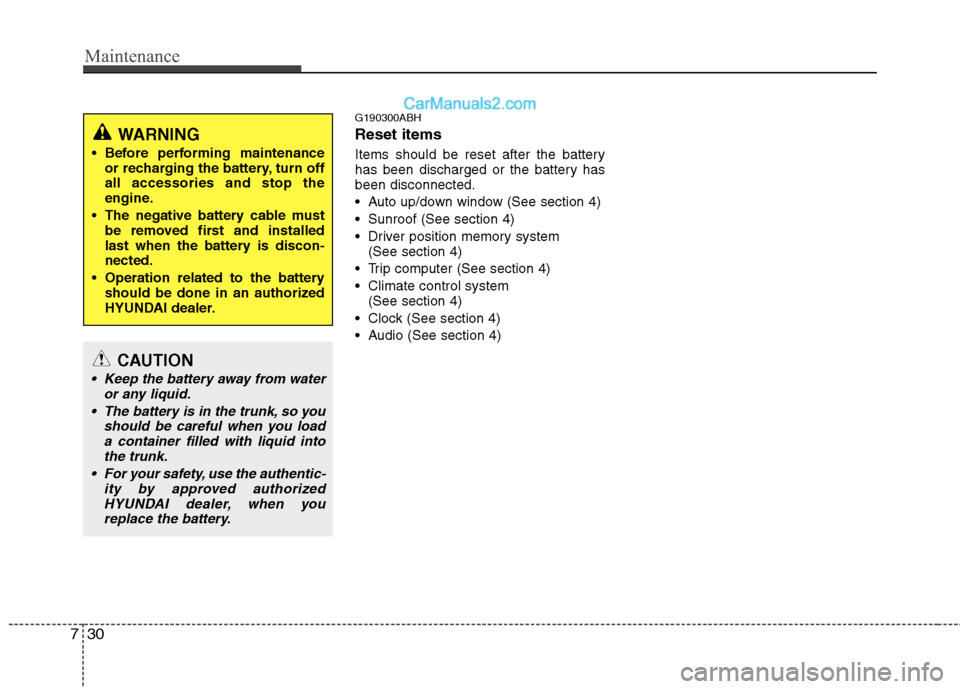
G190300ABH
Reset items
Items should be reset after the battery
has been discharged or the battery has
been disconnected.
Auto up/down window (See section 4)
Sunroof (See section 4)
Driver position memory system
(See section 4)
Trip computer (See section 4)
Climate control system
(See section 4)
Clock (See section 4)
Audio (See section 4)
WARNING
Before performing maintenance
or recharging the battery, turn off
all accessories and stop the
engine.
The negative battery cable must
be removed first and installed
last when the battery is discon-
nected.
Operation related to the battery
should be done in an authorized
HYUNDAI dealer.
CAUTION
Keep the battery away from water
or any liquid.
The battery is in the trunk, so you
should be careful when you load
a container filled with liquid into
the trunk.
For your safety, use the authentic-
ity by approved authorized
HYUNDAI dealer, when you
replace the battery.
Page 361 of 399
Maintenance
46 7
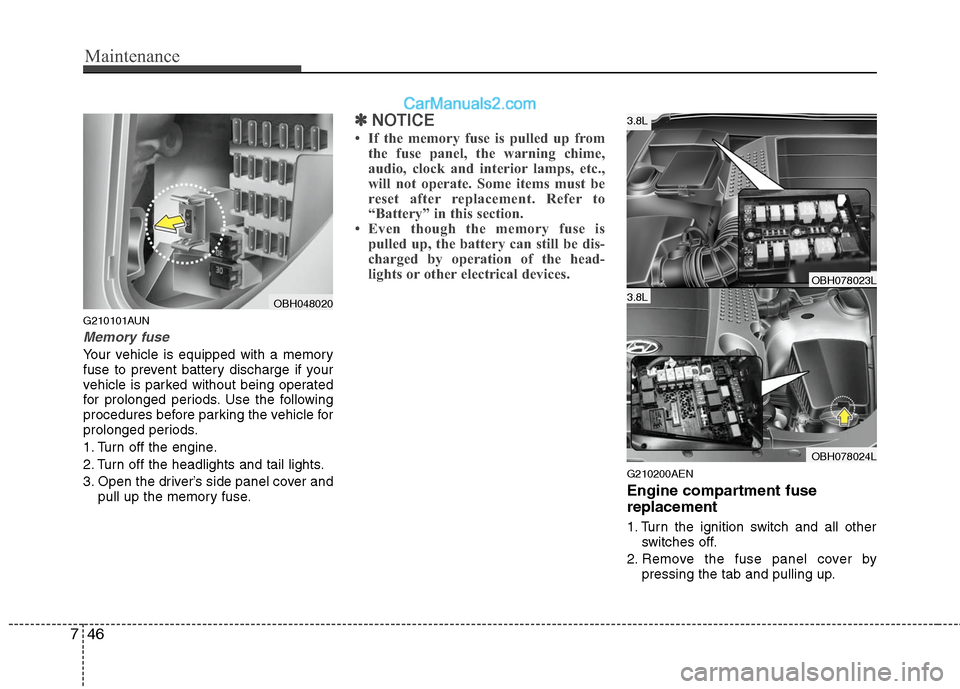
G210101AUN
Memory fuse
Your vehicle is equipped with a memory
fuse to prevent battery discharge if your
vehicle is parked without being operated
for prolonged periods. Use the following
procedures before parking the vehicle for
prolonged periods.
1. Turn off the engine.
2. Turn off the headlights and tail lights.
3. Open the driver’s side panel cover and
pull up the memory fuse.
✽ ✽
NOTICE
• If the memory fuse is pulled up from
the fuse panel, the warning chime,
audio, clock and interior lamps, etc.,
will not operate. Some items must be
reset after replacement. Refer to
“Battery” in this section.
• Even though the memory fuse is
pulled up, the battery can still be dis-
charged by operation of the head-
lights or other electrical devices.
G210200AEN
Engine compartment fuse
replacement
1. Turn the ignition switch and all other
switches off.
2. Remove the fuse panel cover by
pressing the tab and pulling up.
OBH048020
OBH078023L
OBH078024L
3.8L
3.8L
Page 364 of 399
749
Maintenance
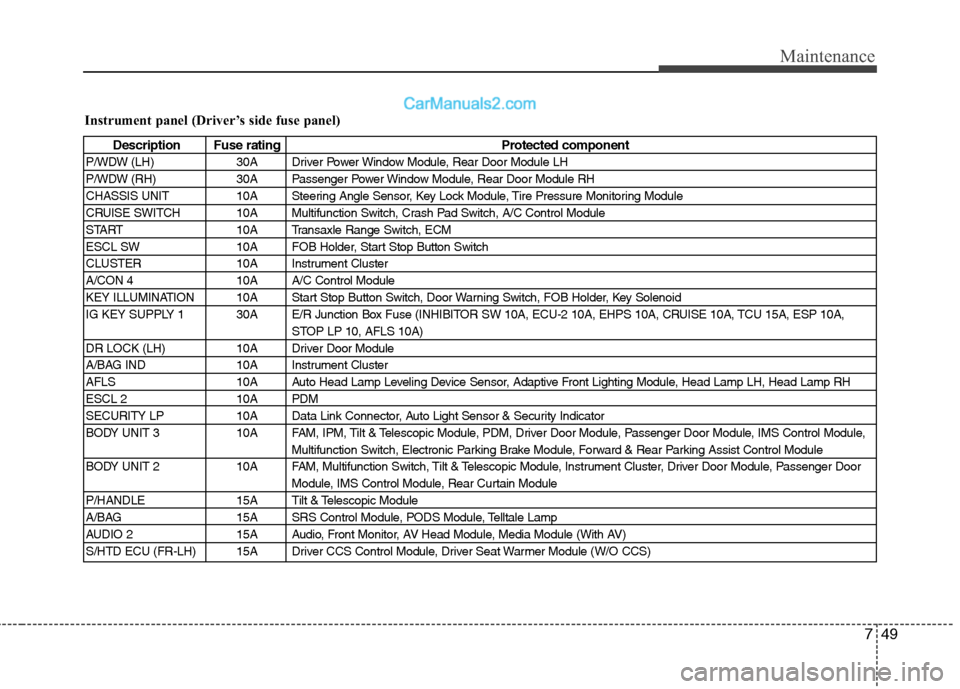
Instrument panel (Driver’s side fuse panel)
Description Fuse rating Protected component
P/WDW (LH) 30A Driver Power Window Module, Rear Door Module LH
P/WDW (RH) 30A Passenger Power Window Module, Rear Door Module RH
CHASSIS UNIT 10A Steering Angle Sensor, Key Lock Module, Tire Pressure Monitoring Module
CRUISE SWITCH 10A Multifunction Switch, Crash Pad Switch, A/C Control Module
START 10A Transaxle Range Switch, ECM
ESCL SW 10A FOB Holder, Start Stop Button Switch
CLUSTER 10A Instrument Cluster
A/CON 4 10A A/C Control Module
KEY ILLUMINATION 10A Start Stop Button Switch, Door Warning Switch, FOB Holder, Key Solenoid
IG KEY SUPPLY 1 30A E/R Junction Box Fuse (INHIBITOR SW 10A, ECU-2 10A, EHPS 10A, CRUISE 10A, TCU 15A, ESP 10A,
STOP LP 10, AFLS 10A)
DR LOCK (LH) 10A Driver Door Module
A/BAG IND 10A Instrument Cluster
AFLS 10A Auto Head Lamp Leveling Device Sensor, Adaptive Front Lighting Module, Head Lamp LH, Head Lamp RH
ESCL 2 10A PDM
SECURITY LP 10A Data Link Connector, Auto Light Sensor & Security Indicator
BODY UNIT 3 10A FAM, IPM, Tilt & Telescopic Module, PDM, Driver Door Module, Passenger Door Module, IMS Control Module,
Multifunction Switch, Electronic Parking Brake Module, Forward & Rear Parking Assist Control Module
BODY UNIT 2 10A FAM, Multifunction Switch, Tilt & Telescopic Module, Instrument Cluster, Driver Door Module, Passenger Door
Module, IMS Control Module, Rear Curtain Module
P/HANDLE 15A Tilt & Telescopic Module
A/BAG 15A SRS Control Module, PODS Module, Telltale Lamp
AUDIO 2 15A Audio, Front Monitor, AV Head Module, Media Module (With AV)
S/HTD ECU (FR-LH) 15A Driver CCS Control Module, Driver Seat Warmer Module (W/O CCS)
Page 365 of 399
Maintenance
50 7
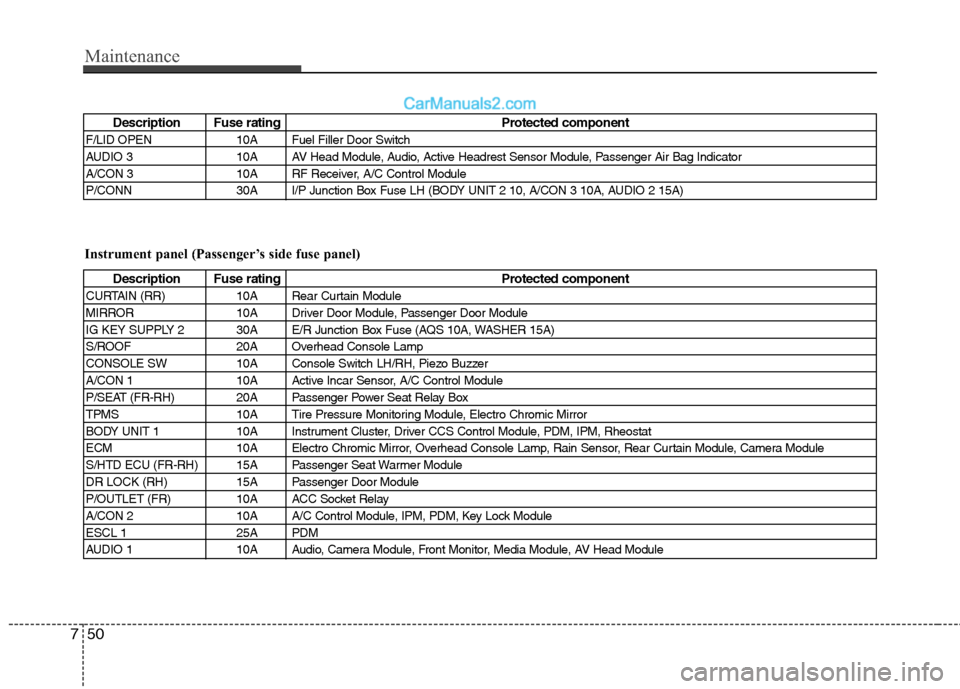
Description Fuse rating Protected component
F/LID OPEN 10A Fuel Filler Door Switch
AUDIO 3 10A AV Head Module, Audio, Active Headrest Sensor Module, Passenger Air Bag Indicator
A/CON 3 10A RF Receiver, A/C Control Module
P/CONN 30A I/P Junction Box Fuse LH (BODY UNIT 2 10, A/CON 3 10A, AUDIO 2 15A)
Instrument panel (Passenger’s side fuse panel)
Description Fuse rating Protected component
CURTAIN (RR) 10A Rear Curtain Module
MIRROR 10A Driver Door Module, Passenger Door Module
IG KEY SUPPLY 2 30A E/R Junction Box Fuse (AQS 10A, WASHER 15A)
S/ROOF 20A Overhead Console Lamp
CONSOLE SW 10A Console Switch LH/RH, Piezo Buzzer
A/CON 1 10A Active Incar Sensor, A/C Control Module
P/SEAT (FR-RH) 20A Passenger Power Seat Relay Box
TPMS 10A Tire Pressure Monitoring Module, Electro Chromic Mirror
BODY UNIT 1 10A Instrument Cluster, Driver CCS Control Module, PDM, IPM, Rheostat
ECM 10A Electro Chromic Mirror, Overhead Console Lamp, Rain Sensor, Rear Curtain Module, Camera Module
S/HTD ECU (FR-RH) 15A Passenger Seat Warmer Module
DR LOCK (RH) 15A Passenger Door Module
P/OUTLET (FR) 10A ACC Socket Relay
A/CON 2 10A A/C Control Module, IPM, PDM, Key Lock Module
ESCL 1 25A PDM
AUDIO 1 10A Audio, Camera Module, Front Monitor, Media Module, AV Head Module
Page 394 of 399
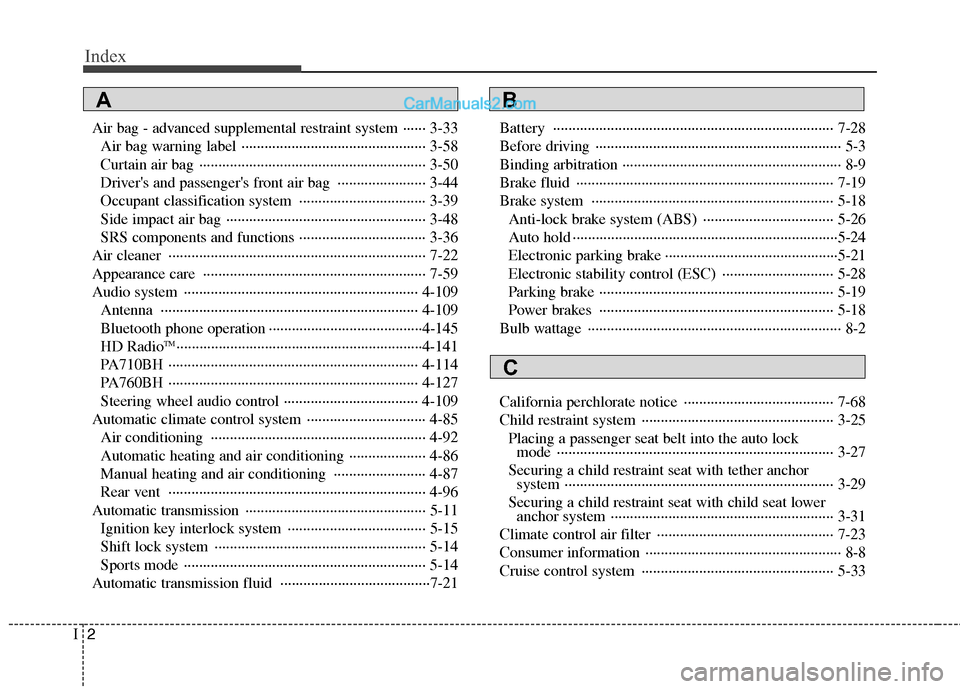
Index
2I
Air bag - advanced supplemental restraint system ······ 3-33
Air bag warning label ················································ 3-58
Curtain air bag ··························································· 3-50
Driver's and passenger's front air bag ······················· 3-44
Occupant classification system ································· 3-39
Side impact air bag ···················································· 3-48
SRS components and functions ································· 3-36
Air cleaner ··································································· 7-22
Appearance care ·························································· 7-59
Audio system ····························································· 4-109
Antenna ··································································· 4-109
Bluetooth phone operation ········································4-145
HD Radio
TM································································4-141
PA710BH ································································· 4-114
PA760BH ································································· 4-127
Steering wheel audio control ··································· 4-109
Automatic climate control system ······························· 4-85
Air conditioning ························································ 4-92
Automatic heating and air conditioning ···················· 4-86
Manual heating and air conditioning ························ 4-87
Rear vent ··································································· 4-96
Automatic transmission ··············································· 5-11
Ignition key interlock system ···································· 5-15
Shift lock system ······················································· 5-14
Sports mode ······························································· 5-14
Automatic transmission fluid ·······································7-21Battery ········································································· 7-28
Before driving ································································ 5-3
Binding arbitration ························································· 8-9
Brake fluid ··································································· 7-19
Brake system ······························································· 5-18
Anti-lock brake system (ABS) ·································· 5-26
Auto hold ·····································································5-24
Electronic parking brake ·············································5-21
Electronic stability control (ESC) ····························· 5-28
Parking brake ····························································· 5-19
Power brakes ····························································· 5-18
Bulb wattage ·································································· 8-2
California perchlorate notice ······································· 7-68
Child restraint system ·················································· 3-25
Placing a passenger seat belt into the auto lock
mode ········································································ 3-27
Securing a child restraint seat with tether anchor
system ······································································ 3-29
Securing a child restraint seat with child seat lower
anchor system ·························································· 3-31
Climate control air filter ·············································· 7-23
Consumer information ··················································· 8-8
Cruise control system ·················································· 5-33
AB
C