child lock Hyundai Genesis 2011 User Guide
[x] Cancel search | Manufacturer: HYUNDAI, Model Year: 2011, Model line: Genesis, Model: Hyundai Genesis 2011Pages: 409, PDF Size: 38.54 MB
Page 80 of 409
43
Features of your vehicle
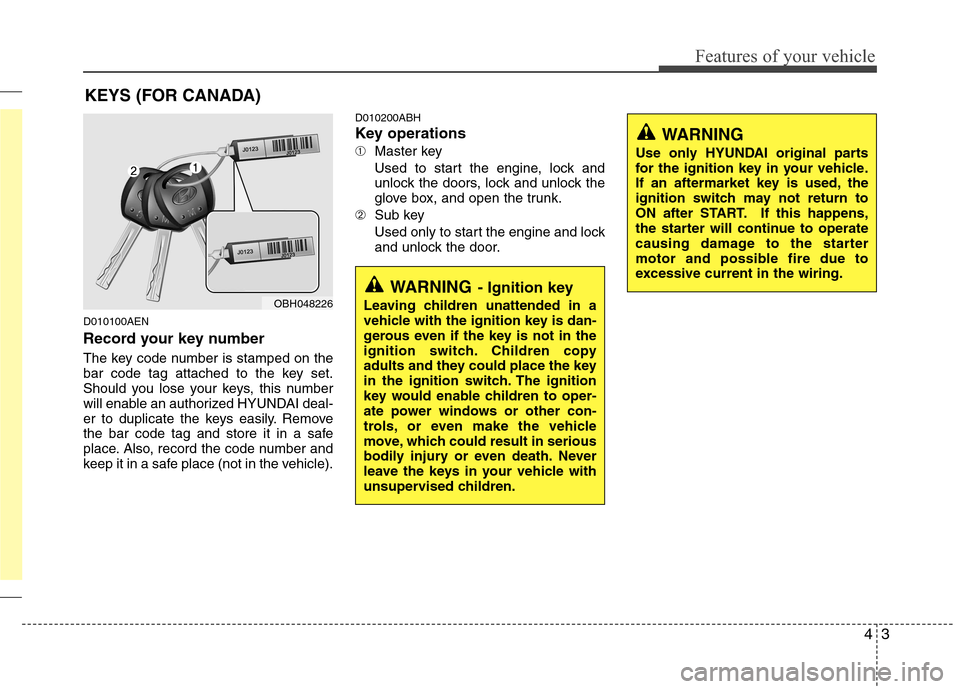
D010100AEN
Record your key number
The key code number is stamped on the
bar code tag attached to the key set.
Should you lose your keys, this number
will enable an authorized HYUNDAI deal-
er to duplicate the keys easily. Remove
the bar code tag and store it in a safe
place. Also, record the code number and
keep it in a safe place (not in the vehicle).
D010200ABH
Key operations
➀Master key
Used to start the engine, lock and
unlock the doors, lock and unlock the
glove box, and open the trunk.
➁Sub key
Used only to start the engine and lock
and unlock the door.
KEYS (FOR CANADA)
WARNING- Ignition key
Leaving children unattended in a
vehicle with the ignition key is dan-
gerous even if the key is not in the
ignition switch. Children copy
adults and they could place the key
in the ignition switch. The ignition
key would enable children to oper-
ate power windows or other con-
trols, or even make the vehicle
move, which could result in serious
bodily injury or even death. Never
leave the keys in your vehicle with
unsupervised children.OBH048226
WARNING
Use only HYUNDAI original parts
for the ignition key in your vehicle.
If an aftermarket key is used, the
ignition switch may not return to
ON after START. If this happens,
the starter will continue to operate
causing damage to the starter
motor and possible fire due to
excessive current in the wiring.
Page 95 of 409
Features of your vehicle
18 4
When pushing down on the front por-
tion (1) of the switch, all vehicle doors
will lock.
When pushing down on the rear por-
tion (2) of the switch, all vehicle doors
will unlock.
If the key is in the ignition switch or the
smart key is in the vehicle, and any
door is open, the doors will not lock
even though the front portion (1) of
central door lock switch is pressed.D050300AAM-EE
Impact sensing door unlock system
(if equipped)
In the event of air bag deployment result-
ing from a vehicle impact, all doors will
automatically unlock.
D050400ABH-EU
Speed sensing door lock system
(if equipped)
Type A
All doors will be automatically locked
when the vehicle speed exceeds 12.5
mph (20 km/h). And all doors will be auto-
matically unlocked after you turn the
engine off or when you remove the igni-
tion key. (if equipped)
Type B
All doors will be automatically locked
when the vehicle speed exceeds 9.3 mph
(15 km/h). And all doors will be automat-
ically unlocked after you turn the engine
off or when you remove the ignition key.
(if equipped)
WARNING- Unlocked
vehicles
Leaving your vehicle unlocked can
invite theft or possible harm to you
or others from someone hiding in
your vehicle while you are gone.
Always remove the ignition key,
engage the parking brake, close all
windows and lock all doors when
leaving your vehicle unattended.
WARNING- Unattended
children
An enclosed vehicle can become
extremely hot, causing death or
severe injury to unattended chil-
dren or animals who cannot escape
the vehicle. Furthermore, children
might operate features of the vehi-
cle that could injure them, or they
could encounter other harm, possi-
bly from someone gaining entry to
the vehicle. Never leave children or
animals unattended in your vehicle.
WARNING - Doors
The doors should always be fully
closed and locked while the vehi-
cle is in motion to prevent acci-
dental opening of the door.
Locked doors will also discour-
age potential intruders when the
vehicle stops or slows.
Be careful when opening doors
and watch for vehicles, motorcy-
cles, bicycles or pedestrians
approaching the vehicle in the
path of the door. Opening a door
when something is approaching
can cause damage or injury.
Page 96 of 409
419
Features of your vehicle
✽ ✽
NOTICE
You can activate or deactivate some auto
door lock/unlock features in the INFO
menu of DIS (Driver Information
System, if equipped) as follows;
• Speed sensing auto door lock
• Auto door unlock by unlocking the
driver's door
• Auto door unlock when the ignition
key is removed from the ignition
switch or the smart key is removed
from the smart key holder.
• Auto door lock/unlock by shifting the
transmission shift lever out of P
(Park) or into P (Park)
If you want to activate or deactivate
some door lock/unlock feature, refer to
the DIS manual (if equipped) supplied
separately.
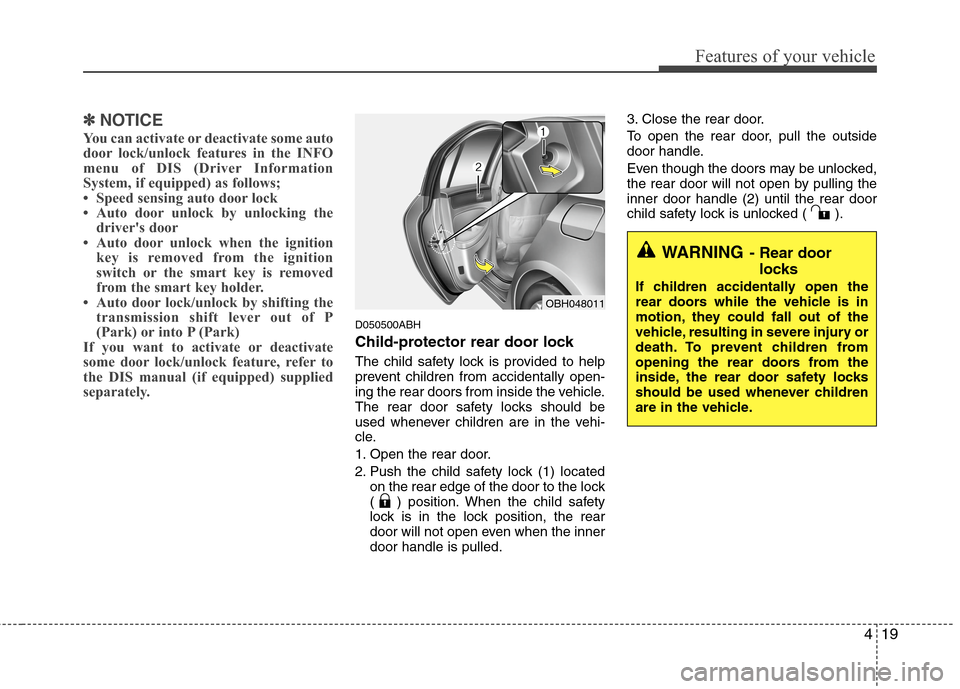
D050500ABH
Child-protector rear door lock
The child safety lock is provided to help
prevent children from accidentally open-
ing the rear doors from inside the vehicle.
The rear door safety locks should be
used whenever children are in the vehi-
cle.
1. Open the rear door.
2. Push the child safety lock (1) located
on the rear edge of the door to the lock
( ) position. When the child safety
lock is in the lock position, the rear
door will not open even when the inner
door handle is pulled.3. Close the rear door.
To open the rear door, pull the outside
door handle.
Even though the doors may be unlocked,
the rear door will not open by pulling the
inner door handle (2) until the rear door
child safety lock is unlocked ( ).
OBH048011
WARNING- Rear door
locks
If children accidentally open the
rear doors while the vehicle is in
motion, they could fall out of the
vehicle, resulting in severe injury or
death. To prevent children from
opening the rear doors from the
inside, the rear door safety locks
should be used whenever children
are in the vehicle.
Page 98 of 409
421
Features of your vehicle
D070200ABH
Closing the trunk
To close, lower the trunk lid, then press
down on it until it locks. To be sure the
trunk lid is securely fastened, always
check by trying to pull it up.
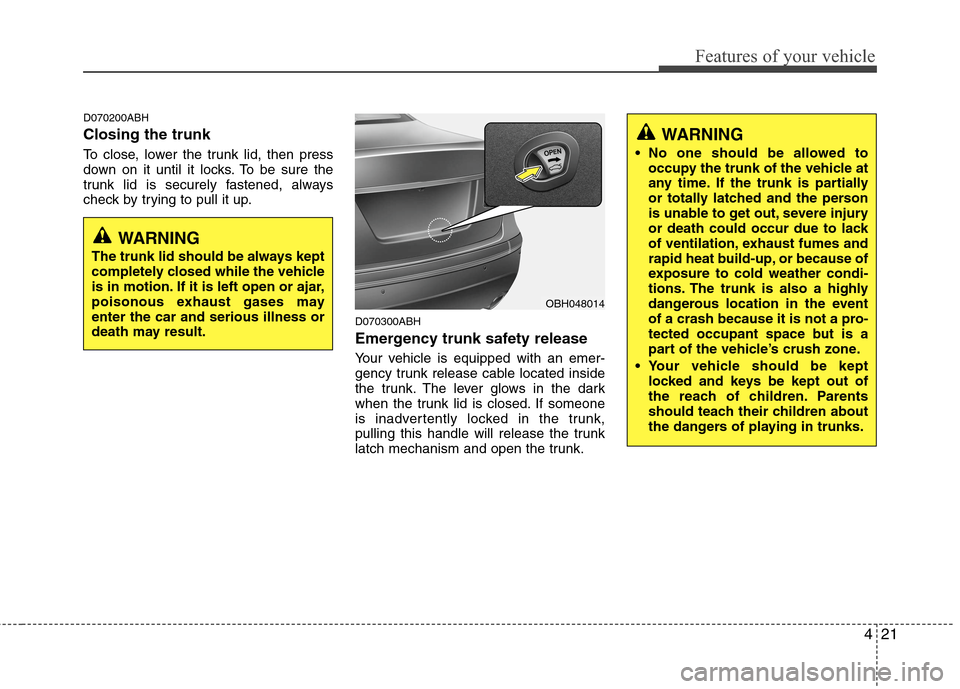
D070300ABH
Emergency trunk safety release
Your vehicle is equipped with an emer-
gency trunk release cable located inside
the trunk. The lever glows in the dark
when the trunk lid is closed. If someone
is inadvertently locked in the trunk,
pulling this handle will release the trunk
latch mechanism and open the trunk.
OBH048014
WARNING
The trunk lid should be always kept
completely closed while the vehicle
is in motion. If it is left open or ajar,
poisonous exhaust gases may
enter the car and serious illness or
death may result.
WARNING
No one should be allowed to
occupy the trunk of the vehicle at
any time. If the trunk is partially
or totally latched and the person
is unable to get out, severe injury
or death could occur due to lack
of ventilation, exhaust fumes and
rapid heat build-up, or because of
exposure to cold weather condi-
tions. The trunk is also a highly
dangerous location in the event
of a crash because it is not a pro-
tected occupant space but is a
part of the vehicle’s crush zone.
Your vehicle should be kept
locked and keys be kept out of
the reach of children. Parents
should teach their children about
the dangers of playing in trunks.
Page 103 of 409
Features of your vehicle
26 4
D080104AUN
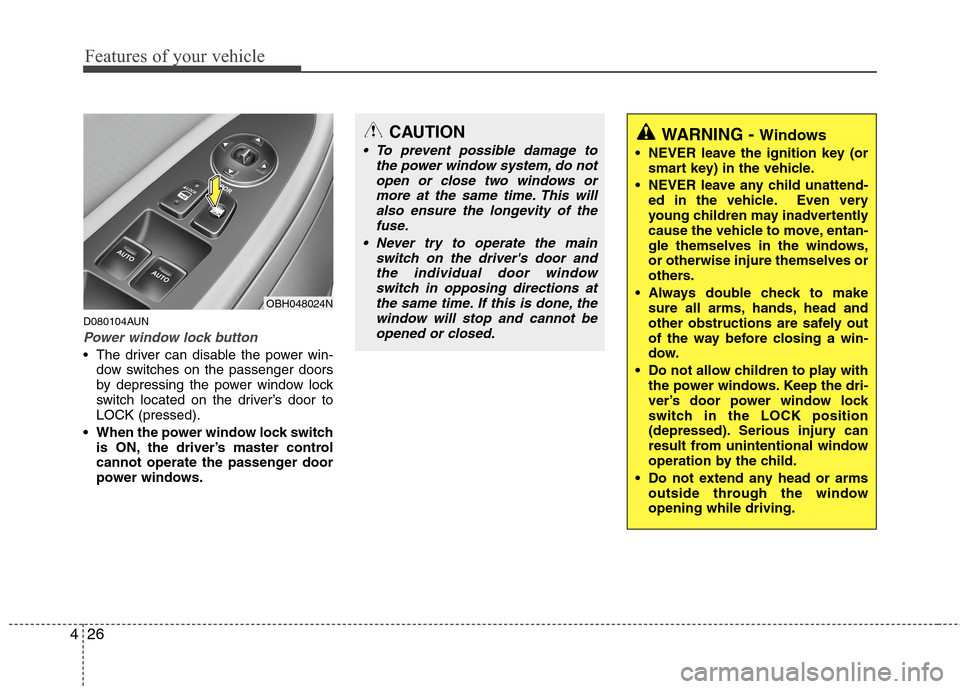
Power window lock button
The driver can disable the power win-
dow switches on the passenger doors
by depressing the power window lock
switch located on the driver’s door to
LOCK (pressed).
When the power window lock switch
is ON, the driver’s master control
cannot operate the passenger door
power windows.
OBH048024N
CAUTION
To prevent possible damage to
the power window system, do not
open or close two windows or
more at the same time. This will
also ensure the longevity of the
fuse.
Never try to operate the main
switch on the driver's door and
the individual door window
switch in opposing directions at
the same time. If this is done, the
window will stop and cannot be
opened or closed.WARNING - Windows
NEVER leave the ignition key (or
smart key) in the vehicle.
NEVER leave any child unattend-
ed in the vehicle. Even very
young children may inadvertently
cause the vehicle to move, entan-
gle themselves in the windows,
or otherwise injure themselves or
others.
Always double check to make
sure all arms, hands, head and
other obstructions are safely out
of the way before closing a win-
dow.
Do not allow children to play with
the power windows. Keep the dri-
ver’s door power window lock
switch in the LOCK position
(depressed). Serious injury can
result from unintentional window
operation by the child.
Do not extend any head or arms
outside through the window
opening while driving.
Page 196 of 409
4119
Features of your vehicle
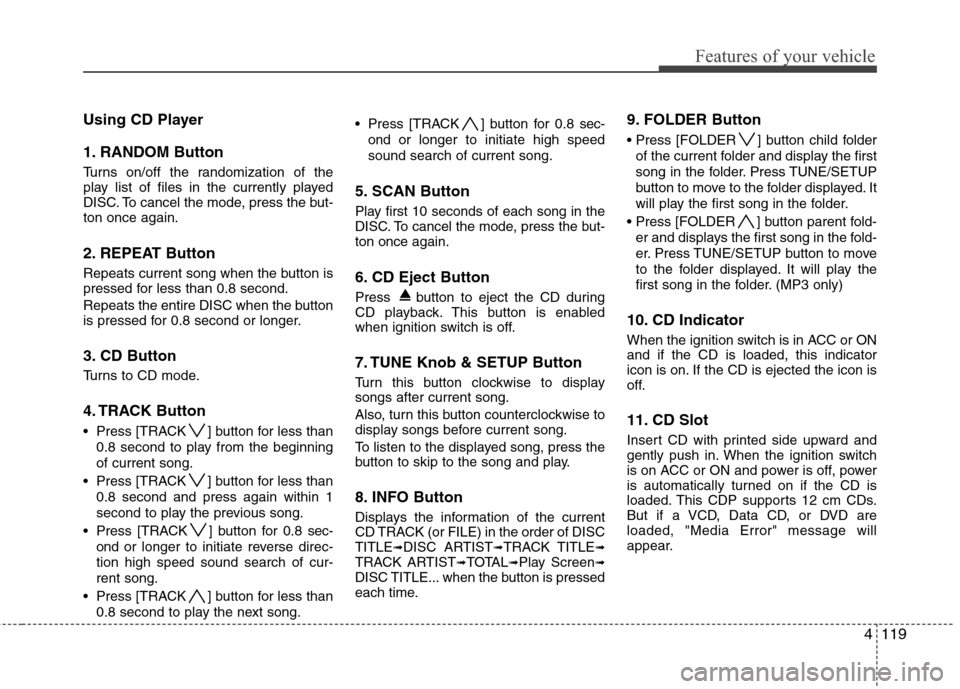
Using CD Player
1. RANDOM Button
Turns on/off the randomization of the
play list of files in the currently played
DISC. To cancel the mode, press the but-
ton once again.
2. REPEAT Button
Repeats current song when the button is
pressed for less than 0.8 second.
Repeats the entire DISC when the button
is pressed for 0.8 second or longer.
3. CD Button
Turns to CD mode.
4. TRACK Button
Press [TRACK ] button for less than
0.8 second to play from the beginning
of current song.
Press [TRACK ] button for less than
0.8 second and press again within 1
second to play the previous song.
Press [TRACK ] button for 0.8 sec-
ond or longer to initiate reverse direc-
tion high speed sound search of cur-
rent song.
Press [TRACK ] button for less than
0.8 second to play the next song. Press [TRACK ] button for 0.8 sec-
ond or longer to initiate high speed
sound search of current song.
5. SCAN Button
Play first 10 seconds of each song in the
DISC. To cancel the mode, press the but-
ton once again.
6. CD Eject Button
Press button to eject the CD during
CD playback. This button is enabled
when ignition switch is off.
7. TUNE Knob & SETUP Button
Turn this button clockwise to display
songs after current song.
Also, turn this button counterclockwise to
display songs before current song.
To listen to the displayed song, press the
button to skip to the song and play.
8. INFO Button
Displays the information of the current
CD TRACK (or FILE) in the order of DISC
TITLE
➟DISC ARTIST➟TRACK TITLE➟TRACK ARTIST➟TOTAL➟Play Screen➟DISC TITLE... when the button is pressed
each time.
9. FOLDER Button
Press [FOLDER ] button child folder
of the current folder and display the first
song in the folder. Press TUNE/SETUP
button to move to the folder displayed. It
will play the first song in the folder.
Press [FOLDER ] button parent fold-
er and displays the first song in the fold-
er. Press TUNE/SETUP button to move
to the folder displayed. It will play the
first song in the folder. (MP3 only)
10. CD Indicator
When the ignition switch is in ACC or ON
and if the CD is loaded, this indicator
icon is on. If the CD is ejected the icon is
off.
11. CD Slot
Insert CD with printed side upward and
gently push in. When the ignition switch
is on ACC or ON and power is off, power
is automatically turned on if the CD is
loaded. This CDP supports 12 cm CDs.
But if a VCD, Data CD, or DVD are
loaded, "Media Error" message will
appear.
Page 209 of 409
Features of your vehicle
132 4
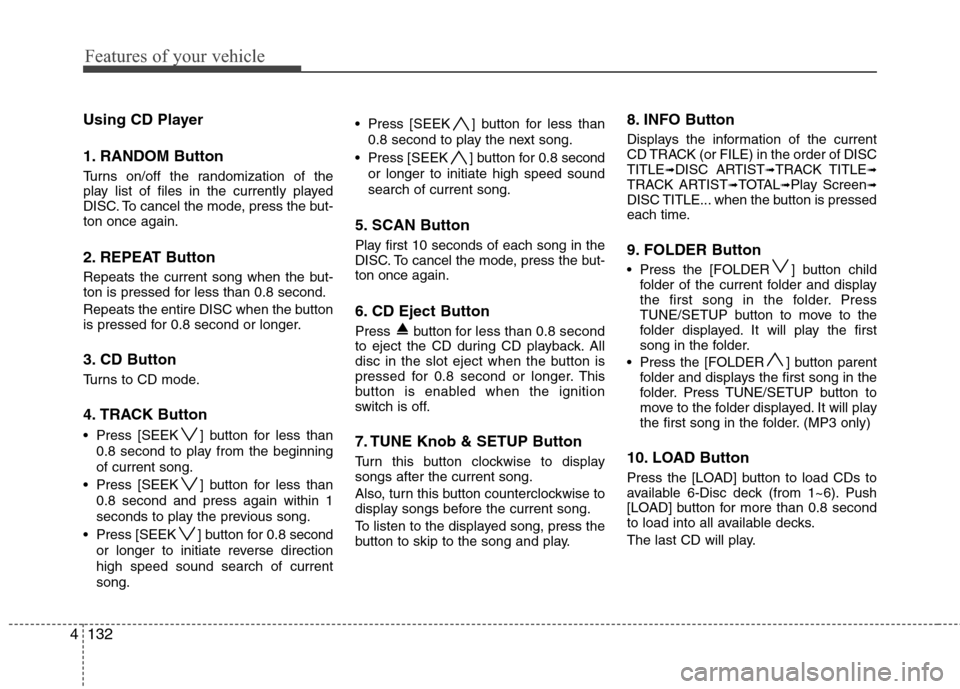
Using CD Player
1. RANDOM Button
Turns on/off the randomization of the
play list of files in the currently played
DISC. To cancel the mode, press the but-
ton once again.
2. REPEAT Button
Repeats the current song when the but-
ton is pressed for less than 0.8 second.
Repeats the entire DISC when the button
is pressed for 0.8 second or longer.
3. CD Button
Turns to CD mode.
4. TRACK Button
Press [SEEK ] button for less than
0.8 second to play from the beginning
of current song.
Press [SEEK ] button for less than
0.8 second and press again within 1
seconds to play the previous song.
Press [SEEK ] button for 0.8 second
or longer to initiate reverse direction
high speed sound search of current
song. Press [SEEK ] button for less than
0.8 second to play the next song.
Press [SEEK ] button for 0.8 second
or longer to initiate high speed sound
search of current song.
5. SCAN Button
Play first 10 seconds of each song in the
DISC. To cancel the mode, press the but-
ton once again.
6. CD Eject Button
Press button for less than 0.8 second
to eject the CD during CD playback. All
disc in the slot eject when the button is
pressed for 0.8 second or longer.This
button is enabled when the ignition
switch is off.
7. TUNE Knob & SETUP Button
Turn this button clockwise to display
songs after the current song.
Also, turn this button counterclockwise to
display songs before the current song.
To listen to the displayed song, press the
button to skip to the song and play.
8. INFO Button
Displays the information of the current
CD TRACK (or FILE) in the order of DISC
TITLE
➟DISC ARTIST➟TRACK TITLE➟TRACK ARTIST➟TOTAL➟Play Screen➟DISC TITLE... when the button is pressed
each time.
9. FOLDER Button
Press the [FOLDER ] button child
folder of the current folder and display
the first song in the folder. Press
TUNE/SETUP button to move to the
folder displayed. It will play the first
song in the folder.
Press the [FOLDER ] button parent
folder and displays the first song in the
folder. Press TUNE/SETUP button to
move to the folder displayed. It will play
the first song in the folder. (MP3 only)
10. LOAD Button
Press the [LOAD] button to load CDs to
available 6-Disc deck (from 1~6). Push
[LOAD] button for more than 0.8 second
to load into all available decks.
The last CD will play.
Page 244 of 409
Driving your vehicle
12 5
Always depress the brake pedal when
shifting from N (Neutral) to a forward or
reverse gear.E060101ABH
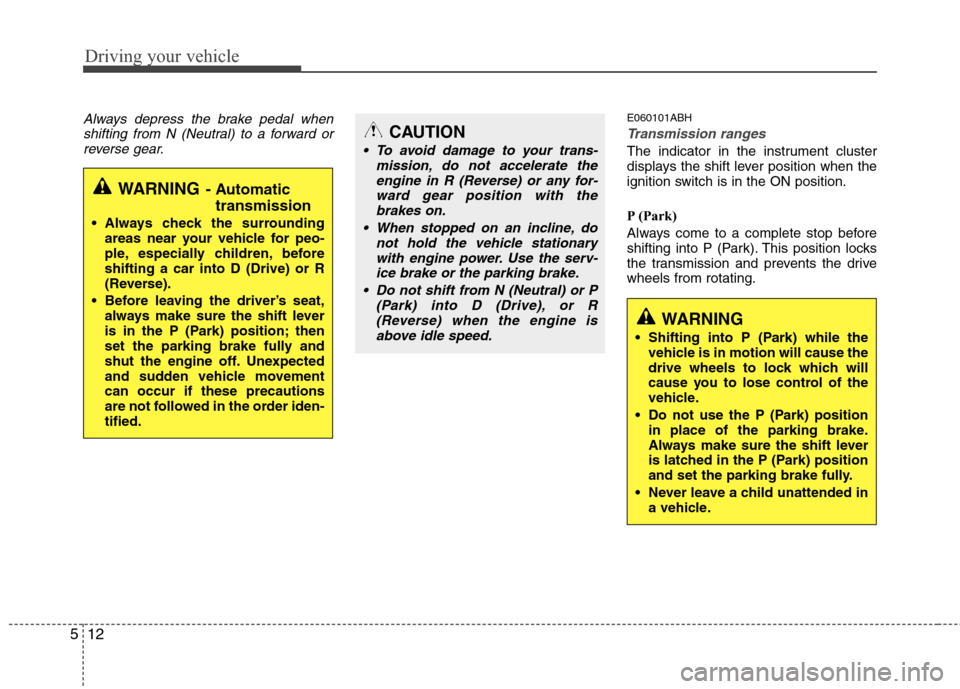
Transmission ranges
The indicator in the instrument cluster
displays the shift lever position when the
ignition switch is in the ON position.
P (Park)
Always come to a complete stop before
shifting into P (Park). This position locks
the transmission and prevents the drive
wheels from rotating.
WARNING- Automatic
transmission
Always check the surrounding
areas near your vehicle for peo-
ple, especially children, before
shifting a car into D (Drive) or R
(Reverse).
Before leaving the driver’s seat,
always make sure the shift lever
is in the P (Park) position; then
set the parking brake fully and
shut the engine off. Unexpected
and sudden vehicle movement
can occur if these precautions
are not followed in the order iden-
tified.
CAUTION
To avoid damage to your trans-
mission, do not accelerate the
engine in R (Reverse) or any for-
ward gear position with the
brakes on.
When stopped on an incline, do
not hold the vehicle stationary
with engine power. Use the serv-
ice brake or the parking brake.
Do not shift from N (Neutral) or P
(Park) into D (Drive), or R
(Reverse) when the engine is
above idle speed.
WARNING
Shifting into P (Park) while the
vehicle is in motion will cause the
drive wheels to lock which will
cause you to lose control of the
vehicle.
Do not use the P (Park) position
in place of the parking brake.
Always make sure the shift lever
is latched in the P (Park) position
and set the parking brake fully.
Never leave a child unattended in
a vehicle.
Page 314 of 409
613
What to do in an emergency
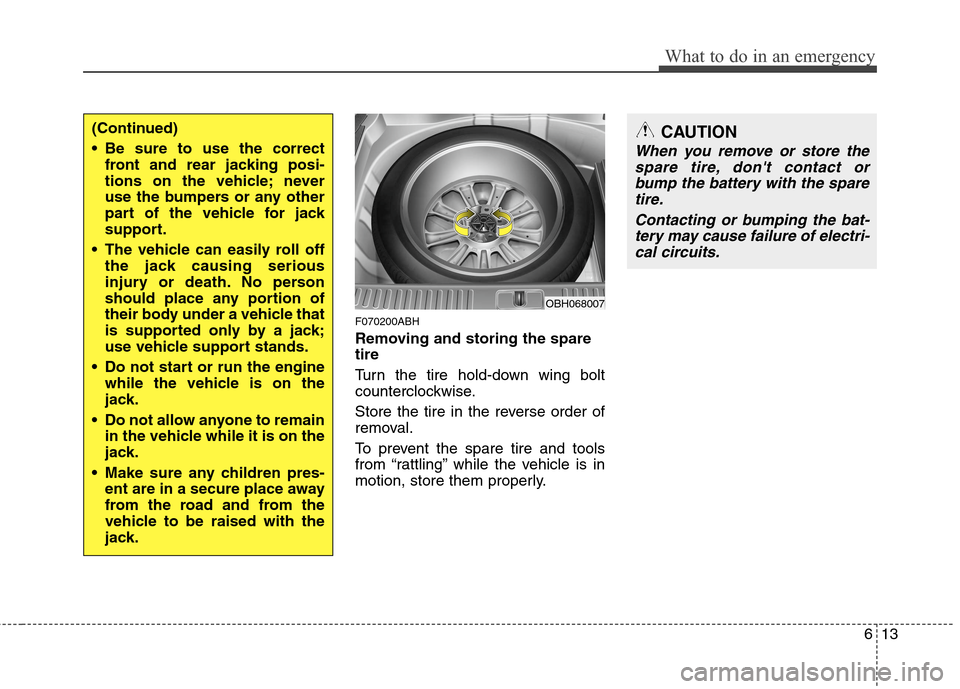
F070200ABH
Removing and storing the spare
tire
Turn the tire hold-down wing bolt
counterclockwise.
Store the tire in the reverse order of
removal.
To prevent the spare tire and tools
from “rattling” while the vehicle is in
motion, store them properly.
OBH068007
(Continued)
Be sure to use the correct
front and rear jacking posi-
tions on the vehicle; never
use the bumpers or any other
part of the vehicle for jack
support.
The vehicle can easily roll off
the jack causing serious
injury or death. No person
should place any portion of
their body under a vehicle that
is supported only by a jack;
use vehicle support stands.
Do not start or run the engine
while the vehicle is on the
jack.
Do not allow anyone to remain
in the vehicle while it is on the
jack.
Make sure any children pres-
ent are in a secure place away
from the road and from the
vehicle to be raised with the
jack.CAUTION
When you remove or store the
spare tire, don't contact or
bump the battery with the spare
tire.
Contacting or bumping the bat-
tery may cause failure of electri-
cal circuits.
Page 404 of 409
Index
2I
Air bag - advanced supplemental restraint system ······ 3-33
Air bag warning label ················································ 3-58
Curtain air bag ··························································· 3-50
Driver's and passenger's front air bag ······················· 3-44
Occupant classification system ································· 3-39
Side impact air bag ···················································· 3-48
SRS components and functions ································· 3-36
Air cleaner ··································································· 7-22
Appearance care ·························································· 7-59
Audio system ····························································· 4-111
Antenna ··································································· 4-111
Bluetooth phone operation ········································4-147
HD Radio
TM································································4-144
PA710BH ································································· 4-116
PA760BH ································································· 4-129
Steering wheel audio control ··································· 4-111
Automatic climate control system ······························· 4-87
Air conditioning ························································ 4-94
Automatic heating and air conditioning ···················· 4-88
Manual heating and air conditioning ························ 4-89
Rear vent ··································································· 4-98
Automatic transmission ··············································· 5-11
Ignition key interlock system ···································· 5-15
Shift lock system ······················································· 5-14
Sports mode ······························································· 5-14
Automatic transmission fluid ·······································7-21Battery ········································································· 7-28
Before driving ································································ 5-3
Binding arbitration ························································· 8-9
Brake fluid ··································································· 7-19
Brake system ······························································· 5-18
Anti-lock brake system (ABS) ·································· 5-28
Auto hold ·····································································5-25
Electronic parking brake (EPB) ··································5-21
Electronic stability control (ESC) ····························· 5-30
Parking brake ····························································· 5-19
Power brakes ····························································· 5-18
Bulb wattage ·································································· 8-2
California perchlorate notice ······································· 7-68
Child restraint system ·················································· 3-25
Placing a passenger seat belt into the auto lock
mode ········································································ 3-27
Securing a child restraint seat with tether anchor
system ······································································ 3-29
Securing a child restraint seat with child seat lower
anchor system ·························································· 3-31
Climate control air filter ·············································· 7-23
Consumer information ··················································· 8-8
Cruise control system ·················································· 5-35
AB
C