instrument panel Hyundai Genesis 2011 User Guide
[x] Cancel search | Manufacturer: HYUNDAI, Model Year: 2011, Model line: Genesis, Model: Hyundai Genesis 2011Pages: 409, PDF Size: 38.54 MB
Page 64 of 409
345
Safety features of your vehicle
The seat belt buckle sensors determine if
the driver and front passenger's seat
belts are fastened. These sensors pro-
vide the ability to control the SRS deploy-
ment based on whether or not the seat
belts are fastened, and how severe the
impact is.
The advanced SRS offers the ability to
control the air bag inflation within two lev-
els. A first stage level is provided for mod-
erate-severity impacts. A second stage
level is provided for more severe impacts.
According to the impact severity, and
seat belt usage, the SRSCM (SRS
Control Module) controls the air bag
inflation. Failure to properly wear seat
belts can increase the risk or severity of
injury in an accident.Additionally, your vehicle is equipped
with an occupant classification system in
the front passenger's seat. The occupant
classification system detects the pres-
ence of a passenger in the front passen-
ger's seat and will turn off the front pas-
senger's air bag under certain condi-
tions. For more detail, see "Occupant
classification system" in this section.
WARNING
If the occupant classification sys-
tem is not working properly, the
SRS air bag warning light on the
instrument panel will illuminate
because the SRS air bag warning
light is connected with the occu-
pant classification system. If the
SRS air bag warning light does not
illuminate when the ignition switch
is turned to the ON position,
remains illuminated after approxi-
mately 6 seconds when the ignition
switch is turned to the ON position,
or if it illuminates while the vehicle
is being driven, have an authorized
HYUNDAI dealer inspect the
advanced SRS air bag system as
soon as possible.
WARNING
Do not place any objects under-
neath the front seats as they could
interfere with the occupant classifi-
cation system.
Page 66 of 409
347
Safety features of your vehicle
OBH038058N
OBH038059L
OBH038062
Rear impact
Side impact
Rollover
(Continued)
No objects should be placed over
or near the air bag modules on
the steering wheel, instrument
panel, and the front passenger's
panel above the glove box,
because any such object could
cause harm if the vehicle is in a
crash severe enough to cause
the air bags to deploy.
Never place covers, blankets or
seat warmers on the passenger
seat as these may interfere with
the occupant classification sys-
tem.
Do not tamper with or disconnect
SRS wiring or other components
of the SRS system. Doing so
could result in injury, due to acci-
dental deployment of the air bags
or by rendering the SRS inopera-
tive.
If the SRS air bag warning light
remains illuminated while the
vehicle is being driven, have an
authorized HYUNDAI dealer
inspect the air bag system as
soon as possible.
(Continued)(Continued)
Air bags can only be used once –
have an authorized HYUNDAI
dealer replace the air bag imme-
diately after deployment.
The SRS is designed to deploy
the front air bags only when an
impact is sufficiently severe and
when the impact angle is less
than 30° from the forward longitu-
dinal axis of the vehicle.
Additionally, the air bags will only
deploy once. Seat belts must be
worn at all times.
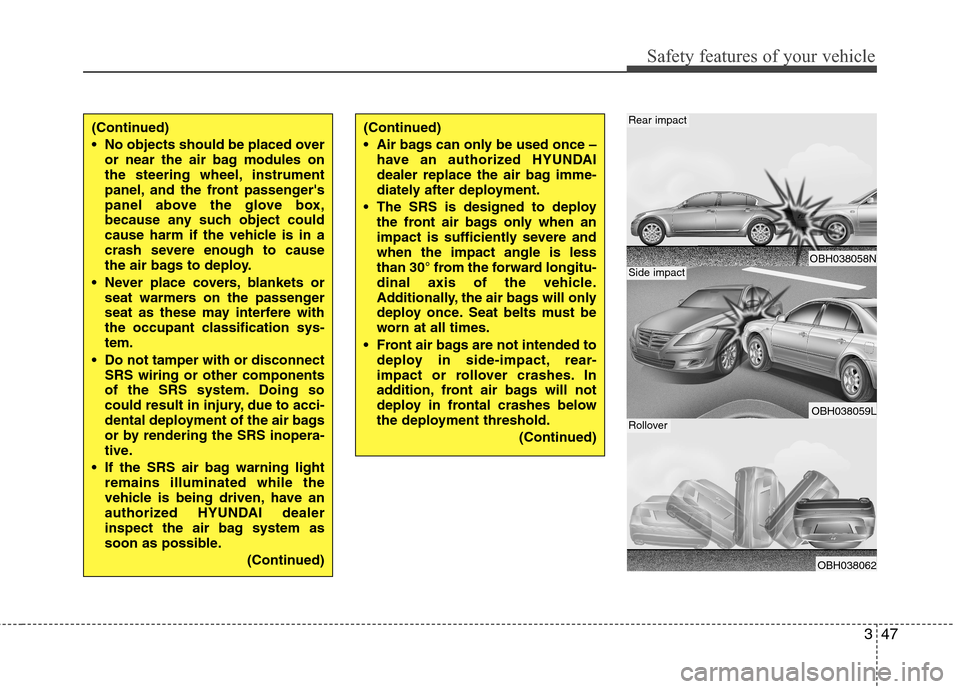
Front air bags are not intended to
deploy in side-impact, rear-
impact or rollover crashes. In
addition, front air bags will not
deploy in frontal crashes below
the deployment threshold.
(Continued)
Page 75 of 409
Safety features of your vehicle
56 3
C041100BBH
SRS Care
The SRS is virtually maintenance-free
and there are no parts you can safely
service by yourself. If the SRS air bag
warning light " " does not illuminate,
when you turn the ignition on, or continu-
ously remains on, have your vehicle
immediately inspected by an authorized
HYUNDAI dealer.
Any work on the SRS system, such as
removing, installing, repairing, or any
work on the steering wheel, the front
passenger's panel, front seats and roof
rails must be performed by an authorized
HYUNDAI dealer. Improper handling of
the SRS system may result in serious
personal injury.
WARNING
Modification to SRS components
or wiring, including the addition
of any kind of badges to the pad
covers or modifications to the
body structure, can adversely
affect SRS performance and lead
to possible injury.
For cleaning the air bag pad cov-
ers, use only a soft, dry cloth or
one which has been moistened
with plain water. Solvents or
cleaners could adversely affect
the air bag covers and proper
deployment of the system.
No objects should be placed over
or near the air bag modules on the
steering wheel, instrument panel,
and the front passenger's panel
above the glove box, because any
such object could cause harm if the
vehicle is in a crash severe enough
to cause the air bags to inflate.
(Continued)
(Continued)
If the air bags inflate, they must
be replaced by an authorized
HYUNDAI dealer.
Do not tamper with or disconnect
SRS wiring, or other components
of the SRS system. Doing so
could result in injury, due to acci-
dental inflation of the air bags or
by rendering the SRS inopera-
tive.
If components of the air bag sys-
tem must be discarded, or if the
vehicle must be scrapped, certain
safety precautions must be
observed. An authorized
HYUNDAI dealer knows these
precautions and can give you the
necessary information. Failure to
follow these precautions and pro-
cedures could increase the risk
of personal injury.
If your car was flooded and has
soaked carpeting or water on the
flooring, you shouldn't try to start
the engine; have the car towed to
an authorized HYUNDAI dealer.
Page 127 of 409
Features of your vehicle
50 4
D150100AUN
Instrument panel illumination
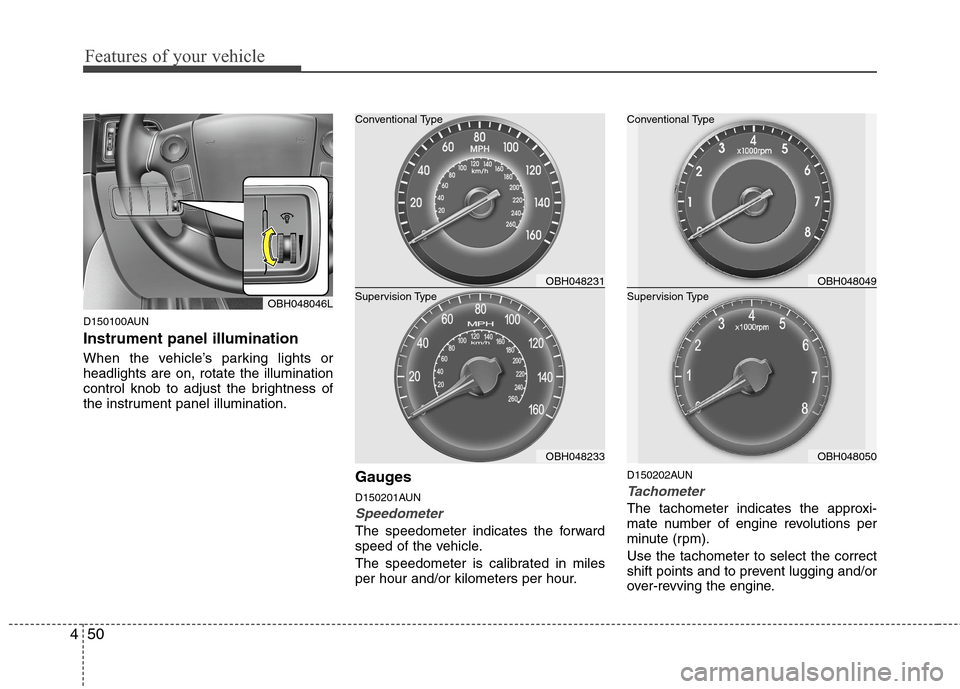
When the vehicle’s parking lights or
headlights are on, rotate the illumination
control knob to adjust the brightness of
the instrument panel illumination.
Gauges
D150201AUN
Speedometer
The speedometer indicates the forward
speed of the vehicle.
The speedometer is calibrated in miles
per hour and/or kilometers per hour.
D150202AUN
Tachometer
The tachometer indicates the approxi-
mate number of engine revolutions per
minute (rpm).
Use the tachometer to select the correct
shift points and to prevent lugging and/or
over-revving the engine.
OBH048046L
OBH048049
OBH048050 Supervision Type Conventional Type
OBH048231
OBH048233 Supervision Type Conventional Type
Page 153 of 409
Features of your vehicle
76 4
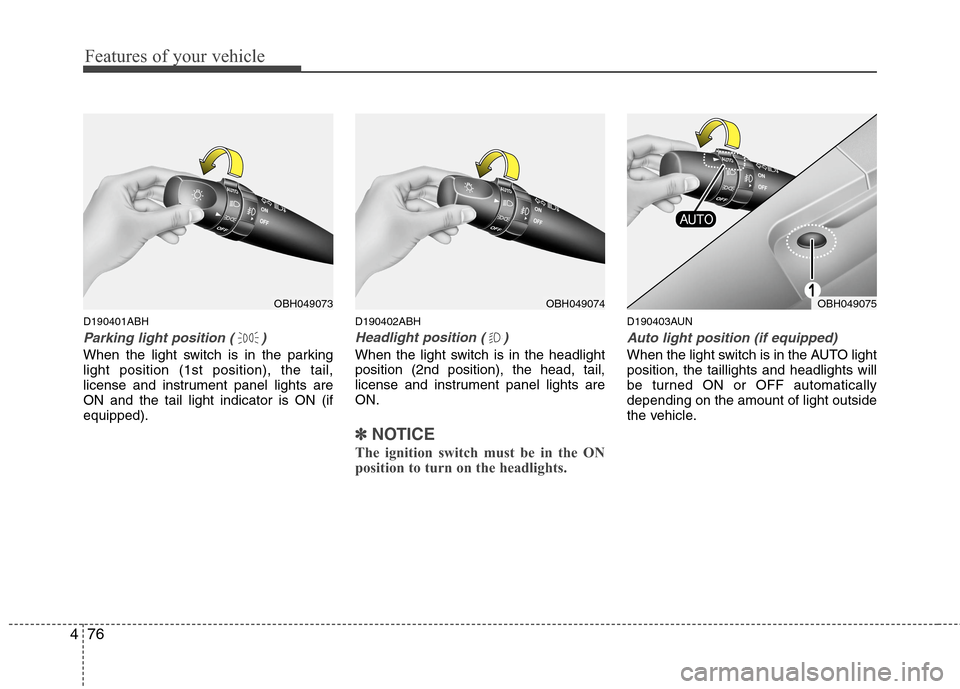
D190401ABH
Parking light position ( )
When the light switch is in the parking
light position (1st position), the tail,
license and instrument panel lights are
ON and the tail light indicator is ON (if
equipped).
D190402ABH
Headlight position ( )
When the light switch is in the headlight
position (2nd position), the head, tail,
license and instrument panel lights are
ON.
✽ ✽
NOTICE
The ignition switch must be in the ON
position to turn on the headlights.
D190403AUN
Auto light position (if equipped)
When the light switch is in the AUTO light
position, the taillights and headlights will
be turned ON or OFF automatically
depending on the amount of light outside
the vehicle.
OBH049074OBH049075OBH049073
Page 163 of 409
D220000AUN
✽ ✽
NOTICE
If you want to defrost and defog the
front windshield, refer to “Windshield
defrosting and defogging” in this sec-
tion.
D220100AEN
Rear window defroster
The defroster heats the window to
remove frost, fog and thin ice from the
rear window, while the engine is running.
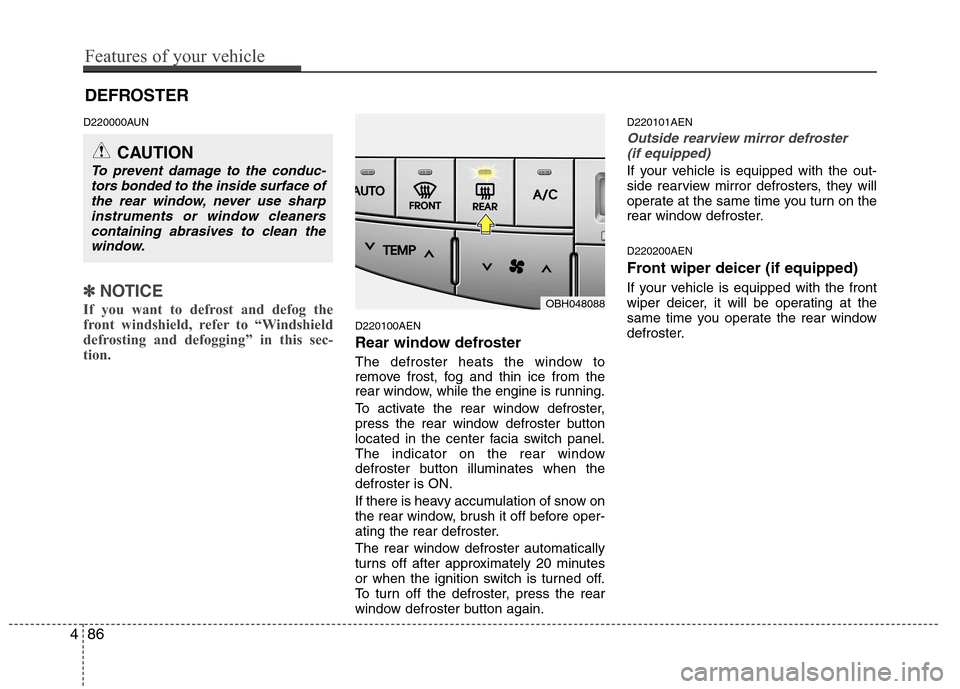
To activate the rear window defroster,
press the rear window defroster button
located in the center facia switch panel.
The indicator on the rear window
defroster button illuminates when the
defroster is ON.
If there is heavy accumulation of snow on
the rear window, brush it off before oper-
ating the rear defroster.
The rear window defroster automatically
turns off after approximately 20 minutes
or when the ignition switch is turned off.
To turn off the defroster, press the rear
window defroster button again.
D220101AEN
Outside rearview mirror defroster
(if equipped)
If your vehicle is equipped with the out-
side rearview mirror defrosters, they will
operate at the same time you turn on the
rear window defroster.
D220200AEN
Front wiper deicer (if equipped)
If your vehicle is equipped with the front
wiper deicer, it will be operating at the
same time you operate the rear window
defroster.
CAUTION
To prevent damage to the conduc-
tors bonded to the inside surface of
the rear window, never use sharp
instruments or window cleaners
containing abrasives to clean the
window.
DEFROSTER
OBH048088
486
Features of your vehicle
Page 165 of 409
Features of your vehicle
88 4
D240100ABH
Automatic heating and air condi-
tioning
The automatic climate control system is
controlled by simply setting the desired
temperature.
The Full Automatic Temperature Control
(FATC) system automatically controls the
heating and cooling system as follows;
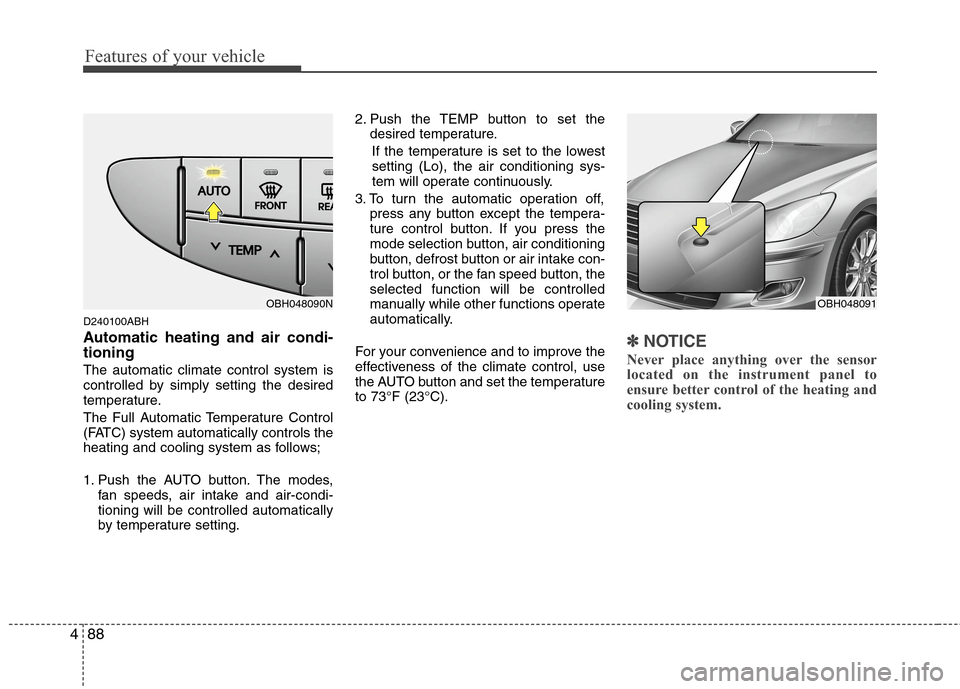
1. Push the AUTO button. The modes,
fan speeds, air intake and air-condi-
tioning will be controlled automatically
by temperature setting.2. Push the TEMP button to set the
desired temperature.
If the temperature is set to the lowest
setting (Lo), the air conditioning sys-
tem will operate continuously.
3. To turn the automatic operation off,
press any button except the tempera-
ture control button. If you press the
mode selection button, air conditioning
button, defrost button or air intake con-
trol button, or the fan speed button, the
selected function will be controlled
manually while other functions operate
automatically.
For your convenience and to improve the
effectiveness of the climate control, use
the AUTO button and set the temperature
to 73°F (23°C).
✽ ✽
NOTICE
Never place anything over the sensor
located on the instrument panel to
ensure better control of the heating and
cooling system.
OBH048091OBH048090N
Page 167 of 409
Features of your vehicle
90 4
❈
❈
Rear outlet vents (F)
The air flow of the Rear outlet vents is
delivered by the front climate control
system and delivered through the
inside air duct of the front doors. If the
door is open or not closed completely,
the air flow of the Rear outlet vent is
not delivered properly. Make sure the
front doors are closed completely.
The air flow of the Rear outlet vents
may be weaker than the instrument
panel vents due to the long air duct in
the front doors.
D240201ABH
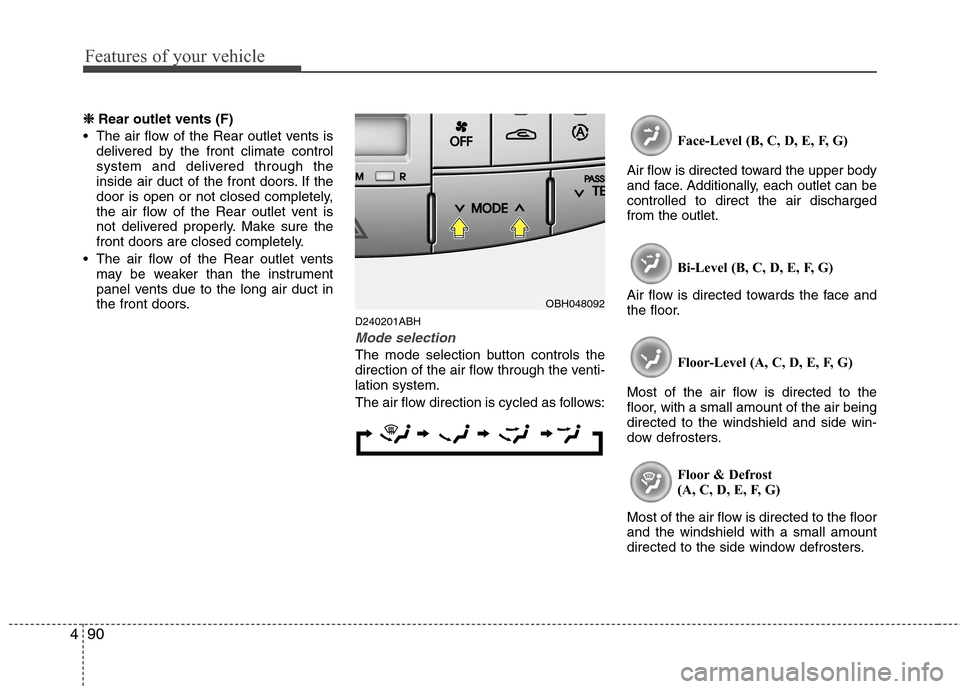
Mode selection
The mode selection button controls the
direction of the air flow through the venti-
lation system.
The air flow direction is cycled as follows:Face-Level (B, C, D, E, F, G)
Air flow is directed toward the upper body
and face. Additionally, each outlet can be
controlled to direct the air discharged
from the outlet.
Bi-Level (B, C, D, E, F, G)
Air flow is directed towards the face and
the floor.
Floor-Level (A, C, D, E, F, G)
Most of the air flow is directed to the
floor, with a small amount of the air being
directed to the windshield and side win-
dow defrosters.
Floor & Defrost
(A, C, D, E, F, G)
Most of the air flow is directed to the floor
and the windshield with a small amount
directed to the side window defrosters.
OBH048092
Page 168 of 409
491
Features of your vehicle
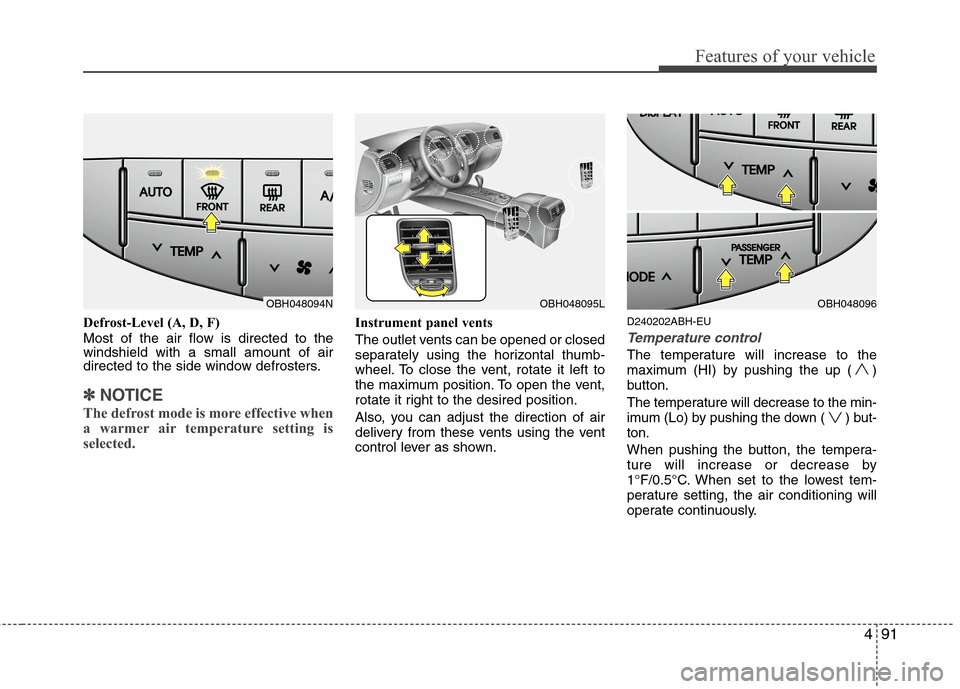
Defrost-Level (A, D, F)
Most of the air flow is directed to the
windshield with a small amount of air
directed to the side window defrosters.
✽ ✽
NOTICE
The defrost mode is more effective when
a warmer air temperature setting is
selected.
Instrument panel vents
The outlet vents can be opened or closed
separately using the horizontal thumb-
wheel. To close the vent, rotate it left to
the maximum position. To open the vent,
rotate it right to the desired position.
Also, you can adjust the direction of air
delivery from these vents using the vent
control lever as shown.D240202ABH-EU
Temperature control
The temperature will increase to the
maximum (HI) by pushing the up ( )
button.
The temperature will decrease to the min-
imum (Lo) by pushing the down ( ) but-
ton.
When pushing the button, the tempera-
ture will increase or decrease by
1°F/0.5°C. When set to the lowest tem-
perature setting, the air conditioning will
operate continuously.
OBH048094NOBH048095LOBH048096
Page 374 of 409
749
Maintenance
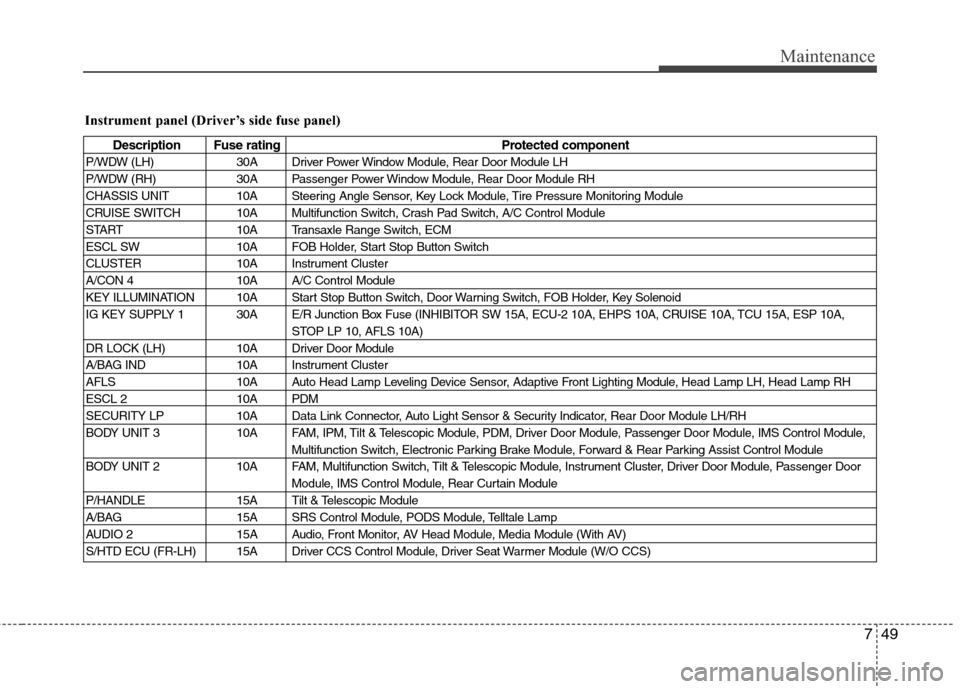
Instrument panel (Driver’s side fuse panel)
Description Fuse rating Protected component
P/WDW (LH) 30A Driver Power Window Module, Rear Door Module LH
P/WDW (RH) 30A Passenger Power Window Module, Rear Door Module RH
CHASSIS UNIT 10A Steering Angle Sensor, Key Lock Module, Tire Pressure Monitoring Module
CRUISE SWITCH 10A Multifunction Switch, Crash Pad Switch, A/C Control Module
START 10A Transaxle Range Switch, ECM
ESCL SW 10A FOB Holder, Start Stop Button Switch
CLUSTER 10A Instrument Cluster
A/CON 4 10A A/C Control Module
KEY ILLUMINATION 10A Start Stop Button Switch, Door Warning Switch, FOB Holder, Key Solenoid
IG KEY SUPPLY 1 30A E/R Junction Box Fuse (INHIBITOR SW 15A, ECU-2 10A, EHPS 10A, CRUISE 10A, TCU 15A, ESP 10A,
STOP LP 10, AFLS 10A)
DR LOCK (LH) 10A Driver Door Module
A/BAG IND 10A Instrument Cluster
AFLS 10A Auto Head Lamp Leveling Device Sensor, Adaptive Front Lighting Module, Head Lamp LH, Head Lamp RH
ESCL 2 10A PDM
SECURITY LP 10A Data Link Connector, Auto Light Sensor & Security Indicator, Rear Door Module LH/RH
BODY UNIT 3 10A FAM, IPM, Tilt & Telescopic Module, PDM, Driver Door Module, Passenger Door Module, IMS Control Module,
Multifunction Switch, Electronic Parking Brake Module, Forward & Rear Parking Assist Control Module
BODY UNIT 2 10A FAM, Multifunction Switch, Tilt & Telescopic Module, Instrument Cluster, Driver Door Module, Passenger Door
Module, IMS Control Module, Rear Curtain Module
P/HANDLE 15A Tilt & Telescopic Module
A/BAG 15A SRS Control Module, PODS Module, Telltale Lamp
AUDIO 2 15A Audio, Front Monitor, AV Head Module, Media Module (With AV)
S/HTD ECU (FR-LH) 15A Driver CCS Control Module, Driver Seat Warmer Module (W/O CCS)