Ac control Hyundai Genesis 2012 Repair Manual
[x] Cancel search | Manufacturer: HYUNDAI, Model Year: 2012, Model line: Genesis, Model: Hyundai Genesis 2012Pages: 393, PDF Size: 8.81 MB
Page 197 of 393
Features of your vehicle
124 4
PA710BHC(BHG,BHM)
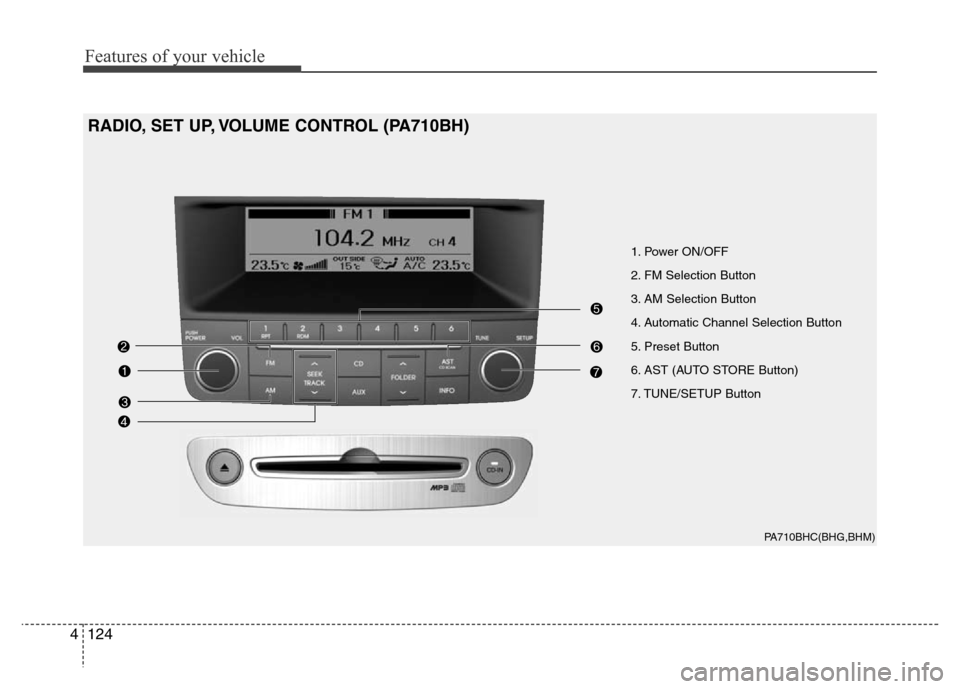
1. Power ON/OFF
2. FM Selection Button
3. AM Selection Button
4. Automatic Channel Selection Button
5. Preset Button
6. AST (AUTO STORE Button)
7. TUNE/SETUP Button
RADIO, SET UP, VOLUME CONTROL (PA710BH)
Page 198 of 393
4125
Features of your vehicle
1. Power ON/OFF & Volume
Control Switch
Turns ON/OFF when the ignition switch
is in ACC or ON. Turn the switch to the
right to increase the volume, turn the
switch to the left to decrease the volume.
2. FM Selection Button
Turns to FM mode and toggles FM1 and
FM2 when the button is pressed each
time.
3. AM Selection Button
Turns to AM mode.
4. Automatic Channel Selection
Button
• When the [SEEK ] button is pressed,
it reduces the band frequency to auto-
matically select channel. Stops at the
previous frequency if no channel is
found.
• When the [SEEK ] button is pressed,
it increases the band frequency to auto-
matically select channel. Stops at the
previous frequency if no channel is
found.
5. Pre-set Button
Push [1]~[6] buttons less than 0.8 second
to play the channel saved in each button.
Push pre-set button for more than 0.8 sec-
ond to save current channel to the respec-
tive button with a beep.
6. AST (AUTO STORE) Button
When the button is pressed, it automati-
cally selects and saves channels with
high reception rate to PRESET but-
tons(1~6) and plays the most strong fre-
quency saved in PRESET.
If no channel is saved after AST, it will
play the previous channel.
7. TUNE/SETUP Button
When you turn the button clockwise or
counterclockwise, the frequency increas-
es or decreases by each step.
General(AM 9kHz, FM 100kHz), USA
(AM 10kHz, FM 200kHz)
Press the button to enter the SETUP
mode. If no action is taken for 5 seconds
after pressing the button, it will return to
the play mode. (After entering SETUP
mode, move between items using the
left, right and push functions of the
TUNE/SETUP button.)
Page 210 of 393
4137
Features of your vehicle
PA760BHC(BHG,BHM)
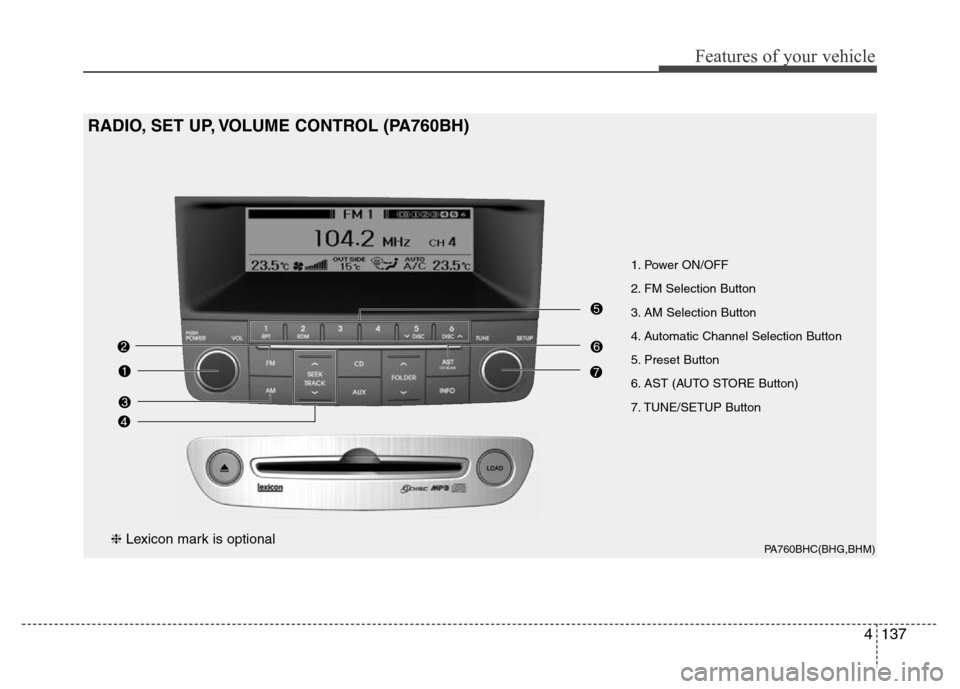
1. Power ON/OFF
2. FM Selection Button
3. AM Selection Button
4. Automatic Channel Selection Button
5. Preset Button
6. AST (AUTO STORE Button)
7. TUNE/SETUP Button
RADIO, SET UP, VOLUME CONTROL (PA760BH)
❈Lexicon mark is optional
Page 211 of 393
Features of your vehicle
138 4
1. Power ON/OFF & Volume
Control Button
Turns ON/OFF set when the ignition
switch is in ACC or ON. If the button is
turned to the right, it increases the vol-
ume and left, decreases the volume.
2. FM Selection Button
Turns to FM mode and toggles FM1 and
FM2 when the button is pressed each
time.
3. AM Selection Button
Turns to AM mode.
4. Automatic Channel Selection
Button
• When the [SEEK ] button is pressed,
it reduces the band frequency to auto-
matically select channel. Stops at the
previous frequency if no channel is
found.
• When the [SEEK ] button is pressed,
it increases the band frequency to auto-
matically select channel. Stops at the
previous frequency if no channel is
found.
5. Preset Button
Push [1]~[6] buttons less than 0.8 sec-
ond to play the channel saved in each
button. Push pre-set button for more than
0.8 second to save current channel to the
respective button with a beep.
6. AST (AUTO STORE Button)
When the button is pressed, it automati-
cally selects and saves channels with
high reception rate to PRESET but-
tons(1~6) and plays the most strong fre-
quency saved in PRESET.
If no channel is saved after AST, it will
play the previous channel.
7. TUNE/SETUP Button
• When you rotate to clockwise or coun-
terclockwise, the frequency increase or
decreases by each step.
General(AM 9kHz, FM 100kHz), USA
(AM 10kHz, FM 200kHz)
• When you press this button, enter the
SETUP mode. If no action is taken for
5 seconds after pressing the button, it
will return to the play mode. (After
entering SETUP mode, move between
items using the left, right and push
functions of the TUNE/SETUP button.)
❇ SURROUND is only Lexicon model.
Page 223 of 393
5
Before driving / 5-3
Key / 5-4
Engine Start/Stop button / 5-7
Automatic transmission / 5-11
Brake system / 5-17
Electronic controlled suspension (ECS) / 5-35
Cruise control system / 5-39
Smart cruise control system / 5-43
Lane departure warning system (LDWS) / 5-55
Intelligent accelerator pedal / 5-58
Economical operation / 5-59
Special driving conditions / 5-61
Winter driving / 5-65
Vehicle weight / 5-69
Trailer towing / 5-70
Driving your vehicle
Page 224 of 393
Driving your vehicle
2 5
E010000ABH
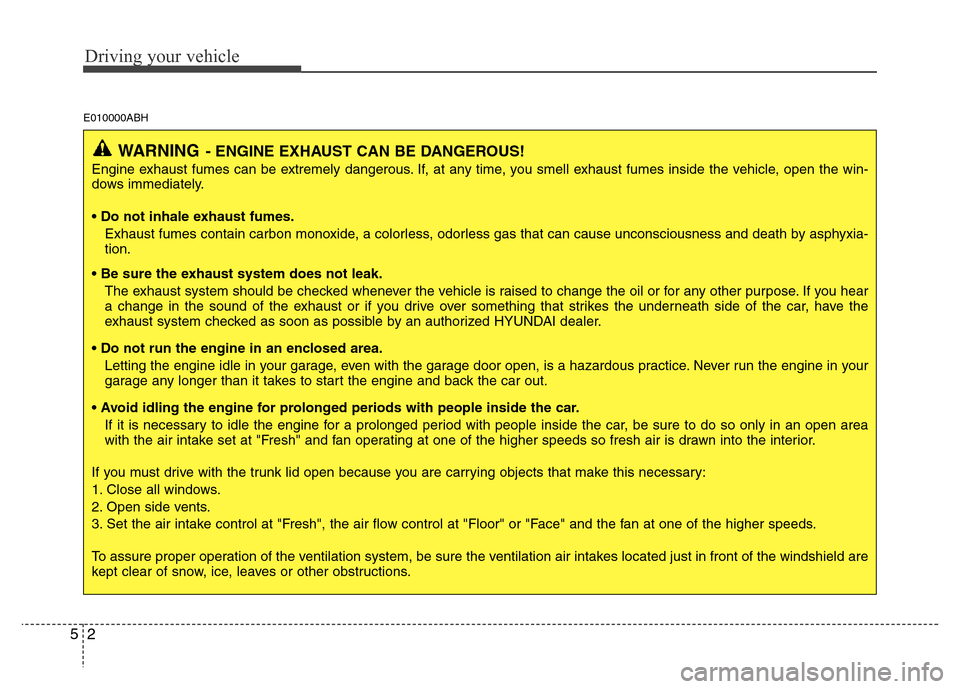
WARNING- ENGINE EXHAUST CAN BE DANGEROUS!
Engine exhaust fumes can be extremely dangerous. If, at any time, you smell exhaust fumes inside the vehicle, open the win-
dows immediately.
• Do not inhale exhaust fumes.
Exhaust fumes contain carbon monoxide, a colorless, odorless gas that can cause unconsciousness and death by asphyxia-
tion.
• Be sure the exhaust system does not leak.
The exhaust system should be checked whenever the vehicle is raised to change the oil or for any other purpose. If you hear
a change in the sound of the exhaust or if you drive over something that strikes the underneath side of the car, have the
exhaust system checked as soon as possible by an authorized HYUNDAI dealer.
• Do not run the engine in an enclosed area.
Letting the engine idle in your garage, even with the garage door open, is a hazardous practice. Never run the engine in your
garage any longer than it takes to start the engine and back the car out.
• Avoid idling the engine for prolonged periods with people inside the car.
If it is necessary to idle the engine for a prolonged period with people inside the car, be sure to do so only in an open area
with the air intake set at "Fresh" and fan operating at one of the higher speeds so fresh air is drawn into the interior.
If you must drive with the trunk lid open because you are carrying objects that make this necessary:
1. Close all windows.
2. Open side vents.
3. Set the air intake control at "Fresh", the air flow control at "Floor" or "Face" and the fan at one of the higher speeds.
To assure proper operation of the ventilation system, be sure the ventilation air intakes located just in front of the windshield are
kept clear of snow, ice, leaves or other obstructions.
Page 225 of 393
53
Driving your vehicle
E020100AUN
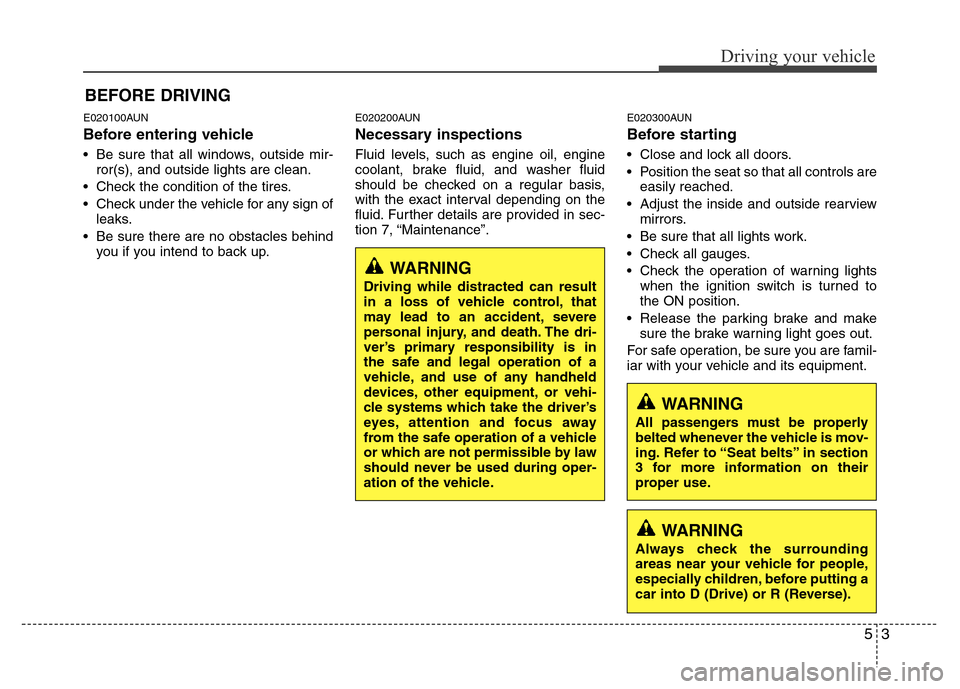
Before entering vehicle
• Be sure that all windows, outside mir-
ror(s), and outside lights are clean.
• Check the condition of the tires.
• Check under the vehicle for any sign of
leaks.
• Be sure there are no obstacles behind
you if you intend to back up.
E020200AUN
Necessary inspections
Fluid levels, such as engine oil, engine
coolant, brake fluid, and washer fluid
should be checked on a regular basis,
with the exact interval depending on the
fluid. Further details are provided in sec-
tion 7, “Maintenance”.
E020300AUN
Before starting
• Close and lock all doors.
• Position the seat so that all controls are
easily reached.
• Adjust the inside and outside rearview
mirrors.
• Be sure that all lights work.
• Check all gauges.
• Check the operation of warning lights
when the ignition switch is turned to
the ON position.
• Release the parking brake and make
sure the brake warning light goes out.
For safe operation, be sure you are famil-
iar with your vehicle and its equipment.
BEFORE DRIVING
WARNING
All passengers must be properly
belted whenever the vehicle is mov-
ing. Refer to “Seat belts” in section
3 for more information on their
proper use.
WARNING
Always check the surrounding
areas near your vehicle for people,
especially children, before putting a
car into D (Drive) or R (Reverse).
WARNING
Driving while distracted can result
in a loss of vehicle control, that
may lead to an accident, severe
personal injury, and death. The dri-
ver’s primary responsibility is in
the safe and legal operation of a
vehicle, and use of any handheld
devices, other equipment, or vehi-
cle systems which take the driver’s
eyes, attention and focus away
from the safe operation of a vehicle
or which are not permissible by law
should never be used during oper-
ation of the vehicle.
Page 227 of 393
55
Driving your vehicle
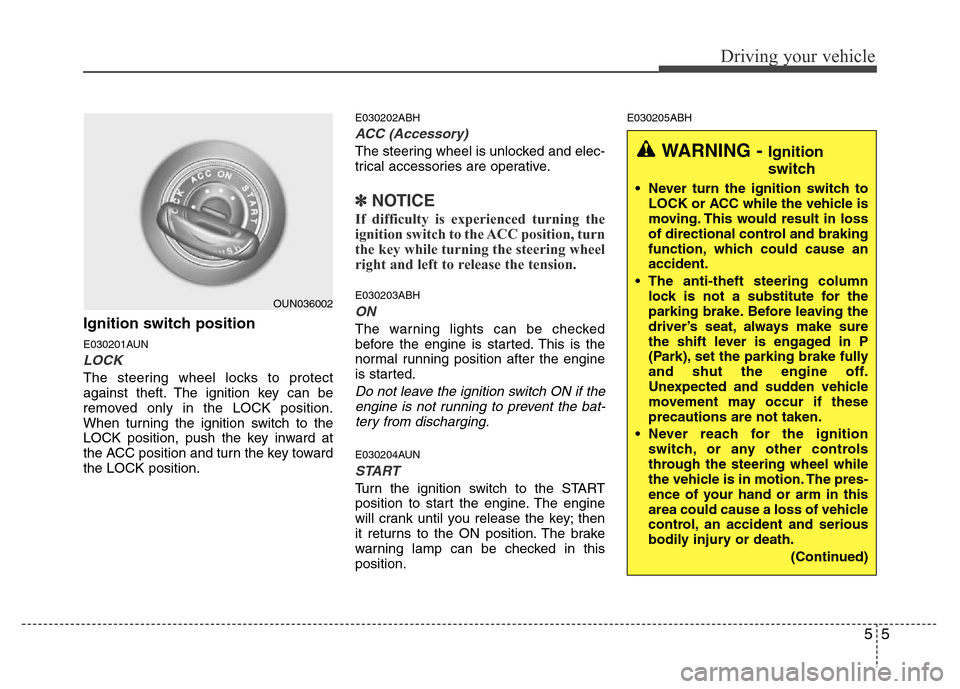
Ignition switch position
E030201AUN
LOCK
The steering wheel locks to protect
against theft. The ignition key can be
removed only in the LOCK position.
When turning the ignition switch to the
LOCK position, push the key inward at
the ACC position and turn the key toward
the LOCK position.
E030202ABH
ACC (Accessory)
The steering wheel is unlocked and elec-
trical accessories are operative.
✽NOTICE
If difficulty is experienced turning the
ignition switch to the ACC position, turn
the key while turning the steering wheel
right and left to release the tension.
E030203ABH
ON
The warning lights can be checked
before the engine is started. This is the
normal running position after the engine
is started.
Do not leave the ignition switch ON if the
engine is not running to prevent the bat-
tery from discharging.
E030204AUN
START
Turn the ignition switch to the START
position to start the engine. The engine
will crank until you release the key; then
it returns to the ON position. The brake
warning lamp can be checked in this
position.
E030205ABH
OUN036002
WARNING - Ignition
switch
• Never turn the ignition switch to
LOCK or ACC while the vehicle is
moving. This would result in loss
of directional control and braking
function, which could cause an
accident.
• The anti-theft steering column
lock is not a substitute for the
parking brake. Before leaving the
driver’s seat, always make sure
the shift lever is engaged in P
(Park), set the parking brake fully
and shut the engine off.
Unexpected and sudden vehicle
movement may occur if these
precautions are not taken.
• Never reach for the ignition
switch, or any other controls
through the steering wheel while
the vehicle is in motion. The pres-
ence of your hand or arm in this
area could cause a loss of vehicle
control, an accident and serious
bodily injury or death.
(Continued)
Page 233 of 393
511
Driving your vehicle
E060000AENE060100ABH
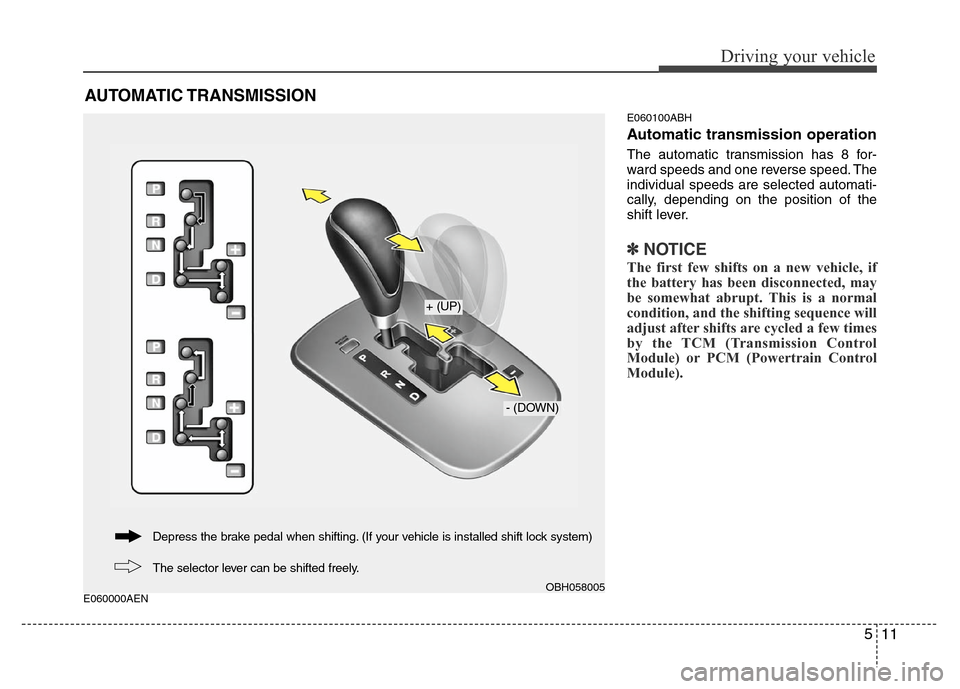
Automatic transmission operation
The automatic transmission has 8 for-
ward speeds and one reverse speed. The
individual speeds are selected automati-
cally, depending on the position of the
shift lever.
✽NOTICE
The first few shifts on a new vehicle, if
the battery has been disconnected, may
be somewhat abrupt. This is a normal
condition, and the shifting sequence will
adjust after shifts are cycled a few times
by the TCM (Transmission Control
Module) or PCM (Powertrain Control
Module).
AUTOMATIC TRANSMISSION
OBH058005
+ (UP)
- (DOWN)
The selector lever can be shifted freely. Depress the brake pedal when shifting. (If your vehicle is installed shift lock system)
Page 234 of 393
Driving your vehicle
12 5
For smooth operation, depress the brake
pedal when shifting from N (Neutral) to a
forward or reverse gear.E060101BBH
Transmission ranges
The indicator in the instrument cluster
displays the shift lever position when the
ignition switch is in the ON position.
P (Park)
Always come to a complete stop before
shifting into P (Park). This position locks
the transmission and prevents the drive
wheels from rotating.
WARNING- Automatic
transmission
• Always check the surrounding
areas near your vehicle for peo-
ple, especially children, before
shifting a car into D (Drive) or R
(Reverse).
• Before leaving the driver’s seat,
always make sure the shift lever
is in the P (Park) position; then
set the parking brake fully and
shut the engine off. Unexpected
and sudden vehicle movement
can occur if these precautions
are not followed in the order iden-
tified.
CAUTION
• To avoid damage to your trans-
mission, do not accelerate the
engine in R (Reverse) or any for-
ward gear position with the
brakes on.
• When stopped on an incline, do
not hold the vehicle stationary
with engine power. Use the serv-
ice brake or the parking brake.
• Do not shift from N (Neutral) or P
(Park) into D (Drive), or R
(Reverse) when the engine is
above idle speed.
WARNING
• Shifting into P (Park) while the
vehicle is in motion will cause the
drive wheels to lock which will
cause you to lose control of the
vehicle.
• Do not use the P (Park) position
in place of the parking brake.
Always make sure the shift lever
is latched in the P (Park) position
and set the parking brake fully.
• Never leave a child unattended in
a vehicle.