Control knob Hyundai Genesis 2012 Owner's Manual
[x] Cancel search | Manufacturer: HYUNDAI, Model Year: 2012, Model line: Genesis, Model: Hyundai Genesis 2012Pages: 393, PDF Size: 8.81 MB
Page 13 of 393
Your vehicle at a glance
2 2
INTERIOR OVERVIEW
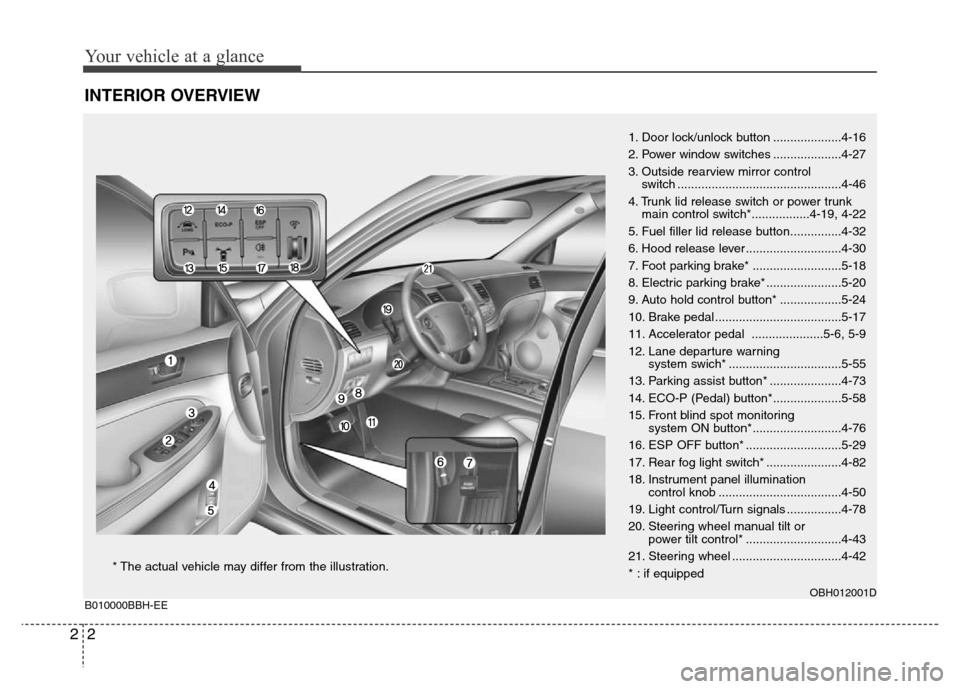
1. Door lock/unlock button ....................4-16
2. Power window switches ....................4-27
3. Outside rearview mirror control
switch ................................................4-46
4. Trunk lid release switch or power trunk
main control switch*.................4-19, 4-22
5. Fuel filler lid release button...............4-32
6. Hood release lever ............................4-30
7. Foot parking brake* ..........................5-18
8. Electric parking brake* ......................5-20
9. Auto hold control button* ..................5-24
10. Brake pedal .....................................5-17
11. Accelerator pedal .....................5-6, 5-9
12. Lane departure warning
system swich* .................................5-55
13. Parking assist button* .....................4-73
14. ECO-P (Pedal) button*....................5-58
15. Front blind spot monitoring
system ON button*..........................4-76
16. ESP OFF button* ............................5-29
17. Rear fog light switch* ......................4-82
18. Instrument panel illumination
control knob ....................................4-50
19. Light control/Turn signals ................4-78
20. Steering wheel manual tilt or
power tilt control* ............................4-43
21. Steering wheel ................................4-42
* : if equipped
OBH012001DB010000BBH-EE
* The actual vehicle may differ from the illustration.
Page 20 of 393
Safety features of your vehicle
4 3
C010200AEN
Front seat adjustment - power
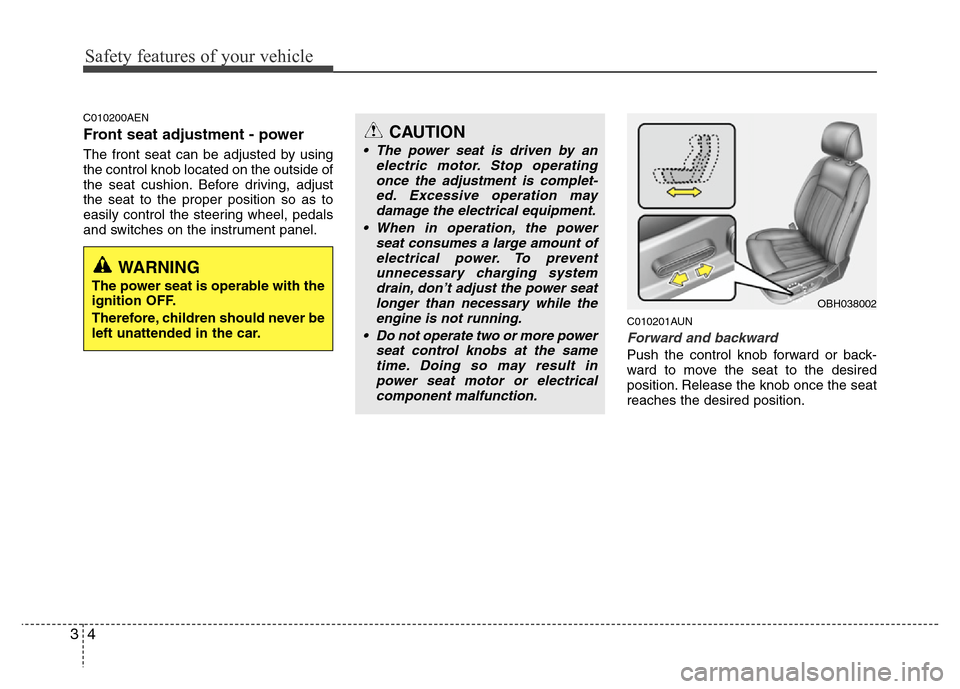
The front seat can be adjusted by using
the control knob located on the outside of
the seat cushion. Before driving, adjust
the seat to the proper position so as to
easily control the steering wheel, pedals
and switches on the instrument panel.
C010201AUN
Forward and backward
Push the control knob forward or back-
ward to move the seat to the desired
position. Release the knob once the seat
reaches the desired position.
CAUTION
• The power seat is driven by an
electric motor. Stop operating
once the adjustment is complet-
ed. Excessive operation may
damage the electrical equipment.
• When in operation, the power
seat consumes a large amount of
electrical power. To prevent
unnecessary charging system
drain, don’t adjust the power seat
longer than necessary while the
engine is not running.
• Do not operate two or more power
seat control knobs at the same
time. Doing so may result in
power seat motor or electrical
component malfunction.
WARNING
The power seat is operable with the
ignition OFF.
Therefore, children should never be
left unattended in the car.
OBH038002
Page 21 of 393
35
Safety features of your vehicle
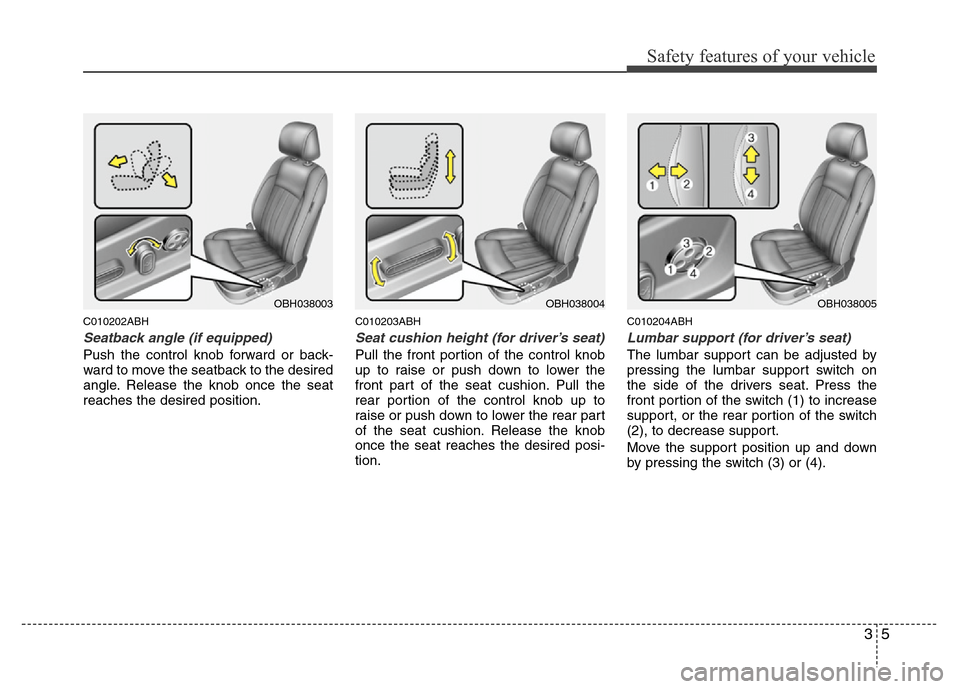
C010202ABH
Seatback angle (if equipped)
Push the control knob forward or back-
ward to move the seatback to the desired
angle. Release the knob once the seat
reaches the desired position.
C010203ABH
Seat cushion height (for driver’s seat)
Pull the front portion of the control knob
up to raise or push down to lower the
front part of the seat cushion. Pull the
rear portion of the control knob up to
raise or push down to lower the rear part
of the seat cushion. Release the knob
once the seat reaches the desired posi-
tion.
C010204ABH
Lumbar support (for driver’s seat)
The lumbar support can be adjusted by
pressing the lumbar support switch on
the side of the drivers seat. Press the
front portion of the switch (1) to increase
support, or the rear portion of the switch
(2), to decrease support.
Move the support position up and down
by pressing the switch (3) or (4).
OBH038003OBH038004OBH038005
Page 112 of 393
439
Features of your vehicle
D120000AEN
A driver position memory system is pro-
vided to store and recall the driver seat,
outside rearview mirror and steering
wheel positions with a simple button
operation. By saving the desired positions
into the system memory, different drivers
can reposition the driver seat, outside
rearview mirror and steering wheel based
upon their driving preference. If the bat-
tery is disconnected, the position memo-
ry will be lost and the driving positions
should be restored in the system.
✽NOTICE
The buzzer sounds 10 times if there is a
malfunction of the memory system.
Have the driver position memory system
checked by an authorized HYUNDAI
dealer.
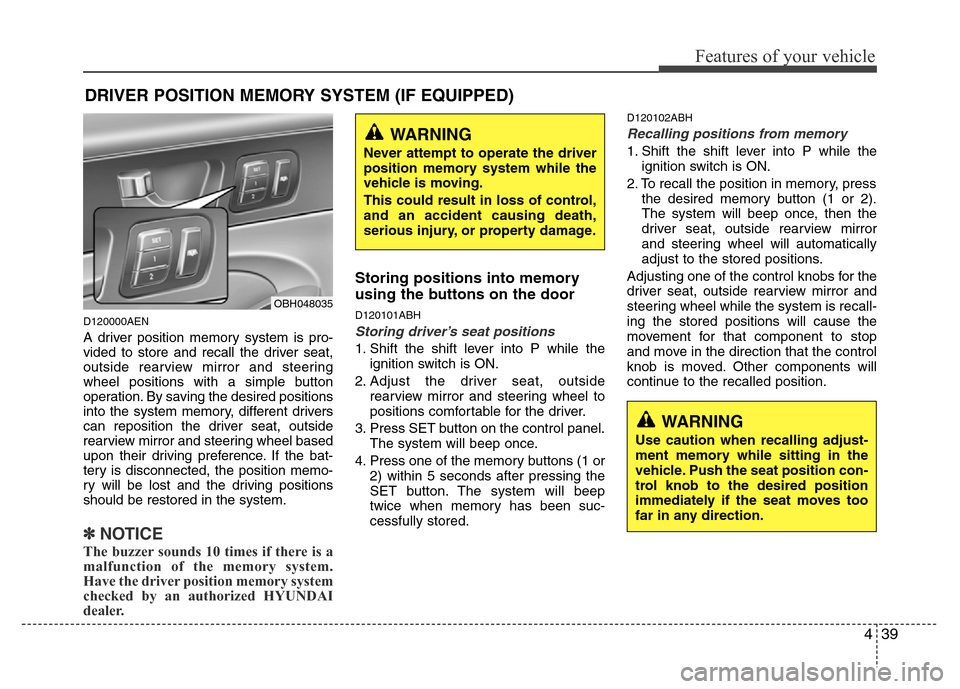
Storing positions into memory
using the buttons on the door
D120101ABH
Storing driver’s seat positions
1. Shift the shift lever into P while the
ignition switch is ON.
2. Adjust the driver seat, outside
rearview mirror and steering wheel to
positions comfortable for the driver.
3. Press SET button on the control panel.
The system will beep once.
4. Press one of the memory buttons (1 or
2) within 5 seconds after pressing the
SET button. The system will beep
twice when memory has been suc-
cessfully stored.
D120102ABH
Recalling positions from memory
1. Shift the shift lever into P while the
ignition switch is ON.
2. To recall the position in memory, press
the desired memory button (1 or 2).
The system will beep once, then the
driver seat, outside rearview mirror
and steering wheel will automatically
adjust to the stored positions.
Adjusting one of the control knobs for the
driver seat, outside rearview mirror and
steering wheel while the system is recall-
ing the stored positions will cause the
movement for that component to stop
and move in the direction that the control
knob is moved. Other components will
continue to the recalled position.
DRIVER POSITION MEMORY SYSTEM (IF EQUIPPED)
WARNING
Never attempt to operate the driver
position memory system while the
vehicle is moving.
This could result in loss of control,
and an accident causing death,
serious injury, or property damage.
WARNING
Use caution when recalling adjust-
ment memory while sitting in the
vehicle. Push the seat position con-
trol knob to the desired position
immediately if the seat moves too
far in any direction.
OBH048035
Page 116 of 393
443
Features of your vehicle
D130300AEN
Tilt steering
Tilt steering allows you to adjust the
steering wheel before you drive. You can
also raise it to give your legs more room
when you exit and enter the vehicle.
The steering wheel should be positioned
so that it is comfortable for you to drive,
while permitting you to see the instru-
ment panel warning lights and gauges.
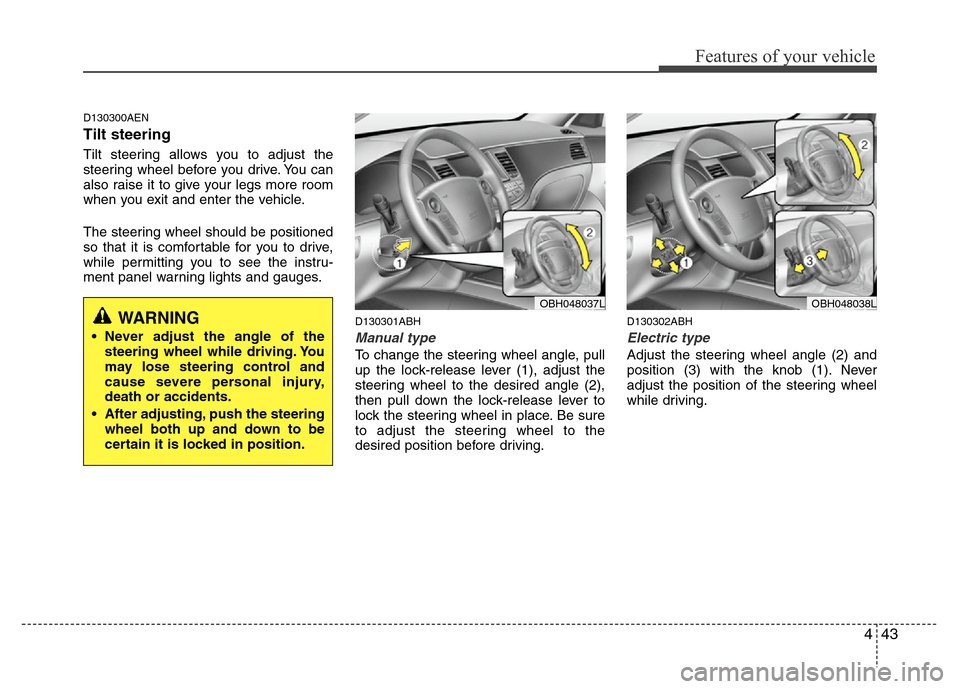
D130301ABH
Manual type
To change the steering wheel angle, pull
up the lock-release lever (1), adjust the
steering wheel to the desired angle (2),
then pull down the lock-release lever to
lock the steering wheel in place. Be sure
to adjust the steering wheel to the
desired position before driving.
D130302ABH
Electric type
Adjust the steering wheel angle (2) and
position (3) with the knob (1). Never
adjust the position of the steering wheel
while driving.
WARNING
• Never adjust the angle of the
steering wheel while driving. You
may lose steering control and
cause severe personal injury,
death or accidents.
• After adjusting, push the steering
wheel both up and down to be
certain it is locked in position.
OBH048037LOBH048038L
Page 123 of 393
Features of your vehicle
50 4
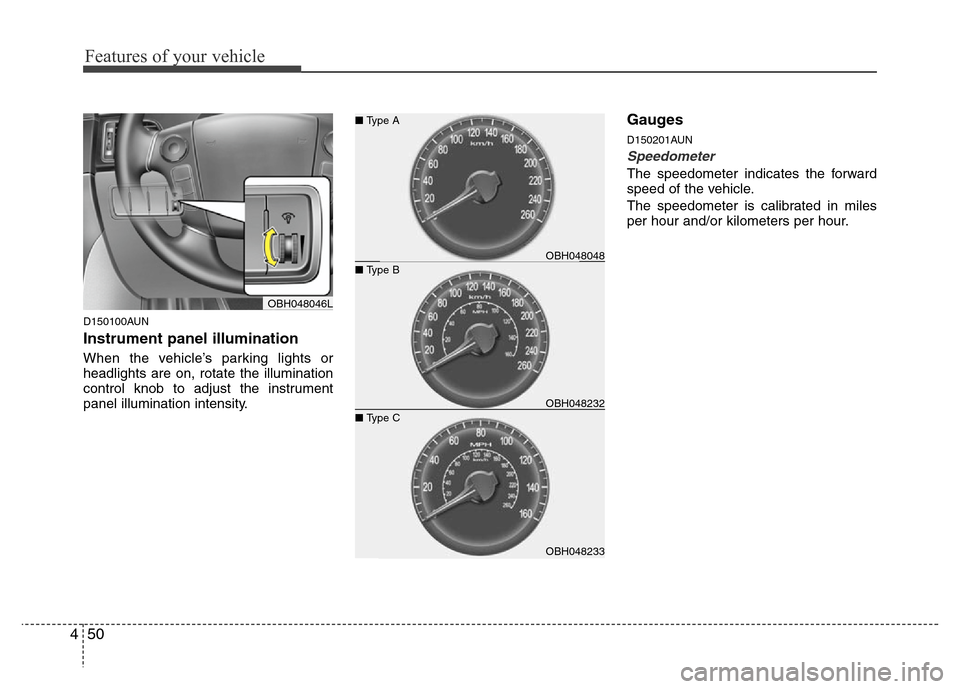
D150100AUN
Instrument panel illumination
When the vehicle’s parking lights or
headlights are on, rotate the illumination
control knob to adjust the instrument
panel illumination intensity.
Gauges
D150201AUN
Speedometer
The speedometer indicates the forward
speed of the vehicle.
The speedometer is calibrated in miles
per hour and/or kilometers per hour.
OBH048046L
OBH048233 ■ Type C
OBH048048 ■ Type A
OBH048232 ■ Type B
Page 152 of 393
479
Features of your vehicle
D190400AUN
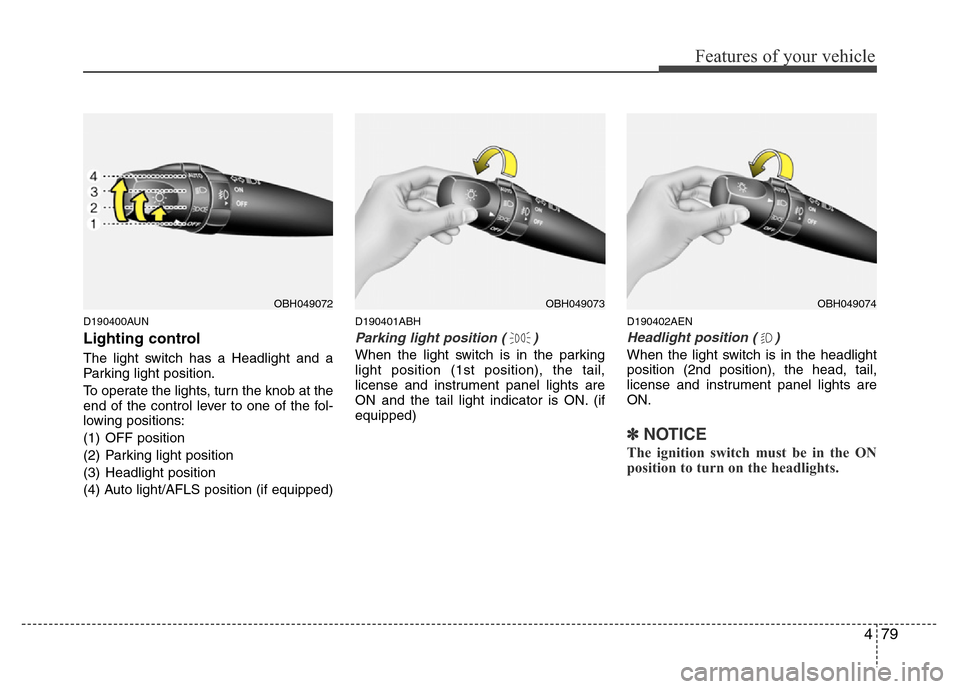
Lighting control
The light switch has a Headlight and a
Parking light position.
To operate the lights, turn the knob at the
end of the control lever to one of the fol-
lowing positions:
(1) OFF position
(2) Parking light position
(3) Headlight position
(4) Auto light/AFLS position (if equipped)
D190401ABH
Parking light position ( )
When the light switch is in the parking
light position (1st position), the tail,
license and instrument panel lights are
ON and the tail light indicator is ON. (if
equipped)
D190402AEN
Headlight position ( )
When the light switch is in the headlight
position (2nd position), the head, tail,
license and instrument panel lights are
ON.
✽NOTICE
The ignition switch must be in the ON
position to turn on the headlights.
OBH049072OBH049074OBH049073
Page 159 of 393
Features of your vehicle
86 4
MIST( ) : For a single wiping cycle,
push the lever upward and
release it with the lever in
the OFF position. The
wipers will operate continu-
ously if the lever is pushed
upward and held.
OFF (O) : Wiper is not in operation
INT (---) : Wiper operates intermittently
at the same wiping intervals.
Use this mode in a light rain or
mist. To vary the speed setting,
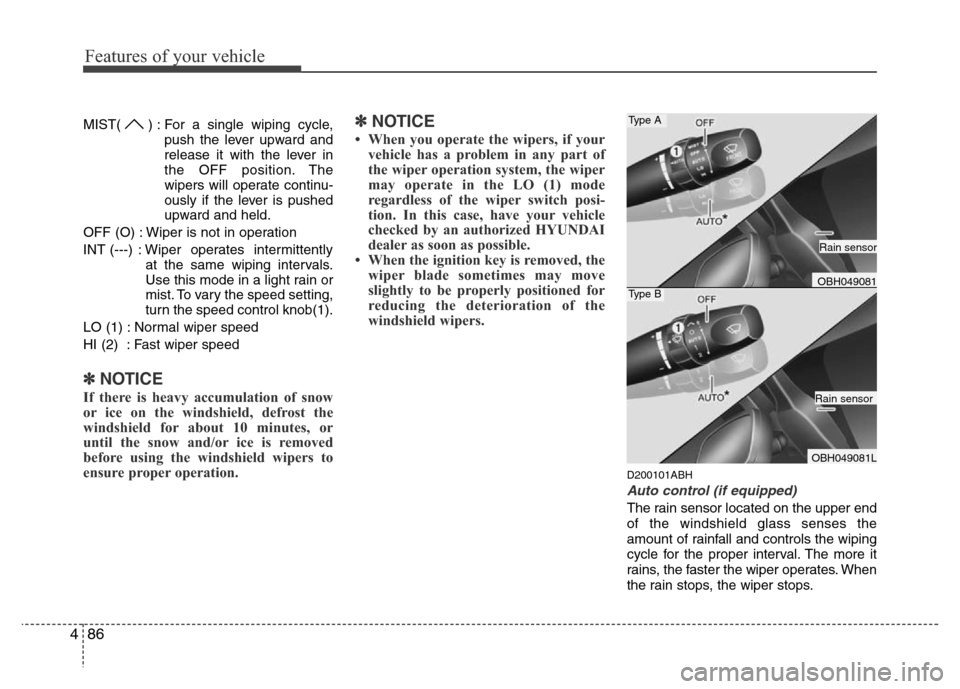
turn the speed control knob(1).
LO (1) : Normal wiper speed
HI (2) : Fast wiper speed
✽NOTICE
If there is heavy accumulation of snow
or ice on the windshield, defrost the
windshield for about 10 minutes, or
until the snow and/or ice is removed
before using the windshield wipers to
ensure proper operation.
✽NOTICE
• When you operate the wipers, if your
vehicle has a problem in any part of
the wiper operation system, the wiper
may operate in the LO (1) mode
regardless of the wiper switch posi-
tion. In this case, have your vehicle
checked by an authorized HYUNDAI
dealer as soon as possible.
• When the ignition key is removed, the
wiper blade sometimes may move
slightly to be properly positioned for
reducing the deterioration of the
windshield wipers.
D200101ABH
Auto control (if equipped)
The rain sensor located on the upper end
of the windshield glass senses the
amount of rainfall and controls the wiping
cycle for the proper interval. The more it
rains, the faster the wiper operates. When
the rain stops, the wiper stops.
Type A
Type BOBH049081
OBH049081L
Rain sensor
Rain sensor
Page 160 of 393
487
Features of your vehicle
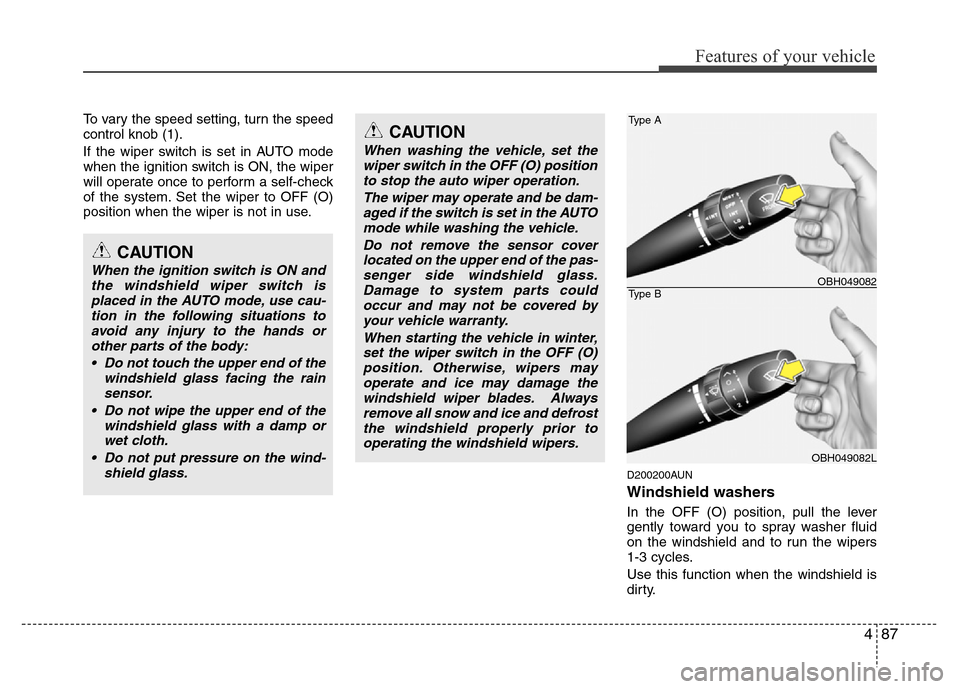
To vary the speed setting, turn the speed
control knob (1).
If the wiper switch is set in AUTO mode
when the ignition switch is ON, the wiper
will operate once to perform a self-check
of the system. Set the wiper to OFF (O)
position when the wiper is not in use.
D200200AUN
Windshield washers
In the OFF (O) position, pull the lever
gently toward you to spray washer fluid
on the windshield and to run the wipers
1-3 cycles.
Use this function when the windshield is
dirty.
CAUTION
When the ignition switch is ON and
the windshield wiper switch is
placed in the AUTO mode, use cau-
tion in the following situations to
avoid any injury to the hands or
other parts of the body:
• Do not touch the upper end of the
windshield glass facing the rain
sensor.
• Do not wipe the upper end of the
windshield glass with a damp or
wet cloth.
• Do not put pressure on the wind-
shield glass.
CAUTION
When washing the vehicle, set the
wiper switch in the OFF (O) position
to stop the auto wiper operation.
The wiper may operate and be dam-
aged if the switch is set in the AUTO
mode while washing the vehicle.
Do not remove the sensor cover
located on the upper end of the pas-
senger side windshield glass.
Damage to system parts could
occur and may not be covered by
your vehicle warranty.
When starting the vehicle in winter,
set the wiper switch in the OFF (O)
position. Otherwise, wipers may
operate and ice may damage the
windshield wiper blades. Always
remove all snow and ice and defrost
the windshield properly prior to
operating the windshield wipers.
Type A
Type BOBH049082
OBH049082L
Page 177 of 393
Features of your vehicle
104 4
✽NOTICE
• Replace the filter every 15,000 km
(10,000 miles) or once a year.
If the car is being driven in severe
conditions such as dusty or rough
roads, more frequent air conditioner
filter inspections and changes are
required.
• When the air flow rate suddenly
decreases, the system should be
checked at an authorized HYUNDAI
dealer.
D230400AEN
Checking the amount of air con-
ditioner refrigerant and compres-
sor lubricant
When the amount of refrigerant is low,
the performance of the air conditioning is
reduced. Overfilling also has a negative
impact on the air conditioning system.
Therefore, if abnormal operation is
found, have the system inspected by an
authorized HYUNDAI dealer.
✽NOTICE
It is important when servicing the air
conditioning system that the correct
type and amount of oil and refrigerant is
used. Otherwise, damage to the com-
pressor and abnormal system operation
may occur. D2301000BBH-EE
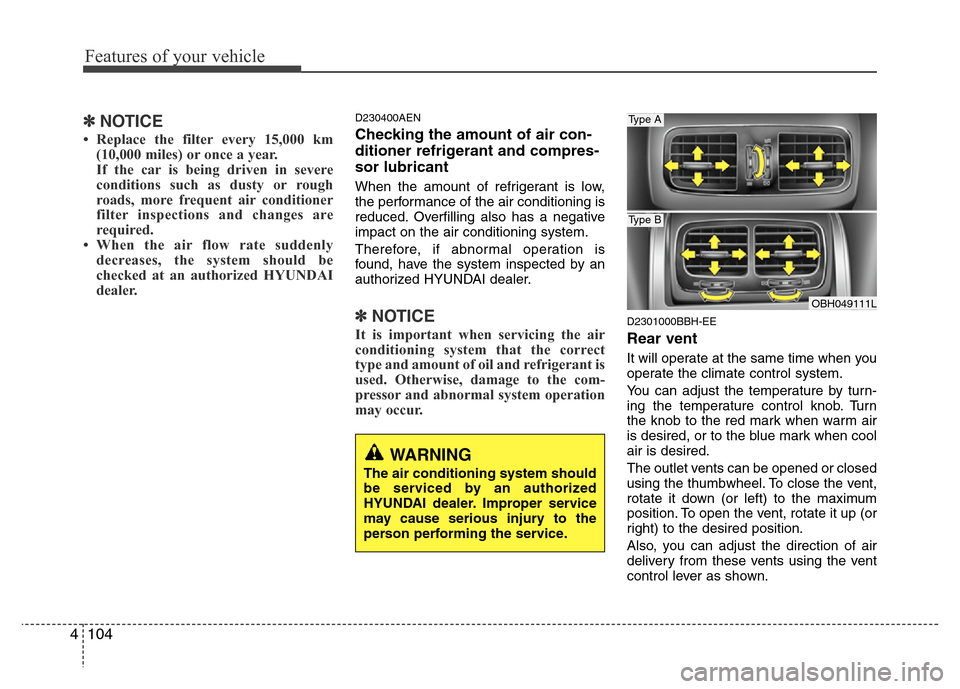
Rear vent
It will operate at the same time when you
operate the climate control system.
You can adjust the temperature by turn-
ing the temperature control knob. Turn
the knob to the red mark when warm air
is desired, or to the blue mark when cool
air is desired.
The outlet vents can be opened or closed
using the thumbwheel. To close the vent,
rotate it down (or left) to the maximum
position. To open the vent, rotate it up (or
right) to the desired position.
Also, you can adjust the direction of air
delivery from these vents using the vent
control lever as shown.
WARNING
The air conditioning system should
be serviced by an authorized
HYUNDAI dealer. Improper service
may cause serious injury to the
person performing the service.
OBH049111L
Type A
Type B