front Hyundai Genesis 2013 Manual Online
[x] Cancel search | Manufacturer: HYUNDAI, Model Year: 2013, Model line: Genesis, Model: Hyundai Genesis 2013Pages: 429, PDF Size: 8.94 MB
Page 246 of 429
57
Driving your vehicle
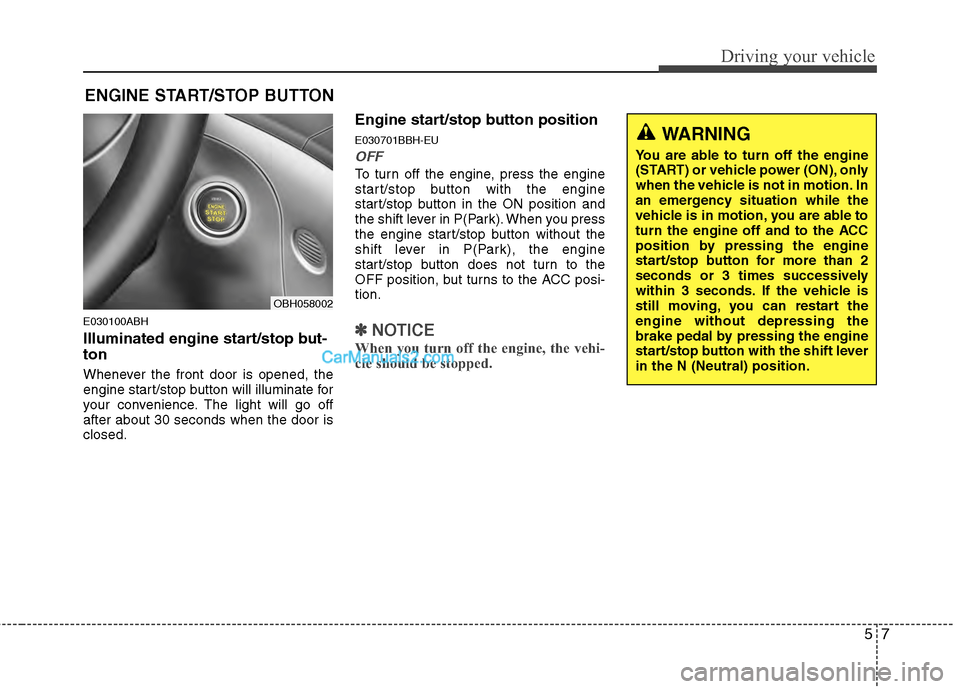
E030100ABH
Illuminated engine start/stop but-
ton
Whenever the front door is opened, the
engine start/stop button will illuminate for
your convenience. The light will go off
after about 30 seconds when the door is
closed.
Engine start/stop button position
E030701BBH-EU
OFF
To turn off the engine, press the engine
start/stop button with the engine
start/stop button in the ON position and
the shift lever in P(Park). When you press
the engine start/stop button without the
shift lever in P(Park), the engine
start/stop button does not turn to the
OFF position, but turns to the ACC posi-
tion.
✽ ✽NOTICE
When you turn off the engine, the vehi-
cle should be stopped.
ENGINE START/STOP BUTTON
OBH058002
WARNING
You are able to turn off the engine
(START) or vehicle power (ON), only
when the vehicle is not in motion. In
an emergency situation while the
vehicle is in motion, you are able to
turn the engine off and to the ACC
position by pressing the engine
start/stop button for more than 2
seconds or 3 times successively
within 3 seconds. If the vehicle is
still moving, you can restart the
engine without depressing the
brake pedal by pressing the engine
start/stop button with the shift lever
in the N (Neutral) position.
Page 258 of 429
519
Driving your vehicle
E070102AUN
Disc brakes wear indicator
Your vehicle has disc brakes.
When your brake pads are worn and new
pads are required, you will hear a high-
pitched warning sound from your front
brakes or rear brakes. You may hear this
sound come and go or it may occur
whenever you depress the brake pedal.
Please remember that some driving con-
ditions or climates may cause a brake
squeal when you first apply (or lightly
apply) the brakes. This is normal and does
not indicate a problem with your brakes.
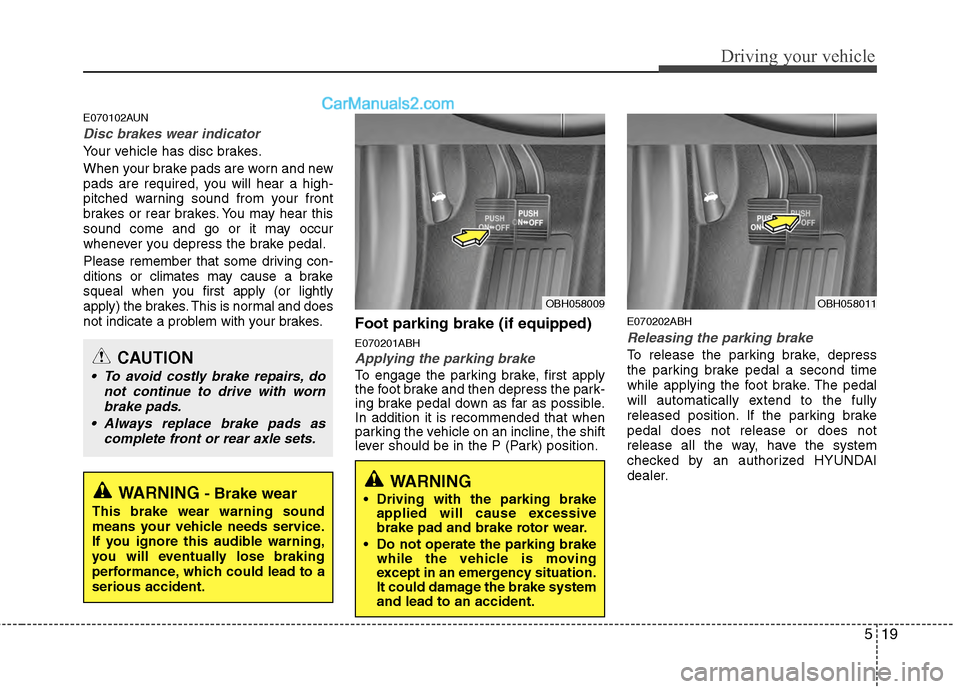
Foot parking brake (if equipped)
E070201ABH
Applying the parking brake
To engage the parking brake, first apply
the foot brake and then depress the park-
ing brake pedal down as far as possible.
In addition it is recommended that when
parking the vehicle on an incline, the shift
lever should be in the P (Park) position.
E070202ABH
Releasing the parking brake
To release the parking brake, depress
the parking brake pedal a second time
while applying the foot brake. The pedal
will automatically extend to the fully
released position. If the parking brake
pedal does not release or does not
release all the way, have the system
checked by an authorized HYUNDAI
dealer.
WARNING- Brake wear
This brake wear warning sound
means your vehicle needs service.
If you ignore this audible warning,
you will eventually lose braking
performance, which could lead to a
serious accident.
CAUTION
To avoid costly brake repairs, donot continue to drive with wornbrake pads.
Always replace brake pads as complete front or rear axle sets.
OBH058009
WARNING
Driving with the parking brakeapplied will cause excessive
brake pad and brake rotor wear.
Do not operate the parking brake while the vehicle is moving
except in an emergency situation.
It could damage the brake system
and lead to an accident.
OBH058011
Page 268 of 429
529
Driving your vehicle
The ABS continuously senses the speed
of the wheels. If the wheels are going to
lock, the ABS system repeatedly modu-
lates the hydraulic brake pressure to the
wheels.
When you apply your brakes under con-
ditions which may lock the wheels, you
may hear a “tik-tik’’ sound from the
brakes, or feel a corresponding sensation
in the brake pedal. This is normal and it
means your ABS is active.
In order to obtain the maximum benefit
from your ABS in an emergency situa-
tion, do not attempt to modulate your
brake pressure and do not try to pump
your brakes. Press your brake pedal as
hard as possible or as hard as the situa-
tion warrants and allow the ABS to con-
trol the force being delivered to the
brakes.✽ ✽NOTICE
A click sound may be heard in the
engine compartment when the vehicle
begins to move after the engine is start-
ed. These conditions are normal and
indicate that the anti-lock brake system
is functioning properly.
Even with the anti-lock brake system,
your vehicle still requires sufficient
stopping distance. Always maintain a
safe distance from the vehicle in front
of you.
Always slow down when cornering. The anti-lock brake system cannot pre-
vent accidents resulting from exces-
sive speeds.
On loose or uneven road surfaces, operation of the anti-lock brake system
may result in a longer stopping dis-
tance than for vehicles equipped with a
conventional brake system.
W-78
CAUTION
If the ABS warning light is on and
stays on, you may have a problemwith the ABS. In this case, howev-er, your regular brakes will worknormally.
The ABS warning light will stay on for approximately 3 seconds afterthe ignition switch is ON. Duringthat time, the ABS will go throughself-diagnosis and the light will gooff if everything is normal. If thelight stays on, you may have aproblem with your ABS. Contactan authorized HYUNDAI dealer assoon as possible.
Page 274 of 429
535
Driving your vehicle
Be careful when parking on a hill.Firmly engage the parking brake and
place the gear selector lever in P. If
your car is facing downhill, turn the
front wheels into the curb to help keep
the car from rolling. If your car is facing
uphill, turn the front wheels away from
the curb to help keep the car from
rolling. If there is no curb or if it is
required by other conditions to keep
the car from rolling, block the wheels.
Under some conditions your parking brake can freeze in the engaged posi-
tion. This is most likely to happen when
there is an accumulation of snow or ice
around or near the rear brakes or if the
brakes are wet. If there is a risk that the
parking brake may freeze, apply it only
temporarily while you put the gear
selector lever in P (automatic transmis-
sion) and block the rear wheels so the
car cannot roll. Then release the park-
ing brake.
Do not hold the vehicle on an incline with the accelerator pedal. This can
cause the transmission to overheat.
Always use the brake pedal or parking
brake.
Page 280 of 429
541
Driving your vehicle
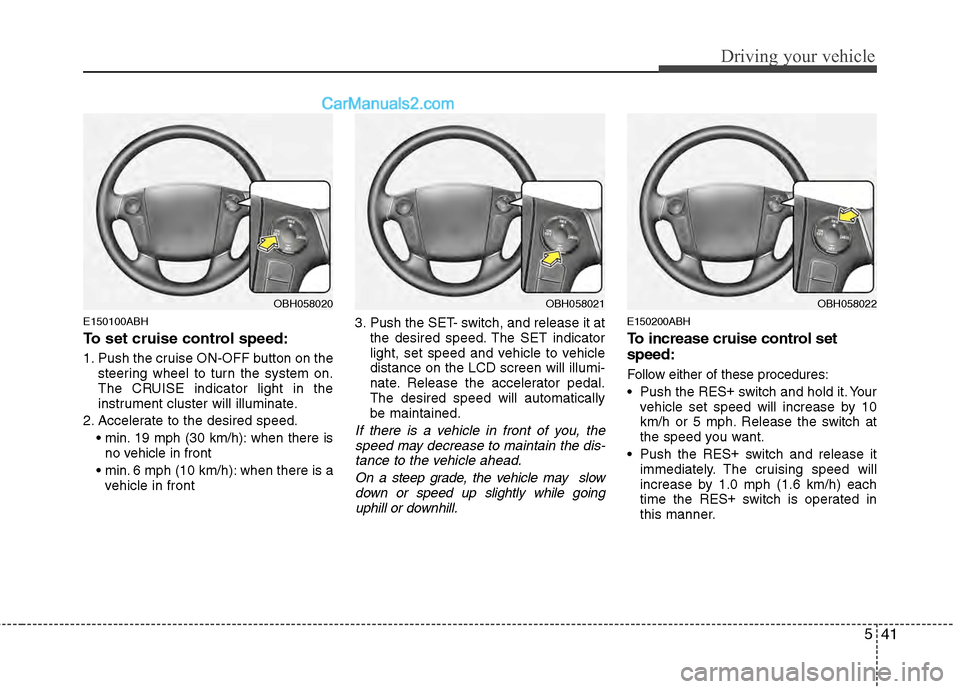
E150100ABH
To set cruise control speed:
1. Push the cruise ON-OFF button on thesteering wheel to turn the system on.
The CRUISE indicator light in the
instrument cluster will illuminate.
2. Accelerate to the desired speed. 19 mph (30 km/h): when there isno vehicle in front
6 mph (10 km/h): when there is a
vehicle in front 3. Push the SET- switch, and release it at
the desired speed. The SET indicator
light, set speed and vehicle to vehicle
distance on the LCD screen will illumi-
nate. Release the accelerator pedal.
The desired speed will automatically
be maintained.
If there is a vehicle in front of you, thespeed may decrease to maintain the dis-tance to the vehicle ahead.
On a steep grade, the vehicle may slowdown or speed up slightly while goinguphill or downhill.
E150200ABH
To increase cruise control set
speed:
Follow either of these procedures:
Push the RES +
switch and hold it. Your
vehicle set speed will increase by 10
km/h or 5 mph. Release the switch at
the speed you want.
Push the RES +
switch and release it
immediately. The cruising speed will
increase by 1.0 mph (1.6 km/h) each
time the RES +
switch is operated in
this manner.
OBH058021OBH058022OBH058020
Page 281 of 429
Driving your vehicle
42
5
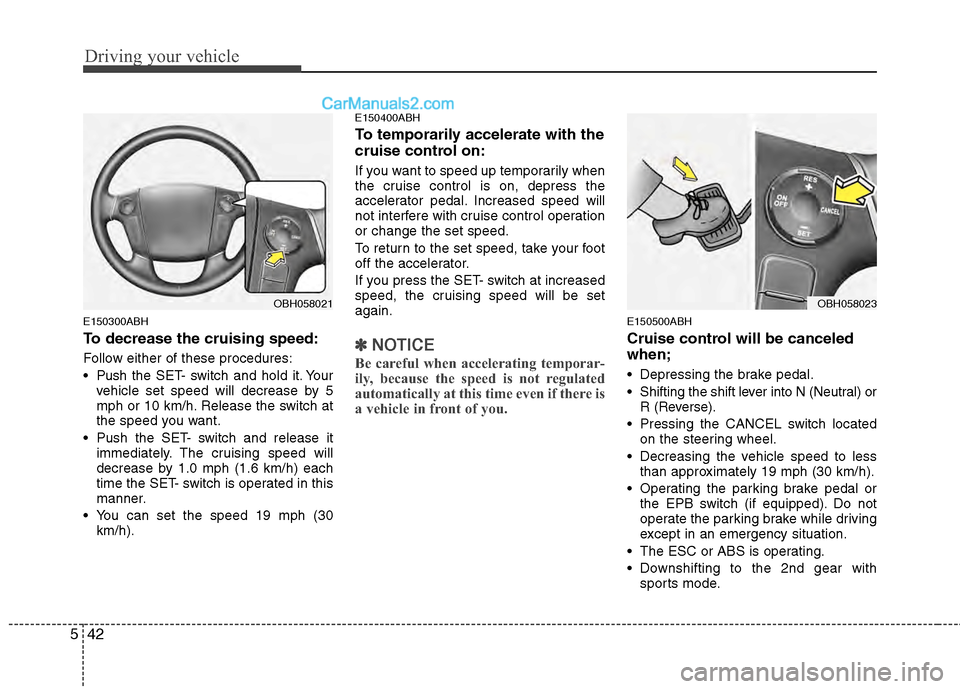
E150300ABH
To decrease the cruising speed:
Follow either of these procedures:
Push the SET- switch and hold it. Your
vehicle set speed will decrease by 5
mph or 10 km/h. Release the switch at
the speed you want.
Push the SET- switch and release it immediately. The cruising speed will
decrease by 1.0 mph (1.6 km/h) each
time the SET- switch is operated in this
manner.
You can set the speed 19 mph (30 km/h).
E150400ABH
To temporarily accelerate with the
cruise control on:
If you want to speed up temporarily when
the cruise control is on, depress the
accelerator pedal. Increased speed will
not interfere with cruise control operation
or change the set speed.
To return to the set speed, take your foot
off the accelerator.
If you press the SET- switch at increased
speed, the cruising speed will be set
again.
✽ ✽ NOTICE
Be careful when accelerating temporar-
ily, because the speed is not regulated
automatically at this time even if there is
a vehicle in front of you.
E150500ABH
Cruise control will be canceled
when;
Depressing the brake pedal.
Shifting the shift lever into N (Neutral) or
R (Reverse).
Pressing the CANCEL switch located on the steering wheel.
Decreasing the vehicle speed to less than approximately 19 mph (30 km/h).
Operating the parking brake pedal or the EPB switch (if equipped). Do not
operate the parking brake while driving
except in an emergency situation.
The ESC or ABS is operating.
Downshifting to the 2nd gear with sports mode.
OBH058021OBH058023
Page 282 of 429
543
Driving your vehicle
Decreasing the vehicle speed to lessthan approximately 6 mph (10 km/h) as
the vehicle in front of you.
The ESC is turned off.
The sensor or the cover is dirty or obscured with foreign matter.
Each of these actions will cancel smartcruise control operation (the SET indica-tor light, set speed and vehicle to vehicledistance on the LCD screen will go off),but it will not turn the system off. If youwish to resume smart cruise controloperation, push the RES+ switch locatedon your steering wheel. You will return toyour previously preset speed.
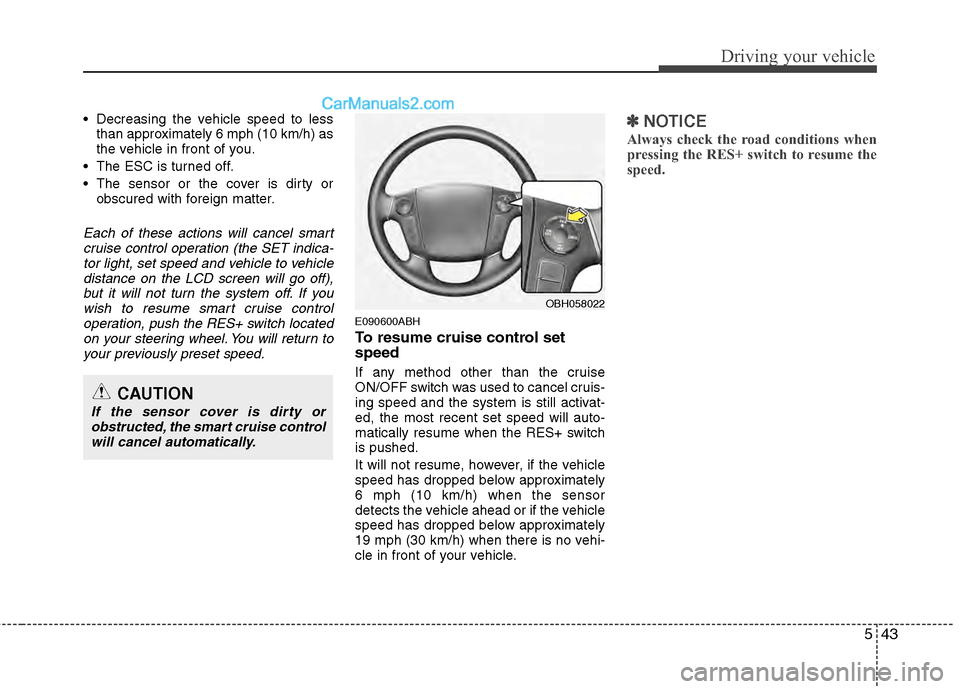
E090600ABH
To resume cruise control set
speed
If any method other than the cruise
ON/OFF switch was used to cancel cruis-
ing speed and the system is still activat-
ed, the most recent set speed will auto-
matically resume when the RES+ switch
is pushed.
It will not resume, however, if the vehicle
speed has dropped below approximately
6 mph (10 km/h) when the sensor
detects the vehicle ahead or if the vehicle
speed has dropped below approximately
19 mph (30 km/h) when there is no vehi-
cle in front of your vehicle.
✽ ✽ NOTICE
Always check the road conditions when
pressing the RES+ switch to resume the
speed.
OBH058022
CAUTION
If the sensor cover is dirty or
obstructed, the smart cruise controlwill cancel automatically.
Page 288 of 429
549
Driving your vehicle
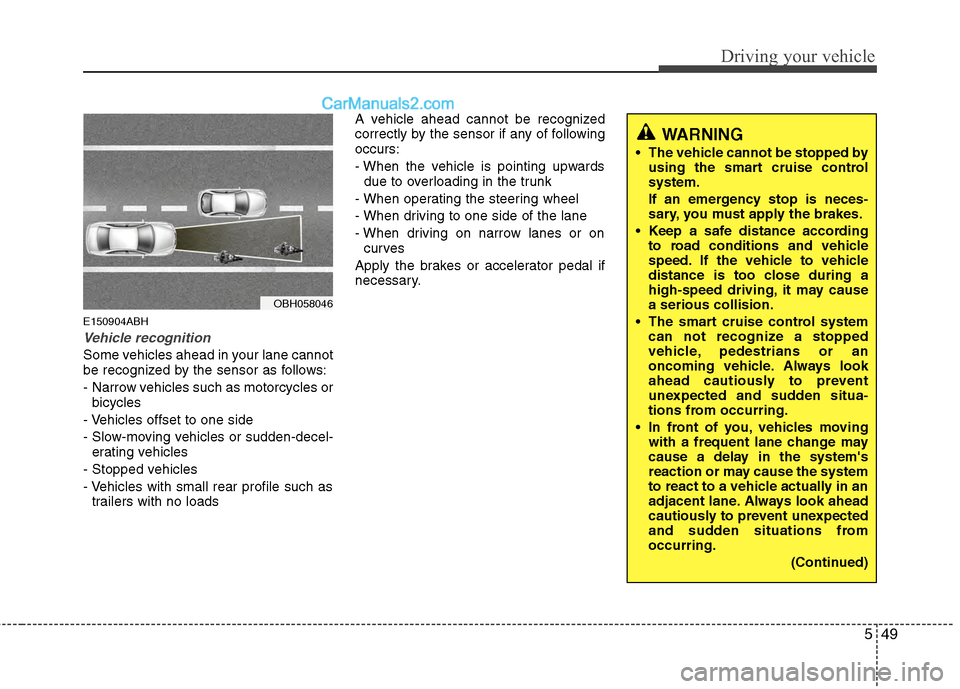
E150904ABH
Vehicle recognition
Some vehicles ahead in your lane cannot
be recognized by the sensor as follows:
- Narrow vehicles such as motorcycles orbicycles
- Vehicles offset to one side
- Slow-moving vehicles or sudden-decel- erating vehicles
- Stopped vehicles
- Vehicles with small rear profile such as trailers with no loads A vehicle ahead cannot be recognized
correctly by the sensor if any of following
occurs:
- When the vehicle is pointing upwards
due to overloading in the trunk
- When operating the steering wheel
- When driving to one side of the lane
- When driving on narrow lanes or on curves
Apply the brakes or accelerator pedal if
necessary.
OBH058046
WARNING
The vehicle cannot be stopped by using the smart cruise control
system.
If an emergency stop is neces-
sary, you must apply the brakes.
Keep a safe distance according to road conditions and vehicle
speed. If the vehicle to vehicle
distance is too close during a
high-speed driving, it may cause
a serious collision.
The smart cruise control system can not recognize a stopped
vehicle, pedestrians or an
oncoming vehicle. Always look
ahead cautiously to prevent
unexpected and sudden situa-
tions from occurring.
In front of you, vehicles moving with a frequent lane change may
cause a delay in the system's
reaction or may cause the system
to react to a vehicle actually in an
adjacent lane. Always look ahead
cautiously to prevent unexpected
and sudden situations from
occurring.
(Continued)
Page 290 of 429
551
Driving your vehicle
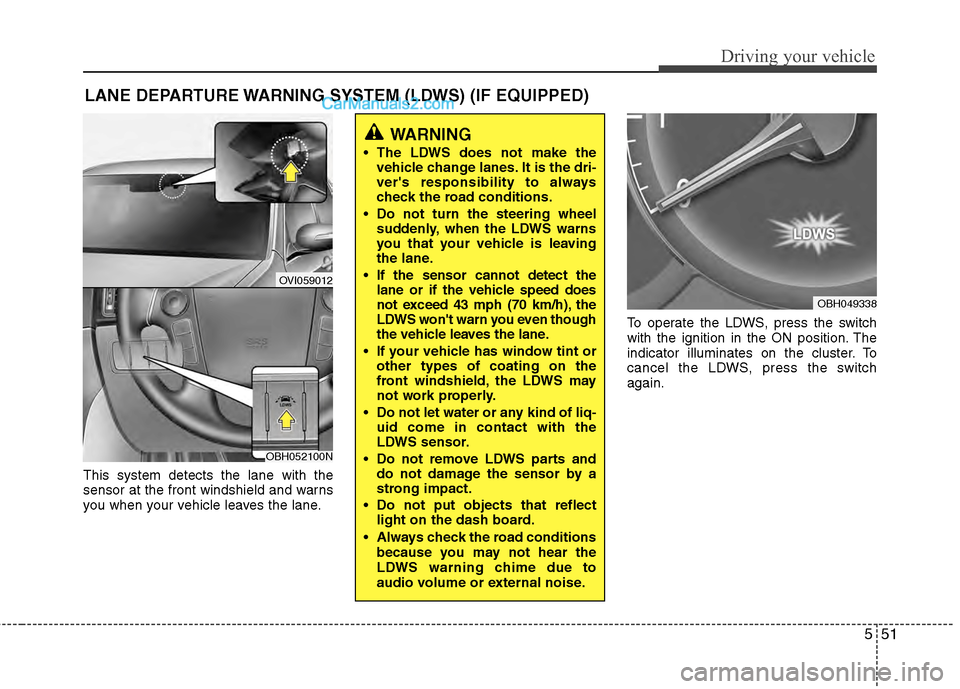
This system detects the lane with the
sensor at the front windshield and warns
you when your vehicle leaves the lane.To operate the LDWS, press the switch
with the ignition in the ON position. The
indicator illuminates on the cluster. To
cancel the LDWS, press the switch
again.
LANE DEPARTURE WARNING SYSTEM (LDWS) (IF EQUIPPED)
OVI059012
WARNING
The LDWS does not make the
vehicle change lanes. It is the dri-
ver's responsibility to always
check the road conditions.
Do not turn the steering wheel suddenly, when the LDWS warns
you that your vehicle is leaving
the lane.
If the sensor cannot detect the lane or if the vehicle speed does
not exceed 43 mph (70 km/h), the
LDWS won't warn you even though
the vehicle leaves the lane.
If your vehicle has window tint or other types of coating on the
front windshield, the LDWS may
not work properly.
Do not let water or any kind of liq- uid come in contact with the
LDWS sensor.
Do not remove LDWS parts and do not damage the sensor by a
strong impact.
Do not put objects that reflect light on the dash board.
Always check the road conditions because you may not hear the
LDWS warning chime due to
audio volume or external noise.
OBH049338
OBH052100N
Page 292 of 429
553
Driving your vehicle
The LDWS does not operate
when:
The driver turns on the turn signal tochange lane.
However, when the hazard warning
flasher is operating, the LDWS oper-
ates normally.
Operating the wiper switch with HI mode due to heavy rain.
Driving on the lane line.
✽ ✽ NOTICE
To change lane, operate the turn signal
switch then change the lane.
The LDWS may not warn you even
if the vehicle leaves the lane, or
may warn you even if the vehicle
does not leave the lane when:
The lane can't be visible due to snow,
rain, stain, a puddle or many other
things.
The brightness outside changes sud- denly.
Not turning on the headlights at night or in a tunnel.
Difficult to distinguish the color of the lane marking from the road.
Driving on a steep grade or a curve.
Light reflects from the water on the road.
The lens or windshield is stained with foreign matter.
The sensor cannot detect the lane because of fog, heavy rain or heavy
snow.
The surrounding of the inside rear view mirror temperature is high due to a
direct sun light.
The lane is very wide or narrow.
The lane line is damaged or indistinct.
A shadow is on the lane line by a medi- an strip.
There is a mark that looks like lane line.
There is a boundary structure. The distance from vehicle ahead is
very short or the vehicle ahead drives
hiding the lane line.
The vehicle shakes heavily.
The lane number increases or decreases or the lane lines are cross-
ing.
Putting something on the dashboard.
Driving with the sun in front of you.
Driving in areas under construction.
The lane line is more than two.