engine Hyundai Genesis 2014 Owners Manual
[x] Cancel search | Manufacturer: HYUNDAI, Model Year: 2014, Model line: Genesis, Model: Hyundai Genesis 2014Pages: 546, PDF Size: 13.59 MB
Page 209 of 546
3-118
Convenient features of your vehicle
Windshield washers
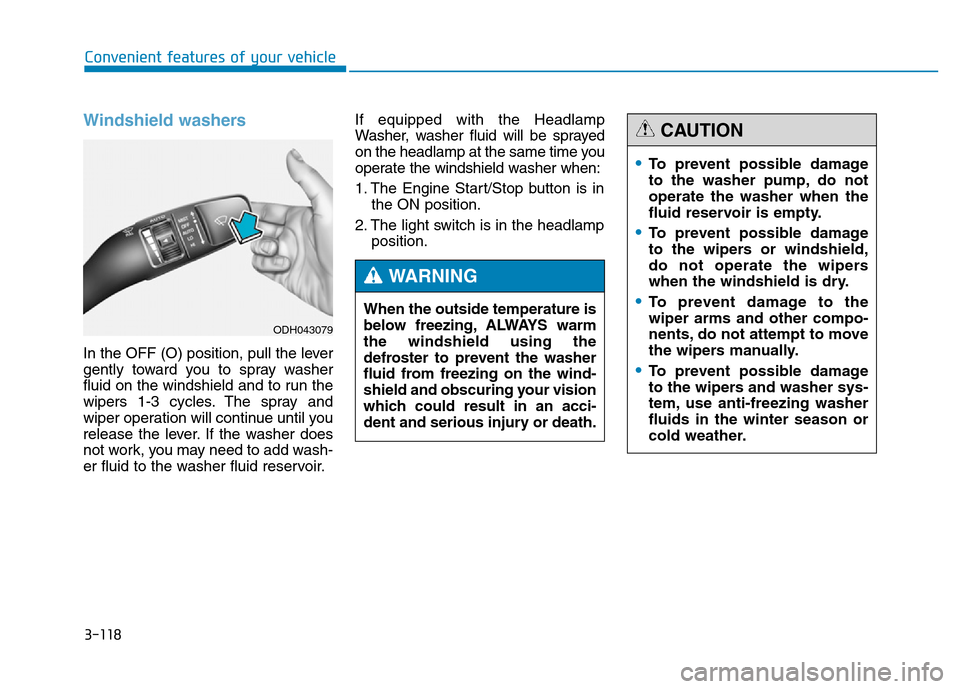
In the OFF (O) position, pull the lever
gently toward you to spray washer
fluid on the windshield and to run the
wipers 1-3 cycles. The spray and
wiper operation will continue until you
release the lever. If the washer does
not work, you may need to add wash-
er fluid to the washer fluid reservoir.If equipped with the Headlamp
Washer, washer fluid will be sprayed
on the headlamp at the same time you
operate the windshield washer when:
1. The Engine Start/Stop button is in
the ON position.
2. The light switch is in the headlamp
position.
ODH043079
When the outside temperature is
below freezing, ALWAYS warm
the windshield using the
defroster to prevent the washer
fluid from freezing on the wind-
shield and obscuring your vision
which could result in an acci-
dent and serious injury or death.
WARNING
•To prevent possible damage
to the washer pump, do not
operate the washer when the
fluid reservoir is empty.
•To prevent possible damage
to the wipers or windshield,
do not operate the wipers
when the windshield is dry.
•To prevent damage to the
wiper arms and other compo-
nents, do not attempt to move
the wipers manually.
•To prevent possible damage
to the wipers and washer sys-
tem, use anti-freezing washer
fluids in the winter season or
cold weather.
CAUTION
Page 210 of 546
3-119
Convenient features of your vehicle
3
DRIVER ASSIST SYSTEM
Rear view camera
(if equipped)
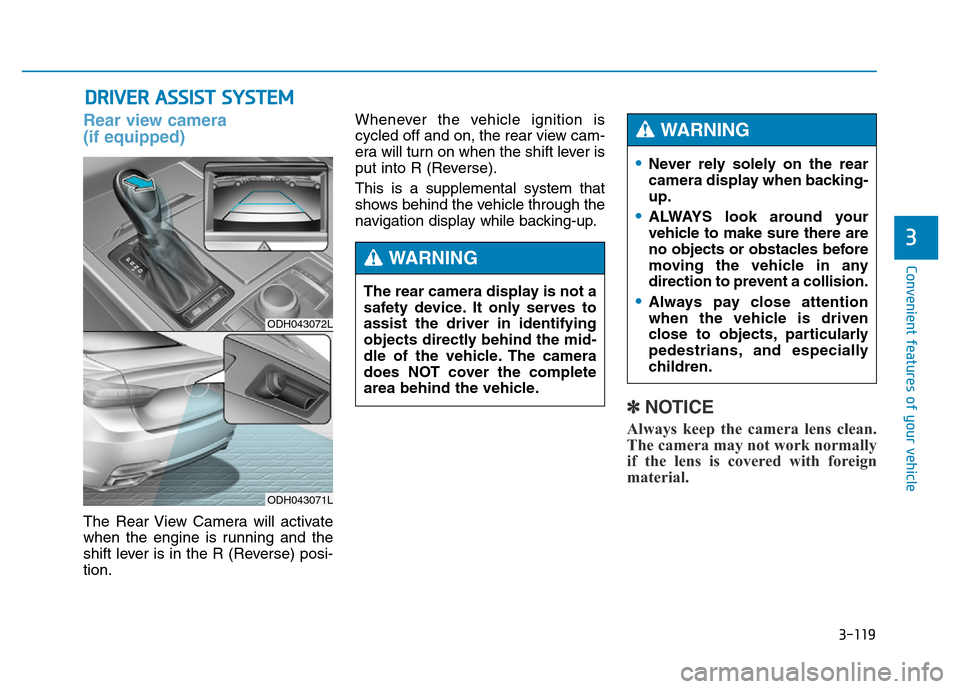
The Rear View Camera will activate
when the engine is running and the
shift lever is in the R (Reverse) posi-
tion.Whenever the vehicle ignition is
cycled off and on, the rear view cam-
era will turn on when the shift lever is
put into R (Reverse).
This is a supplemental system that
shows behind the vehicle through the
navigation display while backing-up.
✽NOTICE
Always keep the camera lens clean.
The camera may not work normally
if the lens is covered with foreign
material.
ODH043072L
ODH043071L
The rear camera display is not a
safety device. It only serves to
assist the driver in identifying
objects directly behind the mid-
dle of the vehicle. The camera
does NOT cover the complete
area behind the vehicle.
WARNING
•Never rely solely on the rear
camera display when backing-
up.
•ALWAYS look around your
vehicle to make sure there are
no objects or obstacles before
moving the vehicle in any
direction to prevent a collision.
•Always pay close attention
when the vehicle is driven
close to objects, particularly
pedestrians, and especially
children.
WARNING
Page 212 of 546
3-121
Convenient features of your vehicle
3
Operating condition
• This system will activate when the
Parking Assist System button is
pressed with the engine running.
• The Parking Assist System button
turns on automatically and activates
the Parking Assist System when you
move the shift lever to the R
(Reverse) position. However, if vehi-
cle speed exceeds 10 km/h, the sys-
tem will not warn you even though
objects are detected, and if vehicle
speed exceeds 20 km/h, the system
will turn off automatically. To turn on
the system, press the Parking Assist
System button.
• When more than two objects are
sensed at the same time, the clos-
est one will be recognized first.
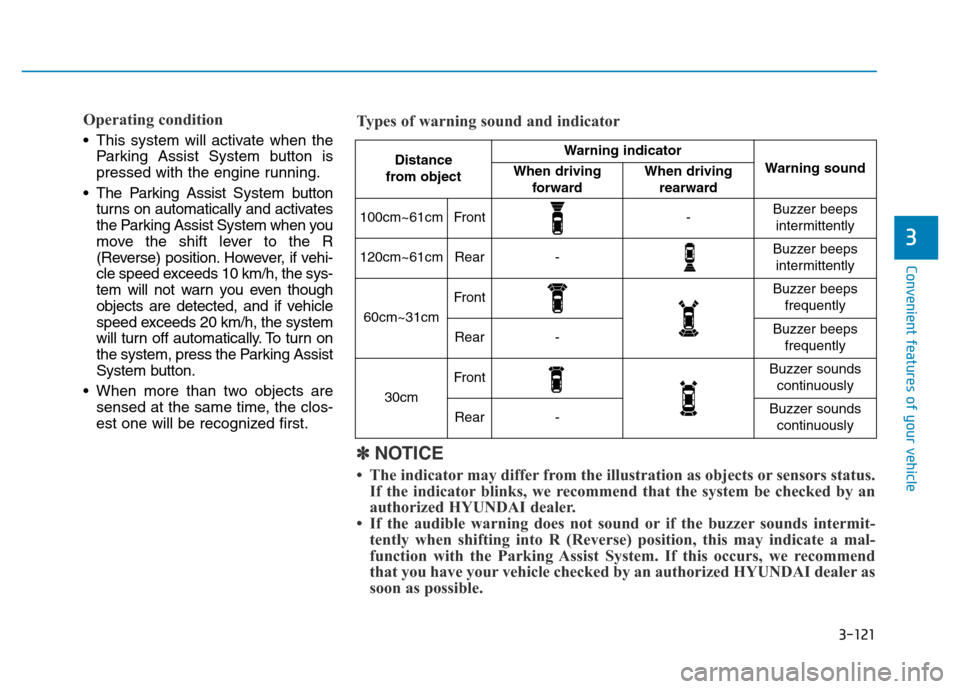
Distance
from object Warning indicator
Warning soundWhen driving
forwardWhen driving
rearward
100cm~61cmFront-Buzzer beeps
intermittently
120cm~61cmRear-Buzzer beeps
intermittently
60cm~31cm
FrontBuzzer beeps
frequently
Rear-Buzzer beeps
frequently
30cm
FrontBuzzer sounds
continuously
Rear-Buzzer sounds
continuously
✽NOTICE
• The indicator may differ from the illustration as objects or sensors status.
If the indicator blinks, we recommend that the system be checked by an
authorized HYUNDAI dealer.
• If the audible warning does not sound or if the buzzer sounds intermit-
tently when shifting into R (Reverse) position, this may indicate a mal-
function with the Parking Assist System. If this occurs, we recommend
that you have your vehicle checked by an authorized HYUNDAI dealer as
soon as possible. Types of warning sound and indicator
Page 213 of 546
3-122
Convenient features of your vehicle
Non-operational conditions of
Parking Assist System
Parking Assist System may not
operate normally when:
• Moisture is frozen to the sensor.
• Sensor is covered with foreign mat-
ter, such as snow or water, or the
sensor cover is blocked.
There is a possibility of Parking
Assist System malfunction when:
• Driving on uneven road surfaces
such as unpaved roads, gravel,
bumps, or gradient.
• Objects generating excessive noise
such as vehicle horns, loud motor-
cycle engines, or truck air brakes
can interfere with the sensor.
• Heavy rain or water spray is present.
• Wireless transmitters or mobile
phones are present near the sensor.
• The sensor is covered with snow.
• Any non-factory equipment or
accessories have been installed, or
if the vehicle bumper height or sen-
sor installation has been modified.
Detecting range may decrease
when:
• Outside air temperature is
extremely hot or cold.
• Undetectable objects smaller than
1 m and narrower than 14 cm in
diameter.
The following objects may not be
recognized by the sensor:
• Sharp or slim objects such as
ropes, chains or small poles.
• Objects, which tend to absorb sen-
sor frequency such as clothes,
spongy material or snow.
Page 217 of 546
3-126
Convenient features of your vehicle
• When there is an obstacle such as
a trash can, bicycle, shopping cart,
etc.
• When a vehicle is equipped with a
snow chain or spare tire
• When the tire pressure is lower or
higher than the standard tire pres-
sure
• When a trailer connected to the
vehicle
• When the sensor is positioned incor-
rectly by an impact to the bumper
• When the sensor is covered with
foreign matter, such as snow or
water
• When moisture is frozen on the
sensor
• When an accessory is installed on
the detective area the of sensors
(such as number plate holder)
• When the vehicle is equipped with
an unauthorized sized wheel
• When there is a problem with the
wheel alignment• When the vehicle is leaned severe-
ly to one side
• When there is ultrasonic interfer-
ence from other vehicles such as
horn sounds, motorcycle's engine
noise, air brake noise of heavy vehi-
cles and the Parking Assist System
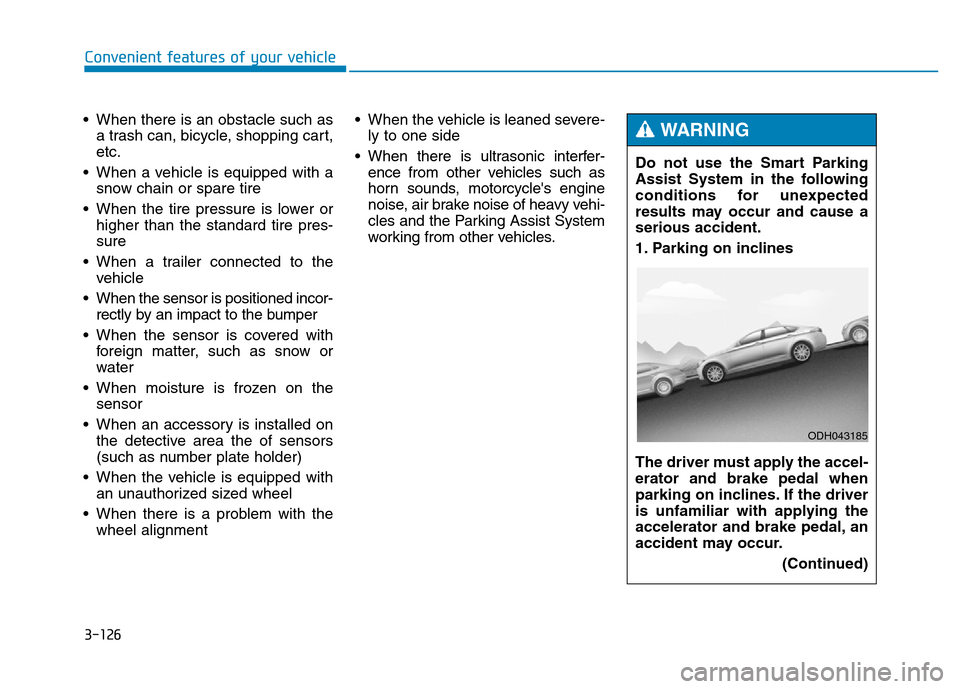
working from other vehicles.Do not use the Smart Parking
Assist System in the following
conditions for unexpected
results may occur and cause a
serious accident.
1. Parking on inclines
The driver must apply the accel-
erator and brake pedal when
parking on inclines. If the driver
is unfamiliar with applying the
accelerator and brake pedal, an
accident may occur.
(Continued)
WARNING
ODH043185
Page 221 of 546
3-130
Convenient features of your vehicle
• The Parking Assist System will be
activated (the button indicator will
illuminate).
A warning sound will be heard if an
obstacle is detected.
• Press the Smart Parking Assist
System button again for more than
2 seconds to turn off the system.
• The Smart Parking Assist System
defaults to the OFF position when-
ever the engine is turned on.
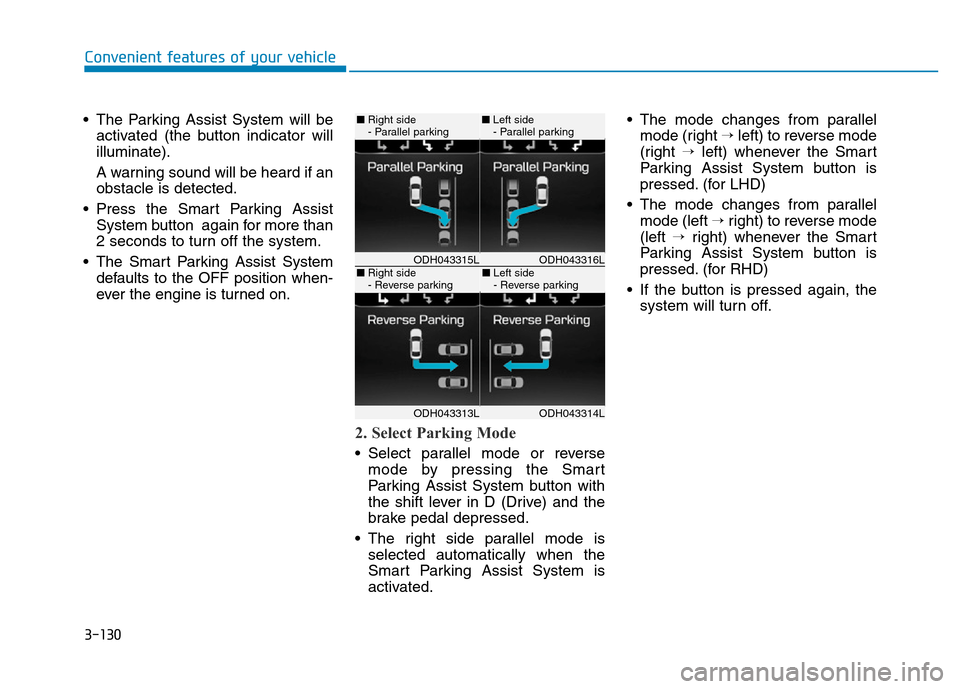
2. Select Parking Mode
• Select parallel mode or reverse
mode by pressing the Smart
Parking Assist System button with
the shift lever in D (Drive) and the
brake pedal depressed.
• The right side parallel mode is
selected automatically when the
Smart Parking Assist System is
activated.• The mode changes from parallel
mode (right →left) to reverse mode
(right →left) whenever the Smart
Parking Assist System button is
pressed. (for LHD)
• The mode changes from parallel
mode (left →right) to reverse mode
(left →right) whenever the Smart
Parking Assist System button is
pressed. (for RHD)
• If the button is pressed again, the
system will turn off.
ODH043316LODH043315L
ODH043314LODH043313L
■Right side
- Parallel parking■Left side
- Parallel parking
■Right side
- Reverse parking■Left side
- Reverse parking
Page 227 of 546
3-136
Convenient features of your vehicle
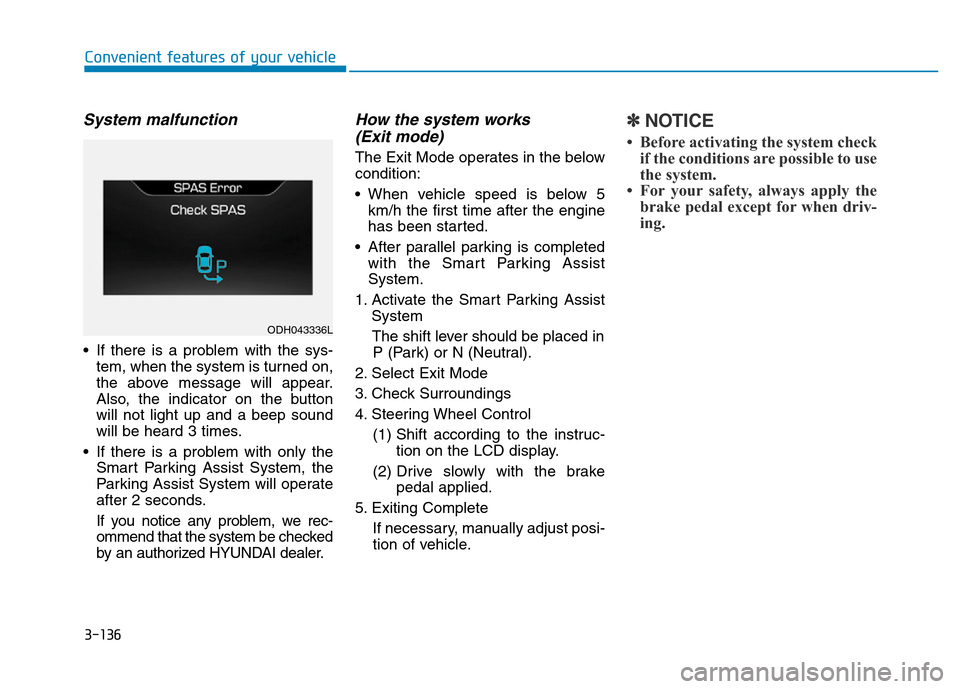
System malfunction
• If there is a problem with the sys-
tem, when the system is turned on,
the above message will appear.
Also, the indicator on the button
will not light up and a beep sound
will be heard 3 times.
• If there is a problem with only the
Smart Parking Assist System, the
Parking Assist System will operate
after 2 seconds.
If you notice any problem, we rec-
ommend that the system be checked
by an authorized HYUNDAI dealer.
How the system works
(Exit mode)
The Exit Mode operates in the below
condition:
• When vehicle speed is below 5
km/h the first time after the engine
has been started.
• After parallel parking is completed
with the Smart Parking Assist
System.
1. Activate the Smart Parking Assist
System
The shift lever should be placed in
P (Park) or N (Neutral).
2. Select Exit Mode
3. Check Surroundings
4. Steering Wheel Control
(1) Shift according to the instruc-
tion on the LCD display.
(2) Drive slowly with the brake
pedal applied.
5. Exiting Complete
If necessary, manually adjust posi-
tion of vehicle.
✽NOTICE
• Before activating the system check
if the conditions are possible to use
the system.
• For your safety, always apply the
brake pedal except for when driv-
ing.
ODH043336L
Page 228 of 546
3-137
Convenient features of your vehicle
3
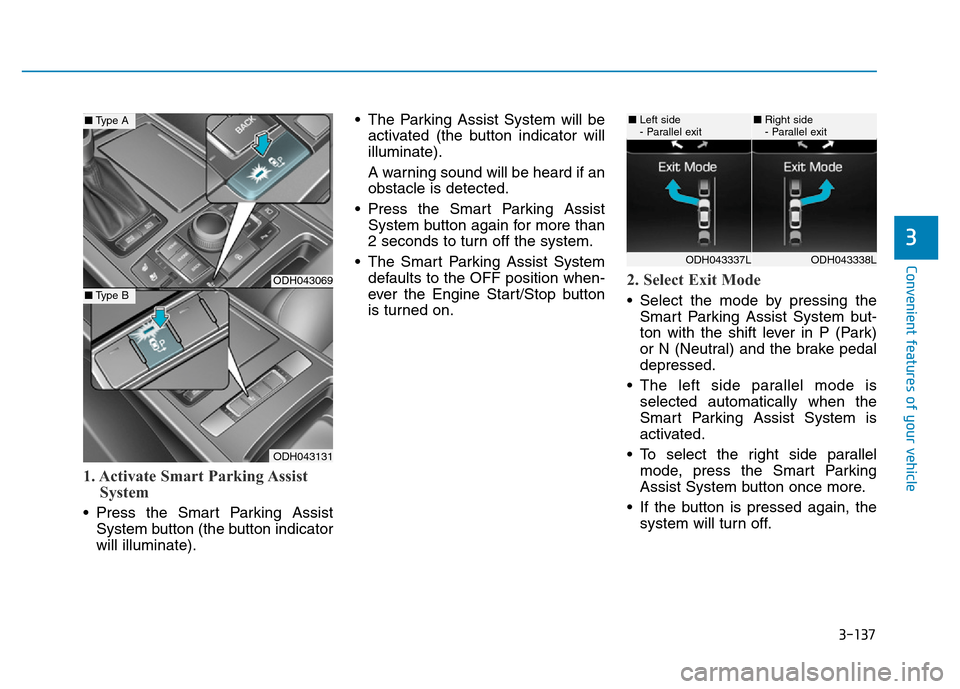
1. Activate Smart Parking Assist
System
• Press the Smart Parking Assist
System button (the button indicator
will illuminate).• The Parking Assist System will be
activated (the button indicator will
illuminate).
A warning sound will be heard if an
obstacle is detected.
• Press the Smart Parking Assist
System button again for more than
2 seconds to turn off the system.
• The Smart Parking Assist System
defaults to the OFF position when-
ever the Engine Start/Stop button
is turned on.
2. Select Exit Mode
• Select the mode by pressing the
Smart Parking Assist System but-
ton with the shift lever in P (Park)
or N (Neutral) and the brake pedal
depressed.
• The left side parallel mode is
selected automatically when the
Smart Parking Assist System is
activated.
• To select the right side parallel
mode, press the Smart Parking
Assist System button once more.
• If the button is pressed again, the
system will turn off.
ODH043069
ODH043131
■Type A
■Type B
ODH043338LODH043337L
■Left side
- Parallel exit■Right side
- Parallel exit
Page 236 of 546
3-145
Convenient features of your vehicle
3
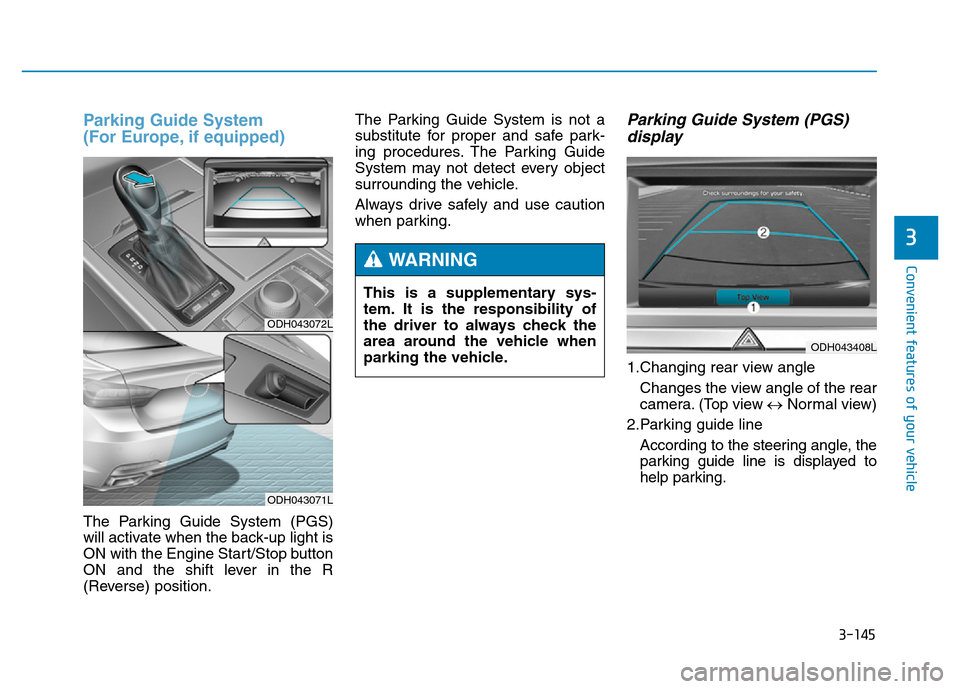
Parking Guide System
(For Europe, if equipped)
The Parking Guide System (PGS)
will activate when the back-up light is
ON with the Engine Start/Stop button
ON and the shift lever in the R
(Reverse) position.The Parking Guide System is not a
substitute for proper and safe park-
ing procedures. The Parking Guide
System may not detect every object
surrounding the vehicle.
Always drive safely and use caution
when parking.
Parking Guide System (PGS)
display
1.Changing rear view angle
Changes the view angle of the rear
camera. (Top view ↔Normal view)
2.Parking guide line
According to the steering angle, the
parking guide line is displayed to
help parking.
ODH043072L
ODH043071L
This is a supplementary sys-
tem. It is the responsibility of
the driver to always check the
area around the vehicle when
parking the vehicle.
WARNING
ODH043408L
Page 237 of 546
3-146
Convenient features of your vehicle
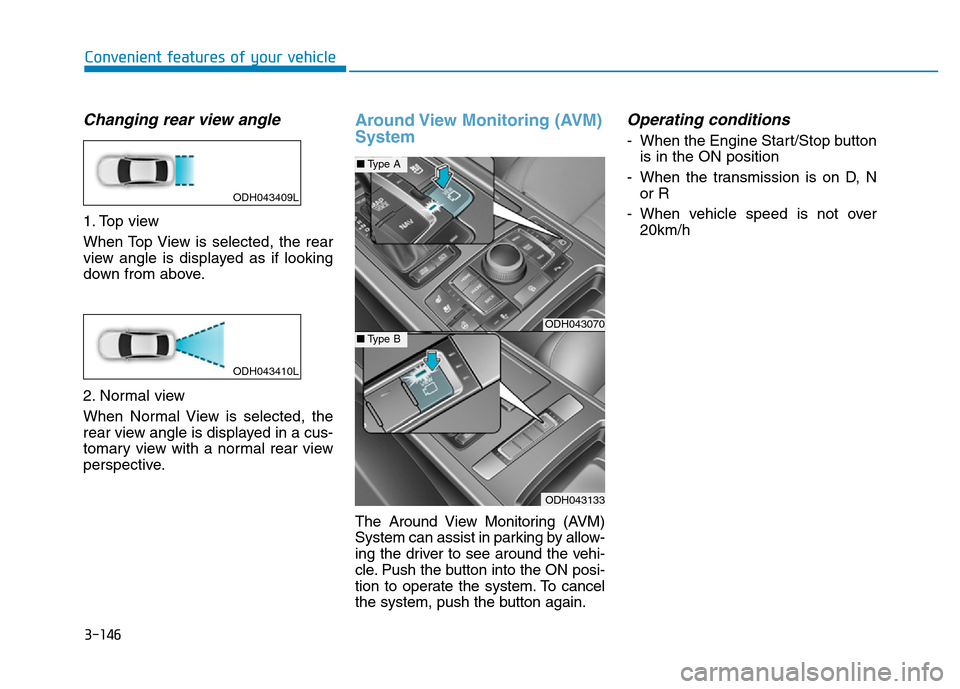
Changing rear view angle
1. Top view
When Top View is selected, the rear
view angle is displayed as if looking
down from above.
2. Normal view
When Normal View is selected, the
rear view angle is displayed in a cus-
tomary view with a normal rear view
perspective.
Around View Monitoring (AVM)
System
The Around View Monitoring (AVM)
System can assist in parking by allow-
ing the driver to see around the vehi-
cle. Push the button into the ON posi-
tion to operate the system. To cancel
the system, push the button again.
Operating conditions
- When the Engine Start/Stop button
is in the ON position
- When the transmission is on D, N
or R
- When vehicle speed is not over
20km/h
ODH043070
ODH043133
■Type A
■Type B
ODH043409L
ODH043410L