brake sensor Hyundai Genesis 2014 User Guide
[x] Cancel search | Manufacturer: HYUNDAI, Model Year: 2014, Model line: Genesis, Model: Hyundai Genesis 2014Pages: 546, PDF Size: 13.59 MB
Page 326 of 546
5-50
Driving your vehicle
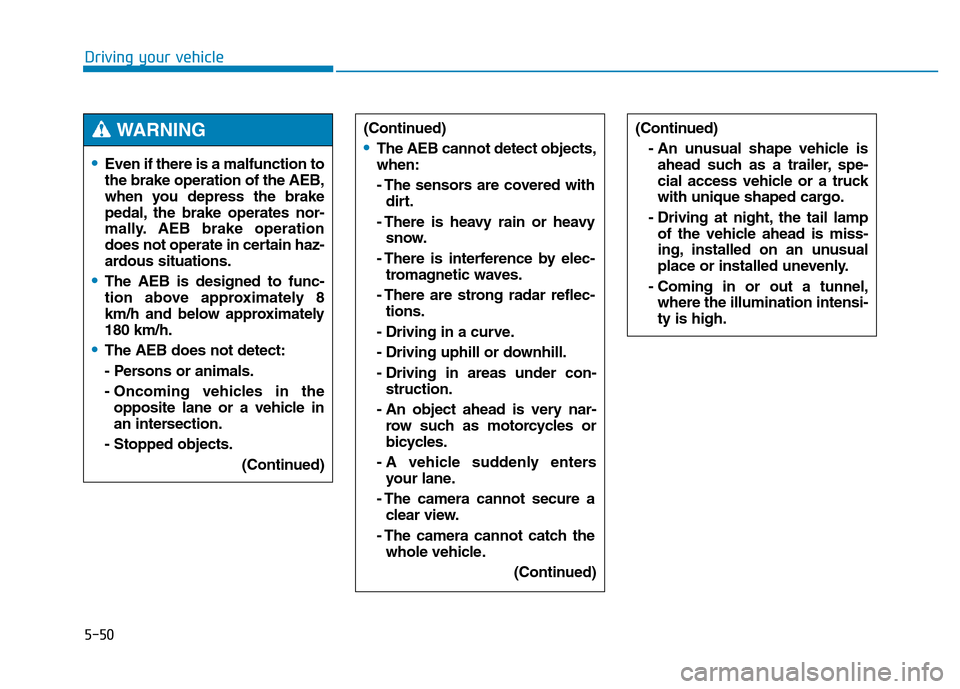
•Even if there is a malfunction to
the brake operation of the AEB,
when you depress the brake
pedal, the brake operates nor-
mally. AEB brake operation
does not operate in certain haz-
ardous situations.
•The AEB is designed to func-
tion above approximately 8
km/h and below approximately
180 km/h.
•The AEB does not detect:
- Persons or animals.
- Oncoming vehicles in the
opposite lane or a vehicle in
an intersection.
- Stopped objects.
(Continued)
(Continued)
•The AEB cannot detect objects,
when:
- The sensors are covered with
dirt.
- There is heavy rain or heavy
snow.
- There is interference by elec-
tromagnetic waves.
- There are strong radar reflec-
tions.
- Driving in a curve.
- Driving uphill or downhill.
- Driving in areas under con-
struction.
- An object ahead is very nar-
row such as motorcycles or
bicycles.
- A vehicle suddenly enters
your lane.
- The camera cannot secure a
clear view.
- The camera cannot catch the
whole vehicle.
(Continued)
(Continued)
- An unusual shape vehicle is
ahead such as a trailer, spe-
cial access vehicle or a truck
with unique shaped cargo.
- Driving at night, the tail lamp
of the vehicle ahead is miss-
ing, installed on an unusual
place or installed unevenly.
- Coming in or out a tunnel,
where the illumination intensi-
ty is high.WARNING
Page 335 of 546
5-59
Driving your vehicle
5
Cancelled automatically
• The driver's door is opened.
• The shift lever is shifted to N
(Neutral), R (Reverse) or P (Park).
• The EPB (Electric Parking Brake)
is applied.
• The vehicle speed is over 180km/h
(113mph)
• The vehicle stops on a steep
incline.
• The ESC, TCS or ABS is operat-
ing.
• The ESC is turned off.
• The sensor or the cover is dirty or
blocked with foreign matter.
• When the vehicle is stopped for
more than 5 minutes.
• The vehicle stops and goes repeat-
edly for a long period of time.
• The driver starts driving by pushing
the lever up (RES +) or down
(SET -), approximately 3 minutes
after the vehicle is stopped by the
Smart Cruise Control System with
no other vehicle ahead.• The driver starts driving by pushing
the lever up (RES +) or down
(SET -), after stopping the vehicle
with a vehicle stopped far away in
front.
• The accelerator pedal is continu-
ously depressed for more than one
minute.
Each of these actions will cancel
the Smart Cruise Control opera-
tion. (the Set Speed and Vehicle-
to-Vehicle Distance on the LCD
display will go off.)
In a condition the Smart Cruise
Control is cancelled automatically,
the Smart Cruise Control will not
resume even though the RES+ or
SET- lever is pushed. Also, the
EPB will be applied when the vehi-
cle is stopped.
✽NOTICE
If the Smart Cruise Control is can-
celled by other than the reasons
mentioned, we recommend that the
system be checked by an authorized
HYUNDAI dealer.
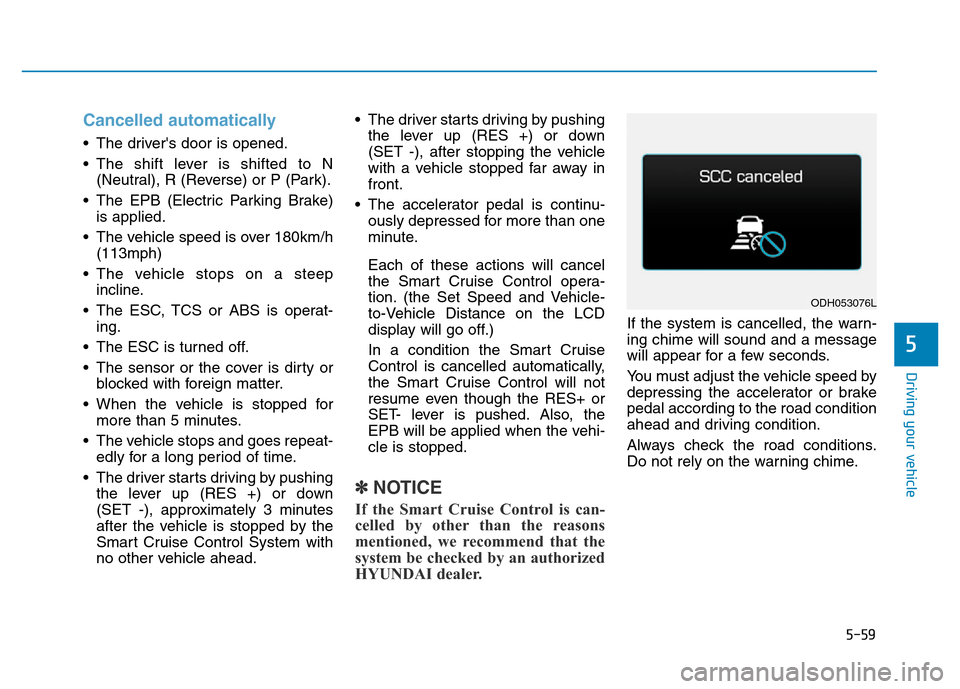
If the system is cancelled, the warn-
ing chime will sound and a message
will appear for a few seconds.
You must adjust the vehicle speed by
depressing the accelerator or brake
pedal according to the road condition
ahead and driving condition.
Always check the road conditions.
Do not rely on the warning chime.
ODH053076L
Page 339 of 546
5-63
Driving your vehicle
5
In traffic situation
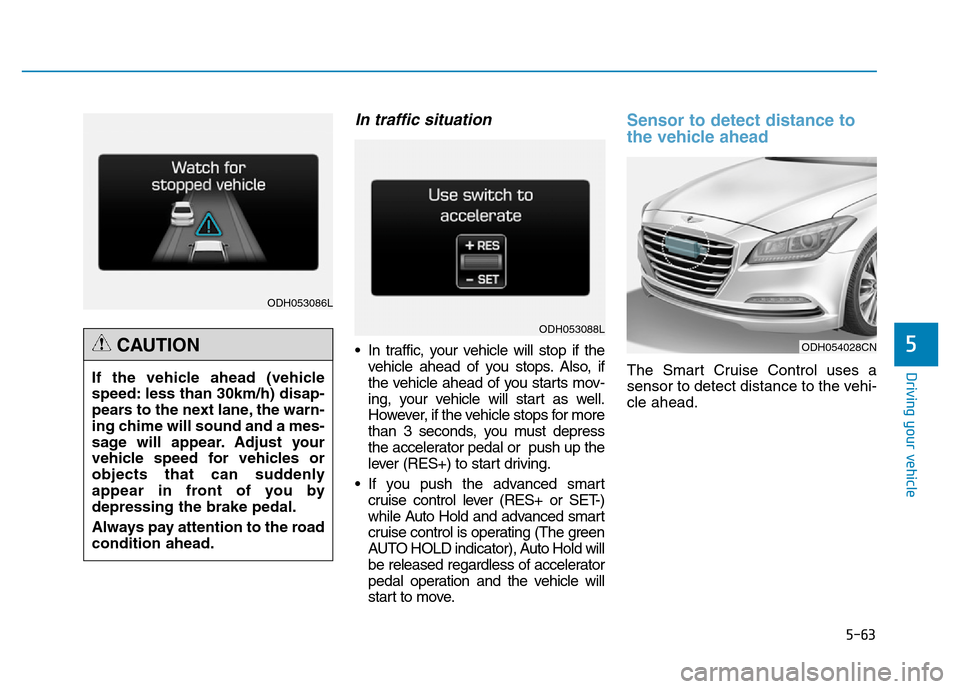
• In traffic, your vehicle will stop if the
vehicle ahead of you stops. Also, if
the vehicle ahead of you starts mov-
ing, your vehicle will start as well.
However, if the vehicle stops for more
than 3 seconds, you must depress
the accelerator pedal or push up the
lever (RES+) to start driving.
• If you push the advanced smart
cruise control lever (RES+ or SET-)
while Auto Hold and advanced smart
cruise control is operating (The green
AUTO HOLD indicator), Auto Hold will
be released regardless of accelerator
pedal operation and the vehicle will
start to move.
Sensor to detect distance to
the vehicle ahead
The Smart Cruise Control uses a
sensor to detect distance to the vehi-
cle ahead.
ODH054028CN
ODH053086L
ODH053088L
If the vehicle ahead (vehicle
speed: less than 30km/h) disap-
pears to the next lane, the warn-
ing chime will sound and a mes-
sage will appear. Adjust your
vehicle speed for vehicles or
objects that can suddenly
appear in front of you by
depressing the brake pedal.
Always pay attention to the road
condition ahead.
CAUTION
Page 342 of 546
5-66
Driving your vehicle
On inclines
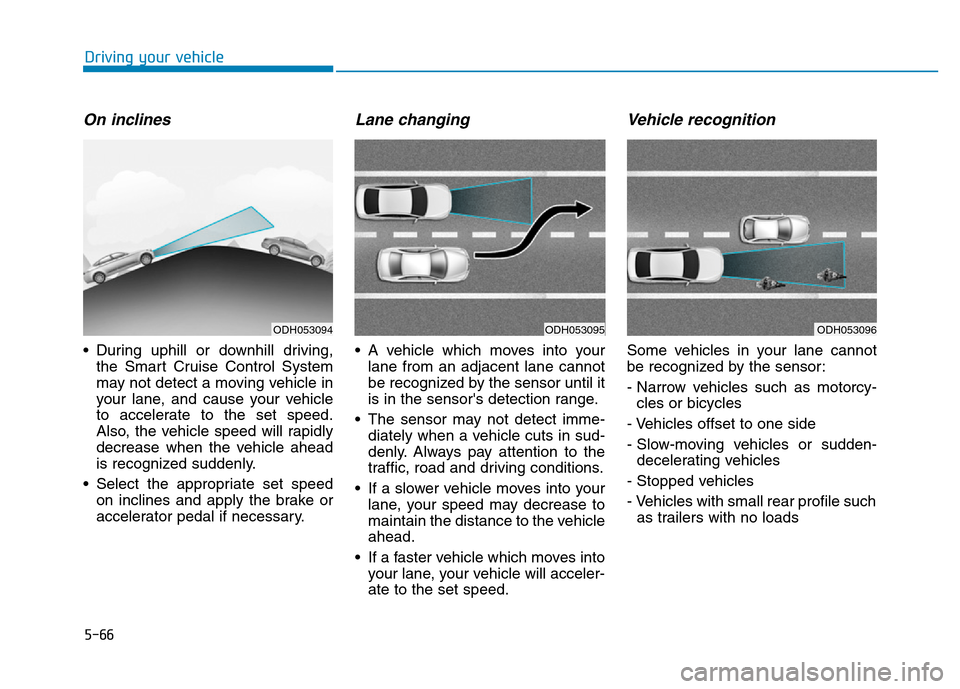
• During uphill or downhill driving,
the Smart Cruise Control System
may not detect a moving vehicle in
your lane, and cause your vehicle
to accelerate to the set speed.
Also, the vehicle speed will rapidly
decrease when the vehicle ahead
is recognized suddenly.
• Select the appropriate set speed
on inclines and apply the brake or
accelerator pedal if necessary.
Lane changing
• A vehicle which moves into your
lane from an adjacent lane cannot
be recognized by the sensor until it
is in the sensor's detection range.
• The sensor may not detect imme-
diately when a vehicle cuts in sud-
denly. Always pay attention to the
traffic, road and driving conditions.
• If a slower vehicle moves into your
lane, your speed may decrease to
maintain the distance to the vehicle
ahead.
• If a faster vehicle which moves into
your lane, your vehicle will acceler-
ate to the set speed.
Vehicle recognition
Some vehicles in your lane cannot
be recognized by the sensor:
- Narrow vehicles such as motorcy-
cles or bicycles
- Vehicles offset to one side
- Slow-moving vehicles or sudden-
decelerating vehicles
- Stopped vehicles
- Vehicles with small rear profile such
as trailers with no loads
ODH053094ODH053095ODH053096
Page 343 of 546
5-67
Driving your vehicle
5
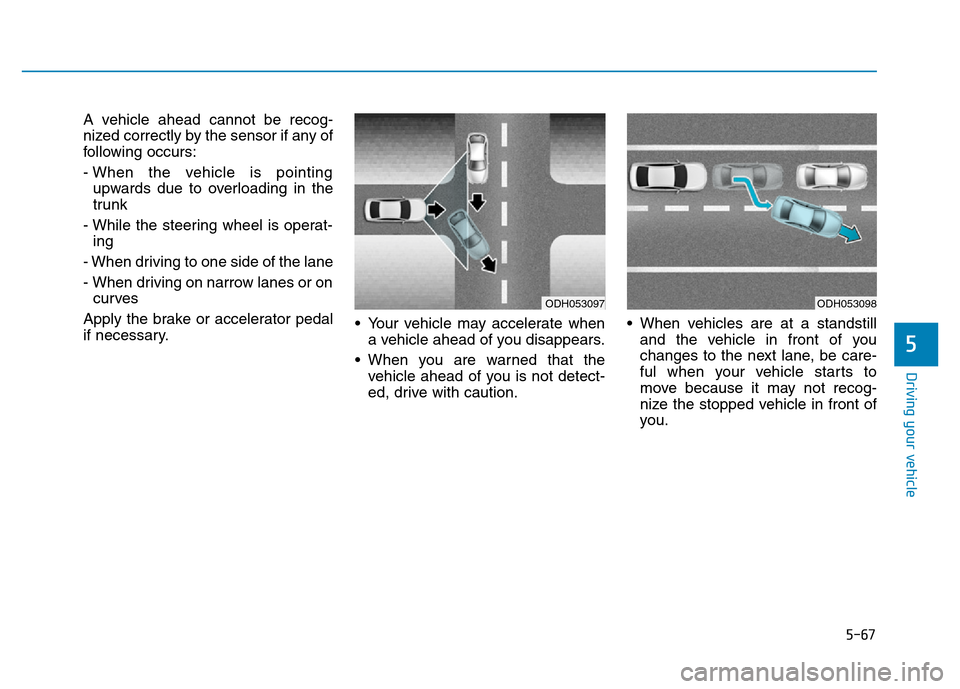
A vehicle ahead cannot be recog-
nized correctly by the sensor if any of
following occurs:
- When the vehicle is pointing
upwards due to overloading in the
trunk
- While the steering wheel is operat-
ing
- When driving to one side of the lane
- When driving on narrow lanes or on
curves
Apply the brake or accelerator pedal
if necessary.• Your vehicle may accelerate when
a vehicle ahead of you disappears.
• When you are warned that the
vehicle ahead of you is not detect-
ed, drive with caution.• When vehicles are at a standstill
and the vehicle in front of you
changes to the next lane, be care-
ful when your vehicle starts to
move because it may not recog-
nize the stopped vehicle in front of
you.
ODH053097ODH053098
Page 355 of 546
5-79
Driving your vehicle
5
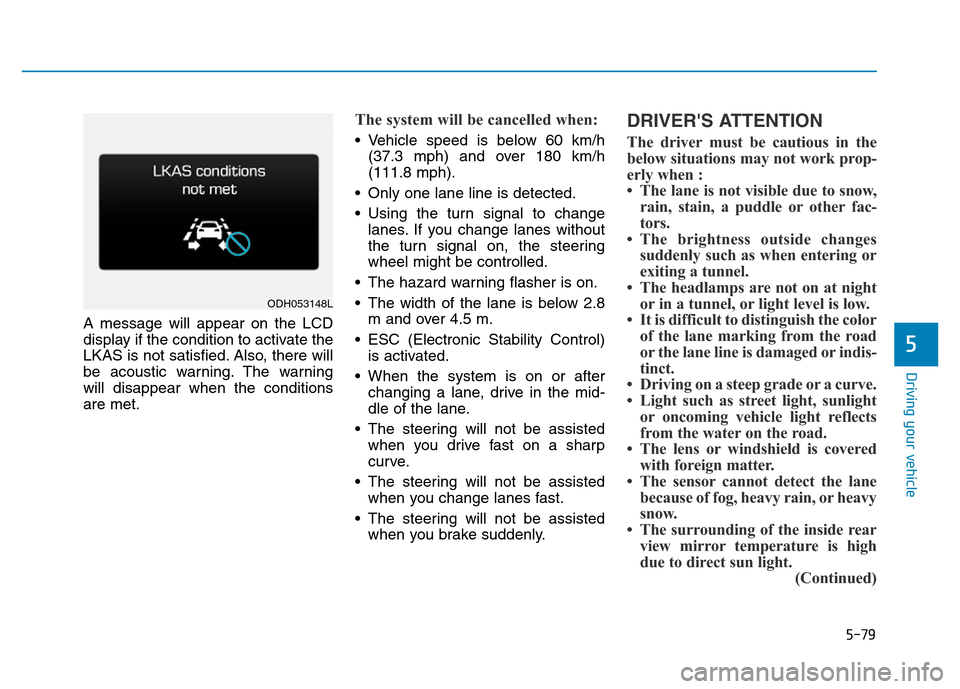
A message will appear on the LCD
display if the condition to activate the
LKAS is not satisfied. Also, there will
be acoustic warning. The warning
will disappear when the conditions
are met.
The system will be cancelled when:
• Vehicle speed is below 60 km/h
(37.3 mph) and over 180 km/h
(111.8 mph).
• Only one lane line is detected.
• Using the turn signal to change
lanes. If you change lanes without
the turn signal on, the steering
wheel might be controlled.
• The hazard warning flasher is on.
• The width of the lane is below 2.8
m and over 4.5 m.
• ESC (Electronic Stability Control)
is activated.
• When the system is on or after
changing a lane, drive in the mid-
dle of the lane.
• The steering will not be assisted
when you drive fast on a sharp
curve.
• The steering will not be assisted
when you change lanes fast.
• The steering will not be assisted
when you brake suddenly.
DRIVER'S ATTENTION
The driver must be cautious in the
below situations may not work prop-
erly when :
• The lane is not visible due to snow,
rain, stain, a puddle or other fac-
tors.
• The brightness outside changes
suddenly such as when entering or
exiting a tunnel.
• The headlamps are not on at night
or in a tunnel, or light level is low.
• It is difficult to distinguish the color
of the lane marking from the road
or the lane line is damaged or indis-
tinct.
• Driving on a steep grade or a curve.
• Light such as street light, sunlight
or oncoming vehicle light reflects
from the water on the road.
• The lens or windshield is covered
with foreign matter.
• The sensor cannot detect the lane
because of fog, heavy rain, or heavy
snow.
• The surrounding of the inside rear
view mirror temperature is high
due to direct sun light.
(Continued)
ODH053148L
Page 419 of 546
6-16
What to do in an emergency
If you drive the vehicle for about 10
minutes at speeds above 25 km/h
after replacing the low pressure tire
with the spare tire, the below will
happen:
• The TPMS malfunction indicator
may blink for approximately 1
minute and then remain continu-
ously illuminated because the
TPMS sensor is not mounted on
the spare wheel.You may not be able identify a low
tire by simply looking at it. Always
use a good quality tire pressure
gauge to measure the tire's inflation
pressure. Please note that a tire that
is hot (from being driven) will have a
higher pressure measurement than a
tire that is cold (from sitting station-
ary for at least 3 hours and driven
less than 1.6 km (1 mile) during that
3 hour period).
Allow the tire to cool before measur-
ing the inflation pressure. Always be
sure the tire is cold before inflating to
the recommended pressure.
A cold tire means the vehicle has
been sitting for 3 hours and driven for
less than 1.6 km (1 mile) in that 3
hour period.TPMS
•The TPMS cannot alert you to
severe and sudden tire dam-
age caused by external fac-
tors such as nails or road
debris.
•If you feel any vehicle instabil-
ity, immediately take your foot
off the accelerator, apply the
brakes gradually and with
light force, and slowly move to
a safe position off the road.
WARNING
Page 431 of 546
6-28
What to do in an emergency
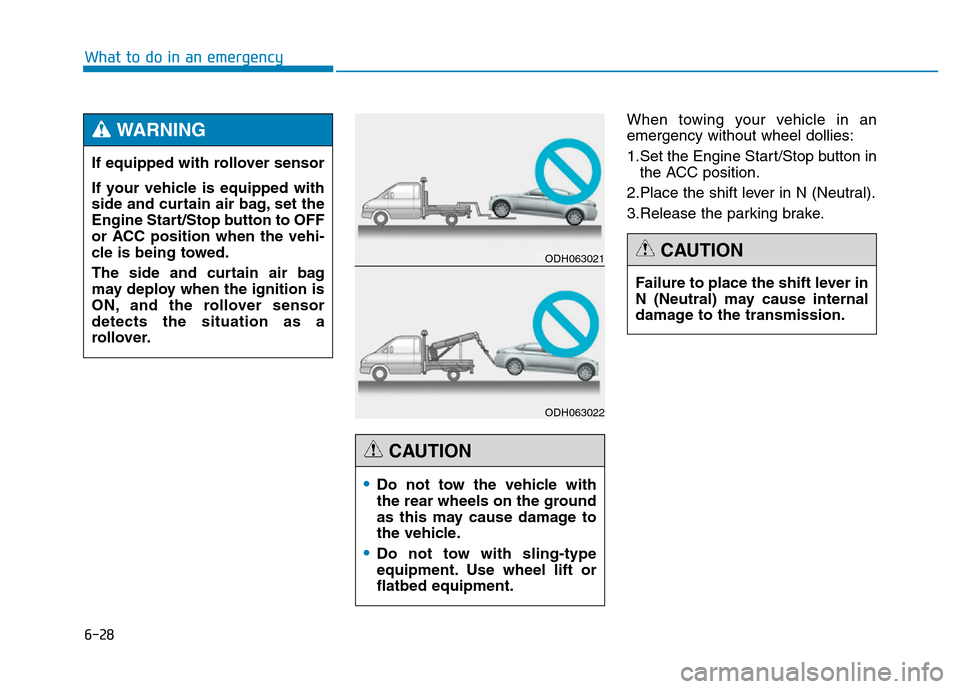
When towing your vehicle in an
emergency without wheel dollies:
1.Set the Engine Start/Stop button in
the ACC position.
2.Place the shift lever in N (Neutral).
3.Release the parking brake.
Failure to place the shift lever in
N (Neutral) may cause internal
damage to the transmission.
CAUTION
•Do not tow the vehicle with
the rear wheels on the ground
as this may cause damage to
the vehicle.
•Do not tow with sling-type
equipment. Use wheel lift or
flatbed equipment.
CAUTION
ODH063021
ODH063022
If equipped with rollover sensor
If your vehicle is equipped with
side and curtain air bag, set the
Engine Start/Stop button to OFF
or ACC position when the vehi-
cle is being towed.
The side and curtain air bag
may deploy when the ignition is
ON, and the rollover sensor
detects the situation as a
rollover.
WARNING
Page 497 of 546
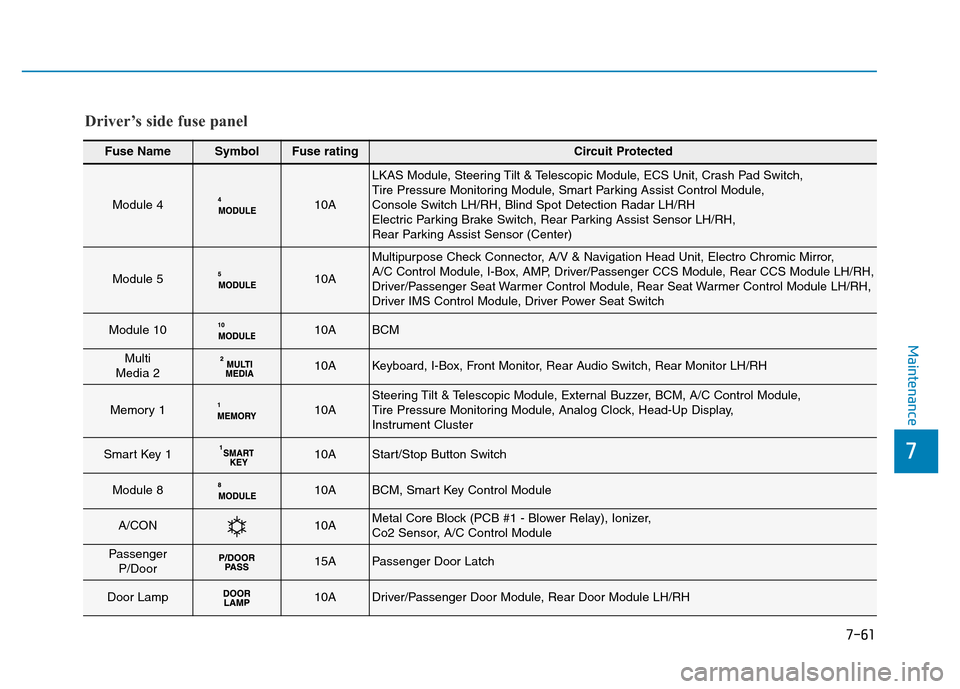
7-61
7
Maintenance
Fuse NameSymbolFuse ratingCircuit Protected
Module 410A
LKAS Module, Steering Tilt & Telescopic Module, ECS Unit, Crash Pad Switch,
Tire Pressure Monitoring Module, Smart Parking Assist Control Module,
Console Switch LH/RH, Blind Spot Detection Radar LH/RH
Electric Parking Brake Switch, Rear Parking Assist Sensor LH/RH,
Rear Parking Assist Sensor (Center)
Module 510A
Multipurpose Check Connector, A/V & Navigation Head Unit, Electro Chromic Mirror,
A/C Control Module, I-Box, AMP, Driver/Passenger CCS Module, Rear CCS Module LH/RH,
Driver/Passenger Seat Warmer Control Module, Rear Seat Warmer Control Module LH/RH,
Driver IMS Control Module, Driver Power Seat Switch
Module 1010ABCM
Multi
Media 210AKeyboard, I-Box, Front Monitor, Rear Audio Switch, Rear Monitor LH/RH
Memory 110ASteering Tilt & Telescopic Module, External Buzzer, BCM, A/C Control Module,
Tire Pressure Monitoring Module, Analog Clock, Head-Up Display,
Instrument Cluster
Smart Key 110AStart/Stop Button Switch
Module 810ABCM, Smart Key Control Module
A/CON10AMetal Core Block (PCB #1 - Blower Relay), Ionizer,
Co2 Sensor, A/C Control Module
Passenger
P/Door15APassenger Door Latch
Door Lamp10ADriver/Passenger Door Module, Rear Door Module LH/RH
Driver’s side fuse panel
Page 498 of 546
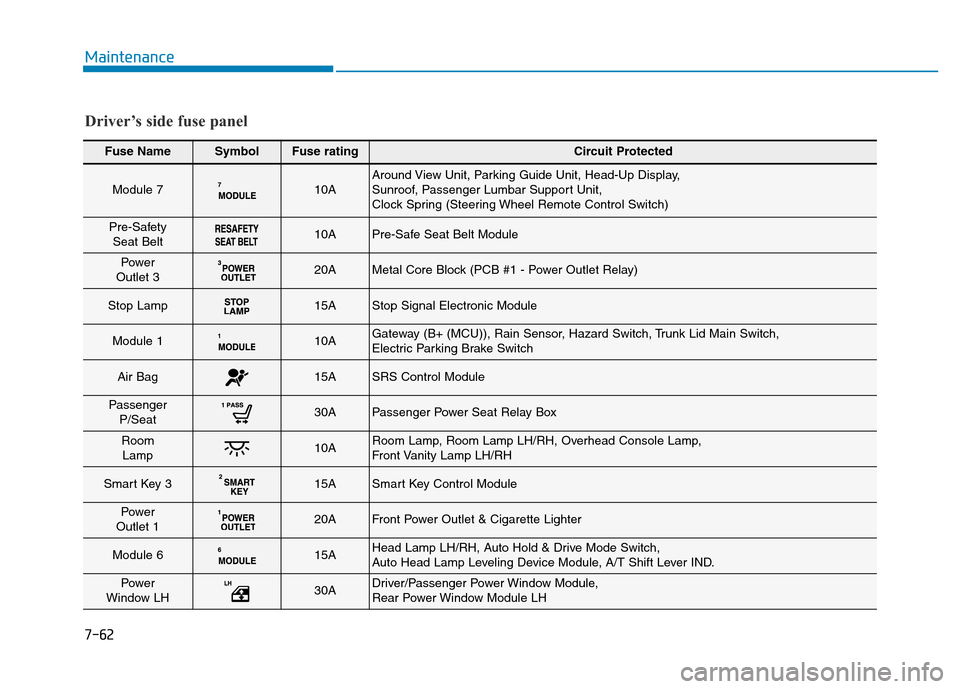
7-62
Maintenance
Fuse NameSymbolFuse ratingCircuit Protected
Module 710AAround View Unit, Parking Guide Unit, Head-Up Display,
Sunroof, Passenger Lumbar Support Unit,
Clock Spring (Steering Wheel Remote Control Switch)
Pre-Safety
Seat Belt10APre-Safe Seat Belt Module
Power
Outlet 320AMetal Core Block (PCB #1 - Power Outlet Relay)
Stop Lamp15AStop Signal Electronic Module
Module 110AGateway (B+ (MCU)), Rain Sensor, Hazard Switch, Trunk Lid Main Switch,
Electric Parking Brake Switch
Air Bag15ASRS Control Module
Passenger
P/Seat30APassenger Power Seat Relay Box
Room
Lamp10ARoom Lamp, Room Lamp LH/RH, Overhead Console Lamp,
Front Vanity Lamp LH/RH
Smart Key 315ASmart Key Control Module
Power
Outlet 120AFront Power Outlet & Cigarette Lighter
Module 615AHead Lamp LH/RH, Auto Hold & Drive Mode Switch,
Auto Head Lamp Leveling Device Module, A/T Shift Lever IND.
Power
Window LH30ADriver/Passenger Power Window Module,
Rear Power Window Module LH
Driver’s side fuse panel