mirror Hyundai Genesis 2014 Owner's Guide
[x] Cancel search | Manufacturer: HYUNDAI, Model Year: 2014, Model line: Genesis, Model: Hyundai Genesis 2014Pages: 546, PDF Size: 13.59 MB
Page 262 of 546
3-171
Convenient features of your vehicle
3
Glove box
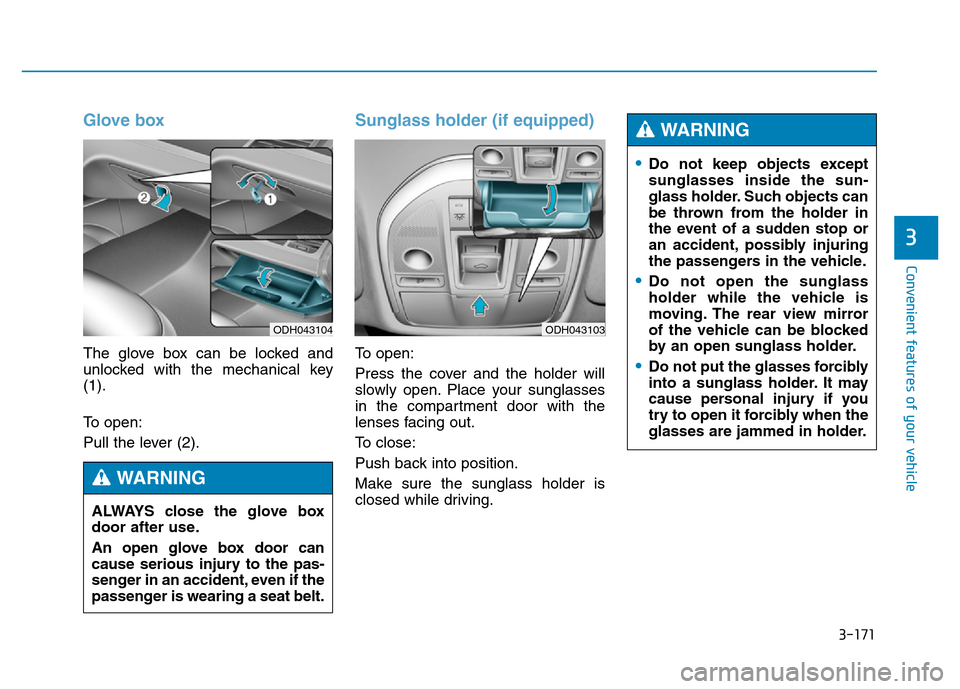
The glove box can be locked and
unlocked with the mechanical key
(1).
To open:
Pull the lever (2).
Sunglass holder (if equipped)
To open:
Press the cover and the holder will
slowly open. Place your sunglasses
in the compartment door with the
lenses facing out.
To close:
Push back into position.
Make sure the sunglass holder is
closed while driving.
ODH043104
ALWAYS close the glove box
door after use.
An open glove box door can
cause serious injury to the pas-
senger in an accident, even if the
passenger is wearing a seat belt.
WARNING
ODH043103
•Do not keep objects except
sunglasses inside the sun-
glass holder. Such objects can
be thrown from the holder in
the event of a sudden stop or
an accident, possibly injuring
the passengers in the vehicle.
•Do not open the sunglass
holder while the vehicle is
moving. The rear view mirror
of the vehicle can be blocked
by an open sunglass holder.
•Do not put the glasses forcibly
into a sunglass holder. It may
cause personal injury if you
try to open it forcibly when the
glasses are jammed in holder.
WARNING
Page 264 of 546
3-173
Convenient features of your vehicle
3
Rear
To open the cover:
Press the button and it will slowly
open.
Sunvisor
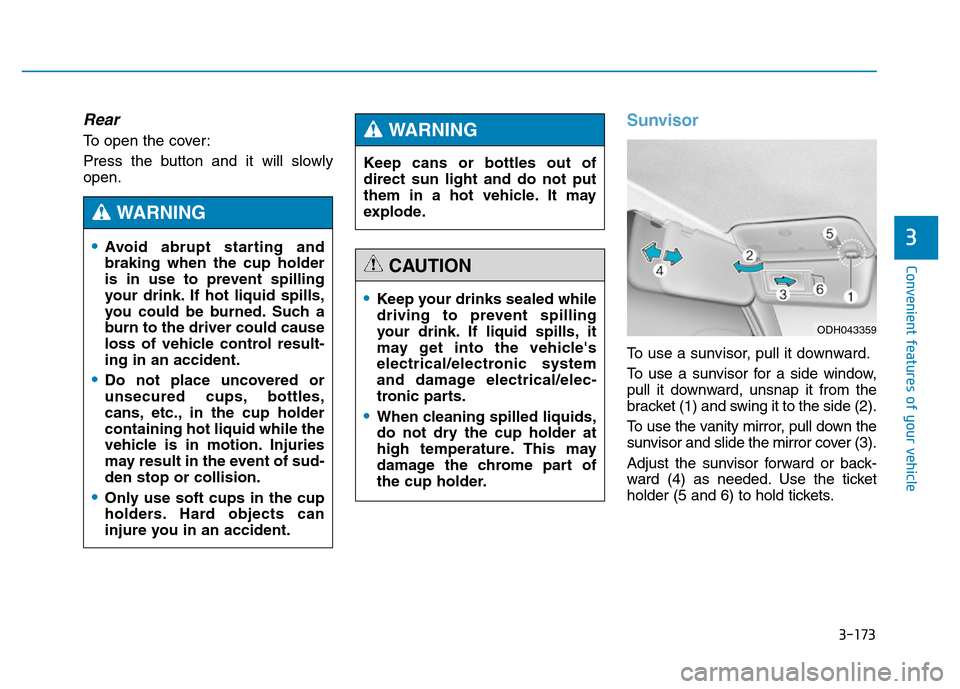
To use a sunvisor, pull it downward.
To use a sunvisor for a side window,
pull it downward, unsnap it from the
bracket (1) and swing it to the side (2).
To use the vanity mirror, pull down the
sunvisor and slide the mirror cover (3).
Adjust the sunvisor forward or back-
ward (4) as needed. Use the ticket
holder (5 and 6) to hold tickets.
•Keep your drinks sealed while
driving to prevent spilling
your drink. If liquid spills, it
may get into the vehicle's
electrical/electronic system
and damage electrical/elec-
tronic parts.
•When cleaning spilled liquids,
do not dry the cup holder at
high temperature. This may
damage the chrome part of
the cup holder.
CAUTION
•Avoid abrupt starting and
braking when the cup holder
is in use to prevent spilling
your drink. If hot liquid spills,
you could be burned. Such a
burn to the driver could cause
loss of vehicle control result-
ing in an accident.
•Do not place uncovered or
unsecured cups, bottles,
cans, etc., in the cup holder
containing hot liquid while the
vehicle is in motion. Injuries
may result in the event of sud-
den stop or collision.
•Only use soft cups in the cup
holders. Hard objects can
injure you in an accident.
WARNING
Keep cans or bottles out of
direct sun light and do not put
them in a hot vehicle. It may
explode.
WARNING
ODH043359
Page 265 of 546
3-174
Convenient features of your vehicle
✽NOTICE
Close the vanity mirror cover
securely and return the sunvisor to
its original position after use.
Power outlet (if equipped)
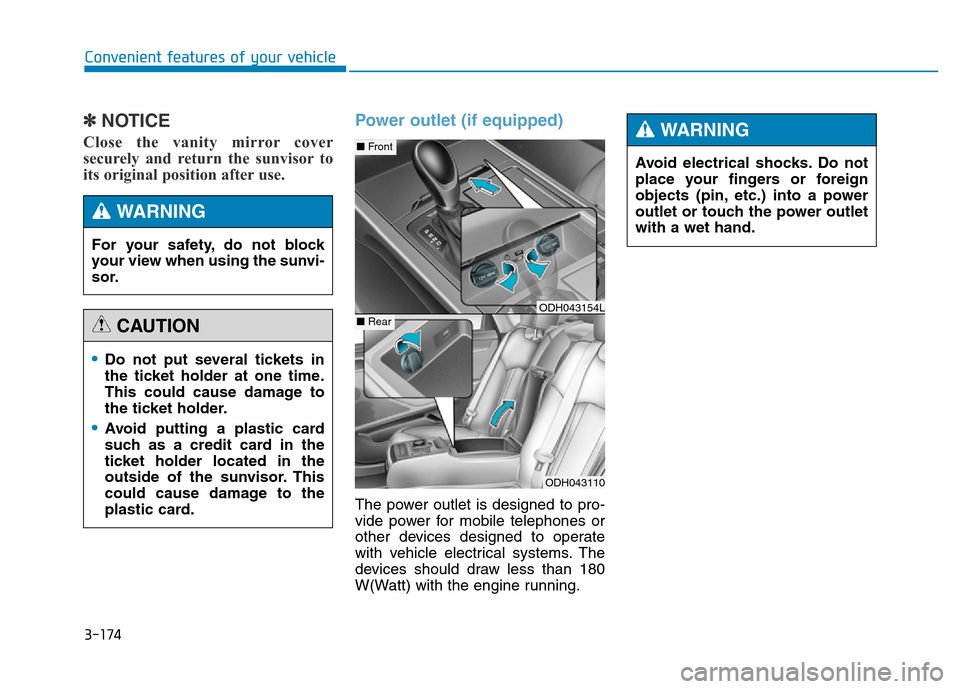
The power outlet is designed to pro-
vide power for mobile telephones or
other devices designed to operate
with vehicle electrical systems. The
devices should draw less than 180
W(Watt) with the engine running.
•Do not put several tickets in
the ticket holder at one time.
This could cause damage to
the ticket holder.
•Avoid putting a plastic card
such as a credit card in the
ticket holder located in the
outside of the sunvisor. This
could cause damage to the
plastic card.
CAUTION
For your safety, do not block
your view when using the sunvi-
sor.
WARNING
ODH043110
■Front
■RearODH043154L
Avoid electrical shocks. Do not
place your fingers or foreign
objects (pin, etc.) into a power
outlet or touch the power outlet
with a wet hand.
WARNING
Page 280 of 546
5-4
Driving your vehicle
Before entering the vehicle
• Be sure all windows, outside mir-
ror(s), and outside lights are clean
and unobstructed.
• Remove frost, snow, or ice.
• Visually check the tires for uneven
wear and damage.
• Check under the vehicle for any
sign of leaks.
• Be sure there are no obstacles
behind you if you intend to back up.
Before starting
• Make sure the hood, the trunk, and
the doors are securely closed and
locked.
• Adjust the position of the seat and
steering wheel.
• Adjust the inside and outside
rearview mirrors.
• Verify all the lights work.
• Fasten your seatbelt. Check that all
passengers have fastened their
seatbelts.
• Check the gauges and indicators in
the instrument panel and the mes-
sages on the instrument display
when the Engine Start/Stop button
is in the ON position.
• Check that any items you are car-
rying are stored properly or fas-
tened down securely.
BEFORE DRIVING
To reduce the risk of SERIOUS
INJURY or DEATH, take the fol-
lowing precautions:
•ALWAYS wear your seat belt.
All passengers must be prop-
erly belted whenever the vehi-
cle is moving. For more infor-
mation, refer to “Seat Belts” in
chapter 2.
•Always drive defensively.
Assume other drivers or
pedestrians may be careless
and make mistakes.
•Stay focused on the task of
driving. Driver distraction can
cause accidents.
•Leave plenty of space
between you and the vehicle
in front of you.
WARNING
Page 349 of 546
5-73
Driving your vehicle
5
The LDWS does not operate when:
• The driver turns on the turn signal
to change lanes or operates the
hazard warning flasher.
• Operating the wiper switch with HI
mode due to heavy rain.
• Driving on the lane line.
✽NOTICE
Always operate the turn signal
before changing lanes.
DRIVER'S ATTENTION
The LDWS may not warn you even
if the vehicle leaves the lane, or may
warn you even if the vehicle does not
leave the lane when:
• The lane can't be visible due to
snow, rain, stain, a puddle or other
factors.
• The brightness outside changes
suddenly such as tunnel enter/exit.
• The headlamps are not on at night
or in a tunnel, or light level is low.
• It is difficult to distinguish the
color of the lane marking from the
road or the lane line is damaged or
indistinct.
• Driving on a steep grade or a
curve.
• Light such as street light, sunlight
or oncoming vehicle light reflects
from the water on the road.
• The lens or windshield is covered
with foreign matter.
• The sensor cannot detect the lane
because of fog, heavy rain, or
heavy snow.
(Continued)(Continued)
• The surrounding of the inside rear
view mirror temperature is high
due to direct sun light.
• The lane is very wide or narrow.
• The windshield is fogged by
humid air in the vehicle.
• A shadow is on the lane line.
• There is a mark that looks like a
lane line.
• There is a boundary structure,
such as a concrete barrier.
• The distance from the vehicle
ahead is very short or the vehicle
ahead drives covering the lane
line.
• The vehicle vibrates heavily due to
road conditions.
• The number of lanes increases or
decreases or the lane lines are
crossing.
• Putting something on the dash-
board.
• Driving with the sun in front of
you.
• Driving in areas under construc-
tion.
• There are more than two lane
lines.
Page 351 of 546
5-75
Driving your vehicle
5
LKAS operation
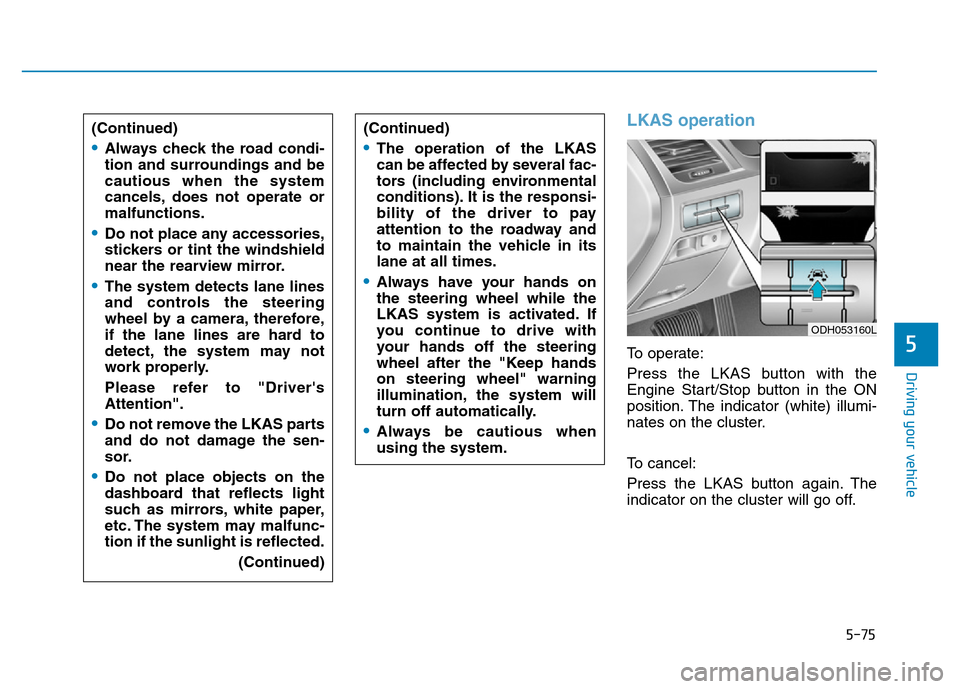
To operate:
Press the LKAS button with the
Engine Start/Stop button in the ON
position. The indicator (white) illumi-
nates on the cluster.
To cancel:
Press the LKAS button again. The
indicator on the cluster will go off. (Continued)
•Always check the road condi-
tion and surroundings and be
cautious when the system
cancels, does not operate or
malfunctions.
•Do not place any accessories,
stickers or tint the windshield
near the rearview mirror.
•The system detects lane lines
and controls the steering
wheel by a camera, therefore,
if the lane lines are hard to
detect, the system may not
work properly.
Please refer to "Driver's
Attention".
•Do not remove the LKAS parts
and do not damage the sen-
sor.
•Do not place objects on the
dashboard that reflects light
such as mirrors, white paper,
etc. The system may malfunc-
tion if the sunlight is reflected.
(Continued)
(Continued)
•The operation of the LKAS
can be affected by several fac-
tors (including environmental
conditions). It is the responsi-
bility of the driver to pay
attention to the roadway and
to maintain the vehicle in its
lane at all times.
•Always have your hands on
the steering wheel while the
LKAS system is activated. If
you continue to drive with
your hands off the steering
wheel after the "Keep hands
on steering wheel" warning
illumination, the system will
turn off automatically.
•Always be cautious when
using the system.
ODH053160L
Page 355 of 546
5-79
Driving your vehicle
5
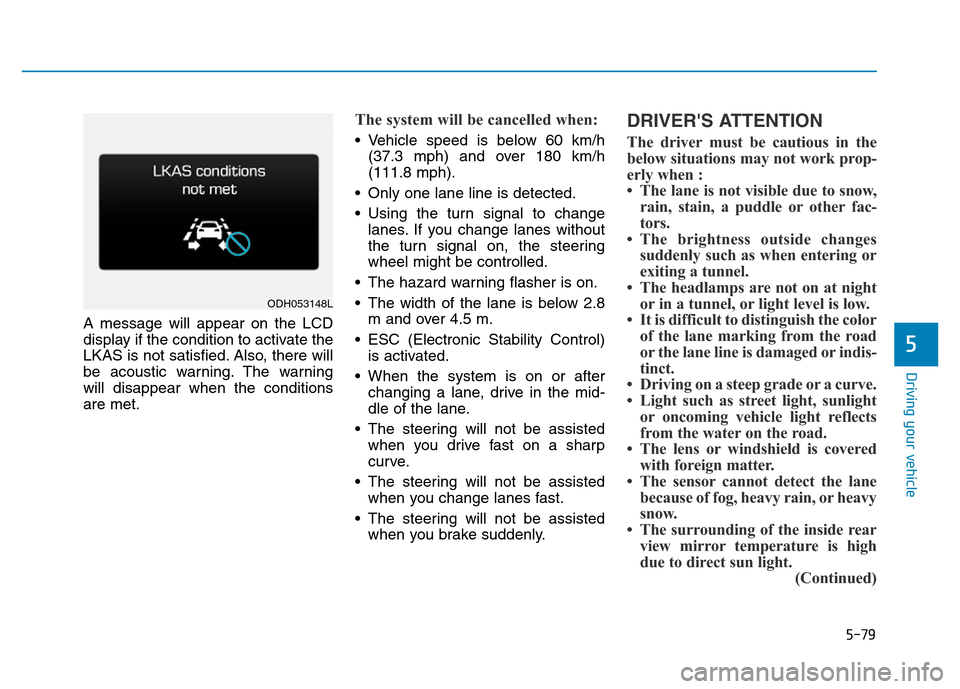
A message will appear on the LCD
display if the condition to activate the
LKAS is not satisfied. Also, there will
be acoustic warning. The warning
will disappear when the conditions
are met.
The system will be cancelled when:
• Vehicle speed is below 60 km/h
(37.3 mph) and over 180 km/h
(111.8 mph).
• Only one lane line is detected.
• Using the turn signal to change
lanes. If you change lanes without
the turn signal on, the steering
wheel might be controlled.
• The hazard warning flasher is on.
• The width of the lane is below 2.8
m and over 4.5 m.
• ESC (Electronic Stability Control)
is activated.
• When the system is on or after
changing a lane, drive in the mid-
dle of the lane.
• The steering will not be assisted
when you drive fast on a sharp
curve.
• The steering will not be assisted
when you change lanes fast.
• The steering will not be assisted
when you brake suddenly.
DRIVER'S ATTENTION
The driver must be cautious in the
below situations may not work prop-
erly when :
• The lane is not visible due to snow,
rain, stain, a puddle or other fac-
tors.
• The brightness outside changes
suddenly such as when entering or
exiting a tunnel.
• The headlamps are not on at night
or in a tunnel, or light level is low.
• It is difficult to distinguish the color
of the lane marking from the road
or the lane line is damaged or indis-
tinct.
• Driving on a steep grade or a curve.
• Light such as street light, sunlight
or oncoming vehicle light reflects
from the water on the road.
• The lens or windshield is covered
with foreign matter.
• The sensor cannot detect the lane
because of fog, heavy rain, or heavy
snow.
• The surrounding of the inside rear
view mirror temperature is high
due to direct sun light.
(Continued)
ODH053148L
Page 360 of 546
5-84
Driving your vehicle
BSD (Blind Spot Detection) /
LCA (Lane Change Assist)
Operating conditions
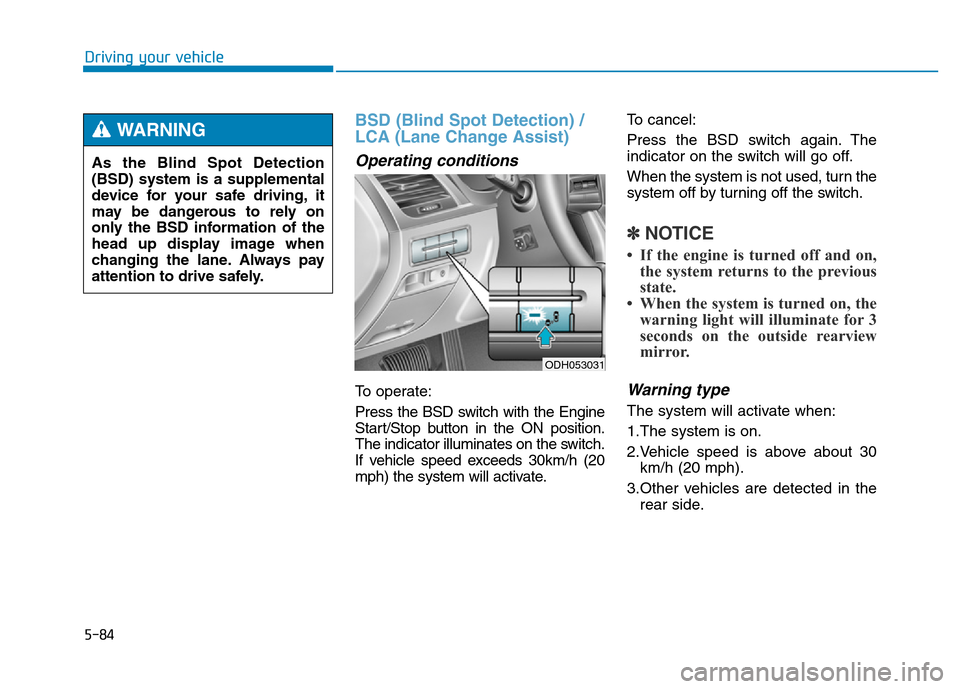
To operate:
Press the BSD switch with the Engine
Start/Stop button in the ON position.
The indicator illuminates on the switch.
If vehicle speed exceeds 30km/h (20
mph) the system will activate.To cancel:
Press the BSD switch again. The
indicator on the switch will go off.
When the system is not used, turn the
system off by turning off the switch.
✽NOTICE
• If the engine is turned off and on,
the system returns to the previous
state.
• When the system is turned on, the
warning light will illuminate for 3
seconds on the outside rearview
mirror.
Warning type
The system will activate when:
1.The system is on.
2.Vehicle speed is above about 30
km/h (20 mph).
3.Other vehicles are detected in the
rear side.
ODH053031
As the Blind Spot Detection
(BSD) system is a supplemental
device for your safe driving, it
may be dangerous to rely on
only the BSD information of the
head up display image when
changing the lane. Always pay
attention to drive safely.
WARNING
Page 361 of 546
5-85
Driving your vehicle
5
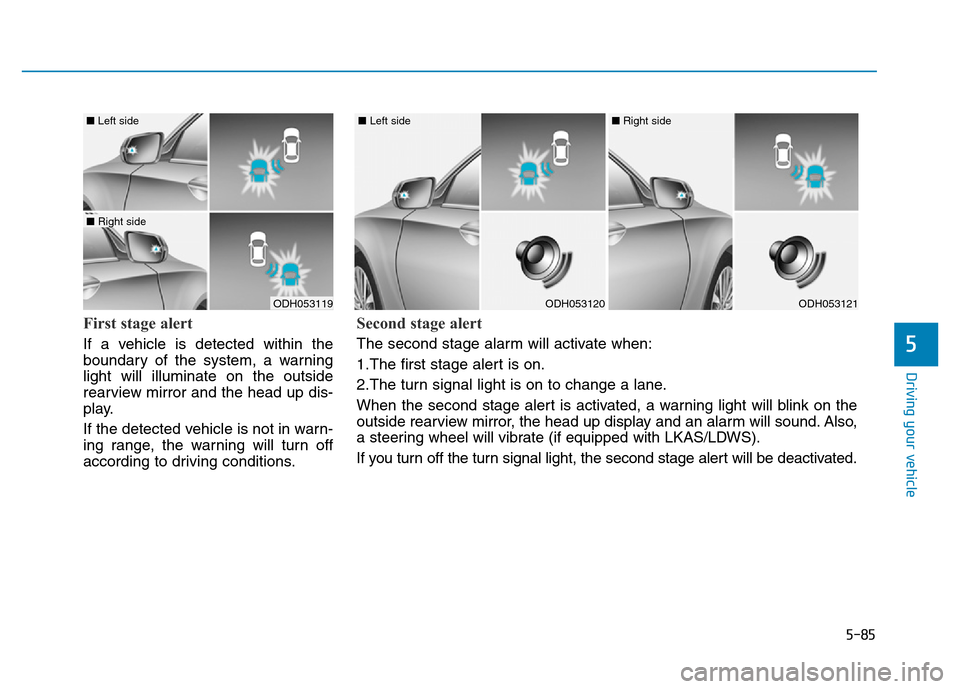
First stage alert
If a vehicle is detected within the
boundary of the system, a warning
light will illuminate on the outside
rearview mirror and the head up dis-
play.
If the detected vehicle is not in warn-
ing range, the warning will turn off
according to driving conditions.
ODH053119
■ Left side
■ Right side
ODH053120
■ Left side
ODH053121
■ Right side
Second stage alert
The second stage alarm will activate when:
1.The first stage alert is on.
2.The turn signal light is on to change a lane.
When the second stage alert is activated, a warning light will blink on the
outside rearview mirror, the head up display and an alarm will sound. Also,
a steering wheel will vibrate (if equipped with LKAS/LDWS).
If you turn off the turn signal light, the second stage alert will be deactivated.
Page 363 of 546
5-87
Driving your vehicle
5
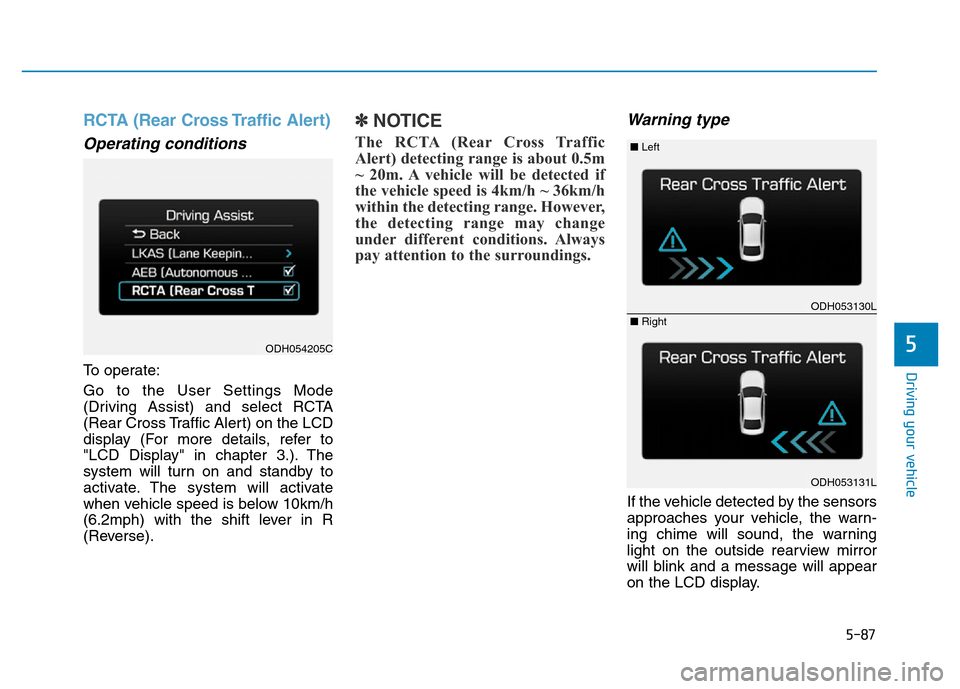
RCTA (Rear Cross Traffic Alert)
Operating conditions
To operate:
Go to the User Settings Mode
(Driving Assist) and select RCTA
(Rear Cross Traffic Alert) on the LCD
display (For more details, refer to
"LCD Display" in chapter 3.). The
system will turn on and standby to
activate. The system will activate
when vehicle speed is below 10km/h
(6.2mph) with the shift lever in R
(Reverse).
✽NOTICE
The RCTA (Rear Cross Traffic
Alert) detecting range is about 0.5m
~ 20m. A vehicle will be detected if
the vehicle speed is 4km/h ~ 36km/h
within the detecting range. However,
the detecting range may change
under different conditions. Always
pay attention to the surroundings.
Warning type
If the vehicle detected by the sensors
approaches your vehicle, the warn-
ing chime will sound, the warning
light on the outside rearview mirror
will blink and a message will appear
on the LCD display.
ODH054205C
ODH053130L
ODH053131L
■ Left
■ Right