LCD Hyundai Genesis 2015 User Guide
[x] Cancel search | Manufacturer: HYUNDAI, Model Year: 2015, Model line: Genesis, Model: Hyundai Genesis 2015Pages: 501, PDF Size: 38.76 MB
Page 156 of 501
3-62
Convenient features of your vehicle
Instrument Cluster Control
Adjusting Instrument Cluster
Illumination
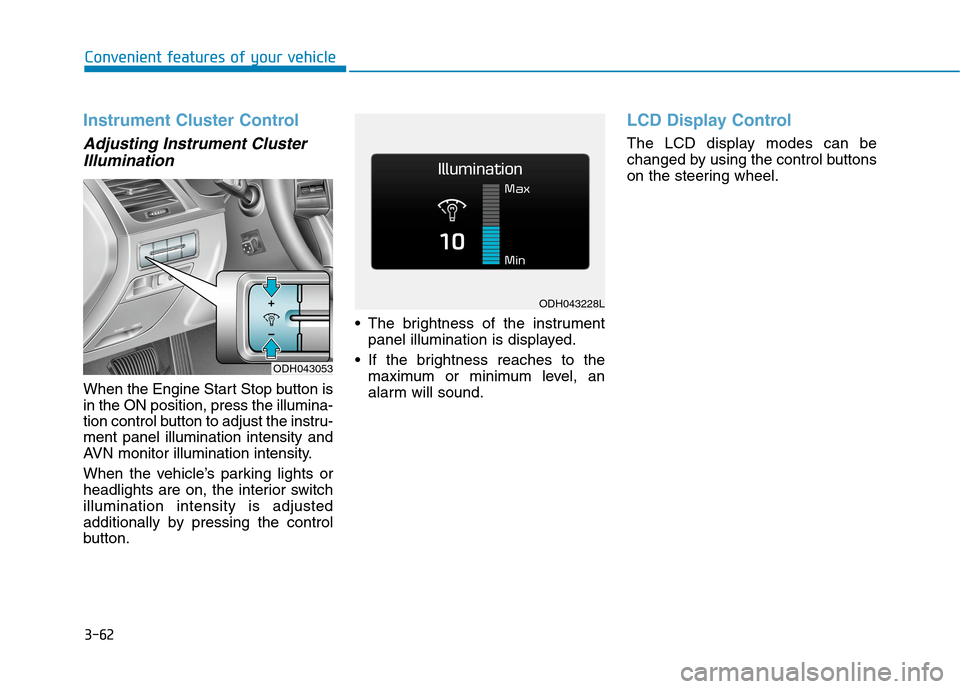
When the Engine Start Stop button is
in the ON position, press the illumina-
tion control button to adjust the instru-
ment panel illumination intensity and
AVN monitor illumination intensity.
When the vehicle’s parking lights or
headlights are on, the interior switch
illumination intensity is adjusted
additionally by pressing the control
button. The brightness of the instrument
panel illumination is displayed.
If the brightness reaches to the
maximum or minimum level, an
alarm will sound.
LCD Display Control
The LCD display modes can be
changed by using the control buttons
on the steering wheel.
ODH043053
ODH043228L
Page 157 of 501
3-63
Convenient features of your vehicle
3
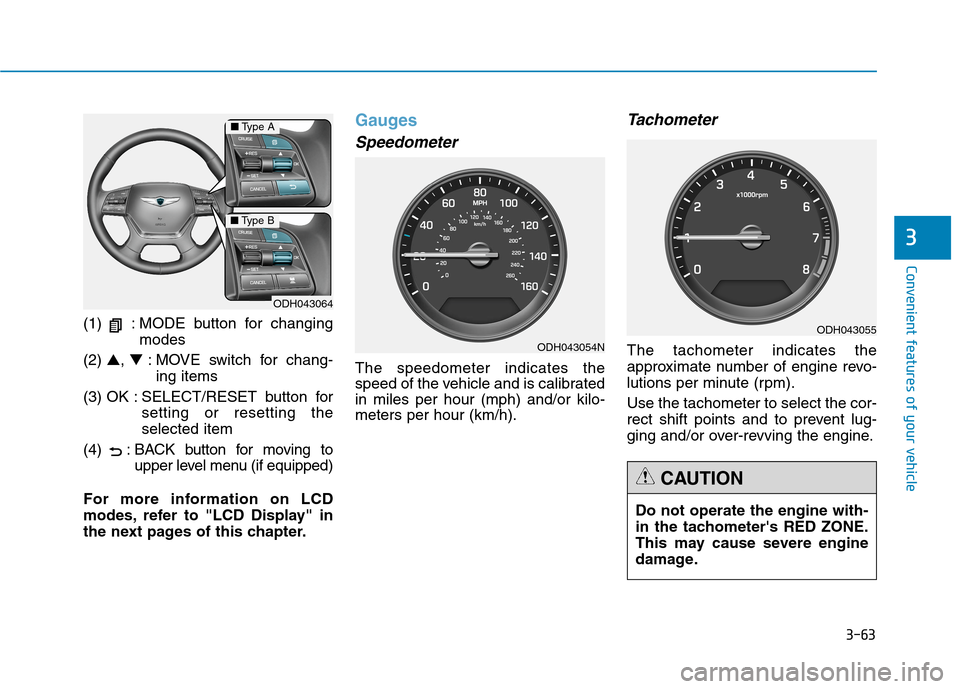
(1) : MODE button for changing
modes
(2) ▲, ▼: MOVE switch for chang-
ing items
(3) OK : SELECT/RESET button for
setting or resetting the
selected item
(4) : BACK button for moving to
upper level menu (if equipped)
For more information on LCD
modes, refer to "LCD Display" in
the next pages of this chapter.
Gauges
Speedometer
The speedometer indicates the
speed of the vehicle and is calibrated
in miles per hour (mph) and/or kilo-
meters per hour (km/h).
Tachometer
The tachometer indicates the
approximate number of engine revo-
lutions per minute (rpm).
Use the tachometer to select the cor-
rect shift points and to prevent lug-
ging and/or over-revving the engine.
ODH043064
■Type A
■Type B
ODH043054N
Do not operate the engine with-
in the tachometer's RED ZONE.
This may cause severe engine
damage.
CAUTION
ODH043055
Page 161 of 501
3-67
Convenient features of your vehicle
3
LCD Modes
L LC
CD
D
D
DI
IS
SP
PL
LA
AY
Y
Modes SymbolExplanation
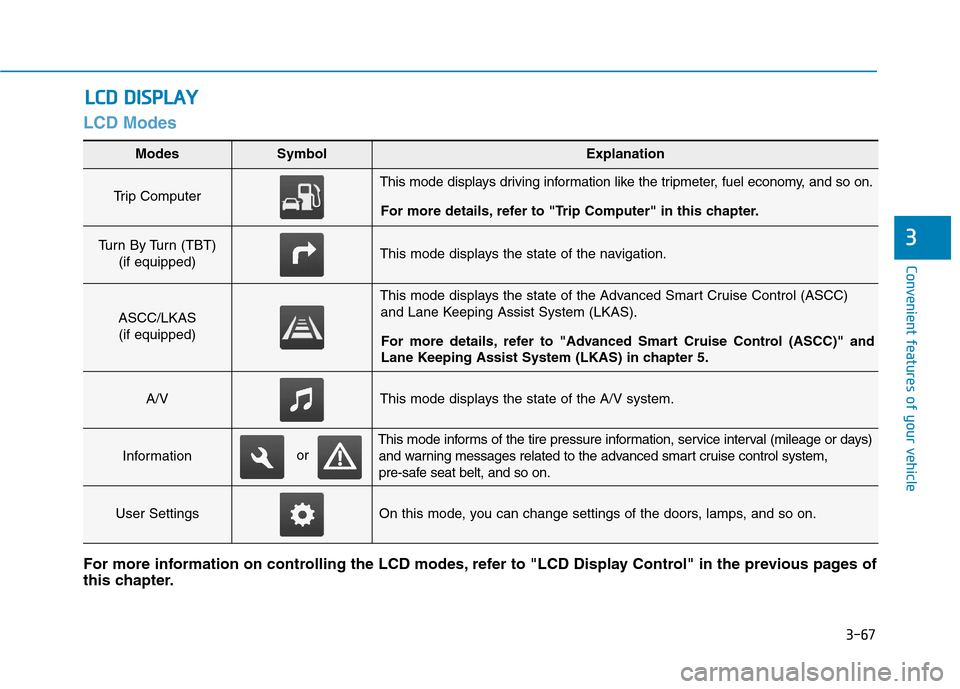
Trip Computer This mode displays driving information like the tripmeter, fuel economy, and so on.
For more details, refer to "Trip Computer" in this chapter.
Turn By Turn (TBT)
(if equipped)This mode displays the state of the navigation.
ASCC/LKAS
(if equipped)
This mode displays the state of the Advanced Smart Cruise Control (ASCC)
and Lane Keeping Assist System (LKAS).
For more details, refer to "Advanced Smart Cruise Control (ASCC)" and
Lane Keeping Assist System (LKAS) in chapter 5.
A/VThis mode displays the state of the A/V system.
Information
This mode informs of the tire pressure information, service interval (mileage or days)
and warning messages related to the advanced smart cruise control system,
pre-safe seat belt, and so on.
User SettingsOn this mode, you can change settings of the doors, lamps, and so on.
For more information on controlling the LCD modes, refer to "LCD Display Control" in the previous pages of
this chapter.
or
Page 164 of 501
3-70
Convenient features of your vehicle
Information Mode
Tire pressure information
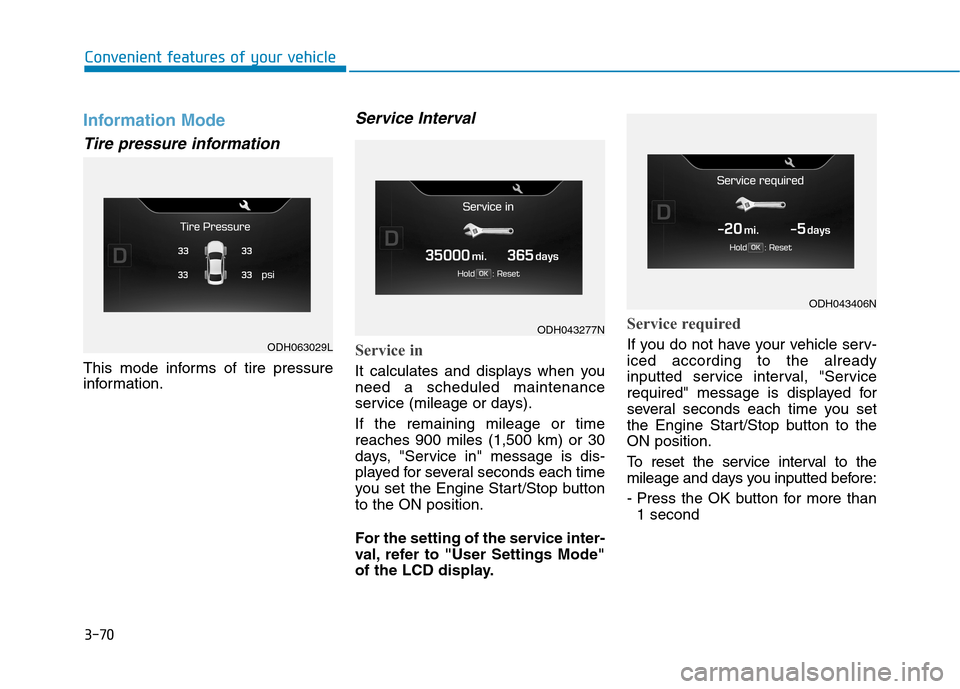
This mode informs of tire pressure
information.
Service Interval
Service in
It calculates and displays when you
need a scheduled maintenance
service (mileage or days).
If the remaining mileage or time
reaches 900 miles (1,500 km) or 30
days, "Service in" message is dis-
played for several seconds each time
you set the Engine Start/Stop button
to the ON position.
For the setting of the service inter-
val, refer to "User Settings Mode"
of the LCD display.
Service required
If you do not have your vehicle serv-
iced according to the already
inputted service interval, "Service
required" message is displayed for
several seconds each time you set
the Engine Start/Stop button to the
ON position.
To reset the service interval to the
mileage and days you inputted before:
- Press the OK button for more than
1 secondODH063029L
ODH043277N
ODH043406N
Page 165 of 501
3-71
Convenient features of your vehicle
3
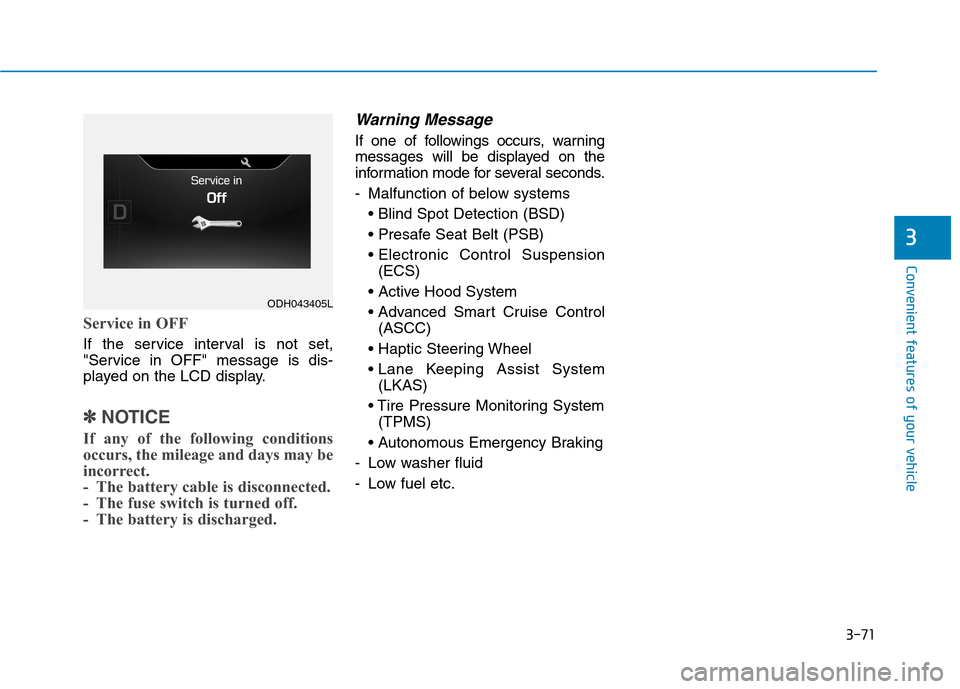
Service in OFF
If the service interval is not set,
"Service in OFF" message is dis-
played on the LCD display.
✽ ✽
NOTICE
If any of the following conditions
occurs, the mileage and days may be
incorrect.
- The battery cable is disconnected.
- The fuse switch is turned off.
- The battery is discharged.
Warning Message
If one of followings occurs, warning
messages will be displayed on the
information mode for several seconds.
- Malfunction of below systems
(ECS)
(ASCC)
(LKAS)
(TPMS)
- Low washer fluid
- Low fuel etc.
ODH043405L
Page 172 of 501
3-78
Convenient features of your vehicle
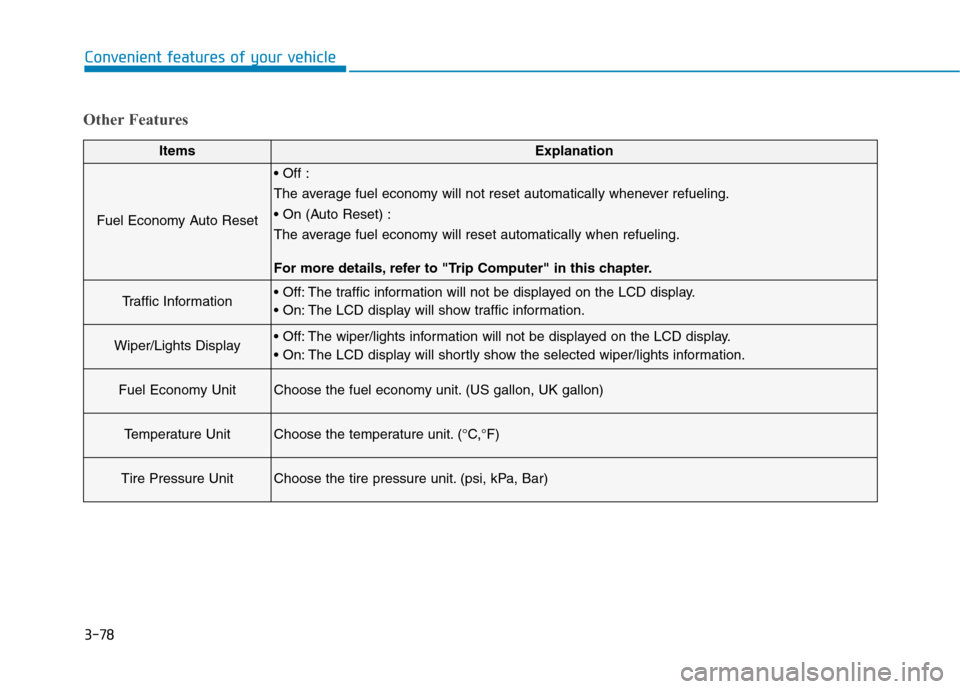
Other Features
ItemsExplanation
Fuel Economy Auto Reset
The average fuel economy will not reset automatically whenever refueling.
The average fuel economy will reset automatically when refueling.
For more details, refer to "Trip Computer" in this chapter.
Traffic Information The traffic information will not be displayed on the LCD display.
The LCD display will show traffic information.
Wiper/Lights Display The wiper/lights information will not be displayed on the LCD display.
The LCD display will shortly show the selected wiper/lights information.
Fuel Economy UnitChoose the fuel economy unit. (US gallon, UK gallon)
Temperature UnitChoose the temperature unit. (°C,°F)
Tire Pressure UnitChoose the tire pressure unit. (psi, kPa, Bar)
Page 183 of 501
3-89
Convenient features of your vehicle
3
Overview
Description
The trip computer is a microcomput-
er-controlled driver information sys-
tem that displays information related
to driving.
✽ ✽
NOTICE
Some driving information stored in
the trip computer (for example
Average Vehicle Speed) resets if the
battery is disconnected.
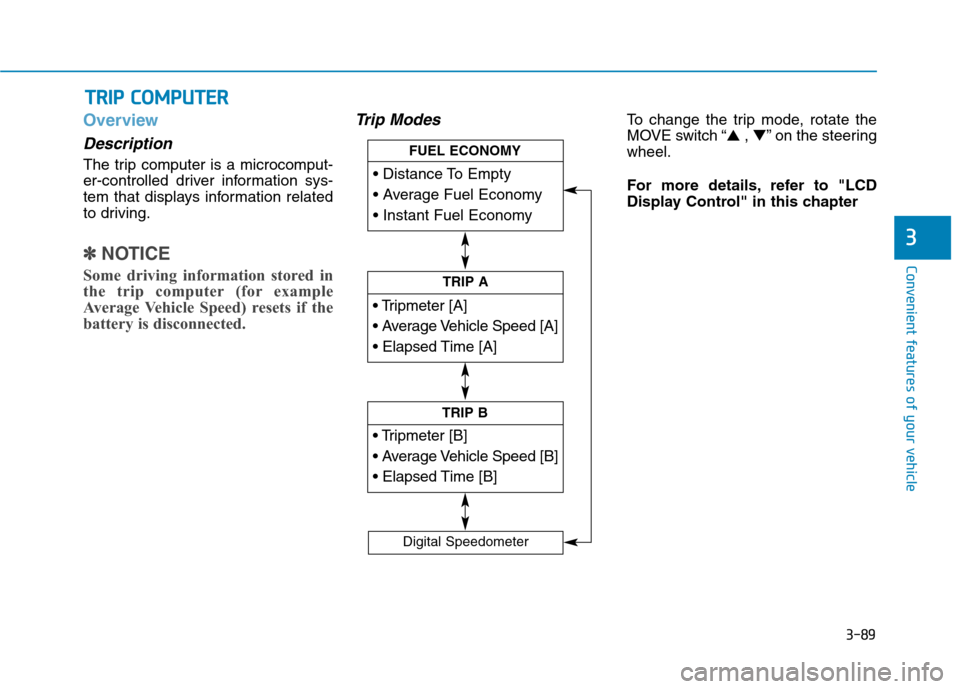
Trip ModesTo change the trip mode, rotate the
MOVE switch “▲ , ▼” on the steering
wheel.
For more details, refer to "LCD
Display Control" in this chapter
T TR
RI
IP
P
C
CO
OM
MP
PU
UT
TE
ER
R
TRIP A
TRIP B
FUEL ECONOMY
Digital Speedometer
Page 186 of 501
3-92
Convenient features of your vehicle
Average Fuel Economy (2)
The average fuel economy is calcu-
lated by the total driving distance
and fuel consumption since the last
average fuel economy reset.
- Fuel economy range:
0.0 ~ 99.9 MPG or L/100km
The average fuel economy can be
reset both manually and automati-
cally.
Manual reset
To clear the average fuel economy
manually, press the OK button on the
steering wheel for more than 1 sec-
ond when the average fuel economy
is displayed.
For more details on the OK button,
refer to the "LCD Display Control"
in this chapter.
Automatic reset
To make the average fuel economy
be reset automatically whenever refu-
eling, select the "Auto Reset" mode in
User Setting menu of the LCD display
(Refer to "LCD Display").
Under "Auto Reset" mode, the aver-
age fuel economy will be cleared to
zero (---) when the vehicle speed
exceeds 1 km/h after refueling more
than 1.6 gallons (6 liters).
✽ ✽
NOTICE
The average fuel economy is not dis-
played for more accurate calculation
if the vehicle does not drive more
than 0.19 miles (300 meters) since
the Engine Start/Stop button is
turned to ON.
Instant Fuel Economy (3)
This mode displays the instant fuel
economy during the last few sec-
onds when the vehicle speed is
more than 6.2 MPH (10 km/h).
- Fuel economy range:
0 ~ 50 MPG or 0 ~ 30 L/100km
Page 194 of 501
3-100
Convenient features of your vehicle
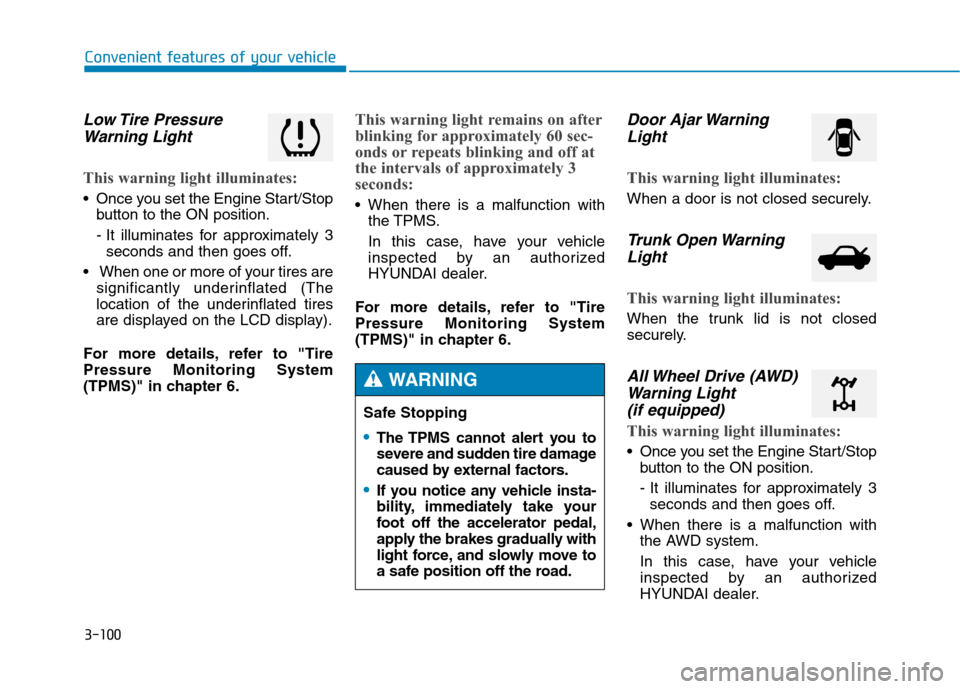
Low Tire Pressure
Warning Light
This warning light illuminates:
Once you set the Engine Start/Stop
button to the ON position.
- It illuminates for approximately 3
seconds and then goes off.
When one or more of your tires are
significantly underinflated (The
location of the underinflated tires
are displayed on the LCD display).
For more details, refer to "Tire
Pressure Monitoring System
(TPMS)" in chapter 6.
This warning light remains on after
blinking for approximately 60 sec-
onds or repeats blinking and off at
the intervals of approximately 3
seconds:
When there is a malfunction with
the TPMS.
In this case, have your vehicle
inspected by an authorized
HYUNDAI dealer.
For more details, refer to "Tire
Pressure Monitoring System
(TPMS)" in chapter 6.
Door Ajar Warning
Light
This warning light illuminates:
When a door is not closed securely.
Trunk Open Warning
Light
This warning light illuminates:
When the trunk lid is not closed
securely.
All Wheel Drive (AWD)
Warning Light
(if equipped)
This warning light illuminates:
Once you set the Engine Start/Stop
button to the ON position.
- It illuminates for approximately 3
seconds and then goes off.
When there is a malfunction with
the AWD system.
In this case, have your vehicle
inspected by an authorized
HYUNDAI dealer.
Safe Stopping
The TPMS cannot alert you to
severe and sudden tire damage
caused by external factors.
If you notice any vehicle insta-
bility, immediately take your
foot off the accelerator pedal,
apply the brakes gradually with
light force, and slowly move to
a safe position off the road.
WARNING
Page 195 of 501
3-101
Convenient features of your vehicle
3
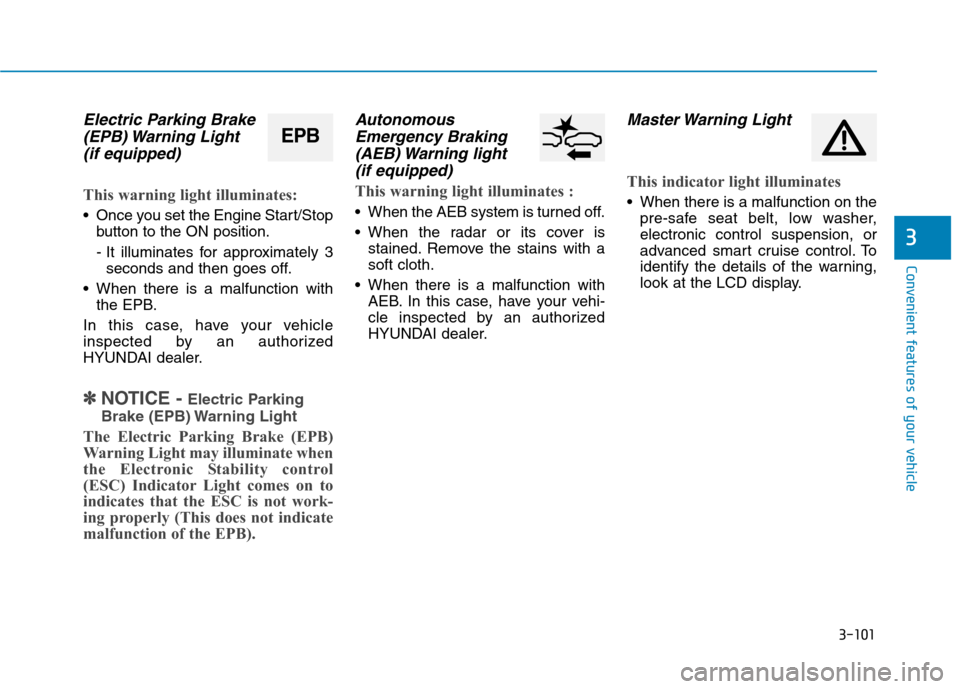
Electric Parking Brake
(EPB) Warning Light
(if equipped)
This warning light illuminates:
Once you set the Engine Start/Stop
button to the ON position.
- It illuminates for approximately 3
seconds and then goes off.
When there is a malfunction with
the EPB.
In this case, have your vehicle
inspected by an authorized
HYUNDAI dealer.
✽ ✽
NOTICE - Electric Parking
Brake (EPB) Warning Light
The Electric Parking Brake (EPB)
Warning Light may illuminate when
the Electronic Stability control
(ESC) Indicator Light comes on to
indicates that the ESC is not work-
ing properly (This does not indicate
malfunction of the EPB).
Autonomous
Emergency Braking
(AEB) Warning light
(if equipped)
This warning light illuminates :
When the AEB system is turned off.
When the radar or its cover is
stained. Remove the stains with a
soft cloth.
When there is a malfunction with
AEB. In this case, have your vehi-
cle inspected by an authorized
HYUNDAI dealer.
Master Warning Light
This indicator light illuminates
When there is a malfunction on the
pre-safe seat belt, low washer,
electronic control suspension, or
advanced smart cruise control. To
identify the details of the warning,
look at the LCD display.
EPB