transmission Hyundai Genesis 2015 User Guide
[x] Cancel search | Manufacturer: HYUNDAI, Model Year: 2015, Model line: Genesis, Model: Hyundai Genesis 2015Pages: 501, PDF Size: 38.76 MB
Page 273 of 501
5-13
Driving your vehicle
5
R (Reverse)
Use this position to drive the vehicle
backward.
N (Neutral)
The wheels and transmission are not
engaged.
Use N (Neutral) if you need to restart
a stalled engine, or if it is necessary
to stop with the engine ON. Shift into
P (Park) if you need to leave your
vehicle for any reason.
Always depress the brake pedal
when you are shifting from N
(Neutral) to another gear.
D (Drive)
This is the normal driving position.
The transmission will automatically
shift through a 8-gear sequence, pro-
viding the best fuel economy and
power.
For extra power when passing anoth-
er vehicle or driving uphill depress
the accelerator pedal further until
you feel the transmission downshift
to a lower gear.
The DRIVE MODE switch, located
on the shift lever console, allows the
driver to switch from NORMAL mode
to SPORT, ECO or SNOW mode.
When driving in ice or snow condi-
tions, it is recommended you switch
to SNOW mode. Press the DRIVE
MODE switch for 2~3 seconds until
"SNOW" displays in the center of the
instrument cluster. To cancel SNOW
mode, press the DRIVE MODE
switch one time to select NORMAL
mode.
For more information, refer to
"Drive Mode Integrated Control
System" later in this chapter. Always come to a complete
stop before shifting into or out
of R (Reverse); you may dam-
age the transmission if you shift
into R (Reverse) while the vehi-
cle is in motion.
CAUTION
Do not shift into gear unless
your foot is firmly on the brake
pedal. Shifting into gear when
the engine is running at high
speed can cause the vehicle to
move very rapidly. You could
lose control of the vehicle and
hit people or objects.
WARNING
Page 274 of 501
5-14
Driving your vehicle
Sports mode
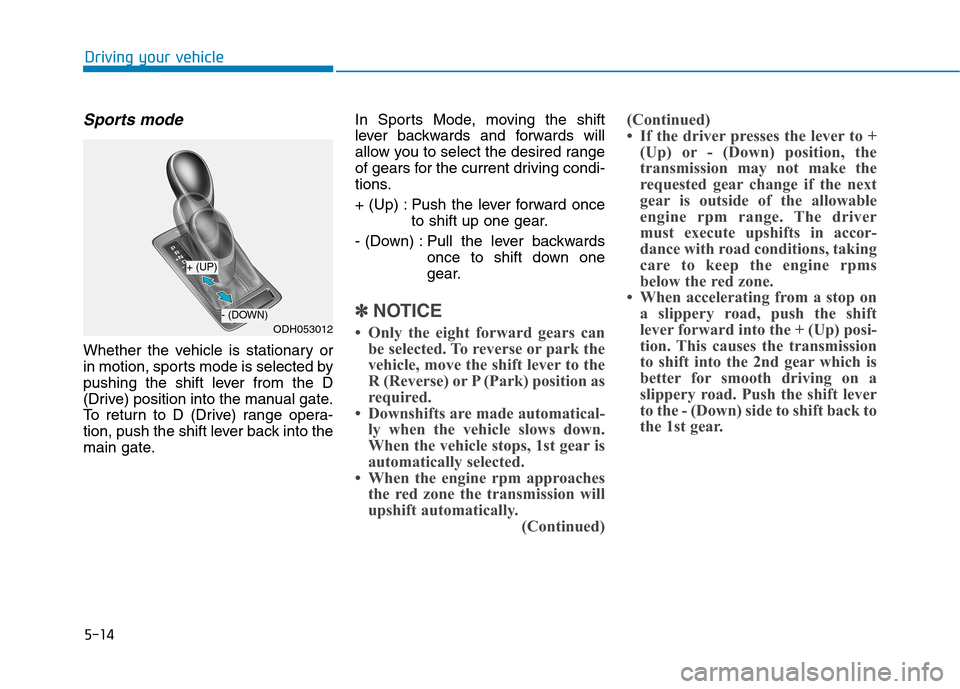
Whether the vehicle is stationary or
in motion, sports mode is selected by
pushing the shift lever from the D
(Drive) position into the manual gate.
To return to D (Drive) range opera-
tion, push the shift lever back into the
main gate.In Sports Mode, moving the shift
lever backwards and forwards will
allow you to select the desired range
of gears for the current driving condi-
tions.
+ (Up) : Push the lever forward once
to shift up one gear.
- (Down) : Pull the lever backwards
once to shift down one
gear.
✽ ✽
NOTICE
• Only the eight forward gears can
be selected. To reverse or park the
vehicle, move the shift lever to the
R (Reverse) or P (Park) position as
required.
• Downshifts are made automatical-
ly when the vehicle slows down.
When the vehicle stops, 1st gear is
automatically selected.
• When the engine rpm approaches
the red zone the transmission will
upshift automatically.
(Continued)(Continued)
• If the driver presses the lever to +
(Up) or - (Down) position, the
transmission may not make the
requested gear change if the next
gear is outside of the allowable
engine rpm range. The driver
must execute upshifts in accor-
dance with road conditions, taking
care to keep the engine rpms
below the red zone.
• When accelerating from a stop on
a slippery road, push the shift
lever forward into the + (Up) posi-
tion. This causes the transmission
to shift into the 2nd gear which is
better for smooth driving on a
slippery road. Push the shift lever
to the - (Down) side to shift back to
the 1st gear.ODH053012
+ (UP)
- (DOWN)
Page 276 of 501
5-16
Driving your vehicle
Shift-lock system
For your safety, the automatic trans-
mission has a shift-lock system
which prevents shifting the transmis-
sion from P (Park) into R (Reverse)
unless the brake pedal is depressed.
To shift the transmission from P
(Park) into R (Reverse):
1.Depress and hold the brake pedal.
2.Start the engine or place the
Engine Start/Stop button in the ON
position.
3.Move the shift lever.
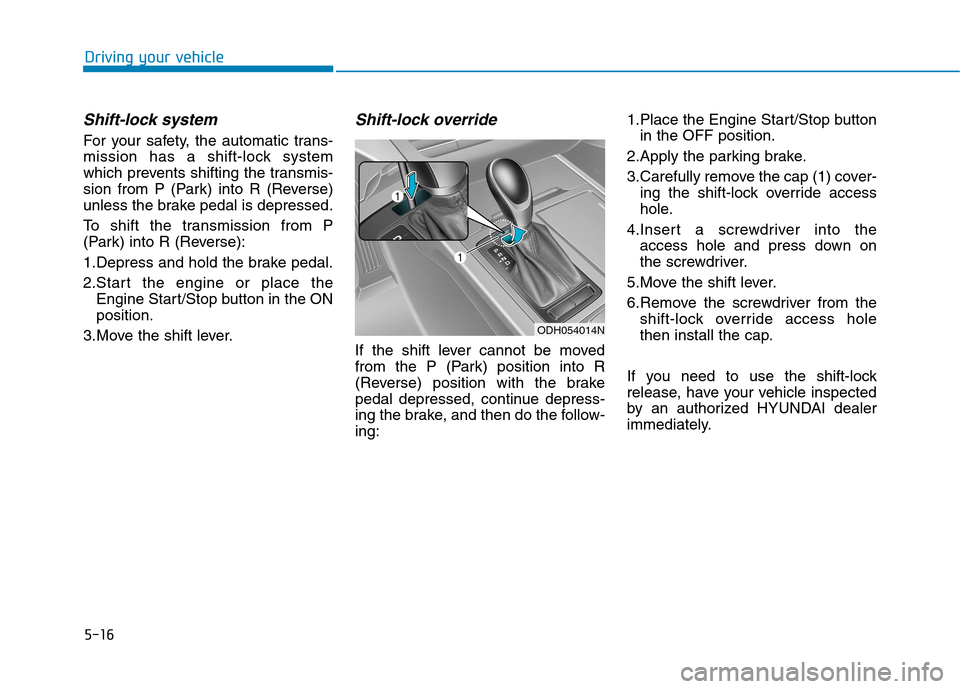
Shift-lock override
If the shift lever cannot be moved
from the P (Park) position into R
(Reverse) position with the brake
pedal depressed, continue depress-
ing the brake, and then do the follow-
ing:1.Place the Engine Start/Stop button
in the OFF position.
2.Apply the parking brake.
3.Carefully remove the cap (1) cover-
ing the shift-lock override access
hole.
4.Insert a screwdriver into the
access hole and press down on
the screwdriver.
5.Move the shift lever.
6.Remove the screwdriver from the
shift-lock override access hole
then install the cap.
If you need to use the shift-lock
release, have your vehicle inspected
by an authorized HYUNDAI dealer
immediately.
ODH054014N
Page 277 of 501
5-17
Driving your vehicle
5
Parking
Always come to a complete stop and
continue to depress the brake pedal.
Move the shift lever into the P (Park)
position, apply the parking brake,
and place the Engine Start/Stop but-
ton in the OFF position. Take the Key
with you when exiting the vehicle.
Good driving practices
Never move the shift lever from P
(Park) or N (Neutral) to any other
position with the accelerator pedal
depressed.
Never move the shift lever into P
(Park) when the vehicle is in
motion.
Be sure the vehicle is completely
stopped before you attempt to shift
into R (Reverse) or D (Drive).
Do not move the shift lever to N
(Neutral) when driving. Doing so
may result in an accident because
of a loss of engine braking and the
transmission could be damaged.
Do not drive with your foot resting
on the brake pedal. Even light, but
consistent pedal pressure can
result in the brakes overheating,
brake wear and possibly even
brake failure.
Depressing both accelerator and
brake pedals at the same time can
trigger logic for engine power
reduction to assure vehicle decel-
eration. Vehicle acceleration will
resume after the brake pedal is
released. When driving in Sports Mode, slow
down before shifting to a lower
gear. Otherwise, the lower gear
may not be engaged if the engine
rpms are outside of the allowable
range.
Always apply the parking brake
when leaving the vehicle. Do not
depend on placing the transmis-
sion in P (Park) to keep the vehicle
from moving.
Exercise extreme caution when
driving on a slippery surface. Be
especially careful when braking,
accelerating or shifting gears. On a
slippery surface, an abrupt change
in vehicle speed can cause the
drive wheels to lose traction and
may cause loss of vehicle control
resulting in an accident.
Optimum vehicle performance and
economy is obtained by smoothly
depressing and releasing the
accelerator. When you stay in the vehicle
with the engine running, be
careful not to depress the accel-
erator pedal for a long period of
time. The engine or exhaust
system may overheat and start
a fire.
The exhaust gas and the
exhaust system are very hot.
Keep away from the exhaust
system components.
Do not stop or park over flam-
mable materials, such as dry
grass, paper or leaves. They
may ignite and cause a fire.
WARNING
Page 280 of 501
5-20
Driving your vehicle
For safe AWD operation
Before driving
Make sure all passengers are
wearing seat belts.
Sit upright and adjust the steering
wheel to a position comfortable for
you to drive.
Driving on snow-covered or icy
roads
Start off slowly by applying the
accelerator pedal gently.
Use of snow tires is recommended.
For more information on Snow
Tires refer to "Winter Driving" in
this chapter.
Keep sufficient distance between
your vehicle and the vehicle in front
of you.
Use engine braking during deceler-
ation.
Avoid speeding, rapid acceleration,
sudden brake applications, and
sharp turns to prevent skids.
Driving in sand or mud
Maintain slow and constant speed.
Keep sufficient distance between
your vehicle and the vehicle in front
of you.
Reduce vehicle speed and always
check the road condition.
Avoid speeding, rapid acceleration,
sudden brake applications, and
sharp turns to prevent getting
stuck.
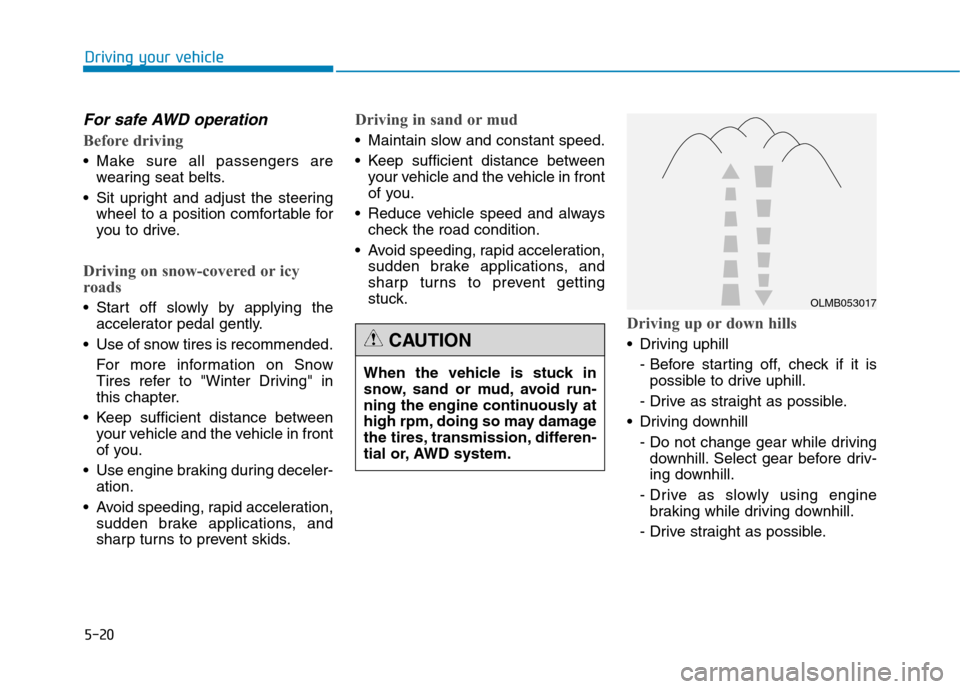
Driving up or down hills
Driving uphill
- Before starting off, check if it is
possible to drive uphill.
- Drive as straight as possible.
Driving downhill
- Do not change gear while driving
downhill. Select gear before driv-
ing downhill.
- Drive as slowly using engine
braking while driving downhill.
- Drive straight as possible. When the vehicle is stuck in
snow, sand or mud, avoid run-
ning the engine continuously at
high rpm, doing so may damage
the tires, transmission, differen-
tial or, AWD system.CAUTION
OLMB053017
Page 302 of 501
5-42
Driving your vehicle
D DR
RI
IV
VE
E
M
MO
OD
DE
E
I
IN
NT
TE
EG
GR
RA
AT
TE
ED
D
C
CO
ON
NT
TR
RO
OL
L
S
SY
YS
ST
TE
EM
M
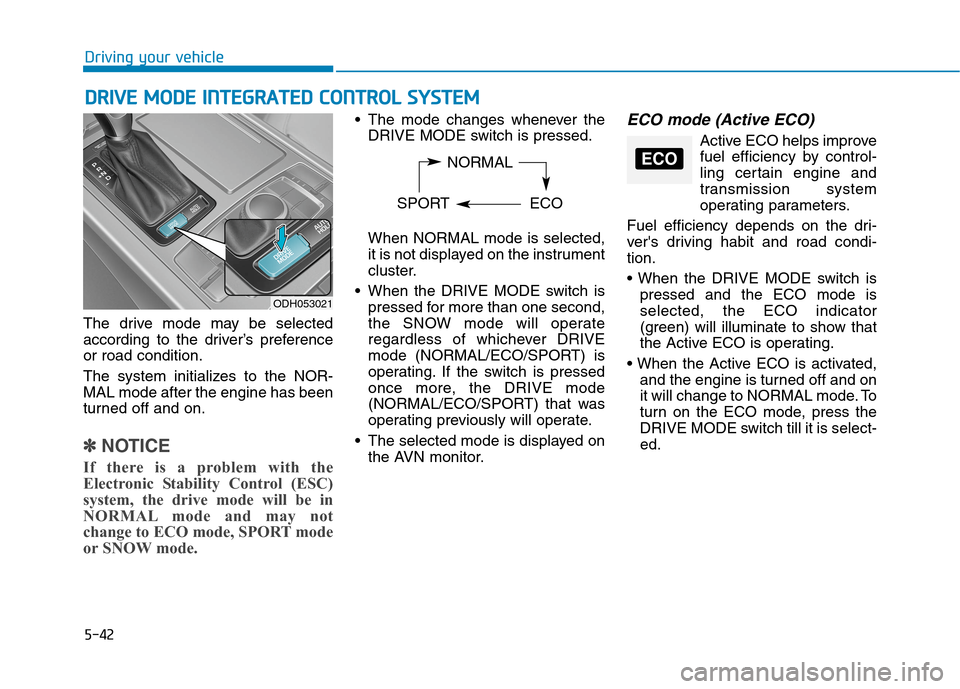
The drive mode may be selected
according to the driver’s preference
or road condition.
The system initializes to the NOR-
MAL mode after the engine has been
turned off and on.
✽ ✽
NOTICE
If there is a problem with the
Electronic Stability Control (ESC)
system, the drive mode will be in
NORMAL mode and may not
change to ECO mode, SPORT mode
or SNOW mode.
The mode changes whenever the
DRIVE MODE switch is pressed.
When NORMAL mode is selected,
it is not displayed on the instrument
cluster.
When the DRIVE MODE switch is
pressed for more than one second,
the SNOW mode will operate
regardless of whichever DRIVE
mode (NORMAL/ECO/SPORT) is
operating. If the switch is pressed
once more, the DRIVE mode
(NORMAL/ECO/SPORT) that was
operating previously will operate.
The selected mode is displayed on
the AVN monitor.ECO mode (Active ECO)
Active ECO helps improve
fuel efficiency by control-
ling certain engine and
transmission system
operating parameters.
Fuel efficiency depends on the dri-
ver's driving habit and road condi-
tion.
pressed and the ECO mode is
selected, the ECO indicator
(green) will illuminate to show that
the Active ECO is operating.
and the engine is turned off and on
it will change to NORMAL mode. To
turn on the ECO mode, press the
DRIVE MODE switch till it is select-
ed.
ODH053021
NORMAL
SPORT ECOECO
Page 303 of 501
5-43
Driving your vehicle
5
When Active ECO is activated:
The acceleration response may be
slightly reduced as the accelerator
pedal is depressed moderately.
The air conditioner performance
may be limited.
The shift pattern of the automatic
transmission may change.
The engine noise may get louder.
The above situations are normal
conditions when the Active ECO sys-
tem is activated to improve fuel effi-
ciency.Limitation of Active ECO opera-
tion:
If the following conditions occur while
Active ECO is operating, the system
operation is limited even though
there is no change in the ECO indi-
cator.
When the coolant temperature is
low:
The system will be limited until
engine performance becomes nor-
mal.
When driving up a hill:
The system will be limited to gain
power when driving uphill because
engine torque is restricted.
When using the automatic trans-
mission Sports mode:
The system will be limited accord-
ing to the shift location.SPORT mode
SPORT mode focuses on
dynamic driving by auto-
matically controlling the
steering wheel, engine
and transmission system.
When the DRIVE MODE switch is
pressed and the SPORT mode is
selected, the SPORT indicator
(yellow) will illuminate.
When the SPORT mode is activat-
ed, and the engine is turned off
and on it will change to NORMAL
mode. To turn on the SPORT
mode, press the DRIVE MODE
switch again.
If the system is activated:
- After accelerating and releasing
the accelerator pedal, the gear
and engine speed RPM may not
drop as soon as in NORMAL
mode.
- Up-shifting is delayed.
✽ ✽
NOTICE
In SPORT mode, the fuel efficiency
may decrease.
SPORT
Page 346 of 501
5-86
Driving your vehicle
Hazardous driving conditions
When hazardous driving conditions
are encountered such as water,
snow, ice, mud or sand:
Drive cautiously and allow extra dis-
tance for braking.
Avoid sudden movements in braking
or steering.
If stuck in snow, mud, or sand, use
second gear. Accelerate slowly to
avoid spinning the drive wheels.
Use sand, rock salt, or other non-slip
material under the drive wheels to
provide traction when stuck in ice,
snow, or mud.
Rocking the vehicle
If it is necessary to rock the vehicle
to free it from snow, sand, or mud,
first turn the steering wheel right and
left to clear the area around your
front wheels. Then, shift back and
forth between R (Reverse) and a for-
ward gear.
Try to avoid spinning the wheels, and
do not race the engine.
To prevent transmission wear, wait
until the wheels stop spinning before
shifting gears. Release the accelera-
tor pedal while shifting, and press
lightly on the accelerator pedal while
the transmission is in gear. Slowly
spinning the wheels in forward and
reverse directions causes a rocking
motion that may free the vehicle.
S SP
PE
EC
CI
IA
AL
L
D
DR
RI
IV
VI
IN
NG
G
C
CO
ON
ND
DI
IT
TI
IO
ON
NS
S
Downshifting with an automatic
transmission while driving on
slippery surfaces can cause an
accident. The sudden change in
tire speed could cause the tires
to skid. Be careful when down-
shifting on slippery surfaces.
WARNING
If the tires spin at high speed the
tires can explode, and you or
others may be injured. Do not
attempt this procedure if people
or objects are anywhere near the
vehicle.
The vehicle can overheat caus-
ing an engine compartment fire
or other damage. Spin the
wheels as little as possible and
avoid spinning the wheels at
speeds over 35 mph (56 km/h) as
indicated on the speedometer.
WARNING
Page 347 of 501
5-87
Driving your vehicle
5
Smooth cornering
Avoid braking or gear changing in
corners, especially when roads are
wet. Ideally, corners should always
be taken under gentle acceleration.
Driving at night
Night driving presents more hazards
than driving in the daylight. Here are
some important tips to remember:
Slow down and keep more dis-
tance between you and other vehi-
cles, as it may be more difficult to
see at night, especially in areas
where there may not be any street
lights.
Adjust your mirrors to reduce the
glare from other driver's head-
lamps.
Keep your headlamps clean and
properly aimed. Dirty or improperly
aimed headlamps will make it
much more difficult to see at night.
Avoid staring directly at the head-
lamps of oncoming vehicles. You
could be temporarily blinded, and it
will take several seconds for your
eyes to readjust to the darkness. If you are still stuck after rock-
ing the vehicle a few times, have
the vehicle pulled out by a tow
vehicle to avoid engine over-
heating, possible damage to the
transmission, and tire damage.
See “Towing” in chapter 6.
To prevent damage to the trans-
mission, turn OFF the ESC prior
to rocking the vehicle.CAUTION
Page 363 of 501
6-6
What to do in an emergency
7.Connect the jumper cables in the
exact sequence shown in the illus-
tration. First connect one jumper
cable to the red, positive (+)
jumper terminal of your vehicle (1).
8.Connect the other end of the
jumper cable to the red, positive
(+) battery/jumper terminal of the
assisting vehicle (2).
9.Connect the second jumper cable
to the black, negative (-)
battery/chassis ground of the
assisting vehicle (3).
10. Connect the other end of the sec-
ond jumper cable to the black,
negative (-) chassis ground of
your vehicle (4).
Do not allow the jumper cables to
contact anything except the cor-
rect battery or jumper terminals
or the correct ground. Do not lean
over the battery when making
connections.
11. Start the engine of the assisting
vehicle and let it run at approxi-
mately 2,000 rpm for a few min-
utes. Then start your vehicle.If your vehicle will not start after a
few attempts, it probably requires
servicing. In this event please seek
qualified assistance. If the cause of
your battery discharging is not
apparent, have your vehicle checked
by an authorized HYUNDAI dealer.
Disconnect the jumper cables in the
exact reverse order you connected
them:
1.Disconnect the jumper cable from
the black, negative (-) chassis
ground of your vehicle (4).
2.Disconnect the other end of the
jumper cable from the black, nega-
tive (-) battery/chassis ground of
the assisting vehicle (3).
3.Disconnect the second jumper
cable from the red, positive (+) bat-
tery/jumper terminal of the assist-
ing vehicle (2).
4.Disconnect the other end of the
jumper cable from the red, positive
(+) jumper terminal of your vehicle
(1).
Push-starting
Vehicles equipped with automatic
transmission cannot be push-start-
ed.
Follow the directions in this chapter
for jump-starting.