start stop button Hyundai Genesis 2015 Owner's Guide
[x] Cancel search | Manufacturer: HYUNDAI, Model Year: 2015, Model line: Genesis, Model: Hyundai Genesis 2015Pages: 501, PDF Size: 38.76 MB
Page 114 of 501
3-20
Convenient features of your vehicle
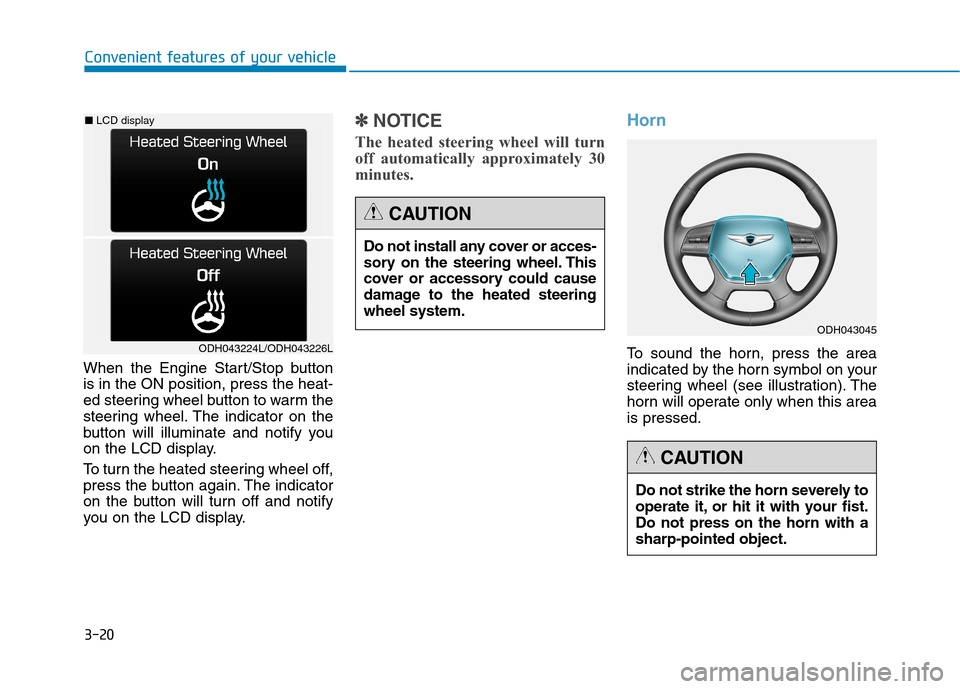
When the Engine Start/Stop button
is in the ON position, press the heat-
ed steering wheel button to warm the
steering wheel. The indicator on the
button will illuminate and notify you
on the LCD display.
To turn the heated steering wheel off,
press the button again. The indicator
on the button will turn off and notify
you on the LCD display.
✽ ✽
NOTICE
The heated steering wheel will turn
off automatically approximately 30
minutes.
Horn
To sound the horn, press the area
indicated by the horn symbol on your
steering wheel (see illustration). The
horn will operate only when this area
is pressed.ODH043224L/ODH043226L
■LCD display
Do not install any cover or acces-
sory on the steering wheel. This
cover or accessory could cause
damage to the heated steering
wheel system.
CAUTION
Do not strike the horn severely to
operate it, or hit it with your fist.
Do not press on the horn with a
sharp-pointed object.
CAUTION
ODH043045
Page 131 of 501
3-37
Convenient features of your vehicle
3
Folding/Unfolding the outside
rearview mirror
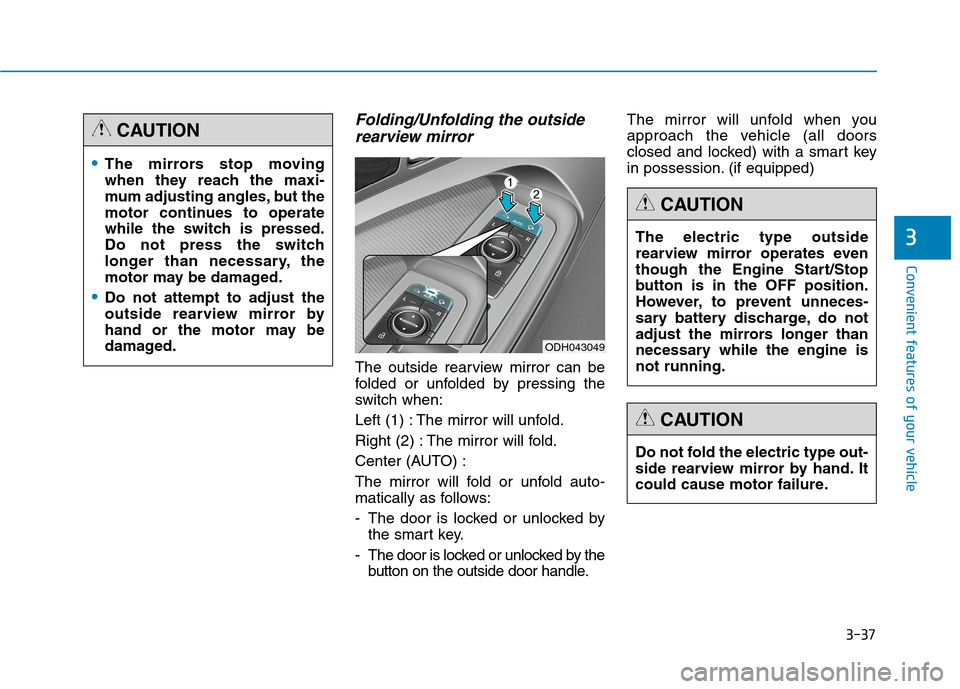
The outside rearview mirror can be
folded or unfolded by pressing the
switch when:
Left (1) : The mirror will unfold.
Right (2) : The mirror will fold.
Center (AUTO) :
The mirror will fold or unfold auto-
matically as follows:
- The door is locked or unlocked by
the smart key.
- The door is locked or unlocked by the
button on the outside door handle.The mirror will unfold when you
approach the vehicle (all doors
closed and locked) with a smart key
in possession. (if equipped)
The mirrors stop moving
when they reach the maxi-
mum adjusting angles, but the
motor continues to operate
while the switch is pressed.
Do not press the switch
longer than necessary, the
motor may be damaged.
Do not attempt to adjust the
outside rearview mirror by
hand or the motor may be
damaged.
CAUTION
ODH043049
The electric type outside
rearview mirror operates even
though the Engine Start/Stop
button is in the OFF position.
However, to prevent unneces-
sary battery discharge, do not
adjust the mirrors longer than
necessary while the engine is
not running.
CAUTION
Do not fold the electric type out-
side rearview mirror by hand. It
could cause motor failure.
CAUTION
Page 132 of 501

3-38
Convenient features of your vehicle
Reverse parking aid function
When you move the shift lever to the
R (Reverse) position, the outside
rearview mirror(s) will rotate down-
wards to aid with driving in reverse.
The position of the outside rearview
mirror switch (1) determines whether
or not the mirrors will move:
Left/Right :When either the L (Left) or
R (Right) switch is select-
ed, both outside rearview
mirrors will move.
Neutral : When neither switch is select-
ed, the outside rearview mir-
rors will not move.The outside rearview mirrors will
automatically revert to their original
positions if any of the following occur:
The Engine Start/Stop button is
pressed to either the OFF position
or the ACC position.
The shift lever is moved to any
position except R (Reverse).
The remote control outside rearview
mirror switch is not selected.
ODH043042
Page 134 of 501
3-40
Convenient features of your vehicle
Power windows
The Engine Start/Stop button must
be in the ON position to be able to
raise or lower the windows. Each
door has a Power Window switch to
control that door's window. The driv-
er has a Power Window Lock switch
which can block the operation of pas-
senger windows. The power windows
will operate for approximately 30
seconds after the Engine Start/Stop
button is placed in the ACC or OFF
position. However, if the front doors
are opened, the Power Windows
cannot be operated even within the
30 second period.
✽ ✽
NOTICE
• In cold and wet climates, power
windows may not work properly
due to freezing conditions.
• While driving with the rear win-
dows down or with the sunroof (if
equipped) opened (or partially
opened), your vehicle may demon-
strate a wind buffeting or pulsation
noise. This noise is normal and can
be reduced or eliminated by taking
the following actions. If the noise
occurs with one or both of the rear
windows down, partially lower
both front windows approximately
one inch. If you experience the
noise with the sunroof open, slight-
ly close the sunroof.
Window opening and closing
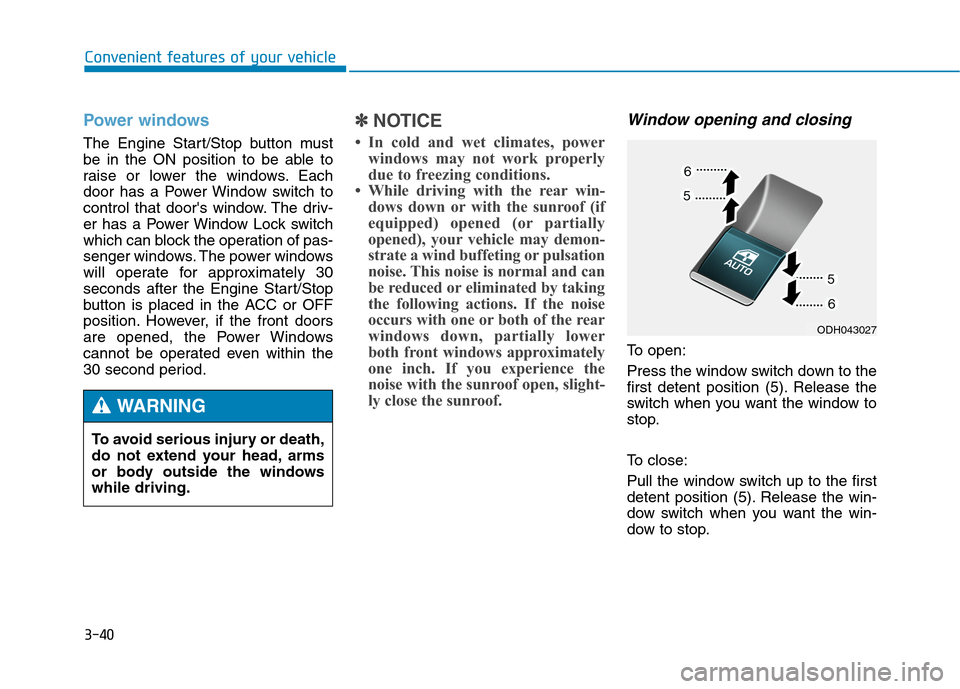
To open:
Press the window switch down to the
first detent position (5). Release the
switch when you want the window to
stop.
To close:
Pull the window switch up to the first
detent position (5). Release the win-
dow switch when you want the win-
dow to stop. To avoid serious injury or death,
do not extend your head, arms
or body outside the windows
while driving.
WARNING
ODH043027
Page 135 of 501
3-41
Convenient features of your vehicle
3
Auto up/down window
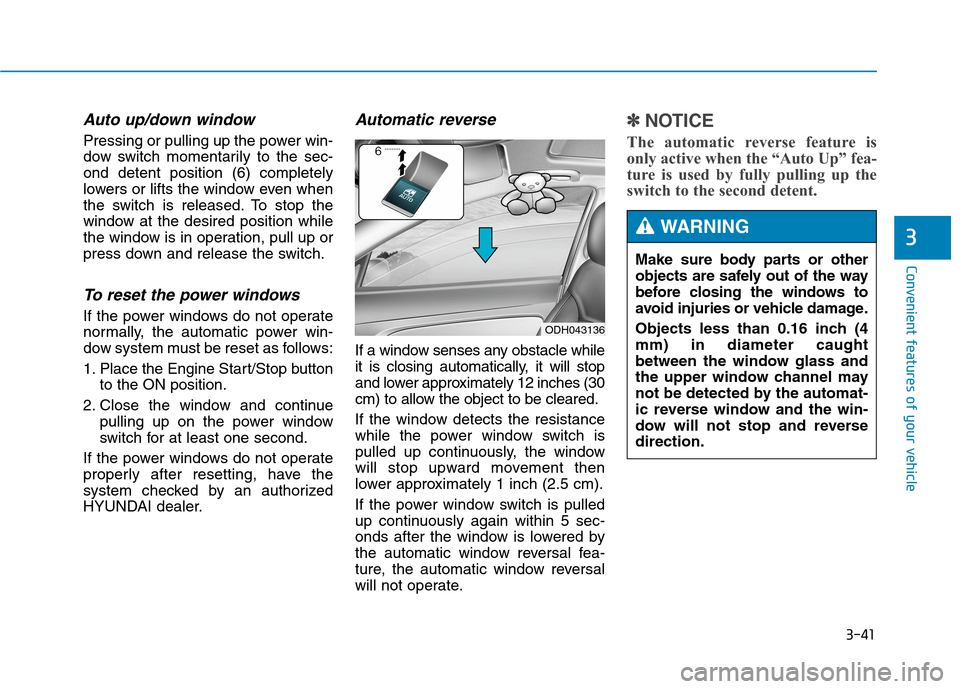
Pressing or pulling up the power win-
dow switch momentarily to the sec-
ond detent position (6) completely
lowers or lifts the window even when
the switch is released. To stop the
window at the desired position while
the window is in operation, pull up or
press down and release the switch.
To reset the power windows
If the power windows do not operate
normally, the automatic power win-
dow system must be reset as follows:
1. Place the Engine Start/Stop button
to the ON position.
2. Close the window and continue
pulling up on the power window
switch for at least one second.
If the power windows do not operate
properly after resetting, have the
system checked by an authorized
HYUNDAI dealer.
Automatic reverse
If a window senses any obstacle while
it is closing automatically, it will stop
and lower approximately 12 inches (30
cm) to allow the object to be cleared.
If the window detects the resistance
while the power window switch is
pulled up continuously, the window
will stop upward movement then
lower approximately 1 inch (2.5 cm).
If the power window switch is pulled
up continuously again within 5 sec-
onds after the window is lowered by
the automatic window reversal fea-
ture, the automatic window reversal
will not operate.
✽ ✽
NOTICE
The automatic reverse feature is
only active when the “Auto Up” fea-
ture is used by fully pulling up the
switch to the second detent.
ODH043136
Make sure body parts or other
objects are safely out of the way
before closing the windows to
avoid injuries or vehicle damage.
Objects less than 0.16 inch (4
mm) in diameter caught
between the window glass and
the upper window channel may
not be detected by the automat-
ic reverse window and the win-
dow will not stop and reverse
direction.
WARNING
Page 137 of 501
3-43
Convenient features of your vehicle
3
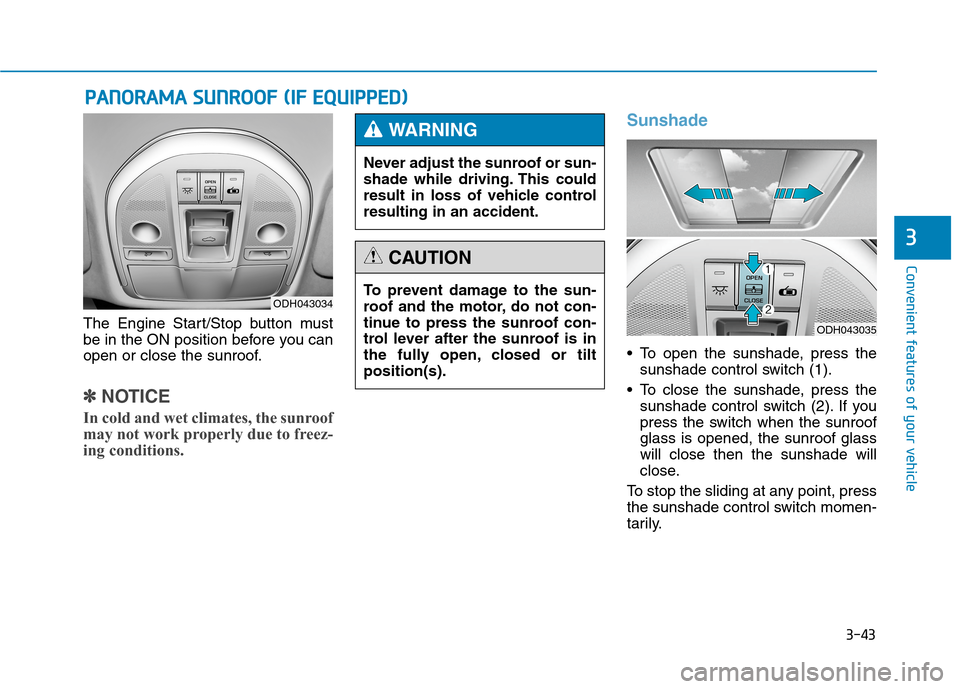
The Engine Start/Stop button must
be in the ON position before you can
open or close the sunroof.
✽ ✽
NOTICE
In cold and wet climates, the sunroof
may not work properly due to freez-
ing conditions.
Sunshade
To open the sunshade, press the
sunshade control switch (1).
To close the sunshade, press the
sunshade control switch (2). If you
press the switch when the sunroof
glass is opened, the sunroof glass
will close then the sunshade will
close.
To stop the sliding at any point, press
the sunshade control switch momen-
tarily.
P PA
AN
NO
OR
RA
AM
MA
A
S
SU
UN
NR
RO
OO
OF
F
(
(I
IF
F
E
EQ
QU
UI
IP
PP
PE
ED
D)
)
ODH043034To prevent damage to the sun-
roof and the motor, do not con-
tinue to press the sunroof con-
trol lever after the sunroof is in
the fully open, closed or tilt
position(s).
CAUTION
Never adjust the sunroof or sun-
shade while driving. This could
result in loss of vehicle control
resulting in an accident.
WARNING
ODH043035
Page 144 of 501
3-50
Convenient features of your vehicle
To close:
Do one of the following:
- Press the Power Trunk Main
Control button (1) until the Power
Trunk is closed securely.
- Press the Close button (3) on the
trunk.
- Press the Lock button (4) on the
trunk while carrying the Smart Key
with all the vehicle’s doors closed.
All doors will lock and arm the theft
alarm system.
If you push a button or switch while
the trunk is opening or closing, it
could stop moving. Press any button
to operate the Power Trunk again.
✽ ✽
NOTICE
The Power Trunk Lock button will
not work if you press the button
when:
- Any door is open.
- The Engine Start/Stop button is
not in the OFF position.
- The Smart Key is in the vehicle.
Never leave children or animals
unattended in your vehicle.
Children or animals might oper-
ate the power trunk that could
result in injury to themselves or
others, or damage to the vehicle.
WARNING
Always keep the trunk lid com-
pletely closed while the vehicle is
in motion. If it is left open or ajar,
poisonous exhaust gases con-
taining carbon monoxide (CO)
may enter the vehicle and seri-
ous illness or death may result.
WARNING
Make sure there are no people
or objects around the trunk
before opening or closing the
Power Trunk. Wait until the trunk
is open fully and stopped
before loading or unloading
cargo from the vehicle.
WARNING
Page 154 of 501
3-60
Convenient features of your vehicle
✽ ✽
NOTICE
• Make sure to refuel your
vehicle according to the "Fuel
Requirements" suggested in the
Introduction chapter.
• Do not spill fuel on the exterior
surfaces of the vehicle. Any type of
fuel spilled on painted surfaces
may damage the paint.
If the fuel filler cap requires
replacement, use only a gen-
uine HYUNDAI cap or the equiv-
alent specified for your vehicle.
An incorrect fuel filler cap can
result in a serious malfunction
of the fuel system or emission
control system.
CAUTION
(Continued)
When refueling, always move
the shift lever to the P (Park)
position, set the parking
brake, and press the Engine
Start/Stop button to the OFF
position. Sparks produced by
electrical components related
to the engine can ignite fuel
vapors causing a fire.
Do not use matches or a
lighter and do not smoke or
leave a lit cigarette in your
vehicle while at a gas station,
especially during refueling.
Do not over-fill or top-off your
vehicle tank, which can cause
gasoline spillage.
(Continued)
(Continued)
If a fire breaks out during refu-
eling, leave the vicinity of the
vehicle, and immediately con-
tact the manager of the gas
station and then contact the
local fire department. Follow
any safety instructions they
provide.
If pressurized fuel sprays out,
it can cover your clothes or
skin and thus subject you to
the risk of fire and burns.
Always remove the fuel cap
carefully and slowly. If the cap
is venting fuel or if you hear a
hissing sound, wait until the
condition stops before com-
pletely removing the cap.
Always check that the fuel cap
is installed securely to pre-
vent fuel spillage in the event
of an accident.
Page 156 of 501
3-62
Convenient features of your vehicle
Instrument Cluster Control
Adjusting Instrument Cluster
Illumination
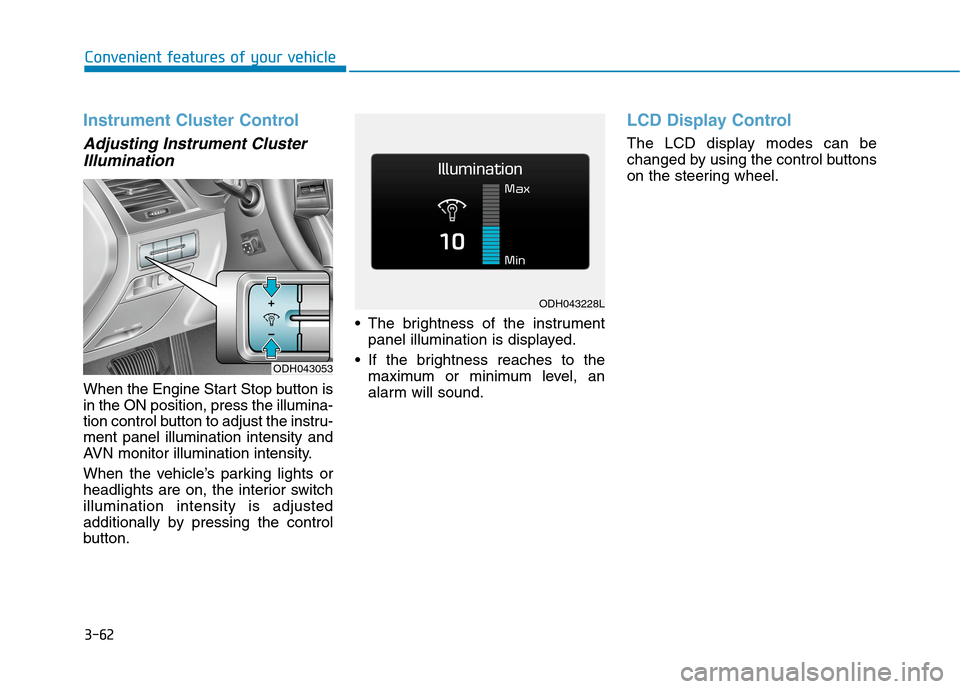
When the Engine Start Stop button is
in the ON position, press the illumina-
tion control button to adjust the instru-
ment panel illumination intensity and
AVN monitor illumination intensity.
When the vehicle’s parking lights or
headlights are on, the interior switch
illumination intensity is adjusted
additionally by pressing the control
button. The brightness of the instrument
panel illumination is displayed.
If the brightness reaches to the
maximum or minimum level, an
alarm will sound.
LCD Display Control
The LCD display modes can be
changed by using the control buttons
on the steering wheel.
ODH043053
ODH043228L
Page 164 of 501
3-70
Convenient features of your vehicle
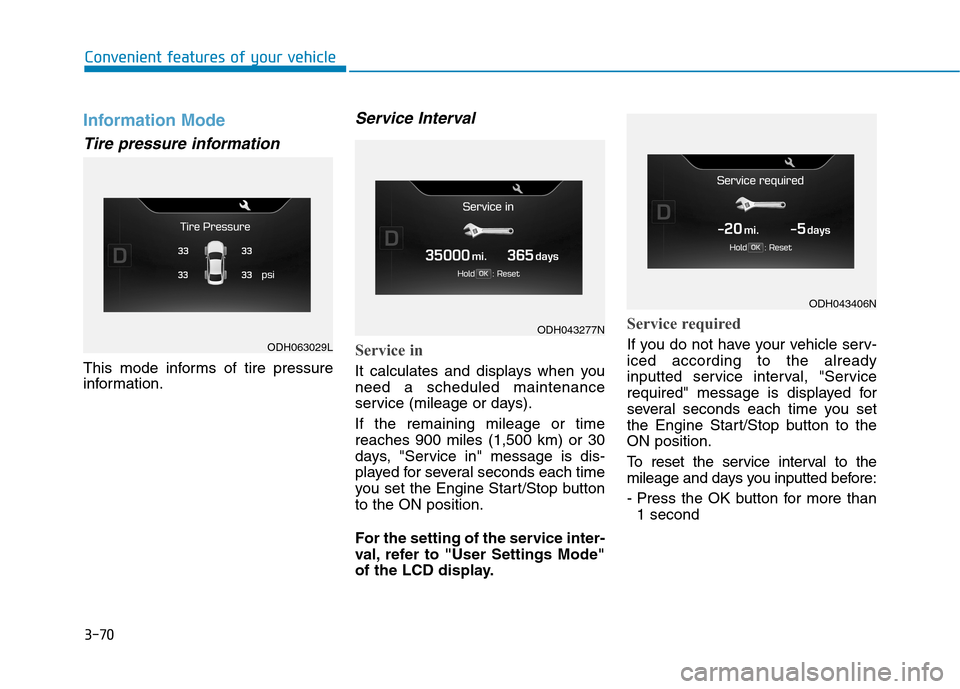
Information Mode
Tire pressure information
This mode informs of tire pressure
information.
Service Interval
Service in
It calculates and displays when you
need a scheduled maintenance
service (mileage or days).
If the remaining mileage or time
reaches 900 miles (1,500 km) or 30
days, "Service in" message is dis-
played for several seconds each time
you set the Engine Start/Stop button
to the ON position.
For the setting of the service inter-
val, refer to "User Settings Mode"
of the LCD display.
Service required
If you do not have your vehicle serv-
iced according to the already
inputted service interval, "Service
required" message is displayed for
several seconds each time you set
the Engine Start/Stop button to the
ON position.
To reset the service interval to the
mileage and days you inputted before:
- Press the OK button for more than
1 secondODH063029L
ODH043277N
ODH043406N