warning Hyundai Genesis 2015 Workshop Manual
[x] Cancel search | Manufacturer: HYUNDAI, Model Year: 2015, Model line: Genesis, Model: Hyundai Genesis 2015Pages: 501, PDF Size: 38.76 MB
Page 87 of 501
2-61
Safety system of your vehicle
2
Why Didn’t My Air Bag Go Off
in a Collision? (Air bags are
not designed to inflate in
every collision.)
There are certain types of accidents
in which the air bag would not be
expected to provide additional protec-
tion. These include rear impacts, sec-
ond or third collisions in multiple
impact accidents, as well as low
speed impacts. Damage to the vehicle
indicates a collision energy absorp-
tion, and is not an indicator of whether
or not an air bag should have inflated.
Air bag collision sensors
NEVER place a rear-facing or
front-facing child restraint in
the front passenger’s seat of
the vehicle.
An inflating frontal air bag
could forcefully strike a child
resulting in serious injury or
death.
Always properly restrain chil-
dren in an appropriate child
restraint in the rear seat of the
vehicle.
WARNING
To reduce the risk of an air bag
deploying unexpectedly and
causing serious injury or death:
Do not hit or allow any objects
to impact the locations where
air bags or sensors are
installed.
(Continued)
(Continued)
Do not perform maintenance
on or around the air bag sen-
sors. If the location or angle of
the sensors is altered, the air
bags may deploy when they
should not or may not deploy
when they should.
Do not install bumper guards
or replace the bumper with a
non-genuine HYUNDAI parts.
This may adversely affect the
collision and air bag deploy-
ment performance.
Press the Engine Start/Stop
button to the OFF or ACC
position when the vehicle is
being towed to prevent inad-
vertent air bag deployment.
Have all air bag repairs con-
ducted by an authorized
HYUNDAI dealer.
WARNING
Page 92 of 501
2-66
Safety system of your vehicle
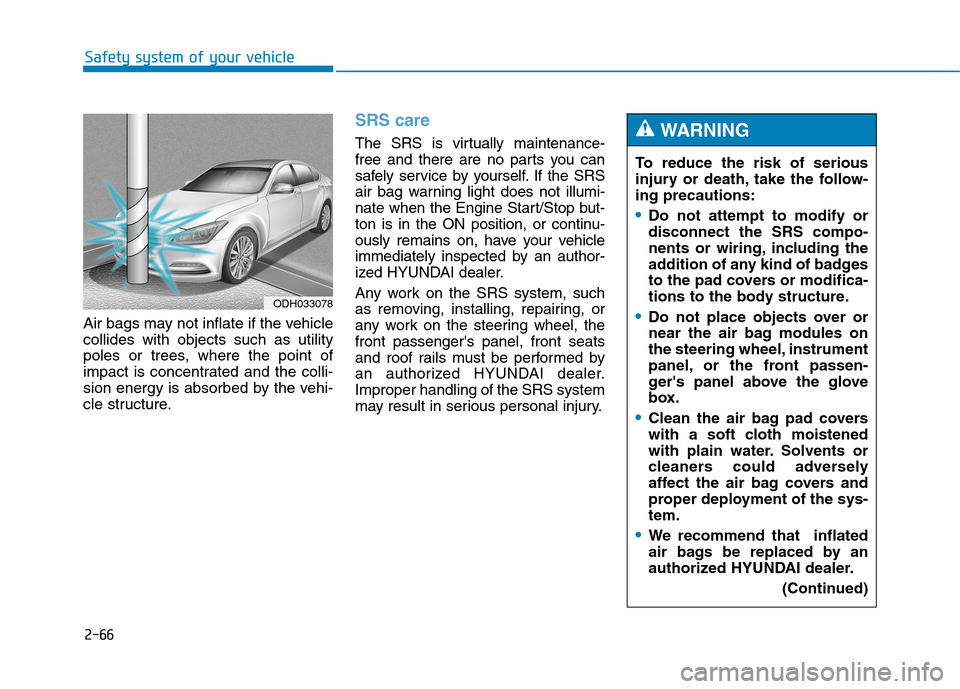
Air bags may not inflate if the vehicle
collides with objects such as utility
poles or trees, where the point of
impact is concentrated and the colli-
sion energy is absorbed by the vehi-
cle structure.
SRS care
The SRS is virtually maintenance-
free and there are no parts you can
safely service by yourself. If the SRS
air bag warning light does not illumi-
nate when the Engine Start/Stop but-
ton is in the ON position, or continu-
ously remains on, have your vehicle
immediately inspected by an author-
ized HYUNDAI dealer.
Any work on the SRS system, such
as removing, installing, repairing, or
any work on the steering wheel, the
front passenger's panel, front seats
and roof rails must be performed by
an authorized HYUNDAI dealer.
Improper handling of the SRS system
may result in serious personal injury.To reduce the risk of serious
injury or death, take the follow-
ing precautions:
Do not attempt to modify or
disconnect the SRS compo-
nents or wiring, including the
addition of any kind of badges
to the pad covers or modifica-
tions to the body structure.
Do not place objects over or
near the air bag modules on
the steering wheel, instrument
panel, or the front passen-
ger's panel above the glove
box.
Clean the air bag pad covers
with a soft cloth moistened
with plain water. Solvents or
cleaners could adversely
affect the air bag covers and
proper deployment of the sys-
tem.
We recommend that inflated
air bags be replaced by an
authorized HYUNDAI dealer.
(Continued)
WARNING
ODH033078
Page 94 of 501
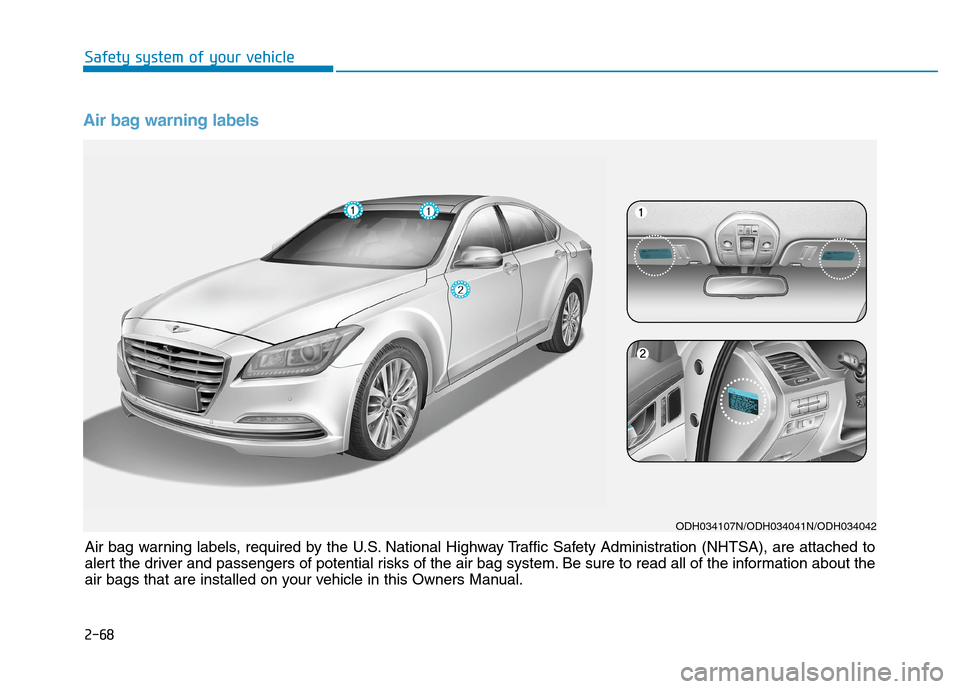
Air bag warning labels
ODH034107N/ODH034041N/ODH034042
Air bag warning labels, required by the U.S. National Highway Traffic Safety Administration (NHTSA), are attached to
alert the driver and passengers of potential risks of the air bag system. Be sure to read all of the information about the
air bags that are installed on your vehicle in this Owners Manual. Safety system of your vehicle
2-68
Page 95 of 501
Convenient features of your vehicle
Accessing your vehicle .........................................3-4
Smart key ...........................................................................3-4
Smart key precautions .....................................................3-7
Immobilizer System ..........................................................3-9
Door locks .............................................................3-11
Operating door locks from outside the vehicle ......3-11
Power Door Latch ...........................................................3-12
Operating door locks from inside the vehicle ........3-12
Auto door lock/unlock features ................................3-14
Child-protector rear door locks ..................................3-14
Theft-alarm system.............................................3-15
Driver position memory system .........................3-16
Storing positions into memory ...................................3-16
Easy access function .....................................................3-17
Steering wheel......................................................3-18
Electric power steering (EPS) ......................................3-18
Tilt steering / Telescope steering...............................3-18
Heated steering wheel ...................................................3-19
Horn ....................................................................................3-20
Mirrors ...................................................................3-21
Inside rearview mirror....................................................3-21
Outside rearview mirror ................................................3-35
Reverse parking aid function.......................................3-38
Windows ................................................................3-39
Power windows ................................................................3-40
Panorama sunroof ...............................................3-43
Sunshade ...........................................................................3-43
Sliding the sunroof ........................................................3-44
Tilting the sunroof ........................................................3-44
Closing the sunroof ........................................................3-45
Resetting the sunroof ....................................................3-46
Exterior features .................................................3-47
Hood ...................................................................................3-47
Trunk ..................................................................................3-48
Smart trunk.......................................................................3-54
Fuel filler door .................................................................3-58
Instrument cluster................................................3-61
Instrument Cluster Control............................................3-62
LCD Display Control ........................................................3-62
Gauges ...............................................................................3-63
LCD display ...........................................................3-67
LCD Modes ........................................................................3-67
Trip Computer Mode.......................................................3-68
Turn By Turn (TBT) Mode ............................................3-69
ASCC/LKAS Mode ...........................................................3-69
A/V Mode..........................................................................3-69
Information Mode ...........................................................3-70
User Settings Mode ........................................................3-72
Warning Messages..........................................................3-79
3
Page 96 of 501
Trip computer .......................................................3-89
Overview............................................................................3-89
Trip A/B .............................................................................3-90
Fuel Economy...................................................................3-91
Digital Speedometer .......................................................3-93
Warning and indicator lights ..............................3-94
Warning lights ..................................................................3-94
Indicator Lights ..............................................................3-102
Head Up Display (HUD).....................................3-106
Description ......................................................................3-106
Head Up Display ON/OFF ...........................................3-107
Head Up Display Information .....................................3-107
Head Up Display Setting .............................................3-108
Light .....................................................................3-109
Exterior lights ................................................................3-109
Smart High Beam ..........................................................3-111
Welcome system ...........................................................3-116
Interior lights..................................................................3-117
Wipers and washers ..........................................3-122
Windshield wipers ........................................................3-122
Windshield washers ....................................................3-124
Driver assist system ..........................................3-125
Rear view camera .........................................................3-125
Parking Guide System ..................................................3-126
Parking Assist System .................................................3-127
Defroster .............................................................3-131
Rear window defroster ...............................................3-131
Automatic climate control system ...................3-133
Automatic heating and air conditioning ..................3-134
Manual heating and air conditioning .......................3-135
System operation ..........................................................3-143
Climate control air filter ............................................3-145
Air conditioner refrigerant and compressor
lubricant ..........................................................................3-146
Air Conditioning refrigerant label .............................3-146
Windshield defrosting and defogging ............3-147
Auto defogging system ON/OFF...............................3-149
Climate control additional features.................3-150
Cluster ionizer ................................................................3-150
Smart ventilation ...........................................................3-150
Rear climate system ON/OFF ....................................3-151
CO2 control auto air conditioner ..............................3-151
Storage compartment ........................................3-152
Center console storage ...............................................3-152
Glove box ........................................................................3-153
Sunglass holder .............................................................3-153
3
Page 98 of 501
3-4
Convenient features of your vehicle
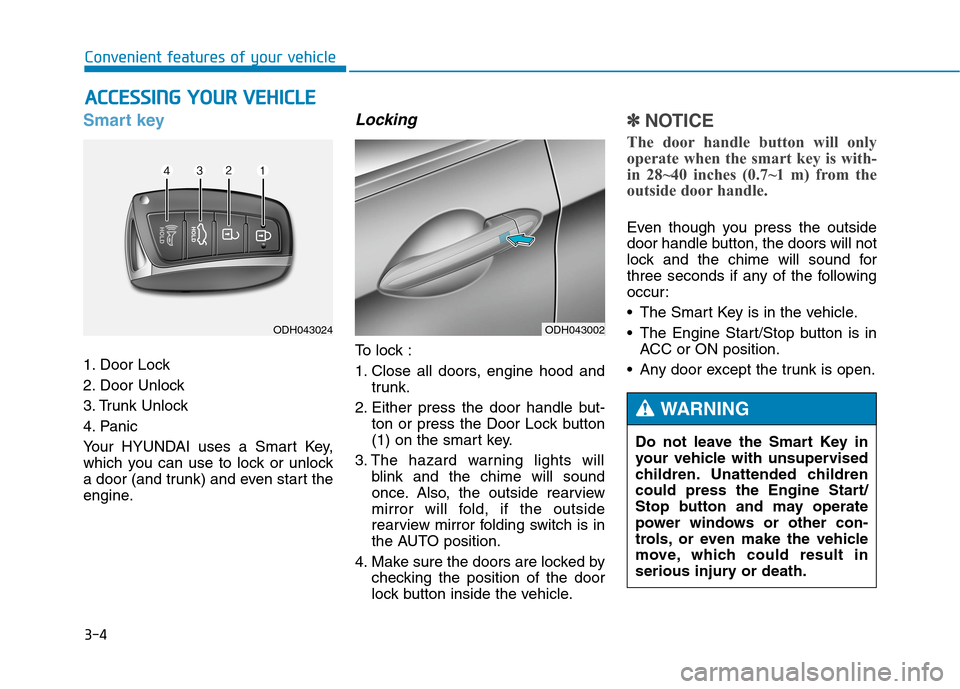
Smart key
1. Door Lock
2. Door Unlock
3. Trunk Unlock
4. Panic
Your HYUNDAI uses a Smart Key,
which you can use to lock or unlock
a door (and trunk) and even start the
engine.
Locking
To lock :
1. Close all doors, engine hood and
trunk.
2. Either press the door handle but-
ton or press the Door Lock button
(1) on the smart key.
3. The hazard warning lights will
blink and the chime will sound
once. Also, the outside rearview
mirror will fold, if the outside
rearview mirror folding switch is in
the AUTO position.
4. Make sure the doors are locked by
checking the position of the door
lock button inside the vehicle.
✽ ✽
NOTICE
The door handle button will only
operate when the smart key is with-
in 28~40 inches (0.7~1 m) from the
outside door handle.
Even though you press the outside
door handle button, the doors will not
lock and the chime will sound for
three seconds if any of the following
occur:
• The Smart Key is in the vehicle.
The Engine Start/Stop button is in
ACC or ON position.
Any door except the trunk is open.
A AC
CC
CE
ES
SS
SI
IN
NG
G
Y
YO
OU
UR
R
V
VE
EH
HI
IC
CL
LE
E
ODH043002ODH043024
Do not leave the Smart Key in
your vehicle with unsupervised
children. Unattended children
could press the Engine Start/
Stop button and may operate
power windows or other con-
trols, or even make the vehicle
move, which could result in
serious injury or death.
WARNING
Page 99 of 501
3-5
Convenient features of your vehicle
Unlocking
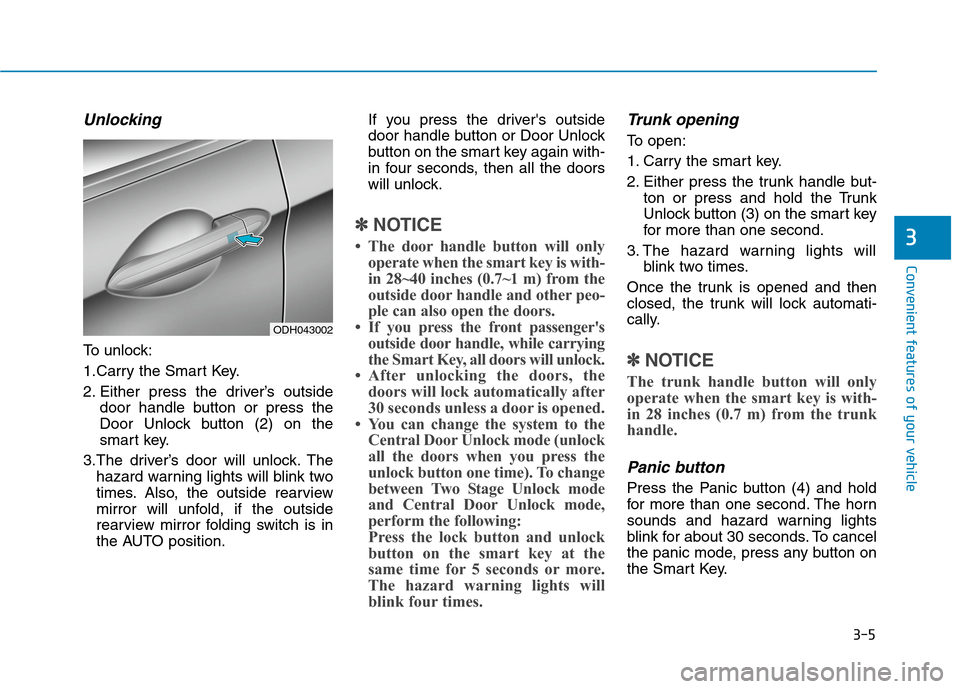
To unlock:
1.Carry the Smart Key.
2. Either press the driver’s outside
door handle button or press the
Door Unlock button (2) on the
smart key.
3.The driver’s door will unlock. The
hazard warning lights will blink two
times. Also, the outside rearview
mirror will unfold, if the outside
rearview mirror folding switch is in
the AUTO position.If you press the driver's outside
door handle button or Door Unlock
button on the smart key again with-
in four seconds, then all the doors
will unlock.
✽ ✽
NOTICE
• The door handle button will only
operate when the smart key is with-
in 28~40 inches (0.7~1 m) from the
outside door handle and other peo-
ple can also open the doors.
• If you press the front passenger's
outside door handle, while carrying
the Smart Key, all doors will unlock.
• After unlocking the doors, the
doors will lock automatically after
30 seconds unless a door is opened.
• You can change the system to the
Central Door Unlock mode (unlock
all the doors when you press the
unlock button one time). To change
between Two Stage Unlock mode
and Central Door Unlock mode,
perform the following:
Press the lock button and unlock
button on the smart key at the
same time for 5 seconds or more.
The hazard warning lights will
blink four times.
Trunk opening
To open:
1. Carry the smart key.
2. Either press the trunk handle but-
ton or press and hold the Trunk
Unlock button (3) on the smart key
for more than one second.
3. The hazard warning lights will
blink two times.
Once the trunk is opened and then
closed, the trunk will lock automati-
cally.
✽ ✽
NOTICE
The trunk handle button will only
operate when the smart key is with-
in 28 inches (0.7 m) from the trunk
handle.
Panic button
Press the Panic button (4) and hold
for more than one second. The horn
sounds and hazard warning lights
blink for about 30 seconds. To cancel
the panic mode, press any button on
the Smart Key.
3
ODH043002
Page 104 of 501
3-10
Convenient features of your vehicle
Do not attempt to alter this system or
add other devices to it. Electrical
problems could result that may make
your vehicle inoperable.This device complies with Part 15
of the FCC rules.
Operation is subject to the following
two conditions:
1. This device may not cause harm-
ful interference, and
2. This device must accept any inter-
ference received, including inter-
ference that may cause undesired
operation.
✽ ✽
NOTICE
Changes or modifications not
expressly approved by the party
responsible for compliance could
void the user's authority to operate
the device.
In order to prevent theft of your
vehicle, do not leave spare keys
anywhere in your vehicle. Your
immobilizer password is a cus-
tomer unique password and
should be kept confidential.
WARNING
The transponder in your key is
an important part of the immo-
bilizer system. It is designed to
give years of trouble-free serv-
ice, however you should avoid
exposure to moisture, static
electricity and rough handling.
Immobilizer system malfunc-
tion could occur.
CAUTION
Page 107 of 501
3-13
Convenient features of your vehicle
If the inner door handle of the dri-
ver’s (or front passenger’s) door is
pulled when the door lock button is
in the lock position, the button is
unlocked and door opens.
Doors cannot be locked if the
smart key is in the vehicle and any
door is open.
✽ ✽
NOTICE
If a power door lock ever fails to
function while you are in the vehicle
try one or more of the following
techniques to exit:
Operate the door unlock feature
repeatedly (both electronic and
manual) while simultaneously
pulling on the door handle.
Operate the other door locks and
handles, front and rear.
Lower a front window and use the
mechanical key to unlock the door
from outside.
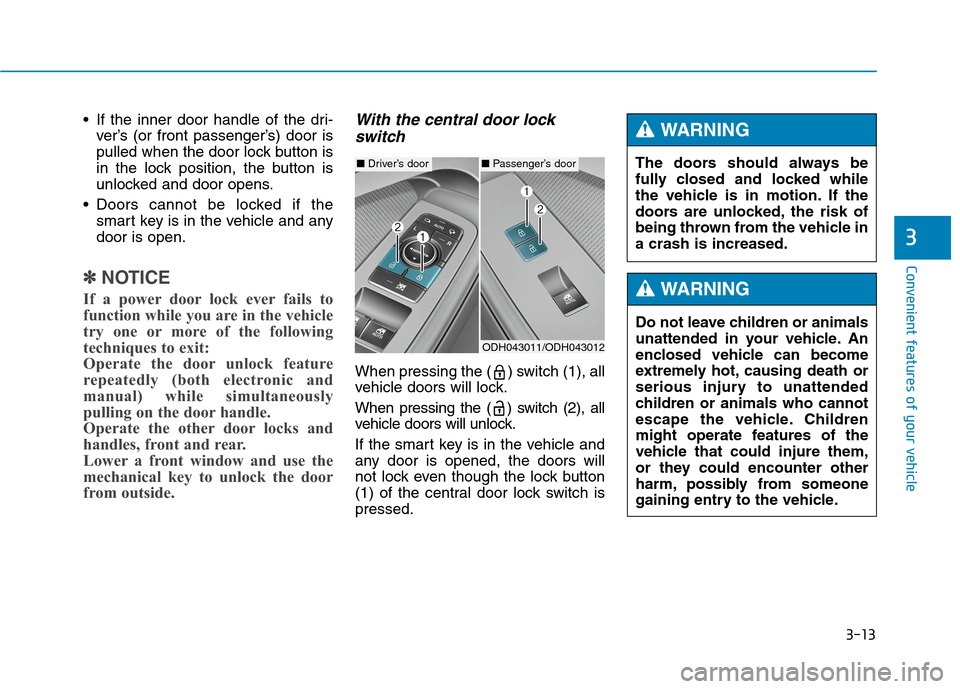
With the central door lock
switch
When pressing the ( ) switch (1), all
vehicle doors will lock.
When pressing the ( ) switch (2), all
vehicle doors will unlock.
If the smart key is in the vehicle and
any door is opened, the doors will
not lock even though the lock button
(1) of the central door lock switch is
pressed.
3
ODH043011/ODH043012
■Driver’s door■Passenger’s doorThe doors should always be
fully closed and locked while
the vehicle is in motion. If the
doors are unlocked, the risk of
being thrown from the vehicle in
a crash is increased.
WARNING
Do not leave children or animals
unattended in your vehicle. An
enclosed vehicle can become
extremely hot, causing death or
serious injury to unattended
children or animals who cannot
escape the vehicle. Children
might operate features of the
vehicle that could injure them,
or they could encounter other
harm, possibly from someone
gaining entry to the vehicle.
WARNING
Page 108 of 501
3-14
Auto door lock/unlock features
Impact sensing door unlock
system
All doors will be automatically
unlocked when an impact causes the
air bags to deploy.
Speed sensing door lock system
All doors will be automatically locked
when vehicle speed exceeds 9 mph
(15 km/h).
All of the doors will be automatically
unlocked after the engine is turned
off.
Shift lever auto door lock
All doors will be automatically locked
when shifting the shift lever out of P
(Park) with the engine running.
You can activate or deactivate the
Auto Door Lock/Unlock features from
the User Settings Mode on the LCD
display.
For more details, refer to "LCD
Display" in this chapter.
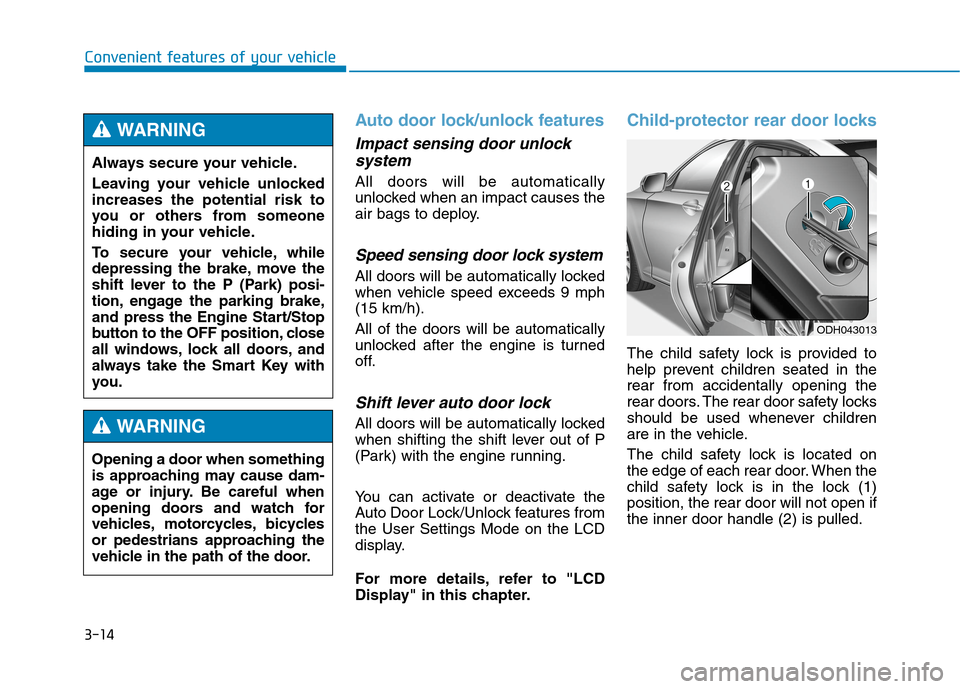
Child-protector rear door locks
The child safety lock is provided to
help prevent children seated in the
rear from accidentally opening the
rear doors. The rear door safety locks
should be used whenever children
are in the vehicle.
The child safety lock is located on
the edge of each rear door. When the
child safety lock is in the lock (1)
position, the rear door will not open if
the inner door handle (2) is pulled.
Convenient features of your vehicle
ODH043013
Always secure your vehicle.
Leaving your vehicle unlocked
increases the potential risk to
you or others from someone
hiding in your vehicle.
To secure your vehicle, while
depressing the brake, move the
shift lever to the P (Park) posi-
tion, engage the parking brake,
and press the Engine Start/Stop
button to the OFF position, close
all windows, lock all doors, and
always take the Smart Key with
you.
WARNING
Opening a door when something
is approaching may cause dam-
age or injury. Be careful when
opening doors and watch for
vehicles, motorcycles, bicycles
or pedestrians approaching the
vehicle in the path of the door.
WARNING