lane Hyundai Genesis 2015 Owner's Manual
[x] Cancel search | Manufacturer: HYUNDAI, Model Year: 2015, Model line: Genesis, Model: Hyundai Genesis 2015Pages: 501, PDF Size: 38.76 MB
Page 16 of 501
F16
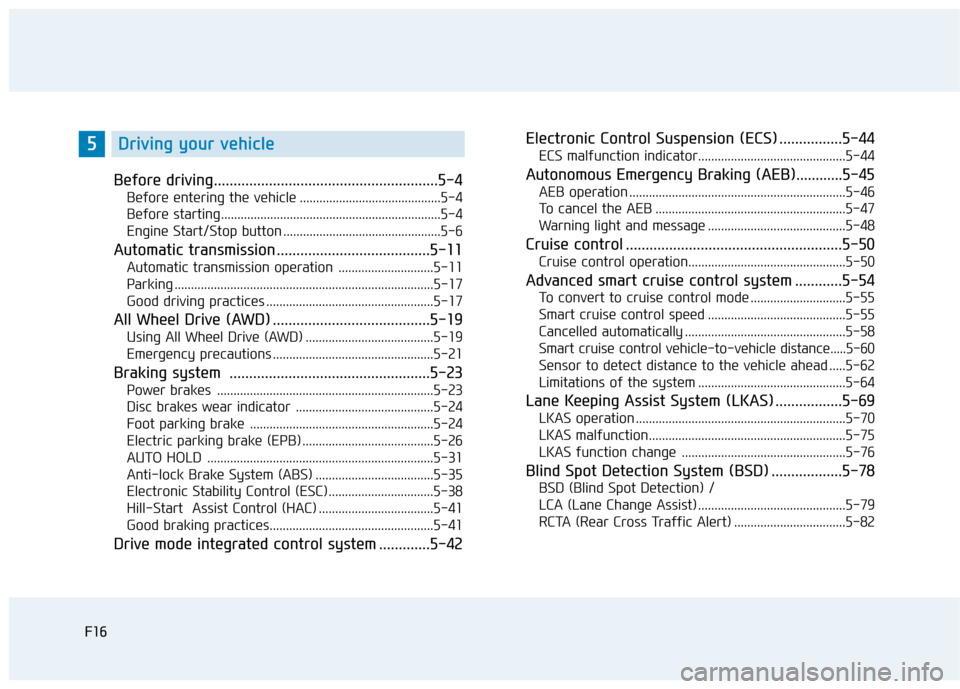
Before driving.........................................................5-4
Before entering the vehicle ...........................................5-4
Before starting...................................................................5-4
Engine Start/Stop button ................................................5-6
Automatic transmission .......................................5-11
Automatic transmission operation .............................5-11
Parking ...............................................................................5-17
Good driving practices ...................................................5-17
All Wheel Drive (AWD) ........................................5-19
Using All Wheel Drive (AWD) .......................................5-19
Emergency precautions .................................................5-21
Braking system ...................................................5-23
Power brakes ..................................................................5-23
Disc brakes wear indicator ..........................................5-24
Foot parking brake ........................................................5-24
Electric parking brake (EPB) ........................................5-26
AUTO HOLD .....................................................................5-31
Anti-lock Brake System (ABS) ....................................5-35
Electronic Stability Control (ESC)................................5-38
Hill-Start Assist Control (HAC) ...................................5-41
Good braking practices..................................................5-41
Drive mode integrated control system .............5-42Electronic Control Suspension (ECS) ................5-44
ECS malfunction indicator.............................................5-44
Autonomous Emergency Braking (AEB)............5-45
AEB operation ..................................................................5-46
To cancel the AEB ..........................................................5-47
Warning light and message ..........................................5-48
Cruise control .......................................................5-50
Cruise control operation................................................5-50
Advanced smart cruise control system ............5-54
To convert to cruise control mode .............................5-55
Smart cruise control speed ..........................................5-55
Cancelled automatically .................................................5-58
Smart cruise control vehicle-to-vehicle distance.....5-60
Sensor to detect distance to the vehicle ahead .....5-62
Limitations of the system .............................................5-64
Lane Keeping Assist System (LKAS) .................5-69
LKAS operation ................................................................5-70
LKAS malfunction............................................................5-75
LKAS function change ..................................................5-76
Blind Spot Detection System (BSD) ..................5-78
BSD (Blind Spot Detection) /
LCA (Lane Change Assist) .............................................5-79
RCTA (Rear Cross Traffic Alert) ..................................5-82
F16
5Driving your vehicle
Page 23 of 501
1-4
Your vehicle at a glance
I IN
NT
TE
ER
RI
IO
OR
R
O
OV
VE
ER
RV
VI
IE
EW
W
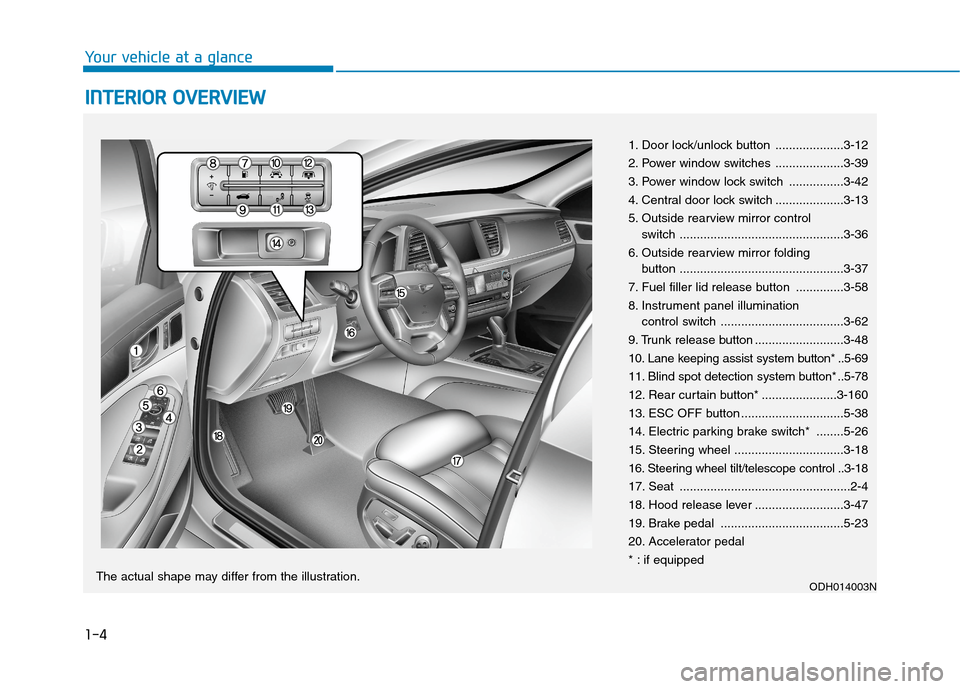
1. Door lock/unlock button ....................3-12
2. Power window switches ....................3-39
3. Power window lock switch ................3-42
4. Central door lock switch ....................3-13
5. Outside rearview mirror control
switch ................................................3-36
6. Outside rearview mirror folding
button ................................................3-37
7. Fuel filler lid release button ..............3-58
8. Instrument panel illumination
control switch ....................................3-62
9. Trunk release button ..........................3-48
10. Lane keeping assist system button* ..5-69
11. Blind spot detection system button* ..5-78
12. Rear curtain button* ......................3-160
13. ESC OFF button ..............................5-38
14. Electric parking brake switch* ........5-26
15. Steering wheel ................................3-18
16. Steering wheel tilt/telescope control ..3-18
17. Seat ..................................................2-4
18. Hood release lever ..........................3-47
19. Brake pedal ....................................5-23
20. Accelerator pedal
* : if equipped
ODH014003NThe actual shape may differ from the illustration.
Page 130 of 501
3-36
Convenient features of your vehicle
Use your interior rearview mirror or
direct observation to determine the
actual distance of following vehicles
when changing lanes.
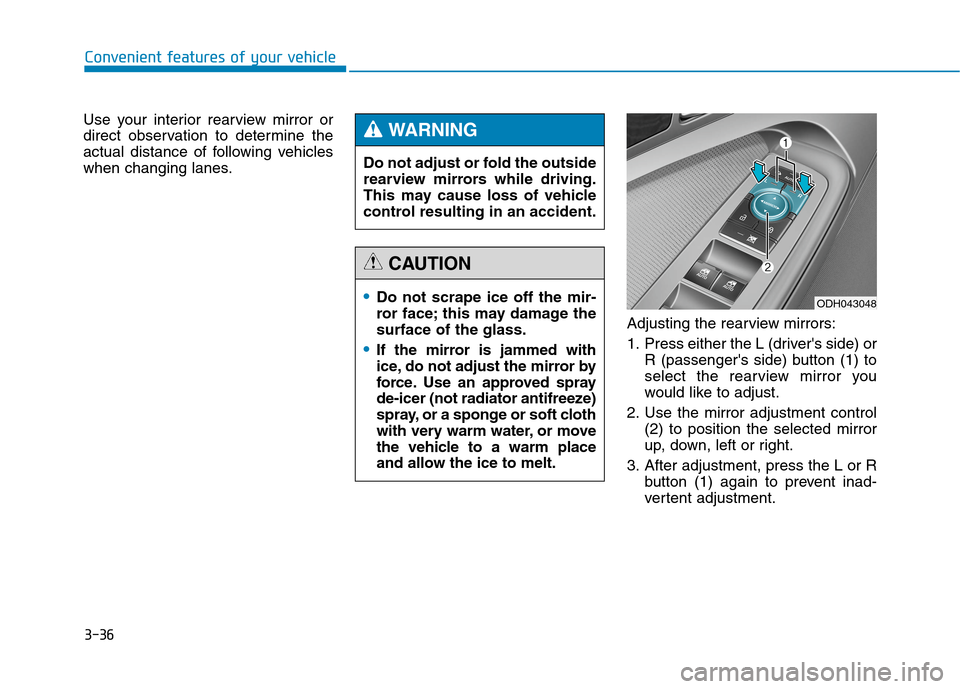
Adjusting the rearview mirrors:
1. Press either the L (driver's side) or
R (passenger's side) button (1) to
select the rearview mirror you
would like to adjust.
2. Use the mirror adjustment control
(2) to position the selected mirror
up, down, left or right.
3. After adjustment, press the L or R
button (1) again to prevent inad-
vertent adjustment. Do not adjust or fold the outside
rearview mirrors while driving.
This may cause loss of vehicle
control resulting in an accident.
WARNING
Do not scrape ice off the mir-
ror face; this may damage the
surface of the glass.
If the mirror is jammed with
ice, do not adjust the mirror by
force. Use an approved spray
de-icer (not radiator antifreeze)
spray, or a sponge or soft cloth
with very warm water, or move
the vehicle to a warm place
and allow the ice to melt.
CAUTION
ODH043048
Page 161 of 501
3-67
Convenient features of your vehicle
3
LCD Modes
L LC
CD
D
D
DI
IS
SP
PL
LA
AY
Y
Modes SymbolExplanation
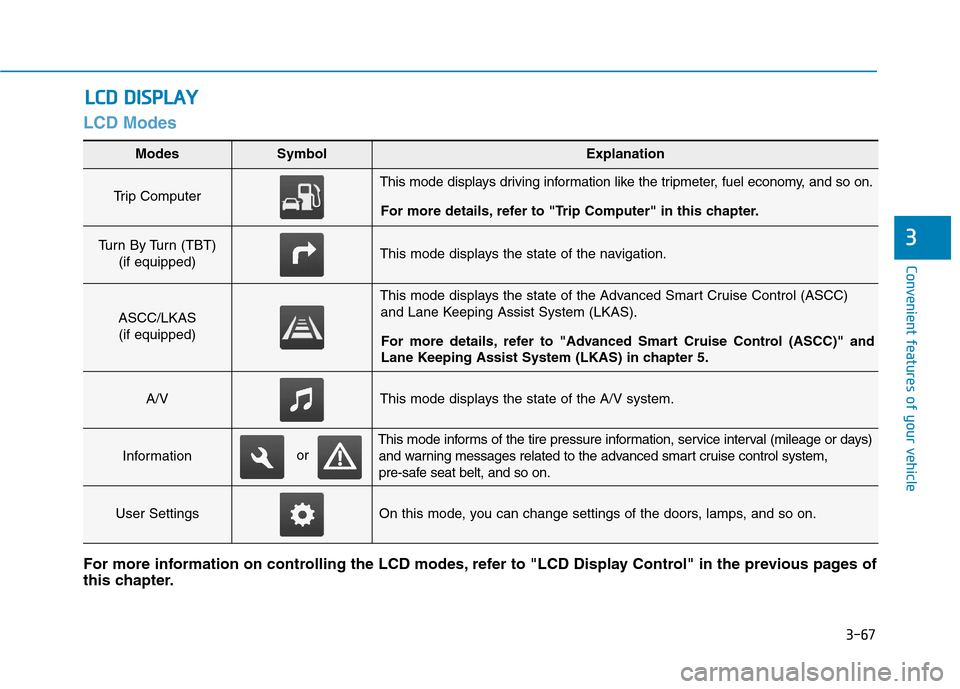
Trip Computer This mode displays driving information like the tripmeter, fuel economy, and so on.
For more details, refer to "Trip Computer" in this chapter.
Turn By Turn (TBT)
(if equipped)This mode displays the state of the navigation.
ASCC/LKAS
(if equipped)
This mode displays the state of the Advanced Smart Cruise Control (ASCC)
and Lane Keeping Assist System (LKAS).
For more details, refer to "Advanced Smart Cruise Control (ASCC)" and
Lane Keeping Assist System (LKAS) in chapter 5.
A/VThis mode displays the state of the A/V system.
Information
This mode informs of the tire pressure information, service interval (mileage or days)
and warning messages related to the advanced smart cruise control system,
pre-safe seat belt, and so on.
User SettingsOn this mode, you can change settings of the doors, lamps, and so on.
For more information on controlling the LCD modes, refer to "LCD Display Control" in the previous pages of
this chapter.
or
Page 163 of 501
3-69
Convenient features of your vehicle
3
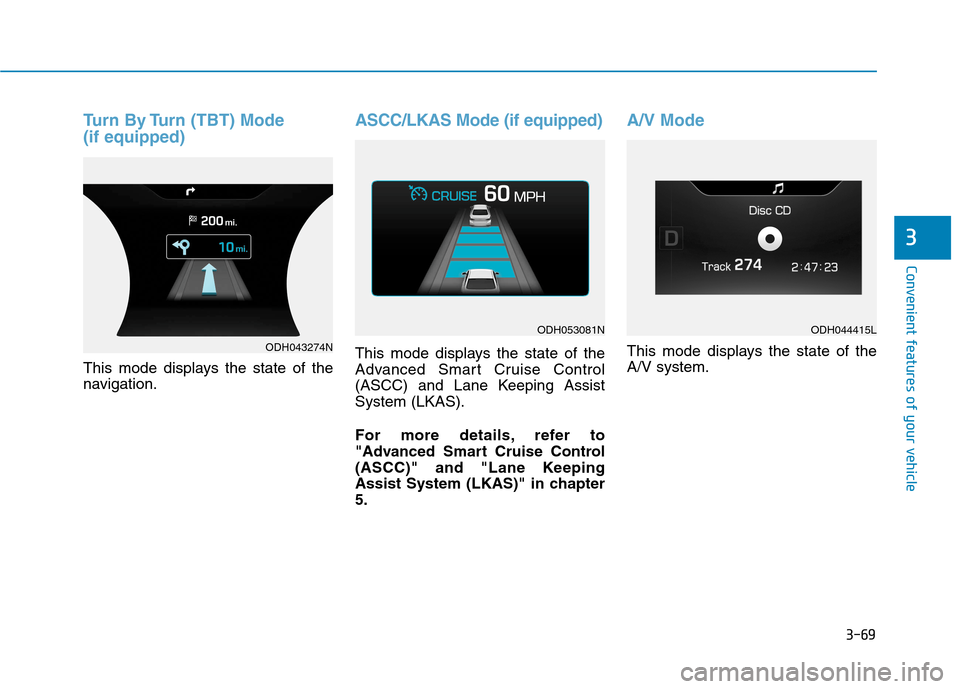
Turn By Turn (TBT) Mode
(if equipped)
This mode displays the state of the
navigation.
ASCC/LKAS Mode (if equipped)
This mode displays the state of the
Advanced Smart Cruise Control
(ASCC) and Lane Keeping Assist
System (LKAS).
For more details, refer to
"Advanced Smart Cruise Control
(ASCC)" and "Lane Keeping
Assist System (LKAS)" in chapter
5.
A/V Mode
This mode displays the state of the
A/V system.ODH043274N
ODH053081NODH044415L
Page 167 of 501
3-73
Convenient features of your vehicle
3
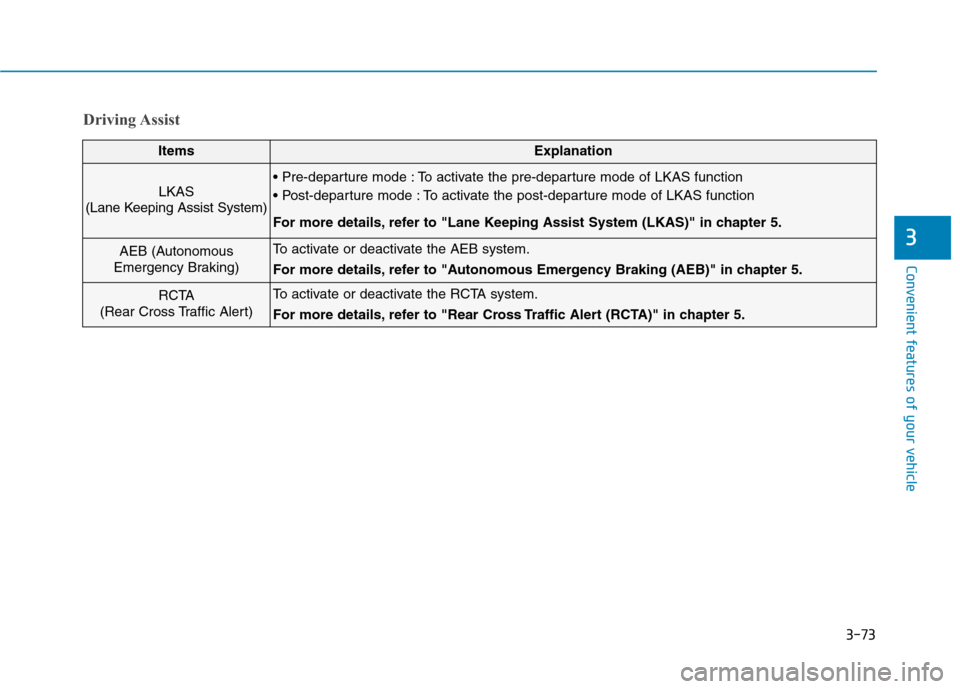
Driving Assist
ItemsExplanation
LKAS
(Lane Keeping Assist System) To activate the pre-departure mode of LKAS function
To activate the post-departure mode of LKAS function
For more details, refer to "Lane Keeping Assist System (LKAS)" in chapter 5.
AEB (Autonomous
Emergency Braking)To activate or deactivate the AEB system.
For more details, refer to "Autonomous Emergency Braking (AEB)" in chapter 5.
RCTA
(Rear Cross Traffic Alert)To activate or deactivate the RCTA system.
For more details, refer to "Rear Cross Traffic Alert (RCTA)" in chapter 5.
Page 169 of 501
3-75
Convenient features of your vehicle
3
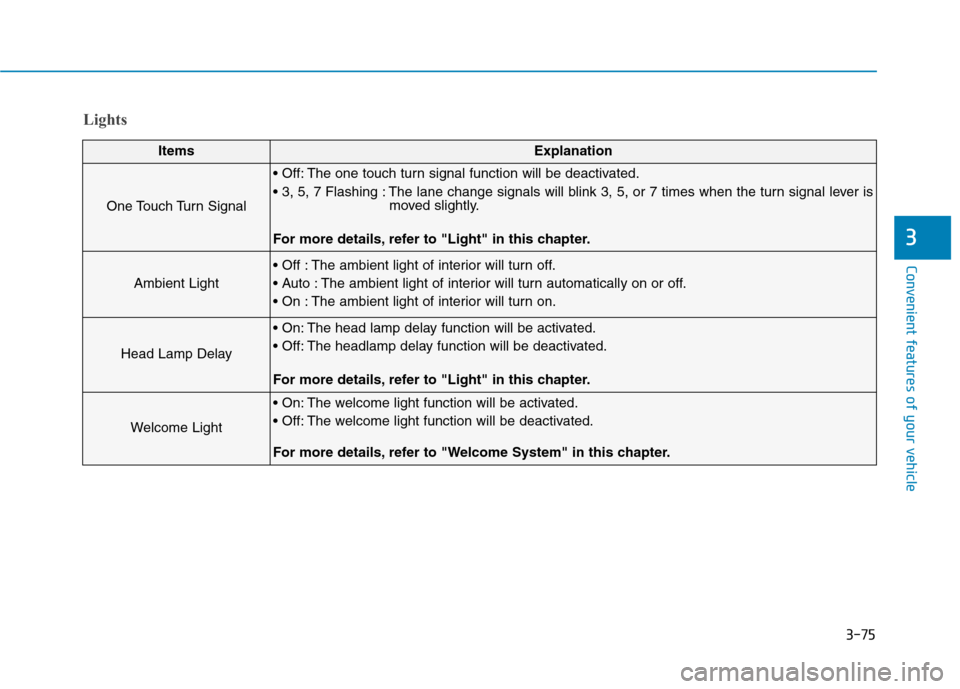
Lights
ItemsExplanation
One Touch Turn Signal
The one touch turn signal function will be deactivated.
The lane change signals will blink 3, 5, or 7 times when the turn signal lever is
moved slightly.
For more details, refer to "Light" in this chapter.
Ambient Light
The ambient light of interior will turn off.
The ambient light of interior will turn automatically on or off.
The ambient light of interior will turn on.
Head Lamp Delay
The head lamp delay function will be activated.
The headlamp delay function will be deactivated.
For more details, refer to "Light" in this chapter.
Welcome Light
The welcome light function will be activated.
The welcome light function will be deactivated.
For more details, refer to "Welcome System" in this chapter.
Page 199 of 501
3-105
Convenient features of your vehicle
3
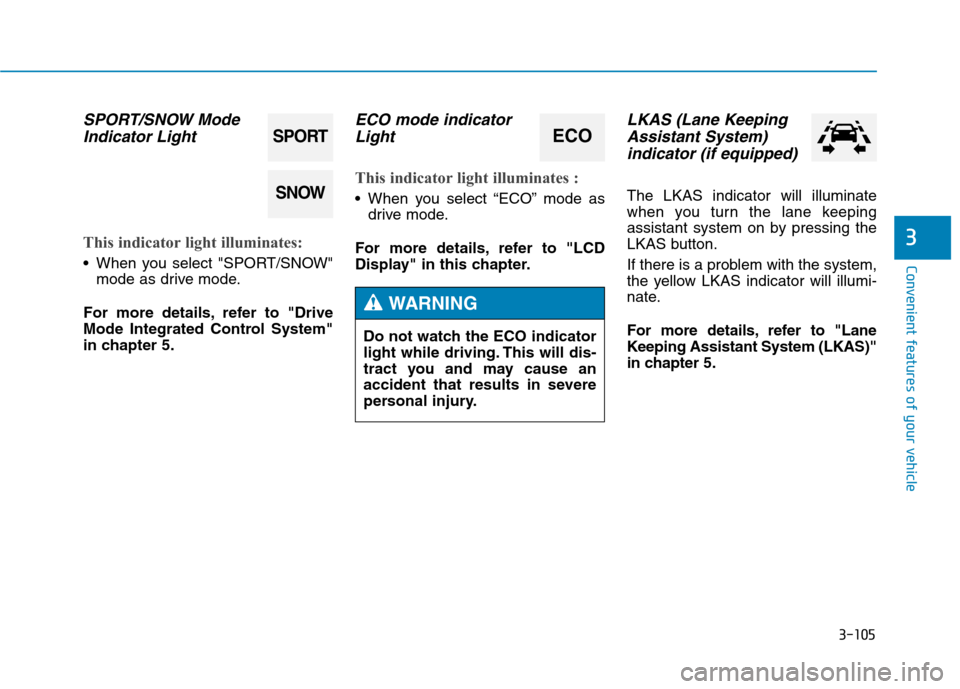
SPORT/SNOW Mode
Indicator Light
This indicator light illuminates:
When you select "SPORT/SNOW"
mode as drive mode.
For more details, refer to "Drive
Mode Integrated Control System"
in chapter 5.
ECO mode indicator
Light
This indicator light illuminates :
When you select “ECO” mode as
drive mode.
For more details, refer to "LCD
Display" in this chapter.
LKAS (Lane Keeping
Assistant System)
indicator (if equipped)
The LKAS indicator will illuminate
when you turn the lane keeping
assistant system on by pressing the
LKAS button.
If there is a problem with the system,
the yellow LKAS indicator will illumi-
nate.
For more details, refer to "Lane
Keeping Assistant System (LKAS)"
in chapter 5.
SPORT
SNOW
ECO
Do not watch the ECO indicator
light while driving. This will dis-
tract you and may cause an
accident that results in severe
personal injury.
WARNING
Page 201 of 501
3-107
Convenient features of your vehicle
3
Head Up Display ON/OFF
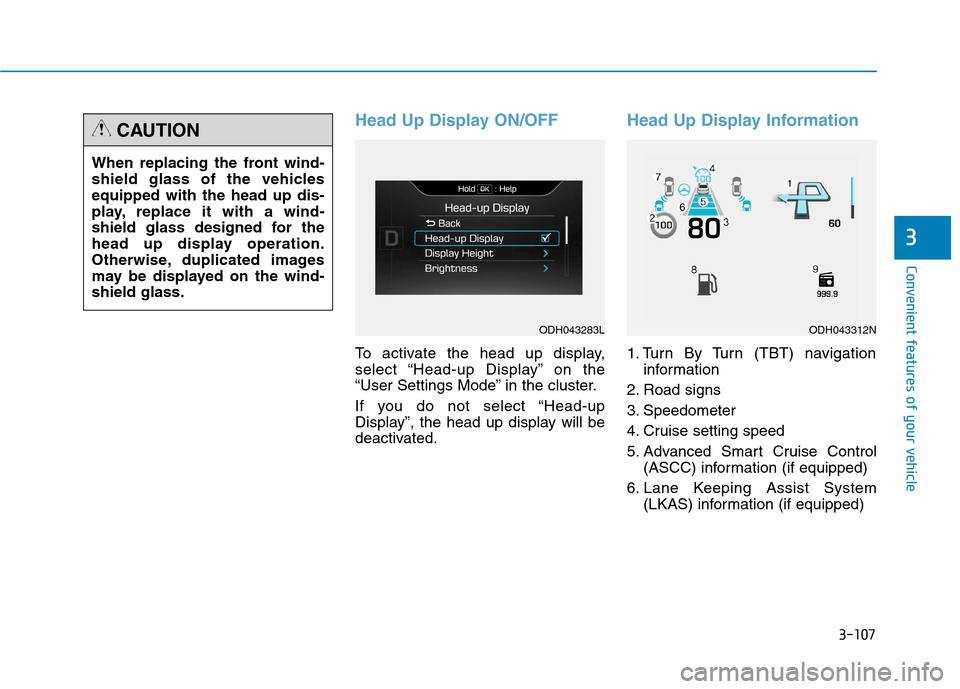
To activate the head up display,
select “Head-up Display” on the
“User Settings Mode” in the cluster.
If you do not select “Head-up
Display”, the head up display will be
deactivated.
Head Up Display Information
1. Turn By Turn (TBT) navigation
information
2. Road signs
3. Speedometer
4. Cruise setting speed
5. Advanced Smart Cruise Control
(ASCC) information (if equipped)
6. Lane Keeping Assist System
(LKAS) information (if equipped) When replacing the front wind-
shield glass of the vehicles
equipped with the head up dis-
play, replace it with a wind-
shield glass designed for the
head up display operation.
Otherwise, duplicated images
may be displayed on the wind-
shield glass.
CAUTION
ODH043283LODH043312N
Page 202 of 501
3-108
Convenient features of your vehicle
7. Blind Spot Detection (BSD) sys-
tem information (if equipped)
8. Warning lights (Low fuel)
9. Audio/Video information
On the "User settings Mode" of the
LCD display, you can activate or
deactivate the Turn By Turn (TBT)
navigation, smart cruise control
(scc), Lane Keeping Assist
System(LKAS), and Blind Spot
Detection (BSD) system information.
✽ ✽
NOTICE
If you select the Turn By Turn
(TBT) navigation information as
HUD contents, the Turn By Turn
(TBT) navigation information will
not be displayed on the LCD
Display.
Head Up Display Setting
On the LCD display, you can change
the head up display settings as fol-
lows.
1. Head up display ON/OFF
2. Display height
3. Illumination
4. Contents setting
5. Speedometer number size
6. Speedometer number color
For more details, refer to "LCD
Display" in this chapter.