bonnet Hyundai Genesis 2016 Owner's Manual - RHD (UK, Australia)
[x] Cancel search | Manufacturer: HYUNDAI, Model Year: 2016, Model line: Genesis, Model: Hyundai Genesis 2016Pages: 502, PDF Size: 13.19 MB
Page 13 of 502
1-2
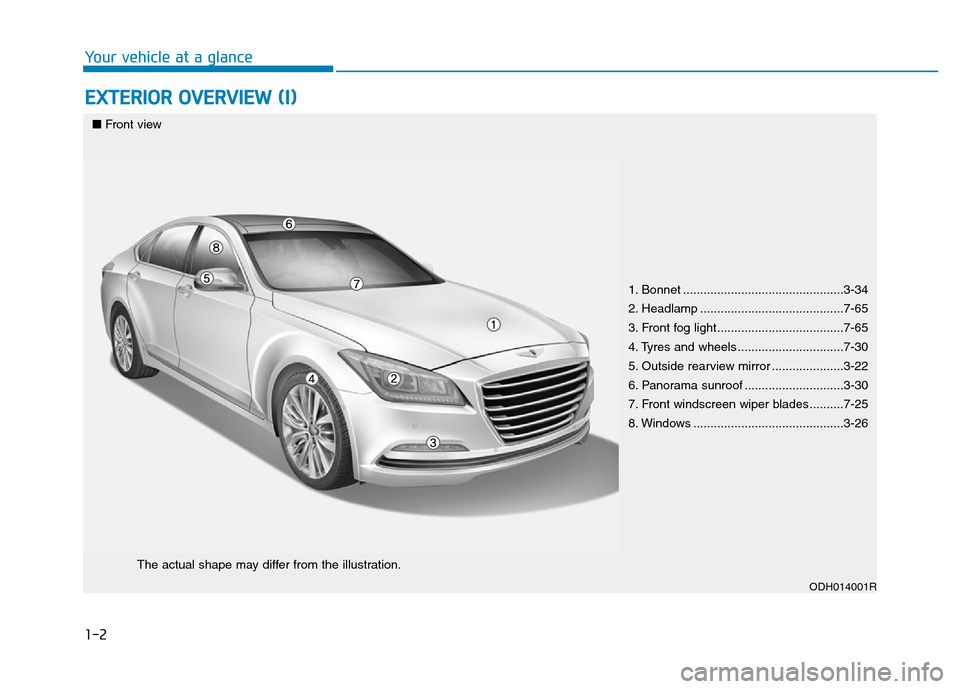
EXTERIOR OVERVIEW (I)
Your vehicle at a glance
1. Bonnet ...............................................3-34
2. Headlamp ..........................................7-65
3. Front fog light.....................................7-65
4. Tyres and wheels ...............................7-30
5. Outside rearview mirror .....................3-22
6. Panorama sunroof .............................3-30
7. Front windscreen wiper blades ..........7-25
8. Windows ............................................3-26
ODH014001R
■Front view
The actual shape may differ from the illustration.
Page 15 of 502
1-4
Your vehicle at a glance
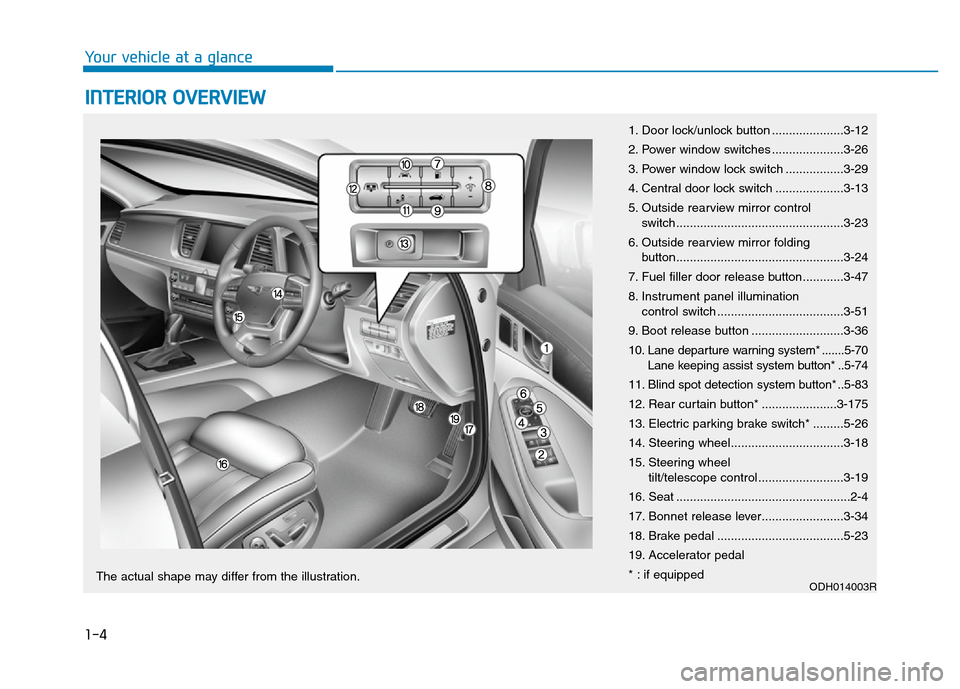
INTERIOR OVERVIEW
1. Door lock/unlock button .....................3-12
2. Power window switches .....................3-26
3. Power window lock switch .................3-29
4. Central door lock switch ....................3-13
5. Outside rearview mirror control
switch.................................................3-23
6. Outside rearview mirror folding
button.................................................3-24
7. Fuel filler door release button............3-47
8. Instrument panel illumination
control switch .....................................3-51
9. Boot release button ...........................3-36
10. Lane departure warning system* .......5-70
Lane keeping assist system button* ..5-74
11. Blind spot detection system button* ..5-83
12. Rear curtain button* ......................3-175
13. Electric parking brake switch* .........5-26
14. Steering wheel.................................3-18
15. Steering wheel
tilt/telescope control .........................3-19
16. Seat ...................................................2-4
17. Bonnet release lever........................3-34
18. Brake pedal .....................................5-23
19. Accelerator pedal
* : if equipped
ODH014003RThe actual shape may differ from the illustration.
Page 19 of 502
Safety system of your vehicle
2
Important safety precautions...............................2-2
Always wear your seat belt ..........................................2-2
Restrain all children .........................................................2-2
Air bag hazards ................................................................2-2
Driver distraction .............................................................2-2
Control your speed ..........................................................2-3
Keep your vehicle in safe condition ............................2-3
Seats ........................................................................2-4
Safety precautions ..........................................................2-5
Front seats ..........................................................................2-6
Rear seats .........................................................................2-11
Head restraint .................................................................2-16
Seat warmers and coolers ............................................2-20
Seat belts ..............................................................2-24
Seat belt safety precautions ......................................2-24
Seat belt warning light .................................................2-25
Seat belt restraint system ...........................................2-27
Pre-safe Seat belt (PSB) ..............................................2-32
Additional seat belt safety precautions ...................2-33
Care of seat belts ..........................................................2-36
Child Restraint System (CRS) .............................2-37
Children always in the rear seat ................................2-37
Selecting a Child Restraint System (CRS) ................2-38
Installing a Child Restraint System (CRS)..................2-40
Air bag
- supplemental restraint system.....................2-50
Where are the air bags? ..............................................2-52
How does the air bags system operate? .................2-55
What to expect after an air bag inflates ................2-59
Passenger's front air bag ON/OFF switch ..............2-60
Do not install a child restraint on
the front passenger seat ..............................................2-62
Why didn't my air bag go off in a collision? ...........2-63
SRS care ...........................................................................2-68
Additional safety precautions .....................................2-69
Air bag warning labels ...................................................2-70
Active bonnet lift system ...................................2-71
Active bonnet lift system activation situation .........2-71
Active bonnet lift system non-activation
situation .............................................................................2-72
Active bonnet lift system malfunction ......................2-73
Page 89 of 502
2-71
Safety system of your vehicle
2
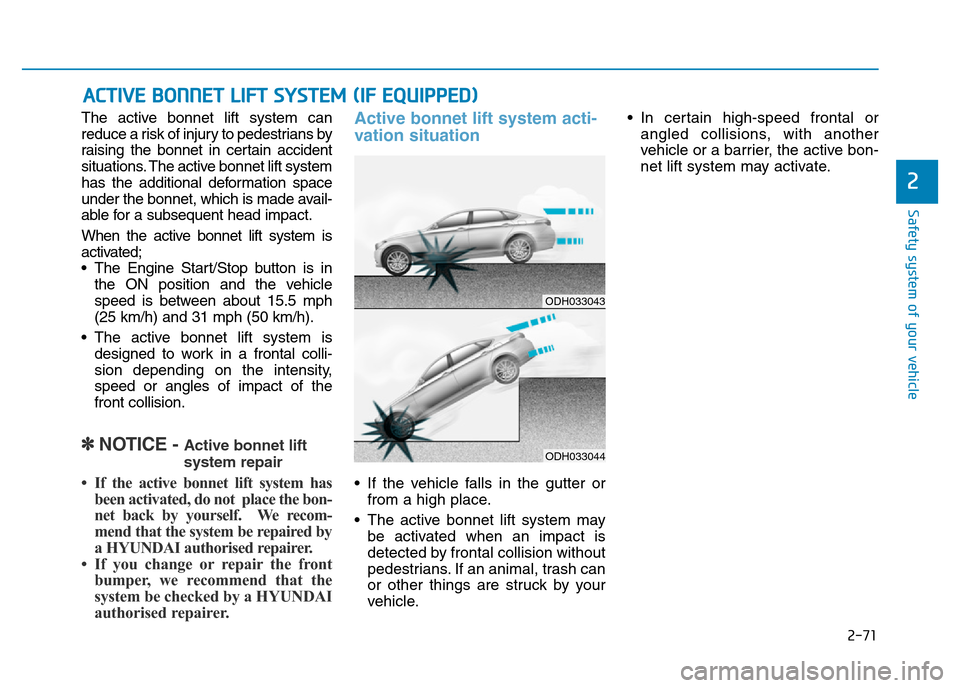
The active bonnet lift system can
reduce a risk of injury to pedestrians by
raising the bonnet in certain accident
situations. The active bonnet lift system
has the additional deformation space
under the bonnet, which is made avail-
able for a subsequent head impact.
When the active bonnet lift system is
activated;
• The Engine Start/Stop button is in
the ON position and the vehicle
speed is between about 15.5 mph
(25 km/h) and 31 mph (50 km/h).
• The active bonnet lift system is
designed to work in a frontal colli-
sion depending on the intensity,
speed or angles of impact of the
front collision.
✽NOTICE - Active bonnet lift
system repair
• If the active bonnet lift system has
been activated, do not place the bon-
net back by yourself. We recom-
mend that the system be repaired by
a HYUNDAI authorised repairer.
• If you change or repair the front
bumper, we recommend that the
system be checked by a HYUNDAI
authorised repairer.
Active bonnet lift system acti-
vation situation
• If the vehicle falls in the gutter or
from a high place.
• The active bonnet lift system may
be activated when an impact is
detected by frontal collision without
pedestrians. If an animal, trash can
or other things are struck by your
vehicle.• In certain high-speed frontal or
angled collisions, with another
vehicle or a barrier, the active bon-
net lift system may activate.
ACTIVE BONNET LIFT SYSTEM (IF EQUIPPED)
ODH033043
ODH033044
Page 90 of 502
2-72
Safety system of your vehicle
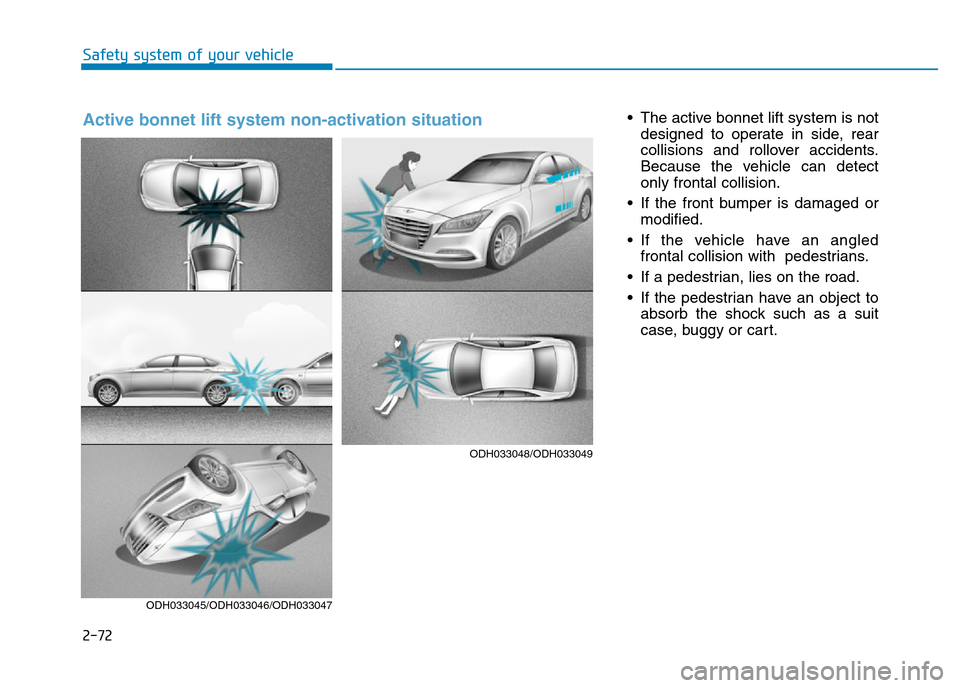
• The active bonnet lift system is not
designed to operate in side, rear
collisions and rollover accidents.
Because the vehicle can detect
only frontal collision.
• If the front bumper is damaged or
modified.
• If the vehicle have an angled
frontal collision with pedestrians.
• If a pedestrian, lies on the road.
• If the pedestrian have an object to
absorb the shock such as a suit
case, buggy or cart.
ODH033045/ODH033046/ODH033047
Active bonnet lift system non-activation situation
ODH033048/ODH033049
Page 91 of 502
2-73
Safety system of your vehicle
2
Active bonnet lift
system malfunction
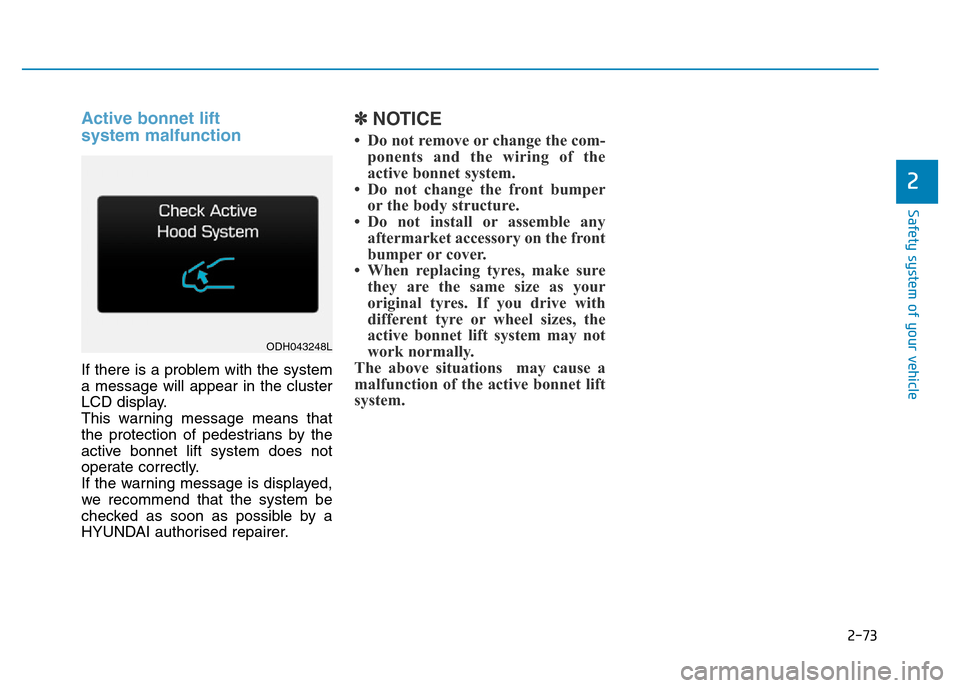
If there is a problem with the system
a message will appear in the cluster
LCD display.
This warning message means that
the protection of pedestrians by the
active bonnet lift system does not
operate correctly.
If the warning message is displayed,
we recommend that the system be
checked as soon as possible by a
HYUNDAI authorised repairer.
✽NOTICE
• Do not remove or change the com-
ponents and the wiring of the
active bonnet system.
• Do not change the front bumper
or the body structure.
• Do not install or assemble any
aftermarket accessory on the front
bumper or cover.
• When replacing tyres, make sure
they are the same size as your
original tyres. If you drive with
different tyre or wheel sizes, the
active bonnet lift system may not
work normally.
The above situations may cause a
malfunction of the active bonnet lift
system.
ODH043248L
Page 92 of 502
Convenient features of your vehicle
Accessing your vehicle .........................................3-4
Smart key ............................................................................3-4
Smart key precautions .....................................................3-7
Immobiliser System ........................................................3-10
Door locks .............................................................3-11
Operating door locks from outside the vehicle .....3-11
Power Door Latch ...........................................................3-12
Operating door locks from inside the vehicle ........3-12
Auto door lock/unlock features ................................3-14
Child-protector rear door locks ..................................3-14
Theft-alarm system.............................................3-15
Driver position memory system .........................3-16
Storing memory positions .............................................3-16
Easy access function .....................................................3-17
Steering wheel......................................................3-18
Electric power steering (EPS) ......................................3-18
Tilt steering/Telescope steering .................................3-19
Heated steering wheel ...................................................3-20
Horn ....................................................................................3-20
Mirrors ...................................................................3-21
Inside rearview mirror....................................................3-21
Outside rearview mirror ..............................................3-22
Reverse parking aid function.......................................3-25
Windows ................................................................3-26
Power windows ................................................................3-26
Panorama sunroof ...............................................3-30
Sunshade ...........................................................................3-30
Sliding the sunroof ........................................................3-31
Tilting the sunroof ........................................................3-31
Closing the sunroof ........................................................3-32
Resetting the sunroof ....................................................3-33
Bonnet ...................................................................3-34
Opening the bonnet ......................................................3-34
Closing the bonnet ..........................................................3-34
Boot........................................................................3-36
Non-Powered Boot.........................................................3-36
Power Boot .......................................................................3-37
Emergency boot safety release ..................................3-41
Smart boot ............................................................3-43
Fuel filler door .....................................................3-47
Opening the fuel filler door .........................................3-47
Closing the fuel filler door ...........................................3-47
Emergency fuel filler lid release .................................3-49
Instrument cluster................................................3-50
Instrument Cluster Control............................................3-51
LCD Display Control ........................................................3-52
Gauges ...............................................................................3-52
3
Page 95 of 502
3-4
Convenient features of your vehicle
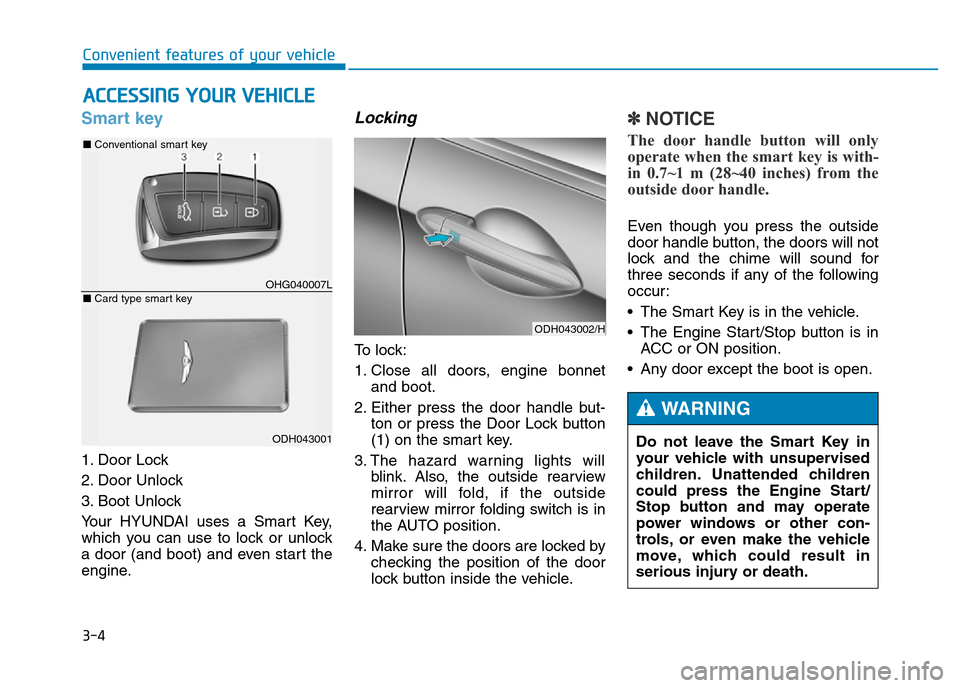
Smart key
1. Door Lock
2. Door Unlock
3. Boot Unlock
Your HYUNDAI uses a Smart Key,
which you can use to lock or unlock
a door (and boot) and even start the
engine.
Locking
To lock:
1. Close all doors, engine bonnet
and boot.
2. Either press the door handle but-
ton or press the Door Lock button
(1) on the smart key.
3. The hazard warning lights will
blink. Also, the outside rearview
mirror will fold, if the outside
rearview mirror folding switch is in
the AUTO position.
4. Make sure the doors are locked by
checking the position of the door
lock button inside the vehicle.
✽NOTICE
The door handle button will only
operate when the smart key is with-
in 0.7~1 m (28~40 inches) from the
outside door handle.
Even though you press the outside
door handle button, the doors will not
lock and the chime will sound for
three seconds if any of the following
occur:
• The Smart Key is in the vehicle.
• The Engine Start/Stop button is in
ACC or ON position.
• Any door except the boot is open.
ACCESSING YOUR VEHICLE
ODH043002/H
Do not leave the Smart Key in
your vehicle with unsupervised
children. Unattended children
could press the Engine Start/
Stop button and may operate
power windows or other con-
trols, or even make the vehicle
move, which could result in
serious injury or death.
WARNING
OHG040007L
■Conventional smart key
ODH043001
■Card type smart key
Page 106 of 502
3-15
Convenient features of your vehicle
This system helps to protect your
vehicle and valuables. The horn will
sound and the hazard warning lights
will blink continuously if any of the
following occurs:
- A door is opened without using the
smart key.
- The boot is opened without using
the smart key.
- The engine bonnet is opened.
The alarm continues for 30 seconds,
then the system resets. To turn off
the alarm, unlock the doors with the
smart key.
The Theft Alarm System automati-
cally sets 30 seconds after you lock
the doors and the boot. For the sys-
tem to activate, you must lock the
doors and the boot from outside the
vehicle with the smart key or by
pressing the button on the outside of
the door handles with the smart key
in your possession.
The hazard warning lights will blink
once to indicate the system is armed.Once the security system is set,
opening any door, the boot, or the
bonnet without using the smart key
will cause the alarm to activate.
The Theft Alarm System will not set if
the bonnet, the boot, or any door is
not fully closed. If the system will not
set, check the bonnet, the boot, or
the doors are fully closed.
Do not attempt to alter this system or
add other devices to it.
✽NOTICE
• Do not lock the doors until all pas-
sengers have left the vehicle. If the
remaining passenger leaves the
vehicle when the system is armed,
the alarm will be activated.
• If the vehicle is not disarmed with
the smart key, open the doors by
using the mechanical key and
start the engine.
• When the system is disarmed but a
door or boot is not opened within
30 seconds, the system will be
rearmed.
✽NOTICE
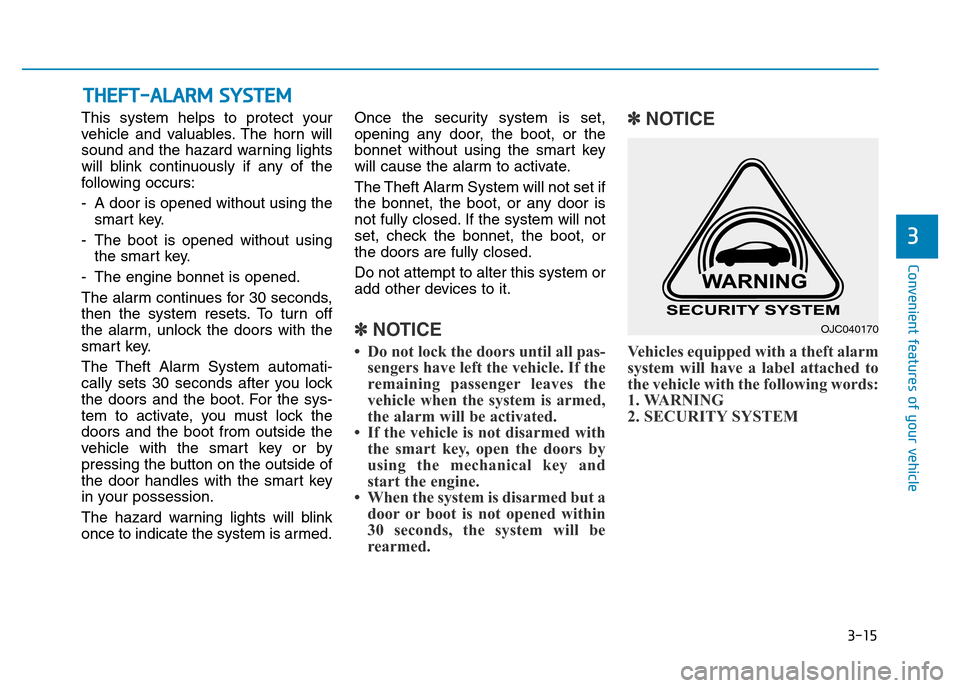
Vehicles equipped with a theft alarm
system will have a label attached to
the vehicle with the following words:
1. WARNING
2. SECURITY SYSTEM
THEFT-ALARM SYSTEM
3
OJC040170
Page 125 of 502
3-34
Convenient features of your vehicle
Opening the bonnet
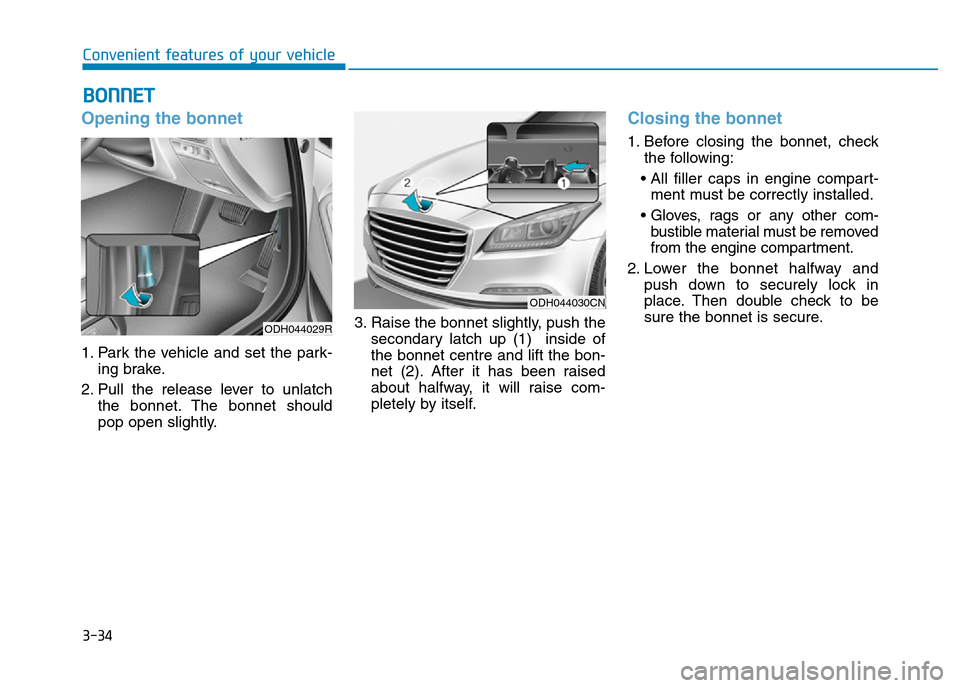
1. Park the vehicle and set the park-
ing brake.
2. Pull the release lever to unlatch
the bonnet. The bonnet should
pop open slightly.3. Raise the bonnet slightly, push the
secondary latch up (1) inside of
the bonnet centre and lift the bon-
net (2). After it has been raised
about halfway, it will raise com-
pletely by itself.
Closing the bonnet
1. Before closing the bonnet, check
the following:
• All filler caps in engine compart-
ment must be correctly installed.
• Gloves, rags or any other com-
bustible material must be removed
from the engine compartment.
2. Lower the bonnet halfway and
push down to securely lock in
place. Then double check to be
sure the bonnet is secure.
BONNET
ODH044029R
ODH044030CN