change wheel Hyundai Genesis 2016 Owner's Manual - RHD (UK, Australia)
[x] Cancel search | Manufacturer: HYUNDAI, Model Year: 2016, Model line: Genesis, Model: Hyundai Genesis 2016Pages: 502, PDF Size: 13.19 MB
Page 87 of 502
2-69
Safety system of your vehicle
2
Additional safety precautions
Passengers should not move out of
or change seats whilst the vehicle
is moving.A passenger who is not
wearing a seat belt during a crash or
emergency stop can be thrown
against the inside of the vehicle,
against other occupants, or be ejected
from the vehicle.
Do not use any accessories on seat
belts.Devices claiming to improve
occupant comfort or reposition the
seat belt can reduce the protection
provided by the seat belt and increase
the chance of serious injury in a crash.
Do not modify the front seats.
Modification of the front seats could
interfere with the operation of the sup-
plemental restraint system sensing
components or side air bags.
Do not place items under the front
seats.Placing items under the front
seats could interfere with the opera-
tion of the supplemental restraint sys-
tem sensing components and wiring
harnesses.
Do not cause impact to the doors.
Impact to the doors when the Engine
Start/Stop button is in the ON position
may cause the air bags to inflate. (Continued)•If components of the air bag
system must be discarded, or if
the vehicle must be scrapped,
certain safety precautions
must be observed. Consult a
HYUNDAI authorised repairer
for the necessary information.
Failure to follow these precau-
tions could increase the risk of
personal injury.To reduce the risk of serious
injury or death take the follow-
ing precautions:
•Do not attempt to modify or
disconnect the SRS compo-
nents or wiring, including the
addition of any kind of badges
to the pad covers or modifica-
tions to the body structure.
•Do not place objects over or
near the air bag modules on
the steering wheel, instrument
panel, and the front passen-
ger's panel above the glove
box.
•Clean the air bag pad covers
with a soft cloth moistened
with plain water. Solvents or
cleaners could adversely
affect the air bag covers and
proper deployment of the sys-
tem.
•We recommend that inflated
air bags be replaced by a
HYUNDAI authorised repairer.
(Continued)
WARNING
Page 91 of 502
2-73
Safety system of your vehicle
2
Active bonnet lift
system malfunction
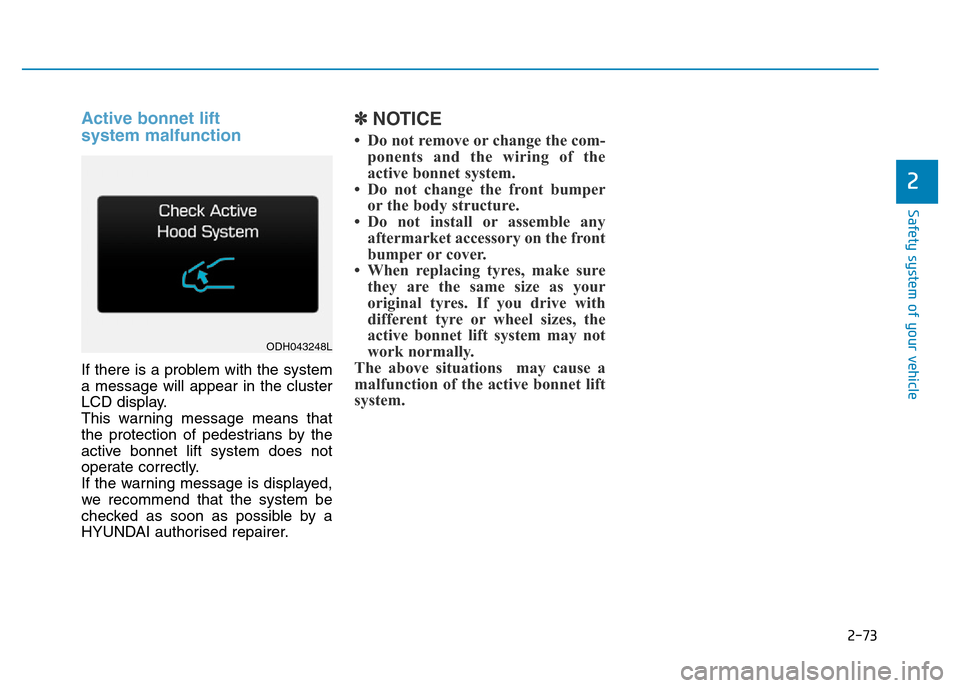
If there is a problem with the system
a message will appear in the cluster
LCD display.
This warning message means that
the protection of pedestrians by the
active bonnet lift system does not
operate correctly.
If the warning message is displayed,
we recommend that the system be
checked as soon as possible by a
HYUNDAI authorised repairer.
✽NOTICE
• Do not remove or change the com-
ponents and the wiring of the
active bonnet system.
• Do not change the front bumper
or the body structure.
• Do not install or assemble any
aftermarket accessory on the front
bumper or cover.
• When replacing tyres, make sure
they are the same size as your
original tyres. If you drive with
different tyre or wheel sizes, the
active bonnet lift system may not
work normally.
The above situations may cause a
malfunction of the active bonnet lift
system.
ODH043248L
Page 109 of 502
3-18
STEERING WHEEL
Convenient features of your vehicle
Electric power steering (EPS)
The system assists you with steering
the vehicle. If the engine is turned off
or if the power steering system
becomes inoperative, you may still
steer the vehicle, but it will require
increased steering effort.
Should you notice any change in the
effort required to steer during normal
vehicle operation, we recommend
that the system be checked by a
HYUNDAI authorised repairer.
✽NOTICE
The following symptoms may occur
during normal vehicle operation:
• The steering effort may be high
immediately after placing the
Engine Start/Stop button in the
ON position.
This happens as the system per-
forms the EPS system diagnostics.
When the diagnostics is complet-
ed, the steering wheel will return
to its normal condition.
• A click noise may be heard from
the EPS relay after the Engine
Start/Stop button is in the ON or
OFF position.
• Motor noise may be heard when
the vehicle is at stop or at a low
driving speed.
• When you operate the steering
wheel in low temperature, abnor-
mal noise may occur. If tempera-
ture rises, the noise will disappear.
This is a normal condition.
If the Electric Power Steering
System does not operate nor-
mally, the warning light ( ) will
illuminate on the instrument
cluster. The steering wheel will
require increase effort. We rec-
ommend that the system be
checked by a HYUNDAI autho-
rised repairer as soon as possi-
ble.
CAUTION
Page 110 of 502
3-19
Convenient features of your vehicle
3
Tilt steering / Telescope steering
Manual type
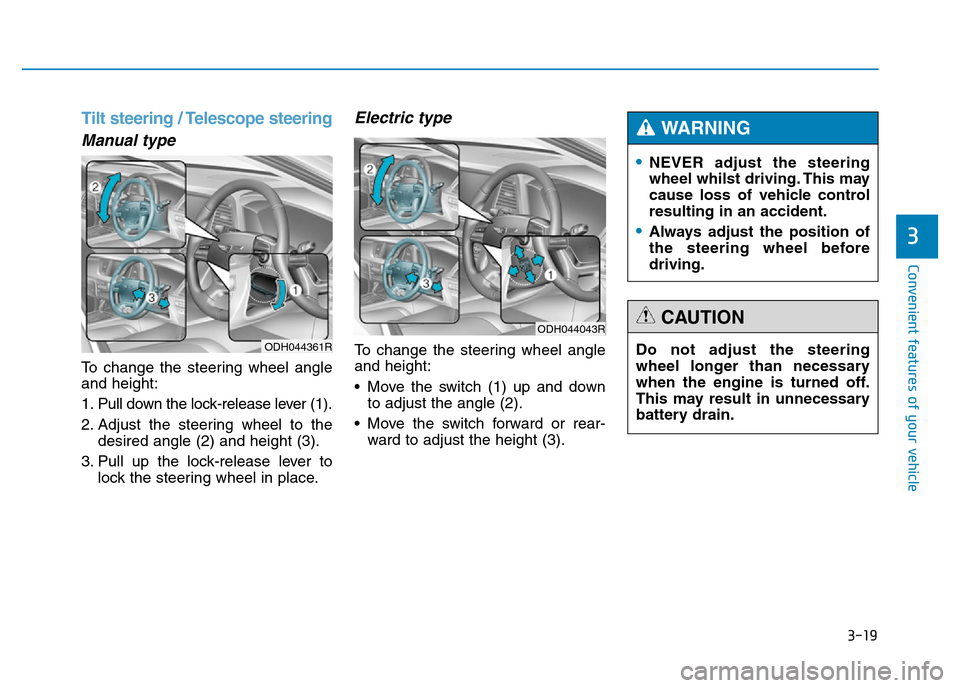
To change the steering wheel angle
and height:
1. Pull down the lock-release lever (1).
2. Adjust the steering wheel to the
desired angle (2) and height (3).
3. Pull up the lock-release lever to
lock the steering wheel in place.
Electric type
To change the steering wheel angle
and height:
• Move the switch (1) up and down
to adjust the angle (2).
• Move the switch forward or rear-
ward to adjust the height (3).
•NEVER adjust the steering
wheel whilst driving. This may
cause loss of vehicle control
resulting in an accident.
•Always adjust the position of
the steering wheel before
driving.
WARNING
Do not adjust the steering
wheel longer than necessary
when the engine is turned off.
This may result in unnecessary
battery drain.
CAUTIONODH044043R
ODH044361R
Page 158 of 502
3-67
Convenient features of your vehicle
3
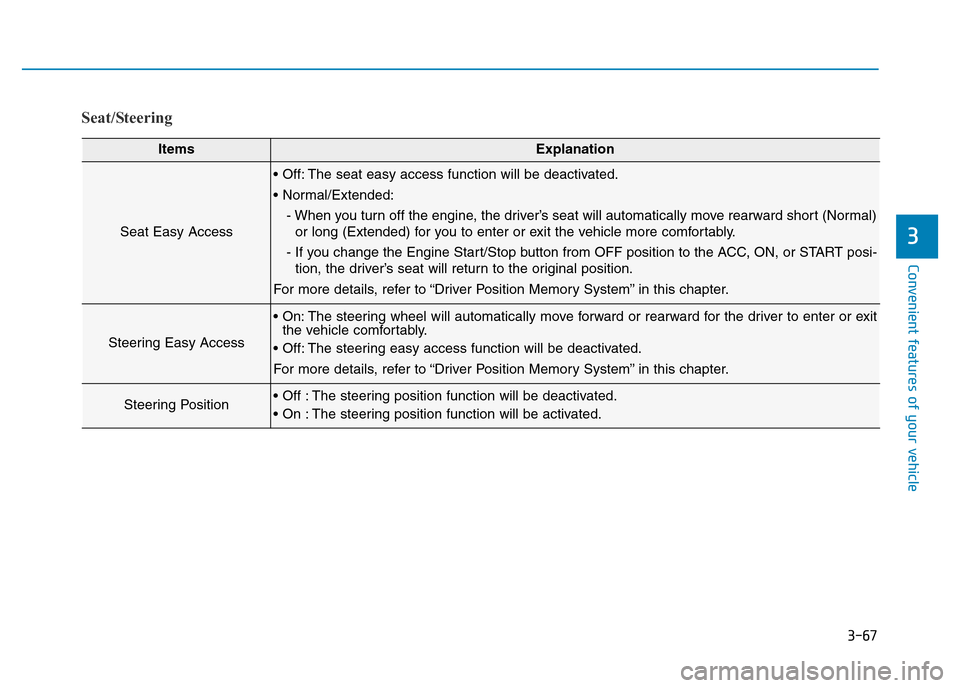
Seat/Steering
ItemsExplanation
Seat Easy Access
• Off: The seat easy access function will be deactivated.
• Normal/Extended:
- When you turn off the engine, the driver’s seat will automatically move rearward short (Normal)
or long (Extended) for you to enter or exit the vehicle more comfortably.
- If you change the Engine Start/Stop button from OFF position to the ACC, ON, or START posi-
tion, the driver’s seat will return to the original position.
For more details, refer to “Driver Position Memory System” in this chapter.
Steering Easy Access
• On: The steering wheel will automatically move forward or rearward for the driver to enter or exit
the vehicle comfortably.
• Off: The steering easy access function will be deactivated.
For more details, refer to “Driver Position Memory System” in this chapter.
Steering Position• Off : The steering position function will be deactivated.
• On : The steering position function will be activated.
Page 160 of 502
3-69
Convenient features of your vehicle
3
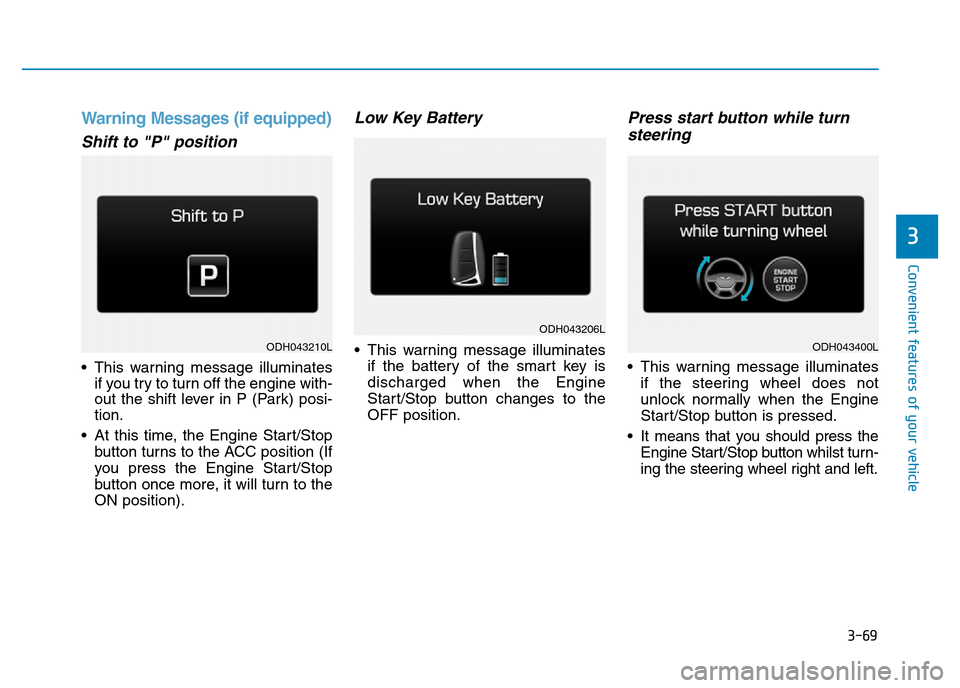
Warning Messages (if equipped)
Shift to "P" position
• This warning message illuminates
if you try to turn off the engine with-
out the shift lever in P (Park) posi-
tion.
• At this time, the Engine Start/Stop
button turns to the ACC position (If
you press the Engine Start/Stop
button once more, it will turn to the
ON position).
Low Key Battery
• This warning message illuminates
if the battery of the smart key is
discharged when the Engine
Start/Stop button changes to the
OFF position.
Press start button while turn
steering
• This warning message illuminates
if the steering wheel does not
unlock normally when the Engine
Start/Stop button is pressed.
• It means that you should press the
Engine Start/Stop button whilst turn-
ing the steering wheel right and left.
ODH043206L
ODH043210LODH043400L
Page 161 of 502
3-70
Convenient features of your vehicle
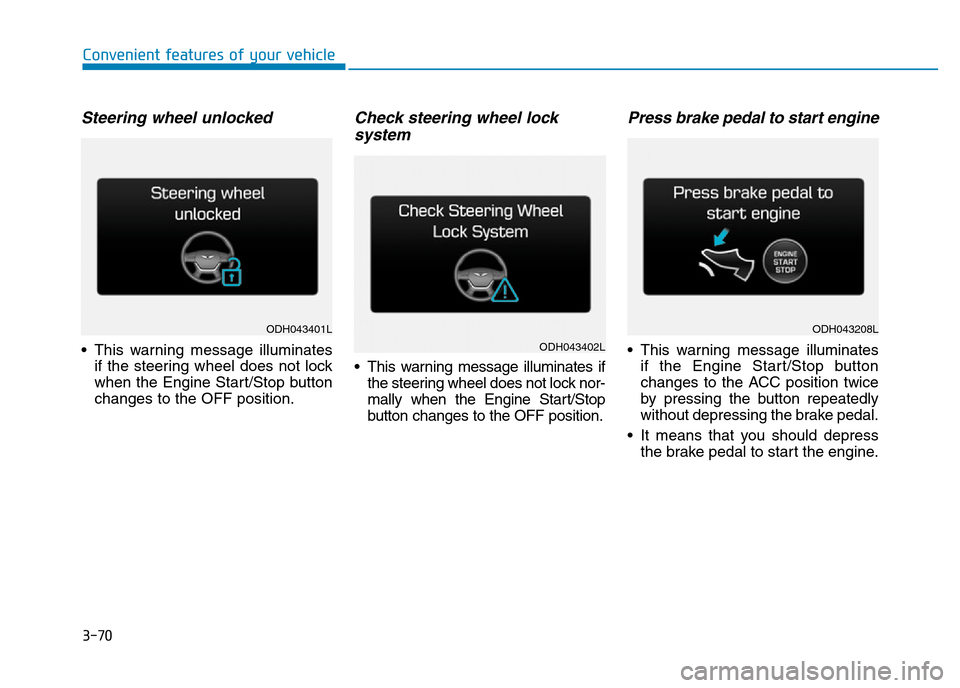
Steering wheel unlocked
• This warning message illuminates
if the steering wheel does not lock
when the Engine Start/Stop button
changes to the OFF position.
Check steering wheel lock
system
• This warning message illuminates if
the steering wheel does not lock nor-
mally when the Engine Start/Stop
button changes to the OFF position.
Press brake pedal to start engine
• This warning message illuminates
if the Engine Start/Stop button
changes to the ACC position twice
by pressing the button repeatedly
without depressing the brake pedal.
• It means that you should depress
the brake pedal to start the engine.
ODH043401L
ODH043402L
ODH043208L
Page 171 of 502
3-80
Convenient features of your vehicle
Overview
Description
The trip computer is a microcomput-
er-controlled driver information sys-
tem that displays information related
to driving.
✽NOTICE
Some driving information stored in
the trip computer (for example
Average Vehicle Speed) resets if the
battery is disconnected.
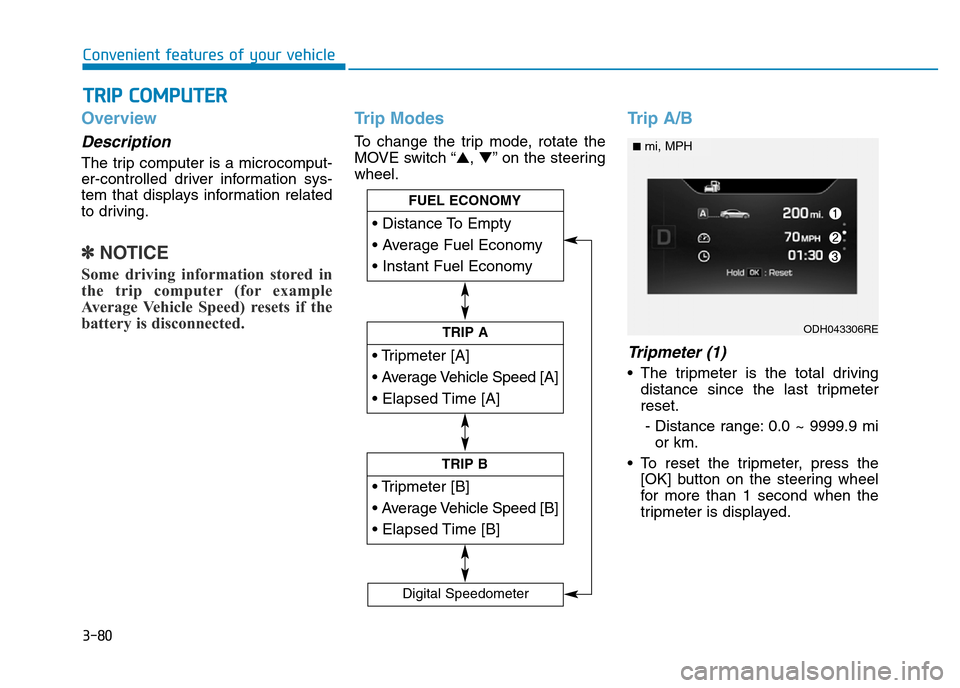
Trip Modes
To change the trip mode, rotate the
MOVE switch “▲,▼” on the steering
wheel.
Trip A/B
Tripmeter (1)
• The tripmeter is the total driving
distance since the last tripmeter
reset.
- Distance range: 0.0 ~ 9999.9 mi
or km.
• To reset the tripmeter, press the
[OK] button on the steering wheel
for more than 1 second when the
tripmeter is displayed.
TRIP COMPUTER
Page 274 of 502
Driving your vehicle
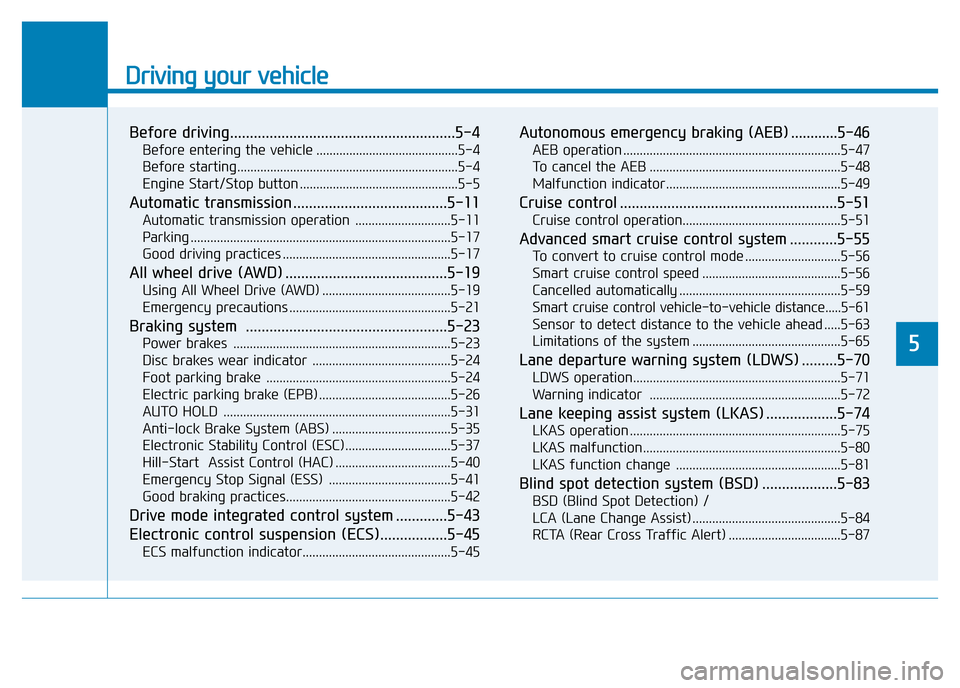
Before driving.........................................................5-4
Before entering the vehicle ...........................................5-4
Before starting...................................................................5-4
Engine Start/Stop button ................................................5-5
Automatic transmission .......................................5-11
Automatic transmission operation .............................5-11
Parking ...............................................................................5-17
Good driving practices ...................................................5-17
All wheel drive (AWD) .........................................5-19
Using All Wheel Drive (AWD) .......................................5-19
Emergency precautions .................................................5-21
Braking system ...................................................5-23
Power brakes ..................................................................5-23
Disc brakes wear indicator ..........................................5-24
Foot parking brake ........................................................5-24
Electric parking brake (EPB) ........................................5-26
AUTO HOLD .....................................................................5-31
Anti-lock Brake System (ABS) ....................................5-35
Electronic Stability Control (ESC)................................5-37
Hill-Start Assist Control (HAC) ...................................5-40
Emergency Stop Signal (ESS) .....................................5-41
Good braking practices..................................................5-42
Drive mode integrated control system .............5-43
Electronic control suspension (ECS).................5-45
ECS malfunction indicator.............................................5-45
Autonomous emergency braking (AEB) ............5-46
AEB operation ..................................................................5-47
To cancel the AEB ..........................................................5-48
Malfunction indicator.....................................................5-49
Cruise control .......................................................5-51
Cruise control operation................................................5-51
Advanced smart cruise control system ............5-55
To convert to cruise control mode .............................5-56
Smart cruise control speed ..........................................5-56
Cancelled automatically .................................................5-59
Smart cruise control vehicle-to-vehicle distance.....5-61
Sensor to detect distance to the vehicle ahead .....5-63
Limitations of the system .............................................5-65
Lane departure warning system (LDWS) .........5-70
LDWS operation...............................................................5-71
Warning indicator ..........................................................5-72
Lane keeping assist system (LKAS) ..................5-74
LKAS operation ................................................................5-75
LKAS malfunction............................................................5-80
LKAS function change ..................................................5-81
Blind spot detection system (BSD) ...................5-83
BSD (Blind Spot Detection) /
LCA (Lane Change Assist) .............................................5-84
RCTA (Rear Cross Traffic Alert) ..................................5-87
5
Page 290 of 502
5-17
Driving your vehicle
5
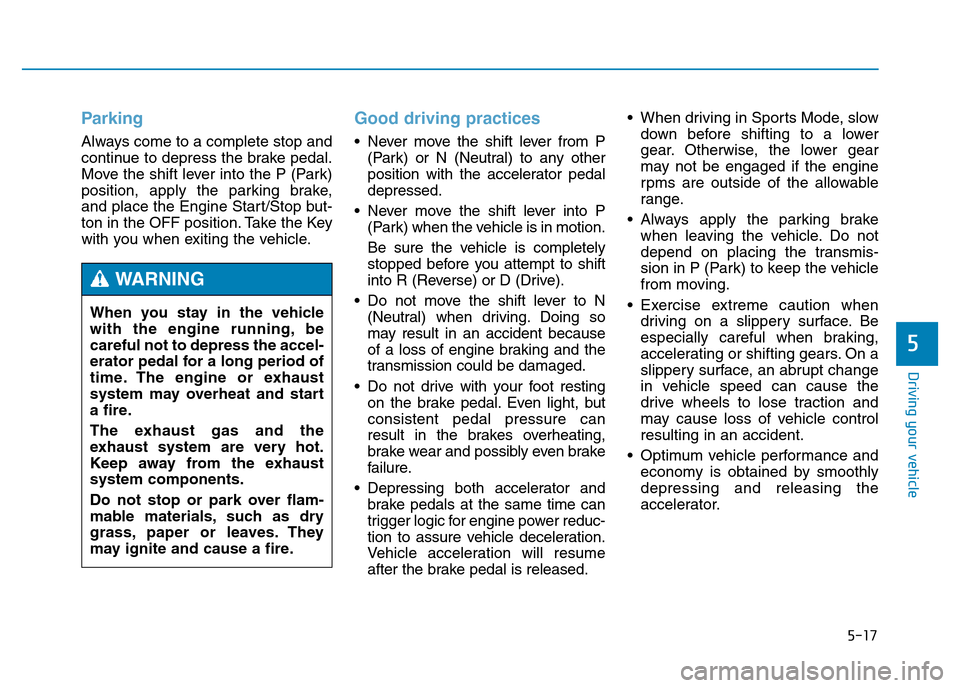
Parking
Always come to a complete stop and
continue to depress the brake pedal.
Move the shift lever into the P (Park)
position, apply the parking brake,
and place the Engine Start/Stop but-
ton in the OFF position. Take the Key
with you when exiting the vehicle.
Good driving practices
• Never move the shift lever from P
(Park) or N (Neutral) to any other
position with the accelerator pedal
depressed.
• Never move the shift lever into P
(Park) when the vehicle is in motion.
Be sure the vehicle is completely
stopped before you attempt to shift
into R (Reverse) or D (Drive).
• Do not move the shift lever to N
(Neutral) when driving. Doing so
may result in an accident because
of a loss of engine braking and the
transmission could be damaged.
• Do not drive with your foot resting
on the brake pedal. Even light, but
consistent pedal pressure can
result in the brakes overheating,
brake wear and possibly even brake
failure.
• Depressing both accelerator and
brake pedals at the same time can
trigger logic for engine power reduc-
tion to assure vehicle deceleration.
Vehicle acceleration will resume
after the brake pedal is released.• When driving in Sports Mode, slow
down before shifting to a lower
gear. Otherwise, the lower gear
may not be engaged if the engine
rpms are outside of the allowable
range.
• Always apply the parking brake
when leaving the vehicle. Do not
depend on placing the transmis-
sion in P (Park) to keep the vehicle
from moving.
• Exercise extreme caution when
driving on a slippery surface. Be
especially careful when braking,
accelerating or shifting gears. On a
slippery surface, an abrupt change
in vehicle speed can cause the
drive wheels to lose traction and
may cause loss of vehicle control
resulting in an accident.
• Optimum vehicle performance and
economy is obtained by smoothly
depressing and releasing the
accelerator. When you stay in the vehicle
with the engine running, be
careful not to depress the accel-
erator pedal for a long period of
time. The engine or exhaust
system may overheat and start
a fire.
The exhaust gas and the
exhaust system are very hot.
Keep away from the exhaust
system components.
Do not stop or park over flam-
mable materials, such as dry
grass, paper or leaves. They
may ignite and cause a fire.
WARNING